


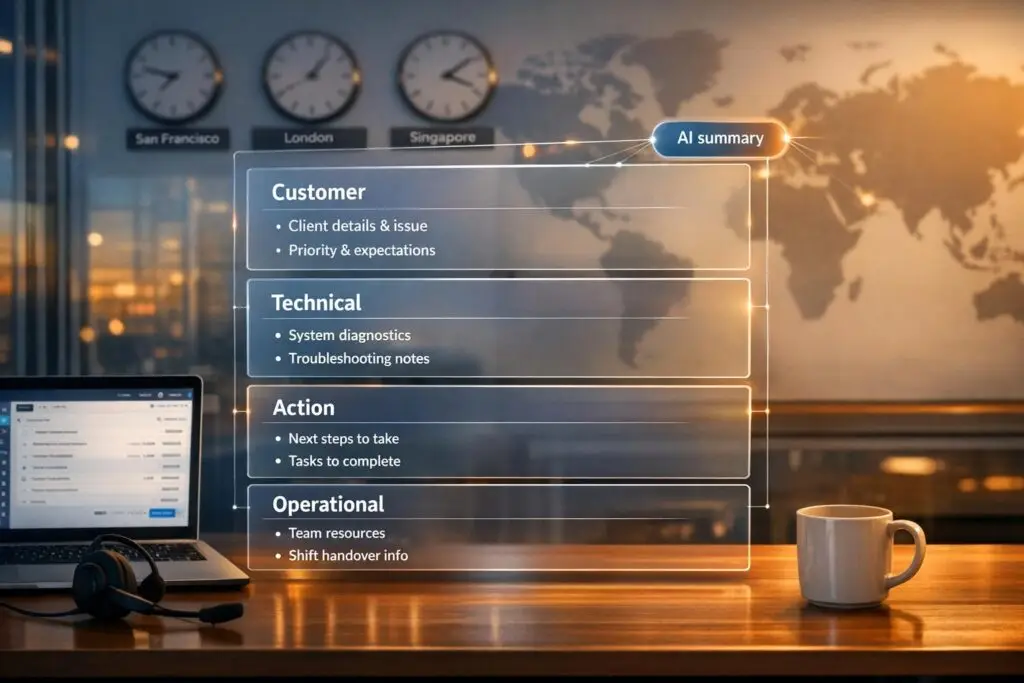
Effective handoffs are essential for global support teams to avoid losing critical information during shift changes. Poor handoffs can result in 78% context loss, add an average of 3.5 days to resolution times, and cost businesses $62 billion annually. To ensure smooth transitions, a structured handoff template should always include:
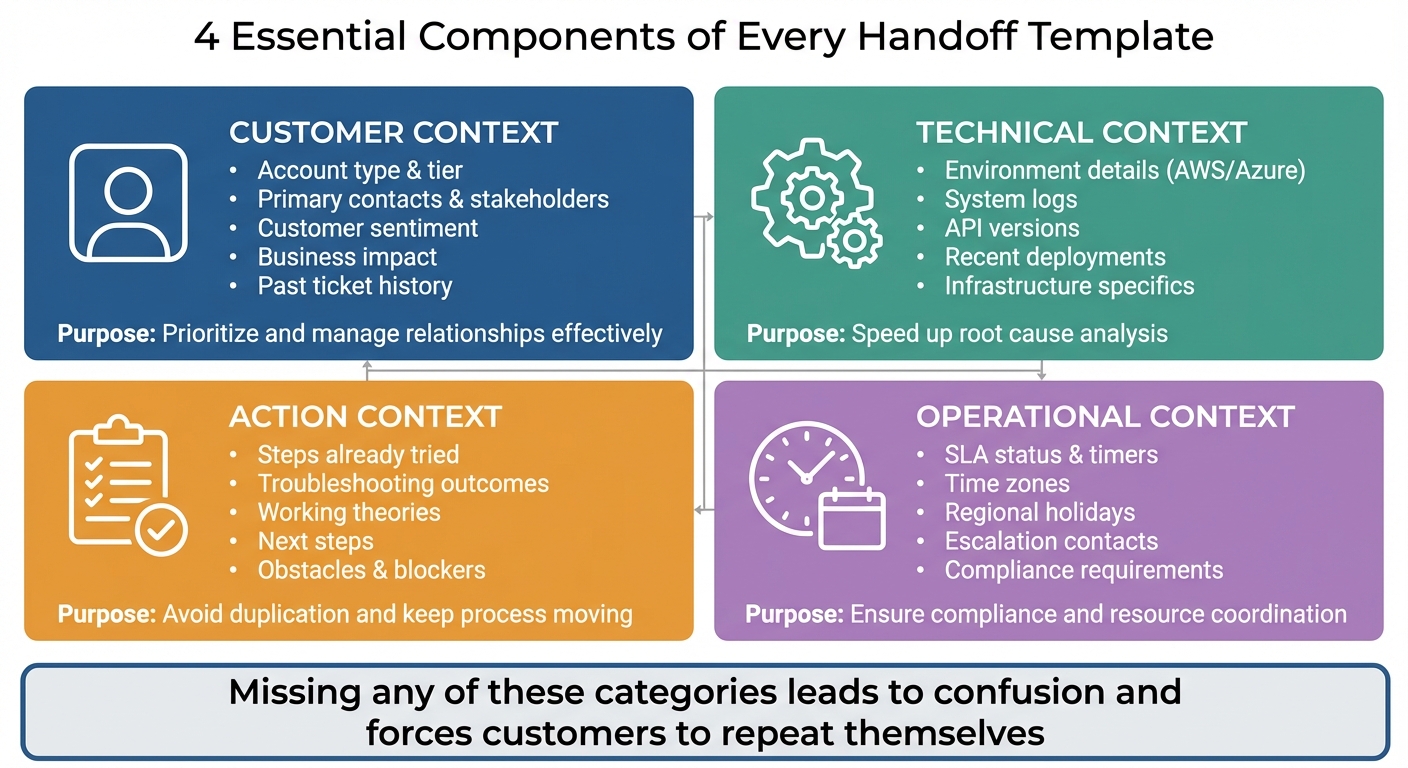
- Customer Context: Account type, key stakeholders, sentiment, and business impact.
- Technical Context: Environment details, logs, API versions, and recent deployments.
- Action Context: Steps already tried, working theories, and next steps.
- Operational Context: SLA status, time zones, holidays, and escalation contacts.
Clear ownership, detailed summaries, and consistent formats are non-negotiable. AI tools can further streamline the process by generating concise summaries, detecting sentiment, and automating repetitive tasks. These steps reduce delays, improve customer satisfaction, and ensure no details are overlooked.
Key Takeaway: A well-structured handoff process reduces confusion, prevents duplication, and keeps global teams aligned, saving time and improving customer trust.
What to Include in Every Handoff Template
Essential Components of Support Team Handoff Templates
A solid handoff template should cover four main areas: who the customer is, what actions have already been taken, what needs to happen next, and who is responsible. Skipping any of these can lead to confusion and force the customer to repeat themselves, which no one wants [[2]](https://docs.buildbetter.ai/pages/Use Cases/cs/support-handoff). The structure below ensures that transitions are smooth and efficient.
| Context Category | Key Details to Include | Purpose |
|---|---|---|
| Customer Context | Account type, primary contacts, sentiment, business impact | Helps prioritize and manage relationships effectively |
| Technical Context | Environment, logs, API versions, recent deployments | Speeds up root cause analysis |
| Action Context | Steps already tried, working theories, next steps | Avoids duplication and keeps the process moving forward |
| Operational Context | SLA status, time zone, holidays, escalation contacts | Ensures compliance and resource coordination |
Here’s a closer look at what each category should include to ensure a smooth handoff.
Customer Context and Account History
Begin by noting the customer’s account tier (e.g., Enterprise or Standard), key stakeholders (like a CTO or DevOps lead), and a summary of past tickets related to the issue [[2]](https://docs.buildbetter.ai/pages/Use Cases/cs/support-handoff)[5]. This helps the next agent avoid treating a high-priority account like a routine case. Include details about the customer’s current emotional state – whether they’re frustrated, neutral, or urgently awaiting resolution – and any promises already made, such as callback times or resolution deadlines [[2]](https://docs.buildbetter.ai/pages/Use Cases/cs/support-handoff)[5].
Business impact often outweighs technical severity. For instance, documenting that the issue is costing "$50,000/day in lost revenue" makes it clear why the case needs immediate attention [[2]](https://docs.buildbetter.ai/pages/Use Cases/cs/support-handoff)[3]. Alongside this, provide an overview of how many users are affected to give the receiving agent a clear sense of urgency.
Once the customer’s background is clear, the focus shifts to the issue itself and what’s already been done to address it.
Current Issue Status and Previous Actions
Summarize the problem in 3–5 sentences, making sure to include why the issue has been escalated (e.g., low AI confidence, a sudden spike in negative sentiment, or a policy-related block) [[2]](https://docs.buildbetter.ai/pages/Use Cases/cs/support-handoff)[5]. Then, list all troubleshooting steps that have been attempted so far and their outcomes. This avoids wasting time on methods that have already failed [1][3].
"The problem lives in the handoffs. Something in your workflow’s architecture actively prevents information from traveling with the ticket as it moves between systems, teams, or states."
– Richie Aharonian, Head of Customer Experience & Revenue Operations, Unito [3]
Include technical specifics like API versions, infrastructure details, and timestamps for key events (e.g., "2:22 PM – Alert fired"). These details help the next agent quickly understand the timeline and progression of the issue [1][[2]](https://docs.buildbetter.ai/pages/Use Cases/cs/support-handoff).
Priority Levels and Escalation Information
Different platforms use various methods to define priority levels – some use labels like "Urgent", while others rely on numerical designations like "P1." To avoid confusion, the template should clearly translate these priority levels so the receiving team understands how critical the issue is. Back this up with "Customer Impact" data, such as whether a key system is down or how many users are affected [3].
Additionally, note which Subject Matter Experts (SMEs) or departments have already been involved. This prevents the same contacts from being looped in again unnecessarily. If the issue has been escalated, include the reason and the current escalation status [3].
Next Steps and Ownership
Clear ownership is non-negotiable. Assigning a specific person to the case dramatically reduces the chances of a handoff failure, which happens 73% more often when ownership is unclear [[2]](https://docs.buildbetter.ai/pages/Use Cases/cs/support-handoff). Outline the next steps, any obstacles (like missing permissions or vendor delays), and any promises made to the customer [1][[2]](https://docs.buildbetter.ai/pages/Use Cases/cs/support-handoff).
"Every handoff needs a named owner with accountability."
– BuildBetter [[2]](https://docs.buildbetter.ai/pages/Use Cases/cs/support-handoff)
The handoff isn’t complete until the receiving agent confirms they’ve taken responsibility (e.g., "Handoff received. I now own active monitoring") [[2]](https://docs.buildbetter.ai/pages/Use Cases/cs/support-handoff)[3]. This step ensures the case doesn’t fall through the cracks.
Time Zone and Regional Factors
Include the customer’s time zone and any regional factors that might affect response times or SLAs. For example, mention local holidays, language preferences, or time-specific events like peak traffic times or scheduled maintenance windows [1]. If a major event is coming up – like a product launch or marketing campaign that could spike support requests – make sure to flag it [1].
For global teams, specify the hours when the customer expects responses. A customer in Tokyo flagged as urgent at 6:00 PM local time shouldn’t have to wait until 9:00 AM Eastern Time for a reply.
sbb-itb-e60d259
How to Build a Handoff Template
To prevent the loss of important details during handoffs, create a template that combines core modules with fields tailored to specific regions. A well-designed template should strike a balance between uniformity and flexibility, ensuring that all essential information is transferred regardless of the destination.
Start by outlining the core modules your template must include: an issue summary, customer details, technical environment, attempted fixes, and next steps. Then, layer in additional fields like SLA timers, compliance notes, or escalation contacts specific to the operation. The goal is to answer key questions consistently: What happened? What was attempted? What comes next? Who is responsible now?
"Every handoff is a compression point. Information gets compressed into whatever the receiving system can accept."
– Richie Aharonian, Head of Customer Experience & Revenue Operations, Unito [3]
If transferring context manually takes more than five minutes, it’s a sign the process needs streamlining or the template requires refinement [[2]](https://docs.buildbetter.ai/pages/Use Cases/cs/support-handoff). Analyze delayed tickets to identify gaps or unnecessary complexity. Instead of placing blame on individuals, focus on improving the structure through feedback loops [3][8].
Using a Table Format for Consistency
A table format is a practical way to standardize handoff elements across regions. It ensures clarity, especially when transitioning between systems, like moving from a regional CRM to a global platform. Without this standardization, "mechanical information loss" can occur if data doesn’t align with the receiving system [3].
Here’s an example of a table structure that works for most teams:
| Element | Description | Responsible Party | Status |
|---|---|---|---|
| Issue Summary | Brief 3–5 sentence overview of the problem and impact | Outgoing Agent | Required |
| Customer Context | Account tier, sentiment, and key stakeholders | Outgoing Agent | Required |
| Technical Details | Information like environment (AWS/Azure), logs, version numbers | Technical Lead | Optional |
| Attempted Actions | Troubleshooting steps already taken and their outcomes | Outgoing Agent | Required |
| Next Steps | Actionable items for the incoming team | Outgoing Agent | Required |
| Ownership | Person or team taking over | Incoming Manager | Required |
| SLA Timer | Current status of response/resolution deadlines | System/Automation | Automated |
This structure ensures all handoffs include the same critical categories, reducing the risk of losing essential context. For fields that don’t directly match across regional systems, automation can help by appending structured information with clear formatting and labels [3].
"Consistency is the backbone of quality handover."
– Zutec [7]
Establish a feedback system where receiving teams can report incomplete handoffs. This helps leadership identify and address process flaws [8]. Some organizations even tie performance bonuses to ensuring that all required fields in handoff documentation are completed, which improves adherence to the process [8].
Once the core template is in place, you can adjust it to meet the needs of individual regions.
Adapting Templates for Different Regions
Global teams need a standardized framework that can adapt to local requirements. This "Global Template, Local Fit" approach avoids the chaos of entirely separate processes while respecting regional differences [9].
"Global doesn’t mean uniform at all costs. The future belongs to enterprises that design for ‘Global Template, Local Fit.’"
– David Branley, Product and Topic Expert, SAP [9]
Use simple, direct language to ensure clarity across varying levels of language proficiency [1]. For instance, replace phrases like "the customer is on the fence" with "the customer has not yet made a decision." Include region-specific details, such as traffic patterns, scheduled maintenance, or deployment windows in the local time zone [1]. If regions have specific legal requirements, like GDPR in Europe or data residency rules in APAC, add dedicated compliance fields.
To improve collaboration, schedule overlap periods of one to two hours between outgoing and incoming shifts for live discussions and clarifications [1]. For follow-the-sun models (APAC → Europe → Americas), centralized documentation is crucial. Each region should have access to the full 24-hour operational view, not just the notes from the last shift [1]. When time zones don’t allow for live overlap, short video walkthroughs (5–10 minutes) can provide clarity, with communication channels open for follow-up questions [1].
Ensure shorthand, tags, macros, and urgency scales are standardized across all regions to avoid misinterpretations [6]. End every internal note with a clear "Next Action" and assigned "Owner" to eliminate ambiguity during transitions [6].
This structured yet adaptable template sets the stage for integrating AI tools and other advancements, which will be covered in later sections.
Common Handoff Mistakes and How to Fix Them
Even with a solid handoff process in place, human errors can still creep in, leading to costly missteps. These mistakes often come from rushed transitions, assuming shared knowledge, or leaving ownership unclear. The result? Lost productivity and frustrated customers.
One common issue is missing context. Critical details – like "Customer Impact" or "Affected Users" – sometimes don’t make it from one system to another, such as when data moves from a support platform to an engineering tool. This forces teams to ask repetitive questions, which can seriously hurt customer satisfaction (CSAT). In fact, repeated inquiries are sometimes referred to as a "CSAT death sentence" [5]. High-performing teams aim for a Repeat Question Rate of under 5% for escalations [5]. To fix this, audit your workflows for mismatched fields and use structured context blocks to ensure no important details get lost [3].
Another big problem is unclear ownership. Tickets can sit idle when the outgoing agent assumes the next shift is fully aware of the issue, while the incoming team might not even realize they’re responsible [1][3]. The solution? Require the new assignee to explicitly confirm ownership. Adding a one- to two-hour overlap between shifts also gives teams a chance to discuss tricky cases in real time [1].
Vague summaries are another productivity killer. A summary like "everything’s fine" doesn’t help the next team understand what’s really going on. This forces them to dig through logs or rediscover issues that were already known [1]. Instead, use precise documentation like "P95 latency increased by 200ms" or "Cache clear applied at 3:45 PM ET as a temporary fix" [1]. Without this level of detail, the next team might miss that the system is running on a fragile workaround that could fail again [1]. Tracking incident reopens within four hours of a shift change – with a goal of less than 5% – is a good way to measure improvement [1].
Finally, communication gaps can derail even the best handoffs. Silence after an escalation or double handoffs frustrate customers, and 60% of consumers may switch to a competitor after just one bad service experience [5][10]. To avoid this, send immediate auto-replies with estimated wait times and ensure the first human response references something specific from the prior interaction – like, "I saw you tried [X] twice" [4][5]. This shows that context was carried over and helps rebuild customer trust.
Fixing these common mistakes is crucial for smooth, efficient handoffs, especially in today’s fast-paced B2B support environments where AI tools play an increasing role.
Using AI to Improve Handoff Quality
AI tools are stepping in to address the challenges of traditional handoffs, offering streamlined solutions that save time and improve accuracy. For example, AI can create concise summaries – just 3–5 sentences – highlighting the customer’s main request, previous actions, and the reason human intervention is needed. This is especially useful during busy periods when every second counts [5].
Another key feature is sentiment analysis, which monitors a customer’s tone throughout the interaction. If frustration is detected – like repeated comments such as "I didn’t get that" or a shift from neutral to irritated – AI can trigger immediate escalations. You can set thresholds so mild frustration prompts monitoring, while active frustration (e.g., "I’m canceling" or "Refund now") leads to urgent alerts sent to managers via Slack or SMS [4]. This approach aligns with customer expectations, as 71% of them want agents to know their issue history without having to repeat it [11]. By flagging emotional cases early, AI helps teams deliver quicker, more empathetic responses.
AI doesn’t stop at summaries. It can also create conversation bundles packed with structured metadata, such as customer IDs, detected intents, confidence scores, and escalation triggers [5]. This ensures that no crucial context is lost when tickets move between systems. Teams using AI-assisted handoffs report productivity boosts of 30–50%, thanks to features like suggested knowledge base articles or macros during live interactions [5]. These tools work seamlessly with structured templates, improving operational workflows.
Automated Case Summaries and Sentiment Analysis
The best AI-generated summaries are short and easy to scan. A good practice is to limit them to five sentences, organized under headers like "Request", "Resolution Attempted", and "Root Cause" [5]. For example, instead of combing through a long transcript, an agent might see:
"Customer requested a refund for order #4521. AI verified the account and confirmed eligibility. Sentiment: frustrated after two failed login attempts. Escalation: requires manual approval for high refund amounts."
When agents step in, their first response should acknowledge the context provided by AI. For instance, they might say:
"I see you’ve been asking about refund options and already tried resetting your password twice."
This acknowledgment helps rebuild customer trust and smooths the transition. To measure success, monitor Handoff CSAT (Customer Satisfaction) separately from overall satisfaction, aiming for a score above 85% [5].
AI-Powered Issue Flagging and Priority Detection
AI also excels at flagging complex cases that require human intervention before they escalate. By scoring intent complexity, it can identify multi-turn conversations, ambiguous requests, or policy-sensitive issues early [5]. For instance, if a customer rephrases the same question three times without resolution, the system can automatically escalate the case [4].
Smart routing takes this a step further by matching detected intent, customer tier, and issue complexity to the right specialist [[2]](https://docs.buildbetter.ai/pages/Use Cases/cs/support-handoff). For example, billing issues might go to finance, technical bugs to engineering, and high-value customers nearing renewal could receive priority service. Tools like Supportbench’s AI summarization features enable teams to resolve these escalations 71% faster [[2]](https://docs.buildbetter.ai/pages/Use Cases/cs/support-handoff).
Before the handoff, AI verifies user data, retrieves order details, and pre-fills CRM forms to prepare agents for immediate action [5]. This automation reduces average handle time and eliminates repetitive tasks, speeding up the process. In a technical support pilot, AI summarization cut after-call work by 15% and increased first reply speed by 9% [12]. These results show how automation not only saves time but also improves the customer experience overall.
Conclusion
Handoff templates play a crucial role in keeping global support teams running smoothly. Poor handoffs can lead to hefty business costs and frustrated customers who often have to repeat themselves. The solution? Using structured templates that consistently capture key details like customer context, issue status, priority, and next steps.
The best teams approach handoffs like APIs – structured, validated, and designed to avoid losing critical information. For example, AI-generated summaries can shrink context transfer times from 45 minutes to just 3.2 minutes. Smart routing, guided by intent and customer tier, ensures the right specialist handles each case, while sentiment analysis helps flag dissatisfied customers before issues escalate. These strategies enable teams to resolve cases 71% faster [[2]](https://docs.buildbetter.ai/pages/Use Cases/cs/support-handoff).
To improve handoff processes, support leaders should start by auditing their current workflows. Focus on metrics like Handoff CSAT (aim for 85% or higher) and Repeat Question Rate (keep it below 5%) to pinpoint where context breaks down [5]. Implement practical solutions like the 5-Minute Rule, create overlap windows between shifts, assign clear ownership for handoffs, and use validation steps to ensure no details are missed. This methodical approach can turn handoffs into a strategic advantage.
FAQs
What’s the minimum info a handoff must include?
A proper handoff should always include the customer’s issue history, the current status of the issue, and its urgency or priority level. These details are crucial for ensuring a seamless transition and maintaining the necessary context to address the problem efficiently.
How do we enforce clear ownership after a shift change?
To keep things running smoothly during shift changes, it’s crucial to clearly assign responsibilities, use well-organized checklists, and set internal SLAs (Service Level Agreements). These steps help ensure accountability and make the handover of case ownership seamless.
Which handoff metrics should we track first?
Start by keeping an eye on metrics such as the percentage of context retained during transitions, speed of resolution improvements, and customer satisfaction scores. These metrics play a direct role in evaluating the effectiveness of handoffs and maintaining smooth support transitions. Regularly analyzing these areas can highlight weaknesses and help boost overall team performance.






