


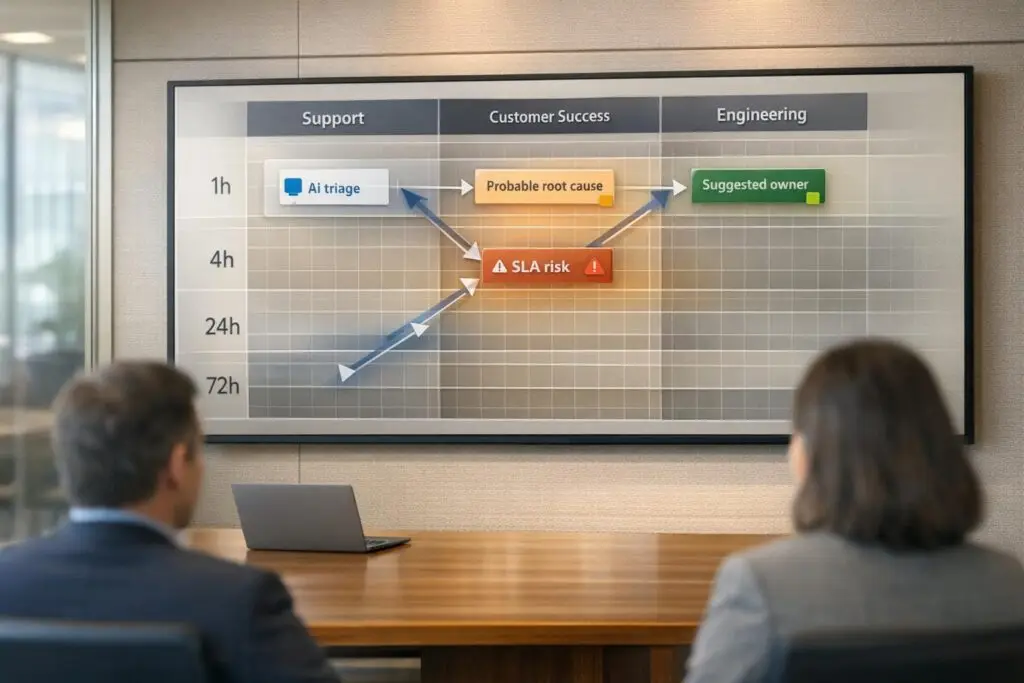
When issues arise, having a clear escalation matrix ensures fast resolutions, minimizes confusion, and improves team collaboration. Here’s how to create one that aligns Support, Customer Success (CS), and Engineering:
- Define Issue Types and Priorities: Categorize problems (e.g., Critical, High, Standard) based on urgency, customer impact, and business risk.
- Set Escalation Tiers: Assign responsibilities across Tier 0 (self-service), Tier 1 (frontline agents), Tier 2 (specialists), and Tier 3 (engineering).
- Establish Triggers and SLAs: Use time, priority, and customer sentiment to determine when issues should escalate. Define response and resolution times to improve SLA performance.
- Clarify Roles and Notification Chains: Specify decision-making authority and ensure smooth handoffs with real-time alerts (e.g., Slack or email).
- Leverage AI Tools: Automate ticket routing, predict escalation needs, and update knowledge bases to reduce repetitive issues.
Key Benefits:
- Resolve 50% of tickets at Tier 1.
- Reduce escalation rates below 10%.
- Improve customer satisfaction (CSAT) by up to 14 points with AI-driven processes.
Avoid These Mistakes:
- Vague severity criteria or unclear roles.
- Over-escalating minor issues.
- Relying on static documentation instead of dynamic updates.
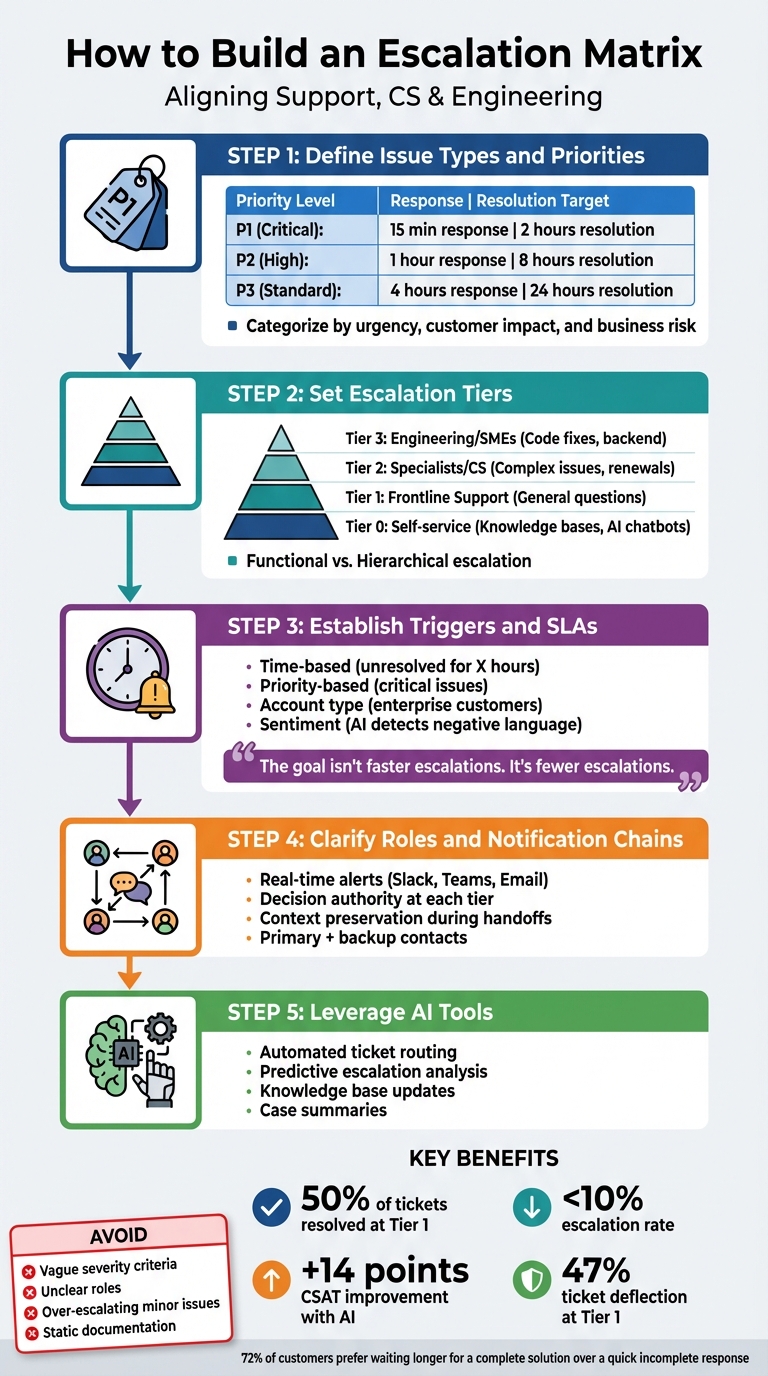
5-Step Escalation Matrix Framework for Support Teams
Build a Smart Escalation System with AI | 3.2 – AI Customer Service Masterclass
sbb-itb-e60d259
Core Components of an Escalation Matrix
To bring Support, Customer Success, and Engineering into alignment, it’s essential to understand the building blocks of an escalation matrix.
What is an Escalation Matrix?
An escalation matrix is a structured guide that outlines how issues progress through an organization. It categorizes problems by severity – Critical, High, Medium, or Low – assigns roles at each level (from L1 frontline agents to L4 executives), and establishes response timelines to ensure timely resolution[2][4]. This framework provides a roadmap for unresolved issues, ensuring they are escalated efficiently.
Key components of an escalation matrix include:
- Issue classification: Helps prioritize resources.
- Escalation tiers: Establishes a clear hierarchy for handling problems.
- Defined roles: Includes contact details so everyone knows who is responsible.
- Response timelines (SLAs): Triggers automatic escalation if deadlines aren’t met[2][4][5].
It also differentiates between two types of escalation:
- Hierarchical escalation: Moves issues up the chain of command based on seniority.
- Functional escalation: Directs issues to specific experts, regardless of their rank[2][3][4].
Benefits of Using an Escalation Matrix
A well-designed escalation matrix can resolve nearly 50% of tickets at Tier 1, reducing the load on specialized teams and allowing experts to focus on more complex challenges[7]. Incorporating AI-powered ticket routing can also improve CSAT scores by as much as 14 points[7].
Setting clear triggers – such as "unresolved for 24 hours" or "technical bug affecting payment processing" – eliminates confusion and ensures tickets move forward without delays[2][6].
"Escalations have a much more significant impact than they realize. It’s a bottleneck that can be removed rather easily"[7].
- Tina Grubisa, Value Consultant at Mosaic AI
Problems That Happen Without an Escalation Matrix
Without a defined process, frontline agents often develop "avoidance behavior", escalating routine issues simply because they’re unsure of their authority[7]. This leads to knowledge silos, where experts repeatedly solve the same problems without documenting solutions. As a result, preventable issues keep escalating, and strategic work gets pushed aside.
Excessive escalation rates – those exceeding 15% – indicate a lack of training and unclear roles. This creates a chaotic environment where teams work in isolation, customers repeat their concerns to multiple agents, and resolution times stretch unnecessarily.
"Between an uncontrolled escalation and passivity, there’s a demanding road of responsibility that we must follow"[2].
- Dominique De Villepin, Former Prime Minister of France
These challenges highlight the importance of building a streamlined and effective escalation matrix.
How to Build an Escalation Matrix: Step-by-Step
Creating an escalation matrix requires understanding how issues flow through your teams and who has the authority to make decisions at each step. Follow these steps to ensure seamless collaboration between Support, CS, and Engineering.
Step 1: Categorize Your Issue Types
Start by developing a severity scoring system to prioritize issues based on business impact and urgency. Typically, issues are ranked as P1 (Critical) through P3 (Standard), or P4 if needed. For example:
- P1 (Critical): System-wide outages or security breaches affecting multiple customers.
- P3 (Standard): Minor feature requests or general questions.
It’s essential to assess customer impact, revenue risks, and account value. Avoid relying solely on ticket labels like "billing" or "technical." Instead, evaluate whether agents have the tools and information to resolve the issue effectively.
Interestingly, 72% of customers prefer waiting longer for a complete solution over receiving a quick but incomplete response [1].
| Priority Level | Description | Response Target | Resolution Target |
|---|---|---|---|
| P1 (Critical) | System outages, security breaches, revenue-blocking issues | 15 minutes | 2 hours |
| P2 (High) | Functionality disruptions, billing issues, high-priority accounts | 1 hour | 8 hours |
| P3 (Standard) | General questions, feature requests, minor glitches | 4 hours | 24 hours |
Source: [1]
Conduct regular root-cause analyses to uncover whether recurring issues stem from product shortcomings rather than support failures. Over time, this review helps fine-tune your categories.
Once you’ve clearly defined your issue types, it’s time to establish tiers and roles.
Step 2: Set Up Escalation Tiers and Assign Team Roles
Organize your escalation structure into tiers to create a clear chain of responsibility:
- Tier 0: Self-service options like knowledge bases or AI chatbots.
- Tier 1 (Frontline Support): Handles general questions and common problems.
- Tier 2 (Technical Specialists/CS): Tackles complex tickets needing deeper expertise, such as renewal risks or contract disputes.
- Tier 3 (Engineering/SMEs): Addresses advanced issues like code fixes or backend verification.
Differentiate between two types of escalation:
- Functional escalation: Lateral movement to another team when specific expertise is required.
- Hierarchical escalation: Moving up the chain of authority for managerial approval.
Define a clear chain of command and ensure smooth handoffs. Maintaining conversation history and account data during transitions eliminates the need for customers to repeat themselves. This approach aligns with the goal of seamless collaboration and can significantly boost customer satisfaction. For instance, AI-native platforms have been shown to lift CSAT scores by 14 points and deflect 47% of tickets at Tier 1 [7].
Step 3: Create Escalation Triggers and Set SLAs
Set up triggers that determine when issues should escalate. These can be based on:
- Time: Escalate if no response is received within a set timeframe.
- Priority: Immediately address critical issues like system-wide outages.
- Account type: Give enterprise customers higher priority.
- Sentiment: Escalate if AI detects negative language, such as "unacceptable" or "cancel."
AI-powered triage tools can analyze ticket content and predict escalation needs based on historical patterns, rather than relying on simple keyword matching [7].
Set SLA-based triggers to preempt deadline breaches. For example, triggers can activate 15 minutes before an SLA deadline, ensuring proactive action. AI can also help cut resolution times by providing instant answers and reducing reliance on subject matter experts.
"The goal isn’t faster escalations. It’s fewer escalations." [7]
- Tina Grubisa, Value Consultant at Mosaic AI
Make sure every resolved escalation feeds back into your knowledge base. Documenting solutions prevents similar issues from escalating in the future.
Step 4: Build Notification Chains and Clarify Decision Authority
Set up real-time alerts in tools your teams already use, like Slack, Microsoft Teams, or email. This minimizes context switching and speeds up responses. Define decision-making authority at each level:
- Tier 1 agents might handle refunds up to a certain limit.
- Tier 2 managers could approve higher-value refunds or other escalated decisions.
Empowering frontline agents with more authority can reduce unnecessary escalations. Create notification workflows that include primary contacts, backups, and escalation paths if no response is received within a specific timeframe.
Ensure all notifications include relevant context, like customer details, case history, and previously attempted troubleshooting steps. This prevents teams from starting over when handling escalated tickets.
With notification chains in place, the final step is leveraging AI for automation.
Step 5: Use AI Tools for Automation and Routing
Platforms like Supportbench offer AI features that automate ticket routing, adjust priorities in real time, and provide predictive insights. AI can:
- Automatically assign issue types and set priorities.
- Predict escalation patterns based on content analysis.
- Generate case summaries, giving agents and engineers instant context without digging through ticket histories.
AI also supports knowledge base updates. For example, when an SME resolves a ticket, the solution can automatically feed into Tier 0 or Tier 1 resources. This creates a continuous improvement loop, reducing future escalations [7].
Example Escalation Matrix Framework
An effective escalation matrix transforms broad policies into clear, actionable steps. The framework below organizes tiers, triggers, roles, and SLAs, ensuring every team knows exactly how to respond when issues arise.
Shift the focus from ambiguous technical symptoms to measurable business impacts. For instance, instead of debating whether a CPU spike qualifies as critical, ask questions like: How many users are affected? Is there a risk to revenue? Is a workaround available? This approach clears up confusion and accelerates decision-making.
"If your teams argue about whether something is ‘sev 1’ or ‘sev 2’ while customers are waiting, you don’t have a severity problem – you have a shared-language problem." – fitgap [8]
Adopt a two-stage severity assignment process to balance speed with accuracy. Support teams assign an initial severity within 10 minutes based on the information at hand. Engineering then reviews and either confirms or adjusts the severity within the next 10 minutes, using technical evidence. This method avoids delays while ensuring the correct resources are engaged [8]. It builds on the categorization process discussed earlier.
Table: Sample Escalation Matrix
| Tier | Issue Type | Trigger | Support Role | CS Role | Engineering Role | SLA (Response/Update) | Notification Workflow | Decision Authority |
|---|---|---|---|---|---|---|---|---|
| P1 – Critical | Total Outage / Data Breach | >25% users affected; No workaround; Revenue risk | Intake & hourly customer comms | Direct outreach to VIP stakeholders | Incident Commander; Immediate fix | 15m Response / 30m Update | PagerDuty alert to On-Call & CTO | Incident Commander |
| P2 – High | Major Feature Failure | <25% users affected; Partial workaround; High-value account | Triage & evidence collection | Monitor sentiment; Update account health | Senior Engineer; Same-day resolution | 1h Response / 60m Update | Slack alert to Eng channel & CS Lead | Support Lead |
| P3 – Normal | Minor Bug / Performance | Full workaround available; Low time sensitivity | Standard queue management | Periodic update in business reviews | Product Engineer; Backlog/Next sprint | 24h Response / Weekly Update | Automated ticket routing | Product Manager |
| P4 – Low | Feature Request / UI | Cosmetic issue; General inquiry | Documentation & feedback loop | Log as "Voice of Customer" | Product Design; Future roadmap | 48h Response / Monthly Update | Email notification | Product Manager |
Connect severity levels to your paging tools to automatically trigger the next response tier. For example, P1 incidents require stakeholder updates every 30 minutes, while P2 incidents need updates every 60 minutes [8]. Use standardized intake forms with dropdowns for "workaround status" and "affected customer tier" to ensure that structured data feeds into your matrix [8]. This framework ties seamlessly to earlier steps, making escalations measurable and actionable.
Common Escalation Matrix Mistakes to Avoid
When creating an escalation matrix to improve teamwork, it’s easy to fall into traps that can derail the process. Even the best-designed matrix can fail if key details – like unclear severity criteria – are ignored. For instance, if one engineer labels an issue as "critical" while another calls it "moderate", the problem isn’t technical – it’s a communication breakdown [9]. Microsoft’s Xbox Live team tackled this by introducing clear, universally understood criteria, cutting formal escalations by 28% [10]. The solution? Swap vague terms for measurable data, such as downtime in minutes or the number of impacted users [9][10].
Vague Triggers and Undefined Roles
Rigid escalation paths can slow down critical work, especially during edge cases. Imagine needing approval from a specific manager who’s unavailable – progress grinds to a halt [9]. To avoid this, design escalation routes that automatically notify a backup if the primary contact doesn’t respond [9]. Amazon Web Services (AWS) improved their Mean Time To Resolution (MTTR) by 35% by using RACI matrices to clarify roles and responsibilities [10]. Similarly, Datadog reduced false positives by 35% through data-driven escalation strategies [10].
"If everybody is accountable, nobody is accountable!" – Ben Brearley, Founder, Thoughtful Leader [11]
Another common issue? Misaligned tools and processes. If your escalation matrix lives in a spreadsheet but your team works in Slack, details can easily get lost [9][7]. Keep everything in one place – use a dedicated Slack thread to track evidence and timelines [9]. After resolving an issue, compare the outcome to expectations and refine your matrix as needed [9][7].
Escalating Too Much or Too Little
Striking the right balance between over-escalation and under-escalation is tricky. In 2025, cybersecurity firm Cynet resolved almost 50% of its tickets at Tier 1, reducing the need to involve senior engineers. By centralizing knowledge and empowering agents with quick answers, they boosted customer satisfaction scores by 14 points and nearly halved resolution times [7]. The takeaway? Focus on outcome-based criteria. Instead of escalating every billing issue over $10,000, ensure agents have the tools and information to handle cases independently [7].
Monitor your escalation rate monthly. If frontline agents escalate more than 20% of their cases, they likely need better training or resources [7]. Use AI-powered triage to analyze ticket content, customer history, and complexity, flagging only the issues that truly require specialist input [7]. At the same time, allow team members to escalate manually when they notice patterns – like specific signs of customer frustration – that AI might overlook [7].
Reducing Team Silos
Static documentation can hinder teamwork. Treat your escalation matrix as a dynamic tool that evolves with your team’s needs [9]. Spotify’s engineering teams cut resolution times by 40% by using visual tools to address issues in real time [10]. Consider creating color-coded flowcharts – red for critical issues, yellow for moderate ones – to help teams make quick decisions under pressure [10]. Regularly review escalated cases to assess whether thresholds are too strict (leading to burnout) or too lenient (causing SLA breaches) [7].
Keep in mind that 79% of customers expect consistent service across departments [10]. This makes cross-team alignment essential, not optional. Breaking down silos between Support, Customer Success, and Engineering ensures smoother collaboration and better results for everyone involved.
How AI Improves Escalation Matrices
AI has reshaped how escalation matrices function by automating processes like ticket routing and prioritization. Using Natural Language Processing (NLP), AI scans incoming tickets for urgent terms like "error" or "locked out", detects emotional cues, and assigns priority levels in real time [12][14]. With context-aware routing, AI leverages CRM data to ensure high-value or high-risk accounts are directed to senior engineers, while routine issues remain at Tier 1 [12][13].
The real game-changer lies in shifting from reactive issue management to proactive problem prevention. Companies integrating AI analytics into customer support report cost reductions of 20–30% and a boost in customer satisfaction (CSAT) by over 10% [14]. Gartner forecasts that by 2029, agentic AI will autonomously handle 80% of common customer service issues [16]. This isn’t just about efficiency – it’s about eliminating the frustration of repeated escalations. Let’s explore how AI automates routing, predicts escalation patterns, and ensures SLA compliance.
AI for Automatic Routing and Priority Setting
Manual ticket reviews can be slow and prone to delays. AI removes this bottleneck by instantly categorizing tickets based on intent – like billing versus technical issues – and routing them to the appropriate department or tier [13][15]. When escalation is unavoidable, AI creates structured handoffs that include the customer’s goal, diagnostics already performed, and suggested next steps [16]. This reduces the "swivel-chair" effect, where customers have to repeat their concerns to multiple agents.
AI-powered "Agent Assist" tools also play a critical role by surfacing solutions from past resolved cases, enabling frontline agents to handle complex problems without escalating to higher tiers [7].
"Escalations have a much more significant impact than they realize. It’s a bottleneck that can be removed rather easily" [7].
- Tina Grubisa, Value Consultant at Mosaic AI
Beyond routing, AI identifies escalation trends by analyzing historical ticket data, helping teams address recurring issues before they escalate further.
Predictive Analytics for Escalation Patterns
Predictive AI uses historical data to uncover recurring friction points. For instance, if a specific product feature is responsible for 70% of Tier 1 escalations, teams can address the root cause through improved documentation or engineering tweaks [15]. This approach not only resolves common issues but also protects Subject Matter Experts (SMEs) from being overburdened by repetitive tasks. AI can even generate knowledge base articles from resolved complex tickets, making expertise more accessible [7].
By identifying patterns early, predictive analytics enable teams to intervene before issues grow larger. Updating the knowledge base with insights from resolved escalations helps prevent similar problems in the future, closing the feedback loop effectively [7].
AI Automation for SLA Tracking and Case Summaries
AI simplifies SLA management by monitoring deadlines and generating concise case summaries, which can reduce resolution times and boost agent productivity by 35% [17]. Generative AI can deflect up to 47% of Tier 1 tickets, meaning almost half of these issues are resolved without needing escalation [17]. Traditional ticketing systems rely on manual categorization and rigid routing rules, but AI-driven systems offer dynamic capabilities. They classify tickets instantly based on intent, urgency, and sentiment; route them to the best-fit agent; and trigger proactive escalations before SLA breaches occur [17].
"AI isn’t here to replace your expert agents. It’s here to augment them. By handling the repetitive, predictable stuff, AI frees up your team’s brainpower for the complex, high-stakes issues" [15].
- Priyanka Dahiya, Head of Content and Marketing at Ticketdesk AI
Platforms like Supportbench integrate AI features directly, offering tools like ticket summaries, case history searches, QA insights, and knowledge article creation – all without requiring costly add-ons. This seamless integration connects data across CRM platforms, Slack, and internal knowledge bases, reducing context switching and ensuring every escalation is resolved efficiently.
Conclusion
Creating an escalation matrix that brings Support, CS, and Engineering together can eliminate bottlenecks and open up time for more strategic initiatives. The foundation lies in setting clear triggers – like time sensitivity, priority, account impact, and customer sentiment – while ensuring ownership is well-defined across all tiers. Maintaining context during handoffs is equally critical so customers never have to repeat their concerns. Every escalation should be seen as an opportunity to improve documentation and training, helping your team shift from reacting to problems to preventing them altogether.
AI takes this process to the next level by identifying risks in real time, providing agents with expert knowledge, and automating transitions between teams. This leads to smoother escalations and a more customer-focused approach at scale.
To maximize these benefits, integrate your ticketing system with your CRM and product databases. This eliminates the need for context switching and ensures seamless workflows. Automate knowledge capture so that solutions from Tier 3 escalations become knowledge base articles for Tier 1 agents. Keep track of how much time your Engineering team spends on escalations versus strategic tasks – this will highlight areas where frontline training or product updates are most needed.
Platforms like Supportbench come equipped with AI features such as ticket summaries, case history searches, QA insights, and automated knowledge article creation – without requiring expensive add-ons. By connecting data from CRM platforms, Slack, and internal knowledge bases, you can resolve escalations efficiently while keeping your team focused on what truly matters: building strong customer relationships and addressing issues before they escalate.
This streamlined approach ties together the key steps and AI-driven tools discussed throughout this guide.
FAQs
How do we pick the right severity levels?
When defining severity levels, base them on clear, impact-driven definitions that balance technical, support, and business viewpoints. The focus should always be on the actual impact on customers and operations – not just the symptoms of the issue.
It’s crucial to establish a shared language among teams to prevent misunderstandings or disputes during high-pressure incidents. A well-defined severity matrix should directly connect to your escalation protocols, ensuring a smooth response process.
Don’t forget: Regular incident reviews are key. These reviews help refine your severity matrix over time, making it more consistent and effective.
When should Support escalate to Engineering?
When an issue becomes too intricate or has a major impact, it’s time for Support to escalate it to Engineering. This typically involves situations like system failures, critical technical problems, or high-severity incidents (such as severity 1 cases). Escalation is essential when the problem goes beyond what Support can handle and demands Engineering’s specialized knowledge to tackle the technical hurdles or mitigate serious risks to the business or customers.
What should an escalation handoff include?
An escalation handoff needs to guarantee a seamless transfer of information to keep support consistent and efficient. Here’s what it should include:
- Issue Summary: A concise overview of the problem, previous customer interactions, and any actions already taken.
- Ticket Details: Key information like customer data and the history of the issue.
- Next Steps: Clear instructions or defined actions to prevent redundant efforts.
- Escalation Reason: A documented explanation of why the issue was escalated, along with its priority level.
- AI Context (if applicable): Any AI-driven insights to ensure the customer doesn’t have to repeat themselves.
This approach minimizes disruptions and keeps the support process running smoothly.
Related Blog Posts
- How do you stop “drive-by” escalations from Sales/Execs (without politics)?
- How do you build an internal escalation agreement with Engineering (templates + SLAs)?
- How do you run an executive escalation program without training customers to escalate?
- How to design escalation paths that customers can understand






