


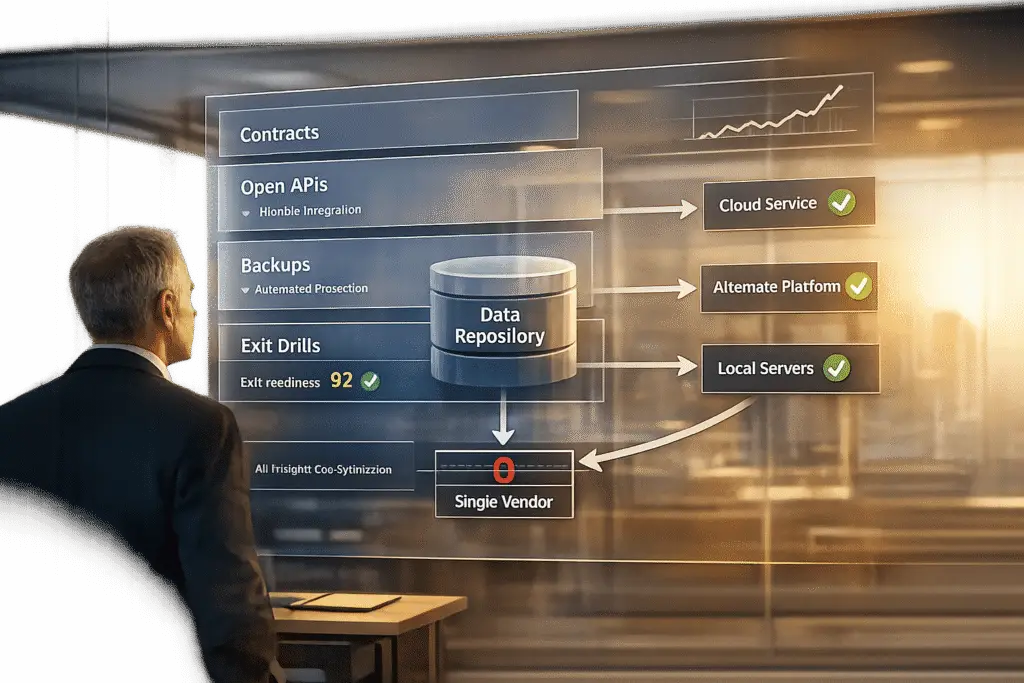
Vendor lock-in can trap businesses, making it expensive and difficult to switch platforms. For customer support teams, this can lead to higher costs, operational disruptions, and limited flexibility. Here’s what you need to know:
- Key Risks:
- High switching costs due to proprietary data formats and integration challenges.
- Limited access to data in usable formats, often stripped of metadata and business logic.
- Dependency on a single vendor’s roadmap, leaving you vulnerable to price hikes, outages, or platform failures.
- Real-World Examples:
- Builder.ai‘s collapse in May 2025 left customers stranded mid-project.
- OpenAI‘s June 2025 outage caused major disruptions for teams relying solely on their API.
- Solutions:
- Use platforms with open APIs and standard data formats.
- Negotiate contracts that guarantee data export rights and migration support.
- Regularly back up your data and test portability with "exit drills."
Vendor lock-in isn’t just a technical issue – it’s a business risk. By prioritizing data portability and planning ahead, you can protect your operations and stay in control.
Vendor Lock-In Risks and Statistics for B2B Customer Support Teams
Vendor lock-in isn’t a buzzword. It’s one of the biggest risks facing organizations right now.
sbb-itb-e60d259
What Is Vendor Lock-In in B2B Customer Support?
Vendor lock-in occurs when your support operations become so reliant on a single SaaS platform that switching to another provider feels nearly impossible – whether due to high costs, technical hurdles, or operational disruptions [8][10].
In the world of AI-powered support systems, this lock-in happens on multiple levels. Your customer interaction data, chat histories, and AI embeddings often get stored in formats that don’t work with other systems [1][11]. Beyond that, workflows, reports, and even your team’s institutional knowledge can become tied to one vendor. Even AI prompts and fine-tuned models are often tailored to a specific vendor’s tools – like OpenAI’s Assistants API or other unique frameworks [9][3].
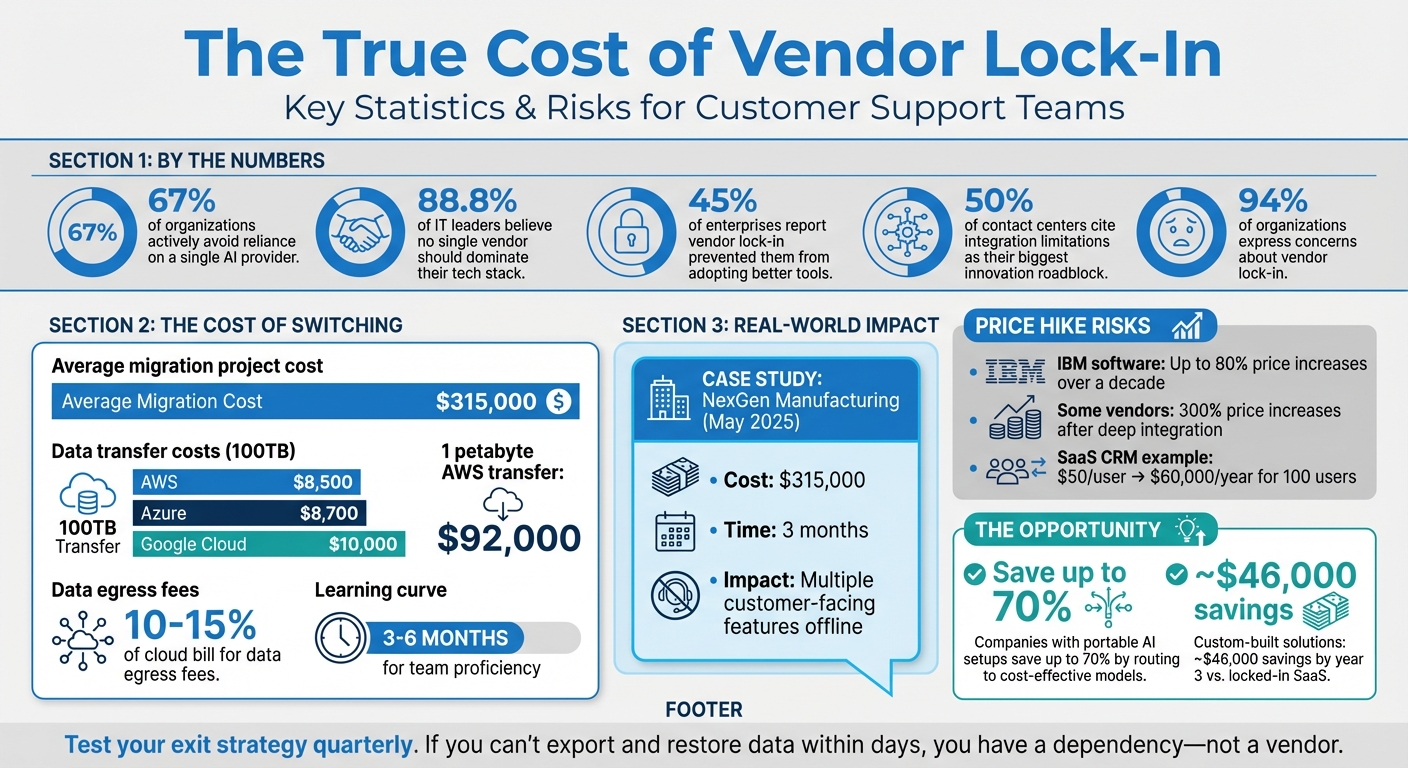
The outcome? What starts as a simple software subscription can turn into a full-blown technical dependency that’s tough – and costly – to escape. In fact, 67% of organizations actively try to avoid heavy reliance on a single AI provider, while 88.8% of IT leaders believe no single vendor should dominate their tech stack [7].
How Vendor Lock-In Works
Three key mechanisms drive vendor lock-in: technical coupling, data gravity, and contractual constraints.
From a technical standpoint, your support platform becomes deeply integrated with the vendor’s proprietary APIs, data formats, and AI models. For example, workflows built around a vendor’s "native memory" features or AI agents trained with their specific prompt structures create dependencies [3][11] that are hard to replicate elsewhere.
Then there’s data gravity – a challenge that grows over time. Your support operation generates vast amounts of data, including tickets, chat logs, knowledge base articles, and AI training sets. This data often ends up stored in the vendor’s proprietary systems. While exporting it might seem simple, the reality is different. You might receive a basic CSV file, but it could lack crucial metadata, conversation links, audit logs, or the business logic that powers your workflows [8][1].
Finally, contractual lock-in adds a legal and financial layer. Auto-renewal clauses, long notice periods (often 60-90 days), and ambiguous data export terms make switching providers an uphill battle – even if the vendor raises prices or stops delivering value [8]. Together, these technical, data, and contractual barriers can undermine your ability to stay agile and control costs.
Why Customer Support Leaders Should Care
Vendor lock-in isn’t just about technical inconvenience – it’s a serious strategic risk that affects your ability to scale, innovate, and manage expenses [7].
When you’re locked into one platform, you’re stuck following that vendor’s roadmap. If they lag behind competitors in adopting new AI features, you’re unable to switch to better tools without facing a costly migration [2][7]. Worse, if the platform fails entirely, you could be forced into expensive, time-consuming rebuilds [6][7].
Lock-in also increases operational vulnerability. A single vendor outage can bring your entire support function to a halt. For example, on June 10, 2025, an OpenAI disruption caused widespread issues for teams relying solely on their API, leaving AI-powered agents offline for hours [6]. Teams without multi-model backups were left scrambling.
Cost management becomes another headache. Many SaaS platforms use per-seat pricing that scales sharply. For instance, a CRM that costs $50 per user may seem manageable for 10 employees, but at 100 users, you’re looking at $60,000 annually [10]. And even when competitors lower prices – like when Google slashed Gemini 1.5 Pro API costs by 50-64% in 2025 – you can’t take advantage if your systems are locked into another vendor [6].
"If you can’t export your data and configurations in a usable format within days – not weeks – you don’t have ‘a vendor,’ you have a dependency." – Leutrim Miftaraj, Founder, Innopulse.io [1]
The takeaway? Vendor lock-in limits your ability to adapt, manage costs, and build resilient support systems. In a fast-evolving AI landscape, these risks are too big to ignore.
Main Risks of Vendor Lock-In for Customer Support Teams
Vendor lock-in can create serious challenges, affecting operations, finances, and the ability to adapt and grow.
Expensive Switching Costs
Breaking away from a locked-in platform can be far more costly than just canceling a subscription. For example, transferring 100TB of data comes with a hefty price tag: $8,500 for AWS, $8,700 for Azure, and $10,000 for Google Cloud [12]. On top of that, rebuilding workflows and integrations demands significant engineering time [12][3].
Take NexGen Manufacturing as an example. In May 2025, their AI provider, Builder.ai, collapsed. The fallout? They spent $315,000 and three months migrating 40 AI workflows to a new platform. During this time, multiple customer-facing features went offline [7]. Unfortunately, this isn’t an isolated case – the average migration project costs around $315,000 [7].
Switching platforms also comes with a steep learning curve. Teams typically need 3–6 months to become proficient with a new platform’s tools for monitoring, security, and workflows. During this period, productivity dips, and customer response times increase [12].
Vendor lock-in also erodes your ability to negotiate. When switching isn’t a viable option, providers can raise prices without fear of losing customers. For instance, IBM has implemented software price hikes of up to 80% over the last decade [5]. If you’re locked in, you’re stuck paying whatever they demand.
Restricted Data Access
Your customer support data is invaluable, but vendor lock-in can make accessing and using it a nightmare. The issue isn’t just about retrieving your data – it’s about getting it in a usable format that retains its full value.
Vendors often provide basic CSV exports, but these are stripped of critical metadata, such as conversation links, audit logs, and workflow logic [8][1]. While you might get raw ticket numbers and timestamps, you lose the context that powers insights like customer journey mapping or escalation patterns.
This phenomenon, known as "data gravity", makes moving data an overwhelming task. Years of accumulated support tickets, workflows, and histories turn migration into a months-long project that drains resources [13]. 88.8% of IT leaders agree that no single cloud provider should control their entire tech stack [14]. However, data-egress fees and proprietary formats often make multi-cloud strategies financially unfeasible.
The costs are staggering. Data-egress fees alone typically account for 10% to 15% of a cloud bill [14]. For teams running large AI operations, the numbers are even worse. Transferring 1 petabyte of training data out of AWS, for instance, costs around $92,000 [14]. These fees act like a "tax", forcing teams to abandon projects like custom AI training or advanced analytics simply because the data is locked up [14].
These limitations directly impact your ability to remain flexible and adapt to new technologies.
Reduced Flexibility and Scalability
Vendor lock-in doesn’t just drain your wallet – it restricts your ability to evolve. Being tied to one provider means you’re stuck following their roadmap, even if it doesn’t align with your goals. In fast-changing fields like AI, this can leave you lagging behind competitors [7].
45% of enterprises report that vendor lock-in has already prevented them from adopting better tools [7]. Similarly, 50% of contact centers cite integration limitations as their biggest roadblock to innovation [5]. When locked into one platform, you miss out on market advancements – like when Google cut Gemini 1.5 Pro API costs by 50–64%, or when OpenAI launched more affordable 4o-mini models [6].
Integrations also become a bottleneck. Most support platforms are deeply embedded in a network of tools like CRMs, chat systems, and analytics dashboards. Removing or replacing one component can disrupt the entire system [13]. Scaling operations or customizing workflows, then, becomes a technical headache requiring significant engineering effort.
Consider what happened in June 2025, when Microsoft retired older GPT-4 "0613" variants without notice. Businesses in the Switzerland North region, which relied on those models for compliance reasons, had no local replacement options. They were forced to re-architect their systems on short notice [6]. When you’re locked in, you’re at the mercy of your vendor’s decisions – not your own timeline.
Increased Operational Disruptions
Relying on a single provider also introduces a critical risk: a single point of failure. If your provider goes down, so does your entire customer support operation.
These outages can cripple businesses. Without multi-model failover systems, automated support tools can grind to a halt, leaving customers in the lurch. The risks extend beyond technical issues – vendor insolvency can trigger an immediate crisis, requiring expensive system rebuilds.
"Vendor lock-in isn’t a technology problem, it’s a business risk. The more freedom you build into your stack, the more control you keep over your future." – Christian Montes, Chief Operating Officer, NobelBiz [5]
This reliance highlights the importance of maintaining flexibility with multi-vendor capabilities. Otherwise, your operations become vulnerable to your provider’s stability, pace of innovation, and overall business continuity – factors entirely outside your control.
Warning Signs Your Support Platform Locks You In
Identifying potential lock-in issues early can save you from expensive and time-consuming disruptions down the line. Here are some key warning signs that your support platform might be designed to keep you stuck.
Proprietary Data Storage
One major red flag is when your platform stores data in vendor-specific formats that don’t align with widely-used standards like CSV, JSON, XML, or SQL. The problem often isn’t just the format – it’s the lack of essential metadata. For instance, while some platforms may provide basic CSV exports, they might leave out critical details like conversation links, audit logs, attachments, or workflow logic. Without these elements, your data becomes much harder to use when switching to a new system.
Another issue is when data export requires manual intervention. If you need to submit a support ticket or wait for vendor approval to access your own data, it’s a sign of dependency rather than flexibility. Some vendors even charge data dump fees, throttle export speeds, or enforce restrictive contracts that delete your data immediately after termination – or give you only a short window to retrieve it. These practices can make switching to helpdesk software unnecessarily challenging.
Restricted or Paid API Access
If a platform charges extra for API access or for connecting with third-party tools, it’s a clear indication that the vendor is discouraging integrations. These restrictions can take various forms, such as throttling data exports, imposing high fees for bulk data retrieval, or using proprietary protocols instead of standard REST or GraphQL APIs.
Another concerning signal is when API access requires manual approval or when documentation is hidden behind a paywall. Before committing to a platform, ensure that API documentation is publicly available and that your contract guarantees continued API access for at least 30 to 90 days after termination. This will help you retrieve your data programmatically during a migration.
| Lock-In Signal | Description | Risk Level |
|---|---|---|
| Paid API Access | Charging for third-party integrations or internal system connections | High |
| Throttled Exports | Limiting data retrieval speed or volume during migrations | High |
| Manual Approval | Requiring support tickets to access or export historical data | High |
| Proprietary Formats | Returning data in non-standard structures | Medium |
| Required SDKs | Forcing the use of proprietary SDKs instead of raw HTTP calls | Medium |
These API limitations often create a closed ecosystem, making it even harder to leave the platform without significant effort.
Forced Feature Bundles You Don’t Need
Lock-in tactics aren’t limited to data and API restrictions. Many vendors package essential tools – such as advanced APIs, data export capabilities, or compliance monitoring – into expensive enterprise bundles. This forces you to pay for features you might not need just to access the ones you do.
These bundles can make switching platforms more difficult and costly. Every feature you rely on becomes its own migration challenge, and the pricing structure often makes staying seem cheaper than leaving. Vendors exploit this dynamic, using bundled pricing to maximize their revenue while limiting your ability to operate independently.
To assess whether you’re locked into a bundle, calculate your “migration tax” – the total time and cost required to switch platforms within 90 days. If the cost feels overwhelming, it’s a strong indication that you’re deeply tied to a bundled dependency.
How to Keep Your Data Portable
If you’re concerned about the warning signs of restricted data access or high switching costs, it’s time to take action. By implementing a few smart strategies, you can ensure your data remains portable and your operations stay secure. The key? Start planning for data portability from day one – don’t wait until you’re already looking for an exit.
Review Vendor Contracts Carefully
Your contract is the backbone of your data portability plan. Scrutinize it to make sure you have the right to leave without penalties or losing access to your data. Look for clauses that clearly define data ownership, guarantee export rights in standard formats, and provide a post-termination access window (usually 30–90 days). Also, check for migration support, termination rights with reasonable notice (60–90 days), and caps on price increases or excessive egress fees [4][16][17][18][1].
Make sure the contract ensures you can export all your data – not just raw text, but also historical records, attachments, and audit logs [4][1][17]. Push for the vendor to include migration assistance, such as technical documentation, API access, and professional support during the transition [4][1].
"The agreement must state clearly that you retain all ownership rights to your data, including customer information, transaction records, and any content uploaded to the platform." – Will Bond, Growth Marketing Lead, Genie AI [4]
Choose Platforms with Open APIs and Standard Formats
While contracts protect your rights, the platform’s technical design plays a key role in making data extraction easier. Platforms with open APIs and widely used data formats can significantly reduce switching costs. For example, systems using REST or GraphQL protocols allow your team to update credentials and test workflows instead of rewriting integrations from scratch [15]. On the other hand, proprietary formats can act like a "trap door", making data extraction a costly and time-consuming process [1].
Look for platforms that use standard protocols like Redis or Memcached, which make your application code portable across hosting providers. This way, you’ll only need to update the connection string [17]. Ensure API documentation is publicly accessible, and your contract includes a guarantee of API access for at least 30 to 90 days after termination. This ensures you can retrieve your data programmatically during migration [4].
Switching from a provider with high lock-in can take months of engineering time, while moving between more flexible platforms might only take a few days [15]. Some vendors even raise prices by as much as 300% once customers are deeply integrated and unable to switch easily [15]. To avoid this, consider using the adapter pattern. This involves creating an internal abstraction layer where your application calls your own functions (like validateEmail()) instead of relying directly on the vendor’s SDK. That way, switching providers only requires updating the adapter [15][3].
Set Up Regular Data Backups
Regular backups are essential for maintaining data portability. Run quarterly drills to export and restore your data into a staging or alternate system. This helps identify any gaps in your backup strategy before they become major issues during an actual migration [16][1].
Store your backups independently – services like Amazon S3 are a good option – rather than relying solely on vendor-provided tools [17][19]. During these drills, make sure your backups include everything: metadata, ticket history, attachments, audit logs, relationship data, and configuration settings like workflows, user roles, and policies [19][1].
Use standard formats like CSV, JSON, XML, or Parquet for your exports, as they’re widely compatible with other platforms [17][4][3]. For AI-powered systems, log all inputs and outputs so you can "replay" historical interactions against a new model to evaluate the impact of a migration [3]. Additionally, keep audit trails for 12 to 36 months to ensure compliance both during and after the migration process [1].
"Don’t wait for termination to test portability. If you can’t run an export-and-restore exercise today, you won’t be able to do it under renewal pressure." – Innopulse [1]
Best Practices for System Integration and Migration
Once you’ve secured data portability and selected a platform that offers flexibility, the next step is carefully planning your system integration and migration. This preparation is essential to avoid issues like downtime, workflow interruptions, or compliance problems. Following these practices can help ensure a smoother transition.
Use AI for Data Migration
AI tools can make data migration much easier by automating repetitive tasks and organizing unstructured data. For example, instead of manually processing thousands of tickets, AI can extract key information, create summaries, and enforce JSON schema outputs [3]. This eliminates delays that often slow down agents [21].
To avoid being locked into a single AI model, consider implementing a routing layer – essentially an internal interface like generate() or classify() – so your application communicates with your own API rather than a specific vendor’s SDK [3][9]. This setup makes switching AI providers more of a configuration adjustment rather than a complete overhaul. Additionally, keep raw data (like original text and feedback) separate from derived data (like embeddings and summaries). This separation allows you to recalculate AI artifacts if you decide to switch providers [3]. Before launching, create a "golden set" of 50–200 anonymized real-world cases to serve as a stable test set when evaluating different AI vendors [3].
A great example of this approach comes from Rossi Residencial, a Brazilian construction company. In July 2025, they migrated four SAP environments to Google Cloud using "Migrate to Virtual Machines" (formerly Velostrata). By carefully mapping their systems and mirroring their architecture in advance, they achieved zero downtime during the migration. This move not only reduced infrastructure costs by 50% but also freed up the IT team to focus on strategic projects instead of constant troubleshooting [21].
Test Multi-Vendor Workflows
While AI tools can simplify migration, testing workflows across multiple vendors is a critical step to ensure your integration strategy is solid. Before committing to a single vendor, simulate real-world tasks like ticket handling, escalations, and reporting in a sandbox environment. This lets you identify potential usability issues without affecting live data [20].
Running old and new systems in parallel for a short time can help monitor stability, spot missing workflows, and prevent service disruptions [20]. Instead of a single "Big Bang" migration, consider a phased approach. This allows for testing, troubleshooting, and running systems in tandem [20][21]. Additionally, perform "exit and swap drills" by temporarily moving a pipeline step to an alternative engine or disabling non-essential vendor features. These exercises help you gauge how easily you can switch providers if needed [3].
"Switching platforms is a strategic move – one that should be guided by data, not frustration." – Eric Klimuk, Founder and CTO, Supportbench [20]
Use KCS-Driven Knowledge Management
Beyond technical strategies, adopting a Knowledge-Centered Service (KCS) approach ensures that your organization’s knowledge base remains accessible and adaptable during migration. KCS emphasizes building a knowledge base with standardized articles that can be easily exported and imported across different platforms. This prevents valuable institutional knowledge from being locked into proprietary formats.
When migrating, develop a field-level mapping document to ensure data from the source system aligns correctly with the target system. Pay special attention to relational data, such as ticket-to-user links [21]. Use KCS principles to validate data exports, making sure to employ standard formats like JSONL, CSV, or Parquet while preserving critical metadata and audit trails for compatibility [1][3]. Before migration, audit your legacy systems to eliminate duplicate or outdated records – moving unnecessary data only increases risks and reduces efficiency [21].
After the migration, use real-time dashboards to monitor performance and confirm that support teams can create and update tickets without issues [21]. To maintain readiness, conduct quarterly export-and-restore exercises. These tests ensure your data and configurations can be rebuilt in a staging environment, avoiding surprises when renewal deadlines approach [1].
AI-Powered Solutions to Reduce Vendor Lock-In
AI tools can help you avoid becoming overly dependent on a single vendor. Instead of tying you to proprietary systems, AI-powered workflows create abstraction layers that make it easier to switch providers without having to rebuild everything. This approach is increasingly important, with 94% of organizations now expressing concerns about vendor lock-in – a rise compared to previous years [24]. By integrating AI into your migration strategies, you can ensure greater flexibility through smarter data management.
AI Copilot Features for Multi-System Support
AI copilots are designed to work across multiple platforms, freeing you from reliance on a single vendor’s ecosystem. These tools can query systems like CRMs, ticketing platforms, and databases in one seamless workflow, eliminating the need for manual switching between platforms [25][26].
The secret lies in abstraction layers, which act as a buffer between your application and the AI provider. Tools like Vercel AI SDK, LangChain, and LiteLLM allow you to write code once and switch between providers – such as OpenAI and Anthropic – with just a single line of code change. This reduces migration time and ensures your operations stay flexible [9][3].
Some organizations are adopting "Bring Your Own Agent" (BYOA) architectures. In this setup, a custom-built AI agent connects to a headless support infrastructure via APIs, keeping your support system’s intelligence independent of any specific helpdesk vendor [23]. This approach ensures adaptability and reduces the risks associated with vendor lock-in. By 2029, autonomous AI is expected to resolve 80% of common customer service issues, and by 2026, 40% of enterprise applications are predicted to include task-specific AI agents – up from less than 5% in 2025 [23].
To further safeguard flexibility, configure your AI systems to enforce a canonical JSON schema for outputs. This ensures your workflows remain intact, even if you switch models, as the system won’t rely on a single provider’s unique response format [3].
"Vendors are betting that high switching costs from rebuilding agents on another platform will make customers sticky." – Rebecca Wettemann, Industry Analyst [24]
AI-Generated Metrics and Summaries
AI doesn’t just enable multi-system support; it also standardizes data outputs. By creating consistent outputs – such as ticket summaries, resolution notes, or customer activity overviews – AI ensures your data is portable and not tied to a single vendor’s proprietary structure.
For example, Supportbench offers AI-powered features like ticket summaries, case history searches, and knowledge article creation. These tools produce structured data that can be easily exported and used across different platforms. The AI generates summaries for tickets when they’re opened, provides updates for each activity, and creates a complete case summary upon closure – all in standardized formats that avoid vendor-specific constraints.
AI systems also assign confidence scores to responses, automatically sending high-confidence answers while flagging uncertain ones for review. To maintain performance consistency across providers, a "golden set" of 50–200 real-world cases is used for validation [3][25][26]. In top-tier deployments, autonomous AI achieves 60-80% resolution rates, compared to 30% or less for traditional rule-based systems [26].
To prepare for potential migrations, it’s a good idea to run quarterly "migration drills." By routing a small portion of traffic through an alternative model, you can ensure that switching providers remains technically feasible without sacrificing quality [3].
"The winning strategy in an AI-abundant future isn’t picking the right tool. It’s orchestrating the right ensemble." – Alexander Zanfir, Writer and Developer [22]
Conclusion: Maintain Control Over Your Data
Keeping control of your data is a key element for running efficient AI-powered support operations. Vendor lock-in isn’t just a technical problem – it’s a business risk that can limit flexibility and drive up costs. The strategies shared here offer practical ways to sidestep dependency issues: negotiate solid contracts, use abstraction layers to ensure portability, back up your data consistently, and test your exit strategy with regular drills.
The numbers speak for themselves: companies with portable AI setups can cut costs by as much as 70% by directing tasks to the most cost-effective models rather than relying on a single provider [9]. For example, SaaS CRM systems can cost $72,000 annually for 100 users, but opting for a custom-built solution based on owned data could save around $46,000 by the third year [10]. These savings highlight the clear financial and operational advantages of maintaining data portability.
To put these best practices into action, start with quarterly portability drills – reroute a small portion of your workload to an alternate provider to ensure your exit strategy works in real scenarios. Centralize your data in a self-managed warehouse to avoid being stuck with costly export fees or proprietary formats. Tools like Terraform or Pulumi can also help by allowing you to define your cloud infrastructure in code, making it easier to replicate your environment anywhere.
It’s not about avoiding vendors – it’s about working with them on your terms. By owning your data, controlling integrations, and staying ready to switch providers without starting from scratch, you’ll create a support system that’s flexible, resilient, and ready to scale.
FAQs
What data should I export to avoid lock-in?
To avoid being tied to a single vendor, make sure to export all critical data required to rebuild or move your support operations. This includes ticket metadata, conversations, timestamps, customer profiles, performance metrics, configuration details, and any derived outputs. Stick to standard, reusable file formats to ensure smooth compatibility during migrations or integrations down the road. A well-thought-out export plan helps lower dependency on proprietary systems, cuts down switching costs, and ensures your data remains accessible when you need it.
How can I test portability without risking downtime?
To make sure data portability works without causing disruptions, start by running a pilot migration using a small subset of your data. This lets you confirm that export formats, data integrity, and workflows remain intact. During testing, implement a delta migration to sync any changes made to the data, minimizing risks. Before making the full switch, carefully validate the migrated data for accuracy and functionality to ensure a seamless transition without interruptions.
What contract terms protect my data exit rights?
When negotiating a contract, it’s crucial to include specific terms that protect your ability to access and control your data. Here are the essential provisions to look for:
- Data and Metadata Ownership: Ensure the contract clearly states that you own your data and any associated metadata. This eliminates ambiguity about who has rights over the information.
- Exportability in Standard Formats: The agreement should guarantee that you can export your data in widely-used, compatible formats. This ensures a smoother transition if you decide to switch vendors.
- Termination Conditions Without Excessive Fees: Look for clauses that define clear termination terms, ensuring you can end the contract without facing unreasonable costs or penalties.
Other key considerations include customer-managed access controls, which let you oversee who can access your data, and reasonable egress fees, so you’re not overcharged when retrieving your data. Additionally, benchmarking rights are important for testing and comparing the vendor’s performance, giving you leverage to assess alternatives.
Finally, strong Service Level Agreements (SLAs) are vital. These should outline defined response times and escalation procedures, helping you maintain control over your data and avoid being locked into a vendor’s ecosystem.
Related Blog Posts
- How do tariffs and cross-border risk change SaaS vendor selection for Canadian teams?
- Why “All-in-One” Suites Actually Cost More: Unbundling the CRM
- CapEx vs. OpEx in Support Software: Structuring Your Contract
- Negotiating Support Software Contracts: Red Flags to Watch For
Evaluating help desks for a B2B team?
Supportbench is all-inclusive from $32 per agent per month, with migration and onboarding included. See pricing or book a 20-minute demo.






