


A support taxonomy is a structured system for tagging and categorizing customer support tickets. It helps teams organize issues like "Billing Problems" or "Login Errors" to improve efficiency and gain insights for product decisions. Effective tagging reduces response times by up to 40% and boosts ticket resolution rates by 30%. Here’s how to build a system that works:
- Core Categories: Start with broad categories like "Technical Issues" or "Feature Requests." Use a clear naming convention (e.g.,
bug/login-failure) to keep things organized. - Limit Tags: Aim for 30–50 tags. Too many tags lead to errors; too few lack detail.
- Subcategories: Add layers for more detail (e.g.,
Billing > Payment Failed > PayPal Error). - Automation: Use AI to handle repetitive tagging tasks as ticket volumes grow.
- Governance: Regularly review and clean up tags to avoid duplicates or irrelevant ones.
- Insights: Use tagged data to identify trends, prioritize fixes, and improve products.
Tags create a shared language between support, product, and engineering teams, making customer feedback actionable. With AI tools and proper workflows, you can turn ticket data into smarter decisions.
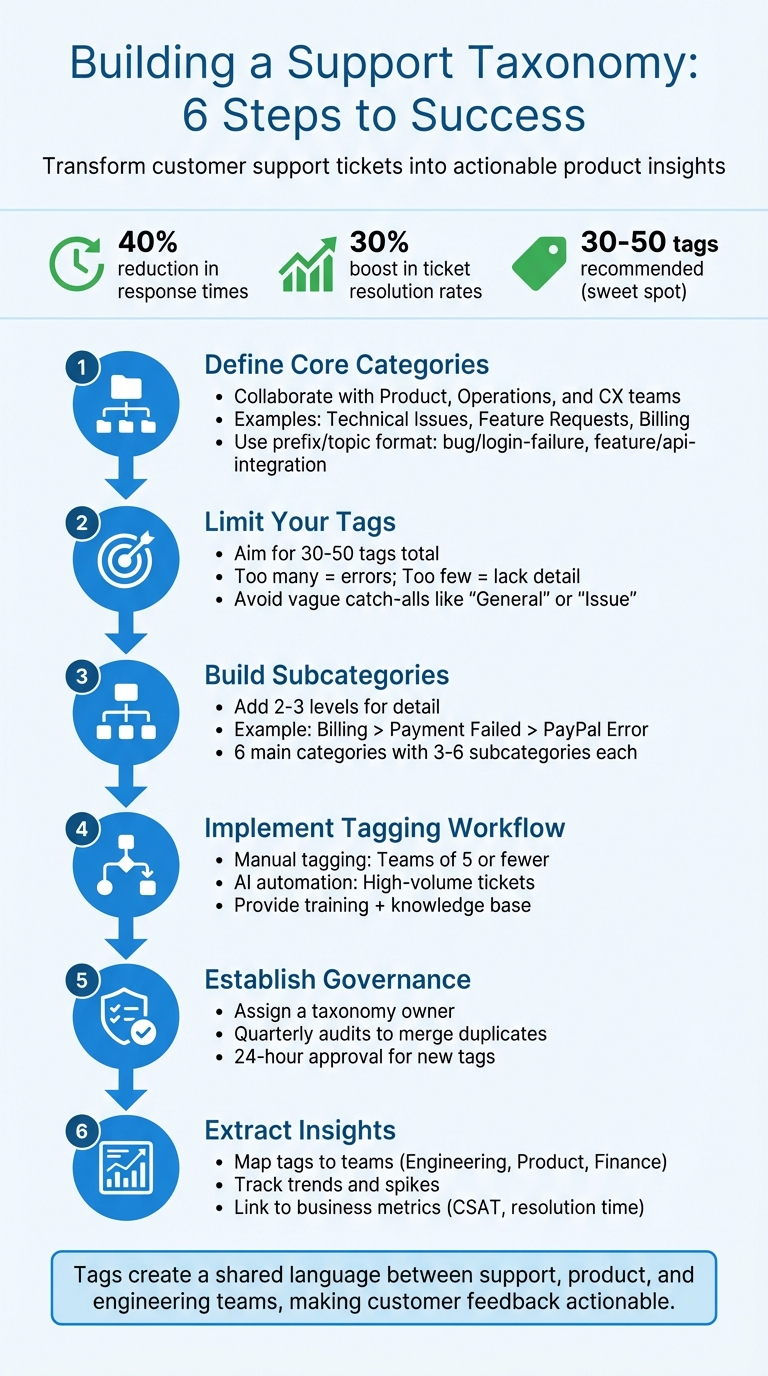
6-Step Process to Build an Effective Support Ticket Taxonomy
Setting Up Your Main Tag Categories
Choosing Your Core Categories
Your core categories are the backbone of an effective tagging system. To get this right, collaborate with teams like Product, Operations, and CX to pinpoint the most critical data points. As Jenny Dempsey, CX Manager at Apeel, explains:
"I typically start by talking to other teams to understand what needs to be measured outside of what I/my team want to measure. I learned early on that if I just measure what I want, I don’t have access to data that other teams need" [1][3].
For B2B SaaS companies, some of the most useful categories include Technical Issues, Usability Issues, Feature Requests, User Education, and Billing [5]. Meanwhile, if you’re in eCommerce, key categories might focus on Product Questions, Delivery Queries, Product Issues, Product Requests, and Payments [5]. These categories help identify major pain points and guide product teams on what to prioritize.
Sometimes, it’s smart to create temporary categories for specific events or launches. Aistė Sobutienė, Customer Support Director at Vinted, uses this tactic when rolling out new products. Short-term tags allow her team to collect immediate feedback and make quick adjustments [3].
To keep your categories neat and easy to use, adopt a prefix/topic format. For example, tags like bug/login-failure, feature/api-integration, or billing/refund-request group related issues together. This makes dropdown lists manageable and helps agents quickly find the right tag [2]. A clear naming convention like this is essential as your tagging system grows.
Once your core categories are set, the next step is figuring out how much detail to include for maximum usability and meaningful analysis.
Finding the Right Level of Detail
One of the biggest mistakes is going overboard with categories. If you have 400–500 tags, agents will likely pick the first one that seems “good enough,” leading to inaccurate data [3].
The ideal range is 30 to 50 tags. Kirsty Pinner, Chief Product Officer at SentiSum, emphasizes:
"The sweet spot for great insights and ease of tagging for agents is a taxonomy with 30-50 tags maximum covering the main problems, questions and feedback that arise" [1][3].
This range strikes the perfect balance – detailed enough for meaningful reporting but simple enough for agents to use consistently.
Steer clear of vague catch-all tags like "General" or "Issue." These become dumping grounds for unrelated issues, skewing your data. Pinner warns:
"Avoid general tags like ‘packaging’. They tend to become a catch-all for any kind of issue, so agents apply them quickly and move on" [3].
Every tag should serve a distinct and well-defined purpose.
For high-volume support teams, a hierarchical structure works best. Use broad categories at Level 1 and drill down into specifics at Level 2. If your team deals with lower volumes (hundreds of tickets per month), a flat list of clear categories is often enough [5][1]. The key is tailoring your structure to your workload – don’t overcomplicate a small operation, and don’t oversimplify a complex one.
Building Subcategories for Detailed Analysis
Creating Second and Third-Level Tags
Once your core categories are set, you can take analysis to the next level by adding detailed subcategories. This approach shifts the focus from just tracking ticket volumes to uncovering the root causes behind them. For example, instead of broadly tagging a ticket as Billing, you could refine it to something like Billing > Payment Failed > PayPal Error. This level of detail makes it easier to pinpoint the exact issue.
For B2B support teams, a practical setup often includes six main categories, each with three to six subcategories, keeping the total number of tags in the 30–50 range [1][4]. Take a parent category like Access/Security – you could break it down further into subcategories such as Login Trouble, Two-Factor Reset, and Permissions to identify specific challenges users face.
To keep tags organized, consider using a prefix naming convention. For instance, billing/refund-request or bug/login-failure groups related issues together, making it easier for agents to quickly select the right tag. If you notice a high volume of tickets in a Level 2 subcategory like Payment Failed, consider adding a third layer, such as Payment Failed > Credit Card Declined, Payment Failed > PayPal Error, and Payment Failed > Bank Rejection. This added granularity can help teams prioritize fixes, like focusing on a specific payment gateway. However, ensure these layers stay manageable with a strong governance process in place.
Preventing Tag Bloat and Duplication
To keep your tagging system effective, it’s crucial to avoid uncontrolled growth. Without clear rules, you could end up with 400–500 tags, which defeats the purpose of having a structured system [3]. Kirsty Pinner, Chief Product Officer at SentiSum, emphasizes this point:
"Think about your tagging structure carefully; there’s a balance between too generic and too specific."
Avoid vague or redundant tags that don’t provide actionable insights. Every tag should serve a specific purpose, directly tied to decisions your team needs to make.
Assigning a tag owner – like a lead agent or support operations manager – can help maintain order. This person should review and approve all new tag requests. Anyone proposing a new tag must justify it with clear use cases. For example, this process prevents duplicates like "SSO" and "Single Sign On" from cluttering your system. A streamlined taxonomy ensures that your tags remain useful and insights stay actionable.
Regular audits are also essential. Export tag usage data periodically to identify and merge duplicates or retire tags that are no longer relevant. To ensure consistency, maintain an internal knowledge base article that clearly explains when and how to use each tag. Include screenshots and examples to make it easier for new agents to get up to speed and apply tags correctly. These steps will keep your tagging system clean, efficient, and aligned with your goals.
Studio Update #06: Fine Tuning to Tag Support Tickets? Plus Dynamic AI prompting via Spreadsheets
sbb-itb-e60d259
Setting Up Your Tagging Workflow
Once you’ve nailed down your core and subcategory tags, the next step is creating a tagging workflow that ensures consistency and delivers actionable insights.
When to Use Manual Tagging
Manual tagging is ideal for smaller teams (five people or fewer) or when rolling out a new taxonomy[1]. It’s especially useful in situations that require human judgment for nuanced categorization. To make this process smooth, provide agents with clear guidance. For example, Jenny Dempsey, CX Manager at Apeel, shares her approach:
"I created an easy-to-access knowledge base article that explains what tags to use and when. I have everyone bookmark this and refer to it."[1]
Start by training your team. Spend about 30 minutes explaining your tagging structure – like prefixes such as billing/refund or bug/login – and let them practice with 10 real tickets. A cheat sheet with screenshots showing specific scenarios for applying each tag can help eliminate confusion and promote consistency[2]. Once your team is familiar with the process, you’ll be ready to scale up with AI for handling larger ticket volumes.
Using AI to Automate Tagging
As ticket volumes grow, manual tagging can become a bottleneck. It eats up agents’ time, slowing down responses and increasing the likelihood of errors[6]. This is where AI-assisted tagging steps in. Using Natural Language Processing (NLP), AI can interpret customer intent and sentiment, while Machine Learning (ML) refines accuracy based on historical data[6].
Before deploying AI tagging live, test it in simulation mode using past tickets to gauge its accuracy[6]. Make sure the AI has access to all your knowledge sources – like your help desk, Confluence wiki, Notion docs, and Google Drive – so it can fully understand your product context. Start by automating simple, high-volume categories like "Password Resets" or "Billing Questions", then gradually tackle more complex issues[6]. To maintain quality, pair automation with regular reviews to ensure your taxonomy evolves alongside your operations.
Maintaining Tagging Quality Over Time
Keeping your taxonomy effective requires ongoing maintenance. Assign a lead agent as the "taxonomy owner" to manage updates, approve new tag requests within 24 hours, and oversee quarterly cleanups to merge duplicate tags or retire unused ones[2][4]. When someone suggests a new tag, ask them to justify its need and provide two sample use cases to avoid unnecessary additions[2].
Monitor tag usage regularly to spot problems early. If certain tags are rarely used or agents rely too often on vague labels like "General Issue", tweak the taxonomy to address these gaps[2][4]. During the initial rollout, hold daily 20-minute calibration sessions to review sample tickets and refine tag names. This helps catch inconsistencies before they become ingrained habits[4].
Turning Tagged Data into Product Decisions
Transforming your organized ticket data into actionable product decisions is a game-changer. A well-structured taxonomy doesn’t just organize – it uncovers what’s broken, what’s missing, and what your customers truly need. By refining this data step by step, you can turn it into a powerful decision-making tool for your entire organization.
Finding Patterns in Your Data
With a structured taxonomy in place, your tags can now highlight specific friction points. A hierarchical system – starting with broad tags and narrowing down to detailed subcategories – makes problem areas crystal clear. For example, moving from a general "Payments" tag to something as specific as "Paypal not working" allows you to track trends over time and catch problems before they spiral out of control.
Breaking tags into categories based on intent further sharpens your analysis. For example:
- Problem tags: Highlight technical issues like bugs.
- Request tags: Focus on feature demands.
- Feedback tags: Capture general customer sentiment.
If you notice a 25% increase in a tag like "unable to checkout using Paypal", it’s a clear signal that engineering needs to address a defect [1]. AI tools can also help by retroactively tagging thousands of tickets, uncovering granular insights that manual tagging might overlook.
"If you create a tag specific to a problem, like ‘unable to checkout using Paypal,’ then if you report a 25% increase in this tag’s usage this month you can be confident you know why."
- Kirsty Pinner, Product Owner, SentiSum [1]
Sharing Insights with Product Teams
Once you’ve identified patterns, the next step is ensuring the insights make their way to the right teams. Map tags to specific teams for immediate action. For example:
- Engineering: Handles "Bugs and Quality" tags.
- Product/UX: Manages "Product Usage" tags.
- Finance: Takes care of "Billing" tags.
Collaborate with product and engineering teams early on to ensure your taxonomy supports their reporting needs. This cross-team alignment ensures the data you collect is actionable across departments, not just within support.
Using standardized prefixes like bug/, feature/, or incident/ makes data more predictable and easier for developers to search. Additionally, tracking tag spikes after a product release can help pinpoint issues tied to specific deployments. Linking these categories to business metrics – like CSAT scores, ticket reopen rates, or resolution times – provides a clear view of where improvements are needed most.
Using Supportbench for Tag Analysis
Supportbench takes the tagging system you’ve built and turns it into actionable insights. Its AI-powered dashboards visualize trends and analyze tagged data, making it simple to identify recurring problems or popular feature requests. With Predictive CSAT, you can even forecast customer satisfaction based on ticket tags, giving you an early warning system for potential pain points.
The platform’s AI summaries group tickets into clusters and provide context for specific issues, saving you from the grind of manual review. Sentiment analysis further refines this process by gauging the emotional tone of tickets, helping you prioritize fixes for frustrated customers over neutral feedback.
To keep your reporting system organized, adopt a "prefix + topic" format (e.g., bug/login or feature/sso). Regularly exporting tag data – perhaps quarterly – lets you clean up duplicate or rarely used tags, keeping your system streamlined and effective.
Conclusion
A well-structured tagging system can shift your support approach from reactive to proactive. By narrowing broad categories like "Payments" into specific issues such as "PayPal integration failure", you create a direct line between customer challenges and product decisions. Using 30-50 tags strikes the right balance – detailed enough for actionable insights without overwhelming your team [1]. This clarity ties support data directly to product strategy.
Tags act as a shared language, aligning support, product, and engineering teams around real customer needs. Consistent naming conventions allow developers to identify patterns quickly, while product managers can prioritize their backlogs based on actual ticket data instead of assumptions [2].
"A well-thought-out tag taxonomy, consistently applied by agents, will allow you to track worrying trends as they unfold and unearth valuable insights that drive product improvement." – Ben Goodey, Customer Service Researcher, SentiSum [1]
AI-powered platforms like Supportbench take this a step further by automating tagging with AI without sacrificing precision. Instead of relying on agents for manual categorization, AI handles tasks like classification, sentiment analysis, and trend detection. This frees up your team to focus on resolving complex customer issues. Features like simulation mode let you test tagging rules against historical tickets before implementation, ensuring your system is practical and effective [6].
To get started, assign a taxonomy owner, schedule regular governance reviews, and integrate automation tools to keep your tagging system clean and actionable. By aligning tagging practices with broader team objectives, you can transform support data into insights that improve products, reduce repeat inquiries, and enhance the overall customer experience – all while making your support operations more efficient and strategically aligned.
FAQs
How do I choose the right tags for my support team?
Creating a clear and standardized tagging system can make a world of difference in organizing and sharing data effectively across teams. Start by defining a set of 30–50 tags that are easy to manage and align with your objectives. To keep things organized, structure these tags hierarchically using prefixes like billing/, bug/, or feature/. This approach not only makes tags more intuitive but also simplifies their application.
Consistency is key, so make sure to train your team on how to use these tags properly. Over time, observe trends and refine the system as needed. For added efficiency, consider incorporating AI tools to automate tagging. This can save time and ensure greater accuracy.
Finally, schedule regular reviews of your tagging system. This helps prevent unnecessary tag proliferation (aka "tag sprawl") and keeps the system clear and functional.
When should I use a flat list vs a multi-level taxonomy?
For straightforward operations with a smaller support volume, a flat list is the way to go. It keeps things simple, making classification and reporting quick and easy. On the other hand, if you’re dealing with a more complex setup that demands detailed categorization, a multi-level taxonomy is better. This structured, hierarchical system allows for more precise routing, deeper analysis, and enhanced tracking – perfect for environments that require detailed reporting.
How can I measure if tagging is improving product decisions?
To determine if tagging improves product decisions, focus on tracking specific metrics like tag accuracy, consistency, and the relevance of insights generated. Look for signs such as better identification of recurring issues, more effective prioritization of product backlogs, and measurable outcomes like reduced ticket volume or quicker resolution times. Regularly review these metrics and gather feedback from the product team to confirm that tagging supports development goals and leads to actionable improvements.
Related Blog Posts
- How do you standardize ticket categorization so reporting is accurate (and consistent)?
- How do you identify the top ticket drivers and turn them into a Product backlog?
- How do you standardize ticket categorization so dashboards are accurate?
- How do you build a taxonomy that Product, Support, and Success can share (one language)?






