



Support fraud is a growing problem for B2B companies, draining revenue and resources. Fraudsters exploit shared license keys, fake documents, and stolen credentials to access services they shouldn’t. Manual processes to stop fraud are slow, error-prone, and frustrate legitimate customers.
Key insights from the article:
- Fraud costs businesses heavily: For every $1 stolen, $4.60 is spent on recovery.
- Fraud tactics are evolving, with AI-generated fake documents and shared license abuse on the rise.
- Manual fraud detection fails to keep up, creating inefficiencies and delays.
- Automation with AI can instantly verify identities, confirm licenses, and detect fraud patterns.
Steps to prevent fraud with automation:
- Identify high-risk areas like password resets or license misuse.
- Use AI for rapid identity verification and behavioral analysis.
- Automate license validation to prevent shared or exploited keys.
- Deploy AI to detect unusual patterns and social engineering attempts.
- Continuously monitor and refine fraud prevention systems.
AI-powered tools reduce fraud, save time, and improve customer experiences by replacing outdated manual checks with automated workflows. Platforms like Supportbench integrate these solutions directly into support operations, offering real-time fraud detection and secure license management.
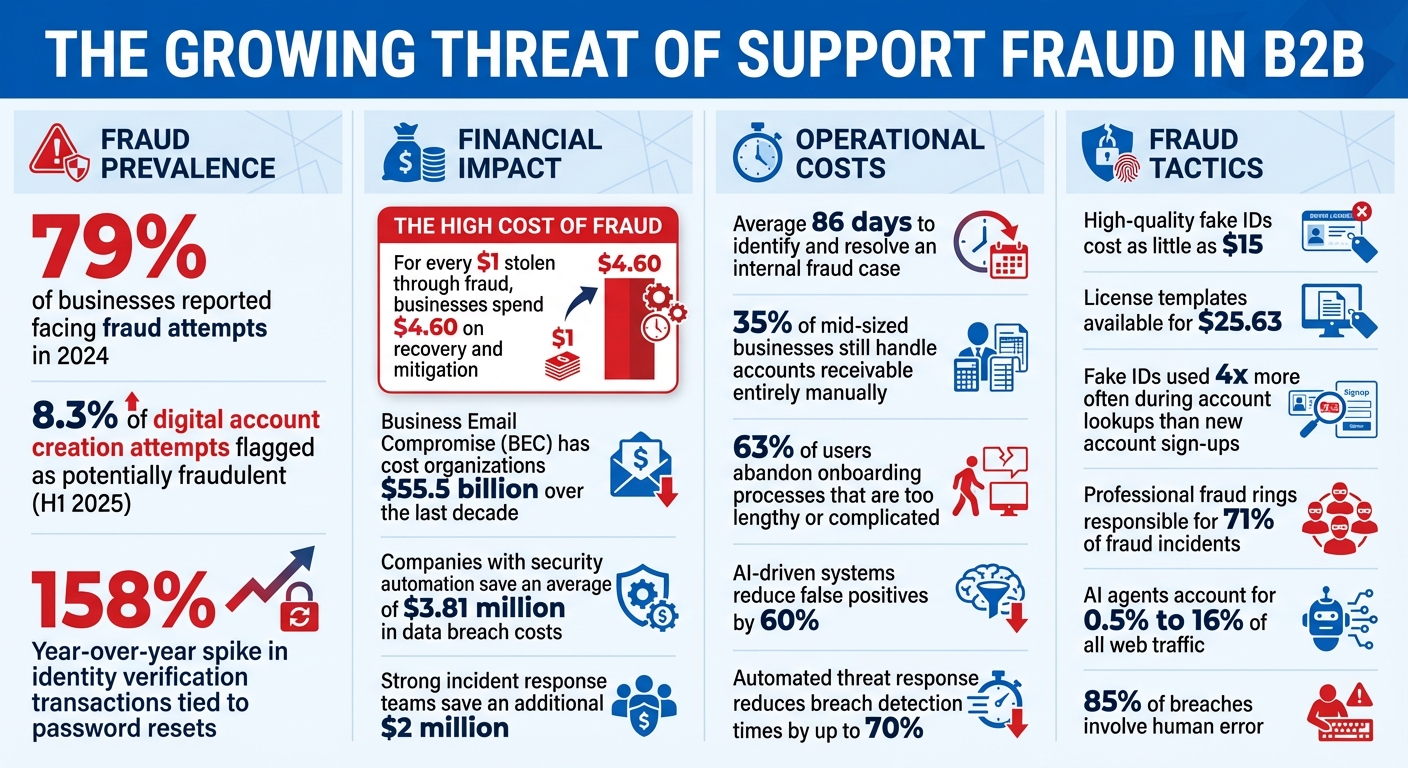
Support Fraud Statistics and Impact on B2B Businesses 2024-2025
What Is Support Fraud in B2B Customer Support?
Support fraud in the B2B world often flies under the radar. It sneaks into the system under the guise of routine tasks – things like invoices, license renewals, or urgent support requests – blending seamlessly into everyday workflows [8]. Unlike fraud in B2C, which tends to focus on single transactions, B2B fraud exploits the intricate processes and decentralized decision-making common in large organizations [1].
Some of the most frequent tactics include using fake identities created with synthetic AI-generated IDs, submitting unauthorized license requests, or abusing licenses through shared access keys or exceeding usage limits [2][3]. Fraudsters have become increasingly sophisticated, leveraging generative AI to create highly convincing business documents that can easily fool a casual review.
B2B companies are especially vulnerable because of the trust-based relationships they maintain and the lengthy approval chains that can create blind spots. As Egle Nartautaite, Fraud Manager at Pitney Bowes, explains:
"B2B fraud prevention is slightly behind B2C. If a fraudster gets blocked by a B2C merchant, they might be successful with the same tactics on a B2B business" [12].
The statistics are alarming: in 2024, 79% of businesses reported facing fraud attempts [11]. By the first half of 2025, 8.3% of digital account creation attempts were flagged as potentially fraudulent [10]. Even more troubling, there was a 158% year-over-year spike in identity verification transactions tied to password resets – an entry point for account takeovers [9]. This highlights why automated verification systems are becoming indispensable in modern support operations.
Risks and Costs of Support Fraud
The impact of support fraud goes far beyond financial losses. For every $1 stolen through fraud, businesses spend an average of $4.60 on recovery and mitigation efforts [11]. A prime example is Business Email Compromise (BEC), which has cost organizations a staggering $55.5 billion over the last decade [11].
Operationally, fraud drains resources. Teams spend countless hours investigating suspicious requests, verifying identities, and cleaning up after incidents. On average, it takes 86 days to identify and resolve an internal fraud case [11]. During this time, workflows are disrupted, legitimate customers face delays, and overall productivity takes a hit.
But the damage doesn’t stop there. A single fraud incident can tarnish a company’s reputation. In B2B, where relationships are built on trust and long-term partnerships, a breach can undo years of goodwill. Clients may lose faith in your ability to protect their data, and compliance penalties under regulations like GDPR or CCPA can add to the financial burden if sensitive information is compromised [1].
Consider the case of Connex Credit Union in June 2025. A data breach exposed the government IDs of 172,000 customers, providing fraudsters with the tools to launch subsequent identity-based attacks [10]. Such incidents don’t just harm one company – they can ripple through entire industries.
Why Manual Fraud Detection Fails
As fraud tactics evolve, manual detection methods are proving inadequate. Bryan Lewis, CEO of Intellicheck, sums it up:
"The biggest misconception is the assumption that if the ID looks real it is real. This false sense of security defies the reality" [9].
Human reviewers face significant challenges. They’re slow, prone to fatigue, and can be easily deceived by AI-generated documents. Even a modest 2.15% error rate can translate into hundreds of thousands of fraud attempts when scaled across millions of transactions [9].
Manual processes also create inefficiencies. Support teams get bogged down with repetitive verification tasks, diverting attention from genuine customer needs. By the time fraud-related financial losses are uncovered, it’s often too late to recover the funds [9]. Jan Syrinek, Head of Product at Resistant AI, puts it bluntly:
"Manually checking every field is slow, laborious, and prone to human error. Fraudsters are improving fast – which is why AI document verification is now essential" [2].
The solution lies in automation. AI-powered systems can verify identities in milliseconds, spot patterns invisible to human eyes, and scale effortlessly to match the demands of growing businesses. It’s not about working harder – it’s about working smarter.
How to Prevent Support Fraud with Automation: Step-by-Step
Automating fraud prevention creates multiple layers of defense, targeting points in your workflow that are most vulnerable. Here’s how to integrate automation effectively into your operations.
Step 1: Identify Fraud Risks in Your Support Workflow
Start by auditing the areas where fraud is most likely to occur. For example, password resets are a major target. In 2025, password reset verification transactions surged by 158% compared to the previous year, making them a key entry point for fraudsters [9]. Account lookups are another weak spot, with fake IDs used four times more often during these attempts than in new account sign-ups [9].
Analyze every point where users access sensitive data. Look for patterns in past fraud cases – what workflows were exploited, and when did suspicious requests occur? For instance, were there spikes in fraudulent activity at odd hours? Identifying risks early can save significant losses down the line.
Set clear criteria for your automated systems to flag potential fraud. For example, requests from mismatched IP addresses, digital copies of IDs instead of originals, or inconsistencies in barcode data should trigger alerts [5][9]. With AI agents now accounting for 0.5% to 16% of all web traffic [6], it’s critical to spot fraud attempts by autonomous systems using stolen credentials.
Step 2: Set Up Automated User Identity Verification
Automated identity verification is essential for securing support workflows. Start by verifying email domains to ensure requests come from legitimate corporate addresses. Multi-factor authentication (MFA) using one-time passwords can further confirm account control [14].
Behavioral analysis adds another layer of protection. By monitoring typical user behavior – such as login times, request frequency, and accessed data types – you can set alerts for unusual activity [4][15]. For instance, if a user who usually logs in from New York suddenly submits a support ticket from Romania at 3:00 AM, that’s a clear warning sign.
Biometric verification, like passive liveness detection, can confirm a user’s presence without requiring actions like blinking or nodding [13]. This creates a balance: low-risk users get a smooth experience, while high-risk actions trigger extra verification steps.
Once identities are confirmed, focus on securing licenses to prevent unauthorized access.
Step 3: Automate License Ownership Validation
Every support request should automatically trigger a license check against your internal database or CRM system. Use server-side verification through SDKs to confirm license status, expiration dates, and device fingerprints all at once [5]. Avoid relying on client-side verification as it can be bypassed with code tampering or anti-debugging methods [5].
Rate limiting is another critical safeguard. For example, cap license validation at 100 checks per hour [5]. If a single license key triggers 500 requests in an hour, it’s a clear sign of abuse. Device fingerprinting can further secure licenses by linking them to specific hardware, preventing unauthorized use of shared keys [5].
Adding IP or domain whitelisting ensures licenses are only valid from approved locations. This is particularly useful for enterprise clients that restrict support access to corporate networks [5].
Step 4: Use AI to Detect Unusual Request Patterns
AI is a powerful tool for spotting patterns that humans might miss. Use anomaly detection algorithms to flag unusual activity, like login attempts from unexpected locations or repeated account creation [16]. Techniques such as random forests can analyze complex fraud attempts, while K-means clustering groups similar transactions to highlight suspicious behavior [16].
AI can also evaluate sentiment and intent in support tickets [17]. For example, aggressive language, urgent password reset requests, or unusual user behavior might signal social engineering attempts. With professional fraud rings responsible for 71% of fraud incidents [13], staying ahead of their evolving tactics is crucial.
Behavioral fingerprinting takes this a step further by analyzing operational patterns, such as the timing between actions or the sequence of commands. These patterns create a unique "fingerprint" for each user, and deviations from this norm can trigger automated alerts or rejections [4]. This ensures consistent monitoring across all verification steps.
Step 5: Monitor Fraud Prevention Systems in Real Time
To maintain robust defenses, monitor your systems continuously and refine them as needed. Use dashboards to track metrics like identity verification failures, rejected license validations, and flagged requests. For instance, if 50 failed login attempts come from the same IP within 10 minutes, your team should receive an instant alert.
Regularly update your AI models to counter new fraud tactics [16]. Simulate sophisticated attacks through penetration testing or red team exercises to uncover weaknesses in your systems [16]. With high-quality fake IDs now costing as little as $15 [13], staying proactive is essential.
Don’t stop at initial verification. Implement post-verification monitoring to catch account takeovers after authentication [4]. This layered approach ensures that even if one defense is breached, others are in place to catch fraudulent activity.
Common Fraud Prevention Mistakes and How to Avoid Them
Fraud prevention systems often falter due to poor design. A common misstep is relying solely on in-house solutions or overly manual processes. Take the example of Rise, a company that, in July 2025, shifted from a manual verification system plagued by delays and high false-positive rates to an automated identity verification tool. This change led to a 94% approval rate and a sharp decrease in customer support tickets tied to verification issues [18].
Misconfigurations can be costly. High false-positive rates waste resources as teams spend time reviewing legitimate requests, leaving actual fraud unchecked. Alarmingly, 35% of mid-sized businesses still handle accounts receivable entirely manually [20]. On top of that, 63% of users abandon onboarding processes they find too lengthy or complicated [22]. These examples highlight the importance of a well-tuned, automated system.
How to Balance Security with Customer Experience
While automation is essential, balancing robust security with a smooth customer experience is just as critical. Overly strict verification processes can alienate legitimate users. A smart approach is to front-load verification – conduct thorough identity checks during account setup to establish trust, then rely on less intrusive background checks for future interactions [4][13].
Risk-based authentication is another effective tool. Low-risk users from familiar devices can proceed uninterrupted, while higher-risk scenarios – like password resets from new devices or unusual behavior – trigger additional verification steps [22][23]. Passive signals, such as device fingerprinting, IP reputation, and behavioral biometrics (e.g., typing patterns, mouse movements), help verify users without requiring active input [22][23]. This approach introduces what experts call "good friction" – users are more likely to accept verification if it feels purposeful and is paired with clear communication [13][22].
"Automation does not replace human agents – it concentrates them where they matter most." – Lorikeet [21]
It’s also crucial to plan escalation paths from the start. Automated systems should have clear triggers for handing off cases to human agents to avoid frustrating customers [21]. Monitor both the resolution rate (problems actually solved) and the automation rate to ensure efficiency doesn’t come at the expense of quality [21].
Why AI Configuration and Training Matter
Poorly trained AI systems can create more problems than they solve, generating high false-positive rates that overwhelm analysts and obscure real threats. To address this, train AI models on millions of examples, including various IDs and fraud attempts, to improve accuracy. Implement feedback loops to refine the system continuously, feeding data on true positives, false positives, and missed fraud back into the AI for retraining [4][18].
Set clear KPIs for fraud teams, such as acceptable fraud loss limits, to measure performance and accountability [19]. Automate routine tasks like license checks and basic verifications, allowing human analysts to focus on complex edge cases and reducing burnout [18].
Adopting a "fraud is inevitable" mindset is dangerous. This approach leads to underreporting and overlooks recurring fraud schemes, making your platform an easy target [19]. Instead, centralize your data in a single case management system to eliminate blind spots and ensure risk teams collaborate closely with product development [18][19].
sbb-itb-e60d259
How Supportbench Prevents Support Fraud with Built-In AI

Supportbench takes fraud prevention to the next level by weaving verification directly into its support workflows. With AI-powered anomaly detection, the platform monitors access patterns and data usage in real time, flagging unusual activity that could signal identity fraud. Its automated threat response system acts immediately on potential threats, reducing breach detection times by up to 70% [24].
Automating Identity Verification and License Validation
Supportbench simplifies verification through role-based controls and secure API integrations. By limiting access to sensitive customer and license data based on roles, the platform minimizes internal fraud risks – a vital safeguard given that 85% of breaches involve human error. Secure API gateways further enhance security, enabling real-time cross-checking of user data and license statuses without adding unnecessary hurdles for legitimate users [24].
Detecting Fraud with Predictive Analytics
The AI Copilot in Supportbench provides agents with a summarized case history, making it easier to identify inconsistencies that might suggest account takeovers. Additionally, sentiment analysis helps flag cases with extreme urgency or aggressive language, often tactics used in social engineering. These tools, combined with AI-driven quality assurance and predictive scoring, reduce false positives by 60% [25]. This real-time, predictive system complements earlier fraud prevention measures by adding an extra layer of dynamic protection.
Scaling Fraud Prevention While Controlling Costs
Supportbench’s no-code automation empowers organizations to update fraud rules without IT assistance. The AI tags and prioritizes tickets based on factors like topic, customer value, and sentiment, ensuring potential fraud cases are promptly addressed. Automating these processes not only strengthens fraud prevention but also keeps costs in check. Companies that fully embrace security automation save an average of $3.81 million in data breach costs, while those with strong incident response teams save an additional $2 million [24]. This proactive strategy transforms support teams into key players in an organization’s security framework.
"In an era where data breaches and compliance failures can have catastrophic consequences, choosing a customer support platform like Supportbench is not just a strategic decision; it’s a necessity."
- Nooshin Alibhai, Founder and CEO of Supportbench [24]
Conclusion
Fraud in support systems has evolved beyond the point where manual checks and reactive approaches can keep up. Fraudsters now have access to low-cost tools like $15 fake IDs [13] and $25.63 license templates [2], while generative AI enables them to create forgeries that are virtually flawless.
The key is finding the right balance between security and user experience. Introduce extra verification steps only in high-risk situations, allowing legitimate users to navigate the process smoothly [13]. Every automated action should be tied to a verified identity, with continuous, AI-driven monitoring in the background to detect anomalies in milliseconds [4][15][7].
AI-driven solutions are reshaping the way support teams tackle fraud. Platforms like Supportbench make this shift achievable by integrating fraud prevention directly into their unified support systems. With features like role-based access controls, predictive analytics, and AI-powered anomaly detection, Supportbench simplifies secure operations without requiring additional security tools or specialized fraud teams.
To get started, launch a focused pilot program with clear success metrics. Let AI handle routine identity and license verifications in real time. This approach transforms your support team from a reactive cleanup crew into a proactive, strategic defense against fraud.
FAQs
What support actions should trigger identity checks?
Identity verification is essential during crucial support actions to safeguard against fraud and maintain security. Key moments include account creation, login attempts, transactions, and accessing sensitive information. By automating identity checks at these stages, you can confirm a user’s legitimacy, minimize fraudulent activities, block unauthorized access, and ensure that all actions can be traced back to verified users.
How can we verify license ownership automatically?
You can leverage AI-powered tools to confirm license ownership instantly. By integrating license verification SDKs or APIs, you can access features like server-side validation, anti-tampering mechanisms, and robust error handling. Some solutions even enable tracking usage on individual devices through machine fingerprints. Automating these processes helps ensure that only authorized users access your software, cutting down on fraud while keeping the user experience seamless.
How can we reduce false positives without adding friction?
To reduce false positives without disrupting the user experience, rely on smart, automated verification tools that strike a balance between security and convenience. AI-powered systems can swiftly verify identities and spot fraud, cutting down on unnecessary checks. Combining techniques like biometric authentication, behavioral analysis, and synthetic identity detection improves precision, allowing legitimate users to move through smoothly while keeping fraudulent activities at bay.






