



Want to keep your customers loyal? Focus on clarity in support.
The faster your team resolves confusion and provides clear, actionable answers, the less likely customers are to churn. In B2B support, where multiple stakeholders are involved, delays and unclear communication can erode trust, disrupt workflows, and even push customers to switch providers.
Here’s why clarity matters:
- 70% of consumers say service quality impacts loyalty.
- 59% of customers consider switching providers after just three poor support experiences.
- Improving retention by 5% can boost profits by 25% to 95%.
To reduce churn, identify bottlenecks in your support workflows, improve routing, centralize customer data, and use AI tools to speed up resolutions. By focusing on clarity, you can strengthen customer trust, protect revenue, and enhance satisfaction.
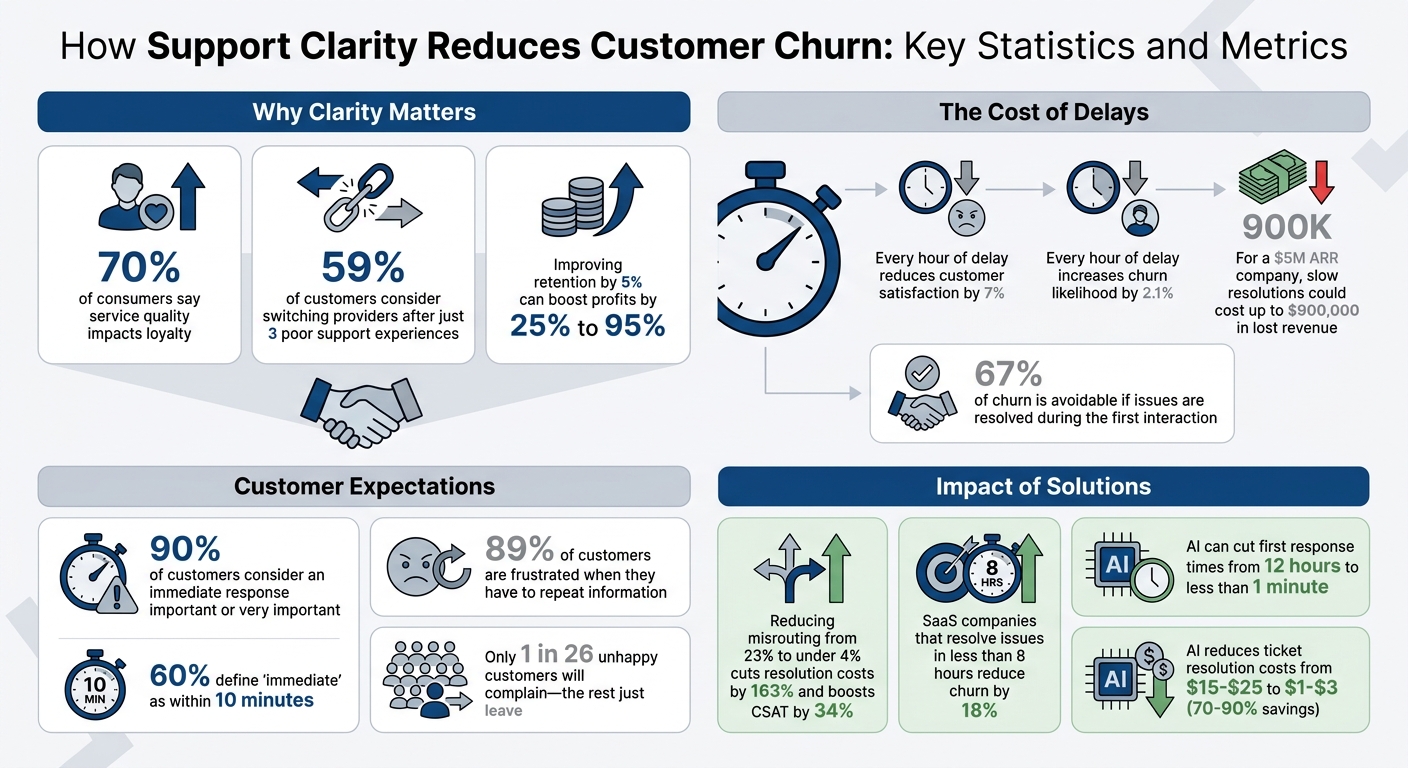
How Support Clarity Reduces Customer Churn: Key Statistics and Metrics
How to Reduce Churn & Boost Growth with Fast, Empathetic Customer Support – Eli Winderbaum, Captions
sbb-itb-e60d259
Finding Bottlenecks in Your Clarity Process
To improve your time to clarity, you first need to uncover where delays are happening. Metrics like first response time might look good on the surface, but they often mask deeper issues. For instance, a ticket may get acknowledged quickly, but the actual resolution could take much longer. The real bottleneck often lies in the gap between that initial acknowledgment and providing a meaningful, actionable resolution. To address this, it’s essential to examine common breakdowns in clarity and evaluate your support workflows to identify the true sources of delays.
Common Clarity Breakdowns
Clarity issues generally fall into two main categories: performer-based problems (related to people) and systems-based problems (related to tools and processes).
- Performer-based bottlenecks often stem from unclear task ownership or delays caused by waiting for specialists to step in [1][7].
- Systems-based bottlenecks, on the other hand, can be just as disruptive. For example, rigid approval processes for tasks like refunds or compliance checks can create unnecessary workflow obstacles [7]. Disconnected systems can lead to information silos, which customers experience as confusion and frustration [1][5][6]. Additionally, communication gaps between teams – whether due to missing details, unanswered questions, or unclear priorities – can make these issues even worse [5].
As an organization grows, communication starts to bottleneck. At Hope for Haiti, we’ve seen those inefficiencies hurt us: when we can’t run like a well-oiled machine, we’re not serving as many people as we could be.
- Skyler Badenoch, CEO, Hope for Haiti [5]
Reviewing Your Support Workflows
Finding bottlenecks requires going beyond surface-level metrics. For example, instead of simply measuring "Created to First Reply", break it into smaller segments like Created → Assigned, Assigned → First View, and First View → Outbound Message. This breakdown can reveal delays caused by routing issues, workload imbalances, or time spent on research [7]. Identifying these specific delays is key to improving your support process and reducing customer churn.
Tools like process mapping can help you visualize where work gets stuck. Use flowcharts or Kanban boards to track how tickets move through your system and identify stages where they consistently stall [5][6]. Pay particular attention to two metrics: reopened tickets and transfer rates. Reopened tickets often indicate that initial responses lacked clarity or didn’t fully resolve the issue [10]. High transfer rates, meanwhile, suggest that agents might not have the knowledge or resources to resolve cases on the first contact [11].
Techniques like the "5 Whys" can help you dig deeper into root causes of delays. For example, if tickets are delayed because they’re waiting for manager approval, asking "why" repeatedly might reveal that agents are submitting incomplete information, which then requires rework [6]. Additionally, heatmaps can be useful for spotting when your team is overwhelmed. By overlaying ticket arrival rates with agent capacity in 15-minute intervals, you can identify exactly when bottlenecks occur [7].
How Disconnected Tools Slow Down Resolution
Workflow delays are only part of the problem. Disconnected tools can also slow down your clarity process. When agents have to switch between multiple platforms – like a CRM, order system, email, and chat – just to handle one ticket, it eats up time and disrupts focus [3]. This constant context switching not only slows responses but also increases the chances of missing critical details. Unsurprisingly, 89% of customers report being frustrated when they have to repeat information they’ve already provided [8].
Fragmented tools can waste a significant amount of time – up to one-third of an agent’s day [3]. This is especially problematic in B2B support, where agents often need access to subscription details, ARR, product usage data, and technical integration information to resolve issues effectively [8]. Manual processes make things worse. When systems don’t sync, agents can spend 10% to 20% of their time manually updating records across different platforms [3]. Streamlining your systems to provide agents with uninterrupted access to customer context can dramatically reduce time to clarity and improve customer retention.
How to Reduce Time to Clarity
Once you’ve identified the roadblocks to clarity, it’s crucial to address them without delay. Quick responses need to go beyond surface-level acknowledgments – they must offer meaningful, actionable solutions to protect your bottom line. As Teammates.ai puts it:
A fast acknowledgement that does not answer the question, verify identity, or set an ETA is not revenue protection. It is optics [7].
The strategies outlined below focus on removing unnecessary steps, reducing case handoffs, and giving agents the tools they need to provide clear, actionable answers on the first attempt. Let’s dive into how optimized routing, centralized data, and consistent support practices can significantly cut down the time it takes to achieve clarity.
Improving Routing and Case Ownership
Routing cases to the right agent from the start is key to avoiding unnecessary delays. Intent-based routing uses a single classification system across email, chat, and voice channels to send inquiries to agents with the right expertise – whether that’s billing, technical support, or product-related issues – without wasting time [7]. This approach prevents cases from bouncing between teams or sitting idle in general queues.
Clear case ownership is equally important. Every case should have one accountable owner who oversees it from start to finish. When ownership is unclear, tickets can bounce endlessly between teams, pushing response times – especially for the 90th percentile (P90) – higher and higher [7]. This doesn’t mean one agent handles everything themselves, but rather that they coordinate the resolution process and keep the customer informed throughout.
For repeat issues like refunds or identity verification, pre-approved playbooks can help streamline the process. These playbooks allow agents to act immediately within company guidelines, bypassing unnecessary approval steps [7].
Centralizing Customer Context
Disconnected tools can slow everything down. For B2B agents, hunting through multiple systems to find the information they need wastes valuable time. Subscription details, ARR tiers, product usage stats, and open cases often live in separate platforms, making it harder to resolve issues quickly [12]. Centralizing this information into a single support platform eliminates this "tool hunt" and lets agents focus on solving problems.
Centralized data also ensures that customers don’t have to repeat themselves when switching communication channels. For example, if a customer moves from chat to email, agents should already have access to their previous interactions. This continuity not only speeds up resolution but also builds trust by eliminating the frustration of re-explaining the same issue [4].
For B2B cases especially, agents need immediate access to a customer’s identity, plan details, ARR tier, and open cases [7]. Having this context upfront reduces back-and-forth exchanges and helps agents deliver precise, relevant answers right away.
Creating Consistent Support Responses
Once agents have centralized data, they can focus on delivering consistent, high-quality responses. Consistency doesn’t mean sounding robotic – it’s about providing accurate, reliable answers every time. A standardized macro library for common queries ensures that no matter which agent handles the case, the customer gets the right information [13]. These templates should allow for personalization while maintaining accuracy. Tools like keyboard shortcuts or slash commands (e.g., /refund) can make inserting these macros even faster.
Behind these macros is a robust internal knowledge base (KB) that acts as the single source of truth for product details, policies, and procedures. A well-organized KB can cut average handle times for complex cases by 15% to 25% [13]. When agents have instant access to accurate information, they can respond more confidently and efficiently.
AI can take this a step further by drafting initial responses based on the internal KB, turning agents into editors rather than writers [13]. As Supp Blog explains:
A five-minute resolution that solves the problem completely is better than a two-minute response that generates three follow-up messages [13].
This approach keeps the human touch intact while eliminating delays caused by research and content creation, ensuring faster resolutions and happier customers.
Using AI to Improve Clarity and Speed
By automating key support processes, AI not only simplifies workflows but also speeds up resolution times, directly contributing to better customer experiences and reduced churn. Every AI tool discussed here is geared toward shortening the "time to clarity."
AI can dramatically cut first response times – from 12 hours to less than a minute [14]. This matters because 90% of customers consider an immediate response important or very important, and 60% define "immediate" as within 10 minutes [14]. Additionally, 67% of churn is avoidable if issues are resolved during the first interaction [14]. On top of that, AI significantly lowers costs: resolving a ticket with AI typically costs $1–$3 compared to $15–$25 for human-handled tickets, resulting in 70–90% savings for automatable tasks [14].
AI eliminates delays in triage, research, and response composition. Modern platforms can analyze sentiment, retrieve relevant information instantly, and prioritize cases based on churn risk. This allows agents to focus on high-value interactions while AI handles context gathering and drafts initial responses.
AI Sentiment and Intent Detection
AI goes beyond basic keyword matching to accurately identify a customer’s intent, ensuring faster routing to the right teams [1]. For example, it can distinguish whether a customer needs assistance with billing, technical troubleshooting, or product guidance, cutting triage delays by 60–80% [1].
Sentiment analysis adds another layer by detecting emotional cues like frustration or anger in real time. If a customer’s message indicates high frustration, AI can immediately escalate the issue to a human agent, complete with a summary of the problem and relevant case history [14]. This "smart escalation" ensures agents start with full context, avoiding the need for customers to repeat themselves. As the Relay team explains:
The most impactful application of AI in email support is draft generation [1].
To maximize efficiency, focus on training AI intent detection on the top 20 inquiry types that account for 80% of your support volume [14]. Combined with sentiment analysis, this approach ensures timely escalations and faster resolutions.
Automated Knowledge Search and Case Summaries
One of the biggest challenges in resolving support tickets is the time spent searching for answers. Agents often dig through documentation or consult colleagues when immediate solutions aren’t at hand [1]. AI removes this hurdle by instantly surfacing the most relevant knowledge base articles tailored to the customer’s issue. For best results, your knowledge base should be searchable (retrieving information in under 30 seconds), accurate, up-to-date, and cover 90%+ of the questions agents face [1].
AI can also draft responses based on knowledge base content, shifting the agent’s role from "researcher and writer" to "reviewer and editor" [1]. Reviewing AI-generated drafts significantly reduces response times. As the Relay team highlights:
Reviewing an existing draft is almost always faster than writing from scratch, even when the draft needs significant modification [1].
Another time-saver is AI-generated case summaries. When a ticket is transferred between teams, these summaries provide the new agent with a complete interaction history, including extracted details and transcripts. This avoids the dreaded "context reset", where customers are forced to re-explain their issues [7].
Beyond drafting and summarizing, AI helps prioritize cases more effectively.
Predictive Case Prioritization and Risk Detection
Traditional first-in-first-out (FIFO) systems treat all cases equally, which can delay urgent issues. AI-powered prioritization changes the game by assigning priority scores based on customer sentiment, account value, and churn risk [1]. This ensures that critical cases – such as those from frustrated customers or high-value accounts – get immediate attention.
For instance, Supportbench uses AI to automate prioritization, categorize issues, and flag at-risk customers before they churn [15]. Sentiment-based escalation dynamically adjusts priorities, ensuring no critical tickets slip through the cracks [1]. This proactive approach helps protect revenue by addressing high-stakes cases promptly.
When introducing AI for prioritization, start with a "shadow mode" trial for 3–5 days. During this period, your team can review AI suggestions and fine-tune thresholds before automating the process fully [14]. Setting clear sentiment thresholds – for example, involving a human agent when frustration exceeds a certain confidence score – strikes the right balance between automation and the personal touch that B2B customers value.
Measuring Time to Clarity
When it comes to customer support, timing is everything. One key metric to track is the time to first meaningful response – the moment an answer actually moves the case forward, not just an automated reply [7]. Why does this matter? Because delays in providing clarity can lead to customer churn. Measuring this accurately can help turn vague support interactions into efficient, revenue-saving conversations.
To get started, go beyond basic averages. Instead, focus on median response times, which are less influenced by extreme cases. Take it a step further by tracking the P90 (90th percentile) of response times. This helps identify the longest delays – the ones most likely to frustrate customers and lead to silent churn [7]. As Teammates.ai puts it:
Time to first response is revenue protection, not a support KPI. A delayed first reply increases churn probability, refund demand, and public escalation [7].
Break response times into phases like triage, research, and composition. If research consistently takes more than 30 seconds, it’s time to update your knowledge base. If triage delays spike during certain hours, you might have a capacity or routing issue.
Metrics That Matter
To connect clarity with retention, focus on metrics that reveal how well your support team is performing. First Contact Resolution (FCR) is a top predictor of retention – improving it can cut churn by up to 67% [8]. The SaaS industry averages 71%, so achieving 75% or higher puts you in a strong position [8]. Another key metric is the Customer Effort Score (CES), which measures how easy it is for customers to get answers. High effort often signals that churn is on the horizon [8].
You should also keep an eye on your escalation rate. If more than 5% of tickets require escalation, it’s a sign that your initial triage or knowledge base isn’t working as it should [9]. To understand the impact of response delays, group customers by response time bands (under 1 minute, 10–60 minutes, 1–24 hours) and analyze churn and refund rates for each group [7].
| Metric | Formula | B2B Target |
|---|---|---|
| First Contact Resolution (FCR) | (Tickets Resolved on First Contact ÷ Total Tickets) × 100 | 70–79% [9] |
| First Response Time (FRT) | Total First Response Time ÷ Total Number of Tickets | < 10 mins (Chat), < 4 hours (Email) [8] |
| Escalation Rate | (Escalated Tickets ÷ Total Tickets) × 100 | Below 5% [9] |
| Customer Effort Score (CES) | Survey-based measurement of resolution ease | High effort = churn risk [8] |
Monitoring Trends with Dashboards
Real-time dashboards are a game-changer compared to static monthly reports. Use tools like heatmaps to compare ticket arrival rates against your team’s capacity by hour and day [7]. If delays occur without a spike in ticket volume, you’ve likely uncovered a routing or policy bottleneck.
Tickets without clear ownership can inflate your P90 response times, signaling inefficiencies in routing [7]. Automated SLA warning tags can help prioritize urgent cases before they hit deadlines [16].
Dashboards that highlight knowledge gaps are also critical. They help pinpoint unclear or missing documentation, which can reduce the time agents spend searching for answers [8]. These tools help bridge the gap between support interactions and product clarity, ultimately speeding up resolution times.
Improving Over Time
Clarity metrics are invaluable for spotting recurring issues and making incremental improvements. For example, segment resolution times and customer satisfaction by issue type – like billing versus technical problems – to identify specific bottlenecks [1]. Keep an eye on reopen rates, as they often indicate that the initial response wasn’t clear enough [7].
Close the loop by using exit surveys to identify why customers churn (e.g., product complexity, price, or service quality) and map those reasons back to support data [2]. It’s worth noting that only 1 in 26 unhappy customers will actually complain – the rest just leave [8]. This makes it even more important to catch problems early.
Finally, align your support metrics with broader business goals, like reducing churn or improving agent retention. Avoid "metric theater" by excluding auto-responders and internal notes from your calculations – only count responses that genuinely help the customer [7]. By measuring clarity the right way, you can protect your revenue and strengthen customer loyalty. These steps ensure that your support strategy not only resolves issues but also keeps customers coming back.
Conclusion
This guide has shown how improving clarity can directly cut churn rates and boost revenue. Speeding up the time it takes to provide clear solutions not only safeguards revenue but also helps build stronger customer relationships. Research shows that every hour of delay reduces customer satisfaction by 7% and increases the likelihood of churn by 2.1% [17]. For a company with $5M in annual recurring revenue (ARR), slow resolutions could cost up to $900,000 in lost revenue [17].
By using automated ticket routing, centralized context, and AI-driven workflows, you can minimize friction and lower resolution costs. For example, reducing misrouting from 23% to under 4% with automated routing doesn’t just save time – it also cuts resolution costs by 163% and boosts customer satisfaction (CSAT) scores by 34% [17]. AI-powered drafting tools further streamline responses, allowing agents to focus on editing rather than starting from scratch.
The impact of these changes goes beyond just keeping customers. SaaS companies that resolve issues in less than 8 hours can reduce churn by 18%, proving that quick, clear resolutions are essential [17]. Resolving issues on the first contact is key to preventing churn. Delays not only hurt revenue but also erode customer trust – this guide’s strategies are designed to combat that risk directly.
Keep in mind: a fast first response is critical to protecting revenue [7]. By focusing on key metrics like median response times, P90 delays, and the timing of first meaningful responses, you can pinpoint breakdowns in clarity and address them before customers decide to leave. The goal isn’t speed for its own sake – it’s about delivering clear, actionable answers that move cases forward and reinforce customer confidence in your product and team.
Start by evaluating your current workflows to identify clarity bottlenecks. From there, implement routing and AI tools that align with your needs, and monitor the metrics that connect directly to retention. These steps will help you protect revenue, enhance customer satisfaction, and scale your support operations effectively.
FAQs
What is “time to clarity” in customer support?
"Time to clarity" measures how quickly support teams deliver clear and actionable solutions to customer problems. When clarity is achieved faster, it minimizes delays, boosts customer satisfaction, and ensures a smoother support experience by resolving concerns efficiently.
How can I measure “first meaningful response” in my support data?
Measuring “first meaningful response” means tracking how long it takes for your team to provide a clear, actionable reply after a customer submits a request. This isn’t just about speed – it’s about ensuring the response directly addresses the issue. To do this, you’ll need to compare timestamps from when the request is received to when the meaningful reply is sent. Using tools that assess clarity and relevance can help pinpoint delays and refine workflows, ensuring every response genuinely helps the customer.
Where should I start using AI to cut time to clarity without hurting quality?
Automating the initial stages of triage and response is an excellent way to improve efficiency. AI can sort and prioritize support requests, reducing delays in identifying and addressing issues. Features like sentiment analysis, summarization, and workflow automation ensure that responses are not only fast but also clear and actionable. By concentrating on these aspects, businesses can speed up response times without compromising the quality of customer interactions.






