



Sales tools like Groove are great for acquiring customers, but they struggle with the demands of post-sales support. Supportbench, built specifically for B2B post-sales needs, addresses these gaps with features like dynamic SLAs, AI-powered ticket routing, and a unified Customer 360 view. Here’s why the difference matters:
- Groove’s Limitations: Focuses on sales tasks (e.g., lead tracking, calls) and lacks robust tools for long-term case management, escalations, and AI-powered workflows.
- Supportbench’s Strengths: Tailored for post-sales support with AI tools, advanced triage, multi-level escalations, and integrated customer data.
Quick Comparison
| Feature | Groove | Supportbench |
|---|---|---|
| Primary Focus | Sales and lead management | Post-sales support |
| Triage | Basic rules | AI-powered routing |
| Customer View | Limited | Full Customer 360 |
| AI Features | Minimal | Integrated, task-specific |
| SLA Management | Static | Dynamic, risk-based |
If you’re managing complex B2B accounts, Groove’s sales-first design may fall short. Supportbench provides the tools needed to improve resolution times, reduce costs, and boost customer satisfaction.
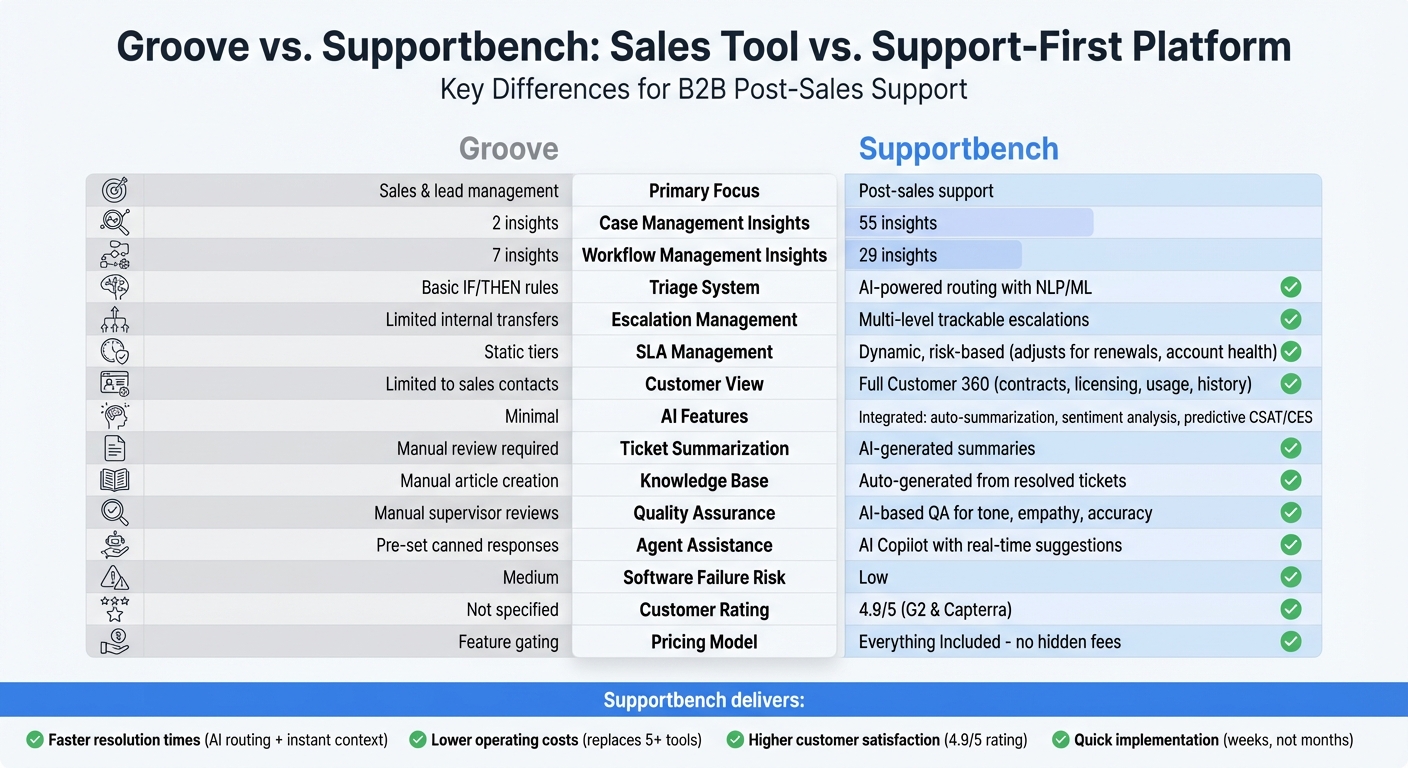
Groove vs Supportbench Feature Comparison for B2B Post-Sales Support
Marty Kausas, Pylon CEO on Modern B2B Support, AI KB & Post‑Sales Tools
sbb-itb-e60d259
Groove‘s Sales-First Design Limitations

Groove’s focus on sales-centric features becomes a challenge when applied to the needs of support teams. By prioritizing lead generation and call management, Groove falls short in handling the intricate workflows required for long-term technical cases or cross-department coordination. This mismatch creates operational hurdles, particularly when managing complex support scenarios that demand more robust tools.
For instance, Groove offers just 2 insights for case management and 7 for workflow management, compared to Supportbench’s 55 and 29, respectively. These numbers highlight Groove’s limited capacity to address the depth and complexity required in support environments.
Weak Triage and Escalation Features
Groove’s triage system is tailored for straightforward cases, leaving it ill-equipped for complex, multi-level escalations. The platform lacks a reliable escalation management framework, making it difficult to track cases as they move across departments or to ensure accountability. This forces teams to resort to manual processes, increasing the risk of delays and errors.
Another limitation is Groove’s static response timers, which fail to adapt to dynamic factors like account risk or renewal timelines. Without AI-powered triage tools – such as predictive First Contact Resolution scoring or sentiment-based prioritization – managers must manually sift through queues to identify high-priority cases. This inefficiency adds unnecessary strain on support teams.
Missing AI and Automation Features
Groove’s absence of integrated AI tools puts it at a disadvantage for post-sales support. For example, it does not offer automatic case summarization, leaving agents to piece together context from multiple emails manually. Essential features like sentiment analysis, auto-tagging, and intelligent routing are also missing, limiting its ability to streamline workflows.
Without AI-driven features to summarize interactions or suggest responses, agents lose valuable time reconstructing customer histories from fragmented communications. The platform also lacks AI-based quality assurance tools that review tickets for empathy and accuracy, further hindering efficiency.
Incomplete Customer Context and Data
Groove’s customer view is narrowly focused on sales contacts and documents, rather than providing a comprehensive Customer 360 view. Key details – like contracts, licensing information, product usage data, and the history of long-term cases – are either unavailable or scattered across multiple systems.
This fragmented approach creates significant operational challenges. For example, support agents often lack immediate access to critical information, such as renewal dates or usage patterns, which are essential for informed decision-making. Groove’s design priorities – "Acquire customers", "Increase sales & revenue", and "generation of new leads" – clearly reflect its focus on the early stages of the customer lifecycle, rather than on long-term retention and customer advocacy.
These design limitations also contribute to Groove’s "medium" software failure risk rating, compared to Supportbench’s "low" risk rating. These gaps highlight the challenges Groove faces in meeting the demands of a support-focused environment, setting the stage for a more detailed feature comparison.
Supportbench: Built for Post-Sales Support
When sales tools fall short, Supportbench steps in with a design tailored specifically for the demands of B2B post-sales support. Unlike sales-focused platforms adapted for support, every feature in Supportbench is crafted to handle the complex realities of multi-department cases and long-term customer needs. This support-first design leads to faster resolutions, improved efficiency, and better customer satisfaction. By addressing the gaps left by sales tools, Supportbench directly tackles inefficiencies in post-sales operations.
The platform is built to handle the unique challenges of high-touch B2B accounts without requiring costly add-ons or extensive IT involvement. Unlike tools that treat support as an afterthought, Supportbench integrates case management, AI-driven automation, and customer context into one cohesive system, making it ideal for teams managing intricate technical products.
Advanced Triage and Escalation Management
Supportbench’s triage system takes ticket routing to the next level with AI-powered tools that go beyond basic keyword matching. Using Natural Language Processing (NLP) and Machine Learning (ML), it analyzes ticket content to assign cases based on agent skills, language, and workload. This smarter routing ensures urgent issues don’t get overlooked due to vague or misleading subject lines.
For example, in May 2025, a premier-tier customer submitted a ticket titled "Quick Question." While the subject sounded minor, the body detailed a full production outage. Traditional systems might have flagged it as "Low" priority. Instead, Supportbench’s AI detected critical terms like "outage" and "cannot access", checked the customer’s "Premier" status, and prioritized the ticket as "Critical", sending it straight to the P1 Incident Management queue.
The platform also offers multi-step escalation paths, allowing teams to create workflows with templates and conditional triggers. Dynamic SLAs adjust automatically based on factors like renewal dates or account importance, ensuring top-tier customers receive the attention they need without manual oversight. With integrations for tools like Salesforce and JIRA, technical issues can be escalated seamlessly to engineering or account management teams. Automated notifications alert teams when tickets meet escalation criteria or breach SLAs, keeping everyone on track.
AI Features for Post-Sales Teams
Supportbench’s AI tools are designed to simplify tasks and speed up resolutions. Automated case summarization gives agents a quick overview of every interaction, eliminating the need to sift through lengthy email chains. This means new team members can get up to speed on ongoing cases in seconds.
The AI Copilot suggests replies based on past cases and knowledge base entries, ensuring consistent responses while saving time. Features like auto-tagging and issue-type assignment cleanly organize incoming cases for better long-term analysis. For instance, when a customer submitted a ticket about a SAML 2.0 Attribute Assertion error but categorized it as a "General Inquiry", Supportbench’s NLP identified technical terms like "SSO", "Okta", and "SAML." It then routed the ticket directly to the "Integration Specialists" queue, skipping Tier 1 and cutting resolution time.
Additional AI-driven features include predictive CSAT and CES scoring, First Contact Resolution detection, and sentiment-based prioritization. These tools help managers identify critical cases – even when customers don’t explicitly label them as urgent. Resolved tickets are automatically converted into knowledge base articles, building a repository of institutional knowledge without extra effort.
Complete Customer View in One Platform
Supportbench consolidates contracts, licensing data, product usage statistics, and interaction history into a single interface, eliminating the need to juggle multiple tools. This account-centric approach gives agents instant access to key details like renewal dates and usage trends, ensuring they have the context needed to make informed decisions.
The Customer 360 view ensures that support, success, and sales teams all see the same up-to-date customer information, reducing data silos. Features like multi-department collaboration and role-based portal access allow customers to view only what’s relevant to them, while internal teams maintain full visibility.
With its "Everything Included" pricing model, Supportbench avoids the hidden costs common with other platforms. AI tools, dynamic SLAs, and advanced reporting are all part of the base package – no extra fees or feature gating. Free migration and onboarding make it easy to get started, and the system is designed for Customer Success Operations teams to manage without heavy IT involvement.
Groove vs. Supportbench: Feature Comparison
When choosing a platform for B2B post-sales support, the distinction between tools built for sales versus those tailored for post-sales support becomes apparent. Groove focuses on lead generation, sales call management, and increasing revenue. On the other hand, Supportbench is designed specifically for customer case management, workflow optimization, and scaling operations in complex B2B scenarios.
This difference emphasizes the unique needs of modern B2B support tools. Groove relies on basic communication tools and rule-based automation, which often fall short when addressing the complex and urgent needs of B2B support. By contrast, Supportbench leverages AI-native triage to analyze sentiment, customer value, and interaction patterns, ensuring more accurate ticket prioritization.
Peer reviews back up these distinctions, showing that Supportbench excels in measurable areas. For instance, it received 55 recognitions for its customer case management capabilities, compared to GrooveHQ’s 2. These differences underline why post-sales support demands tools with advanced triage, escalation, and AI-driven automation.
Triage and Escalation Management
Efficient case routing and escalation are critical for handling the complexities of B2B workflows. Groove relies on rule-based logic, which often overlooks important contextual details. In contrast, Supportbench’s AI-powered system evaluates factors like sentiment, customer tier, and contract status to prioritize high-value accounts effectively.
| Feature | Groove Capabilities | Supportbench Capabilities |
|---|---|---|
| Triage Automation | Basic IF/THEN automation | AI-powered routing based on sentiment and context |
| Multi-Level Escalations | Limited internal transfers | Trackable, multi-level escalations with templates |
| SLA Management | Static SLAs using simple tiers | Dynamic SLAs tailored to renewal dates and risk factors |
| Customer Context | Basic contact management | Comprehensive Customer 360 view (contracts, usage, licensing) |
Supportbench adds value with multi-layered escalation paths, automated notifications, and dynamic SLAs that adjust based on factors like account health or renewal sensitivity. These capabilities go beyond simple routing, offering deeper automation and adaptability.
AI-Powered Workflows and Automation
AI is a game-changer for scaling support operations without increasing team size. Groove’s automation focuses on integrations and communication tools, while Supportbench integrates AI as a foundational component.
| AI Feature | Groove Support | Supportbench Implementation |
|---|---|---|
| Ticket Summarization | Requires manual review | AI-generated summaries for quicker case comprehension |
| Predictive CSAT/CES | Not available | AI-driven sentiment and effort scoring before surveys |
| Knowledge Base Creation | Manual article creation | Automated articles generated from resolved cases |
| Quality Assurance | Manual supervisor reviews | AI-based QA for tone, empathy, and accuracy |
| Agent Copilot | Pre-set canned responses | Real-time suggestions driven by full case history |
"AI is revolutionizing the operational backbone of support by bringing intelligence and context-awareness to ticket routing and prioritization."
- Nooshin Alibhai, Founder and CEO, Supportbench
Supportbench’s AI-driven tools come standard with its "Everything Included" pricing model, avoiding the common trap of charging extra for advanced features like dynamic SLAs and governance. This approach ensures that businesses have access to cutting-edge tools without hidden costs.
Measured Results: Performance Data
Supportbench’s focus on a support-first design brings clear improvements in speed, cost efficiency, and customer satisfaction – three key elements that define successful post-sales support.
Faster Resolution Times with AI
Supportbench uses AI-driven routing powered by NLP to analyze ticket content, sentiment, and customer value. This ensures cases are assigned correctly on the first try, matching them to the right agent based on skills, language proficiency, and workload. This smart assignment process plays a major role in reducing First Contact Resolution (FCR) times.
AI-generated summaries give agents instant context by condensing case histories, saving them from sifting through long email threads or interaction logs. For B2B accounts with complex cases, this feature can save hours of manual effort. Additionally, the unified Customer 360 view eliminates delays caused by switching between tools, further speeding up case resolutions.
Unlike traditional enterprise tools that take months to implement, Supportbench is typically up and running in weeks. Its Knowledge Centered Service (KCS) feature allows agents to turn resolved tickets into knowledge base articles with a single click. Over time, this builds a powerful, searchable knowledge repository, enabling quicker resolutions for similar issues in the future. These time-saving tools directly reduce operational costs.
Lower Operating Costs
Supportbench’s pricing model, which includes all features without additional fees, helps businesses avoid the common "add-on trap." Advanced capabilities like dynamic SLAs and AI-powered routing are standard, and the platform can replace up to five separate tools, cutting both software expenses and administrative complexity. Free migration and onboarding services further reduce setup costs.
Operational savings don’t stop there. With a design tailored for operations teams, Supportbench eliminates the need for IT involvement, saving on technical staff expenses. AI-driven routing also reduces the inefficiency of "ticket tennis" – the back-and-forth transfer of cases caused by misassignments.
The platform’s reliability is another cost-saving factor. With a low software failure risk rating, downtime-related expenses are minimized. These efficiencies not only lower costs but also improve customer satisfaction.
Higher Customer Satisfaction Scores
Supportbench’s design prioritizes customer satisfaction, as reflected in its 4.9/5 rating on G2 and Capterra. Peer reviews highlight its ability to outperform sales-focused alternatives in measuring customer satisfaction and Net Promoter Score (NPS).
Customer Service Manager Eilis Byrnes from Wolseley shared:
"Supportbench has significantly improved our customer satisfaction rates. Our agents can now effortlessly manage thousands of emails daily, thanks to the platform’s ease of use and accuracy."
The platform simplifies tracking and responding to customer sentiment through built-in CSAT and NPS surveys integrated directly into workflows. Dynamic SLAs further enhance satisfaction by adjusting priorities based on renewal sensitivity or risk signals, ensuring critical accounts get the attention they need. This proactive approach helps prevent escalations, particularly during high-stakes renewal periods. With the Customer 360 view, agents have full context for every interaction, avoiding the frustration customers feel when they need to repeat themselves across multiple conversations.
How to Evaluate B2B Post-Sales Platforms
Choosing the right platform for B2B post-sales support is critical. The wrong tool can lead to inefficiencies, extra costs, and frustrated teams. To avoid this, focus on solutions that handle complex cases, involve multiple stakeholders, and provide detailed account data. Below are key criteria to guide your evaluation, building on the strengths of Supportbench’s approach to improving post-sales operations.
Prioritize Post-Sales Requirements
Start by analyzing your support workload. B2B cases often stretch over weeks or even months, requiring collaboration across departments. This means you need a platform that provides visibility into contracts, licensing, and product usage. Tools designed for simpler, one-off tickets often fall short, forcing you to juggle multiple systems to maintain context.
Instead, look for a solution that centralizes all customer data into an account-focused model. This approach eliminates the need to constantly switch between CRMs, billing systems, and support tools, saving time and reducing errors. Effective escalation management is also crucial. Multi-level, role-based access ensures that sensitive data is shared only with the right people while allowing your team to track every handoff seamlessly.
Dynamic SLAs are another must-have. These adjust automatically based on factors like renewal dates, risk levels, or case complexity. This ensures that high-priority accounts get immediate attention, setting the stage for AI-driven tools that minimize manual efforts and enhance efficiency.
Look for Built-In AI and Automation
Integrated AI capabilities should be a top priority. Platforms with AI features built in – not as third-party add-ons – are better equipped to streamline workflows and reduce costs. For instance, automated case summaries allow agents to quickly understand case history, while auto-tagging and issue-type assignment speed up triage processes.
Knowledge management is another area where AI can shine. Look for tools that allow resolved tickets to be converted into knowledge base articles with a single click. This builds a repository of institutional knowledge, reducing repetitive queries over time. AI-driven quality assurance is also valuable, as it reviews tickets for factors like empathy, accuracy, and tone, helping your team maintain high service standards. Some platforms even offer predictive insights, flagging potential issues before they escalate, so you can intervene proactively with at-risk accounts.
Check Scalability and Pricing Clarity
As automation lightens your team’s workload, it’s equally important to ensure that the platform’s pricing model is clear and adaptable. Transparent, all-inclusive pricing prevents unexpected costs as your support needs grow. Be sure to confirm whether key features – like advanced reporting, dynamic SLAs, and AI tools – are included in the base price or hidden behind premium tiers.
Scalability also means empowering your operations team to manage workflows and reporting independently, without constant IT involvement. Platforms that can be implemented quickly – within weeks rather than months – ensure a faster return on investment and improved efficiency.
Lastly, don’t overlook security and compliance. A reliable platform should protect your business from data breaches and downtime, safeguarding both your operations and customer trust.
Conclusion: Why Support-Focused Platforms Win
Sales-focused tools are great at managing leads and campaigns, but they often stumble when it comes to handling the intricate, multi-stakeholder cases involved in post-sales support. Features like dynamic SLA management tied to renewal dates, multi-level escalations, or a comprehensive view of contracts and licensing are typically outside their scope. This shortfall can directly impact resolution times, operational costs, and, most importantly, customer satisfaction.
Supportbench steps in to fill these gaps with a support-first approach. Its built-in AI streamlines ticket management by prioritizing based on emotion and urgency, creates case summaries automatically, and even turns resolved tickets into knowledge base articles with a single click. These features translate into measurable improvements. For example, companies leveraging AI in customer service report a 35% boost in customer satisfaction scores. Supportbench’s stellar 4.9/5 ratings on platforms like G2 and Capterra further highlight its effectiveness.
One user summed it up perfectly:
"Everything you need is included – no surprise bills, no feature gating, no ‘contact sales for pricing.’ What you see is what you get, and you get everything."
When choosing a platform, focus on tools that offer built-in AI for efficiency, transparent pricing without hidden fees, and ease of use for your operations team – without relying heavily on IT. Solutions that can be implemented in weeks, not months, bring faster ROI and allow your team to concentrate on what truly matters: keeping customers happy and reducing churn.
The takeaway is simple: while sales tools are designed to drive acquisition, support-focused platforms like Supportbench are built to enhance retention, cut costs, and ensure long-term customer success. In the world of B2B support, retaining your customers is everything – and the right platform can make all the difference.
FAQs
What makes a support platform “post-sales ready” for B2B?
A "post-sales ready" B2B support platform is designed to handle the unique challenges of managing long-term customer relationships. It offers features such as advanced escalation workflows, tools for seamless collaboration among multiple stakeholders, and reliable case management systems.
Key capabilities include:
- Customizable workflows: Tailor processes to fit specific business needs.
- AI-driven automation: Streamline repetitive tasks and enhance efficiency.
- Real-time analytics: Provide insights to improve resolution times and customer satisfaction.
Beyond these, the platform should integrate knowledge bases, adapt to changing requirements, and deliver proactive, context-aware support. Tools like dynamic SLAs and intelligent routing ensure service is always timely and relevant.
How do dynamic SLAs work in real support queues?
Dynamic SLAs in support queues take flexibility to the next level by adjusting response and resolution targets according to real-time data and context. Unlike their static counterparts, these SLAs factor in elements such as customer value, sentiment, issue complexity, and urgency.
By leveraging AI-powered systems, potential SLA breaches can be predicted ahead of time. This allows for proactive escalations and ensures that critical cases are routed to the most suitable agents. The result? High-priority issues get the attention they deserve, SLA breaches are minimized, and customer satisfaction improves as the system adapts to changing needs.
Which AI features deliver the biggest support cost savings?
AI tools that handle routine tasks and improve self-service options can significantly reduce costs. For instance, AI-powered knowledge base tools streamline the creation and updating of articles, cutting manual work by as much as 70%. Similarly, intelligent ticket triage and routing speeds up resolution times while reducing the need for additional staff. Another cost-saving feature is multi-source AI search, which allows teams to quickly locate information, helping to lower operational expenses even further.
Related Blog Posts
- Help Scout alternatives for B2B teams: what to choose when you outgrow shared inbox
- What are the signs you’ve outgrown Help Scout (SLAs, tiers, escalations, reporting)?
- Freshdesk vs. Supportbench: Why B2B Teams Outgrow Freshdesk’s Ticket Model
- Zoho Desk vs. Supportbench: Which Offers Better Customization for B2B?






