



When managing customer support, collaboration tools like Front and helpdesk platforms like Supportbench serve different purposes. Collaboration tools excel at quick, team-based communication through shared inboxes and real-time discussions. However, as support needs grow more complex – especially in B2B environments – these tools fall short. Helpdesk platforms are specifically designed to handle intricate cases, enforce SLAs, and provide critical customer data like contracts and usage history.
Key differences:
- Collaboration tools focus on speed and teamwork but lack structure for managing long-term, multi-stakeholder cases.
- Helpdesks offer ticketing systems, SLA tracking, and AI-driven features that streamline workflows and improve customer experience.
If your team handles high-touch B2B accounts with technical products or compliance requirements, relying on collaboration tools alone will likely lead to inefficiencies, missed follow-ups, and reporting challenges. A dedicated helpdesk ensures scalable, organized support to meet growing demands.
Quick Comparison:
| Feature | Collaboration Tools (Front) | Helpdesk Platforms (Supportbench) |
|---|---|---|
| Primary Focus | Internal communication | Case management and structure |
| SLA Tracking | Manual | Automated and dynamic |
| Customer Context | Limited | Comprehensive |
| AI Capabilities | Basic (e.g., summaries) | Advanced (e.g., sentiment analysis, SLA alerts) |
| Knowledge Base | Not integrated | Built-in, auto-updated |
| Scalability for B2B | Limited | High |
For growing B2B teams, upgrading to a helpdesk can improve efficiency, ensure compliance, and enhance customer satisfaction.
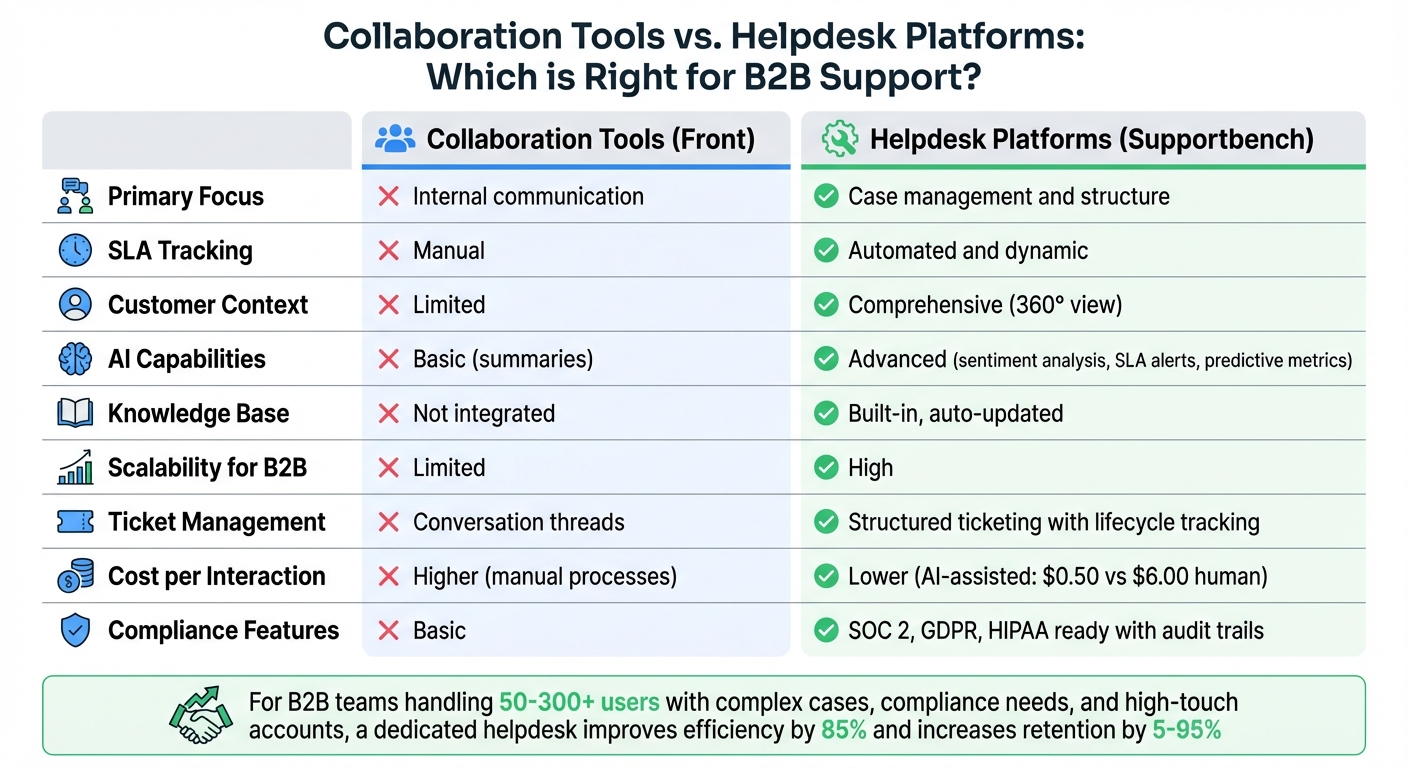
Collaboration Tools vs Helpdesk Platforms: Feature Comparison for B2B Support
7 Best Helpdesk Software & Ticketing Systems for 2025 (Ranked by Best Use Cases)
sbb-itb-e60d259
How Collaboration Tools and Helpdesk Platforms Differ
Choosing the right tool for B2B customer service hinges on understanding the operational philosophy behind these systems. Collaboration tools and helpdesk platforms serve distinct purposes, and their differences shape how teams manage customer interactions effectively.
Collaboration tools, like Front, focus on creating a smooth and intuitive communication experience. They bring teams together with features like shared drafts and internal comments, making coordination easy and seamless. Meanwhile, helpdesk platforms, such as Supportbench, are built for structured management. They excel at handling complex B2B accounts, ensuring accountability, and managing long-term cases that often involve multiple stakeholders.
Collaboration vs. Ticket-Based Operations
Collaboration tools revolve around shared inboxes, consolidating messages from email, chat, SMS, and other channels into one unified interface. This setup keeps teams in sync with features like auto-shared drafts and in-thread discussions, minimizing the need for email forwarding or switching between apps. It’s an approach that’s great for quick, internal coordination.
On the other hand, helpdesk platforms rely on ticketing systems to organize and track customer issues. Each issue becomes a ticket with its own lifecycle, priority, and detailed audit trail. For example, Supportbench offers dynamic SLAs that adapt based on factors like account risk or renewal timelines. This systematic approach ensures that even a lengthy email thread about a technical issue doesn’t get overlooked. While shared inboxes depend on team members manually managing context and handoffs, ticketing systems provide a structured framework that supports scalability and accountability.
Customer Experience vs. Internal Efficiency
Collaboration tools are designed to boost internal efficiency, helping teams respond quickly by working together in real time. The focus is on making customers feel valued by ensuring their requests are addressed promptly. Speed and responsiveness take precedence over rigid processes in this approach.
Helpdesks, however, emphasize delivering a consistent and high-quality customer experience through organized workflows. Tools like Supportbench’s "Customer 360" view give agents access to critical context, such as contracts, licensing details, product usage history, and past case resolutions – all within their workspace. This level of insight is crucial for B2B support, where cases often involve technical complexities, compliance concerns, and revenue stakes. While collaboration tools enhance team communication, helpdesks provide the structure and knowledge agents need to handle intricate issues without compromising on quality.
What Helpdesks Provide That Collaboration Tools Don’t
When managing complex B2B account operations, the distinction between collaboration tools and helpdesks becomes clear. While shared inboxes help teams communicate, they often lack the robust structure required for large-scale, organized support processes.
Ticket Management and SLA Enforcement
Helpdesks, such as Supportbench, offer tools like dynamic SLAs that adapt automatically to real-world conditions. For example, if a customer’s contract is set to renew in 30 days, the platform can tighten response deadlines without manual adjustments. In contrast, collaboration tools rely on conversation threads and lack built-in SLA tracking or enforcement capabilities.
Key features of helpdesks include:
- Automated escalations: Multi-level processes ensure timely issue resolution.
- Real-time SLA monitoring: Tools like countdown timers and pause functions help teams stay on track.
- Smart ticket routing: Requests are automatically categorized by factors like priority or subject matter and sent to agents with the right expertise.
This operational efficiency extends to detailed KPI tracking and audit trails, which are typically absent in collaboration tools. By automating these processes, helpdesks eliminate the time wasted on sorting requests and ensure that customer issues are addressed promptly and effectively.
Integrated Knowledge Base and Self-Service
Helpdesks go beyond ticket management by incorporating integrated knowledge bases, which are essential for reducing repetitive inquiries. By offering self-service options, businesses can cut inbound ticket volume by 20–30%. In fact, research shows that 91% of customers would use an online knowledge base if one were available and tailored to their needs.
Supportbench supports a Knowledge-Centered Service (KCS) approach, enabling agents to convert resolved tickets into knowledge base articles with a single click. This ensures the knowledge base stays up-to-date with relevant, real-world solutions, reducing the workload for support teams over time.
Integrated platforms also address inefficiencies caused by "toggle tax", or the productivity lost when switching between systems. By consolidating knowledge base content, customer contracts, licensing details, and product usage history in one place, agents can resolve issues faster and with more context.
"Don’t overlook the importance of a properly managed knowledge base – it can greatly cut down on the volume of basic, repetitive questions your team needs to address." – Matthew Franzyshen, Business Development Manager, Ascendant
In contrast, collaboration tools are designed for internal communication and lack the infrastructure to build or maintain customer-facing self-service options. This often forces teams to maintain separate knowledge bases or skip self-service entirely, leading to higher ticket volumes and increased agent workload.
AI-Native Features for Support Optimization
The AI capabilities of helpdesks differ significantly from those in collaboration tools. While collaboration tools focus on communication and updates, helpdesk AI is designed to handle the entire ticket lifecycle, leveraging customer context like contracts, licensing, and case history.
Supportbench’s AI features include:
- Automatic case summaries: Condenses lengthy email threads into concise updates for team members.
- Sentiment analysis: Flags cases with negative tones for escalation.
- Predictive metrics: Identifies at-risk accounts using CSAT, CES, and NPS predictions.
For example, Equinix achieved impressive results with AI-powered triage: 96% routing accuracy, 82% ticket resolution, a 33% reduction in resolution time, and 4 hours saved daily per agent – all while maintaining a 96% CSAT score. These results highlight the advantages of AI tools that integrate structured ticket data, SLA context, and customer history – capabilities absent in basic collaboration tools.
Additional AI-driven benefits include intelligent ticket categorization, automated SLA adjustments for high-value accounts, and one-click knowledge base article creation. While collaboration tools may offer basic AI features like message drafting or thread summarization, they lack the operational depth required for complex support workflows.
| Feature | AI-Native Helpdesk | Collaboration Tools |
|---|---|---|
| Primary AI Focus | Ticket lifecycle, triage, and resolution | Communication efficiency and internal updates |
| Contextual Depth | Full customer view (contracts, usage, history) | Limited to conversation threads |
| Knowledge Creation | One-click KB article generation from case history | Manual extraction from chat logs |
| SLA Awareness | AI-driven alerts based on risk or renewal sensitivity | Lacks native SLA enforcement logic |
These features demonstrate why specialized helpdesk platforms are essential for managing sophisticated B2B support operations effectively.
Risks of Using Collaboration Tools for B2B Support
Scalability and Case Complexity
Collaboration tools often struggle as support operations grow and cases become more complex. For example, shared inboxes lack automated tracking features, which can lead to agent collisions and missed messages. While these tools are great for quick, straightforward interactions, they’re not built for the long-term, multifaceted cases typical in B2B support. These cases often stretch over months and involve multiple stakeholders across various departments.
Things get even trickier when dealing with technical escalations. B2B support teams frequently rely on integrations with tools like Jira, GitHub, or Linear. Unfortunately, most collaboration platforms treat these integrations as optional add-ons, forcing agents to jump between systems. This constant switching reduces efficiency and can compromise service quality, especially when the average B2B engagement involves over 62 touchpoints across six months. Without proper tools to handle this complexity, tracking and managing cases proactively becomes a major challenge, leading to reporting difficulties and operational inefficiencies.
Visibility and Reporting Challenges
One of the biggest drawbacks of collaboration tools in B2B support is the lack of visibility into critical metrics. Teams often operate reactively, only addressing problems after customer escalations occur. As Luke from the Experience Matters Podcast put it, "We only realize there’s a problem once customers escalate. By then, it’s already too late". Unlike dedicated helpdesk platforms, collaboration tools don’t provide essential KPIs like backlog aging, SLA compliance rates, or ticket reopening trends. Without these, teams can’t identify or address issues early, leaving leadership without the insights needed to maintain control.
To compensate, teams frequently rely on manual spreadsheets, which are prone to errors and often deliver outdated data. This lack of a centralized "single source of truth" scatters customer history and insights across multiple systems, eroding the trust customers place in the organization.
Cost and Efficiency Challenges
The operational shortcomings of collaboration tools don’t just impact service quality – they also drive up costs. The hidden expenses go far beyond licensing fees. In fragmented IT environments, each additional tool can cost $100–$200 per user annually. Companies often end up deploying multiple systems to fill gaps, such as separate platforms for knowledge-centric solutions, SLA tracking, and customer data.
These inefficiencies also lead to productivity losses. Constantly switching between disconnected tools creates cognitive fatigue and forces agents to rely on time-consuming manual processes. For example, in October 2025, MindInventory streamlined its operations by replacing fragmented tools with a centralized service management solution. This change cut average ticket resolution times by over 85% and eliminated redundant manual tasks. The financial implications are clear: AI-handled interactions cost about $0.50 each, compared to $6.00 for human interactions – a staggering 12× difference.
When B2B Teams Need a Dedicated Helpdesk
Scaling Teams and Workflows
For many teams, the transition from basic collaboration tools to a dedicated helpdesk becomes essential when they reach the 50–300 user range. At this point, shared inboxes start to fail. Conversations get lost, follow-ups are missed, and agents often duplicate efforts, creating inefficiencies. This issue becomes even more pronounced with complex B2B cases that can stretch over months and involve departments like billing, technical support, and legal.
Take Wolseley Canada, for example. By August 2025, they faced growing pains with their email-based system. Missed follow-ups and outdated manual workflows couldn’t keep up with the increasing customer inquiries. Switching to Supportbench allowed them to implement automated routing and a unified dashboard. As a result, their agents could handle over 11,000 emails efficiently, while also speeding up resolution times.
"With the increased rate of emails, we saw an improvement in customer satisfaction. Supportbench helps our agents manage 11,000+ emails easily and accurately by providing them with a platform that is easy to use."
– Eilis Byrnes, Customer Service and Process Improvement Manager, Wolseley Canada
For teams considering a similar move, the migration process typically takes two to four weeks, ensuring minimal disruption. Signs that it’s time to upgrade include struggles with tracking task ownership, a lack of centralized records, and reliance on repetitive manual processes.
Regulatory and Compliance Requirements
As organizations grow, regulatory demands and data governance become increasingly critical. Industries such as manufacturing, logistics, and supply chain face strict compliance standards that basic collaboration tools simply can’t address. To meet these demands, companies require features like RBAC (Role-Based Access Control), audit trails, and certifications such as SOC 2 Type II, GDPR, and HIPAA readiness. Without these, businesses risk exposing sensitive customer data and failing compliance audits.
Dedicated helpdesks take an account-focused approach, grouping data by customer account rather than treating each request as a standalone interaction. This design ensures that only relevant information is visible to each customer, meeting essential compliance needs. Additionally, these platforms maintain detailed logs of all access and escalations, offering full traceability for audits.
Dynamic SLA (Service Level Agreement) management is another critical feature for B2B companies. Unlike static or manual tracking in collaboration tools, platforms like Supportbench automatically adjust SLAs based on factors like account value or renewal risk. This ensures that high-priority clients receive the attention they need without requiring constant oversight from managers.
Customer Retention and Satisfaction
Beyond streamlining operations, a robust helpdesk can significantly impact customer retention and revenue. For example, improving retention by just 5% can increase profits by 25% to 95%. However, poor customer service remains a major issue, with 58% of consumers switching companies due to bad experiences, and 73% considering customer experience a key factor in their purchasing decisions.
B2B relationships come with unique challenges, including a 51% higher risk of account churn when a key contact or "customer champion" leaves the company. Helpdesks address this by offering a "Customer 360" view, which consolidates contracts, licensing history, and all past interactions. This ensures that any agent can step in seamlessly when there’s a change in stakeholders.
The cost savings are also hard to ignore. While support team-assisted interactions average $8, self-service interactions cost just $0.10. Helpdesks facilitate this shift by leveraging Knowledge-Centered Service (KCS) to turn resolved tickets into knowledge base articles automatically. This builds a lasting knowledge base that remains useful even as team members come and go. Companies that focus on improving customer experience through such tools often see 5-10% revenue growth within two years, showing a clear connection between strong support systems and business success.
Conclusion
Collaboration tools often fall short when it comes to handling the demands of B2B support. They lack the depth, governance, and scalability needed for managing long-term cases or meeting strict compliance requirements. For these scenarios, a dedicated helpdesk is essential.
Without features like dynamic SLAs, a comprehensive customer view, and integrated knowledge management, teams spend unnecessary time jumping between tools. This inefficiency not only slows agents down but also affects customer satisfaction and retention rates.
Supportbench tackles these challenges head-on with its AI-powered capabilities. It can summarize email threads, turn tickets into knowledge base articles, and automate routing – all designed to help teams manage high volumes without compromising on quality. For instance, in August 2025, Wolseley Canada moved from an email-based system to Supportbench, enabling them to handle over 11,000 emails while improving customer satisfaction.
These inefficiencies are a clear signal that it might be time to reassess your support infrastructure and helpdesk options. If missed follow-ups or compliance hurdles are holding your team back, it’s worth evaluating whether your current system can not only address today’s problems but also grow with your business while protecting customer relationships.
To ensure your support operation drives revenue, focus on key metrics like resolution time, cost per interaction, and customer retention. Faster resolutions, lower costs, and stronger retention rates are where the real ROI lies.
FAQs
When should we move from a shared inbox to a helpdesk?
When your shared inbox starts to buckle under the weight of increasing support requests, it’s probably time to consider switching to a helpdesk. Some telltale signs include an overwhelming number of inquiries, missed follow-ups, difficulty keeping track of conversations, and a lack of insight into team performance.
A helpdesk can simplify your processes by automating ticket routing, organizing workflows, and offering in-depth reporting. This not only helps scale your operations but also boosts response times, keeps things organized, and enhances customer satisfaction.
What support metrics can a helpdesk track automatically?
A helpdesk system can keep tabs on essential metrics such as ticket volume, response times, resolution times, customer satisfaction scores, and agent performance. By analyzing these insights, teams can better evaluate their efficiency and refine their customer support processes.
How does an AI-native helpdesk reduce support costs?
An AI-powered helpdesk can dramatically reduce support costs by automating up to 70% of knowledge base updates, slashing the average cost per ticket by 50%, and handling up to 85% of inquiries through self-service tools. This combination not only trims operational expenses but also ensures customers continue to receive top-notch support.
Related Blog Posts
- What Is a Help Desk? Definition, Benefits, and Real Examples
- What are the best Intercom alternatives for B2B support teams that need ticketing?
- Freshdesk vs. Supportbench: Why B2B Teams Outgrow Freshdesk’s Ticket Model
- Help Scout vs. Supportbench: The Gap Between Shared Inboxes and Enterprise Helpdesks






