



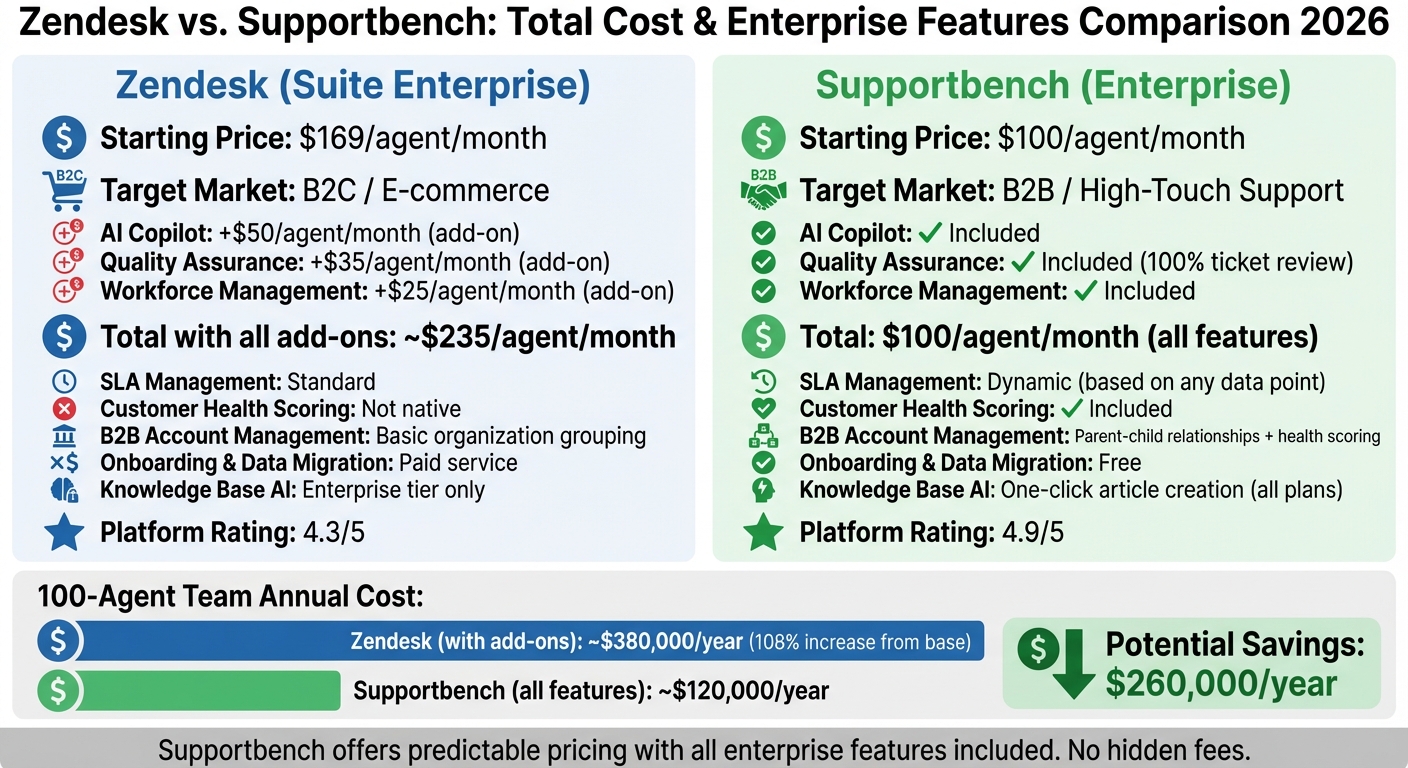
Zendesk and Supportbench are two leading platforms for B2B customer support in 2026. While Zendesk offers a modular pricing structure with add-ons for advanced features, Supportbench provides a flat-rate model that includes all enterprise tools. Here’s a quick breakdown:
- Zendesk: Starts at $169/agent/month for Suite Enterprise, but costs rise significantly with add-ons like AI Copilot ($50), Quality Assurance ($35), and Workforce Management ($25). Total costs can double depending on the features and team size.
- Supportbench: Starts at $100/agent/month for the Enterprise plan, with all features included – AI tools, dynamic SLAs, customer health scoring, and free onboarding. No hidden fees or extra costs.
Key Differences:
- Zendesk is designed for B2C workflows and often requires additional tools or customizations for B2B needs.
- Supportbench focuses on B2B operations, offering out-of-the-box features like multi-level account management and AI-driven insights without extra charges.
Quick Comparison:
| Feature | Zendesk (Suite Enterprise) | Supportbench (Enterprise) |
|---|---|---|
| Starting Price | $169/agent/month | $100/agent/month |
| AI Features | Add-ons ($50/agent) | Included |
| SLA Management | Standard | Dynamic |
| Customer Health Scoring | Not native | Included |
| Onboarding & Data Migration | Paid | Free |
For B2B teams, Supportbench offers a more predictable and cost-effective solution, while Zendesk may suit those prioritizing modular flexibility. The full article dives deeper into costs, features, and scaling considerations.
Zendesk vs Supportbench Pricing and Features Comparison 2026
Zendesk: Pricing Structure and Total Cost of Ownership
Subscription Costs and Plan Tiers
As of 2026, Zendesk’s Customer Service offerings are split into two main categories: Support (focused on email-first operations) and Suite (designed for omnichannel support tools). These plans cater primarily to B2B teams.
- Support Plans: Start at $19 per agent per month (billed annually) for the Team tier. However, this entry-level option may not suffice for B2B teams requiring additional communication channels.
- Suite Plans: Begin at $55 per agent per month for the Suite Team tier and go up to $169 per agent per month for Suite Enterprise. These plans bundle ticketing, messaging, voice capabilities, and basic AI tools.
For more advanced needs, the Suite Professional plan, priced at $115 per agent per month, introduces features like skills-based routing. The Suite Enterprise plan, at $169 per agent per month, adds governance tools such as sandboxes, custom agent roles, and audit logs. Opting for monthly billing instead of annual commitments increases costs by 20–30%, making annual billing the more cost-effective choice for long-term use.
While these subscription prices provide a baseline, the actual costs can escalate significantly due to additional fees and scaling requirements.
Add-On Costs and Hidden Fees
Zendesk offers several add-ons that can quickly inflate the total cost of ownership (TCO). Key add-ons include:
- Zendesk Copilot (advanced AI): $50 per agent per month
- Quality Assurance (QA): $35 per agent per month
- Workforce Management (WFM): $25 per agent per month
For teams using all three, these extras add up to $110 per agent per month, nearly doubling the cost of the Suite Professional plan.
SaaS CRM Review highlights this issue: "Add-ons often dominate total cost. A team on Suite Professional ($115 per agent per month) that enables Copilot (+$50), QA (+$35), and WFM (+$25) is actually paying $225 per agent per month – nearly double the base plan."
Beyond these, there are additional expenses to consider:
- Implementation and Migration: Costs range from $5,000 to over $50,000, depending on data volume and workflow complexity.
- Marketplace Apps and Integrations: Add between $500 to $2,000 per month.
- Zendesk Talk (voice usage): Inbound calls cost $0.012 to $0.037 per minute, while voicemail transcription is priced at $0.05 per minute.
These costs can accumulate quickly, especially as teams expand their usage.
Scaling Costs for Growing B2B Teams
As B2B teams grow, scaling operations introduces additional expenses. Administrative overhead is a key factor, with Zendesk recommending 0.5–1 full-time equivalent (FTE) staff per 50 agents to manage workflows and reporting.
For example, a 100-agent team using the full range of AI, QA, WFM, and contact center features may see their total costs increase by about 108% compared to the base subscription. This means that under annual billing, a 100-agent enterprise setup could cost approximately $380,000 per year, nearly doubling the $182,000 base cost.
To manage these expenses, a phased approach is recommended. For high-cost add-ons like Copilot or QA, consider enabling them for just 10–20% of agents initially. This allows teams to test their return on investment (ROI) before rolling out these features to the entire team, reducing the risk of overspending without measurable benefits.
sbb-itb-e60d259
Supportbench: Pricing Structure and Total Cost of Ownership
Flat-Rate Pricing Model
Supportbench uses a straightforward pricing approach, starting at $32 per agent/month when billed annually. This rate includes enterprise-level features and AI tools without locking essential options behind higher-priced tiers.
After the first 15 agents, the cost increases incrementally by just $2.50 per additional agent, scaling up to 60 agents. Beyond this point, the Enterprise plan kicks in at $100 per agent/month, with a cap at $150 per agent. This ensures predictable costs as your team grows, preventing unexpected spikes in expenses.
This pricing model provides access to the platform’s full range of enterprise and AI functionalities, detailed below.
Included AI and Enterprise Features
The Professional plan includes advanced AI features like ticket summarization, sentiment analysis, automated knowledge base creation, and CSAT/CES prediction. It also incorporates essential B2B tools such as customer health scoring, multi-level relationship management, asset tracking, dynamic SLAs, and over 35 KPI scorecards. Additionally, it offers a robust reporting engine and built-in survey tools for CSAT, NPS, and CES.
"Supportbench’s pricing starts at $35 / agent. Everyone gets an enterprise feature set, with no hidden costs. You don’t need to spend more to get more."
Onboarding, training, and 24/7 digital support are all included at no extra charge. There are no fees for setup, implementation, or data migration, ensuring a smooth and cost-effective start.
Cost Efficiency for Complex B2B Accounts
Supportbench’s transparent pricing and unified platform provide notable savings for B2B teams managing high-value, long-term accounts. By integrating core support, success, and customer experience functions into one system, it eliminates the need for multiple subscriptions or extensive IT involvement.
For example, a 50-agent team on the Professional plan would spend approximately $19,200 per year (50 agents × $32 × 12 months). The platform’s design reduces the need for dedicated administrators, allowing teams to focus on operational efficiency without worrying about budget surprises.
To make transitions seamless and cost-effective, Supportbench also offers contract transfer programs and free data migration services, ensuring a predictable and hassle-free switch from other solutions.
Feature Comparison: Zendesk vs. Supportbench
Enterprise Feature Comparison Table
When comparing enterprise support platforms, the differences become evident when you examine the features offered at various price points. Below is a breakdown of core capabilities, covering pricing, AI features, B2B workflows, and support infrastructure.
| Feature | Zendesk (Suite Enterprise) | Supportbench (Enterprise) |
|---|---|---|
| Starting Price | $150/agent/month | $100/agent/month |
| Primary Target Market | B2C / E-commerce | B2B / High-Touch Support |
| AI Copilot | $50/agent/month add-on | Included in base plans |
| AI Quality Assurance | $35/agent/month add-on | Built-in (100% ticket review) |
| Knowledge Base AI | Enterprise tier only | One-click article creation (all plans) |
| B2B Account Management | Basic organization grouping | Parent-child relationships, health scoring |
| Multi-Level Escalations | Skills-based routing | L1/L2/L3 with templates |
| SLA Management | Standard SLAs | Dynamic SLAs based on any data point |
| White Labeling | Limited/Tiered | Fully white-labeled portals and email |
| Onboarding & Training | Documentation/Videos | Free live onboarding and training |
| Data Migration | Paid service | Free migration included |
| Platform Rating | 4.3/5 (5,770 reviews) | 4.9/5 (80 reviews) |
When factoring in Zendesk’s add-ons, the total cost can climb to about $235 per agent/month. In contrast, Supportbench delivers its full suite of features for $100 per agent/month. This price gap reflects more than just cost – it highlights significant differences in functionality, as explored in the next section.
Key Feature Gaps in Zendesk
Price aside, Zendesk’s design creates challenges for B2B support, particularly for teams managing complex workflows. The platform’s structure and feature segmentation make it less suited for B2B needs.
Zendesk’s focus on B2C workflows limits its ability to handle the intricacies of B2B operations. Its modular design often requires integrating separate products to unify customer data, which can be time-consuming and inefficient.
Critical B2B features, such as customer health scoring, parent-child company relationships, and asset tracking, are not natively supported in Zendesk. These gaps force teams to rely on external tools or custom solutions to meet their needs, whereas Supportbench includes these features out of the box.
AI functionality is another area where the two platforms diverge significantly. Zendesk offers AI features as paid add-ons, while Supportbench includes advanced capabilities like predictive CSAT/CES scoring, sentiment analysis, and automated knowledge base creation within its standard pricing.
Customization also presents challenges for Zendesk users. While the platform provides tools like an App Builder and custom objects, adapting Zendesk to non-standard B2B workflows often leads to roadblocks. By contrast, Supportbench offers Liquid templating for complete control over customer portals and direct SQL access for seamless integration with BI systems. This level of flexibility makes it easier for teams to manage complex data requirements.
7 Best Helpdesk Software & Ticketing Systems for 2025 (Ranked by Best Use Cases)
Zendesk’s Limitations for B2B Support Operations
Zendesk presents several challenges that can reduce efficiency for B2B support teams, particularly when addressing complex customer needs or scaling operations.
AI and Automation Limitations
Zendesk’s AI capabilities require separate add-ons for many features essential to B2B teams. Tools like case summaries, AI-suggested replies, and auto-tagging are not fully integrated and come at an additional cost. This piecemeal approach not only increases expenses but also creates a disjointed experience for support teams.
Another drawback lies in the management of its knowledge base. Turning resolved tickets into knowledge articles is largely a manual process, demanding significant effort from agents. In contrast, AI-driven platforms streamline this by automatically analyzing case histories to generate articles. For B2B teams dealing with complex product documentation or technical issues, this manual system slows down the dissemination of critical information and adds to agents’ workloads.
Zendesk’s SLA automation also lacks flexibility. It doesn’t support dynamic features like adjusting priorities based on account health or renewal timelines. This results in static SLAs that fail to meet the nuanced needs of B2B operations. These gaps highlight broader challenges with customization, which are explored further below.
Customization and Scaling Constraints
Zendesk’s architecture poses additional hurdles for B2B teams, particularly when it comes to tailoring workflows and scaling effectively. Designed with B2C environments in mind, the platform struggles to accommodate the high-touch, relationship-focused approach that B2B support demands. Teams often resort to inefficient workarounds for handling complex cases, which hampers productivity.
Costs rise significantly when scaling, as features like customer health scoring, multi-level relationship tracking, and unified customer context require separate integrations. These add-ons not only inflate expenses but also complicate the support process, making it harder for teams to maintain seamless operations.
Lastly, Zendesk primarily operates as a ticketing system rather than a fully unified platform. For B2B teams, having a centralized view of contracts, licensing, product usage, and support history is critical. Without native integration, agents are forced to switch between multiple tools just to get a complete picture of the customer. This lack of cohesion can slow down resolution times and negatively impact customer satisfaction.
Supportbench’s Advantages for AI-Native B2B Support
Supportbench tackles the challenges of outdated B2B support systems by offering AI-driven features as part of its standard package – no pricey add-ons required. This design supports modern strategies aimed at cutting costs while boosting efficiency in customer support. It’s specifically built for B2B environments, where managing complex accounts, nurturing long-term relationships, and addressing technical needs take precedence over handling massive ticket volumes.
AI Features That Improve Efficiency
Supportbench brings powerful AI tools to the table, starting with predictive CSAT and CES scoring. Instead of relying on customer surveys, the system analyzes interaction data to automatically generate satisfaction scores. This not only reduces survey fatigue but also provides teams with real-time insights into customer sentiment. The result? A 30% faster ticket resolution rate compared to traditional workflows.
Another standout feature is the automated knowledge base creation. Resolved cases are transformed into well-organized documentation, complete with subject lines, summaries, and keywords – saving agents from the tedious task of manual documentation.
The real-time agent assistance feature acts as an AI copilot, offering contextual recommendations during live cases. By reviewing past tickets, internal resources, and customer history, it suggests the best next steps. This not only speeds up response times but also ensures greater accuracy in resolving issues.
"AI is not just a productivity enhancer – it is reshaping the culture of customer service itself. The focus shifts from resolving issues to preventing them".
Supportbench also streamlines operations with smart ticket routing, which assigns cases to the most qualified agents based on skills and workload. Additionally, proactive escalation alerts notify teams before SLA deadlines are missed, helping maintain service quality.
These AI-driven tools don’t just optimize workflows – they’re designed to handle the intricacies of B2B operations with ease.
Built for Complex B2B Workflows
Supportbench is tailored to the intricate needs of enterprise-level support. Its dynamic SLA management adapts response times based on account-specific factors. For example, it can prioritize customers nearing renewal dates or adjust urgency based on contract value and customer health metrics. The platform also includes multi-level escalation management, ensuring smooth handoffs and full visibility as cases move through different support levels (L1 to L3).
This workflow adaptability integrates seamlessly into the platform, ensuring efficiency without sacrificing depth.
Supportbench’s Salesforce synchronization is another game-changer. It displays critical details like licensing, contracts, and renewal timelines directly within support tickets, keeping everything in one place.
"Using Supportbench has provided our department with a complete client management system. Since everything is one platform, we have a clear overview of all client and team interaction".
The platform also supports parent-child company relationships and asset tracking, making it easier to manage customers with multiple subsidiaries, locations, or product setups. These features directly address the operational challenges that often slow down resolutions and inflate costs in B2B support.
Predictable Pricing with Full Features Included
Supportbench offers a straightforward pricing model. After the first 15 agents, the cost rises incrementally by $2.50 per additional agent, capped at $150 per agent. For teams with 60+ agents, the Enterprise plan kicks in at $100 per agent per month, adding perks like sandbox environments, white labeling, and dedicated success management.
"Supportbench’s pricing is affordable, without sacrificing any features… Everyone gets an enterprise feature set, with no hidden costs".
For businesses switching from competitors, Supportbench eases the transition with a contract transfer program. This program honors existing agreements and migrates data at no extra charge.
With an average rating of 4.9/5 across major review platforms, users frequently highlight the platform’s inclusive features and transparent pricing. This predictable cost model eliminates the financial guesswork common with older systems, delivering clear savings for B2B support teams.
Conclusion: Selecting the Right Platform for B2B Support in 2026
Choosing the right platform means looking beyond the surface and analyzing the total cost of ownership (TCO). While Zendesk’s base pricing may seem appealing, the costs can climb quickly with add-ons like advanced AI ($50 per agent), workforce management ($25 per agent), and quality assurance ($35 per agent). In contrast, Supportbench offers a flat rate that includes all enterprise features, starting at $32 per agent per month .
Pricing aside, how each platform is structured can have a huge impact on your support workflows. Zendesk often requires additional tools or custom development to handle complex needs like account hierarchies, dynamic SLAs, or tracking customer health. Supportbench, on the other hand, provides these features out of the box, including parent-child account relationships, asset tracking, and seamless Salesforce synchronization .
"One key limitation is that the platform functions mainly as a ticketing system, requiring supplementary tools to manage complex support tasks."
AI functionality is another key differentiator. Supportbench integrates advanced AI tools – like predictive CSAT scoring, automated knowledge base creation, and real-time agent assistance – directly into its standard offering. Zendesk, however, imposes limits on automated resolutions (10–15 per agent per month on standard plans) and charges $1.50–$2.00 for each additional resolution.
When considering both cost and operational efficiency, the right platform depends on your team’s priorities. If you need predictable pricing and an all-in-one solution that scales without costly add-ons, Supportbench delivers better value over time. For those who prioritize a robust app marketplace and are ready to manage costs tied to modular features, Zendesk is a solid alternative. Ultimately, the decision comes down to weighing the benefits of a unified, inclusive pricing model against the complexity of managing a modular system.
FAQs
What should I include in a true TCO calculation for 2026?
When calculating the total cost of ownership (TCO) for 2026, it’s important to consider all expenses beyond the subscription fee. This includes upfront costs like setup, integration, data migration, and training. Then, factor in ongoing operational expenses such as admin time, maintenance, and any usage-based charges.
Watch out for hidden costs, too – premium features, overages, or unexpected add-ons can quickly add up. Also, think ahead to accommodate growth, scaling needs, and potential upgrades. To keep surprises at bay, regularly audit your licenses and usage. This will help you maintain a clear and accurate financial picture.
Which enterprise features matter most for B2B account-based support?
For B2B account-based support, some essential features stand out: deep account visibility, SLA-driven workflows, and predictive analytics. These tools are designed to handle the complexity of high-value accounts by enabling teams to prioritize tasks, personalize interactions, and engage proactively with clients.
When paired with AI-powered tools, the benefits multiply. Features like automated triage, trend analysis, and knowledge base automation simplify operations, cut down on repetitive tasks, and enhance customer satisfaction. Together, they make enterprise support more efficient, scalable, and tailored to client needs.
How can I estimate ROI from AI features before rolling them out?
To figure out the ROI of AI features, take a data-focused approach to assess both measurable and less obvious advantages. Begin by evaluating current metrics, such as handling time, resolution speed, and escalation rates. Next, estimate how AI-driven tools – like automation and predictive analytics – could enhance these metrics. Assign dollar values to these improvements, account for implementation expenses, and calculate the net ROI. This process helps create a solid business case for investing in AI.






