


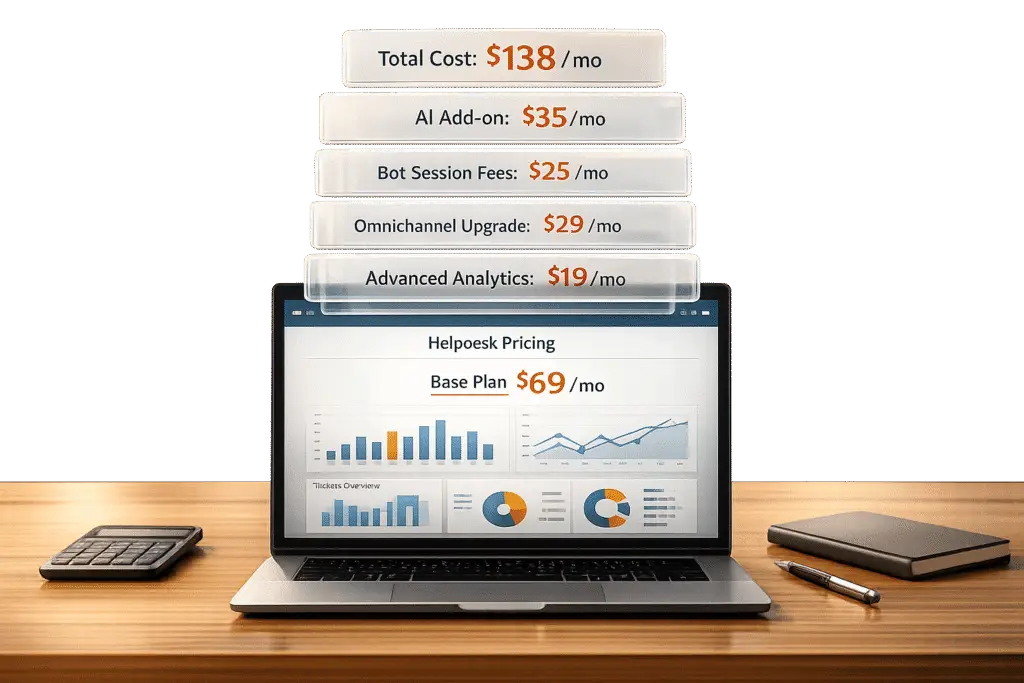
When you look at Freshdesk‘s advertised pricing, it seems affordable – starting at $15 or $49 per agent per month. But the real cost can be much higher. Why? Many important features like custom reports, AI tools, or omnichannel support require additional fees or higher-tier plans. For example:
- AI tools: Freddy AI Copilot adds $29 per agent per month. AI sessions cost $100 per 1,000 and expire monthly.
- Omnichannel support: Costs up to 50% more than standard plans.
- Essential features: Custom reports, multiple SLAs, and advanced security are locked behind higher-cost tiers.
For a team of 50 agents, costs can rise from $30,000 annually on the Pro plan to over $46,800 when adding AI and other upgrades.
Supportbench, by contrast, offers a simpler pricing model: $32 per agent per month with all AI tools and features included – no hidden fees or session limits. For the same 50-agent team, Supportbench costs about $19,200 annually.
Here’s the key takeaway: Freshdesk’s pricing works for small teams with basic needs, but scaling up can lead to unpredictable expenses. Supportbench offers a flat-rate alternative with fewer surprises.
1. Freshdesk
Base Pricing and Plans
Freshdesk offers its pricing on a per-agent, per-month basis across four main tiers. Here’s a quick breakdown:
- Free Plan: Supports up to 2 agents for 6 months, limited to email-based support.
- Growth Plan: Starts at $15 per agent per month (billed annually), adding basic automation and SLA management tools.
- Pro Plan: Costs $49 per agent monthly, unlocking features like custom reports, CSAT surveys, and multiple SLA policies.
- Enterprise Plan: Priced at $79 per agent monthly, it includes advanced security options such as audit logs, IP whitelisting, and HIPAA compliance.
Opting for annual billing offers savings of 15%-20%. For example, a team of 50 agents on the Pro plan would pay about $30,000 annually before factoring in AI or add-ons. These base rates, however, are just the starting point – additional features can significantly drive up costs.
Add-Ons and Hidden Costs
The advertised plans often don’t reflect the true cost of using Freshdesk. Key add-ons, like Freddy AI Copilot, cost $29 per agent monthly, increasing the Pro plan’s cost by roughly 59%. Freddy AI Agent sessions, which automate customer interactions, are sold on a "use-it-or-lose-it" basis – unused credits expire at the end of the billing cycle. Extra session packs cost $100 for 1,000 sessions.
If you want multichannel support (chat, SMS, and phone), you’ll need to switch to a separate pricing model. For instance, the Omni Enterprise plan costs $119 per agent monthly, compared to $79 for the standard Enterprise plan. Features like custom reports are only available starting from the Pro tier, meaning teams often need to upgrade earlier than anticipated.
AI and Advanced Features
Freshdesk includes 500 free AI Agent sessions for Pro and Enterprise users. However, additional sessions are charged, as each bot interaction consumes one session. Freddy AI Copilot licenses can be assigned to specific agents rather than the entire team, offering some flexibility in managing costs.
"The pricing structure is more complex than it appears. The base plans look affordable, but AI features, add-ons, and session-based billing can double or triple your actual costs." – Wilson Wilson, Author, Ferndesk
Advanced tools like skill-based routing and sandbox environments (for secure testing) are only available in the Enterprise tier, which can push companies to upgrade sooner than planned.
Scalability and Operational Impact
For growing organizations, scaling with Freshdesk can quickly become expensive. For example, a 50-agent team on the Pro plan with Freddy AI Copilot would pay about $46,800 annually – averaging $78 per agent monthly – before accounting for extra AI sessions or omnichannel upgrades. Additionally, once you set your currency during the first payment, it cannot be changed through the self-service portal.
Despite the costs, Freshdesk’s advanced reporting tools have proven useful for some teams. George Cremeans from DTI Management shared how his team used Freshdesk’s reporting features to track recurring issues weekly, transforming their support operations from chaotic to organized.
sbb-itb-e60d259
2. Supportbench – Cost-Efficient AI Customer Support & Success Platform
Base Pricing and Plans
Supportbench offers a transparent pricing structure designed to scale with your team. The Professional plan starts at $32 per agent per month when billed annually, or $40 per agent per month if billed monthly. The Enterprise plan is priced at $100 per agent per month (annual billing) or $125 per agent per month (monthly billing). Every customer gains access to the full enterprise-grade platform from the start – no features are locked behind paywalls. For teams exceeding 15 agents, an additional $2.50 per agent applies, capped at $150. Teams with more than 60 agents are automatically upgraded to the Enterprise plan.
Add-Ons and Hidden Costs
Supportbench prides itself on its straightforward pricing. There are no hidden fees or setup charges, and essential AI tools like GenAI bots (GPT-4o), sentiment analysis, activity summarization, and AI reporting are all included in the base price – so you won’t encounter session-based fees. Basic onboarding and training are complimentary with the Professional plan. For organizations needing extra migration help or custom platform adjustments, Professional Services are available for an additional cost. The only specific add-on is Direct SQL Access, which enables real-time queries for BI systems.
AI and Advanced Features
Supportbench’s pricing includes all AI tools in the flat per-agent fee, avoiding the unpredictability of session-based models. These tools cover a range of capabilities, such as AI-driven case summaries, predictive CSAT and CES scoring, first-contact resolution detection, auto-prioritization, and even automated knowledge base article creation from case histories. Advanced features like Sandbox environments, white labeling, and SSO are exclusive to the Enterprise plan.
"Our straightforward pricing ensures you get the best value with no hidden costs." – Supportbench
Scalability and Operational Impact
For a team of 50 agents, the Professional plan with full AI functionality costs about $19,200 annually, including the surcharge for agents beyond the 15-agent threshold. This pricing covers multichannel support, including email, chat, and AI bots, while avoiding session fees or unexpected upgrade costs. The predictable per-agent cap ensures larger teams can expand without worrying about budget surprises. This cost-effective model simplifies scaling and supports efficient AI-driven operations.
Desk.com vs. FreshDesk – my experience with the pricing models
Pros and Cons
Freshdesk vs Supportbench Total Cost Comparison for 50-Agent Teams
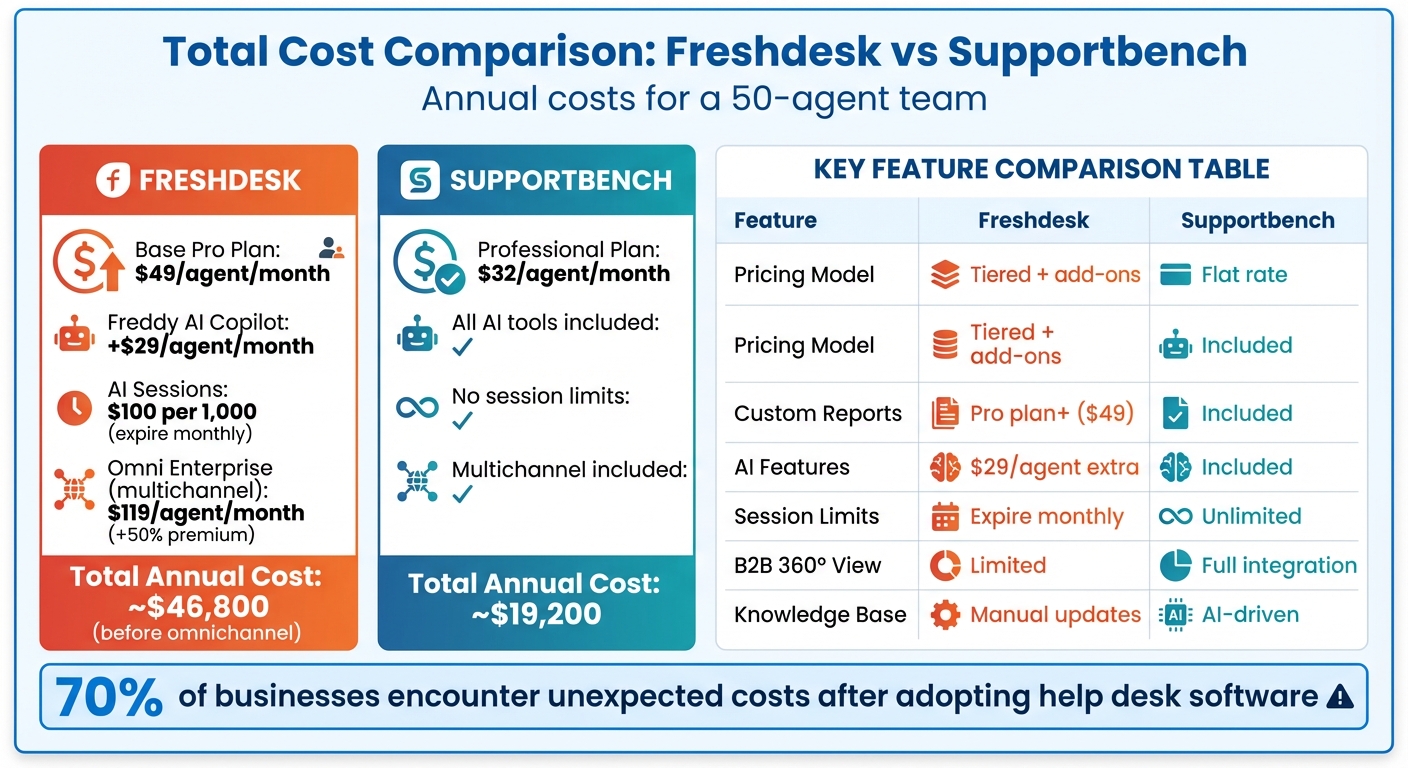
When comparing total cost of ownership, the differences between Freshdesk and Supportbench become clear. Freshdesk starts at $15 per agent per month, but upgrading to unlock essential features like custom reports and multiple SLAs requires the $49/agent Pro plan. For AI capabilities, you’ll need Freddy AI Copilot, which costs $29 per agent per month, plus $100 for every 1,000 sessions – sessions that expire at the end of each billing cycle. Teams needing comprehensive multichannel support will find themselves paying $119 per agent per month for the Omni Enterprise plan, a steep 50% increase over the basic ticketing option.
In contrast, Supportbench includes enterprise-level AI, custom workflows, and advanced reporting as part of its base price. There are no session limits or hidden upgrades required for critical tools like sandbox environments or skill-based routing.
"Supportbench is amazing in how it gets things done compared to other success and case executives arrangements I’ve used." – Caitlyn Langston, CTO
These pricing models directly affect operational efficiency, especially for scaling teams. Freshdesk’s reactive ticketing system is designed to manage support conversations, while Supportbench’s AI-powered knowledge base actively reduces ticket creation. For B2B teams managing intricate customer relationships, Supportbench offers a comprehensive 360-degree view, integrating contract renewals, product history, and support tickets. Freshdesk, on the other hand, places these features behind higher-tier paywalls.
Costs tied to growth highlight further distinctions. Freshdesk’s tiered structure forces teams to upgrade as they scale, and downgrades only take effect after the current billing cycle concludes. The expiring session model adds another layer of unpredictability, making budgeting difficult during unexpected spikes in ticket volumes. Supportbench avoids these challenges with a straightforward pricing model, enabling predictable scaling without surprise expenses.
Here’s a side-by-side comparison of the key differences:
| Factor | Freshdesk | Supportbench |
|---|---|---|
| Pricing Transparency | Complex tiers with add-ons; AI sessions expire monthly | Flat per-agent pricing with all AI included |
| Essential Features | Custom reports and multiple SLAs available only on the $49/agent Pro plan | Enterprise-grade features included in the base $32/agent plan |
| AI Model | Requires $29/agent Copilot add-on plus $100/1,000 expiring AI sessions | Built-in Co-pilot, Automation, and CX Intelligence |
| B2B Context | Traditional ticketing with limited customer visibility | 360‑degree view integrating contracts, renewals, and support tickets |
| Growth Costs | Feature gating forces tier upgrades; downgrades delayed | Transparent pricing that scales without unexpected add-on charges |
| Knowledge Base | Manual updates leading to passive content | AI-driven article creation from ticket history |
Conclusion
Freshdesk’s actual costs can climb significantly beyond its advertised base price. For a 50-agent team, annual expenses may start at $9,000 on the basic plan but skyrocket to around $46,800 when factoring in the Pro plan upgrade ($49 per agent per month), Freddy AI Copilot ($29 per agent per month), and AI session packs ($100 per 1,000 sessions, expiring each billing cycle) – and that’s before adding an estimated 50% premium for omnichannel support. With 70% of businesses encountering unexpected costs after adopting help desk software, it’s essential to recognize these hidden expenses upfront.
These extra charges highlight the importance of conducting a detailed feature audit. Support leaders considering Freshdesk should evaluate which features their teams genuinely need. For example, if tools like custom reporting, sandbox environments, or skill-based routing are priorities, the Growth plan won’t meet those needs – necessitating an upgrade to the Pro or Enterprise tier. Additionally, accurately estimating AI session usage is vital to avoid surprise fees.
When weighing these cost factors, the choice often comes down to balancing predictable pricing with access to necessary features. Freshdesk’s tiered pricing structure frequently forces teams to invest in costly upgrades as they grow. In contrast, Supportbench offers a straightforward, flat-rate model at $32 per agent per month, which includes enterprise-level AI, custom workflows, and advanced reporting. For B2B teams, comparing long-term operational costs against the upfront price is key to selecting a platform that supports scalable, AI-powered customer service.
FAQs
What hidden costs should teams consider when budgeting for Freshdesk?
When planning your budget for Freshdesk, it’s crucial to look beyond the basic subscription fee and consider extra costs that might arise. These can include spending on add-ons like AI tools, virtual assistants, or third-party marketplace apps. If your team requires advanced features – such as better security measures or custom support portals – you may also need to upgrade to a higher-tier plan, which can substantially increase your expenses.
To keep your budget under control, take the time to thoroughly assess your team’s specific needs. Understanding which features are essential versus optional can help you avoid unnecessary spending and stick to your financial plan.
How does Freshdesk’s session-based billing affect overall costs?
Freshdesk’s session-based billing model changes the way costs are calculated by charging based on user sessions instead of a fixed number of agents or tickets. Essentially, your expenses will fluctuate depending on the number of customer interactions, such as support sessions initiated through various channels.
If your team deals with a large number of sessions – especially during peak times or when relying on AI-driven tools – costs can rise unexpectedly. Add-ons and premium features can further increase the cost per session, so it’s important to keep a close eye on session activity. To keep expenses in check, focus on streamlining workflows, minimizing unnecessary interactions, and assessing how features like automation influence session volumes.
What features are only available in higher Freshdesk plans?
Many of Freshdesk’s more advanced tools are only available with higher-tier plans. For instance, features like customized support portals, custom objects, and advanced routing options are included starting with the Pro plan, which costs $55 per agent per month. If you opt for the Enterprise plan at $89 per agent per month, you’ll gain access to additional features such as audit logs, approval workflows, and skills-based assignment.
Certain capabilities, like AI-powered tools, advanced automation, and premium integrations, might also require specific add-ons or subscriptions to higher-tier plans. These upgrades are particularly useful for teams that need more flexibility, robust security, or sophisticated automation beyond the basic offerings.






