


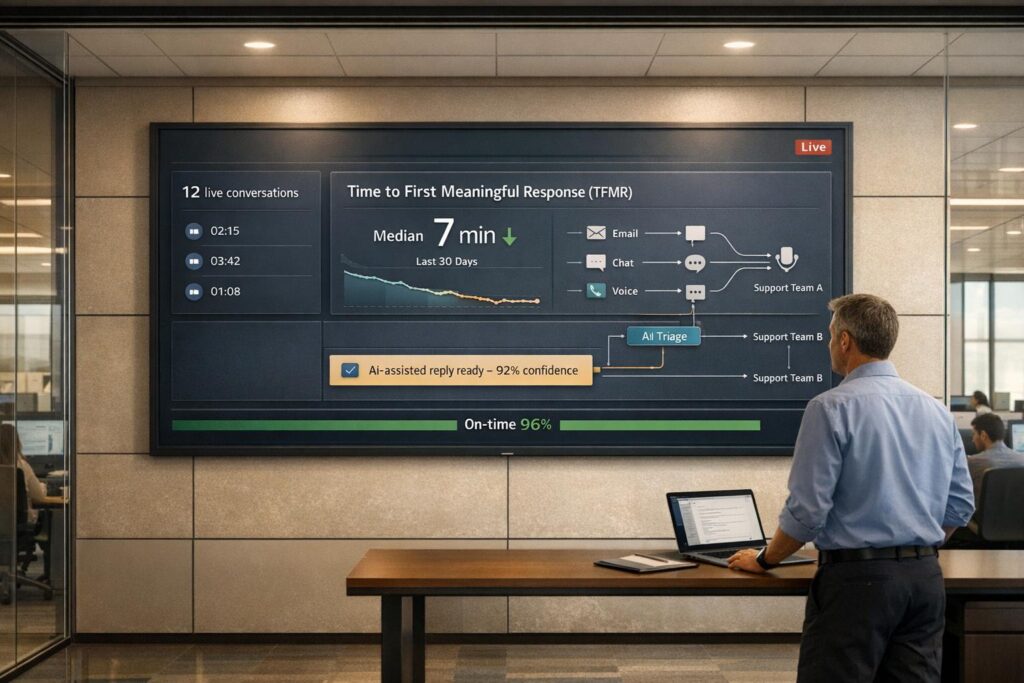
Want to improve customer support? Start by reducing Time to First Meaningful Response (TFMR). Unlike First Response Time (FRT), which often measures a simple acknowledgment, TFMR focuses on how quickly support teams provide actionable help – like troubleshooting steps or resolution timelines. This metric is critical for building trust, especially in B2B environments where delays can lead to churn.
Key Takeaways:
- Why TFMR matters: 90% of customers expect immediate replies, and 33% will leave after one bad experience.
- Tracking TFMR: Measure the time between ticket creation and the first actionable response, ignoring automated replies.
- Reducing delays: Use AI-powered ticket routing and prioritization for triage and generating meaningful responses. AI tools have cut response times by up to 97%.
- Improving workflows: Real-time dashboards, AI prioritization, and automation can spotlight bottlenecks and streamline processes.
Quick Tip: Start by analyzing your current metrics to set a baseline, then implement AI-powered tools to reduce delays and monitor progress regularly.
How to Track Time to First Meaningful Response
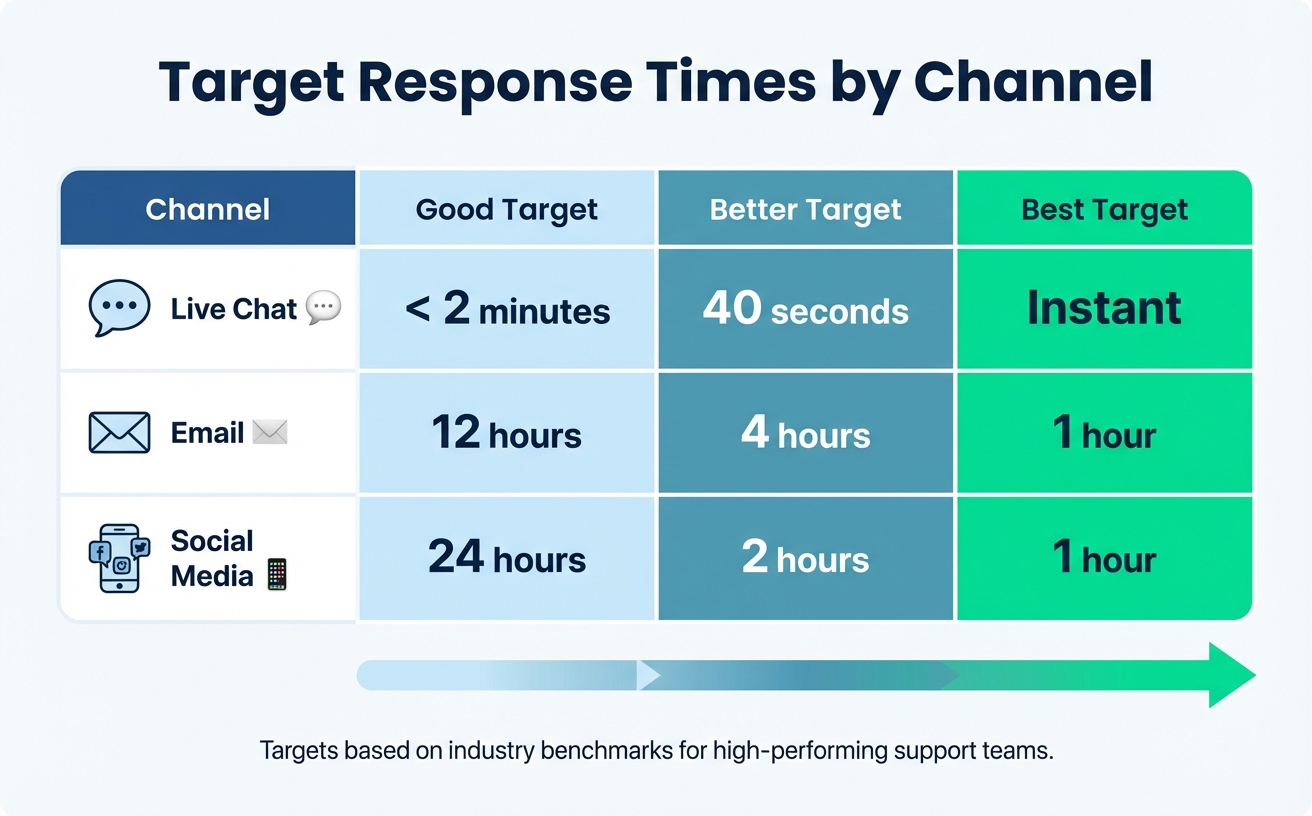
Target Response Times by Customer Support Channel
Time to First Meaningful Response (TFMR) tracks how long it takes to deliver a reply that either resolves the issue or clearly outlines the next steps – ignoring automated acknowledgments. To calculate it, subtract the ticket creation timestamp from the first substantive reply timestamp, then average the results across all tickets. The key is to establish clear metrics that will guide your tracking system.
"You can’t measure improvement if you don’t know where you started. Your initial metrics will form the baseline against which all future progress is judged." – Nooshin Alibhai, Founder and CEO, Supportbench
Define Your TFMR Metrics
Start by collecting essential data: ticket creation times, intent tags, skill group requirements, and timestamps for the first actionable (non-automated) replies. Automated acknowledgments don’t count; only responses that move the ticket forward stop the clock. These metrics not only help track performance but also allow AI tools to refine workflows, improving alignment with modern support practices.
For a clearer view of team performance, use the median response time instead of the average. A single outlier – like a ticket that takes three days to resolve – can distort your average. The median, on the other hand, reflects what’s typical for most tickets. Additionally, normalize timestamps to a single timezone and focus on business hours (unless your team operates 24/7) for a more accurate measurement of availability.
Set Up Dashboards and Tracking Tools
Real-time dashboards are essential for monitoring TFMR. These tools can include SLA timers, AI-driven intent tagging, and sentiment analysis, which help flag urgent cases. Features like "Due Soon" queues and automated alerts via Slack or Microsoft Teams can ensure that deadlines don’t slip through the cracks.
AI can also prioritize tickets based on urgency, customer tier, issue complexity, and agent expertise. This segmentation highlights bottlenecks, such as delays for Enterprise customers compared to SMB customers or slower email responses compared to chat.
Once your monitoring tools are in place, you’ll need baseline metrics to measure progress effectively.
Establish Your Baseline Metrics
The first step is to gather current performance data to create a baseline. Industry benchmarks can provide useful targets: high-performing teams aim for under 2 minutes for live chat, under 4 business hours for email, and less than 24 hours for social media.
| Channel | Good Target | Better Target | Best Target |
|---|---|---|---|
| Live Chat | < 2 minutes | 40 seconds | Instant |
| 12 hours | 4 hours | 1 hour | |
| Social Media | 24 hours | 2 hours | 1 hour |
Additionally, track metrics like ticket volume per channel and average cost per ticket to assess how delays affect your bottom line. Establish Service Level Agreements (SLAs) that define what "fast" means for your team, ensuring consistency across all agents. Regularly review baseline metrics to spot outliers or patterns that could signal data issues.
sbb-itb-e60d259
Find Bottlenecks That Slow Down TFMR
Once you’ve got your baseline metrics in place, the next step is identifying what’s causing delays. Common culprits include manual workflows, disconnected tools, and inefficient routing systems that create bottlenecks over time. This is where AI steps in, helping you uncover less obvious issues and turn historical data into actionable fixes.
Analyze Historical Ticket Data for Delay Patterns
Start by digging into your historical ticket data to uncover patterns that cause delays. Look for tickets that sit unassigned, bounce between teams, or require multiple back-and-forth exchanges before an agent provides a meaningful response. Manual triage often leads to tickets being misrouted or left idle, while incomplete ticket details force agents to chase down additional information – both of which inflate TFMR.
Another delay factor? Fragmented tools. Research shows support employees spend an average of 6.8 hours weekly switching between different systems. When agents need to consult multiple platforms just to piece together a customer’s history or product usage, response times can spiral.
It’s also worth examining delays by communication channel. For instance, email responses might lag during staffing shortages, while chat queues grow during peak times. Breaking down TFMR by channel, time of day, or customer priority in your dashboards can help identify where the biggest delays occur. These insights set the stage for AI to pinpoint inefficiencies you might otherwise miss.
Use AI to Detect Hidden Bottlenecks
AI excels at uncovering inefficiencies that manual reviews often overlook. Tools powered by AI can analyze ticket intent and sentiment, flagging urgent or complex cases that need immediate attention. This type of "ambient AI" extracts meaningful signals – like frustration levels, escalation risks, or issue complexity – from unstructured data such as emails or call transcripts.
Take AssemblyAI as an example: they slashed their First Response Time from 15 minutes to just 23 seconds – a 97% improvement – by using AI for routing and workflow automation. Their AI-driven resolution rate jumped from 25% to 50%, enabling 24/7 support without adding staff.
"Runbooks have helped us handle weird edge cases much more intelligently. Instead of failing the conversation, the agent now guides customers to the right resources automatically." – Lee Vaughn, Manager of Support Engineering, AssemblyAI
AI can also apply predictive scoring to tickets, using keywords and historical data to prioritize issues that might breach SLAs or indicate high customer frustration. Real-time AI dashboards allow you to track patterns – like specific ticket categories or times of day that consistently cause delays – so you can address them proactively.
Categorize and Prioritize Issues by Impact
To streamline your efforts, start by categorizing delays based on intent, sentiment, and channel. Group similar intents, such as "refund request" and "refund via specific channel", to identify larger processes that need improvement. Using median response times instead of averages ensures that outliers don’t skew your analysis, helping you focus on systemic issues affecting the majority of customers.
Next, tie these delays to customer satisfaction metrics. Are routing errors or technical escalations disproportionately impacting CSAT? Monitoring SLA breaches is especially critical, as they represent unmet customer expectations. With 67% of customer churn attributed to slow issue resolution, fixing bottlenecks for high-value accounts or time-sensitive queries is a must.
Lastly, audit your top 20 inquiry types, which likely account for the bulk of your ticket volume. If repetitive tasks like password resets or status updates are clogging the queue, automating them can free up agents to handle more complex, high-priority issues. By tackling these high-impact delays, AI can help you drive down TFMR even further.
How to Reduce TFMR with AI and Automation
Once you’ve pinpointed your bottlenecks, the next step is to bring in AI-driven solutions to eliminate manual delays and speed up response times. AI goes beyond basic keyword matching – it understands context, sentiment, and urgency, allowing it to route cases and craft meaningful responses without needing human input.
Automate Case Triage and Routing
Traditional rule-based systems often fail when faced with variations in customer input. AI-powered triage, on the other hand, uses natural language processing (NLP) to identify intent and sentiment, categorizing tickets with an impressive 98% accuracy. Instead of relying on customers to choose the severity of their issues – often leading to misrouted tickets – AI analyzes the content of messages, flags "danger topics" like system outages or frustrated language, and prioritizes them accordingly.
Smart routing takes this a step further by matching tickets to the right agents based on skill sets, language fluency, current workload, and customer tier data pulled from your CRM. This approach avoids the frustrating "ticket tennis" scenario where cases bounce between teams. It also ensures that high-value accounts get faster attention through dynamic SLA adjustments. For example, a travel company using AI-powered triage cut reply times for urgent requests by 46 percentage points while boosting customer satisfaction (CSAT) by 11%.
"The challenge was to prioritize tickets in a way, so that urgent cases were handled as quick as possible… James Villas reduced reply time to urgent requests by 46% points and increased CSAT +11%." – Johannes, James Villas
Once tickets are routed efficiently, AI can also help craft tailored initial responses.
Generate First Responses with AI
AI can draft highly relevant first responses by pulling from various knowledge sources, including help articles, historical tickets, internal wikis, and CRM data. This capability is particularly crucial in B2B support, where 90% of customers consider an "immediate" response important, and 60% define "immediate" as within 10 minutes. AI-resolved tickets bring significant time savings compared to manual handling.
AssemblyAI, for instance, slashed their first response time from 15 minutes to just 23 seconds – a 97% improvement – while increasing their AI resolution rate from 25% to 50%.
"Runbooks have helped us handle weird edge cases much more intelligently. Instead of failing the conversation, the agent now guides customers to the right resources automatically." – Lee Vaughn, Manager of Support Engineering, AssemblyAI
To ensure a smooth rollout, start by auditing your top 20 inquiry types and deploying AI in shadow mode before going live. Configure sentiment triggers to escalate cases involving frustrated customers.
These AI-generated responses lay the groundwork for streamlined workflows that further cut down on TFMR.
Simplify Workflows with AI-Powered Tools
After optimizing triage and response generation, the next step is refining workflows to maximize efficiency. Platforms like Supportbench integrate AI directly into workflows, automating ticket prioritization, auto-assigning issue types, and tagging cases, so agents don’t waste time on manual categorization. AI-powered agent copilots pull insights from past cases and knowledge bases to suggest relevant answers in real-time, while AI auto-responses generate the next logical reply based on the full case context.
Supportbench’s AI also proactively gathers missing information – replying to incomplete requests to collect details like order numbers before an agent even gets involved. This reduces unnecessary back-and-forth exchanges that can inflate TFMR. When AI cannot fully resolve an issue, it escalates the ticket with complete context, sparing customers from repeating themselves.
These workflow automations can reduce first-assign time by an average of 12 minutes and 31 seconds per ticket. Features like generative AI-driven ticket summarization can further cut resolution times by up to 38%. By consolidating these AI capabilities into a single platform, teams can maintain high-quality responses at scale without adding complexity or increasing costs.
Measure Results and Improve Over Time
Tracking and refining AI-driven changes is crucial for transforming short-term wins into lasting success. A solid measurement framework ensures you capture growth opportunities and maintain momentum.
Set Up Regular TFMR Reviews
Schedule weekly squad reviews to evaluate key metrics like median Time to First Meaningful Response (TFMR) by channel, the percentage of AI-resolved cases, and primary causes for SLA breaches. Complement these with monthly leadership reviews that focus on staffing ratios, bot survey feedback, and AI misroutes.
Stick to median values when analyzing metrics to avoid distortions caused by outliers. Additionally, set up SLA-risk alerts through platforms like Slack or Microsoft Teams. These alerts help managers address at-risk tickets before they exceed SLA targets.
With these processes in place, the next step is staying ahead of potential issues.
Use Predictive Analytics to Stay Ahead
Predictive analytics allow you to address problems before they escalate. Tools like Supportbench’s predictive CSAT and CES analysis analyze case histories and interaction patterns to forecast customer satisfaction scores even before surveys are sent. This means you can identify cases likely to result in low satisfaction and take action to improve outcomes proactively.
"Time to First Meaningful Response (TFMR) is a great example of AI being leveraged to measure perceived value, ahead of CSAT survey." – Crisp.chat
To maintain quality, set escalation triggers when AI confidence scores drop below a certain threshold. These triggers can automatically route cases to human agents. Review escalation accuracy weekly to ensure that the AI correctly identifies when human intervention is necessary, balancing speed with quality.
This proactive approach lays the groundwork for scaling AI improvements across your team.
Scale AI Improvements Across Your Team
Once you’ve validated the effectiveness of AI-driven optimizations, scale them gradually. Start by applying changes to 20% of your ticket volume, comparing results to a control group before rolling them out more broadly. This phased rollout minimizes risk and provides measurable proof of impact.
As you expand AI use cases, monitor how performance scales. Pilot tests have shown satisfaction rates of up to 90% and significantly faster resolution times, demonstrating that AI can deliver quality results even at scale.
Conduct weekly audits of misrouted tickets to fine-tune AI intent classification and routing rules. The more your AI interacts with cases, the better it becomes – but only if you actively monitor and adjust based on real-world performance data. This continuous refinement ensures your AI evolves alongside your team’s needs.
Conclusion
Reducing Time to First Meaningful Response (TFMR) is key to building customer trust and protecting revenue, especially in high-stakes B2B settings where every second matters. Research shows that 67% of customer churn can be avoided when issues are resolved during the first interaction, while 33% of customers might consider switching providers after just one poor service experience.
AI and automation have transformed customer support by outperforming traditional models. For example, AI-powered routing has significantly improved both response times and resolution rates. B2B SaaS companies leveraging AI-first platforms report impressive results: 60% higher ticket deflection and 40% faster response times compared to older help desk software.
These advancements do more than just improve service quality – they also deliver major cost savings. AI-resolved tickets cost between $1 and $3, compared to $15–$25 for tickets handled by human agents, reducing costs by 60–70%. Teams using AI can handle 2× to 5× the ticket volume without needing a proportional increase in staff, freeing up agents to focus on complex, high-value tasks.
To maintain these gains, it’s important to integrate these practices into your broader support strategy. Start by establishing baseline metrics, identify bottlenecks where AI can help, and gradually introduce automation. Monitor median TFMR weekly, leverage predictive analytics to preempt potential issues, and roll out improvements step by step. Addressing TFMR now not only helps retain customers but also supports scalable, efficient growth – without breaking the bank.
FAQs
How can AI help reduce Time to First Meaningful Response (TFMR) in customer support?
AI is transforming customer support by cutting down the Time to First Meaningful Response (TFMR). How? By making processes faster and enabling almost immediate interaction with customers. AI tools can quickly acknowledge and categorize inquiries, ensuring that even during peak times, customers get a prompt initial response. This eliminates the usual delays caused by limited agent availability and ensures urgent issues are prioritized.
On top of that, AI takes care of repetitive tasks like password resets or checking order statuses. This frees up human agents to focus on more complex problems that require a personal touch. Features like intelligent routing and escalation also help by directing inquiries to the right agent right away, avoiding unnecessary delays and bottlenecks. By improving speed, accuracy, and consistency, AI not only shortens TFMR but also enhances customer satisfaction and team efficiency.
How is Time to First Meaningful Response (TFMR) different from First Response Time (FRT)?
The key distinction between Time to First Meaningful Response (TFMR) and First Response Time (FRT) lies in what each metric prioritizes. FRT focuses solely on how fast a support team acknowledges or replies to a customer inquiry, emphasizing speed above all else. TFMR, on the other hand, takes it further by measuring how quickly the team provides a response that is not only timely but also genuinely helpful in addressing the customer’s issue.
In short, FRT is about speed, while TFMR balances speed with substance. A quick FRT doesn’t necessarily mean the customer’s problem is being effectively addressed. However, a low TFMR indicates that the team is delivering prompt responses that actually move the resolution process forward.
How can businesses establish effective baseline metrics for Time to First Meaningful Response (TFMR)?
To get started with Time to First Meaningful Response (TFMR), you first need to define what a "meaningful" response means in your support process. This shouldn’t just be a generic acknowledgment but something that adds value – like offering a solution, providing relevant information, or directly addressing the customer’s concern.
Once that’s clear, measure your current TFMR by tracking how long it takes from the moment a support request is received to when a meaningful response is delivered. Gather data over a reasonable period to account for variations in factors like communication channels, issue types, and agent availability. Analyzing this data will help you calculate your average TFMR and pinpoint potential bottlenecks, such as delays in routing or triage.
With this baseline in hand, compare it against your internal goals or industry standards to set achievable improvement targets. Regularly monitor these metrics to track progress and identify areas for optimization. Tools like AI-powered triage or automated response drafting can help streamline workflows and cut down response times. By refining your baseline over time, you’ll build a solid framework for enhancing customer satisfaction and operational performance.






