


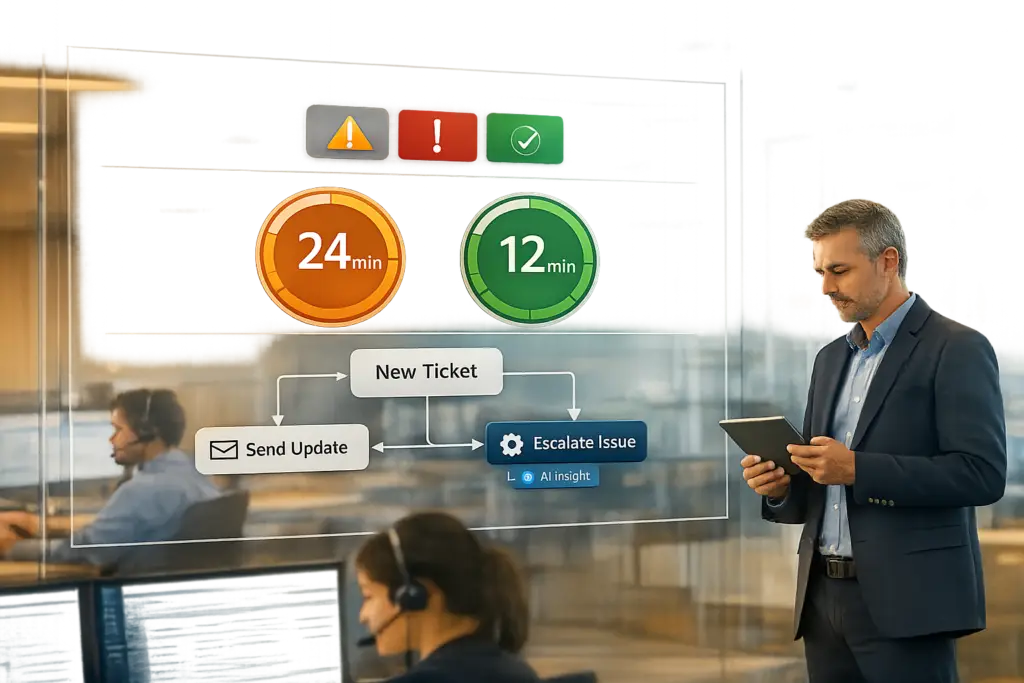
Preventing SLA breaches without micromanaging boils down to smarter systems, not stricter oversight. You can achieve this by combining automated alerts, AI-driven insights, and streamlined workflows that empower agents instead of overwhelming them. Here’s how:
- Automated Alerts: Set alerts to trigger at key milestones (e.g., 25%, 75%, 90% of SLA time) to ensure timely action without flooding agents with unnecessary notifications.
- AI-Powered Tools: Use AI to analyze ticket sentiment, complexity, and urgency. This helps prioritize high-risk cases and reroute them before deadlines are missed.
- Flexible Workflows: Automate ticket escalations, reassignments, and prioritization to eliminate delays caused by manual intervention.
- Dynamic SLAs: Adjust deadlines based on case context (e.g., customer tier, urgency) and pause SLA timers when delays are outside your team’s control.
- Agent Empowerment: Provide real-time dashboards, clear visibility into SLA statuses, and tools like AI copilots to help agents focus on resolutions rather than firefighting.
The goal is simple: shift from reactive problem-solving to proactive management. By integrating these systems, you reduce stress, improve SLA compliance, and keep your team focused on delivering great customer experiences.
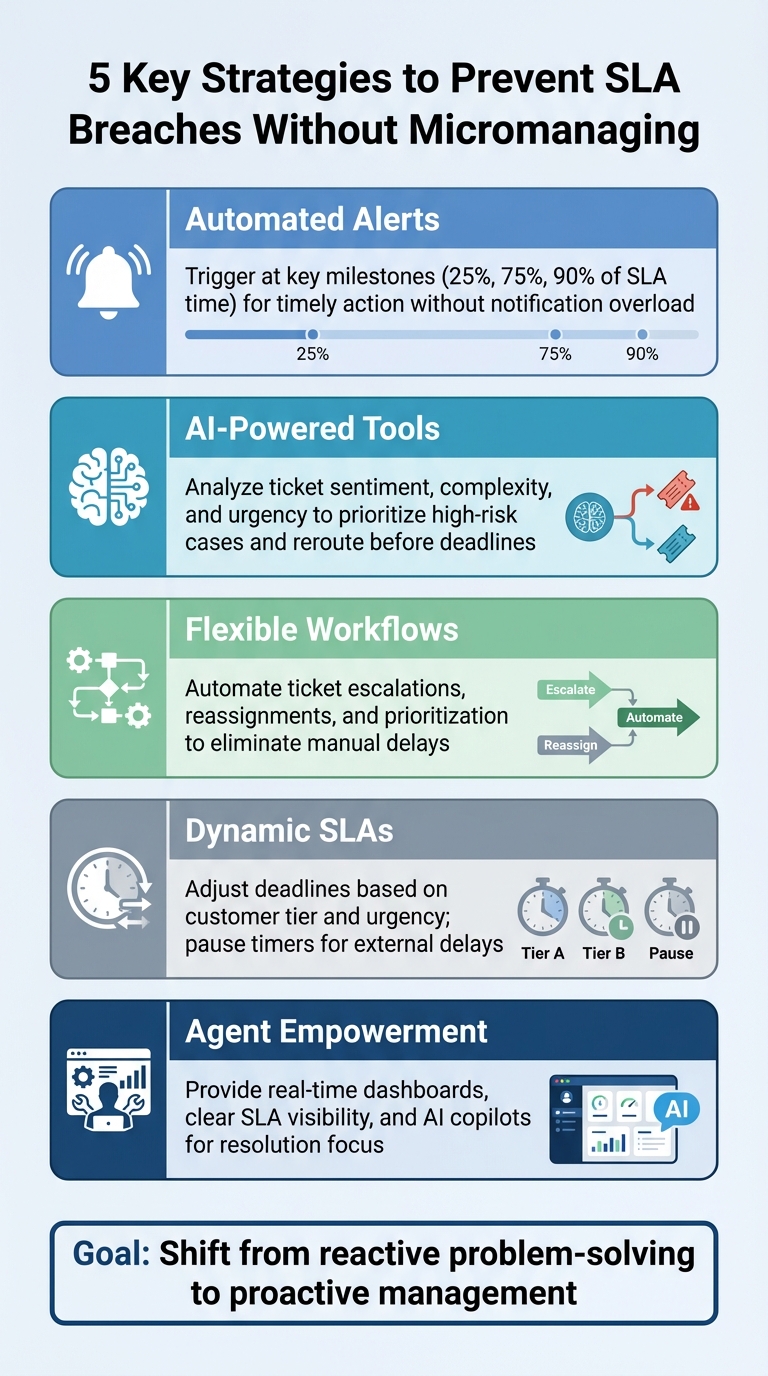
5 Key Strategies to Prevent SLA Breaches Without Micromanaging Support Agents
What Causes SLA Breaches in B2B Support
What SLA Breaches Are and Why They Matter
An SLA breach occurs when support teams fail to meet agreed-upon targets for response times, resolutions, or system availability. These breaches aren’t just about missed deadlines – they represent formal contract violations with measurable risks.
"Missing an SLA doesn’t just mean unhappy end users; it often results in financial penalties, lost contracts, and reputational damage." – Reveille Software
In the B2B world, the stakes are especially high. Financial penalties from SLA breaches can range from thousands to millions of dollars. Beyond the immediate costs, breaches can damage trust with key clients, jeopardize contract renewals, and even lead to regulatory audits when compliance is involved. For businesses handling critical workflows – like loan processing or insurance claims – delays of just a few minutes can create significant ripple effects down the line.
Why SLA Breaches Happen
To address SLA breaches effectively, it’s crucial to understand their underlying causes. In B2B support, these breaches often stem from systemic challenges.
One major factor is resource constraints. Overburdened teams and sudden surges in ticket volume can lead to important cases being overlooked. Process inefficiencies, such as delays in escalation, poor prioritization, and friction between departments, further slow down response times. Technical issues add another layer of complexity – particularly when system failures go unnoticed. For instance, a system might appear functional while a critical process, like document indexing, is actually stalled.
This becomes even more challenging in multi-stakeholder workflows, where delays often arise from manual handoffs between teams. These handoffs rely on human actions – like checking emails or transferring data manually – rather than happening instantly. Because traditional SLA tracking often overlooks these brief but impactful delays, there’s often a disconnect between recorded compliance and the customer’s actual experience.
"Any contract without an SLA is open to misinterpretation and could be exploited." – Workbooks
Legacy support systems also contribute to the problem. For example, automations that run only once per hour struggle to handle high-priority tickets with short response targets, such as 30 minutes. By the time an alert is triggered, the breach may already have occurred. Additionally, poorly defined SLA terms and excessive notifications (leading to alert fatigue) make it harder to prevent breaches. These limitations highlight why traditional monitoring often falls short and set the stage for exploring more proactive strategies later in the discussion.
sbb-itb-e60d259
Power hour mastering automations & SLAs rules, timers & escalations that scale #21
Using Alerts to Catch SLA Risks Early
Timely alerts are the difference between heading off a problem and scrambling to fix it after the fact. Hourly checks often leave critical gaps – by the time an alert goes off, you might already be past a 30-minute response window. The answer isn’t more alerts; it’s better alerts that give your team enough time to act. Here’s how you can set up custom alerts to stay ahead of SLA risks.
How to Configure Custom SLA Alerts
To make alerts effective, configure them to trigger at key percentage markers (like 25%, 75%, and 90%) of the SLA time. This method works for any SLA duration. For instance, a 75% alert would go off at 45 minutes for a 1-hour SLA and at 18 hours for a 24-hour SLA.
"Escalations must trigger while there’s still time to act, not after the SLA has already failed." – Hiver
Here’s how it can work:
- At 25% of SLA time used, send a reminder to the assigned agent to keep the ticket visible.
- At 75%, trigger an alert if no public reply has been sent.
- At 90%, escalate the ticket to a supervisor or move it to a priority queue.
This setup avoids overwhelming your team with unnecessary alerts while making sure urgent cases get the attention they need.
To prevent duplicate alerts for the same ticket, use tag-based control with unique identifiers like sla_alert in your automation rules. Alerts should fire only under specific conditions, such as when no public reply has been made, regardless of internal notes or reassignments. For unassigned critical tickets, set rules to automatically assign them to a backup owner within 15 minutes.
Another key step is aligning SLA clocks with your business hours. Pause the SLA timer during weekends, holidays, or after hours, and stop the clock when the ticket status changes to "Waiting on Customer" or "Pending Third Party". This ensures agents aren’t penalized for delays they can’t control.
How AI Improves Alert Accuracy
While custom alerts help with timing, AI takes things a step further by improving how accurately risks are flagged. AI-powered systems analyze ticket content, customer tone, and case complexity to detect potential breaches well before the deadline. For example, AI can scan for high-risk keywords like "outage", "system down", or "cancel", and immediately escalate tickets involving VIP customers or urgent issues to specialized teams via tools like Slack.
AI doesn’t just stop at flagging risks – it learns and adapts over time. By analyzing historical ticket data, AI can identify patterns, such as which types of cases (like bug investigations involving third parties) are more likely to run over SLA time. These cases can then be routed to senior agents earlier in the process. This reduces unnecessary alerts and ensures notifications are more focused on what truly matters.
"An AI tool isn’t something you set up once and then forget about. It’s a system that improves with feedback." – Kenneth Pangan, Writer and Marketer, eesel AI
AI also eliminates delays caused by manual triage. It can instantly read, categorize, and route incoming tickets to the right department, cutting down on "idle time". Advanced AI platforms even simulate new SLA rules against historical ticket data to predict how they’ll perform before going live. To get the most out of AI, integrate it with your help center, internal wikis, and past ticket data so it can fully grasp the nuances of complex issues.
Building Workflows That Keep SLAs on Track
Alerts are great for flagging issues, but automated workflows are what truly keep things moving. The moment a trigger condition is met, these workflows spring into action – whether it’s reassigning a ticket, escalating it to a supervisor, or adjusting its priority level. By automating these steps, you eliminate the delays and inconsistencies that come with manual decision-making.
"An alert tells you there’s a problem. An action starts doing something about it." – Kenneth Pangan, eesel AI
The key to staying ahead of SLA risks is designing workflows that anticipate problems before they escalate. This means incorporating escalation paths, routing logic, and flexible adjustments that adapt to each case.
Creating Escalation and Prioritization Workflows
Strong workflows don’t just react – they prioritize and route cases automatically based on urgency and SLA requirements. For instance, if the "Reason for contact" field is set to "Outage", a workflow can immediately escalate the ticket to "Urgent" and apply a tighter SLA, like 30 minutes or 1 hour, instead of the usual 24 hours.
Multi-stage alerts are essential for keeping everyone in the loop. You can set up separate automations for different stages of SLA risk. For example:
- A "nearing breach" alert (e.g., when only 2 hours remain) notifies the assigned agent, giving them time to act.
- If a breach still occurs, a "breached" alert escalates the issue to a supervisor or team lead, ensuring management steps in to resolve it.
To avoid unnecessary noise, built-in controls ensure tickets don’t trigger duplicate alerts repeatedly.
Another way to streamline prioritization is through visual tools. For example, adding a "Next SLA Breach" column to agent dashboards – sorted in ascending order – ensures that the most urgent tickets always appear at the top of the list.
Once cases are prioritized, workflows can dynamically adjust deadlines to stay aligned with changing case details.
Dynamic SLAs: Adjusting Deadlines Based on Context
Not all cases should follow the same timeline, which is where dynamic SLAs come into play. These adjust deadlines based on specific factors, such as customer tier, renewal periods, or case complexity. For example, a VIP customer nearing renewal might have a tighter SLA – like 1 hour instead of 4 hours – to ensure their issue is resolved during a critical window.
SLAs can also pause and resume based on ticket status. For instance, when a case is marked "Waiting on Customer" or "Pending Third Party", the SLA clock should stop. This prevents agents from being penalized for delays outside their control. You can even apply these pause settings at the KPI level (like "First Response" versus "Resolution Time") for more precise control.
"If waiting states don’t pause the clock, SLAs end up tracking delays your team cannot control, which quickly erodes trust in the metric." – Hiver
Dynamic workflows also benefit from scalable alert triggers, ensuring notifications go out at the right intervals, no matter how short or long the SLA.
AI takes dynamic SLAs a step further by analyzing ticket content for specific cues – like "system down" or "cancel" – as well as customer tone and case complexity. If AI identifies a high-risk situation, it can automatically escalate the case or adjust the SLA deadline before an agent even sees the ticket.
To ensure these dynamic SLA rules work as intended, some platforms let you test them against historical data. This helps you fine-tune thresholds and conditions without risking live SLA breaches.
Keeping Agents Empowered While Meeting SLAs
Automated alerts and flexible workflows are great, but the real magic happens when agents feel empowered. An effective SLA management system doesn’t just enforce rules – it gives agents the tools and autonomy they need to stay on top of their work without constant supervision.
The trick is finding the sweet spot: enough structure to keep SLAs on track but enough flexibility for agents to handle tricky, non-standard cases. This means providing tools like real-time dashboards, AI-driven support, and the ability to adjust deadlines when necessary.
Giving Agents Clear SLA Visibility
One of the best ways to empower agents is to ensure they have a clear view of their priorities. Live dashboards with color-coded indicators (think red, amber, green) make it easy for agents to track SLA compliance at a glance.
Another simple yet effective strategy is creating custom ticket views. For instance, a "Nearing Breach" view can filter out everything except tickets that need immediate attention. This way, agents can zero in on critical tasks without wading through their entire workload.
But here’s the thing: too many alerts can lead to notification fatigue. To avoid this, configure automations to send alerts only when absolutely necessary – like when a ticket has just two hours left before breaching. Use unique tags to ensure agents don’t get bombarded with duplicate notifications across platforms like email or Slack.
With this kind of visibility in place, agents are better positioned to leverage AI tools that can further improve their efficiency.
How AI Copilots Help Agents Meet SLAs
AI copilots aren’t here to replace agents – they’re here to make their lives easier. For example, Supportbench‘s AI Agent-Copilot handles tedious tasks like summarizing tickets, tagging them, and pulling up relevant cases or knowledge base articles. This means agents can spend less time digging for information and more time solving customer issues.
AI also shines when it comes to prioritization. By analyzing factors like sentiment, urgency, and historical data, AI can classify and route tickets to the right person almost instantly. It can even recalibrate SLA priorities dynamically based on customer sentiment.
Rather than taking over, AI works as a suggestion engine. For example, if it notices a ticket is likely to breach based on past patterns, it might suggest a "Smart Escalation" in a sidebar. The agent can then decide whether to act on it. And for those one-off situations – like a client being unavailable or out sick – systems should allow agents to make manual SLA adjustments without stepping outside protocol [7, 20].
Measuring and Improving Your Alert and Workflow Systems
Setting up alerts and workflows is just the beginning. To keep them effective, you need to regularly evaluate their performance and make adjustments based on data. Even well-designed systems can lose efficiency over time without this step. The goal isn’t to get everything perfect right away – it’s about creating a feedback loop. This loop helps you identify issues like bottlenecks, tweak alert thresholds, and improve overall performance while keeping workloads reasonable. By integrating measurement with your automated systems, you can maintain a cycle of continuous improvement.
Which SLA Metrics to Track
The SLA compliance rate is a great starting point. It measures the percentage of tickets resolved within their target timeframes and offers a snapshot of your system’s overall health. Alongside this, monitor the breach rate, which highlights where things are going wrong. Breaking these breaches down by team, ticket type, priority, or time of day can help pinpoint specific problem areas.
Other key metrics include first response time, which can reveal intake or routing issues, and escalation rate, which indicates how effectively tickets are being escalated when necessary. For a deeper understanding of resolution efficiency, split the process into agent work time (the time agents actively spend on tickets) and requester wait time (the total time customers spend waiting, including holds). This breakdown can help you figure out whether delays are internal or external.
Here’s a quick guide to what these metrics can show and how to act on them:
| Metric | What It Reveals | Action You Can Take |
|---|---|---|
| SLA Compliance Rate | Overall system health | Check if your targets are realistic |
| Breach Rate by Category | Process bottlenecks | Adjust routing or pause rules for high-breach areas |
| Tickets at Risk | Immediate intervention needs | Step in to prevent breaches before they happen |
| Breach Rate by Hour | Staffing and coverage gaps | Shift agent schedules to cover peak breach times |
A simple rule of thumb: if the breach rate for any ticket category exceeds 10%, flag it for immediate workflow review.
These metrics provide the foundation for refining your system over time.
Using Data and Feedback to Improve
Once you’ve set up proactive alerts and workflows, the next step is using data to maintain and improve SLA compliance. Start by establishing baseline metrics. Review ticket data from the past 30–60 days to set realistic targets. As Ritu John from Hiver points out:
"Large jumps (for example, moving from a 6-hour response to 1 hour) will fail immediately and make the SLA meaningless".
Instead of making drastic changes, tighten targets gradually.
Next, dive into recent ticket data to identify recurring issues. Are tickets sitting unassigned for too long? Are they stuck waiting on internal teams? These patterns can highlight where routing rules or pause conditions need tweaking. If breaches are happening more often at specific times – say, between 2:00 PM and 4:00 PM – consider adjusting agent schedules to cover those periods instead of overhauling the entire SLA setup.
Another valuable step is reviewing manual SLA adjustments on a monthly basis. If agents are frequently extending deadlines for similar types of tickets, like legal reviews or third-party investigations, it might be time to create a specific SLA policy for those cases.
Lastly, involve your agents in setting alert thresholds. Their hands-on experience with notifications can help strike a balance between timely alerts and avoiding alert fatigue. Using percentage-based triggers (e.g., alerts at 25%, 50%, and 75% of SLA time used) ensures that notifications are meaningful across different priority levels.
As Hiver explains:
"SLA data becomes a planning input. It tells you where to add coverage, where to route differently, and where SLAs need adjustment".
Conclusion
Avoiding SLA breaches doesn’t mean keeping a constant eye on your agents. Instead, it’s about creating systems that give your team the tools they need: clear visibility, meaningful context, and the freedom to resolve tickets efficiently. Proactive alerts help you spot risks early, automated workflows streamline routing and escalation, and AI tools identify high-priority issues based on tone and complexity.
By shifting from reactive problem-solving to a structured SLA and reporting framework, you can minimize chaos and focus on improving efficiency. Prioritize measuring handoff times and eliminating bottlenecks in your processes so proactive solutions take the lead over reactive fixes.
"At the end of the day, setting up automated SLA alerts isn’t just about hitting your numbers. It’s about changing how your team works, moving from constantly reacting to being in control".
Equip agents with intuitive dashboards and real-time SLA counters so they can independently prioritize urgent tickets. When they understand what’s urgent and why, they’ll naturally make better decisions.
SLA tracking should align with the customer’s experience. Focus on total wait time rather than internal handoffs, track "in transfer" as a measurable state, and ensure every ticket carries full context through bidirectional sync between tools.
Finally, treat your alert and workflow systems as living tools that evolve with regular reviews and data-driven updates. Analyze breach patterns monthly, adjust thresholds based on agent insights, and test new rules against historical data before implementation. These strategies will help you improve customer satisfaction while giving your team the autonomy they need to succeed.
FAQs
How can AI help prevent SLA breaches while maintaining agent autonomy?
AI can be a game-changer when it comes to avoiding SLA breaches. By automatically prioritizing tickets based on their urgency and potential impact, it ensures that the most pressing issues get immediate attention. Using historical data, AI can spot patterns and even predict which tickets are likely to breach SLAs, helping your team stay ahead of potential problems.
On top of that, AI tools can send proactive alerts and initiate workflows to prevent breaches. For instance, they can escalate high-priority tickets to senior agents or notify managers before deadlines are missed. Automating these steps not only keeps SLA compliance on track but also frees up your team to focus on their work without constant oversight. This creates a smoother, more efficient process for everyone involved.
What are dynamic SLAs, and how can they help prevent SLA breaches?
Dynamic SLAs are a new breed of service level agreements that shift and adapt in real-time. They take into account factors like how important the customer is, how complex the issue might be, and how urgent it is. Unlike traditional SLAs that stick to fixed response times, dynamic SLAs lean on AI and live data to adjust targets on the fly. The goal? Make sure critical cases or high-value customers get the attention they need – fast.
These SLAs don’t just react; they anticipate. By analyzing patterns, customer sentiment, and the situation’s context, they can predict potential breaches before they occur. This means support teams can step in early, reshuffle resources, or escalate cases when necessary. The result? Better compliance and happier customers.
How can I create effective alerts without overwhelming my team?
To make alerts useful without overwhelming your team, focus on creating targeted notifications that emphasize only the most pressing issues. For instance, set up alerts to notify your team when tickets are within two hours of breaching an SLA, instead of flagging minor delays. This way, your team can concentrate on what truly requires their attention.
Incorporating AI-powered tools can take this a step further by prioritizing alerts based on urgency and past patterns. You can also define clear thresholds for notifications – like triggering alerts only when a breach is imminent or has already occurred. Make it a habit to regularly review and fine-tune these thresholds to ensure alerts remain relevant and actionable. This approach keeps your team informed without creating a sense of micromanagement.
Related Blog Posts
- How to Set Up SLA Management for Customer Support
- Dynamic SLAs with AI Prioritization
- How do you build an SLA policy that actually improves response times (without burning out agents)?
- How do you set SLAs customers trust – and teams can consistently meet?
Evaluating help desks for a B2B team?
Supportbench is all-inclusive from $32 per agent per month, with migration and onboarding included. See pricing or book a 20-minute demo.






