


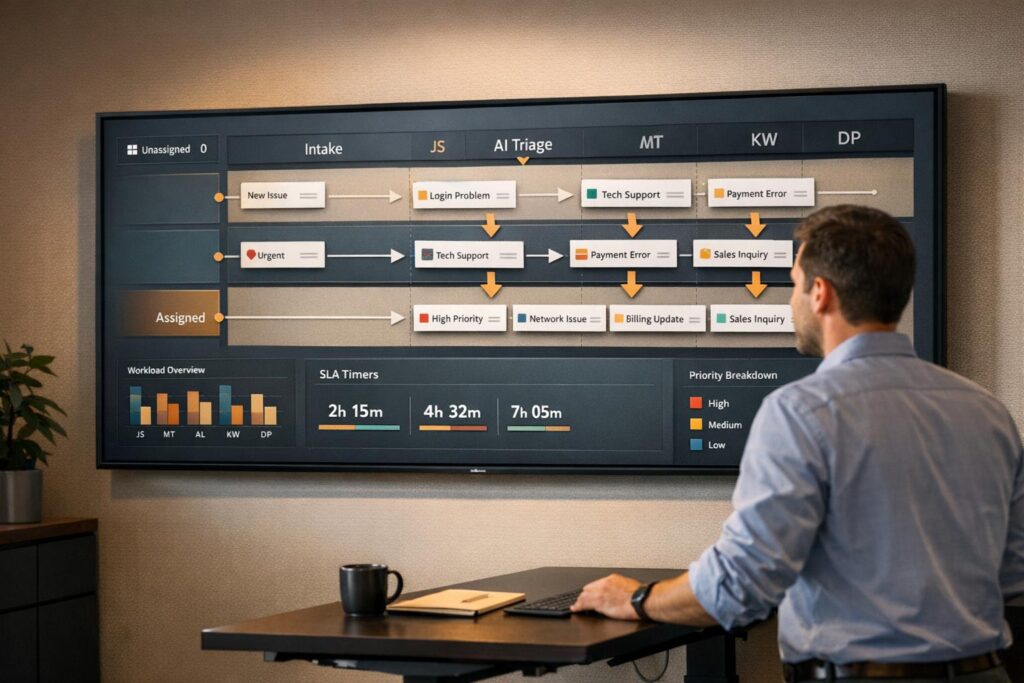
Unowned tickets in shared inboxes can delay customer responses, hurt team efficiency, and damage trust. To fix this, you need clear ownership rules and automated systems to assign tickets effectively. Here’s how:
- Define roles and responsibilities: Match agents to cases based on skills, expertise, and workload.
- Automate ticket assignments: Use rules or AI to route tickets by issue type, priority, or customer tier.
- Monitor and adjust: Use dashboards to track unassigned tickets and update rules regularly.
- Leverage AI: AI tools analyze ticket context and urgency, ensuring the right agent handles the case.
For example, Wolseley Canada handled 7,000+ monthly support emails by automating ticket routing, improving response times and SLA compliance. Clear rules and AI-driven systems ensure accountability, faster resolutions, and better customer experiences.
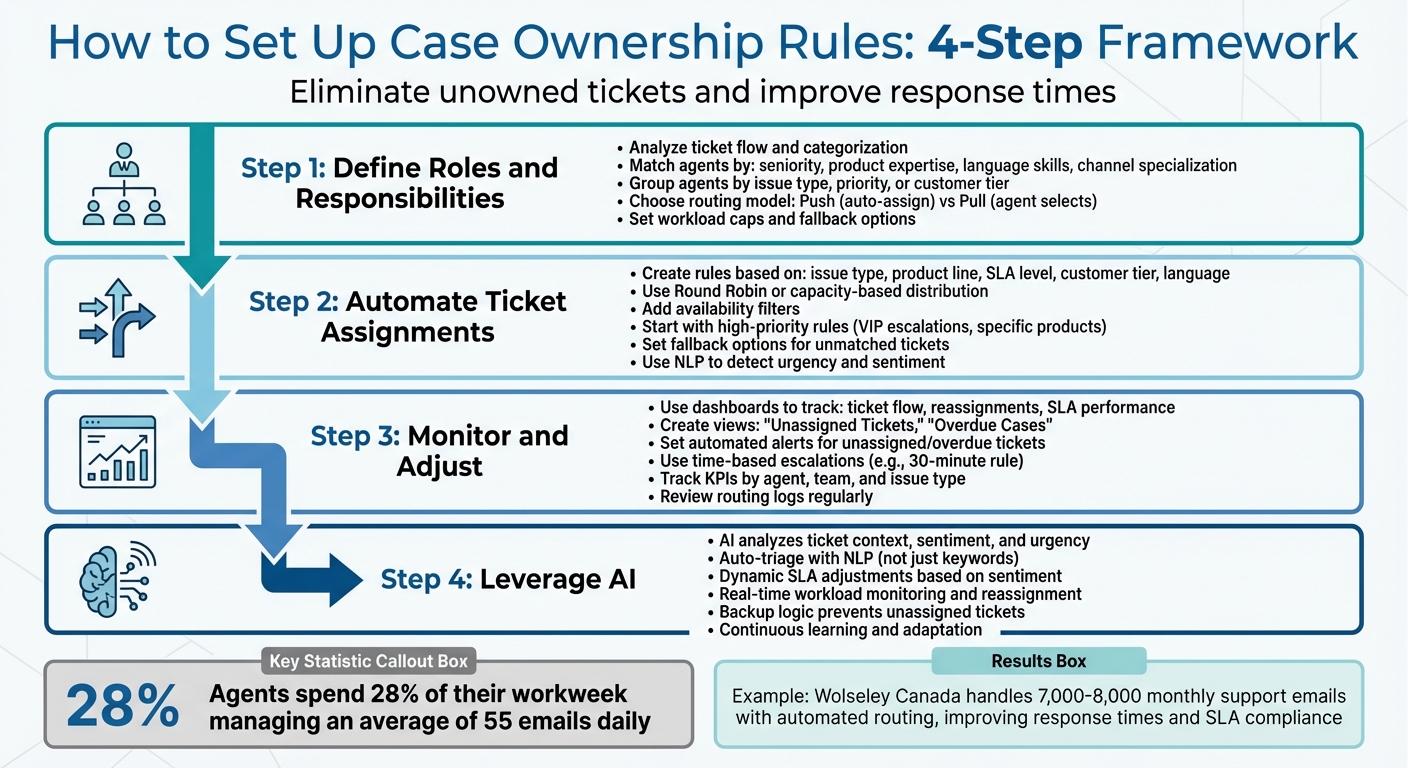
4-Step Framework for Setting Up Case Ownership Rules in Shared Inboxes
Use tags in inbox to assign tickets to agents
Problems Caused by Unowned Tickets in Shared Inboxes
Unowned tickets create a cascade of inefficiencies. When cases remain unassigned, they not only undermine customer trust but also disrupt team workflows, causing ongoing delays and missed opportunities.
How Unowned Tickets Affect Customer Experience and Retention
When no one takes ownership of a ticket, customers often find themselves repeating the same information as their requests bounce from one team to another. This extra effort can frustrate customers, especially in B2B settings where clients expect tailored support for complex products. Without a clear owner, tickets can sit in queues indefinitely, leading to missed SLAs, slower responses, and unresolved critical issues. For high-value accounts, these delays can damage trust and even jeopardize contract renewals, directly impacting customer satisfaction and loyalty.
"When customers connect quickly with an agent who has the right skills and context, their effort is minimized… This is a major driver of loyalty."
– Nooshin Alibhai, CEO, Supportbench
The problems don’t stop with customers – internal teams feel the strain too.
Internal Inefficiencies and Team Frustration
Unowned tickets wreak havoc on internal processes. In shared inboxes without clear assignments, the "bystander effect" often takes hold – team members assume someone else will handle the issue, and as a result, no one does.
Manual task selection only makes things worse. Agents often gravitate toward simpler cases, leaving the tougher ones to pile up. This approach not only delays resolutions but also leads to duplicate responses, creating confusion and wasting valuable time.
Consider this: agents spend about 28% of their workweek managing an average of 55 emails daily. That’s a staggering amount of time lost to inefficiencies. Meanwhile, managers are stuck manually sorting through queues and assigning tasks, leaving critical information siloed in individual inboxes. The result? Uneven workloads – some agents are overwhelmed while others are underutilized. This imbalance can lead to burnout for some and frustration across the team.
"Put the wrong person on the wrong case and you get slower resolution, more transfers, and frustrated customers. Put too much work on a few ‘heroes’ and you burn them out while others sit underutilized."
– Ryan Radcliff, Director of Product Marketing, SupportLogic
How to Set Up Case Ownership Rules
Assigning clear ownership rules ensures every ticket is routed to a specific agent or team, reducing delays and improving accountability.
Define Team Roles and Responsibilities
Start by analyzing how tickets move through your system. Look at where they originate, how they’re categorized, and who handles them. This process will help you spot bottlenecks or misrouted cases.
Next, match agents to the types of cases they’re best equipped to handle. Consider factors like seniority, product expertise, language skills, and channel specialization. For example, senior agents might handle escalations, while newer team members focus on routine inquiries. Group agents logically – by issue type (e.g., billing vs. technical support), ticket priority, or customer tier.
You’ll also need to decide between two routing models: push (the system assigns tickets automatically) or pull (agents pick tickets from a shared queue). Push models work well for large teams managing high volumes, while pull models suit smaller teams handling tickets one at a time. To prevent burnout, set workload caps and establish fallback options for when agents are unavailable or at capacity.
For example, automated ticket routing has been shown to improve both visibility and SLA compliance.
"The ticketing system assisted us in resolving instances that were long overdue and in providing the staff with a smooth platform experience."
– Eilis Byrnes, Customer Service and Process Improvement Manager, Wolseley Canada
Once roles are defined, you can move on to automating ticket assignments.
Configure Automated Assignment Rules
With team responsibilities mapped, create rules that automatically assign tickets based on specific attributes. These rules can trigger assignments based on factors like issue type, product line, SLA level, customer tier, or preferred language. For instance, you might route billing-related tickets to Finance or prioritize VIP customers in the "Premier" tier.
To balance workloads, use Round Robin or capacity-based rules. Include availability filters so tickets only go to agents who are online and ready to respond.
Start with high-priority rules, such as automating VIP escalations or routing inquiries about specific products. Gradually build more complex systems as needed. Match tasks to agent skills by considering certifications and technical expertise, which can improve first-contact resolution rates. Don’t forget to set fallback options – like default queues for tickets that don’t meet specific criteria or when primary agents are unavailable.
Advanced tools, such as natural language processing (NLP), can detect urgency or sentiment in tickets. For instance, in B2B scenarios, tickets from a specific company can be routed directly to their assigned Account Manager.
"AI automates the bulk of routine categorization, prioritization, and routing, freeing human oversight for exceptions, complex edge cases, quality checks, and managing overall workflow performance."
– Nooshin Alibhai, Founder and CEO, Supportbench
Set Up Notifications and Dashboards for Visibility
Visibility is key to ensuring your rules work as intended. Use dashboards to monitor ticket flow, reassignments, and SLA performance. Create specific views like "Unassigned Tickets" or "Overdue Cases" to identify ownership gaps quickly.
Set up automated alerts for unassigned or overdue tickets to maintain accountability. Use time-based automations as safety nets – for example, escalate tickets that remain untouched for 30 minutes. Assign tags to auto-assigned or escalated tickets to make tracking easier.
Use KPI scorecards to track performance by agent, team, or issue type. This transparency helps maintain individual accountability. Reporting tools can also monitor agent capacity, ensuring top performers aren’t overloaded, which could lead to missed tickets. Leverage AI-powered sentiment analysis to flag tickets with negative tones or urgent language, alerting leadership immediately.
Regularly review routing logs and dashboards. As team structures evolve and ticket volumes change, your rules should be updated to stay effective.
sbb-itb-e60d259
Using AI to Automate Ownership and Reduce Gaps
AI takes the guesswork out of ticket assignment by ensuring every case is routed to the right agent instantly. Traditional rule-based systems often stumble when faced with vague language, like misspelled product names or unclear issue descriptions. AI, however, excels in these situations by understanding the context, sentiment, and urgency of each ticket. This capability eliminates delays and ensures tickets don’t fall through the cracks. By building on existing automated rules, AI strengthens ownership and keeps the process seamless.
AI-Powered Auto-Triage and Prioritization
With Natural Language Processing (NLP), AI reviews ticket content to categorize cases based on their actual context, not just keywords. It identifies product names, issue types, and customer sentiment, applying precise tags to each case. For example, AI can pick up on a critical production outage buried in a subject line like "quick question", something a traditional system might miss entirely.
AI also determines priority by analyzing sentiment, urgency-related keywords, and CRM data. This ensures that urgent cases automatically get flagged and sent to agents with the right expertise.
"AI cuts through the noise to identify truly urgent issues requiring immediate attention, regardless of how poorly the initial request might have been phrased or categorized by the user."
– Nooshin Alibhai, Founder and CEO, Supportbench
AI even adjusts SLAs dynamically based on the tone or intent it detects in a ticket. For instance, if a ticket is flagged as "Very negative" through sentiment analysis, the system tightens response deadlines and routes it to agents skilled in de-escalation. This approach ensures critical issues are addressed promptly while less urgent cases are handled in due course.
Real-Time Monitoring and Reassignment
AI doesn’t stop at triage – it continuously monitors ticket distribution to refine the process. It evaluates agent availability, backlog complexity, and workload, factoring in not just the number of tickets but also their priority and status. This real-time assessment helps prevent burnout by distributing cases more evenly across the team.
When an agent reaches their limit or becomes unavailable, AI quickly reassigns unowned tickets to backup teams. It also tracks follow-ups, escalating priority when needed. Tickets are routed to agents in overlapping time zones, enabling real-time communication and smoother resolutions.
Backup logic ensures no ticket is left unassigned. If a specialist isn’t available, the system moves the ticket to a default queue or overflow team. This eliminates the frustrating "ticket tennis" problem, where cases bounce between teams due to misrouting.
Case Study: Supportbench AI Features in Action
In June 2025, Wolseley Canada, led by Customer Service and Process Improvement Manager Eilis Byrnes, adopted Supportbench to handle 7,000 to 8,000 support emails per month.
By using Supportbench’s AI-driven ticket routing, which considers case type and client profile, Wolseley Canada centralized its ticket management and resolved long-standing support challenges. Predictive CSAT scoring allowed the team to identify at-risk cases even before customers submitted surveys, while dynamic SLA management ensured faster responses for high-priority issues during critical times.
"The ticketing system assisted us in resolving instances that were long overdue and in providing the staff with a smooth platform experience."
– Eilis Byrnes, Customer Service and Process Improvement Manager, Wolseley Canada
Supportbench’s AI Copilot further streamlined workflows by summarizing past interactions and suggesting next steps, enabling agents to resolve cases faster without increasing staff. The combination of intelligent triage, real-time reassignment, and predictive insights gave Wolseley Canada complete operational visibility, eliminated unowned tickets, and transformed their support system into an efficient, AI-powered solution.
Best Practices for Ongoing Improvement
Setting up case ownership rules isn’t a one-and-done task. As your team grows, product offerings expand, and customer expectations shift, the rules you once relied on can become outdated. That’s why regular reviews are essential to keep your workflows efficient and your team ready to handle evolving challenges.
Review Rules and Workflows Regularly
Take a close look at your assignment rules every quarter to catch potential issues before they disrupt operations. This helps keep your support system flexible and aligned with your current needs. Keep an eye on key metrics like reassignment rates, resolution times, and SLA compliance through dashboards. If tickets are bouncing between teams or sitting idle, it’s a sign your routing logic needs immediate adjustment.
Before rolling out any updates, test the new rules with real tickets. This scenario testing helps identify conflicts and ensures no cases are left unassigned. When your organization undergoes changes – like launching new products or restructuring teams – update your skills ontology to reflect your agents’ current expertise. Grouping agents by region or product can simplify routing adjustments, making the process smoother for entire teams rather than individuals.
Train and Support Your Team
Once your rules and workflows are updated, it’s crucial to make these changes clear to your team. Transparency in rule logic helps team leads and agents understand how assignments work, which boosts accountability and reduces confusion. For new hires, consider grouping them into smaller, virtual teams with limited assignments. This prevents them from feeling overwhelmed as they get familiar with the system.
"When agents can’t predict how tickets are assigned, they may feel disconnected from the routing logic and goals."
– Nooshin Alibhai, Founder and CEO, Supportbench
Use internal ticket comments as teaching tools for junior staff. These notes can guide them through tricky conversations without the customer seeing the back-and-forth. Over time, as agents gain experience, their skill tags can be updated based on real performance data, allowing their responsibilities to grow naturally.
Use Feedback to Improve Processes
Your frontline agents are often the first to spot edge cases that automation might miss. Encourage them to flag misrouted tickets or rules that don’t make sense. Their feedback is invaluable for refining your system and addressing issues that data alone can’t catch.
"AI isn’t ‘set it and forget it.’ Monitor the accuracy of AI-driven categorization, prioritization, and routing. Provide feedback to the system… and refine configurations based on performance and changing business needs."
– Nooshin Alibhai, Founder and CEO, Supportbench
If you’re leveraging AI for routing, stay actively involved in monitoring its performance. Provide feedback to improve its ability to adapt to shifting customer language and emerging patterns. Keep an eye on metrics like reopen rates and CSAT scores to ensure your adjustments are genuinely improving customer experiences – not just speeding up ticket resolution. By combining regular reviews, clear team communication, and actionable feedback, you can create a support operation that’s both efficient and adaptable.
Conclusion
Unowned tickets can wreak havoc on both customer satisfaction and team morale. When no one takes responsibility for a case, response times stretch, SLA compliance falters, and trust in your service erodes. The answer lies in shifting from manual, pull-based systems to automated, push-based routing, ensuring every ticket is assigned as soon as it arrives.
To achieve effective case ownership, start by defining clear team roles and implementing smart assignment rules. These rules should account for agent skills, current workloads, and the complexity of each case. But static rules alone won’t cut it – AI-powered routing changes the game by analyzing factors like sentiment, urgency, and intent rather than relying on rigid keyword matches. This deeper level of understanding ensures critical issues are addressed promptly, even when customer language is unclear. The result? Faster resolutions and stronger customer relationships.
Real-world examples from 2025 highlight the impact of AI-driven routing on ticket management. As Nooshin Alibhai, Founder and CEO of Supportbench, explains:
"Automated ticket routing isn’t just about saving time – it’s about getting every customer the right help, at the right moment".
FAQs
How can AI help assign tickets more effectively in shared inboxes?
AI is revolutionizing how tickets are assigned in shared inboxes by automating the process and ensuring they land with the right agents quickly and accurately. With the help of natural language processing (NLP), AI can analyze ticket content to understand key details like intent, urgency, and context. This allows it to classify and prioritize requests without human intervention, cutting down on manual work, reducing mistakes, and ensuring every ticket gets the attention it needs.
Beyond just sorting and prioritizing, AI takes other factors into account, such as the type of issue, customer history, sentiment, and even the expertise of available agents. By doing this, it pairs tickets with the team members best equipped to handle them. AI also dynamically adjusts assignments based on factors like agent workload and skill sets, ensuring tickets are resolved efficiently. This not only speeds up response times but also enhances customer satisfaction. Over time, AI continues to learn and refine its routing strategies, making your support system smarter and more efficient with each interaction.
How can I set up automated ticket assignment rules to avoid unassigned tickets?
To prevent tickets from going unassigned, implement automated ticket assignment rules that direct incoming requests to the appropriate agent or team. Begin by setting up clear criteria based on factors like the type of issue, its urgency, or details about the customer. For instance, tickets with certain keywords or originating from specific channels can be routed to specialized teams, cutting down on manual work and speeding up response times.
Adding AI-powered tools takes this a step further by analyzing ticket content for intent, sentiment, and complexity. This approach enables smarter prioritization and routing, which is especially useful in environments with a high volume of requests. By blending rule-based workflows with AI-driven triage, you can ensure faster resolutions, improve accountability, and create a better experience for your customers.
What are the effects of unowned tickets on customer satisfaction and team performance?
Unassigned tickets can throw a wrench into both customer satisfaction and team efficiency. When no one takes ownership of a ticket, it risks slipping through the cracks, leading to delayed responses and slower problem-solving. For customers, this can mean frustration, eroded trust, and a disappointing experience overall.
For teams, unowned tickets can create chaos. Without clear responsibility, confusion grows, miscommunication becomes more likely, and time gets wasted on duplicated work – or worse, urgent issues might be ignored entirely. By setting clear ownership rules, teams can stay accountable and keep operations running smoothly.
Related Blog Posts
- How do you prevent duplicate tickets and “email thread chaos” in customer support?
- How do you build an escalation framework that doesn’t overload Engineering?
- How do you manage backlog aging and prevent “zombie tickets”?
- How do you design a support queue strategy (triage, routing, and ownership rules)?






