


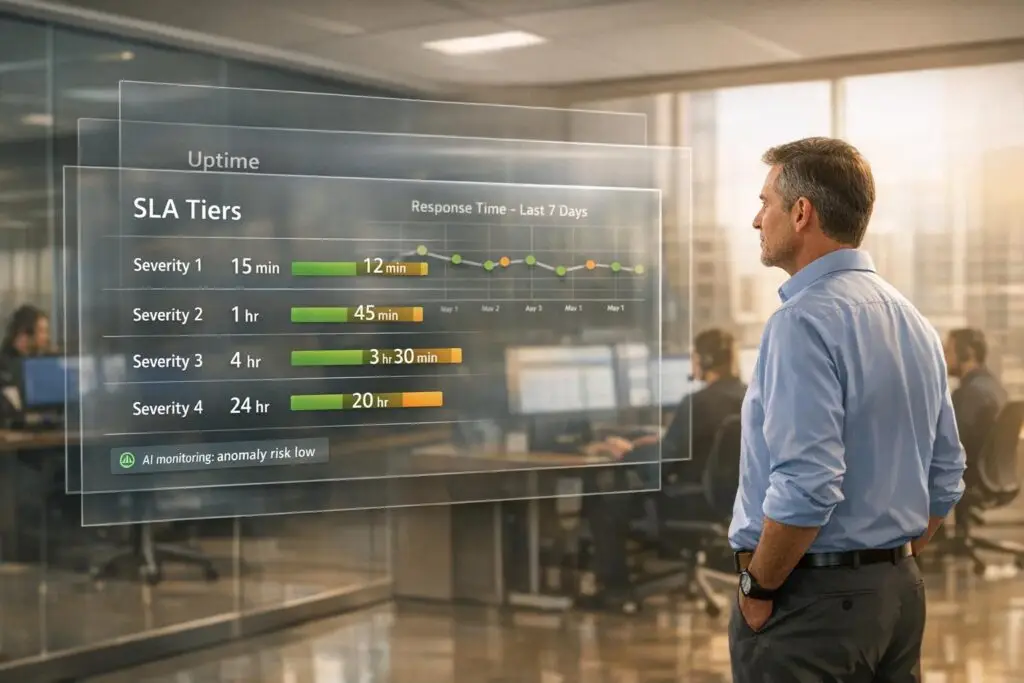
Want to build SLAs (Service Level Agreements) that customers trust and teams can meet? Here’s how:
- Understand Customer Needs: Use historical data and direct feedback to identify what customers value most, like response and resolution times.
- Set Realistic Targets: Avoid overpromising. Define severity levels (e.g., Urgent, High, Normal) with appropriate response times.
- Use SMART Metrics: Ensure SLA goals are Specific, Measurable, Achievable, Relevant, and Time-bound.
- Leverage AI for Monitoring: AI tools can track SLA performance, predict breaches, and optimize workloads in real-time.
- Train and Test: Pilot SLAs internally, gather feedback, and train teams to ensure targets are achievable.
- Continuously Improve: Use feedback loops, root cause analysis, and AI insights to refine SLAs over time.
Key takeaway: SLAs should balance customer expectations with operational realities. Start small, test thoroughly, and evolve your approach to ensure success.
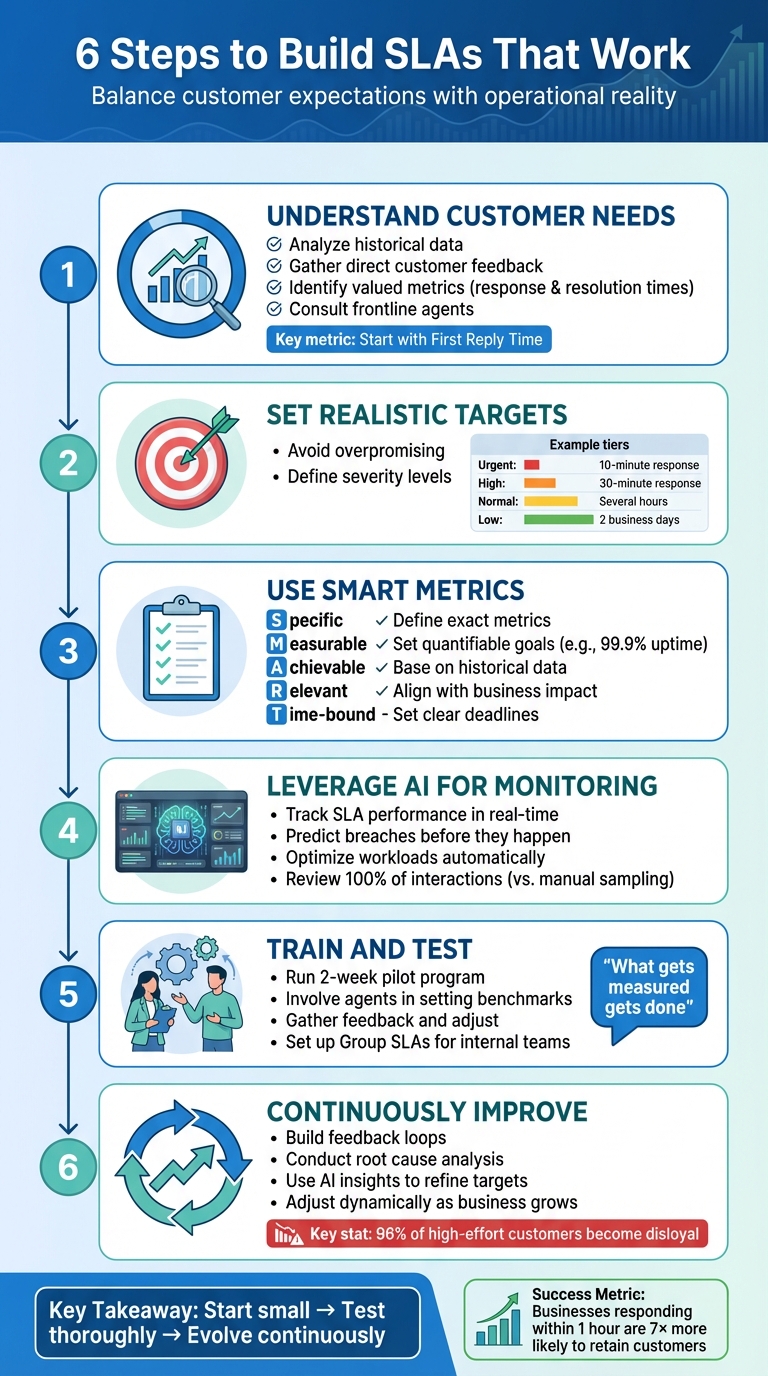
6-Step Framework for Building Trustworthy SLAs That Teams Can Meet
Understanding Customer Needs and Defining SLA Scope
Analyzing Customer Priorities and Case Types
Before setting SLA targets, it’s essential to figure out what your customers value most. Dive into historical data to spot common requests and delays. Then, talk to customers and frontline agents to confirm which metrics truly matter to them. Your support agents, in particular, can provide valuable insights into what’s realistic and what might set the team up for unnecessary challenges.
A great starting point is First Reply Time. It’s simple to track, highly appreciated by customers, and keeps teams accountable without creating confusion. Once you have this baseline, you can layer in additional metrics based on what your data reveals about customer priorities.
From there, organize these insights into clear severity levels and scopes to create precise SLAs.
Defining SLA Scope and Severity Levels
Not every support request demands the same urgency. For instance, a critical outage for an enterprise client is far more pressing than a feature-related question from a trial user. This is where severity levels come into play – they help you prioritize cases and set appropriate response times.
Many teams use a tiered system with categories like Urgent, High, Normal, and Low. For example, an urgent issue might require a 10-minute response, while a normal request could allow for several hours. The trick is to define these levels clearly using criteria like ticket forms, organization fields, or custom status categories in your system.
It’s just as important to outline exclusions. Be upfront about factors like maintenance windows, delays caused by waiting for customer responses, or channels outside the SLA’s scope (e.g., social media support). This clarity helps manage expectations and avoids misunderstandings.
To ensure your SLAs are realistic, consider setting up Operational Level Agreements (OLAs) between internal teams, like Engineering or Finance. These agreements define how internal departments support the customer-facing team, making it easier to meet external SLA commitments.
Once you’ve established clear categories and criteria, the next step is to align these metrics with your broader business goals.
Aligning SLAs with Business Goals
SLAs should directly support your business objectives – whether that’s improving customer retention, protecting revenue, or scaling your support operations. For example, when Noble Schools introduced automated SLA tracking in 2025, they hit 100% compliance with their two-business-day response goal.
The link between SLA performance and business outcomes is straightforward. For premium customers, you might offer faster response times, such as a 30-minute target, while basic plans might allow for several hours. This ensures SLA targets are not only achievable but also contribute to critical business goals.
Before rolling out SLAs publicly, test them internally. This gives you a chance to confirm that your team can consistently meet the targets under regular conditions.
"We don’t gate support behind premium plans. Whether you’re on a free trial or our highest tier, you get the same fast, human-first help." – Akshay, Hiver
Setting Realistic and Measurable SLA Metrics
Using SMART Criteria for SLA Metrics
The SMART framework is a reliable method for crafting SLA metrics that are both clear and achievable. Here’s how it works: Specific metrics pinpoint exactly what you’re measuring – such as First Response Time or Resolution Time. Measurable metrics allow for quantifiable goals, like achieving 99.9% uptime or responding to critical issues within 4 hours. Achievable goals rely on historical data. For instance, if your team’s current average response time is 5 hours, setting a target of 4.5 hours challenges them without causing burnout. Relevant metrics focus on what truly impacts your business, such as uptime for SaaS platforms or faster responses for high-value clients. Finally, Time-bound metrics define clear deadlines, specifying whether they apply to business hours or calendar hours.
Once you’ve established these SMART criteria, the next step is to carefully select and balance key metrics like response and resolution times.
Defining Key Metrics: Response and Resolution Times
Response time is all about creating a positive first impression – it reassures your customers that their concerns are being addressed promptly. On the other hand, resolution time showcases your team’s ability to effectively solve problems, which is critical to fulfilling SLA commitments.
"Timeliness and speed have a direct correlation with satisfaction. A first response perceived as fast can set you on the right track for a positive first impression." – Luis Hernandez, VP of Customer Success, Geckoboard
Avoid falling into the "watermelon SLA" trap – where response targets are met, but resolution quality suffers, leaving the service looking good on the surface (green) but failing underneath (red). To prevent this, tier your metrics by issue severity. For example, a P1 critical issue might demand a 15-minute response and a 4-hour resolution, while a P4 low-priority request could allow for a 2-hour response and a 2-business-day resolution. This approach ensures your team prioritizes what matters most without sacrificing quality for speed.
Industry benchmarks can serve as a helpful guide. For instance, most SaaS providers aim for an uptime of at least 99.5%, while top-tier providers often guarantee 99.9%. For critical issues, resolution times typically range from 4 to 6 hours. While these benchmarks offer a starting point, your actual targets should align with your team’s capabilities and your customers’ expectations.
Incorporating Dynamic Adjustments and Flexibility
Rigid SLAs often fail to reflect real-world challenges. Dynamic SLAs, on the other hand, adapt based on the situation – tightening timelines for renewal-related cases or pausing the clock when waiting on customer input. This flexibility helps avoid penalties for delays beyond your control while still holding your team accountable.
To make this work, define targets based on active operation times and include pausable metrics for cases that are pending or on hold. It’s also helpful to incorporate error budgets that account for occasional misses.
"It’s both unrealistic and undesirable to insist that SLOs will be met 100% of the time: doing so can reduce the rate of innovation and deployment, require expensive, overly conservative solutions, or both." – Google SRE Book
Platforms like Supportbench make implementing dynamic SLAs easier by automatically adjusting response times for high-priority cases, such as those tied to renewals, without requiring manual updates.
Implementing SLA Monitoring with AI Automation
Real-Time SLA Tracking and Prioritization
When you’re juggling dozens of active tickets, manual tracking just doesn’t cut it. That’s where AI-powered tools step in, offering live timers and risk indicators right within each ticket. These tools send out alerts at key milestones – 25%, 50%, and 75% of SLA time – so your team stays on top of priorities. Even better, AI leverages historical data and current workloads to predict potential SLA breaches. It dynamically assigns cases based on complexity and agent capacity, helping to keep bottlenecks at bay.
Traditional manual QA can only review a fraction of interactions, but AI-powered QA changes the game. Using Natural Language Processing and sentiment analysis, it reviews 100% of interactions, providing a much clearer picture of performance.
This level of real-time insight also lays the groundwork for creating dashboards that are tailored to the needs of every support role, ensuring transparency and better decision-making.
Building Transparent SLA Reporting Dashboards
AI-driven tracking doesn’t just stop at managing tickets – it also powers dashboards that transform raw data into actionable insights. These dashboards are designed to serve everyone, from frontline agents to senior leaders.
- For frontline agents: Dashboards offer real-time, task-focused views, highlighting tickets that are close to breaching SLAs with live countdown timers.
- For managers: They provide an overview of compliance trends and breach rates to help with team oversight.
- For senior leaders: Dashboards focus on long-term patterns to inform strategic decisions.
"Configuration is only 20% of success. The remaining 80% is how you see, analyze, and use this data to make decisions."
- Alina Kurinna, Product Marketer, SaaSJet
Daily reviews are essential for staying ahead of SLA compliance issues. Start by filtering for the most overdue tickets. Visual tools, like pie charts showing the status of tickets (Running, Paused, Met, Breached), make it easy to spot when teams are nearing their limits. To get a true sense of productivity, configure dashboards to exclude "waiting on customer" time from calculations.
Platforms like Supportbench simplify this process with pre-built, role-specific dashboard views. Their dynamic SLA tracking automatically adjusts to the context of each case. For instance, response times tighten as customer renewals approach – all without requiring manual tweaks.
The table below highlights the differences between traditional static SLA metrics and modern AI-enhanced dynamic metrics.
Table: Comparing Static vs. Dynamic SLA Metrics
| Feature | Static SLA Metrics | Dynamic SLA Metrics (AI-Enhanced) |
|---|---|---|
| Definition | Fixed time targets (e.g., 4-hour resolution) regardless of context. | Flexible targets that adapt based on ticket complexity, sentiment, or workload. |
| Advantages | Easy to understand and set up in basic tools. | Reflects real-world conditions, accounting for urgency and "waiting" states. |
| Disadvantages | Can result in misleading metrics during workload spikes. | Requires advanced tools and may be less intuitive for customers. |
| Best Use Case | Routine, high-volume tasks with predictable workflows. | Complex cases in B2B environments with varying technical challenges. |
| Alerting Style | Threshold-based (e.g., alert at 80% of SLA time). | Predictive (e.g., alert based on agent capacity and ticket sentiment). |
sbb-itb-e60d259
Training Teams and Continuously Optimizing SLAs
Pre-Launch SLA Testing and Team Training
Before launching your SLA (Service Level Agreement), it’s essential to test it internally. This ensures your team can consistently meet the outlined targets. A great way to do this is by involving agents in setting benchmarks to avoid setting goals that feel unattainable.
Start with a two-week pilot. During this time, track performance, gather feedback, and tweak the targets as needed. This process can also highlight whether specific ticket types require different response times or if your team needs extra training on certain tools.
"By holding agents accountable to specific standards, you’ll see those standards met because what gets measured gets done." – Stella Inabo, Contributing Writer, Zendesk
Training should also include internal accountability through Group SLAs, which monitor how long various departments – like finance, engineering, or sales – hold onto a ticket before forwarding it. When agents understand the entire ticket lifecycle and know where delays usually happen, they can escalate issues more effectively, keeping customer-facing SLAs intact.
Once the pilot confirms the SLA’s feasibility, use structured feedback to fine-tune it further.
Building Feedback Loops for SLA Improvement
SLAs aren’t static – they need to evolve as customer expectations and business needs change. Regular reviews with stakeholders, including customers, agents, and business leaders, can help identify outdated or ineffective parts of your SLA.
When breaches occur, conduct a root cause analysis to determine whether the issue stems from gaps in training, low ticket deflection, or larger systemic problems like unexpected downtime. This approach emphasizes solving problems rather than assigning blame.
"The first rule of managing an SLA breach is not blaming people, but blaming a problem. Solve the problem and you avoid a crisis." – Amy Reinholds, Senior Technical Content Marketing Manager, New Relic
To prevent breaches, set up automated alerts that notify supervisors when an SLA is at risk of being violated. This allows managers to shift resources or escalate tickets before they miss their deadlines. At the same time, collect feedback from both agents and customers through CSAT (Customer Satisfaction) and CES (Customer Effort Score) surveys. Considering that 96% of customers who face high-effort interactions become disloyal, pinpointing where friction occurs is critical to improving your SLA performance.
Use these feedback loops to adjust your SLA dynamically, incorporating insights from AI tools.
Measuring SLA Success and Iterating with AI Insights
AI can transform how you monitor and improve SLAs over time. By proactively identifying potential breaches, AI helps you address issues before they escalate. It also provides insights into which types of cases consistently challenge your SLA targets.
Modern platforms like Supportbench utilize AI to offer instant coaching feedback by analyzing tickets for tone, empathy, and accuracy. Agents receive scorecards that help them stay aligned with SLA expectations. Additionally, AI can predict ticket surges, enabling managers to staff appropriately during peak periods.
"Measuring customer service is not just about tracking numbers – it is about understanding the experiences behind those numbers and making meaningful improvements." – Eric Klimuk, Founder and CTO, Supportbench
AI insights create a continuous feedback loop. For example, businesses that respond within the first hour are seven times more likely to retain customers. If your SLA doesn’t reflect this, you can adjust response time targets accordingly. Similarly, if AI identifies recurring issues with specific ticket categories breaching SLAs, you can either revise the targets or provide additional training for those areas. By relying on data, you can ensure your SLAs remain challenging yet achievable as your business grows.
Conclusion
Set SLAs that foster trust by balancing ambitious goals with the realities of your operations. The secret lies in treating SLAs as dynamic agreements – not fixed promises. These agreements should evolve through ongoing testing, feedback, and insights powered by AI. By including agents in the process of setting benchmarks, defining clear exceptions, and using internal SLAs (Group SLAs) to manage handoffs, you create a structure that safeguards both customer satisfaction and team well-being. This adaptable approach supports the continuous refinement of SLAs explored throughout this article.
Modern AI tools, as discussed earlier, bring a new dimension to SLA management. They enable proactive breach prediction and automated triage, helping your team address potential issues before they escalate. This shift from reactive to proactive management has a direct and positive impact on your business outcomes.
"Measuring customer service is not just about tracking numbers – it is about understanding the experiences behind those numbers and making meaningful improvements." – Eric Klimuk, Founder and CTO, Supportbench
Your SLAs should mirror the customer journey, not just showcase favorable metrics on a dashboard. Avoid falling into the "watermelon effect", where metrics look green on the surface but hide a poor user experience underneath. To counter this, combine technical metrics like uptime with experience-focused indicators such as the Customer Effort Score (CES) to get a more complete and accurate view.
FAQs
How does AI help improve SLA compliance and monitoring?
AI plays a key role in improving SLA compliance and monitoring by automating essential tasks and offering real-time updates. It can keep track of deadlines, send timely alerts, and adjust task priorities to ensure response and resolution times are consistently met. This proactive method helps teams address potential SLA breaches before they escalate, allowing for quick and effective action.
Additionally, AI simplifies request categorization and routes issues based on their urgency and complexity to the appropriate teams. With automated dashboards and analytics, teams gain ongoing visibility into SLA performance, making it easier to fine-tune workflows and allocate resources efficiently. By turning SLA management into a proactive, data-focused process, AI helps maintain compliance and strengthens customer confidence.
What makes dynamic SLAs more effective than static ones?
Dynamic SLAs stand out because they adjust to real-time data and customer behavior, enabling support teams to prioritize tasks and modify response times as situations evolve. This adaptability helps avoid SLA breaches, streamlines operations, and boosts customer satisfaction.
Unlike static SLAs that depend on fixed metrics, dynamic SLAs leverage predictive analytics and AI to maintain ongoing performance optimization. This approach ensures resources are used efficiently and service quality stays reliable, even in unpredictable or complex circumstances. By keeping pace with changing customer expectations, dynamic SLAs foster trust and provide a more dependable support experience.
How can you create SLAs that meet customer expectations and align with business goals?
To create SLAs that align with your business goals and meet customer expectations, start by setting clear and measurable performance metrics. These could include things like response times, resolution times, or specific quality benchmarks. The key is to ensure these metrics reflect your business priorities – whether that’s boosting customer satisfaction, improving efficiency, or increasing revenue – while also focusing on what matters most to your customers during support interactions.
It’s important to regularly review and adjust your SLAs based on performance data and customer feedback. This helps keep them relevant and achievable. Using AI-powered tools can make this process smoother by providing real-time monitoring of SLA performance and offering insights to make proactive adjustments when needed. Open and ongoing communication with your support team and customers is equally critical. This transparency builds trust and ensures that your SLAs continue to drive both operational success and a better customer experience.






