



Zendesk’s rising costs and complexity have left many B2B teams searching for alternatives. High pricing tiers, fragmented workflows, and limited AI capabilities make it less appealing for teams managing long-term, multi-stakeholder support. Here are six non-US platforms offering better solutions with features like AI automation, account management, and predictable pricing:
- Supportbench (UK): Simplifies B2B workflows with AI tools like predictive analytics and dynamic SLAs. Starts at $32 per agent/month.
- Pylon: Focuses on account health tracking and AI-driven insights. Pricing starts at $59 per seat/month, with modular AI add-ons.
- Plain: API-first platform for technical teams, offering AI tools for triage and knowledge base creation. Costs $39 per seat/month.
- Freshdesk: Affordable and user-friendly, with AI automation and omnichannel support. Plans begin at $19 per agent/month.
- Zoho Desk: Budget-friendly option with CRM integration. Pricing starts at $7 per agent/month.
- Jira Service Management: Ideal for technical teams linking support to development workflows. Plans start at $20 per agent/month.
Each platform addresses specific challenges like AI-driven ticket resolution, account-level insights, and cost predictability. Below is a quick comparison to help you choose the right tool for your team.
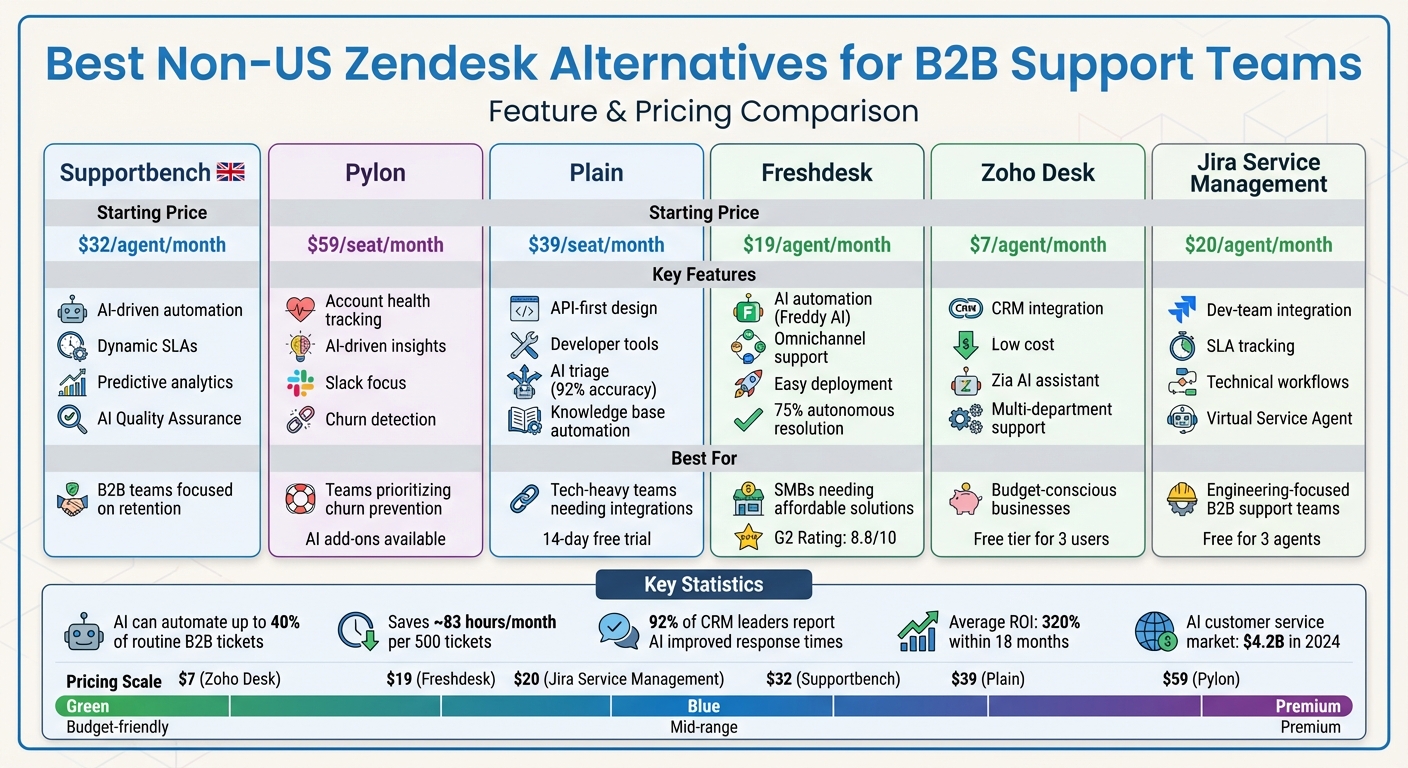
Non-US Zendesk Alternatives Comparison: Features, Pricing & Best Use Cases for B2B Support Teams
Quick Comparison
| Platform | Key Features | Starting Price (per agent/month) | Best For |
|---|---|---|---|
| Supportbench | AI-driven automation, dynamic SLAs | $32 | B2B teams focused on retention |
| Pylon | Account health tracking, Slack focus | $59 | Teams prioritizing churn prevention |
| Plain | API-first design, developer tools | $39 | Tech-heavy teams needing integrations |
| Freshdesk | AI automation, omnichannel support tools | $19 | SMBs needing affordable solutions |
| Zoho Desk | CRM integration, low cost | $7 | Budget-conscious businesses |
| Jira Service Mgmt | Dev-team integration, SLA tracking | $20 | Engineering-focused B2B support teams |
Choose the platform that aligns with your team’s needs, whether it’s AI automation, cost savings, or technical integrations.
sbb-itb-e60d259
1. Supportbench
Supportbench is a UK-based platform tailored for complex B2B post-sale support operations. Unlike traditional helpdesk tools, it combines multiple essential functions – ticketing, AI automation, analytics, SLAs, and a comprehensive 360° customer view – into a single, streamlined workflow. This approach directly addresses the inefficiencies of support systems not designed for B2B. On top of that, its advanced AI features make managing support operations even smoother.
AI Capabilities
Supportbench’s AI, powered by GPT-4o, offers several smart tools that significantly improve efficiency. The AI Copilot suggests replies, prioritizes and routes tickets based on factors like topic and sentiment, and provides real-time feedback using built-in quality assurance. The AI Quality Assurance feature evaluates every ticket for empathy, tone, accuracy, and effectiveness, giving agents instant feedback and performance scorecards.
The platform also uses predictive CSAT and CES analysis to forecast scores even when surveys go unanswered. This enables teams to spot potential churn risks early. Additionally, Supportbench automatically creates knowledge base articles from resolved tickets, reducing the manual workload of building self-service resources. Beyond ticket management, Supportbench shines with its B2B account management tools.
B2B Account Management Tools
Supportbench is designed to handle the complexities of B2B relationships. It supports multi-level company hierarchies (parent-child structures) and allows custom data tables to store critical information like infrastructure details, trained personnel lists, or login credentials. Dynamic SLAs can adapt based on various factors, such as customer tier, product line, or Salesforce-synced data, ensuring that high-value or at-risk clients receive the attention they need.
For example, in March 2023, Vancouver-based Payfirma, which serves nearly 10,000 customers, used Supportbench to cut resolution times by 50% and improve first response times through real-time alerts.
Pricing Scalability
Supportbench offers straightforward pricing that grows predictably with your team. The Professional plan starts at $32 per agent per month (billed annually) and includes features like AI automation, health scoring, KPI scorecards, and free onboarding. Once a team exceeds 15 agents, the cost increases by just $2.50 per additional agent, with a maximum cap of $150 per agent. When a team reaches 60 agents, they automatically transition to the Enterprise plan at $100 per agent per month. This upgrade unlocks features like sandbox environments, white labeling, and dedicated success managers.
"Using Supportbench has provided our department with a complete client management system. Since everything is one platform, we have a clear overview of all client and team interaction." – Jonathan Pasquel, Personnel Manager
Implementation Ease
Supportbench makes getting started simple. Professional plans include free onboarding, while Enterprise customers benefit from live training and a dedicated Customer Success Manager. Its user-friendly interface and no-code automation builder allow businesses to implement the platform quickly – no IT teams or external consultants required. For companies with strict compliance needs, Supportbench even offers the option to choose their data center location for database and file storage, ensuring data residency requirements are met.
2. Pylon
Pylon takes a different approach compared to traditional ticket-focused systems by adopting an account-centric model. Instead of requiring B2B teams to conform to ticket-based workflows, it organizes all customer interactions – whether through Slack, Microsoft Teams, Discord, email, or chat – into a single, unified view. This design makes it easier for teams to manage customer accounts holistically. Backed by $50 million in funding from investors like a16z and Bain Capital Ventures, Pylon’s unique structure forms the foundation for its standout features.
AI Capabilities
Pylon leverages its unified account view to deliver powerful AI-driven tools that significantly boost support efficiency. Its AI functionality is split into two categories: AI Agents**, which can fully resolve support tickets, and **AI Assistants (copilots), which assist human agents by drafting responses and providing essential context.
The AI Copilot goes beyond simple assistance. It can create new help articles from resolved Slack threads, pinpoint gaps in knowledge base content, and translate documentation into more than 50 languages. An internal Ask AI feature allows support and success teams to query customer data directly and summarize sentiment without the need for manual searches.
The results speak for themselves: Pylon has achieved a 90% reduction in First Response Time, cutting it from 35 minutes to under 3.5 minutes. Additionally, about 50% of eligible support inquiries are resolved without human involvement. Beyond direct ticket resolution, Pylon’s AI also handles ticket triage, routes issues based on team expertise, and identifies unusual patterns in ticket volume – helping teams spot churn risks or upsell opportunities early.
B2B Account Management Tools
Pylon’s Account Intelligence feature takes customer support a step further by automatically calculating health scores that link support data to broader customer success outcomes. This helps teams proactively identify churn risks and upsell opportunities. The platform integrates seamlessly with CRMs like Salesforce, HubSpot, and Attio through bidirectional syncing, ensuring that support interactions are always aligned with the overall customer relationship.
Migrating to Pylon is designed to be smooth, with a 2-week timeline for transferring an entire year’s worth of historical data from existing systems. The platform also meets rigorous compliance standards, including SOC 2 Type II, GDPR, ISO 27001, and HIPAA certifications. These certifications make it a reliable choice for teams managing sensitive or regulated environments.
Pricing Scalability
Pylon offers flexible pricing options tailored to different needs. The core platform, Account Intelligence, and AI features are sold separately, allowing teams to customize their plans.
- Starter Plan: $59 per seat per month (billed annually) with a 3-seat minimum.
- Professional Plan: $89 per seat per month.
- Enterprise Plan: $139 per seat per month with a 7-seat minimum, which includes advanced features like Microsoft Teams integration, customer portals, and role-based access control.
AI features come at an additional cost: AI Assistants are $50 per seat per month, while AI Agents start at $100 per month, scaling based on issue volume. For teams needing Account Intelligence Premium, it’s priced at $10 per customer account per month, with a 50-account minimum. This modular pricing structure ensures that both small and large teams can find a plan that works for them.
3. Plain
Plain stands out from older platforms by offering speed and adaptability through its modern, API-focused design. Built with a GraphQL API, this developer-first support platform caters to technical B2B companies. It’s especially suited for infrastructure providers, AI frameworks, and developer tools where customers prefer support interactions via Slack or Microsoft Teams instead of outdated portals. This modern foundation also powers its advanced AI capabilities.
AI Capabilities
Plain provides two AI tools: Ari, an autonomous agent that interacts with customers across multiple channels, and Sidekick, an internal assistant that drafts replies and pulls relevant articles from the knowledge base. Its AI triage system streamlines operations by categorizing and routing incoming requests with about 92% accuracy, significantly cutting down the workload for support teams.
The platform goes beyond simple automation. It transforms resolved conversations into Help Center articles, automatically building a knowledge base that stays relevant. Additionally, its AI generates concise summaries of lengthy conversations and identifies trends across tickets to spot potential churn risks or emerging issues. For instance, Tinybird slashed its enterprise first response time from 1 hour to just 12 minutes after adopting Plain, while Voltage Park brought response times down from over an hour to just 3 minutes.
B2B Account Management Tools
Plain’s company-focused data model is designed to simplify B2B workflows. By treating companies as the primary entities, support teams can manage multiple stakeholders under a single, unified account timeline. Features like "Customer Cards" pull real-time data from internal systems, while "Thread Fields" enable custom data modeling for more complex needs. With native integrations for Slack Connect and Microsoft Teams, conversations happen where customers are already active. Plus, unlimited free viewer seats ensure product and engineering teams have visibility into support operations.
Implementation Ease
Getting started with Plain is quick and straightforward. Basic functionality can be set up in just 30 minutes, while full customization takes only 1 to 3 days. The platform is also SOC2 Type II and GDPR compliant, a refreshing departure from the lengthy deployment times that some other platforms require.
Pricing Scalability
Plain offers transparent pricing at $39 per seat per month, with costs determined solely by team size. Unlike competitors with unpredictable AI-based fees, Plain’s straightforward pricing makes it easier for growing B2B teams to budget. A 14-day free trial is available, allowing teams to explore the platform before making a commitment.
4. Freshdesk
Freshdesk stands out as an AI-driven platform designed to support B2B teams managing complex environments. Known for its ability to handle intricate account structures, it simplifies implementation while delivering powerful tools for customer support.
AI Capabilities
Freshdesk’s Freddy AI suite offers two key tools to enhance efficiency. The Freddy AI Agent autonomously manages routine tasks like order tracking, password resets, and basic troubleshooting. Meanwhile, the Freddy AI Copilot boosts agent productivity by providing real-time reply suggestions, thread summaries, and relevant knowledge base recommendations. Both tools have delivered impressive results – companies like UPayments and Digitrips reported resolving over 75% of live chat queries autonomously, reducing response times by 73%, and nearly doubling ticket handling capacity.
Keira Hayter, Sales Team Manager at Woolacombe Bay Holiday Parks, shared how Freddy AI transformed her team’s confidence:
"I had team members who weren’t comfortable at all with emails. With Freddy AI, they’ve gained so much confidence, and the quality of emails they’re sending now is remarkable".
These AI tools seamlessly integrate with Freshdesk’s account management features, helping teams tackle multi-stakeholder challenges effectively.
B2B Account Management Tools
Freshdesk simplifies complex workflows with features like Parent-Child Ticketing, which breaks down issues into smaller tasks while keeping the main ticket active until all dependencies are resolved. Linked Tickets group related issues under a central ticket, ensuring consistent updates for all stakeholders. The platform supports up to 5,000 collaborators per account and allows teams to track unique business data using Custom Objects. Additionally, Advanced SLA Management ensures prioritized responses for high-value accounts.
Implementation Ease
Freshdesk is designed for quick deployment, with a payback period of less than three months. The Enterprise plan includes a Sandbox environment for testing automation and workflows before going live. Freddy AI Agents come pre-trained on 3.5 billion interactions and adhere to key security standards like SOC 2 and GDPR. This combination of ease and security makes Freshdesk an appealing choice for businesses.
Pricing Scalability
Freshdesk offers straightforward pricing plans: Growth at $19 per agent per month, Pro at $55, and Enterprise at $89. The Pro plan includes 500 free Freddy AI Agent sessions, with additional sessions priced at $49 per 100. A free tier is also available, supporting two agents for six months.
Christophe Tomborski, Back Office Manager at Bridgestone, praised the platform’s flexibility:
"We adopted Freshdesk because it is a highly adaptable solution with metrics that allow us to track and follow up on our customers and agents efficiently".
With its pay-as-you-go model, Freshdesk offers instant upgrades and no cancellation fees, making it an excellent choice for businesses looking to scale.
5. Zoho Desk
Zoho Desk serves over 100,000 businesses worldwide, with millions relying on it daily for customer support. Known for its affordability, it’s particularly suited for managing complex B2B accounts. The platform integrates effortlessly with other tools in the Zoho ecosystem, such as Zoho CRM and Zoho Analytics, making it especially appealing for organizations already using those systems. Let’s dive into how Zoho Desk addresses the unique challenges of B2B support.
AI Capabilities
Zoho Desk’s AI assistant, Zia, handles repetitive tasks with ease. Zia can analyze sentiment to highlight frustrated customers, automatically tag and categorize incoming tickets, and suggest knowledge base articles to speed up resolutions. Its generative AI features include drafting responses, summarizing long ticket threads, and assisting in creating knowledge base content. Additionally, its predictive intelligence detects anomalies in ticket traffic, prioritizes issues based on urgency, and gauges sentiment to streamline triaging.
Jason Nichol, Vice President of Product, shared his thoughts on Zia’s impact:
"I believe that what we’ve achieved in collaboration with the Zoho Desk team has made a huge impact on how efficiently we can resolve complex requests for our clients, and it has been a major improvement for our customer experience".
B2B Account Management Tools
Zoho Desk takes its AI capabilities further with tools tailored for B2B account management. Features like parent–child ticketing allow teams to break down complex issues into smaller, manageable tasks, while ticket merging consolidates multiple inquiries into one thread. The Blueprint feature offers visual workflows to standardize processes across departments, and its integration with Zoho CRM provides account-level insights – such as stakeholder details and contract statuses – directly within the ticket interface. For organizations managing multiple brands or business units, Zoho Desk supports multi-department setups with customized workflows and service-level agreements (SLAs).
Implementation Ease
Zoho Desk is designed to be implemented faster than many other customer service platforms, with the company claiming a 50% quicker setup time. However, more intricate B2B configurations, especially those involving multi-brand requirements, may take several months to fully implement. Its user-friendly interface helps speed up onboarding. Kushagra Sahni, Chief of Staff, highlighted this benefit:
"The simplicity of the Zoho Desk UI has greatly helped my digital transformation team reduce the number of hours spent, from 5 to just 2.5 or 3 hours, in the training and onboarding of the new agents".
It’s worth noting that Zia’s AI features are not enabled by default and must be manually activated through CRM settings.
Pricing Scalability
Zoho Desk offers flexible pricing to accommodate businesses of all sizes. Plans include Express at $7 per agent per month, Standard at $14, Professional at $23, and Enterprise at $40, with annual billing reducing costs by up to 34% compared to monthly payments. A free tier is also available for up to three users, offering basic email ticketing and help center features.
In 2025, Dan Callari, Director of IT at Bob Barker Company, reported impressive results after switching to Zoho Desk, including a 20% reduction in support costs and a 20% drop in monthly case volume. While Zoho Desk boasts a solid 4.4/5 rating on G2 from 6,701 reviews, some users mention a steep learning curve due to a cluttered interface and describe Zia’s AI as less advanced compared to newer platforms.
6. Jira Service Management
Jira Service Management, which started as an IT support tool, now caters to B2B customer service needs through its Customer Service Management app. Its seamless integration with Jira Software connects customer requests directly to development issues, making it easier to resolve long-standing technical challenges – a crucial feature for B2B teams managing intricate accounts.
AI Capabilities
Jira Service Management employs AI tools like the Virtual Service Agent and Rovo Agents to automate Tier-1 support across platforms such as Slack, Microsoft Teams, and web widgets. The Virtual Service Agent uses "intent flows" for guided troubleshooting and "AI answers" that draw from linked knowledge bases to resolve queries automatically. Meanwhile, Rovo Agents, like the Service Triage Assistant, prioritize and route tickets based on sentiment and urgency. Another tool, the Service Request Helper, collects context from both Atlassian and third-party apps to recommend next steps. It also generates concise ticket summaries and draft responses using historical data. Additionally, its AIOps feature groups alerts and identifies gaps in documentation.
"The virtual agent is like a global, 24/7 helping hand. When you’re in a leadership position, it helps you rest easy knowing that some resolutions can be handled even when we’re not available".
Wayne Tombo, Global Head of Customer Support at Atlassian, shared that implementing the AI agent reduced ticket resolution times from 8 days to just 9 minutes and boosted CSAT scores by 6 points. These AI-driven tools are designed to enhance B2B account management efficiency.
B2B Account Management Tools
Jira Service Management allows unlimited unlicensed "customers" to submit and track requests via a portal or email. For teams using Premium or Enterprise plans, it offers tools to manage communication with both internal and external stakeholders through dedicated groups. The Customer Service Management app provides agents with a comprehensive view of each customer, including their organization, interaction history, and the specific products they use. This level of visibility is a hallmark of a modern support CRM designed for B2B complexity. Support teams can organize their workload with customizable queues by organization, ensuring greater transparency for stakeholders. For recurring or complex issues, the platform includes problem management features to group related incidents, analyze root causes, and set up an escalation management system to document workarounds. Its "Teamwork Graph" connects data across tools, giving agents quicker access to customer context.
"With our prior tool, procurement requests would get stuck with manager approval. With Jira Service Management, the biggest win is transparency. People know where their issue is and when it’s being resolved".
Pricing Scalability
Jira Service Management offers flexible pricing to accommodate teams of all sizes, scaling up to 20,000 agents on a single instance. Plans include a Free option for up to 3 agents, Standard at $20, Premium at $51.42 per agent per month, and Enterprise pricing available upon request. Across all tiers, unlicensed customers remain free and unlimited. Atlassian highlights the platform’s lower total cost of ownership compared to competitors, with no extra fees for adding new modules or extending usage to non-IT teams. Premium plans come with the Virtual Service Agent, which includes 1,000 AI-assisted conversations per month, with additional conversations billed at $0.30 each. Asset management for up to 50,000 objects is also included. Organizations migrating to Jira Service Management can reportedly achieve a 275% ROI within three years.
"The People Team has been super happy with the JSM solution we helped create for them… there are plans to migrate additional teams from Zendesk to JSM".
Implementation Ease
Jira Service Management offers pre-configured templates tailored to various teams, enabling quick setup without complicated deployments. Its AI tools simplify initial configuration by suggesting appropriate request types and fields based on a brief description of the team’s needs (e.g., "dog grooming" or "IT support"). However, some AI features, like the Virtual Service Agent, are limited to Premium and Enterprise tiers, and their usage is tracked through Rovo credits. It’s worth noting that the platform’s AI answers are currently unable to extract data from images or complex tables stored in Confluence, which may pose challenges in documentation-heavy workflows.
Comparison: Advantages and Disadvantages
To help you weigh your options, here’s a breakdown of the strengths and weaknesses of each platform. Consider how they align with your needs for case management, stakeholder coordination, and AI-driven automation.
Supportbench is a strong choice for teams looking to manage customer relationships comprehensively. It consolidates key metrics like performance and contract renewals in one place. Its AI Quality Assurance ensures tickets are reviewed for empathy and accuracy, making it a go-to for managing complex B2B accounts effectively.
Pylon shines in tracking account health and identifying churn risks by linking support tickets with customer health scores. This makes it ideal for teams focused on retention. It also integrates seamlessly with Slack, reducing notification clutter. However, its focus on account-level intelligence may feel too narrow for teams managing high-volume, B2C workflows.
Plain is built for technical teams, offering an API-first structure that allows for advanced product integrations and quick interface responses. The trade-off? It requires developer resources to create custom workflows, which could be a hurdle for smaller teams without technical expertise.
Freshdesk provides a budget-friendly option with built-in AI (Freddy AI) and easy deployment that doesn’t require coding. It scores an 8.8/10 on G2 for ease of use, making it a solid choice for teams needing quick, omnichannel support. However, its account-centric features may not meet the demands of more intricate B2B workflows.
Zoho Desk is a cost-effective solution for teams already using the Zoho ecosystem, offering deep CRM integration for better lifecycle visibility. On the downside, its interface feels outdated and can be challenging for teams managing complex B2B workflows.
Jira Service Management excels in technical escalation workflows, seamlessly connecting customer requests to engineering tools. That said, its interface and email templates can be daunting for non-technical users.
Here’s a quick comparison of the platforms:
| Platform | Primary Strength | Key Limitation | Best For |
|---|---|---|---|
| Supportbench | Comprehensive account view | – | B2B teams focused on retention |
| Pylon | Health scoring and churn detection | Limited for high-volume B2C support | Slack-based B2B teams prioritizing retention |
| Plain | API-first design | Requires developer resources | Technical SaaS teams needing integrations |
| Freshdesk | Affordable and user-friendly | Limited B2B account features | SMBs needing fast deployment |
| Zoho Desk | CRM integration at a low cost | Dated UI and steeper learning curve | Budget-conscious teams using Zoho CRM |
| Jira Service Mgmt | Technical workflows and SLA tracking | Complex for non-technical users | Engineering-heavy B2B support teams |
Modern platforms are capable of automating up to 40% of routine B2B tickets, which translates to saving about 83 hours per month for every 500 tickets resolved. This is a game-changer, with 92% of CRM leaders reporting that AI has dramatically improved response times. For example, Supportbench and Freshdesk offer built-in automation for ticket routing and prioritization, while Pylon’s AI can be trained on internal documentation for greater contextual accuracy.
When it comes to pricing, options start at around $25 per agent per month. Freshdesk stands out for including essential features without hidden add-on costs. Zoho Desk also provides an affordable entry point for small businesses. Supportbench delivers enterprise-level control without the hefty price tag of larger suites. Meanwhile, Plain offers a 14-day free trial and starts at $39 per seat per month. Even small gains in customer retention can lead to significant profit increases for B2B companies.
Conclusion
Pick the platform that fits your team’s needs and priorities. If you’re managing complex B2B accounts with multiple stakeholders, Supportbench offers enterprise-level control paired with AI tools to simplify support workflows.
For teams deeply embedded in Slack or Microsoft Teams, Pylon provides excellent account health tracking.
Looking for quick setup and strong automation? Freshdesk delivers both at a reasonable cost. Meanwhile, Zoho Desk is a great choice for budget-conscious teams choosing the right helpdesk who need tight CRM integration.
If smooth handoffs to engineering are key, Jira Service Management ensures effortless transitions to development tools. For those prioritizing API-first flexibility, Plain can be a powerful option – though it often requires dedicated developer support.
The AI customer service market hit $4.2 billion in 2024, with 67% of customers expecting instant responses. Businesses have also reported an average ROI of 320% within 18 months. These figures highlight why speed and reduced friction are more important than ever. The best platform is the one that helps your team deliver faster results and smoother operations.
FAQs
What should B2B support teams look for in a non-US Zendesk alternative?
When exploring non-US alternatives to Zendesk, B2B support teams should prioritize tools designed to handle complex account management, tackle long-term issues, and manage interactions across multiple stakeholders. Platforms with features like automated workflows, predictive analytics, and SLA tracking tailored for B2B needs can make a big difference in streamlining operations.
Another crucial consideration is cost predictability. Flat-rate pricing models that include built-in AI features can help mid-sized teams stick to their budgets more effectively than costly enterprise-level solutions. It’s also essential to choose software that integrates smoothly with your current systems, offers strong customization options, and supports detailed reporting to keep processes efficient and transparent.
Lastly, take a close look at the platform’s implementation process, the quality of vendor support, and how well it can scale as your business grows. The best solutions will combine robust AI capabilities, clear pricing structures, and the flexibility to evolve alongside your support needs.
What AI features do non-US Zendesk alternatives offer for B2B support teams?
Modern Zendesk alternatives outside the US often emphasize automation and intelligent support workflows, particularly for B2B teams. These platforms frequently include AI-powered features like automated ticket routing, predictive analytics, and SLA management. Together, these tools help teams work more efficiently and resolve issues faster.
In addition, many solutions offer advanced AI tools such as chatbots, sentiment analysis, and agent assistance features. These can assist with tasks like drafting responses or summarizing tickets, reducing manual effort, boosting accuracy, and tailoring customer interactions. The extent of AI integration varies – some platforms build these tools directly into their core offerings, while others treat them as optional add-ons. The overall direction, however, leans toward AI-first platforms designed to improve efficiency and provide smarter, more proactive support.
What costs should B2B support teams consider when switching to a non-US Zendesk alternative?
Switching to a non-US Zendesk alternative comes with a variety of costs that B2B support teams need to weigh carefully. Many of these platforms boast clear, scalable pricing that often bundles features like AI automation, reporting tools, and multi-channel support into the base cost – avoiding the extra fees that Zendesk might charge for similar functionalities. This can make budgeting more straightforward, especially as your team expands or needs grow.
However, it’s not just about the subscription price. Teams should also consider additional expenses, such as setup, customization, and integration during the migration process. Taking the time to assess the total cost of ownership – factoring in training and ongoing support – is crucial to ensure the new platform meets both operational requirements and budget constraints.
For mid-sized and large teams, these alternatives often bring cost savings by packaging essential tools into a single platform. This reduces reliance on pricey add-ons or third-party integrations, making them an appealing choice for those looking to streamline both their operations and expenses.
Related Blog Posts
- Zendesk vs Freshdesk vs Supportbench: Which Support Platform is Better and for who in 2026?
- Helpdesk software comparison matrix 2026
- The 3 best help desk ticketing systems for 2026
- Which helpdesk tools are built outside the United States (UK/EU/Canada/Australia)?
Evaluating help desks for a B2B team?
Supportbench is all-inclusive from $32 per agent per month, with migration and onboarding included. See pricing or book a 20-minute demo.






