



Merging two product support teams – like those managing separate products – can feel overwhelming. But with a structured plan, it’s absolutely manageable. The Tiger Team cross-training approach is a proven method to unify workflows, align systems, and maintain service quality throughout the process. Here’s the gist:
- Why merge? Separate teams lead to inefficiencies, duplicated efforts, and slower resolutions. A unified team improves resource allocation, reduces ticket handoffs, and delivers a smoother customer experience.
- What’s the solution? Use a 4-phase rollout plan:
- Plan and design: Align ticket categories, SLAs, and escalation rules. Assign leaders and prepare data.
- Tiger Team pilot: Test workflows with a small group of experienced agents before scaling.
- Scale training: Train the full team, fix gaps, and standardize processes.
- Onboard new hires: Build a structured onboarding program for long-term success.
- Key tools: Shared queues, escalation rubrics, and a skills matrix to define Tier 1 (generalists) vs. Tier 2 (specialists) roles.
- Risks to watch: SLA breaches, agent burnout, and data loss. Mitigate with pilots, role rotation, and clear communication.
The Tiger Team approach ensures a smooth transition while protecting SLAs and team morale. Ready to dive deeper? Let’s break it down step by step.
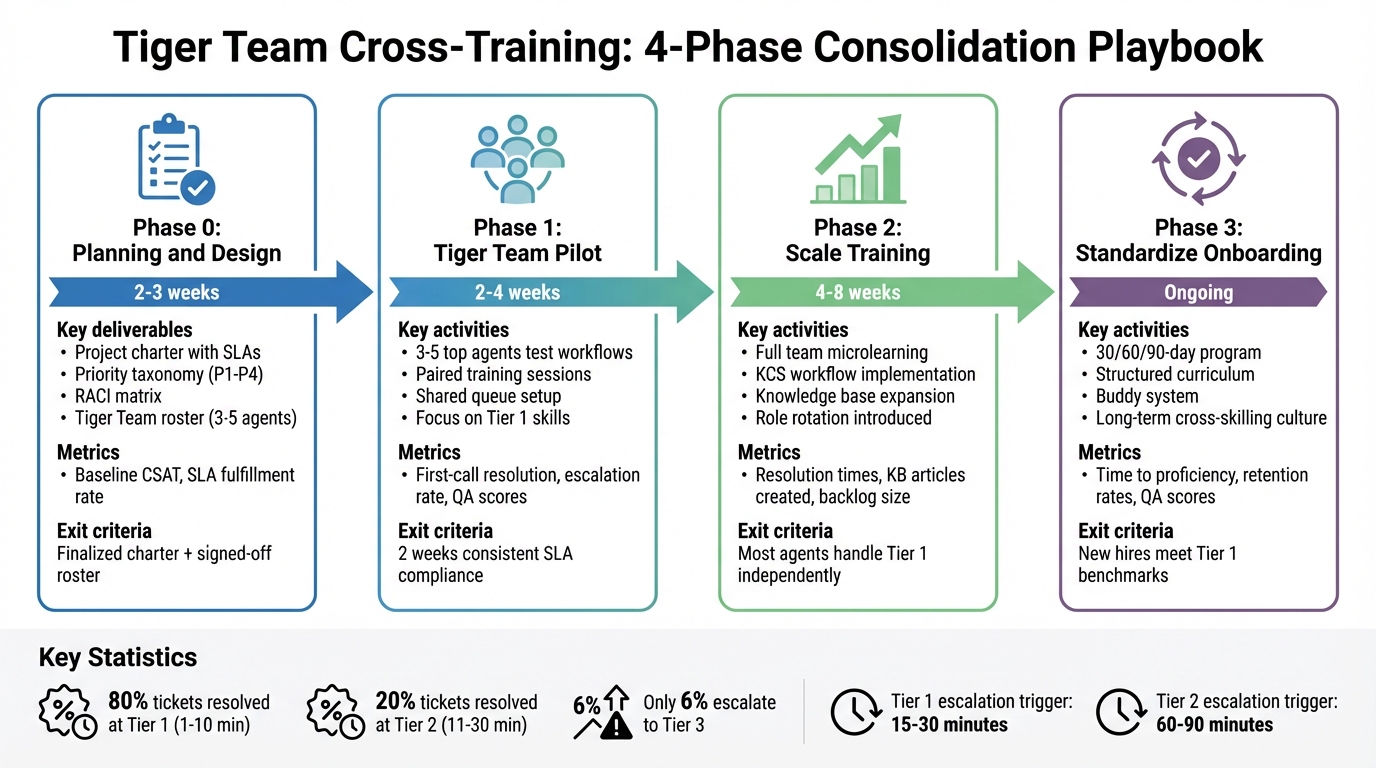
4-Phase Support Team Consolidation Roadmap with Timeline and Key Metrics
Before You Start: Preparation and Risk Assessment
Skipping the groundwork when consolidating a support team is a recipe for trouble. Before announcing your Tiger Team or tweaking queue settings, you need to have solid documentation, aligned taxonomies, and baseline performance data in place. Without these essentials, you’ll end up troubleshooting instead of achieving effective cross-training.
Preconditions for a Successful Consolidation
Start by auditing your ticket taxonomy and SLA definitions. If ticket categories differ, such as "Account Management" for one team and "Finance" for another, your routing rules will break as soon as you merge queues. To avoid this, align categories, tags, and priority levels (P1–P4) across all products beforehand. Clearly document what each priority level means in terms of severity and business impact. This avoids conflicts when stakeholders debate escalation paths.
Next, review your business rules – like triggers, automations, macros, and SLAs. These often fail during consolidation because they reference outdated team assignments or organization values. For instance, an automation might route "Product A" tickets to a view that no longer exists, leaving tickets unassigned until someone notices the backlog. To prevent this, document escalation triggers and standardize time-based limits for issues – such as 15–30 minutes for Tier 1 and 60–90 minutes for Tier 2 – so your agents know exactly when to escalate.
Assign leadership roles to streamline decision-making. Designate a Single Point of Contact (SPOC) for each function to oversee decisions and manage the rollout timeline. Without this structure, you risk endless back-and-forth among managers, which can delay the entire process.
Finally, assess any specialized roles. Certain responsibilities, like compliance, security, or advanced integrations, require expertise or certifications that basic cross-training won’t cover. Identify these roles early on so you can plan for Tier 2 specialists instead of expecting every agent to handle every product.
Once your definitions are aligned and leadership roles are assigned, it’s time to gather the necessary data.
Data You Need to Collect
Collect detailed ticket volume data by product, breaking it down by issue category, backlog age, and seasonality. This helps distinguish repetitive issues, like password resets, from complex technical bugs. With this insight, you can focus your Tier 1 training on common problems while identifying areas that may require specialized Tier 2 support.
Baseline metrics such as Mean Time to Resolution (MTTR), First-Call Resolution (FCR), and Customer Satisfaction (CSAT) are essential for monitoring service quality during consolidation. If MTTR spikes during the initial phases, it might signal that your Tiger Team needs more training before scaling up.
Also, check for technical constraints in your support platform. Some systems impose limits – like a maximum of 10,000 tickets or 10,000 users – which can block automated merges. If you hit these limits, you’ll need to migrate data manually or break the consolidation into smaller batches.
A practical example comes from Mariena Quintanilla, who consolidated support at Foursquare in April 2020. Using a Jira template, she defined product-specific SLAs, priority rubrics, and escalation paths for six B2B products. This structured approach helped align multiple teams and over 100 revenue staff within 90 days.
| Data Category | Specific Data Points to Collect | Purpose |
|---|---|---|
| Volume | Tickets per product, backlog age, seasonality | Allocate staffing and resources |
| Performance | CSAT, MTTR, FCR | Benchmark quality and identify gaps |
| Technical | User/ticket counts, domain lists, custom fields | Evaluate technical feasibility for merging |
| Process | SLA definitions, escalation paths, priority rubrics | Standardize workflows across teams |
| Product | Product velocity, common bug categories | Plan Tier 1 training needs |
These data points highlight potential risks and guide your consolidation strategy.
Risks and How to Prevent Them
SLA breaches are one of the most visible risks during consolidation. If agents are overwhelmed by unfamiliar tickets or if routing rules fail, response times can spike, and customers will notice. Mitigate this by piloting the new workflows with a small, experienced Tiger Team. This trial run can identify broken automations and escalation gaps before they affect the entire team.
Another risk is quality degradation. If skilled agents spend time on low-level tickets while high-priority problems pile up in Tier 2, service quality will suffer. Define a complexity rubric to clearly separate Tier 1 and Tier 2 tickets. Typically, about 80% of tickets should resolve at Tier 1, 20% at Tier 2, and only 6% should escalate to Tier 3.
Rigid roles can lead to agent burnout. If Tier 1 agents are stuck handling repetitive tasks like password resets, they may feel undervalued and disengaged. Combat this by introducing rotating roles – like "Triage", "Ticket Tank", or "Subject Matter Expert" – to keep work varied and interesting while building cross-functional skills.
Data loss is a technical risk that’s often overlooked. During a merge, critical details like tags, notes, and custom fields can disappear. To avoid this, manually export or capture these data points before completing the merge. Audit lookup relationship fields as well, since they usually don’t update automatically.
Finally, stakeholder friction can arise when teams clash over priority definitions or escalation paths. Mariena Quintanilla noted that at Foursquare, failing to explain the "why" behind the consolidation initially caused frustration, even though the technical rollout went smoothly. To minimize this, over-communicate the business rationale, emphasizing how consolidation reduces reliance on product managers, speeds up resolutions, and improves customer experience.
"Help individuals in your organization understand why a change is happening, and you’ll get less friction when the change takes place."
- Mariena Quintanilla, Customer Operations Consultant
| Risk Category | Specific Failure Point | Mitigation Strategy |
|---|---|---|
| Technical | Broken triggers/automations | Audit all business rules and lookup fields pre-merge |
| Operational | SLA breaches/backlog growth | Pilot workflows with a Tiger Team first |
| Human | Agent burnout/disengagement | Rotate roles and vary ticket assignments |
| Data | Loss of tags/notes | Export custom field data before the merge |
| Organizational | Stakeholder disagreements | Use templates to define scope and decision-makers early |
This detailed risk table reinforces the need for a phased approach, ensuring SLA protection and team morale throughout the consolidation process.
4-Phase Rollout Plan for Merging Support Teams
Taking a phased approach when merging support teams ensures a smooth transition, allowing you to start small, test assumptions, and scale effectively. This four-phase plan moves from initial preparation to a fully standardized onboarding process, with clear goals, milestones, and metrics at each step. It builds on the groundwork laid during the planning stage.
Phase 0: Planning and Design (2–3 weeks)
Goal: Lay the foundation for merging teams by creating templates, defining taxonomies, and drafting a Tiger Team charter – before tackling live support queues. This phase addresses fragmentation and SLA risks identified earlier.
Start by documenting product features, SLAs, and support boundaries using a standardized charter. This prevents confusion about who handles what when agents encounter unclear scenarios.
Define a priority taxonomy to categorize issues by urgency. For instance, a P1 issue could be a customer-facing outage affecting multiple accounts, while a P4 might be a minor feature request. This ensures everyone understands the urgency of different issues.
Build a RACI matrix to clarify roles and responsibilities across support, engineering, operations, and customer success. Assign a Single Point of Contact (SPOC) for each function to streamline decisions. Choose leads with strong project management skills, not just product expertise.
Who’s involved: Executive sponsors for strategic oversight, a project lead to design processes, SMEs to validate scope, and cross-functional stakeholders from Revenue, Product, and Engineering.
Entry criteria: Baseline data on ticket volumes, customer satisfaction (CSAT), and resolution times, along with confirmation that the support platform can handle the merge (e.g., fewer than 10,000 tickets/users).
Exit criteria: A finalized project charter, agreed-upon priority definitions, and a signed-off Tiger Team roster.
Metrics to watch: Baseline CSAT, SLA fulfillment rate, and ticket volume by product.
Common failure mode: Choosing workgroup leads without strong leadership skills, which can cause missed deadlines or scope creep.
| Phase 0 Milestone | Owner | Deliverable |
|---|---|---|
| Project charter with SLAs and taxonomy | Project Lead | Completed template |
| RACI matrix and escalation paths | Project Lead + SMEs | Documented handoff rules |
| Tiger Team roster and charter | Manager + Executive Sponsor | List of 3–5 pilot agents |
| Business rule audit | Technical Lead | Updated triggers, automations, and views |
Once these preparations are complete, launch the Tiger Team pilot to test the workflows.
Phase 1: Tiger Team Pilot and Cross-Training (2–4 weeks)
Goal: Test workflows and identify gaps by piloting a shared queue with a small, experienced Tiger Team.
Select 3–5 top-performing agents from each team to form the Tiger Team. These agents will handle tickets from both product lines, using paired sessions to share domain knowledge.
Focus training on Tier 1 skills that both teams need, such as account setup, password resets, and basic troubleshooting. Add soft skills training – like adaptability and clear communication – to help bridge differences between the legacy teams.
Set up a shared queue with proper tagging to track metrics like first-call resolution and escalation rates.
Who’s involved: Tiger Team agents, a Triage Manager to route tickets, SMEs to handle escalations, and a Project Lead to oversee daily standups.
Entry criteria: Phase 0 completion, with a fully configured shared queue and proper tagging.
Exit criteria: The Tiger Team achieves consistent SLA compliance over two weeks with strong first-call resolution and minimal escalations.
Metrics to watch: First-call resolution, average triage time, escalation rate, QA scores, and overall SLA compliance.
Common failure mode: SMEs not documenting their expertise, leading to silos. Avoid this by requiring a knowledge base article for every escalated ticket.
"With the merged team, you know who to ask. You don’t mind bothering."
- Rick, Developer, Fugro
For example, Fugro combined "Team Geo" (GIS specialists) and "Team FÊTE" (Machine Learning experts) for a five-month seafloor mapping project. Using weekly sprints and paired sessions, they delivered a successful MVP and increased velocity from 9 to 13 story points per week.
With workflows validated and gaps documented, scale training to the full team.
Phase 2: Scale Training and Fix Gaps (4–8 weeks)
Goal: Expand training to the entire support team, address gaps identified earlier, and implement a Knowledge-Centered Service (KCS) workflow to document expertise.
Roll out microlearning sessions to train all agents in small groups. This allows for quality monitoring and quick adjustments to the curriculum.
Expand the feedback loop to include leaders from teams outside the Tiger Team. This ensures unique product needs or compliance requirements aren’t overlooked.
Enhance internal tools like Kanban boards with priority swimlanes and refine ticketing fields (e.g., adding a "Product Line" dropdown) for better routing and reporting.
Introduce a KCS workflow where agents update the knowledge base with new insights gained while resolving tickets.
Who’s involved: The full support team, Triage Manager, SMEs, Project Lead, and stakeholders from Product and Engineering.
Entry criteria: Completion of Phase 1, with a list of identified gaps and training improvements.
Exit criteria: Most agents can handle Tier 1 tickets independently, the knowledge base grows steadily, and backlog trends remain stable or improve.
Metrics to watch: Resolution times, new knowledge base articles, backlog size, agent utilization, and QA scores.
Common failure mode: Burnout from repetitive tasks. Rotate responsibilities, like triage or SME roles, to keep agents engaged.
In April 2020, Mariena Quintanilla consolidated product support at Foursquare after merging with Factual and Placed. Over three months, she coordinated SLAs and priorities across seven product lines, rolling out a unified Jira Service Desk to over 100 team members. This reduced reliance on product managers and streamlined onboarding.
"Help individuals in your organization understand why a change is happening, and you’ll get less friction when the change takes place."
- Mariena Quintanilla, Customer Operations Consultant
With team-wide training complete, shift focus to onboarding new hires.
Phase 3: Standardize New-Hire Onboarding (Ongoing)
Goal: Create a structured onboarding process that incorporates the frameworks and training developed in earlier phases, ensuring new hires quickly gain Tier 1 skills and understand escalation protocols.
Develop a comprehensive onboarding program using training materials, knowledge base articles, and best practices from Phases 0–2. This ensures consistency and helps new hires integrate smoothly. Move away from ad hoc training to a long-term, cross-skilling culture.
Who’s involved: HR and Training Managers, the Project Lead, and experienced agents as mentors.
Entry criteria: A finalized training curriculum and an updated knowledge base.
Exit criteria: New hires complete a structured 30/60/90-day onboarding program, meeting performance benchmarks for Tier 1 support and effectively handling escalations.
Metrics to watch: Time to proficiency, new-hire retention rates, and QA scores during onboarding.
Common failure mode: Inadequate training materials or limited mentorship. Avoid this by scheduling regular training reviews and setting up a buddy system for new hires.
How to Define Tier 1 vs Tier 2 Knowledge
When merging two support teams, one of the biggest challenges is figuring out who handles what. Without clearly defined roles, tickets can get stuck in limbo – escalated too soon, overloading Tier 2 specialists, or bouncing between queues. The solution? A skills matrix that outlines the core competencies of Tier 1 agents and the specialized responsibilities of Tier 2, paired with an escalation rubric to eliminate confusion.
Tier 1 agents should handle about 80% of tickets, leveraging broad knowledge and standardized processes. Meanwhile, Tier 2 specialists focus on resolving complex issues that require deeper expertise in specific areas. As Mozhdeh Rastegar-Panah, Senior Director of Product Marketing at Zendesk, puts it:
"Support tiers are levels of customer support that increase based on the level of assistance needed. A higher support tier indicates a more complex problem that a more specialized support agent should assist with".
Escalation should be based on time and complexity. Tier 1 agents aim to resolve issues within 1–10 minutes using predefined scripts. If they can’t resolve an issue within 15–30 minutes, it’s time to escalate. Tier 2 agents handle more intricate problems, typically taking 11–30 minutes, but no longer than 60–90 minutes before escalating further.
To streamline this process, document every escalation using a standard handoff template. This template should include details about the issue, diagnostics performed, and the reason for escalation. This way, Tier 2 can hit the ground running without duplicating Tier 1’s efforts, keeping resolution times predictable.
Tier 1 Baseline Skills (Shared Across Products)
Tier 1 agents are the first line of human defense, responsible for quickly resolving common customer inquiries. Their role revolves around efficiency, using standardized procedures to address straightforward issues.
Key skills include:
- Account Setup and Management: Tasks like password resets, unlocking accounts, and handling billing inquiries.
- Basic Troubleshooting: Addressing connectivity problems, login issues, and simple configuration challenges.
- Knowledge Base Deflection: Guiding customers to self-service resources like FAQs or articles.
- Ticket Triage and Routing: Assessing ticket complexity and escalating to Tier 2 when needed.
Soft skills such as empathy, clear communication, and critical thinking are vital for managing customer expectations. Tier 1 agents should also be proficient with tools like the support platform, messaging software, and CRM systems. Familiarity with workflows and messaging best practices ensures consistent service across all products. The primary goal? High first-call resolution for straightforward queries.
However, Tier 1 agents shouldn’t be bogged down with edge cases or product-specific complexities. If an issue requires expertise or access beyond their scope, it should be escalated promptly.
Here’s a breakdown of Tier 1’s baseline skills:
| Tier 1 Baseline Skill | Example Tasks | Expected Resolution Time |
|---|---|---|
| Account Setup & Management | Password resets, account unlocks, billing inquiries | 1–5 minutes |
| Basic Troubleshooting | Connectivity issues, login problems, simple configuration | 5–10 minutes |
| Knowledge Base Deflection | Directing customers to FAQs, self-service articles | 1–3 minutes |
| Ticket Triage & Routing | Identifying complexity and escalating to Tier 2 | 2–5 minutes |
Tier 2 Specialist Responsibilities (Product-Specific)
Tier 2 agents, or subject matter experts (SMEs), tackle the complex issues that go beyond Tier 1’s capabilities. Their work often involves advanced technical troubleshooting, root cause analysis, and specialized system access. These agents focus on tasks like configuring add-ons, diagnosing product bugs, and investigating integration failures.
Core responsibilities include:
- Advanced Product Features: Setting up custom integrations, troubleshooting APIs, and configuring complex workflows.
- Bug Investigation and Escalation: Reproducing issues and documenting steps for engineering teams.
- Root Cause Analysis: Digging into underlying system problems rather than just addressing symptoms.
- Knowledge Capture: Documenting solutions for future reference and updating the knowledge base.
Tier 2 agents have access to technical documentation and system tools not available to Tier 1. Their work often involves log analysis, database queries, and collaboration with engineering teams. As Mozhdeh Rastegar-Panah explains:
"Tier 2 support includes agents that have a higher level of technical support experience and expertise. Agents need in-depth knowledge of the product and troubleshooting skills to resolve these types of customer issues".
Tier 2 typically resolves issues within 11–30 minutes, with a maximum troubleshooting time of 60–90 minutes. If a problem can’t be solved within that timeframe, it’s escalated to Tier 3, which may involve engineers or product managers.
When to Escalate: Decision Tree and Complexity Rubric
Clear escalation guidelines are essential to avoid unnecessary handoffs and ensure tickets are routed efficiently. A decision tree can help agents follow a logical process based on diagnostic results, minimizing confusion and maintaining consistency.
There are three main types of escalation triggers:
- Time-Based: If a Tier 1 agent spends 15–30 minutes on a ticket without resolution.
- Complexity-Based: When an issue requires system access or expertise beyond Tier 1’s scope.
- Impact-Based: If the problem affects critical systems or multiple users.
For example, a Tier 1 agent handling a login issue might follow this path:
- Can the customer reset their password? (Yes → Send reset link. No → Check account status.)
- Is the account locked? (Yes → Unlock and notify the customer. No → Escalate to Tier 2 for further investigation.)
A complexity rubric can further streamline this process by assigning a score (1–5) to tickets during intake. Here’s how it works:
| Complexity Level | Description | Tier Assignment | Example |
|---|---|---|---|
| 1 | Simple FAQ or self-service | Tier 1 | Password reset, billing question |
| 2 | Basic troubleshooting with a known solution | Tier 1 | Connectivity issue, login problem |
| 3 | Moderate complexity requiring product knowledge | Tier 2 | Custom integration setup |
| 4 | Advanced troubleshooting requiring root cause analysis | Tier 2 | Bug reproduction, API failure |
| 5 | Requires engineering or product intervention | Tier 3 | System outage, code-level bug fix |
To ensure smooth transitions, standardize handoffs with a documentation template. This should include the problem description, diagnostics performed, observed results, and the reason for escalation. As NinjaOne emphasizes:
"Escalation trigger points define specific criteria that indicate when issues should move to higher support tiers rather than continuing troubleshooting at the current level".
sbb-itb-e60d259
Training and Enablement Plan
A well-structured training plan is essential for effective cross-training. It ensures agents develop both core skills and in-depth product knowledge. Without a clear framework, you risk creating a team that knows a little about everything but struggles to resolve issues confidently.
Cross-Training Curriculum and Methods
A strong cross-training program starts with a tiered skill segmentation strategy. Tier 1 covers general support tasks like password resets, account setups, and basic troubleshooting. Tier 2 moves into advanced areas, including technical analysis and complex problem-solving. Conducting a skills gap analysis ensures each agent receives training tailored to their needs.
To build essential competencies, focus on five key soft skills: empathy, digital literacy, clear communication, simplifying complex ideas, and maintaining a growth mindset. These skills aren’t just nice-to-have – they’re the foundation for navigating new challenges. Pair this with standardized troubleshooting frameworks to give agents a reliable process for resolving issues.
For hands-on experience, consider interactive methods like "Ticket Smash" sessions. In 2024, Zendesk’s Advocacy team used this approach to tackle a backlog of tickets. Led by Madison Davis and Collin Murray, the team allocated several hours for collaborative problem-solving. This not only cleared workloads but also encouraged agents to share insights on tricky cases. As Bryan Flaherty, a Technical Support Engineer at Zendesk, explained:
"Notching a win or two and then coming back to a tricky issue often leads to breakthroughs where previously I was stuck. The key is to keep the momentum!"
Another effective strategy is implementing a peer mentorship system, where junior agents learn from senior colleagues about technical nuances and organizational workflows.
Automation training can also streamline processes. For example, Zendesk’s "Bump Bump Solve" workflow automates follow-ups on inactive tickets. After two automated reminders, unresolved tickets are closed, freeing agents to focus on more pressing issues.
These methods create a strong foundation for knowledge sharing and skill development. The next step is ensuring this knowledge is captured and shared effectively.
Knowledge Capture Using KCS Workflows
Capturing knowledge should be a core part of your workflow, not an afterthought. Assign a knowledge manager to oversee systems for gathering and organizing information. Use tools like Jira or Wiki pages to document product features, service-level agreements (SLAs), priority levels (P1–P4), and escalation paths.
Adopt a Knowledge-Centered Service (KCS) approach to integrate documentation into everyday tasks. When agents resolve complex issues, they should immediately document the solution using a standardized template. This ensures that valuable insights don’t get lost.
Rotating agents into Subject Matter Expert (SME) roles is another way to strengthen knowledge capture. These agents can participate in product meetings and provide feedback, ensuring customer perspectives are included in documentation. Follow this with a "Cobra Strike" approach, where agents handle specific types of tickets for a week and then share insights with the broader team.
When launching new processes or tools, over-communicate. Share links to updated documentation through multiple channels like Slack and email. Create a dedicated Slack channel for feedback on these changes to address gaps quickly.
QA Calibration and Quality Monitoring
To maintain high service standards, rigorous QA calibration is essential. Quality Assurance isn’t just about spotting mistakes – it’s about identifying areas where agents need additional training and ensuring consistent performance across the team.
Assign a Quality Assurance Manager to oversee QA processes, monitor automated systems, and conduct manual reviews. This role works closely with workflow coordinators to ensure compliance and quality during ticket handling.
Set up quality control checkpoints to evaluate both the use of templates and the outcomes of resolutions. Regularly review troubleshooting guides for accuracy and usability based on technician feedback and performance metrics. As Mozhdeh Rastegar-Panah, Senior Director of Product Marketing at Zendesk, noted:
"Support operations teams leverage QA software to evaluate customer interactions and share feedback with agents to reduce customer churn."
Track metrics like first-call resolution (FCR) rates, escalation frequency, and customer satisfaction scores. For example, in a typical three-tier support system, 80% of tickets should be resolved at Tier 1 (1–10 minutes), 20% at Tier 2 (11–30 minutes), and only 6% should escalate to Tier 3. If your numbers differ, QA data can reveal why.
Monitor conversations to identify specific improvement opportunities and provide targeted feedback. For instance, if agents consistently struggle with a particular product feature, use this insight to develop a new training module.
Finally, evaluate how well tickets are prioritized and resources are allocated. This ensures your triage process aligns with quality goals and helps catch inefficiencies before they escalate into larger issues. Regularly refining these processes keeps your team performing at its best.
Conclusion
Summary of the Consolidation Playbook
Bringing together two product support teams requires a carefully planned, phased approach that prioritizes quality and builds internal capabilities. This playbook lays out four distinct phases, each with specific metrics and goals to guide the process. It’s important to view this as a continual effort rather than a one-off task. As Mariena Quintanilla reflected after managing support consolidation for seven product lines during the Foursquare and Factual merger:
"Help individuals in your organization understand why a change is happening, and you’ll get less friction when the change takes place".
A clear distinction between Tier 1 and Tier 2 roles – handling 80% and 20% of tickets respectively – eliminates confusion and ensures smooth escalations. Interestingly, only 6% of tickets escalate beyond Tier 2.
To maintain service-level agreements (SLAs), start by piloting a Tiger Team alongside existing workflows before fully integrating both teams. Use a scaffolding document to establish product-specific SLAs, priority levels (P1–P4), and clear escalation paths before making any major changes. Regularly track key metrics like first-call resolution rates, transfer rates, and backlog depth on a weekly basis to address potential problems early.
By following this playbook, you minimize risks to SLAs while bringing together expertise from both teams. These strategies provide a clear roadmap for taking immediate steps toward a smooth and effective consolidation.
5 Actions to Take This Week
To put these strategies into motion, focus on the following five steps this week:
- Audit recent ticket data from both teams. Analyze the last 3–6 months of ticket volumes, categories, and resolution times to pinpoint overlapping issues and any gaps in coverage.
- Draft a Tiger Team charter. Outline the scope of the pilot, set a timeline (usually 2–4 weeks), and choose 2–3 high-performing agents from each team to lead cross-training efforts.
- Identify pilot agents. Select one standout agent from each team to act as champions for cross-training and knowledge sharing.
- Schedule a stakeholder kickoff meeting. Bring together leaders from Product, Engineering, and Revenue to align on the business case and clarify their roles in the consolidation plan.
- Define a unified escalation rubric. Create a consolidated P1–P4 severity matrix that includes clear escalation paths and unified SLAs for the post-merge environment.
These steps lay the groundwork for a successful team merge, setting the stage for effective execution and long-term improvements.
FAQs
What’s the best way to merge two support teams while maintaining service quality?
Merging two support teams takes careful planning and a step-by-step approach to keep things running smoothly and maintain quality service. The first step is to create a clear consolidation plan. This plan should cover key elements like ticket taxonomy, SLAs, escalation paths, and ownership rules. Laying this foundation helps prevent common issues like SLA breaches or ticket misrouting.
The next phase involves cross-training through a Tiger Team approach. This builds shared knowledge across products by using techniques like shadowing, buddy systems, and shared macros. These methods help agents gain essential skills while highlighting areas that might need the expertise of Tier 2 subject matter experts (SMEs). Keep an eye on metrics like SLA adherence, ticket transfers, and customer satisfaction (CSAT) to measure progress and quickly address any challenges.
Finally, establish a well-defined Tier model. Clearly outline the baseline skills required for Tier 1 agents and the specialized expertise expected from Tier 2 SMEs. Tools like a skills matrix and a ticket complexity rubric can guide decisions on when to escalate issues. Consistent communication, feedback loops, and calibration sessions are key to keeping everyone aligned, maintaining morale, and driving continuous improvement during the merger.
What distinguishes Tier 1 support from Tier 2 support roles?
The key distinction between Tier 1 and Tier 2 support roles lies in their expertise and the complexity of the issues they address. Tier 1 agents are the first line of support, handling common and straightforward problems. Their responsibilities include basic troubleshooting, answering frequently asked questions, and offering solutions based on predefined scripts or knowledge base articles. The primary aim here is to deliver quick resolutions and ensure a seamless experience for customers during their initial contact.
In contrast, Tier 2 agents tackle more advanced and technical challenges that exceed the capabilities of Tier 1. These agents possess a deeper understanding of the product and are skilled in advanced troubleshooting techniques. They often step in when an issue requires detailed analysis or collaboration with product or engineering teams to identify and implement solutions.
To streamline this process, a well-defined escalation system – like a decision tree or a ticket complexity rubric – ensures that only the appropriate issues are passed to Tier 2. This approach minimizes delays and helps maintain high service standards.
How can we prevent SLA breaches and agent burnout when merging support teams?
To avoid SLA breaches and agent burnout when consolidating support teams, it’s crucial to have a well-thought-out phased rollout plan. This plan should include clear escalation processes and a fair distribution of workloads to prevent overwhelming specific team members. Early cross-training of agents is another key step – it ensures broader coverage across products and reduces the risk of overloading certain individuals.
Keep a close eye on critical metrics like SLA compliance, backlog levels, and agent workload to quickly spot and address potential problems. Open and honest communication with your team about upcoming changes and expectations can go a long way in maintaining morale during the transition. Additionally, having a structured onboarding process for new hires is essential. This will help them get up to speed on baseline support tasks and contribute effectively from the start.






