



Dynamic SLAs powered by AI are transforming how customer support works, especially in B2B environments. Unlike static SLAs, which rely on fixed rules and keywords, dynamic SLAs analyze real-time data like tone, urgency, and customer value to prioritize tickets based on true business impact. This approach ensures critical issues are addressed faster, improves customer satisfaction, and reduces inefficiencies in support workflows.
Key Takeaways:
- Static SLAs: Depend on rigid rules, often missing nuanced or critical issues.
- Dynamic SLAs: Use AI, Natural Language Processing (NLP), and predictive analytics to assess sentiment, urgency, and customer data, adjusting priorities in real time.
- B2B Focus: Tailored for complex, high-stakes scenarios where missed issues can harm client relationships and revenue.
- Business Impact: Faster resolutions, reduced SLA breaches, and improved customer experiences lead to higher retention and spending.
Quick Comparison:
| Feature | Static SLAs | Dynamic SLAs |
|---|---|---|
| Logic | Rule-based (IF-THEN) | AI-driven, context-aware |
| Prioritization | Keywords or manual selection | Sentiment, intent, account health |
| Flexibility | Rigid, manual updates | Real-time adjustments |
| Suitability | Limited for B2B needs | High for complex scenarios |
Switching to AI-based SLA management can cut manual effort, predict issues before they escalate, and align support processes with customer needs – all without adding complexity.
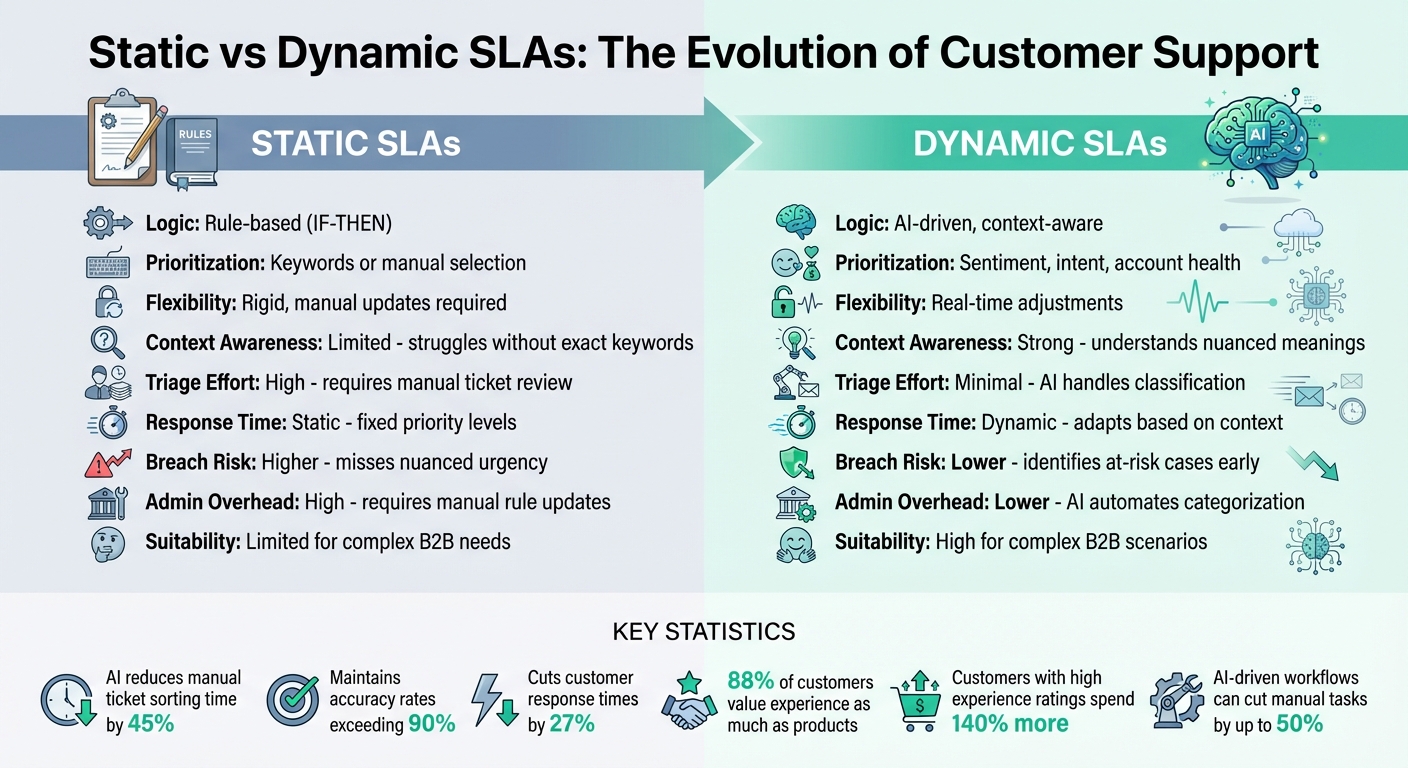
Static vs Dynamic SLAs: Key Differences and Business Impact
How AI-Driven Case Prioritization Works
AI-driven case prioritization is built on three key technologies that work together to manage SLAs dynamically. These systems analyze requests in real time, predict outcomes, and factor in the complete customer context. The result? A smarter system that not only understands what a ticket says but also what it means for customer relationships and business impact. Let’s break down these core components – NLP, predictive analytics, and contextual data integration.
Using Natural Language Processing (NLP) for Prioritization
Natural Language Processing (NLP) scans ticket details to determine the type of issue and its urgency – without relying on customers to label their requests correctly. For instance, if a ticket contains phrases like "outage", "system down", or "cannot log in", the system automatically flags it as high priority, even if the customer didn’t mark it as "urgent".
It doesn’t stop there. Sentiment analysis evaluates the tone of the message, ensuring that even a calmly worded but critical issue gets flagged as quickly as a ticket filled with urgency or frustration. If a customer’s tone becomes more negative or they follow up repeatedly in a short time, the system detects their growing frustration and adjusts the ticket’s priority accordingly.
The results speak for themselves. AI-powered solutions reduce manual ticket sorting time by 45% and maintain accuracy rates exceeding 90%. They also help cut customer response times by 27%. NLP even overrides misleading ticket titles – like reclassifying a ticket labeled "Quick Question" as "Critical" if the body reveals a major production issue.
Predictive Models for SLA Optimization
Predictive models take prioritization a step further by forecasting what might happen next. They calculate scores for key metrics like Customer Satisfaction (CSAT), Customer Effort Score (CES), and First Contact Resolution (FCR). This allows the system to reroute tickets or alert management if there’s a risk of escalation.
This proactive approach shifts support teams away from merely reacting to SLA deadlines. Instead, they can anticipate potential breaches and act before they happen. For example, if sentiment analysis detects rising frustration during a conversation, the system tightens response time targets and escalates the case automatically.
Why does this matter? Because 88% of customers now value their experience with a company as much as its products or services. And those who rate a company highly on experience spend 140% more than dissatisfied customers. Predictive models help ensure that critical issues get resolved quickly, protecting both customer satisfaction and long-term loyalty.
Using Customer Context and Contract Data
While predictive models look ahead, integrating customer-specific data adds another layer of precision to ticket prioritization. AI uses CRM data and interaction patterns to adjust priorities based on factors like customer value, contract tier (e.g., Premier vs. Standard), engagement trends, and Customer Health Scores, which are derived from metrics like product usage, NPS, and renewal rates.
Contract details – such as license type, support level, and specific configurations – ensure customers receive the service they’re entitled to, without requiring manual input. Combining real-time sentiment analysis with historical data, like purchase history and past interactions, allows the system to prioritize a frustrated high-value customer over a neutral one automatically.
Platforms like Supportbench integrate these capabilities seamlessly. By leveraging Customer Health Scores and CRM data, they enable dynamic SLA rules without the need for extra integrations or costly add-ons. The platform predicts CSAT and CES outcomes, automates ticket triage, and fine-tunes SLA targets based on each customer’s unique circumstances – ensuring support teams focus on what truly matters.
Building a Framework for Dynamic SLAs
Core Components of Dynamic SLA Design
At the heart of a dynamic SLA framework lies a Business Rules Engine (BRE). This engine works in real time to evaluate factors like customer tier, request type, and contract terms. Adding to this, AI-powered Natural Language Processing (NLP) steps in to analyze ticket content, gauge sentiment, and assess urgency. When certain events occur – like ticket submission or rapid follow-ups – real-time triggers kick off automated workflows. These workflows are further enhanced by customer context integration, which connects the SLA system with CRM data. This connection ensures the system takes into account customer value, contract details, and whether a client has Premier or VIP status.
Another critical piece of the framework is predictive analytics. By studying historical data and machine learning patterns, the system can spot potential SLA breaches before they happen and initiate preemptive measures. Additionally, Customer Health Scoring (CHS) plays a pivotal role. By factoring in product usage, Net Promoter Scores (NPS), and renewal rates, CHS allows the SLA system to adjust service levels dynamically, especially for customers who might be at risk. Together, these components create the foundation for dynamic SLA systems, setting them apart from traditional static models.
Static vs Dynamic SLA Models: A Comparison
When it comes to handling real-world support scenarios, the differences between static and dynamic SLAs are striking. Static SLAs depend on exact keywords and predefined fields. This can lead to critical issues being overlooked if a customer uses unconventional language or incorrectly categorizes their ticket. On the other hand, dynamic SLAs adapt to context and sentiment, ensuring urgent issues are addressed promptly, no matter how they’re described.
| Feature | Static SLAs | Dynamic SLAs |
|---|---|---|
| Flexibility | Rigid; relies on exact keywords/fields | Highly flexible; adapts to context and sentiment |
| Breach Risk | Higher; misses nuanced urgency | Lower; identifies and escalates at-risk cases early |
| Admin Overhead | High; requires manual rule updates | Lower; AI automates categorization and routing |
| Cost-Efficiency | Lower; agents waste time on misrouted cases | Higher; routes to the right expert the first time |
This comparison highlights why dynamic models are better suited for today’s support challenges. Static systems often trap agents in manual triage or endless "ticket tennis", while dynamic systems focus on improving First Contact Resolution (FCR) by sending tickets to the right expert on the first try. And this matters – a staggering 88% of customers now say that the experience a company provides is just as important as its products or services.
Dynamic SLAs, built on these principles, rely on diverse data sources to function effectively.
Data Sources That Power Dynamic SLAs
Dynamic SLAs draw from a range of data sources to operate seamlessly. CRM records provide insights into customer tier, lifetime value, and contract terms, ensuring high-value clients are prioritized automatically. Ticket content reveals urgency indicators, helping route requests to the appropriate specialized queues. Sentiment analysis detects frustration or urgency, triggering escalations when needed. Additionally, rapid follow-ups and repeated responses signal increasing urgency, prompting quicker action. Finally, customer health data – which includes metrics like product usage, NPS scores, and renewal likelihood – helps identify at-risk customers, allowing the system to adjust priorities and prevent churn.
Here’s how it all comes together: imagine a Premier customer submits a ticket using frustrated language, and their health score indicates declining product usage. The system immediately adjusts response time targets and routes the ticket to a senior agent. This level of precision requires a unified platform where all data sources connect seamlessly. AI-driven platforms like Supportbench make this possible without the need for expensive add-ons or complicated integrations.
Implementing AI for SLA Management
Creating AI-Driven Workflows
To manage SLAs effectively with AI, start by defining multi-criteria rules that factor in customer contracts, license levels, ticket details, and customer value. These rules can create workflows that adapt dynamically to changing situations. For example, integrating real-time sentiment analysis through Natural Language Processing (NLP) allows the system to pick up on tones like frustration, urgency, or sarcasm. This means SLAs can prioritize "at-risk" customers in real time.
AI can automate tasks like ticket classification and routing based on factors such as priority, topic, or sentiment. Imagine a no-code rule that says: "If Priority is High and Sentiment is Negative, set Target Response to 30 minutes." Automation also ensures that senior agents are looped in immediately when sentiment worsens or an SLA breach seems likely.
In 2024, 45% of B2B companies were already using AI in their workflows. By 2026, this figure is projected to hit 60%, leading to efficiency gains of 30%, a 20% drop in errors, and a 15% boost in customer satisfaction. These AI-driven workflows seamlessly integrate with the dynamic SLA framework, ensuring smooth operations across the board.
Why AI-Native Platforms Like Supportbench Work Better
AI-native platforms, such as Supportbench, take SLA management to the next level. Instead of adding AI as an afterthought, they embed intelligence directly into the system’s foundation. This allows for deeper analysis of ticket content and context using NLP and machine learning, moving far beyond basic keyword-based rules.
This built-in intelligence enables SLAs to adjust dynamically in real time, factoring in customer sentiment, urgency, and historical data. For instance, the system can recognize urgency keywords like "outage" and prioritize follow-ups accordingly. It also pulls customer value data from CRM systems, allowing support leaders to configure workflows without needing IT help or complex coding.
Supportbench also provides real-time monitoring and automated alerts, helping teams proactively prevent SLA breaches. Eric Klimuk, Founder and CTO of Supportbench, explains:
"By embedding AI throughout the support stack, Supportbench enables teams to move faster, work more independently, and stay closely aligned with customer needs."
This integrated approach can cut manual tasks in B2B workflows by up to 50%. Additionally, companies that leverage AI in sales and support are 1.7 times more likely to report gaining market share.
Workflow Comparison: Manual vs AI-Driven
The benefits of AI-driven workflows become even clearer when compared side by side with manual processes:
| Feature | Manual Workflows | AI-Driven Workflows |
|---|---|---|
| Triage Effort | High; requires manual ticket review | Minimal; AI handles classification |
| Response Time | Static; fixed priority levels | Dynamic; adapts based on ticket context |
| Configuration | Complex; IT or hard-coding needed | Simple; no-code visual tools |
| Contextual Awareness | Limited; struggles without keywords | Strong; understands nuanced meanings |
| Error Rate | Higher due to human fatigue and errors | Lower; machine learning ensures accuracy |
With Supportbench, setting up dynamic SLAs is straightforward. By navigating to Configuration > Workflows > New Workflow, support managers can quickly define response times and criteria, such as "Priority is High" or specific sentiment triggers. This ensures consistent, high-quality service, no matter the complexity of the situation.
sbb-itb-e60d259
Measuring Success and Continuous Improvement
Key Metrics for Dynamic SLA Success
To make dynamic SLAs truly effective, tracking the right metrics is non-negotiable. These metrics not only highlight performance but also open doors for constant improvements. Start with the essentials: compliance metrics like SLA breach rates, compliance percentages, and warning alerts. Then, layer in predictive customer satisfaction (CSAT), customer effort scores (CES), and sentiment analysis to evaluate the quality of interactions. For instance, tracking sentiment scores throughout a ticket’s lifecycle offers a clear picture of whether a customer’s mood is improving or declining during the interaction. On top of that, AI-powered quality assurance (QA) tools can assess an agent’s empathy, tone, and accuracy.
Operational metrics are just as important. Keep an eye on First Contact Resolution (FCR) rates, ticket deflection rates, and the number of touches needed to resolve a ticket. Interestingly, AI-driven ticket deflection has shown the potential to increase rates from a modest 1–2% to over 20% in just a few weeks. Another valuable tool is Customer Health Scoring (CHS), which, when paired with SLA tracking, helps gauge the overall status of customer relationships. Why does this matter? Because customers who rate their experience highly tend to spend 140% more than those who don’t.
| Metric Category | Specific Metrics to Track | Purpose |
|---|---|---|
| Compliance | SLA Breach Rate, Compliance %, Warning Alerts | Monitor adherence to service agreements |
| Speed | First Response Time, Meaningful Response Time, Resolution Time | Gauge how quickly issues are resolved |
| Quality | QA Score (Tone/Empathy), Sentiment Score, Predictive CSAT | Assess the human element in support |
| Customer Impact | CES, CHS, Churn Risk | Evaluate the stability of customer relationships |
| Efficiency | FCR Rate, Deflection Rate, Touches per Ticket | Measure automation and routing effectiveness |
Feedback Loops for SLA Optimization
Dynamic SLAs thrive on continuous refinement, and feedback loops are the engine that drives this improvement. One effective approach is incorporating human reviews, where managers assess AI categorizations and fine-tune edge cases. Sentiment-based triggers can also play a significant role, automatically escalating tickets when a customer’s tone shifts negatively. Alexey Aylarov, CEO of Voximplant, sums it up perfectly:
"AI-driven sentiment analysis in customer service is no longer a luxury. It’s a necessity for understanding your customers and delivering the personalized service they demand".
AI-powered pattern recognition adds another layer of intelligence, identifying trends and inefficiencies in automated processes. This allows businesses to adjust workflows and business rules as customer needs evolve. By combining real-time and batch analyses, teams can address immediate issues while also planning for long-term improvements. Linking SLA adjustments to real-time customer health changes ensures that service levels remain aligned with customer expectations. Before rolling out new SLA logic, testing it in controlled environments helps catch potential gaps or conflicts.
These iterative processes ultimately feed into a centralized system, giving teams a comprehensive view of performance and areas for improvement.
Centralizing SLA Insights with Supportbench
As dynamic workflows evolve, having a unified view becomes essential for tracking metrics and making informed decisions. This is where platforms like Supportbench come in. Supportbench consolidates key data, offering a clear picture of escalation trends, customer health, and SLA performance. The platform includes live SLA performance dashboards and automated alerts for potential breaches, enabling teams to act before service standards are at risk. Its AI-driven categorization ensures clean, accurate data, which is critical for detailed reporting and trend analysis.
Conclusion
AI-powered dynamic SLAs are reshaping B2B support by prioritizing issues based on factors like sentiment, urgency, and customer value. This approach not only ensures that critical problems are addressed promptly but also predicts potential SLA breaches before they impact customers. Eric Klimuk, Founder and CTO of Supportbench, highlights this shift:
"By making the shift from reactive to proactive SLA management, you can stay ahead of customer issues and ensure a smooth, satisfying customer experience".
AI also streamlines processes by automating triage and routing, reducing unnecessary transfers and connecting customers with the right experts faster. The result? Lower customer effort and more time for teams to tackle complex challenges. These improvements lead to better experiences, which, in turn, drive 140% higher customer spending, with 88% of customers placing as much importance on service as on the product itself.
For support leaders, choosing AI-native platforms like Supportbench is key. These platforms integrate AI directly into case management, knowledge creation, and workflows, offering features like predictive CSAT scoring, sentiment-based routing, and automated prioritization – all without requiring IT involvement or additional licensing fees.
Dynamic SLAs represent a shift toward personalized, context-aware support that adjusts in real time to meet customer needs. As Nooshin Alibhai, Founder and CEO of Supportbench, puts it:
"For support leaders aiming to optimize their operations, embracing intelligent automation is no longer optional; it’s essential".
FAQs
How do dynamic SLAs enhance customer satisfaction in B2B support?
Dynamic SLAs take customer satisfaction to the next level by tailoring response and resolution times to match each client’s specific needs, contract terms, and real-time circumstances. This ensures that service levels stay consistent, minimizes delays, and fosters trust between businesses and their customers.
With AI-driven prioritization, support teams can zero in on the most pressing issues first. This means quicker resolutions for critical cases and a smoother experience for customers. The result? Stronger relationships, improved retention, and a positive impact on long-term revenue.
How does Natural Language Processing (NLP) enhance AI-driven case prioritization?
Natural Language Processing (NLP) gives AI the ability to make sense of unstructured text found in support cases – like ticket subjects, descriptions, and past interactions. By pulling out critical details such as customer intent, urgency, and sentiment, NLP pinpoints key signals that aid in real-time case prioritization.
With this information, AI can automatically tag cases, assign priority levels, and adjust SLAs based on the content of the request. This means support teams can address urgent issues first, while lower-priority cases are routed to the right resources or even directed to self-service options. The result? Faster response times, improved first-contact resolutions, and a smoother experience for customers, ensuring they get the help they need without delay.
How does predictive analytics help prevent SLA breaches?
Predictive analytics leverages historical case data to spot patterns and forecast which cases might miss their SLA targets. By processing this information in real time, it can automatically flag potential issues, adjust case priorities, or send alerts to the support team. This forward-thinking method helps teams tackle problems before they grow, ensuring SLA compliance and boosting customer satisfaction.






