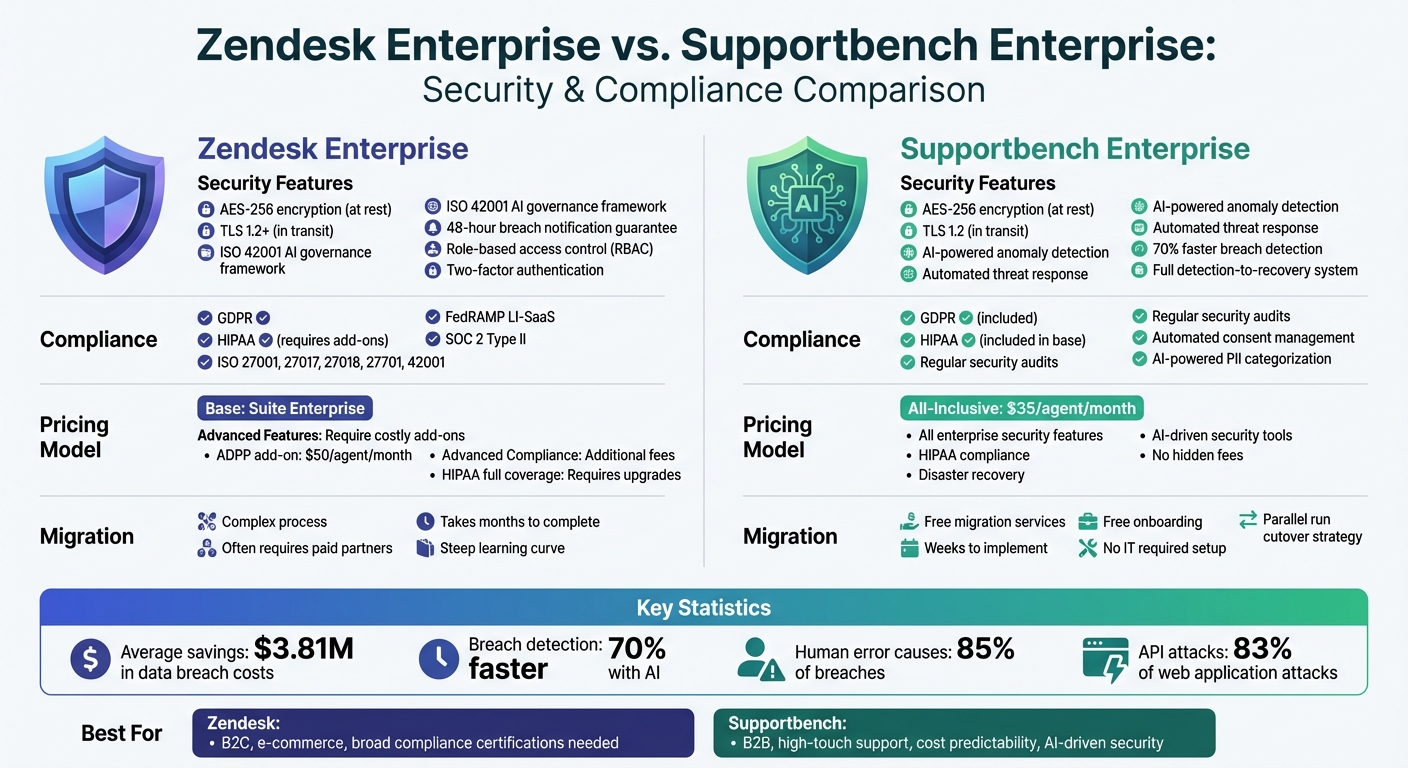
Choosing the right customer support platform is critical for protecting sensitive data and ensuring compliance with evolving regulations. Zendesk Enterprise and Supportbench Enterprise both provide robust security measures, but they differ in implementation, costs, and features.
Here’s a quick breakdown:
- Zendesk Enterprise: Offers layered security with features like AES-256 encryption, role-based access, and optional advanced compliance tools (e.g., BYOK encryption and PII redaction). However, some features require costly add-ons, and migration can be complex.
- Supportbench Enterprise: Focuses on AI-driven security, including anomaly detection and automated threat response. It includes compliance tools like GDPR and HIPAA support in its base pricing, making it cost-effective and easier to implement.
Key Differences:
- AI Tools: Supportbench uses AI to detect and respond to threats, while Zendesk emphasizes governance frameworks.
- Compliance: Zendesk supports more certifications but charges extra for advanced compliance features. Supportbench includes these in its standard pricing.
- Costs: Zendesk’s advanced features often require add-ons, while Supportbench offers an all-inclusive pricing model starting at $35 per agent.
Quick Comparison:
| Feature | Zendesk Enterprise | Supportbench Enterprise |
|---|---|---|
| Encryption | AES-256 (at rest), TLS 1.2+ (in transit) | AES-256 (at rest), TLS 1.2 (in transit) |
| AI Security Tools | Governance framework (ISO 42001) | Anomaly detection, automated response |
| HIPAA Compliance | Requires add-ons for full coverage | Included in base pricing |
| Breach Notification | 48-hour guarantee | Full detection-to-recovery system |
| Pricing | Add-ons for advanced features | All-inclusive ($35/agent) |
| Migration | Complex, often requires paid partners | Free migration and onboarding |
Takeaway: If your organization prioritizes cost predictability, AI-driven security, and ease of implementation, Supportbench is a strong choice. Zendesk might suit businesses needing broad compliance certifications but be prepared for higher costs and potential migration challenges.
Zendesk vs Supportbench Enterprise Security and Compliance Comparison
Zendesk Enterprise Security and Compliance Overview
Zendesk Enterprise employs a layered security approach to protect customer information. It uses AES-256 encryption for data stored at rest and HTTPS/TLS 1.2+ for data in transit, ensuring a strong foundation of protection. Key security features include role-based access control (RBAC), two-factor authentication, and single sign-on (SSO) options like SAML and OIDC. Its infrastructure incorporates DDoS mitigation (via Cloudflare and AWS), intrusion detection and prevention systems (IDPS), and security information and event management (SIEM) for real-time monitoring. These measures provide a solid framework for evaluating and enhancing security.
Security Features in Zendesk Enterprise
Zendesk’s security architecture is reinforced by proactive vulnerability management. This includes annual third-party penetration tests, a Bug Bounty program through HackerOne, and regular external vulnerability scans. A dedicated 24/7 security team monitors alerts and commits to notifying affected customers of confirmed breaches within 48 hours. Enterprise users also benefit from features like IP address whitelisting, which restricts access to approved networks, and private attachments that require user sign-ins to access ticket files.
However, some advanced security features are only available as add-ons. For example, the Advanced Data Privacy and Protection (ADPP) add-on offers Bring Your Own Key (BYOK) encryption, data masking for sensitive information, and automated redaction suggestions for personally identifiable data. It also includes access logs that track events for up to 90 days. Without this add-on, organizations rely on Zendesk’s default encryption rather than customer-managed keys.
Compliance Certifications and Standards
Zendesk Enterprise holds a range of certifications, including ISO 27001:2022, ISO 27017:2015, ISO 27018:2019, ISO 27701:2019, ISO 42001, and CSA STAR AI Levels 1 & 2. It complies with regulations such as GDPR, CCPA/CPRA, HIPAA (via a Business Associate Agreement), PCI-DSS (with redaction tools), and FedRAMP LI-SaaS.
"Zendesk was the second company ever to receive approval for its Binding Corporate Rules (BCRs) from the Irish Data Protection Commissioner." – Zendesk Trust Center
Zendesk also adheres to regional privacy laws, including the Australian Privacy Act, Brazilian LGPD, Canadian PIPEDA, and the UK’s Cyber Essentials Plus. For additional assurance, SOC 2 Type II reports can be requested under an NDA. Enterprise plans include audit logs to track account and user changes, while detailed access logs (showing who viewed or exported data) require the ADPP add-on.
Gaps and Limitations in Zendesk Enterprise
Despite its robust offerings, Zendesk Enterprise has some limitations. FedRAMP authorization is restricted to the Low Impact (LI-SaaS) baseline, which may not meet the needs of government agencies requiring Moderate or High impact levels. HIPAA compliance under the Business Associate Agreement excludes certain features, such as Early Access Programs and Zendesk Talk Text, as well as most Marketplace apps. Organizations in heavily regulated sectors may need to purchase the ADPP add-on to access tools like BYOK encryption and PII redaction.
There are also security concerns with admin-created API tokens, which grant full permissions across the platform. While Zendesk scans attachments for malware in most channels, some channels remain unprotected. Additionally, standard ticket deletion policies don’t automatically clear original conversations stored in Sunshine Conversations; these records are only removed when the associated end-user record is deleted. Finally, Zendesk will phase out password-based API authentication by December 2025, requiring organizations to transition legacy integrations to API tokens or OAuth.
sbb-itb-e60d259
Supportbench Enterprise Security and Compliance Features
Supportbench Enterprise integrates multiple layers of protection into every aspect of its platform. It employs AES 256-bit encryption for data at rest and HTTPS with TLS 1.2 for data in transit. The infrastructure is secured within dedicated VPCs, featuring hardened perimeter defenses, IP whitelisting, and bastion host access for added control and security. This comprehensive setup provides a solid foundation for its advanced security measures.
Security Features in Supportbench Enterprise
Supportbench prioritizes security with tools like role-based access control (RBAC), two-factor authentication (2FA), and detailed audit trails, ensuring only authorized personnel access sensitive information. Its AI-driven anomaly detection identifies unusual access patterns, cutting breach detection times by up to 70% compared to manual processes.
The platform’s data resiliency is built into its infrastructure, featuring real-time backups, a 30-day recovery window, and active-active mirroring across multiple zones. Secure API gateways limit data exposure by restricting access to necessary fields and undergo regular vulnerability assessments. Additionally, real-time malware and spam scanning, powered by the latest threat signatures, provides proactive protection.
Compliance Certifications and Standards
Supportbench adheres to critical regulatory frameworks like GDPR and HIPAA, maintaining a compliance framework that evolves with regulatory changes. Its development process includes rigorous security reviews, cross-functional collaboration, and web vulnerability assessments, ensuring top-tier protection. As Nooshin Alibhai, Founder and CEO of Supportbench, explains:
"Supportbench doesn’t just comply with industry standards like GDPR, HIPAA, and others; it champions them."
Regular security audits, paired with AI-driven tools, ensure that protection measures stay up to date. This approach is particularly beneficial for businesses operating across regions with varying privacy laws. By meeting these regulatory standards, the platform also enhances operational efficiency.
AI-Driven Security and Compliance Tools
Supportbench leverages AI to automate and streamline compliance workflows. For example, the system automatically categorizes and prioritizes tickets containing sensitive data, ensuring proper handling in line with regulatory requirements. It also manages customer consent for data usage, aiding GDPR compliance while enabling personalized support.
The platform’s AI-powered incident management system detects, contains, and remediates security threats, a critical feature for maintaining HIPAA and GDPR standards. Organizations using security automation, like Supportbench’s tools, experience an average savings of $3.81 million in data breach costs. Additionally, stringent role-based controls help address the human factor, which contributes to roughly 85% of breaches.
Side-by-Side Security and Compliance Comparison
Taking a closer look at security and compliance reveals notable differences between the two platforms. While both meet standard industry benchmarks, their approaches to data protection, access management, and regulatory compliance vary in ways that could influence operational costs and risk management strategies.
Data Protection and Privacy Controls
Each platform employs distinct methods to safeguard customer data. Zendesk uses a combination of unique IDs, cryptographic keys, and ephemeral tokens within a least-privilege access framework. On the other hand, Supportbench adopts role-based security, bolstered by continuous monitoring for unusual access patterns.
AI tools further set the two apart. Supportbench’s AI-powered anomaly detection can cut breach detection times by up to 70%, while Zendesk emphasizes AI governance aligned with ISO 42001 standards.
| Feature | Zendesk Enterprise | Supportbench Enterprise |
|---|---|---|
| Encryption at Rest | AES-256 | AES-256 |
| Encryption in Transit | TLS 1.2+ | TLS 1.2 |
| Access Control | Unique IDs, cryptographic keys, least-privilege | Role-based security with access pattern monitoring |
| AI Security Tools | ISO 42001 governance framework | Anomaly detection, automated threat response |
| Breach Notification | 48-hour guarantee | Comprehensive detection-to-recovery plan |
| API Security | TLS-protected endpoints | Secure gateways with restricted field access |
| Privacy Controls | ISO 27701 for GDPR/CCPA alignment | Automated consent management for personalization |
Organizations that leverage automated security measures, like those offered by Supportbench, have seen average savings of $3.81 million in data breach costs. Considering that API attacks account for roughly 83% of all web application attacks, Supportbench’s secure API gateways with restricted data exposure provide a critical layer of protection. These measures highlight the platforms’ distinct approaches to regulatory compliance.
Regulatory Compliance and Certifications
Building on their security frameworks, both platforms address key regulatory standards such as GDPR and HIPAA, though their implementations differ. Zendesk stands out for being the second company ever to gain approval for its Binding Corporate Rules (BCRs) from the Irish Data Protection Commissioner. These BCRs, combined with Data Processing Agreements (DPAs) and EU Standard Contractual Clauses (SCCs), support global data transfers.
For HIPAA compliance, Zendesk requires enterprise customers to enable "Advanced Compliance" features and sign a Business Associate Agreement (BAA). This coverage applies to core products like Ticketing, Help Center, Messaging, Voice, and AI Agents, but excludes Early Access Programs and Marketplace apps from BAA coverage.
| Compliance Area | Zendesk Enterprise | Supportbench Enterprise |
|---|---|---|
| GDPR Implementation | BCRs (processor/controller) plus DPA with SCCs | Evolving framework with automated audits |
| HIPAA Coverage | Enterprise plans with BAA; specific products covered | Supported via role-based security framework |
| SOC 2 Type II | Available upon request | Regular security audits |
| ISO Certifications | 27001, 27017, 27018, 27701, 42001 | Development includes periodic security reviews |
| FedRAMP | Authorized at LI-SaaS level | Not specified |
| Data Residency | US, Australia, Japan, EEA | Dedicated VPCs with regional options |
| PII Protection | Manual controls with optional ADPP add-on ($50/agent/month) | AI-powered categorization and handling |
Zendesk offers its Advanced Data Privacy and Protection (ADPP) add-on for $50 per agent per month (billed annually). This package includes Bring Your Own Key encryption, data masking, and automated PII redaction. In contrast, Supportbench integrates AI-powered sensitive data handling as a standard feature, automatically categorizing and prioritizing tickets containing protected information.
Incident response planning also plays a key role in cost savings. Companies with well-tested plans save an average of $2 million in breach costs compared to those without them. Supportbench’s incident management system covers detection, containment, and remediation, while Zendesk guarantees breach notification within 48 hours, leaving organizations to handle their own response procedures.
Risk Management and Migration Considerations
Managing risks effectively means having tools that can act quickly and strategies that make transitions between platforms smooth. Zendesk and Supportbench approach these challenges differently, with varying costs and complexities that aren’t always obvious at first glance. Here’s a deeper look at how each platform handles risk management and migration hurdles.
Risk Management Tools
Both platforms build on their security features with unique tools for managing risks. Zendesk Enterprise operates a round-the-clock managed security program supported by a dedicated team. If there’s a verified breach, subscribers are notified within 48 hours. For enhanced data protection, Zendesk offers the Advanced Data Privacy and Protection (ADPP) add-on, which includes access logs and advanced encryption using customer-managed keys (via AWS, Azure, or Google Cloud).
Supportbench, on the other hand, uses AI to detect anomalies and manage risks. Its automated threat response system covers everything from detection to recovery, eliminating the need for third-party add-ons. With role-based security and continuous monitoring of access patterns, it tackles vulnerabilities tied to human error – responsible for 85% of data breaches. Research shows that organizations using security automation save an average of $3.81 million in data breach costs compared to those without such measures.
Hidden Costs and Migration Risks
Risk management isn’t just about responding to threats; it’s also about navigating migration challenges and hidden costs. These costs often appear after contracts are signed, and implementation timelines can vary widely.
For Zendesk, migration can come with added expenses. To comply with HIPAA and execute a Business Associate Agreement (BAA), organizations must purchase an Advanced Compliance add-on or upgrade to specific high-tier plans. Even with these upgrades, features like Early Access Programs and certain Marketplace applications remain excluded from BAA coverage, meaning they can’t handle Protected Health Information. Additionally, third-party integrations often fall outside standard compliance agreements, so auditing them before migration is essential.
Zendesk migrations are frequently complex, requiring paid implementation partners and taking months to complete. New teams often face a steep learning curve. In contrast, Supportbench simplifies things with free migration and onboarding services, completing implementation in weeks rather than months. Its parallel run cutover strategy ensures business continuity by allowing defined integrations and rollback plans. Plus, its "no IT required" setup lets operations teams handle workflows without needing complex coding. For organizations with limited IT resources, these differences can significantly impact the total cost of ownership. Prolonged implementations with Zendesk can lead to dual-system costs and temporary productivity losses, which may reduce overall ROI.
How to Evaluate Platforms for Security and Compliance
Selecting a customer support platform with strong security and compliance features involves more than just ticking boxes. It’s about weighing built-in capabilities, additional costs, and how well the platform handles real-world threats. Considering that human error contributes significantly to breaches and 30% of companies struggle to keep up with changing compliance standards, a thorough evaluation is critical.
Key Questions for Evaluating Platforms
Start by ensuring the platform meets your regulatory needs without requiring expensive add-ons. Does it adhere to frameworks like GDPR, HIPAA, or specific standards such as FedRAMP for government agencies or FSQS for financial services? Always request up-to-date SOC 2 Type II reports and ISO certifications (e.g., ISO 27001 or ISO 27701) under an NDA to verify their internal controls. Additionally, check if the platform functions as a "Processor" or "Service Provider" under regulations like GDPR and CCPA – this distinction affects who controls the data.
Look for robust security features like end-to-end encryption (both at rest and in transit) and Enterprise Key Management (BYOK) through AWS KMS or Azure Key Vault, ideally included in the base offering. Role-based access control (RBAC) is another must-have, ensuring only authorized personnel can handle sensitive data. Comprehensive access logs are equally important to track who has viewed tickets or customer profiles.
Hidden costs can also be a major factor. Companies with fully automated security systems save an average of $3.81 million in data breach costs. Clarify whether features like PII redaction, data masking, automated deletion schedules, and HIPAA compliance are included or require additional fees. For instance, Zendesk’s Advanced Data Privacy and Protection (ADPP) is an add-on for advanced encryption and access logs, while Supportbench includes these features in its standard package. These foundational questions set the stage for understanding how AI-driven features can further enhance compliance.
Criteria for Assessing AI-Driven Compliance
AI-driven tools can significantly streamline compliance and reduce risks. Start by looking for platforms with anomaly detection and automated threat response capabilities. These features can flag unusual access patterns or data usage in real time, a critical function given that API attacks account for 83% of all web application breaches.
Assess the platform’s ability to automatically redact Personally Identifiable Information (PII) and Payment Card Industry (PCI) data from tickets, chats, and call transcriptions. Features like "redaction suggestions" can highlight sensitive information for agents before it’s stored, aligning with GDPR’s data minimization principles. AI functionalities like auto-tagging, issue-type assignment, and ticket summarization can also reduce manual workloads, letting your team focus on more complex issues.
"AI in cybersecurity can reduce breach detection times by up to 70%." – McKinsey
Ensure the AI system is regularly updated with the latest threat data to stay effective against evolving risks. Regularly auditing access to AI-driven tools and insights is also essential to minimize internal threats. For businesses with phone support, prioritize platforms with automatic PII and PCI redaction in call transcriptions. This ensures compliance without the need for manual intervention.
Conclusion: Choosing the Right Platform for Security and Compliance
Key Takeaways from the Comparison
In today’s world, where AI-driven security plays a critical role in maintaining operational stability, selecting the right platform is a decision that can’t be taken lightly. The choice largely depends on whether your organization needs a specialized, high-touch B2B solution with detailed access controls or a more generalized system tailored for broader enterprise use. Supportbench is designed specifically for high-touch B2B customer support, catering to complex accounts and long-term relationships with its detailed access controls and relationship-focused governance. On the other hand, Zendesk is more aligned with B2C and e-commerce environments.
When it comes to pricing, the differences are stark. Supportbench offers a straightforward, all-inclusive pricing model starting at $35 per agent, which covers all enterprise security features – no extra fees for HIPAA compliance, disaster recovery, or AI-driven security tools. Zendesk, however, operates as a suite of products, where advanced security features like Enhanced Disaster Recovery are only available at higher-tier plans, such as Suite Enterprise Plus. Similarly, Advanced Compliance requires additional upgrades or legacy add-ons. This "everything included" approach from Supportbench is especially appealing for organizations seeking both robust security and predictable costs.
Another key distinction lies in AI-driven security. Supportbench incorporates features like AI-driven anomaly detection and threat response to proactively mitigate risks, addressing the reality that 85% of data breaches are tied to human error.
Final Recommendations
With these comparisons in mind, organizations should align their platform choice with their specific security needs and operational models. For B2B companies managing intricate customer relationships – particularly in industries like manufacturing, logistics, healthcare, or financial services – Supportbench’s role-based security controls are a strong match for safeguarding high-value accounts. Its relationship-focused approach is well-suited for environments where even a single data breach could result in immense financial and reputational damage.
To make an informed decision, conduct a total cost of ownership analysis that factors in base pricing alongside any additional fees for features like HIPAA compliance, disaster recovery, and advanced encryption. It’s also crucial to request up-to-date certifications, such as SOC 2, SOC 3, and ISO, from both vendors. Verify whether security features apply universally across all modules – Zendesk’s Advanced Compliance, for example, may not extend to data entered into third-party services or certain modules like Explore. For organizations scaling from 50 to 5,000 agents, it’s essential to choose a platform that won’t require costly re-platforming as your security needs grow.
"In the contemporary B2B landscape, where data breaches and compliance failures can cost not just millions of dollars but also invaluable customer trust, the significance of robust security… cannot be overstated"
- Nooshin Alibhai, Founder and CEO of Supportbench
FAQs
Which security features are included by default vs. paid add-ons?
Supportbench Enterprise comes with built-in security features that cover all the basics and then some. It includes multi-layered data protection, AI-powered insights, and enterprise-grade controls – all as part of the standard package.
On the other hand, Zendesk Enterprise provides essential security tools like password policies and data encryption. However, if you need advanced features such as HIPAA compliance or enhanced disaster recovery, you’ll likely need to pay for upgrades or opt for higher-tier plans.
With Supportbench, you get reliable and cost-efficient security right out of the box, without the hassle of purchasing extra add-ons.
What evidence should we request to verify compliance claims?
To ensure compliance claims are legitimate, ask for evidence like certifications (e.g., SOC 2, ISO 27001, HIPAA, GDPR, or CCPA), audit reports, and documented policies. You should also request audit logs and detailed data processing agreements (DPAs). These materials help confirm that compliance and data protection measures are actively maintained. Such documentation is especially critical for industries that are regulated or involve higher risks.
How do we reduce migration risk without disrupting support?
To reduce migration risks while maintaining support, it’s essential to follow a clear plan. Begin with detailed preparation: organize and clean your data, define specific objectives, and configure the new system in advance. Run a pilot test to identify and fix any issues, confirm data accuracy, and ensure workflows operate as expected. When transitioning, consider using delta migration to minimize downtime. Finally, validate the system post-migration to confirm data integrity and proper functionality.
Related Blog Posts
- Zendesk vs Freshdesk vs Supportbench: Which Support Platform is Better and for who in 2026?
- Helpdesk software comparison matrix 2026
- Which helpdesk tools are built outside the United States (UK/EU/Canada/Australia)?
- What’s the best helpdesk for Canadian B2B companies that need strict data location controls?