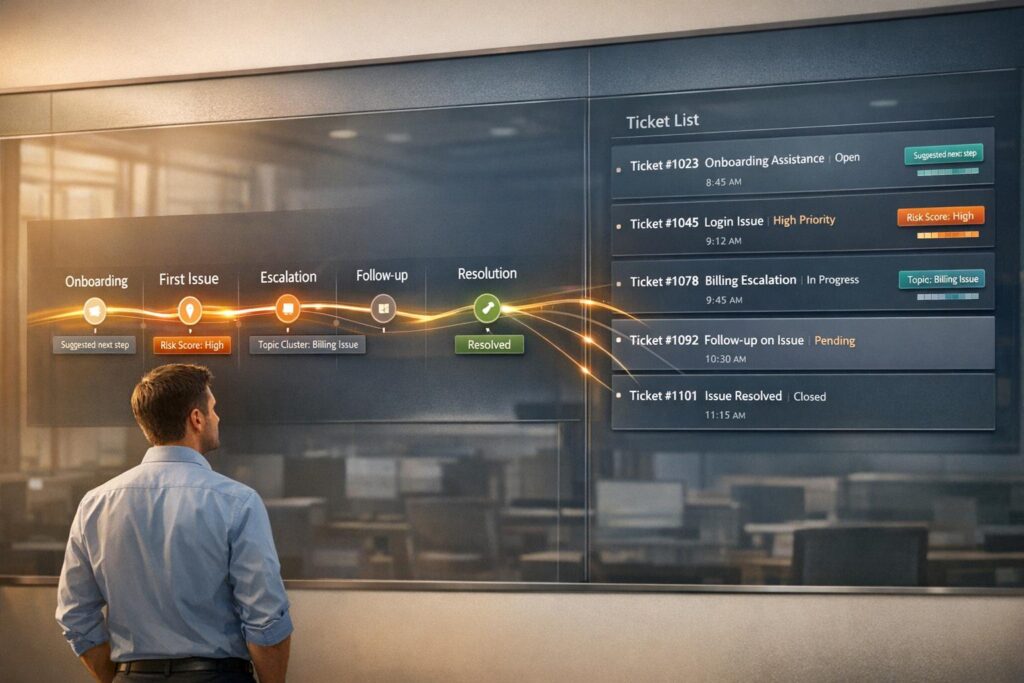
Struggling to manage customer support efficiently? Choosing between timeline views and ticket lists can make a big difference in how you track interactions and resolve issues.
- Timeline Views: Show a chronological history of customer interactions across channels. Great for understanding context, managing complex cases, and improving collaboration during support escalations.
- Ticket Lists: Focus on organizing and prioritizing individual cases. Ideal for high-volume environments where speed, structured workflows, and SLA compliance are critical.
Key takeaway: Use timeline views when context matters most. Opt for ticket lists when speed and structure take priority. A hybrid approach often works best, combining the strengths of both.
Quick Comparison:
| Feature | Timeline Views | Ticket Lists |
|---|---|---|
| Purpose | Track full customer history | Manage and prioritize cases |
| Best For | Complex, multi-step B2B issues | High-volume, transactional requests |
| Focus | Context and personalization | Speed and efficiency |
| Visualization | Chronological interaction history | Tabular list of cases |
| Collaboration | Shared context across teams | Task-focused handoffs |
Next Steps: Dive deeper to see how AI enhances both methods through AI-powered ticket routing and avoid common mistakes when implementing these tools.
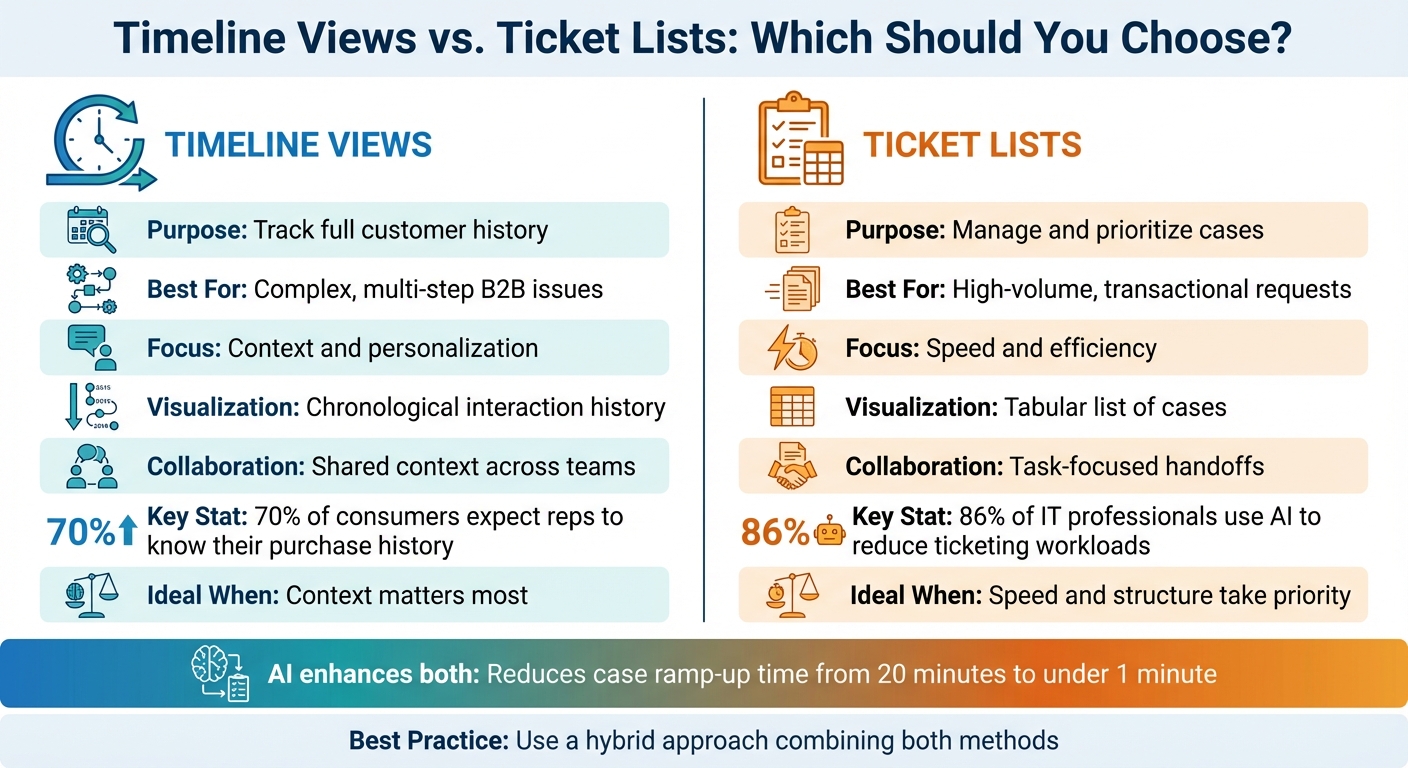
Timeline Views vs Ticket Lists: Feature Comparison for Customer Support
Timeline Views: Chronological Customer Journey Tracking
Timeline views present interactions in a chronological order, pulling together data from tickets, emails, chats, internal notes, and even third-party systems like Shopify. Each entry is recorded with precise timestamps, creating a unified and detailed record [2].
This approach shines in handling complex issues. Take May 2025, for example, when a support team resolved a "500 errors during nightly data sync" problem for Acme Corp. The timeline captured every step: from the initial ticket logged on May 1, 2025, at 10:45 AM, to internal Slack escalations at 8:33 AM, a handoff between agents at 10:10 AM, and the final resolution of a SQL issue at 4:05 PM. The chronological detail revealed exactly when the concurrency problem was identified and when the fix was implemented across environments [2].
But these views go beyond just tracking events. They also include AI-powered sentiment analysis, which monitors how customer emotions change over time. This helps teams differentiate between customers experiencing a one-off issue and those with a history of dissatisfaction [8][9].
"The value in knowing the trend over time is useful when seeing the relationship as a whole. You’d certainly manage a client account differently if they were a long healthy customer who only recently dipped into the red vs a customer who has struggled with poor sentiment over a longer period of time." – Dan Ahrens, VP of Customer Success at Forcepoint [9]
Timeline views also act as a shared source of truth during handoffs. Whether a case moves between agents or from support to engineering, everyone has access to the same context. This eliminates the frustrating "what happened before I got here?" problem, ensuring smoother transitions and faster resolutions [2].
What Timeline Views Include
For e-commerce businesses, timelines integrate data from platforms like Shopify right alongside support interactions. This means agents can see order details – like payment status, order numbers, and item counts – without leaving the timeline. When a customer inquires about a delayed shipment, the agent can instantly view the order date, fulfillment status, and any previous conversations about that order [7].
Sentiment tracking is another key feature. By analyzing the tone of each interaction, the system detects emotions like frustration or satisfaction and maps how these feelings evolve. This helps teams prioritize responses – for example, escalating cases where frustration is building or identifying satisfied customers as candidates for feedback requests [5][8].
Timelines also manage conversation states, marking interactions as "active" or "inactive" based on customer response patterns. If a conversation goes inactive (e.g., no reply for 10 minutes), automated follow-up emails can be triggered to keep the case moving [6]. This ensures no issue gets overlooked, even when customers go silent.
Another critical component is the relationship history. Timelines provide a long-term view of interactions, including resolved tickets, reopened cases, and closed conversations. This allows teams to identify patterns, like whether a customer frequently experiences the same issue or tends to reach out during specific business cycles [6][7].
These features make timeline views invaluable for multi-channel support scenarios where maintaining context is essential.
Best Use Cases for Timeline Views
Timeline views are ideal when context is more important than speed. They’re especially useful in enterprise B2B environments, where customers often have complex, multi-year histories. For instance, when an account manager needs to understand why a client might churn, the timeline can reveal sentiment trends, recurring issues, and response time patterns that aren’t immediately obvious from individual tickets.
They also excel in cross-team collaboration. When support escalates a case to engineering, product, or sales, the timeline ensures everyone has the same context. Engineers, for example, can see the customer’s exact words and the steps the support team has already taken, avoiding unnecessary back-and-forth and speeding up the resolution process [2].
For long-term relationship management, timelines are a goldmine. Account teams can review them before renewal discussions to spot potential concerns or opportunities. If the timeline shows recurring technical issues or slow response times, the team can address these proactively to improve the customer experience [9][10].
Timeline views are also useful for identifying process inefficiencies. By analyzing multiple timelines, support leaders can uncover patterns like frequent handoffs between agents or delays in specific escalation stages. This can highlight areas for improvement, such as reducing "ticket tennis" or streamlining workflows. For example, noticing that introducing technical stakeholders by week three increases win probabilities by 70% can improve revenue forecasting accuracy [10].
However, timeline views aren’t always the best choice for every scenario. When dealing with high volumes of incoming tickets that require quick categorization and routing, the chronological format can slow things down. In such cases, traditional ticket lists may be more efficient.
sbb-itb-e60d259
Ticket Lists: Structured Case Management
While timeline views provide a detailed historical perspective, ticket lists streamline the management of high-volume, urgent support cases. By centralizing scattered requests into one trackable record, ticket lists eliminate the need to sift through multiple channels. Each support request becomes a digital record with essential details like the requester’s name, issue type, urgency level, and any attached files [13][15]. This setup not only organizes information but also lays the groundwork for automated, intelligent case management.
The benefits are immediate. automated triage and routing use pre-defined rules or AI to assign tickets to the right team based on factors like issue type, agent expertise, or availability [13][15]. Round Robin assignment ensures tickets are evenly distributed among agents, reducing delays and helping prevent burnout [13][5].
"Without a standard for prioritization, systems would essentially dump all support tickets into one pool, leaving teams with no clear starting point or goal."
– Greg Rich, CEO, Vivantio [12]
Real-time status updates such as "In Progress", "Waiting for Input", or "Pending" keep agents and customers informed, improving queue management. Managers can quickly identify bottlenecks, while agents stay focused on tickets needing immediate attention. Automated SLA tracking further ensures tickets nearing contractual deadlines are flagged for action [13][15][16].
AI-driven ticket management is gaining momentum. A recent study shows 86% of IT professionals are already using AI to reduce workloads in ticketing systems, while 70% of organizations globally are testing automation in at least one area of operations [13][15]. Natural Language Processing (NLP) plays a key role here, analyzing sentiment and intent to categorize tickets more consistently than manual tagging – an essential feature for handling hundreds of cases daily [11][5].
What Ticket Lists Include
Effective ticket lists are built around lifecycle management. Tickets follow clearly defined stages – New, Triage, Assigned, In Progress, Pending, Resolved, and Closed – ensuring no case is overlooked or left unresolved [16]. The "Pending" status is particularly helpful, distinguishing tickets that need customer input from those requiring agent action, which keeps queues accurate and manageable.
SLA configurations are tailored to individual customer agreements. In B2B settings, response time targets often vary by service tier (e.g., Gold, Silver, Bronze) or the potential revenue impact [14]. These agreements are tracked in real time, ensuring compliance without manual oversight [13].
Intelligent prioritization eliminates guesswork in triage. For example, the ITIL Priority Matrix uses a 3×3 grid to assess tickets based on urgency (severity) and impact (number of users affected) [12]. A system outage affecting hundreds of users would be flagged for immediate action, while a minor issue like a password reset follows standard procedures [16].
Ticket lists also offer customizable filters and views. Agents can organize their workloads by priority, customer, or due date, while managers use KPI dashboards to track performance and analyze trends in ticket volume or resolution times [5]. This dual-layer visibility enhances both individual efficiency and broader strategic planning.
AI-powered tagging further simplifies high-volume ticket management. By analyzing ticket content, the system applies consistent labels across categories such as Incidents (service disruptions), Service Requests (routine needs like license provisioning), Problems (root cause investigations), and Change Requests (planned infrastructure updates) [11][13]. These features make ticket lists indispensable for environments requiring systematic, rapid case handling.
Best Use Cases for Ticket Lists
Ticket lists shine in high-volume support scenarios where speed and structure are critical. When teams handle 200+ tickets daily, this format allows agents to quickly assess priorities, claim assignments, and efficiently work through their queues. It simplifies the process of identifying urgent issues versus less critical tasks [13][15].
They are especially effective for prioritizing urgent issues. For instance, during a critical system outage, ticket lists highlight the incident immediately using automated priority scoring and SLA alerts. Managers can quickly reallocate resources to address tickets nearing their deadlines [13].
Another strength is workload distribution. Round Robin assignment ensures tickets are evenly spread among agents, while skill-based routing directs specific issues – like API integration questions – to the most qualified team members [11][13][5].
"An IT ticketing system efficiently manages internal support inquiries… By formalizing the internal support process, this type of program streamlines case tracking, minimizing resolution times."
– Intercom [15]
For routine service requests, ticket lists provide an efficient structure for repetitive tasks. Processes like password resets, license provisioning, and access requests benefit from automation and standardized workflows. Integrating a knowledge base with the ticket list allows customers to resolve common issues on their own, reducing the overall ticket volume [13][15].
However, ticket lists may not always provide a complete view of a customer’s interaction history, especially for cases involving multiple contacts over time. Without additional integrations to consolidate historical data, agents might struggle to get a full picture of the customer’s background, potentially slowing resolution times [12][5].
Timeline Views vs. Ticket Lists: Direct Comparison
When it comes to managing customer support operations, the choice between timeline views and ticket lists is pivotal. These two visualization methods cater to different goals, shaping how teams capture and act on the customer journey.
Timeline views present customer interactions in chronological order, showcasing emails, calls, notes, and tasks in a seamless flow. This format emphasizes understanding the entire story behind a customer’s experience, making it easier for agents to avoid redundant questions and provide tailored solutions. On the other hand, ticket lists are designed for rapid triage, grouping cases by status, priority, and assignment. This makes them ideal for environments where efficiency and workload distribution are top priorities.
These differences reflect the distinct outcomes each method is designed to achieve. Timeline views focus on delivering contextual depth and personalization, giving agents a clear picture of past interactions and attempted solutions. This approach reduces the frustration customers feel when they have to repeat themselves. Ticket lists, however, prioritize speed and organization, enabling support teams to meet service level agreements and handle high volumes of requests efficiently.
Customer expectations highlight the importance of these tools. Did you know that 70% of consumers expect representatives to know their purchase history and previous interactions? Despite this, 58% of agents report that limited access to customer data leads to poor experiences [17]. Timeline views address this gap by acting as a shared "source of truth", ensuring smooth handoffs between team members.
These contrasting approaches also impact problem-solving and overall performance. Timeline views, for instance, can uncover patterns and recurring issues that might be missed in status-driven ticket lists. Imagine a timeline revealing that customers consistently escalate after receiving templated responses – an insight that could easily go unnoticed in a traditional ticket queue.
Here’s a quick breakdown of how these methods stack up:
Comparison Table
| Dimension | Ticket Lists | Timeline Views |
|---|---|---|
| Primary Goal | Efficiency, triage, and closing cases [18] | Understanding the customer story and context [17] |
| Visualization | Tabular grid of IDs, subjects, and statuses [3] | Chronological feed of all touchpoints [17] |
| Best Use Case | High-volume transactional support (password resets, billing) [19] | Complex B2B escalations and multi-departmental issues [2] |
| Team Collaboration | Internal notes and explicit ticket handoffs [3] | Shared source of truth across Slack, email, and CRM [2] |
| Customer Context | Limited to specific ticket metadata [18] | Full history across all channels and interactions [17] |
| Resolution Speed | Optimized for "Time to Resolution" metrics via routing and SLA triggers [18][19] | Optimized for accuracy and personalization by reducing back-and-forth [17] |
| Data Structure | Status-based (Open, Pending, Resolved) [19] | Chronological/Event-based [2] |
Up next, we’ll dive into how AI-driven tools enhance the strengths of both approaches.
Using AI to Improve Both Visualization Methods
AI transforms static timeline views and ticket lists into smarter, more efficient systems that save time and uncover valuable insights. By building on the strengths of each method, AI simplifies context gathering and case management. For timelines, it pieces together the customer journey and identifies patterns. For ticket lists, it speeds up triage and routing decisions before an agent even steps in.
The results are clear. On average, agents spend about 2 minutes manually gathering context per ticket – adding up to 3 hours daily for 100 tickets. AI-generated summaries slash case ramp-up time from 20 minutes to under 1 minute [21][22]. As Eric Klimuk, Founder and CTO of Supportbench, puts it:
"This ‘context tax’ – the time spent just getting up to speed – directly impacts resolution times, agent productivity, and ultimately, the customer experience" [21].
Traditional rule-based systems often fail to detect urgency when customers avoid using specific keywords [11]. AI, powered by natural language processing (NLP), can interpret both the meaning and sentiment behind messages.
Here’s a closer look at how AI enhances timeline views and ticket lists.
AI Features for Timeline Views
AI takes timeline views to the next level by creating a complete, chronological narrative of customer issues in seconds. Instead of manually piecing together emails, Slack messages, internal notes, and past tickets, agents get a single, consolidated feed [2]. This is especially useful during shift handoffs or escalations.
Sentiment analysis adds another layer by mapping emotional shifts throughout the customer journey. It highlights friction points – like rising frustration – even when customers don’t use obvious words like "angry" or "urgent" [1][11]. For instance, if a customer sends three follow-up emails within 30 minutes, AI flags the urgency, something a basic status system might overlook.
Activity summaries make long interaction histories easy to digest. Instead of combing through dozens of emails, an agent can review a concise summary, such as:
"Customer reported API timeout errors on March 2, 2026. Engineering confirmed fix deployed March 3. Customer still experiencing issues as of March 4."
This snapshot helps agents quickly identify delays or gaps and take action [2][21].
AI also visualizes the customer journey by converting qualitative data into clear, actionable visuals. It pinpoints pain points and areas of friction in the service experience. Bella Williams from Insight7 explains:
"By representing customer interactions visually, businesses can identify friction points that hinder user satisfaction" [1].
AI Features for Ticket Lists
While timeline views benefit from deeper insights, ticket lists leverage AI to improve speed and accuracy in operations.
AI shines in ticket lists through intelligent triage and routing. AI-generated tags like "Bug", "Feature Request", or "How-To" automate categorization, ensuring agents focus on high-priority tickets first [20]. These tags are dynamic, updating as new information comes in, so the ticket always reflects its current state.
Predictive scoring assigns a priority value (0–100) to each ticket by analyzing factors like urgency, customer value (monthly recurring revenue), historical patterns, and system status [22]. For example, a weighted model might assign up to 40 points for urgency, 30 points for customer value, 20 for historical trends, and 10 for system status. Tickets scoring 60+ are marked "Critical", while those scoring 40–59 are "High." This system reduces oversight, where manual processes might delay roughly 30% of tickets by an average of 15 minutes each [22].
Context-aware routing is another game-changer. AI analyzes ticket content and directs it to the most qualified agent. For instance, an API-related issue is routed straight to an "API Specialist", avoiding unnecessary back-and-forth [11]. Nooshin Alibhai, Founder and CEO of Supportbench, highlights this shift:
"AI is revolutionizing the operational backbone of support by bringing intelligence and context-awareness to ticket routing and prioritization" [11].
Predictive SLA management keeps an eye on ticket lists, flagging items at risk of breaching service level agreements based on priority and elapsed time [22]. AI can also integrate data from CRMs and billing systems to prioritize tickets from high-value customers automatically.
Lastly, AI improves data consistency. Manual tagging often leads to inconsistencies – one agent might tag an issue as "Reporting Bug", while another uses "Report Error." AI ensures uniform tagging, providing cleaner data for trend analysis. To maintain accuracy, support leaders should regularly review AI performance and adjust settings as needed [11].
Common Implementation Mistakes to Avoid
Using visualization tools can lead to impressive outcomes, but only if you sidestep some common pitfalls. One major misstep is assuming that handoffs between systems will always be seamless. When a ticket transitions – like moving from your support desk to an engineering tracker – essential details often get lost. Richie Aharonian, Head of Customer Experience & Revenue Operations at Unito, puts it plainly:
"Every handoff is a compression point. Information gets compressed into whatever the receiving system can accept. Everything else either gets manually summarized in a comment (if you’re lucky) or simply disappears" [4].
This issue frequently stems from mismatched schemas. For instance, a "Customer Impact" field in your service desk might not exist in the engineering system, leaving critical context behind [4]. But handoffs aren’t the only problem that can disrupt your support process.
Another common error is depending on static rules for managing ticket lists. Sorting by fixed criteria like date or status can overlook more pressing factors, such as customer frustration. For example, a customer who sends multiple angry follow-ups might remain buried in the queue simply because they didn’t label the issue as "urgent." Using AI-driven sentiment analysis to identify frustration and intent can automatically reprioritize such tickets, ensuring they get the attention they deserve [23].
Fragmented interaction histories pose another challenge. When agents have to piece together timelines from Slack messages, emails, and notes, it slows down resolution times. A better approach is consolidating all communication channels into a single timeline view. Automation can also help by adding structured data – like "Affected Users: 47" – directly into the ticket description, speeding up the process [2] [4].
Synchronization failures can also create confusion. For example, a ticket might show as "In Progress" in one system but actually be "Blocked" in another. Aharonian calls this a "visibility black hole" [4]. To avoid this, map statuses between systems – such as aligning "On Hold" in Support with "Blocked" in Engineering – and use integration tools to sync comments and status updates. Before escalating a ticket, ensure the troubleshooting history is well-documented and the SLA clock is accurate [4].
Finally, ignoring sentiment data strips away important emotional context. Without it, you might know what happened but not how the customer feels. Adding a standardized sentiment field to every interaction record can help. Use AI to analyze tickets and transcripts for sentiment, which can uncover underlying emotions. Incorporating sentiment into your priority scoring – at about 10% of the total – can help you quickly address frustrated customers [24].
Conclusion: How to Choose the Right Approach
Deciding between timeline views and ticket lists comes down to matching the tool with your specific needs. Ticket lists are ideal for handling high-volume, transactional support where speed and meeting SLAs are critical. They’re designed to streamline triage, routing, and quick resolution. On the other hand, timeline views are perfect for gaining a deeper understanding of a customer’s journey – especially for complex B2B accounts with multiple stakeholders and long-running issues.
Your team structure plays a significant role in this decision. Smaller or growing teams often gravitate toward timeline-based tools because they’re easier to adopt and use daily. Meanwhile, larger enterprises managing IT infrastructure often require the structured, ITIL-aligned workflows that ticket lists provide [3]. Customer complexity is another factor. For high-touch B2B clients, timeline views are essential – after all, 70% of consumers expect representatives to know their purchase history and past interactions [17]. For internal IT or DevOps teams handling routine service requests, ticket lists are better suited to maintaining smooth operations.
This is why many organizations find a hybrid approach to be the most effective. Ticket lists can serve as the starting point, ensuring requests are categorized and routed quickly [11]. Timeline views, in turn, are invaluable for escalations or managing accounts where understanding the full context is critical. As Nooshin Alibhai, Founder and CEO of Supportbench, puts it:
"Getting that request accurately categorized, prioritized, and into the hands of the right agent swiftly is fundamental to efficient operations and a positive customer experience" [11].
AI takes this hybrid model to the next level by bridging the gap between context and efficiency. It can automatically generate timelines from scattered data sources like email, chat, and Slack, while also enhancing ticket lists with tools like sentiment scoring and intelligent prioritization [2][11]. This means you don’t have to commit to one method exclusively. Instead, AI allows you to switch seamlessly – using timeline views when deep context is needed and ticket lists for handling straightforward, high-volume tasks.
To make the right choice, assess your team’s pain points. Are you dealing with repeated context requests, missing handoff details, or disorganized queues? Use these insights to decide whether to improve timeline visibility or refine ticket list prioritization. Whichever method you choose – or however you combine them – focus on making your team faster and your customers more satisfied, without adding unnecessary complexity [11].
FAQs
When should my team use a timeline view instead of a ticket list?
A timeline view shines when you need a clear, visual history of customer interactions. It’s particularly helpful for tracking complex cases that involve multiple steps or team members. By presenting interactions in chronological order, it helps maintain context across different touchpoints, making collaboration smoother and more effective.
On the other hand, if your goal is to quickly manage a large number of tickets, a ticket list might be the better choice. However, ticket lists lack the detailed, chronological perspective that’s crucial for handling intricate, long-term support cases.
What does “hybrid” look like in day-to-day B2B support?
In B2B support, a hybrid approach blends timeline views with ticket lists to streamline issue resolution and enhance the customer experience. Timeline views offer a clear chronological history of customer interactions, giving teams valuable context. Meanwhile, ticket lists help organize and prioritize tasks, ensuring nothing falls through the cracks. This combination allows teams to tackle complex cases involving multiple stakeholders more effectively, using both detailed historical insights and structured workflows to resolve issues faster and with a stronger focus on customer needs.
How do we measure ROI from AI summaries, routing, and sentiment scoring?
Measuring ROI means keeping an eye on the right metrics and understanding the benefits. For AI-generated summaries, focus on how they cut down handling times and speed up resolutions. When it comes to routing, the ROI lies in faster and more precise ticket assignments. Sentiment scoring helps prioritize responses better, which can lower the chances of SLA breaches.
To get a clear picture, compare metrics from before and after implementation – like cost savings, resolution times, and customer retention rates. Pair these numbers with qualitative benefits, such as happier customers and more satisfied agents, to capture the full ROI story.