
Support teams often waste time answering the same questions repeatedly. The solution? Turn solved tickets into knowledge base articles using the Knowledge-Centric Support (KCS) workflow. This approach integrates documentation into the ticket resolution process, ensuring your knowledge base stays relevant and reduces ticket volume over time.
Key Takeaways:
- Identify tickets worth converting: Focus on frequent, impactful, or complex issues.
- Structure articles effectively: Use a clear format with fields like Issue, Environment, Resolution, and Cause.
- Leverage AI tools: Automate drafting and ticket selection to save time.
- Review and publish carefully: Validate accuracy and organize articles for easy access.
- Promote self-service: Ensure customers can quickly find and use articles.
Companies like ServiceNow and Salesforce have seen faster resolutions and lower ticket volumes by adopting KCS principles. Following this workflow transforms support activities into a scalable self-service resource.
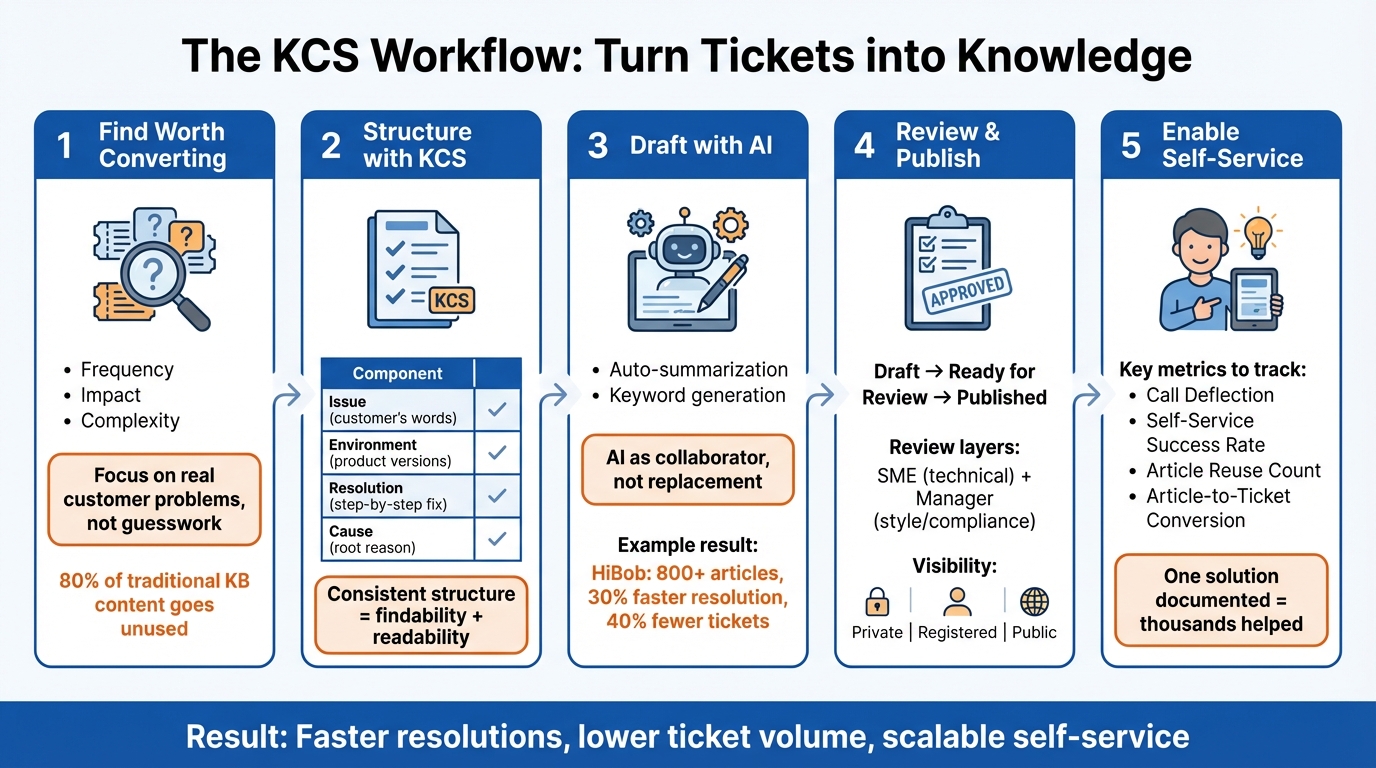
5-Step KCS Workflow for Converting Support Tickets to Knowledge Base Articles
The Beginner’s Guide to Knowledge Centered Service (KCS)
sbb-itb-e60d259
Step 1: Finding Tickets Worth Converting
Only convert solved tickets when there’s clear demand. Research shows that 80% of information in traditional knowledge bases goes unused [5]. Creating articles based on guesswork wastes time and effort.
Here’s the deal: if a solution isn’t already documented in your knowledge base when a ticket is resolved, that’s your signal – it’s a great candidate for a new article [5]. Each ticket is an opportunity to either link to an existing solution or document a new one, ensuring that your knowledge base stays relevant to real customer problems.
Let’s break down what makes a ticket worth converting into an article.
What Makes a Ticket Worth Converting
When deciding which tickets to turn into articles, focus on frequency, impact, and complexity. Start with issues that come up repeatedly across multiple customers. These are the quick wins that can significantly reduce ticket volume. Next, think about customer impact. If a problem disrupts critical workflows or affects key operations, it deserves documentation – even if it’s not common.
For more technical or complex issues, structured articles with sections like "Cause" and "Cause Test" help both agents and customers confirm if a solution applies, cutting down on diagnostic mistakes [2]. But keep these articles short and easy to navigate – ideally no longer than a single page.
Liz Bunger, KCS Program Manager at Motive, explains it well: "Knowledge should be a quick question and answer. Somebody asked the question; here is the answer. And it should be easy to consume. They don’t have time to read a full piece" [4].
A real-world example of this approach in action comes from the University of South Dakota. In 2022, under the leadership of Katharina Wymar, Head of Project Management, the university built a centralized knowledge base with 5,000 articles in just six months. The result? An 18% reduction in time spent on service tickets and 262,000 page views from 31,000 users [5].
Wymar summed it up perfectly: "We lacked that one platform, that one mindset that allowed us to share knowledge" [5].
To make this process even easier, AI tools can help identify the best tickets to convert.
Using AI to Identify Candidate Tickets
AI can take the guesswork out of ticket selection by using gap detection to match customer inquiries with existing documentation [1]. Instead of sifting through hundreds of tickets manually, AI tools can highlight patterns and flag issues without coverage in the knowledge base.
Platforms like Supportbench use AI to automate tasks like ticket summarization, tagging, and identifying issue types. This helps agents quickly spot recurring problems that should be documented. AI can also analyze case histories to recommend resolved tickets that would make strong articles. A smart starting point? Connect these AI tools to your top 10 ticket categories to tackle the most frequent issues first [1]. This ensures your knowledge base grows in a way that directly addresses customer needs.
Step 2: Structuring Articles Using KCS
After pinpointing the right tickets to convert, the next move is organizing them with the Knowledge-Centered Service (KCS) methodology. A consistent structure is key to building a knowledge base that is easy to find, read, and use. The goal? Content that’s practical and accessible.
KCS articles stick to a standardized template, whether you’re creating a Q&A, technical troubleshooting guide, how-to walkthrough, or diagnostic procedure. This uniformity ensures your team can capture and share knowledge efficiently without adding extra work.
Core Components of a KCS Article
Every KCS article should include four key elements: Issue, Environment, Resolution, and Cause. These components make articles comprehensive, reusable, and easy to navigate.
| Component | Description | Perspective |
|---|---|---|
| Issue | The symptom, problem, or question. | Requestor’s context/words |
| Environment | Products, versions, or processes involved. | Standardized/Precise |
| Resolution | The answer, workaround, or fix steps. | Responder’s experience |
| Cause | The underlying reason for the issue. | Diagnostic/Technical |
| Metadata | Attributes like audience, state, and reuse count. | System/Administrative |
The Issue field should reflect the customer’s exact words. This ensures the article is searchable for others experiencing the same problem. The Environment field needs to include specific product versions, configurations, or processes, helping readers quickly determine if the solution applies to their scenario.
For the Resolution field, use numbered steps for multi-step fixes. This keeps instructions clear and minimizes confusion. If the solution requires specialized tools or permissions, include those details in an internal field for support staff while keeping public-facing content simple.
"A well-defined, simple structure is a fundamental element of KCS. A consistent structure contributes to both findability and readability of articles." – Consortium for Service Innovation [2]
For technical issues, consider adding a Cause Test – a quick check to help users confirm the article matches their situation before they proceed. This is especially helpful in B2B contexts where setups can vary significantly.
When dealing with more complex problems, break the content into smaller, linked articles instead of creating one lengthy document. This makes the information easier to digest and update as needed.
Writing for B2B Audiences
Using this structure as a foundation, B2B-focused articles demand precision and concise communication. Readers in B2B settings want actionable guidance without unnecessary fluff.
In these cases, the Environment field becomes even more critical. Since many issues are tied to specific configurations, documenting product versions, integrations, and system setups helps technical users decide if a solution is relevant before they dive in.
When steps require special permissions or tools, guide users to contact support while keeping sensitive details internal. This approach ensures clarity without exposing unnecessary information.
Incorporating multimedia – like screenshots, short videos, or annotated diagrams – can also simplify complex concepts. Visual aids often explain intricate interfaces or hardware setups better than text alone.
For example, the HR platform HiBob adopted AI-driven knowledge management in 2024, aligning with KCS principles. By generating over 800 articles directly from resolved tickets, they cut average resolution time by 30% and reduced ticket volume by more than 40% [7].
"The knowledge manager can only document what they know. And in B2B support, where products are complex and edge cases are technical, they’re always dependent on subject matter experts to inform documentation." – Tina Grubisa, Mosaic AI [7]
Finally, prioritize speed over perfection. B2B products evolve quickly, and support knowledge loses relevance fast – often within 30 days of an issue being identified [6]. Focus on creating content that’s "good enough to solve" rather than delaying for perfection, as outdated documentation benefits no one.
Step 3: Using AI to Draft Articles
Once you’ve established a solid structure for your content, AI can step in to streamline the drafting process. Instead of starting with a blank page, AI helps transform ticket conversations into well-organized drafts. However, think of AI as a collaborative tool – it supports your team but doesn’t replace human insight and judgment [8]. This approach shifts the focus to verification and refinement, saving time while maintaining quality.
AI Summarization and Auto-Drafting
Supportbench provides AI-driven tools to simplify the process of creating knowledge base articles. Its AI KB Article Creation from Case History feature analyzes resolved cases and automatically drafts articles. This eliminates the need for manual copying and formatting by generating subject lines, summaries, and keywords on its own.
Another powerful feature is AI Case Summaries, which condense ticket conversations into concise overviews. These summaries highlight the problem, solution, and key details, sparing agents from sorting through long email chains or chat logs. For B2B support teams handling complex cases that span several days, this can save substantial time every week.
Take Jungle Lodges & Resorts as an example. Over three months, this eco-tourism company in Karnataka achieved a 99%+ response accuracy rate by integrating weekly human reviews of AI-generated content. Their reservation team spent just 30 minutes weekly updating the knowledge base with property-specific details, ensuring the information stayed accurate and relevant [11].
Once the AI generates a draft, the next step is refining it.
Editing AI-Generated Drafts
AI drafts should serve as starting points, not final products. Every fact in the draft – statistics, dates, product versions, and URLs – needs to be carefully verified. AI tools, while highly efficient, can sometimes create "ghost citations", which are references to articles or sources that don’t actually exist [8][9][10].
"When used by experts who are able to assess the quality and effectiveness of documents as situated in contexts with material and ethical stakes, generative AI tools can save time and labor." – Jennifer C. Mallette, Associate Professor [8]
To make the content resonate with B2B audiences, enrich it with industry-specific examples and insights. Add details that AI might overlook, such as recent product updates, troubleshooting steps, or configurations tailored to your customers. Break up dense AI-generated text into scannable sections using descriptive subheadings and numbered steps. Consistency in procedures and settings is also critical, so double-check for alignment across the draft [10][11].
"A chatbot that knows what it does not know is more valuable than one that pretends to know everything." – Hyperleap AI [11]
Lastly, ensure the content aligns with your brand’s tone and terminology. Review the draft against your style guide to maintain consistency across all customer-facing materials [10]. This human touch transforms AI-generated content from generic output into polished, trustworthy documentation ready for publication.
Step 4: Reviewing and Publishing Articles
After drafting, it’s essential to verify each article for technical accuracy and alignment with KCS principles. A structured review process ensures that every piece meets the required quality standards before it reaches customers. This stage serves as the critical link between AI-generated drafts and the final published version, refining content based on real-world support data.
How to Review Articles Effectively
Keep articles in Draft mode until they’ve undergone internal review. Once an agent has completed their edits, mark the article as Ready for Review. This status change helps create a review queue, ensuring no article gets overlooked in the workflow.
Assign articles to subject matter experts for technical validation and managers for style and KCS compliance using the Team Publishing feature. This dual-layer review approach minimizes errors that a single reviewer might miss. While reviewing, consider adding screenshots or links to clarify complex steps and provide better context.
Set strict deadlines for reviews to keep the process efficient. Check that titles are clear and descriptive, descriptions are optimized for search, and instructions reflect the latest product updates. Use preview links to verify how the article will look once published.
Publishing and Organizing Articles
Once an article passes review, it’s time to publish it to enhance the knowledge base’s usability.
Define the article’s visibility settings – Private for internal use, Registered Users for account-specific needs, or Public for general FAQs. This ensures the right audience has access to the right information without exposing sensitive details.
Organize articles under clear categories (e.g., IT Support > Applications > Microsoft) to make navigation intuitive. Proper categorization helps customers find relevant content quickly, improving the efficiency of your customer self-service portal. Optimize the article description for search engines, as this plays a key role in how the article appears in both internal and external search results.
Only agents with Knowledge Admin or management permissions can move articles to published status. This final step ensures a consistent quality standard across the knowledge base. For updates tied to specific timelines, you can schedule automatic publishing to ensure timely delivery of content.
Step 5: Making Articles Available for Self-Service
Once your articles are published, the next step is all about making sure customers can find and use them effortlessly. Following the KCS methodology and leveraging AI-driven insights, your knowledge base should be designed for easy access. The goal? To ensure customers can solve their issues independently, reducing the need for support tickets. This step is what transforms your knowledge base into a powerful tool for ticket deflection.
Making Articles Easy to Find
For your content to be effective, it needs to be discoverable. Start by adding detailed environment metadata – think hardware, software versions, or network configurations – to each article. This ensures that customer searches yield precise results [12]. Also, use the language your customers use. If they search for "login broken" rather than "authentication failure", update your titles to reflect that [12].
You can further improve findability by tracking how well your articles appear in relevant searches. Poor search performance can frustrate users, leading them to submit duplicate tickets for already-resolved issues. To combat this, implement a "flag or fix" system. This allows users or non-licensed agents to flag unhelpful articles, prompting authorized contributors to update the content [12]. And remember, only make articles visible to customers after they’ve been internally validated for accuracy [12].
Once articles are easily accessible, it’s time to measure their impact to fine-tune your self-service strategy.
Tracking Article Performance
To gauge the effectiveness of your self-service efforts, focus on a few key metrics. These metrics not only reflect ticket reduction but also highlight operational efficiency. Here’s what to track:
- Self-Service Success: Measures how often users find the information they need on their own. A high success rate usually means fewer support tickets.
- Self-Service Use: Tracks how often customers attempt to resolve issues through self-service before contacting support.
- Call Deflection: Captures the number of issues resolved through self-service that would otherwise have required support intervention [12].
Another important metric is the article-to-ticket conversion rate. Calculate this by dividing the number of tickets created after an article view by the total views, then multiplying by 100 [13]. If high-traffic articles have high conversion rates, it may indicate that while the content is being found, it’s not solving the problem effectively.
| Metric | What It Measures | Why It Matters |
|---|---|---|
| Call Deflection | Issues solved via self-service that would have been tickets | Reduces incoming support volume |
| Self-Service Success | Percentage of users finding the information they need independently | Correlates with lower ticket volume |
| Article Reuse | Number of times an article is linked to a ticket | Highlights high-demand topics for self-service |
| Article to Ticket Conversion | Percentage of article views that result in a ticket | Identifies content that needs improvement for better deflection |
Regularly analyzing your knowledge base can help you identify which articles are most in demand. These high-performing articles should be given prominent placement in your customer portal [12]. Additionally, monitoring helpfulness scores – calculated as the percentage of positive votes versus total votes – can reveal which articles need improvement to boost their effectiveness [13].
"Providing a solution to one customer creates a little bit of value. Documenting that solution so it can be easily provided to thousands of future customers creates way more value."
Common Mistakes and How to Avoid Them
When transitioning tickets into knowledge base articles using the KCS workflow, there are a few common missteps to watch out for. One of the most frequent issues is making content overly complex. Teams often aim to create all-encompassing "silver bullet" articles that try to address every possible scenario. Instead, focus on producing a functional first draft. According to KCS principles, your initial version doesn’t need to be flawless – it will naturally improve over time as it’s used and refined [14].
"Review and rework only those articles that you use often and as you use them."
Another common mistake is prioritizing quantity over quality. Measuring success by the number of articles written often results in a bloated knowledge base filled with content that adds little value. Instead, adopt a just-in-time approach: create articles based on actual customer tickets. This ensures your content aligns with real-world needs.
Documentation drift is another challenge. Without automated updates or a "reuse is review" mindset, knowledge bases can quickly become outdated. In fact, poor documentation quality is a leading reason why 40% of AI customer service implementations fail within just 90 days [1]. To prevent this, use tools like native integrations, scheduled syncs, or webhooks to keep your knowledge base up-to-date and avoid manual upload delays [1]. Tackling these pitfalls early ensures your knowledge base stays relevant and effective.
Keeping Articles Simple and Focused
Each article should address one specific problem. Trying to cover multiple scenarios in a single article makes it harder for users to find the information they need and for AI systems to provide accurate answers. Use the customer’s exact language when writing the "Problem" section. For example, if customers search for "login broken" rather than "authentication failure", match their wording [14]. This improves searchability across platforms like Google and internal search engines.
Organize your content with concise, numbered lists to make it easier to scan and understand [14]. This approach not only enhances readability but also ensures that AI systems can deliver the correct solutions. A cluttered or disorganized knowledge base can lead to AI errors on a large scale [1]. Before automating your processes, review existing documentation to avoid amplifying outdated or incorrect information. By keeping articles simple and well-structured, you boost both agent efficiency and AI accuracy, streamlining your ticket conversion process.
Maintaining Your Knowledge Base Over Time
Static documentation becomes irrelevant quickly. To address this, implement a licensing model where only qualified agents can publish public-facing content, while others have the ability to flag articles for updates or improvements [14]. This ensures quality control without creating unnecessary delays.
Conduct gap analyses to identify areas where your documentation falls short. Analyze customer queries that didn’t yield answers to pinpoint missing information [1]. For fast-evolving environments like SaaS products with frequent updates, use real-time webhook triggers to keep your knowledge base current. For more stable content, daily or weekly syncs are enough to prevent documentation drift without overloading your system [1].
Balance automation with human oversight. Advanced AI systems can achieve a 71% resolution rate when backed by high-quality content, compared to just 25% for older rule-based models [1]. However, this performance hinges on maintaining an accurate and up-to-date knowledge base. By integrating these maintenance practices into your routine, you’ll preserve the value of your documentation and maximize the benefits of the KCS methodology.
Conclusion
Turning solved tickets into knowledge base articles using the KCS workflow creates a support system that gets better over time. By embedding knowledge creation into your support process, you capture critical expertise, cut down on repetitive tasks, and enable AI to deliver accurate automated answers. Research shows that an effective KCS workflow speeds up resolution times and reduces support volume [1][3]. This sets the foundation for a streamlined, AI-driven KCS approach.
The five-step process – pinpointing valuable tickets, organizing content with KCS principles, using AI for drafting, conducting thorough reviews, and making articles easy to find – turns every support interaction into a chance to grow your team’s shared knowledge. Tools like Supportbench’s AI features automate draft creation from case history, eliminating manual delays.
Knowledge base articles are not static. The KCS methodology prioritizes evolution over perfection: start with a functional draft and refine it based on actual usage. This ongoing improvement, as highlighted earlier, ensures your knowledge base stays relevant and effective. It also helps avoid documentation drift – a major factor in the 40% failure rate of AI customer service implementations within 90 days due to poor documentation quality [1]. Modern platforms with automated syncing and hybrid search keep your knowledge base accurate as your products and processes change.
Leaving resolved tickets unconverted into articles is a missed chance to reduce future workload and empower customers with self-service options. By adopting the KCS workflow and leveraging AI tools, you enhance efficiency and build a sustainable edge by delivering consistent customer service in B2B support.
To get started, focus on high-volume ticket categories, transform resolved cases into articles, and monitor the results on ticket volume and resolution times. With practice, this workflow becomes second nature and delivers even greater benefits over time.
FAQs
How do I decide which solved tickets should become articles?
To figure out which resolved tickets should turn into knowledge base articles, look for ones that offer helpful, reusable insights. The best options often include tickets that detail intricate troubleshooting processes, address recurring problems, or provide answers to frequent customer inquiries. AI tools can assist by spotting patterns in resolved tickets, helping you pinpoint the most suitable ones for creating articles. Focus on content that boosts self-service options and lowers the number of incoming tickets.
What’s the minimum KCS template an article should follow?
The minimum KCS template consists of four main sections: Issue, Environment, Cause, and Resolution. These sections are designed to provide a consistent framework, making it easier to document relevant details and troubleshooting steps. By automatically including this structure in the template, the process becomes more efficient, ensuring that knowledge base content remains clear and easy to reuse.
How do we keep AI-drafted articles accurate and up to date?
To keep AI-generated articles accurate and current, it’s crucial to use automated content refresh systems. These systems regularly update and align your knowledge base with the latest information. However, before incorporating new content into AI workflows, ensure the source material is thoroughly validated for quality and reliability.
By combining automated updates, syncing processes, and rigorous validation, you can maintain relevance while minimizing the chances of outdated or incorrect information. This approach not only boosts accuracy but also enhances the overall quality of your knowledge base.