



Time tracking in customer support can either improve efficiency or create unnecessary stress. Done right, it helps manage workloads, prevent burnout, and identify process bottlenecks. However, poor implementation can lead to inflated metrics, unhappy agents, and wasted time.
Here’s what works:
- Automation: AI-driven tools reduce errors and save time by tracking activity seamlessly.
- Actionable Data and Insights: Metrics should lead to decisions, like reallocating resources or addressing delays.
- Fair Usage: Use tracking to balance workloads and improve processes, not for micromanagement.
Common pitfalls include manual tracking, overly complex metrics, and practices that feel like surveillance. The goal is to make tracking a tool for improvement, not a burden.
When Time Tracking Delivers Real Value in B2B Support
Time tracking becomes a game-changer when it addresses real operational challenges instead of just generating reports. The key difference? Whether the data leads to actionable decisions or simply exists as numbers on a dashboard.
Distributing Workloads and Preventing Agent Burnout
Time tracking helps you see who’s handling what and how much. If certain agents are spending too much time on complex tasks, you can redistribute workloads. This ensures your top performers aren’t stuck on tasks that don’t fully utilize their expertise.
The ideal agent utilization rate hovers between 60% and 70% [2]. Time tracking also highlights when specific customers or product lines consume disproportionate resources compared to their revenue contribution. Automated time tracking eliminates the need for manual timesheets, reducing errors and saving time.
"Agent Utilization: Measures the percentage of an agent’s logged-in time spent actively working on tickets. Balanced utilization helps prevent burnout while maintaining productivity." – Eric Klimuk, Founder and CTO, Supportbench [2]
Tracking time also helps you monitor backlog growth and identify escalation trends. These insights can act as early warning signs of a team being stretched too thin, allowing you to step in before burnout, absenteeism, or turnover become issues. A balanced workload not only prevents these problems but also helps you address bottlenecks in processes for more complex cases.
Speeding Up Resolution for Complex Cases
For technical cases with multiple steps, time tracking pinpoints where delays occur – whether it’s waiting on engineering teams, approval processes, or missing documentation. Tracking Average Resolution Time (ART) by case type can uncover bottlenecks that aren’t tied to agents.
Industry benchmarks provide a good starting point: response times are typically 24 hours for email, 10 minutes for live chat, and 3–7 minutes for phone support [2]. If your team is lagging behind, time tracking data can help you figure out why. Escalation rates above 20% [2] might suggest gaps in your knowledge base or flaws in your triage system.
AI-powered platforms simplify time tracking by automatically starting timers when a ticket is opened and pausing them during interruptions. This approach delivers near-perfect accuracy without requiring agents to manually track their time [3]. For tickets involving multiple agents, advanced systems allow simultaneous tracking, offering a complete picture of the effort involved. Faster resolutions ultimately lead to more balanced workloads and happier customers.
Connecting Time Data to Customer Health and Renewals
Time tracking doesn’t just streamline internal operations – it also helps safeguard revenue. By comparing the time spent on support with the revenue a customer generates, you can spot accounts that seem profitable but are draining resources. Similarly, a popular product might look like a success but could be eating into margins due to high support demands.
"A bestseller isn’t always a profit driver… By tracking all support and service time… you gain a clear picture of the actual internal effort behind what appears to be a profitable item." – Julia Denisenko, Marketing Manager, Zammad [1]
Spikes in resolution times or frequent escalations for key accounts can signal dissatisfaction well before renewal dates. High-performing teams typically hit SLA compliance rates between 75% and 100% [2]. Falling below this range could lead to penalties or lost contracts. Monitoring metrics like the P95 (the slowest 5% of responses) for critical queues – such as payments or enterprise accounts – can help you address issues before they lead to churn. These insights tie directly into resource allocation decisions, making time tracking a vital tool for improving customer satisfaction.
Allocating Resources Faster with AI
AI-driven time tracking doesn’t just record data – it takes action. Modern platforms can automatically reassign or escalate tickets when an SLA breach is about to occur, eliminating the need to wait for reports to identify problems. This real-time "flight deck" view allows you to respond immediately to backlog changes or escalation spikes [2].
"The best metrics don’t just track history – they change what happens next." – Eric Klimuk, Founder and CTO, Supportbench [2]
AI insights go beyond diagnosing inefficiencies – they enable instant resource reallocation. For high-priority cases, AI can direct your most skilled agents to focus on critical issues without manual intervention. This capability is especially valuable during short demand surges, where even a slight delay can lead to customer churn. Acting in real time helps you resolve issues before they escalate, keeping both your team and your customers satisfied.
sbb-itb-e60d259
When Time Tracking Becomes Performative
Time tracking can be a powerful tool for improving productivity, but when it becomes performative, it starts to work against the very goals it’s meant to achieve. The red flags are easy to spot: agents spending more time logging their activities than solving issues, metrics that look impressive but fail to drive real change, and a noticeable drop in morale as tracking feels more like surveillance than support.
Manual Logging in High-Volume Teams
High-volume teams often face significant challenges with manual logging. It’s not just time-consuming – it’s also prone to errors and disrupts workflows. Agents juggling multiple platforms, such as help desks, email, and chat tools, lose momentum every time they stop to record their activities. This constant context switching turns tracking into a chore rather than a helpful tool.
The consequences are clear: 1 in 5 billable hours goes unrecorded when manual tracking methods are used [6]. This inefficiency doesn’t just waste time; it also skews performance metrics, making it harder to get an accurate picture of the team’s effectiveness. These issues set the stage for even bigger challenges, as we’ll see in the next section.
Manipulating Metrics Without Improving Results
When metrics are prioritized over meaningful outcomes, teams often fall into the trap of gaming the system. Agents may focus on quick wins, like cherry-picking easy tickets or sending superficial responses, just to improve stats. For example, a fast First Response Time might look great on paper, but if it’s just a placeholder message to stop the SLA clock, it doesn’t reflect real support.
"When everything gets measured, nothing gets managed. Your weekly review meeting becomes a slideshow of charts that everyone glances at and nobody acts on." – Softabase Editorial Team [5]
The numbers back this up: 73% of support teams track more than 15 KPIs, but fewer than 25% can identify a single decision influenced by these metrics in the past quarter [5]. Just because software makes it easy to gather data doesn’t mean that data is actionable. Without meaningful follow-through, tracking becomes an exercise in futility.
Privacy Concerns and Pushback from Remote Teams
Tracking practices that feel invasive can seriously harm morale, especially in remote teams. When employees aren’t clear on what’s being tracked or how the data will be used, it creates a sense of distrust. For many, granular tracking crosses the line from visibility into outright surveillance.
"Tracking time at a granular level can easily become unhealthy if it’s used the wrong way. Anyone who has worked under aggressive metrics knows the feeling: every second becomes a performance score." – Timewarp TaskUs [7]
This kind of environment breeds frustration and resistance. Instead of fostering collaboration and engagement, it pushes employees to disengage and, in some cases, leave altogether. Ironically, the tool designed to boost efficiency ends up driving away the very people who keep the system running.
Bad Decisions from Inaccurate Data
When time tracking relies on incomplete or inaccurate data, it leads to poor decisions about staffing, budgeting, and resource allocation. Manual logs often miss critical context, and agents can forget to record tasks altogether. Systems that don’t integrate seamlessly into workflows produce metrics that don’t reflect reality.
"Traditional reporting treats metrics as proof of performance rather than tools for informed decision-making. Data often ends up in reports and slide decks that no one acts on." – Eric Klimuk, Founder and CTO, Supportbench [2]
This disconnect fosters a culture of distrust. When agents see flawed numbers being treated as fact, their confidence in the system erodes. Time tracking becomes a box-ticking exercise that everyone tolerates but no one believes in. The challenge lies in ensuring tracking systems support the team rather than hinder it – a balance we’ll explore further in the next section.
How to Evaluate Whether Time Tracking Is Working
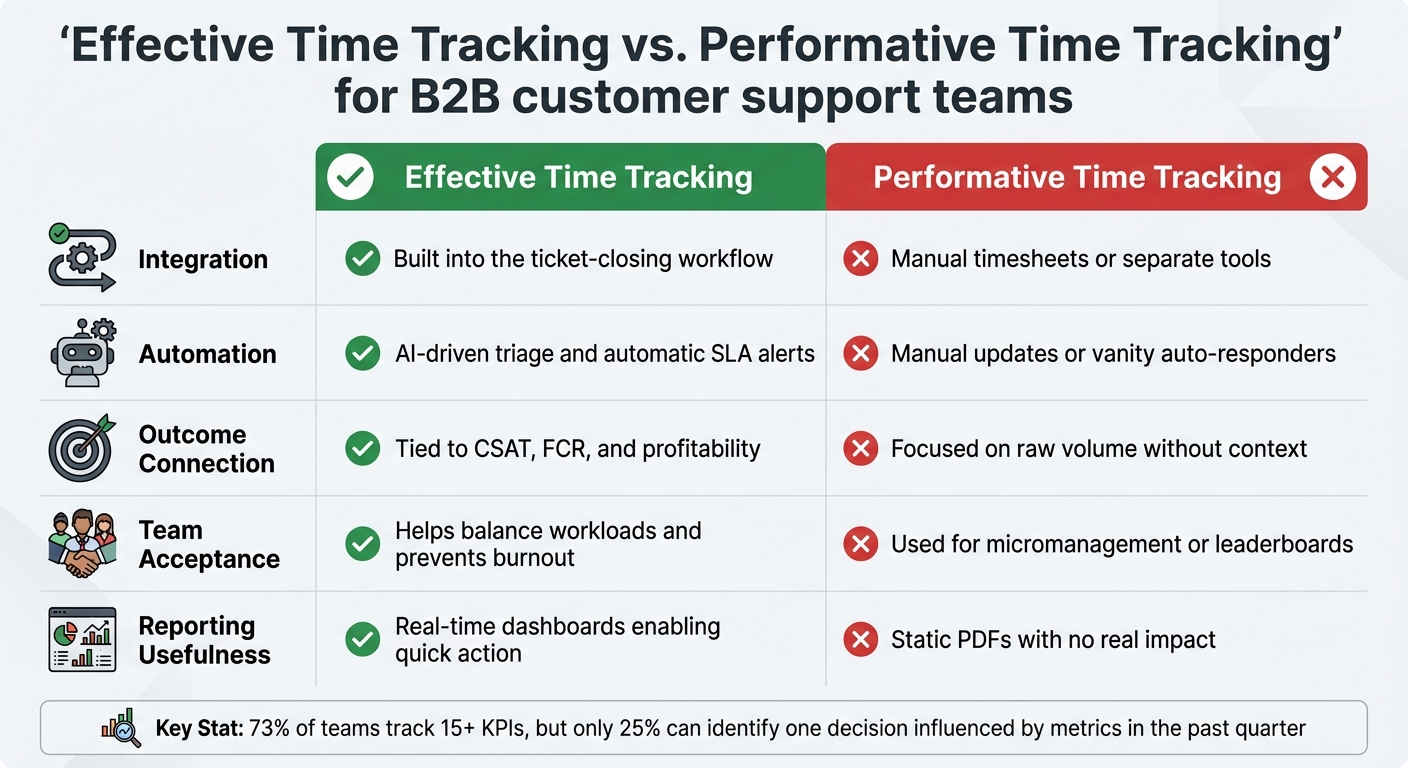
Effective vs Performative Time Tracking in Customer Support
Time tracking only proves its worth when the data it provides leads to actionable decisions. If your team can’t point to a specific change or improvement driven by the metrics, chances are you’re dealing with performative tracking – more about appearances than actual progress.
Start by asking: Do these metrics drive action? Effective tracking systems should fuel real-time dashboards that inspire immediate responses. For example, reassigning tasks when an agent’s workload hits its limit or escalating tickets before SLA deadlines pass. Static reports, like PDFs, often fail to prompt such day-to-day adjustments. Eric Klimuk, Founder and CTO of Supportbench, emphasizes this point:
"If you’re reporting on volume without context or measuring time without linking it to customer satisfaction, you’re just busy, not improving" [2].
Another red flag is an overload of metrics. Many teams track more than 15 KPIs, yet only a handful of these actually influence decisions [5]. If your dashboard takes longer than 10 seconds to understand, it’s likely cluttered with irrelevant stats [5].
Pay attention to how your team interacts with the tracking system. When time data is used to manage workloads fairly and reduce burnout, employees view it as a helpful resource. On the flip side, if it’s mainly used for micromanagement or public leaderboards, morale can suffer, and team members might even manipulate the numbers. The best systems operate quietly in the background, collecting data automatically without disrupting daily tasks.
Here’s a quick comparison to help you identify whether your time tracking is truly effective or just for show:
Comparison Table: Effective Time Tracking vs. Performative Time Tracking
| Factor | Effective Time Tracking | Performative Time Tracking |
|---|---|---|
| Integration | Built into the ticket-closing workflow [1] | Manual timesheets or separate tools [1] |
| Automation | AI-driven triage and automatic SLA alerts [2][4] | Manual updates or vanity auto-responders [4] |
| Outcome Connection | Tied to CSAT, FCR, and profitability [2][1] | Focused on raw volume without context [2] |
| Team Acceptance | Helps balance workloads and prevents burnout [2] | Used for micromanagement or leaderboards [5] |
| Reporting Usefulness | Real-time dashboards enabling quick action [2][5] | Static PDFs with no real impact [5] |
How to Implement Time Tracking Without Hurting Team Morale
Striking the right balance between effective time tracking and avoiding unnecessary oversight comes down to how you approach it. Manual time tracking, for instance, often disrupts workflows and can negatively impact morale. Research shows that manual tracking eats up 1.5 to 3 hours per week per person, and employees only log about 68% of their actual work hours when using manual systems [8].
To avoid these issues, consider switching to automated systems that respect your team’s workflow. AI-powered tools can track time seamlessly by monitoring real-time actions, such as opening, assigning, or resolving tickets. This approach eliminates the need for timers or manually reconstructing work histories, allowing employees to focus on their tasks without interruptions.
That said, automation alone isn’t the full solution. For time tracking to truly benefit your team and business, the data must tie back to meaningful outcomes like first-contact resolution (FCR), customer experience metrics like CSAT, CES, and NPS, or SLA compliance. For example, if time tracking reveals that certain tasks consistently take longer than expected, you can use that insight to improve knowledge base articles or provide targeted training. By aligning time data with customer-focused goals, you not only enhance support operations but also foster a work environment that prioritizes employee well-being.
Integration is another key factor. Time tracking works best when it’s built into your existing support platform, eliminating the need for separate tools that require context switching. Platforms like Supportbench, for example, automatically capture time data as agents handle tickets, differentiating between active work time and waiting periods (like "awaiting customer response"). This level of detail helps pinpoint external bottlenecks, ensuring agents aren’t unfairly evaluated for delays beyond their control. Such seamless integration not only maintains operational efficiency but also helps sustain team morale by reducing unnecessary stress.
Transparency and trust are critical when implementing time tracking. As Shopclawmart/OpenClaw highlights:
"The best time tracking agents don’t silently log hours in the background. That feels like surveillance and people hate it. Instead, design a daily digest flow" [8].
One way to achieve this is by using AI-suggested time entries that agents can review, approve, or adjust at the end of the day. This approach preserves their autonomy while ensuring accurate records. Regular audits of the data can also help identify anomalies, such as unusually long workdays or missing logs, ensuring the system stays aligned with your goals. These strategies lay the groundwork for using AI-powered platforms in a way that makes time tracking both effective and respectful of your team’s needs.
AI-Powered Time Tracking in Modern B2B Support Platforms
Switching from manual time tracking to AI-driven platforms isn’t just about automating tasks – it’s a complete overhaul of how support teams function. These modern systems automatically log work activity, saving companies a staggering $78,700 per 1,000 employees annually by addressing missing time logs alone [10]. This cost-saving directly ties into earlier discussions on automation strategies.
Automatic Time Insights with Built-In AI
AI-powered platforms track every aspect of work automatically – opening tickets, assigning cases, resolving issues – and seamlessly allocate time to specific projects or clients [9]. This eliminates the errors and inefficiencies that often plague manual time tracking.
For B2B support teams, the real advantage lies in the context AI provides. It doesn’t just record how long an agent spends on a ticket; it captures what they’re doing. For instance, in complex technical cases, the system can identify when an engineer spends 15 to 30 minutes gathering context – such as logs, environment details, or configurations – before even beginning the debugging process [11]. This level of detail allows managers to differentiate between productive work and time lost due to inefficient workflows or missing information.
The real power of this data lies in its usability. Instead of static weekly reports, AI delivers real-time dashboards that highlight trends: which ticket types consistently take longer, which customers demand more resources than their contract justifies, and where agents are spending time on tasks that don’t add value. These insights empower managers to make immediate adjustments, aligning time data with customer satisfaction goals. Companies using automatic time tracking often report a 10% increase in "value time" by reducing administrative tasks [9], and 31% see ROI within six months [10].
How Supportbench Handles Time Tracking

Supportbench exemplifies how AI-native tools can seamlessly integrate time tracking into support workflows. By using AI auto-summarization, it eliminates the need for manual documentation. Each ticket provides a 360-degree view, linking time spent to customer tiers, contract renewal dates, and product history. This makes it easier to see which accounts are consuming the most resources.
The platform also includes KPI scorecards that consolidate metrics like first response resolution and escalation rates into a single view. Built-in auditing ensures a historical log of all actions for accountability. Instead of chasing agents for timesheet approvals, managers receive AI-generated timesheets that only require a single click for verification [9]. This approach balances accuracy with agent autonomy, something manual systems often struggle to achieve.
For technical support teams, Supportbench’s AI goes a step further by pulling in critical context – like environment data, case history, and logs – directly into each ticket. This reduces the tedious “scavenger hunt” that often inflates Average Handle Time. As Matthew Plotkin, Head of Accounts at Inkeep, puts it:
"The ‘work’ starts before debugging starts… AI can pull the right context in a few minutes, [allowing] your team to start debugging sooner" [11].
This context-aware tracking ensures that agents aren’t unfairly penalized for delays caused by missing information or external factors. It’s a practical, non-intrusive way to monitor time while improving efficiency – essential for modern, B2B support operations.
Conclusion: Making Time Tracking Work for Your Team
Time tracking is only meaningful when it leads to actionable decisions. Consider this: while 73% of support teams monitor over 15 KPIs, less than 25% can identify even one decision influenced by those metrics in the last quarter [5]. Without tying metrics to outcomes like First Contact Resolution or customer satisfaction, tracking becomes more about appearances than progress.
To address this, a balanced, AI-driven approach can turn raw data into real improvements. The key? Combine automated context gathering with clear links to outcomes – shifting the focus from time spent to identifying and addressing bottlenecks. As Eric Klimuk, Founder and CTO of Supportbench, explains:
"If you’re reporting on volume without context or measuring time without linking it to customer satisfaction, you’re just busy, not improving" [2].
Automation does more than streamline processes; it also helps preserve team morale by reducing the need for micromanagement. For instance, maintaining an agent utilization rate of 60–70% can prevent burnout and keep spirits high [2]. Build regular breaks into your tracking framework and use time data to coach and develop skills, rather than solely for performance evaluations [12][14]. Since remote workers face 18% fewer interruptions than their in-office peers [13], tailor your benchmarks to reflect these differences instead of using a one-size-fits-all approach.
Set aside 60 minutes on the last Friday of each month to review key metrics and identify three actionable improvements [5]. Use medians and P90 metrics, rather than averages, to better understand typical performance and pinpoint the worst-case customer experiences [5][4]. And most importantly, stop tracking metrics that don’t lead to decisions or improvements.
FAQs
What support work should be time-tracked?
Time tracking should prioritize activities that influence customer satisfaction, efficiency, and resource management. This means keeping tabs on the time spent on customer interactions, escalations, follow-ups, and ticket-related administrative tasks. By monitoring these areas, you can pinpoint inefficiencies, balance workloads, and streamline processes. It also sheds light on time-intensive requests or customers requiring extra care, allowing for better planning and alignment with SLAs and customer expectations.
How can we tell if time tracking is helping or just theater?
Time tracking can indeed lead to measurable improvements – if done right. When used effectively, it can result in faster resolution times, more balanced workloads, and even higher customer satisfaction. But here’s the catch: the data it provides must translate into actionable insights. Otherwise, it risks becoming just another exercise in generating reports that look busy but fail to improve efficiency or service quality.
The real focus should be on outcome-oriented metrics. For example, tracking First Contact Resolution (FCR) can reveal whether issues are being solved promptly without requiring follow-ups. Similarly, monitoring Customer Satisfaction (CSAT) scores helps gauge how well your support is meeting customer expectations. And, of course, keeping an eye on resolution times ensures that your team isn’t just working hard but working smart.
If time tracking is only used to inflate activity logs without driving meaningful change, it can quickly turn into a performative task. The goal should always be to use the data to identify bottlenecks, streamline processes, and ultimately deliver better experiences for both your team and your customers.
How do you time-track without hurting team morale?
To track time effectively without harming team morale, prioritize clarity, fairness, and encouragement over micromanagement. Be upfront about why you’re implementing time tracking – whether it’s to streamline workflows, spot challenges, or ensure workloads are distributed evenly. Opt for automated tools to reduce the need for manual inputs and avoid disrupting daily routines. Focus on tracking metrics that matter, such as productivity and customer satisfaction, rather than just hours worked. Encourage voluntary participation and offer training so the process feels supportive rather than controlling. This approach helps build trust and fosters collaboration within the team.






