



Messy tags lead to messy data. In complex B2B environments, inconsistent tagging – like having redundant options such as "Billing", "Payments", and "Invoice Problem" – creates confusion, slows ticket resolution, and clouds reporting. For businesses where the top 100 customers account for over 50% of revenue, this chaos can mean missed opportunities, operational inefficiencies, and poor decision-making.
Here’s how to fix it:
- Audit your tags: Remove duplicates, standardize terms, and eliminate rarely used options.
- Set clear objectives: Every tag should serve a purpose, like routing tickets or improving analytics.
- Use a two-tier system: Broad categories (e.g., "Technical Issue") paired with optional subcategories (e.g., "API Integration").
- Automate tagging: Leverage AI to reduce errors and save time.
- Maintain quality: Regular audits and a tag glossary keep your system clean and usable.
A structured tagging system ensures accurate data, faster workflows, and better insights. Avoid the pitfalls of "tag soup" by keeping your system simple, consistent, and purpose-driven.
Master Ticketing Systems For Better CUSTOMER SUPPORT in 5 Steps
sbb-itb-e60d259
What Is Tag Soup and How Does It Hurt B2B Support?
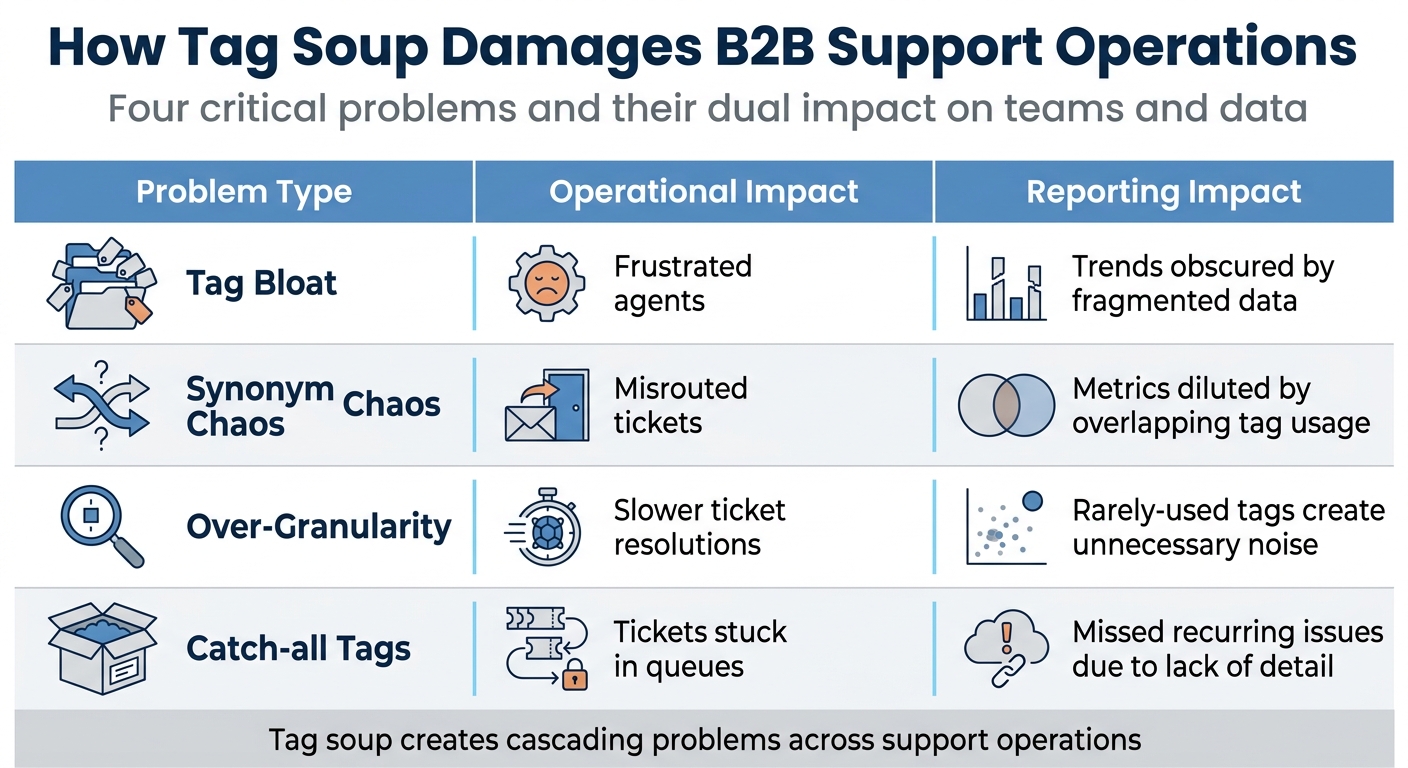
Tag Soup Problems: Operational and Reporting Impact on B2B Support
Defining Tag Soup
Tag soup happens when a support system is overloaded with redundant, conflicting, or overly detailed tags, making it hard to gain clear insights from tickets. Imagine having tags like "Billing", "Payments", "Invoicing", "Payment Issue", and "Invoice Problem" all in the same system. These overlapping options create unnecessary confusion, fragment data, and often lead to the use of vague, catch-all tags like "Other" or "General Inquiry." This clutter makes reporting and operations much harder to manage [2]. As Swifteq explains:
"If a tag doesn’t change how you handle a ticket or how you understand your support data, it’s adding noise instead of clarity" [2].
This lack of organization disrupts ticket routing and reduces the accuracy of data, ultimately creating larger operational headaches.
How Tag Soup Damages Operations
Tag soup can wreak havoc in several ways, including misrouted tickets, slower resolutions, and unreliable reporting. When there are too many similar tags, tickets often end up in the wrong place. Overly detailed tags make it harder for agents to pick the right one, slowing down their workflow [2].
SiriusDecisions highlighted this issue, revealing that 65% of B2B marketing content goes unused, with 25% of these cases directly linked to poor tagging and findability issues [4]. When data gets split across multiple synonymous tags, leadership struggles to see broader trends. For example, billing complaints might be scattered across various tags, making it harder to identify patterns.
| Problem Type | Operational Impact | Reporting Impact |
|---|---|---|
| Tag Bloat | Frustrated agents | Trends obscured by fragmented data |
| Synonym Chaos | Misrouted tickets | Metrics diluted by overlapping tag usage |
| Over-Granularity | Slower ticket resolutions | Rarely-used tags create unnecessary noise |
| Catch-all Tags | Tickets stuck in queues | Missed recurring issues due to lack of detail |
These challenges are even more pronounced in the complex world of B2B support.
Why B2B Support Faces Higher Risk
B2B support is especially prone to tag soup due to its complexity. Unlike B2C support, which focuses on quick, straightforward transactions, B2B support is built around long-term relationships and cases that can take days or even weeks to resolve [1]. Within a single client organization, multiple stakeholders might report the same issue through different channels, leading to duplicate tickets with inconsistent tagging. This fragmentation makes it harder to understand the true scale of a problem.
On top of that, B2B teams spend an average of 3 hours coordinating for every 1 hour spent solving a problem [5]. Tag soup makes this coordination even harder, introducing "broken handoffs" where critical information gets lost between support, engineering, and account management teams. When your top 100 customers account for 50% or more of your total revenue [1], inconsistent tagging can prevent you from spotting at-risk accounts or recurring product issues – problems that could directly impact your bottom line.
The technical nature of B2B issues adds another layer of risk. These cases often involve complex integrations, compliance requirements, or custom setups that demand extensive back-and-forth communication. This complexity can tempt teams to create overly specific tags for every edge case, leading to what Stack Overflow calls tag "sprawl":
"Starting too granular results in tag ‘sprawl’ and makes it more difficult for users to choose the correct tags" [3].
This sprawl makes life harder for agents trying to find the right tag and for leaders trying to trust the data. Given these challenges, a well-organized tagging system is critical to ensuring accuracy and keeping operations on track.
How to Design a Scalable Tagging Taxonomy
Creating an effective tagging system starts with understanding your current setup and aligning it with your business needs. A well-structured taxonomy organizes tickets, aids in routing, and supports precise reporting and analytics. The challenge is balancing structure – strict enough to prevent confusion but adaptable enough to grow with your business. The first step? Take stock of what you already have.
Audit and Clean Your Existing Tags
Start by conducting a complete review of your current tags, including any outdated or improperly used ones. Look for common issues like misspellings, redundant tags, or inconsistent formatting [3][7].
Simplify your system by merging similar tags into one standard version. For example, create synonyms that redirect users from alternative terms to the preferred tag. This eliminates overlap and ensures consistency. Also, remove tags that have been used fewer than five times in the last 90 days – these are likely unnecessary [8].
Standardizing your vocabulary is key. Use consistent naming conventions, and for mandatory tags, always require a value. If a tag doesn’t apply, use placeholders like "na" instead of leaving fields blank. This keeps your data clean and reliable [7]. To maintain order, assign a Data Quality champion or project leader who can oversee the taxonomy and schedule regular audits (monthly or quarterly). These audits will help catch issues like duplicates, unused tags, or formatting inconsistencies before they become unmanageable [6][7].
Set Clear Tagging Objectives
Avoid the chaos of "tag soup" by ensuring every tag serves a specific purpose. As Glean explains:
"A well-designed strategy is opinionated – it decides which tags matter for search, compliance, analytics, and workflow automation, and it says ‘no’ to the rest" [7].
Start by defining the business outcomes you want your tags to support. Do you need tags to route tickets to specialized teams? Apply SLA deadlines? Highlight which product features are driving support inquiries? Each tag should have a clear owner – Finance for accounting tags, IT for system-related tags, and Product for feature requests – to keep the data relevant and actionable [7][4].
Focus on functionality. Only include tags that directly impact processes like search, compliance, analytics, or automation [7]. For high-impact tags, replace free-text entries with picklists to avoid inconsistencies. Additionally, provide a one-sentence definition for each tag category in an internal glossary. This ensures agents know exactly when and how to use each tag, reducing reliance on vague or incorrect options [2].
Build a Tiered Tagging Structure
Once your objectives are clear, organize your tags to allow for both broad insights and detailed analysis. A scalable system often uses a two-tier model: a mandatory high-level "Topic" (Tier 1) and an optional, more detailed "Subtopic" (Tier 2). This approach balances ease of use for agents with the depth needed for analytics [2].
Tier 1 categories should be stable, mutually exclusive, and limited to fewer than 10 options. Examples include "Technical Issue", "Billing & Payments", "Feature Request", or "Escalation." These categories should reflect how your business operates day-to-day.
Tier 2 adds context only when necessary. For instance, under "Technical Issue", you might include subtopics like "Login Problem", "Performance", or "API Integration." This extra detail is helpful for root-cause analysis and product planning but shouldn’t overwhelm agents [2]. A helpful framework is RUF (Reliability, Usability, Functionality), which organizes tickets into three main types: performance issues, questions about existing features, or requests for new capabilities [2].
Here’s an example of how a tiered system might look:
| Tier 1: Topic (Mandatory) | Tier 2: Subtopic (Optional) | Business Objective |
|---|---|---|
| Technical Issue | Login, Performance, API, Integration | Routing to Engineering / Bug Tracking |
| Billing & Payments | Refund Request, Invoice Question, Subscription Change | Revenue Retention / Finance Alignment |
| Feature Request | Reporting Module, Mobile App, UI Enhancement | Product Roadmap Prioritization |
| Escalation | Service Outage, VIP Customer | SLA Management / Urgent Response |
Eliminate any tags that don’t serve a clear purpose. The goal is to create a tagging system that’s concise, enforceable, and aligned with your business priorities – not bloated or overly complex [7][3].
Setting Up Efficient Tagging Workflows
To make your tagging system effective, pair a well-structured taxonomy with streamlined workflows. This combination minimizes manual effort, keeps data consistent, and prevents unnecessary tags from cluttering your system. When done right, these workflows enhance automation and ensure your processes run smoothly.
Use Append-Based Tagging for Multi-Touch Cases
In B2B support, cases often evolve – what starts as a technical issue might later involve billing or other teams. Instead of overwriting tags, append them. This approach preserves the full history of the ticket, offering a complete view of its lifecycle. It also supports multi-touch attribution, allowing automated systems to route or escalate tickets based on the combined metadata. This ensures nothing gets lost as the case moves across teams.
Automate Tagging to Reduce Manual Errors
Manual tagging is time-consuming and prone to mistakes. Automation solves this by applying tags consistently and efficiently. AI tools can optimize your support workflow by analyzing ticket content, detecting patterns, and applying tags automatically. For instance:
- Rule-based systems can assign tags like environment details, regions, or cost centers based on predefined criteria.
- AI can normalize language to match standard tag values, reducing inconsistencies.
- Policy enforcement can require mandatory tags before a ticket is created, ensuring no critical fields are left blank. If a value isn’t applicable, placeholders like "na" can be used to maintain data integrity.
By automating the tagging process, you save time and ensure accuracy across your system.
Prevent Tag Bloat
Without clear oversight, tagging systems can become cluttered with unnecessary tags, slowing down agents and muddying data insights. To avoid this, implement strong governance practices:
- Assign a Tag Custodian to oversee tag definitions, usage, and allowed values.
- Require justification for new tags. If a tag doesn’t improve ticket handling or data clarity, it’s better left out.
- Use picklists to standardize values and prevent free-text entries.
- Avoid vague catch-all categories like "Other" or "General Inquiry", which often become dumping grounds for unrelated issues.
Regular audits – quarterly or bi-annually – are essential. These reviews help identify unused tags, consolidate duplicates, and refine your system. Start with broad categories and only add detailed tags when traffic or data needs justify it. This ensures your tagging system remains clean, efficient, and useful for reporting and decision-making.
Measuring and Maintaining Tagging Quality
For AI-driven, cost-effective B2B support, staying on top of your tagging system is essential. Without regular oversight, tagging systems can quickly lose their effectiveness. The secret lies in setting clear metrics, conducting frequent audits, and maintaining feedback channels with your support team.
Track Key Tagging Metrics
Start by focusing on tagging consistency – ensuring that different agents apply the same tags to similar issues. When tagging is inconsistent, your data becomes unreliable, and reports lose their value. This isn’t just a minor inconvenience; inaccurate data is a costly problem, with 44% of CRM users reporting it can drain over 10% of annual revenue [9]. Monitoring these metrics helps you identify when it’s time to audit and refine your system.
Run Regular Tag Audits and Cleanup
Quarterly tag audits are a smart way to keep your system in check. These audits help you consolidate duplicate tags, remove outdated ones, and streamline your tagging structure. For instance, if tags like "Billing", "Payments", and "Invoicing" are being used interchangeably, choose one term and standardize its use across the board.
Leverage AI-powered tools to catch tagging mistakes in real time, eliminating the need to rely solely on manual reviews. For example, the City and County of Denver improved their accessibility scores by 32% and achieved a QA score of 94/100 in April 2026 by expanding accountability from a small web team to 140 content authors across 40 departments. They used automated scanning to identify and address issues [10]. Similarly, Swiss Post saw an 82% reduction in broken links by assigning clear ownership and implementing systematic monitoring across their 15,118 pages [10]. Always verify that corrective actions are implemented effectively [11][12].
Train Agents and Collect Feedback
Once you’ve set up automated audits and tracking, the next step is empowering your support team. Start by creating a tag glossary – a simple document with one-sentence definitions for each tag. This is especially useful for onboarding new team members. Pair this with a feedback loop where agents can review auto-applied tags and flag any inconsistencies they encounter.
If agents frequently skip certain tags or report confusion about specific categories, use that feedback to refine your system. This "human-in-the-loop" approach ensures that automated tools stay aligned with the realities of day-to-day support work.
Conclusion
A well-structured tagging system does more than just organize your data – it lays the groundwork for efficient, scalable B2B support operations. By creating a clear taxonomy, automating workflows, and conducting regular audits, you can turn raw support data into actionable insights. These insights help refine product decisions, improve ticket routing, and reduce resolution times.
"The taxonomy is the strategy. Ticket tagging is just the execution." – Jake Bartlett, Writer and Customer Support Expert [2]
The role of AI in tagging cannot be overstated. Manual tagging currently takes up as much as 20% of support teams’ time [8]. However, AI tools can reclaim nearly half of that time [8], allowing teams to focus on solving complex issues instead of managing administrative tasks. The financial implications are significant, too – conversational AI is expected to cut global contact center labor costs by $80 billion annually by 2026 [13].
To build a tagging strategy that delivers results, start with the basics: audit your existing tags, remove overly broad categories, standardize terminology, and create a two-tier structure that balances ease of use for agents with meaningful analytical depth. Once the foundation is solid, automation can help ensure consistency as your operations grow. Teams that master this approach don’t just avoid the chaos of poorly managed tags – they create support systems that deliver measurable returns through better data, faster processes, and reduced costs.
The goal is to make your tagging system work for you. With a strong structure and the right tools, every support interaction becomes a valuable data point. This leads to smarter decisions, faster workflows, and a more efficient operation overall. By adopting these practices, your team won’t just sidestep the pitfalls of tag mismanagement – you’ll gain the clarity and precision needed to make informed, impactful decisions at scale.
FAQs
How many Tier 1 tags should we have?
When it comes to Tier 1 tags, there’s no hard-and-fast rule about the exact number you should have. However, keeping them minimal and focused on your core categories is key. Ideally, aim for 5 to 10 tags to prevent overlap or redundancy. That said, the right number will depend on how complex your support operations are. A thoughtfully designed and enforceable set of tags helps maintain clarity and allows for future growth.
When should we add a new subtopic tag?
Creating a new subtopic tag can make a big difference when you need to track a specific aspect of a support issue. It helps improve reporting accuracy, makes it easier to spot recurring problems, and even supports targeted automation efforts.
This becomes particularly useful when existing tags feel too broad or overlap, which can muddy the data and reduce its usefulness. A well-organized tagging system ensures clearer insights and smoother operations, allowing teams to focus on what matters most.
How do we measure tagging quality over time?
To keep an eye on the quality of your tagging system over time, focus on how well tags are being applied and how useful they are for reporting and automation. Some key metrics to monitor include how often tags are used, their relevance, and the number of unused or redundant tags.
Regular audits and gathering feedback from agents can help uncover misaligned or missing tags. Additionally, AI tools can play a role by spotting inconsistencies and recommending updates, ensuring your tagging system stays efficient and effective.






