



Support taxonomy ensures tickets are organized, routed correctly, and tied to customer feedback. But when it doesn’t keep up with product changes, it creates confusion, inefficiencies, and poor customer experiences. Here’s how to keep it updated:
- Build a shared framework: Align taxonomy categories with product features and customer goals. Avoid internal-facing terms and ensure consistency with a shared glossary.
- Regular updates: Schedule weekly feedback sessions and quarterly audits to refine categories, consolidate tags, and prevent issues like "tag bloat."
- Leverage AI: Automate updates, detect mismatches, and use predictive tagging to reduce manual errors. AI can analyze patterns, flag inconsistencies, and streamline taxonomy management.
- Change management: Establish a formal process for taxonomy updates with clear roles, version control, and collaboration between teams.
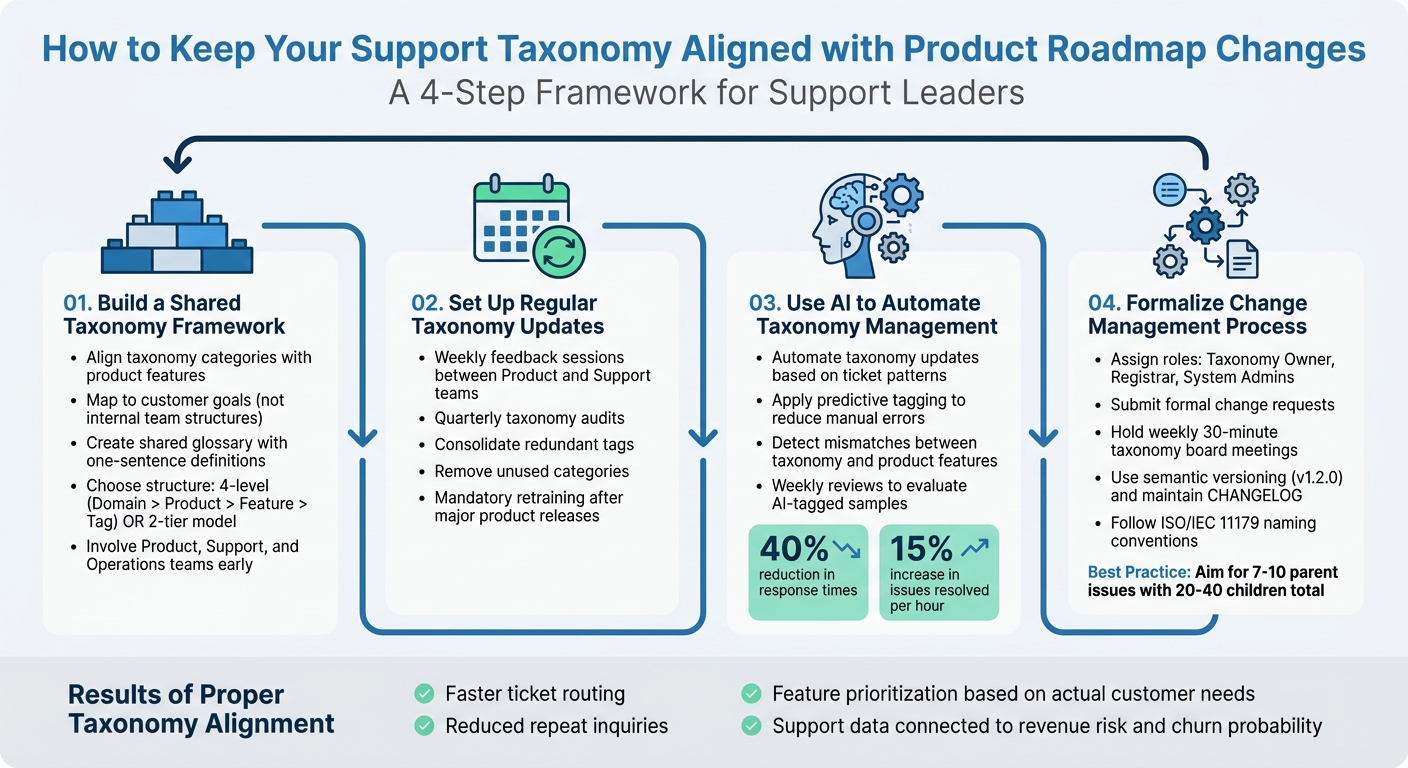
4-Step Process to Align Support Taxonomy with Product Roadmap
Step 1: Build a Shared Taxonomy Framework
Creating a shared taxonomy framework is the first step in organizing, analyzing, and connecting support data to product decisions. Without this structure, you risk inconsistent tagging, scattered reports, and support data that doesn’t contribute to your roadmap. The goal? Build a system that reflects how customers think about your product – not how your internal teams are structured.
Align Taxonomy Categories with Product Features
Start by mapping your taxonomy to product features. Use resources like help center articles, API documentation, release notes, and feature lists to guide this process [3]. For example, when a customer mentions "real-time collaboration", your support agents, product managers, and AI tagging system should all interpret it the same way.
Depending on your support volume, you can choose between a four-level structure (Domain > Product > Feature > Tag) or a simpler two-tier model [1][3]. For B2B support operations, a hierarchical approach often works best, offering enough detail for analysis without overcomplicating things.
Structure your categories around customer goals. Think along the lines of "Account Setup", "Data Export", or "Integration Configuration." Avoid internal-facing categories like "Engineering Team Issues" or "Sales Questions", as they don’t align with how customers view their needs or the "jobs-to-be-done" framework [3][4].
To keep things clear, define boundaries between categories and create a shared glossary. A one-sentence definition for each category and subtopic ensures everyone – whether they’re in support, product, or operations – understands terms the same way. For instance, "Technical Issue" should mean the same thing across the board [1][3][4].
Get Product, Support, and Operations Teams Involved Early
Don’t build your taxonomy in isolation. Bring in product, support, and operations teams from the beginning to ensure the framework reflects both customer needs and business goals. Once your taxonomy is aligned with product features, keep it relevant by involving these teams regularly.
Set up review sessions – weekly or monthly for feedback and quarterly for consolidating tags. These meetings should focus on analyzing ticket clusters, reviewing linked feedback, incorporating sentiment analysis, and ensuring categories accurately capture current user pain points [1][2][4].
Make sure taxonomy fields are synchronized across your CRM, help desk, and issue tracking systems. This prevents "synonym chaos", where different teams use inconsistent terms for the same issue. For example, if your CRM calls something "login issues" while your help desk labels it "access problems", your data becomes fragmented and harder to use for planning [1][2].
A good starting point is the RUF (Reliability, Usability, Functionality) framework [1]. This model offers three stable Tier 1 categories: errors and performance issues (Reliability), questions about existing features (Usability), and requests for new capabilities (Functionality). As your operation grows, you can add complexity only when necessary.
Avoid catch-all categories like "Other" or "General" [1]. If these tags are overused, it’s a sign your Tier 1 categories need tweaking. Work with product and operations teams to refine the structure based on actual ticket trends, not assumptions.
Regularly updating your taxonomy prevents it from becoming a burden. Over time, redundant or outdated tags can pile up, leading to "tag bloat", which reduces data quality and slows down support agents [1][4]. By keeping your framework lean and aligned with your product’s current state, you’ll set the stage for automation and AI-driven insights in the next steps.
sbb-itb-e60d259
Step 2: Set Up a Process for Regular Taxonomy Updates
Once you’ve established a shared taxonomy framework, the next step is keeping it up-to-date as your product evolves. Without regular updates, your taxonomy can quickly become outdated, losing relevance as product features change. To prevent this, build a system that incorporates feedback from your support team and conduct regular audits to ensure your categories align with customer experiences.
Create a System to Collect Support Team Feedback
Your support team is often the first to notice when taxonomy categories no longer reflect reality. For example, frequent use of catch-all tags is a clear sign that updates are needed [1]. Replace these tags entirely and create a feedback loop that turns agent observations into actionable updates for your taxonomy.
Start by introducing weekly collaborative sessions between product and support teams. During these reviews, examine ticket clusters, validate AI-powered ticket routing insights, and adjust scores as needed [2]. These meetings go beyond simply fixing labels – they’re an opportunity to identify emerging issues and phase out outdated categories.
"Set up a weekly review with product and support staff. Examine cluster samples, read linked tickets, and adjust scores as needed. Document all decisions to maintain traceability." – Typewise [2]
Close the loop by keeping agents informed about how their feedback impacts the product. For instance, if their input leads to a roadmap item, tag it and notify the agents who flagged it. When the fix is implemented, encourage agents to follow up with the customers who originally reported the issue [2].
To ensure consistency from day one, integrate your taxonomy glossary into new agent onboarding. Provide one-sentence definitions for each category to avoid inconsistent interpretations among team members [1].
Schedule Quarterly Taxonomy Reviews
While weekly feedback addresses immediate concerns, quarterly audits are essential for maintaining overall taxonomy health. These reviews help prevent long-term issues like label drift or synonym redundancy. Focus on consolidating redundant tags, removing unused categories, and ensuring the taxonomy reflects current product features and customer needs.
For example, merge overlapping tags like "Billing", "Payments", and "Invoicing" to maintain clarity and consistency [1].
"Conduct regular tag audits to keep your options clean, useful, and up to date. Consolidate tags ruthlessly." – Swifteq [1]
After every major product release or terminology update, mandate taxonomy retraining [2]. New features often introduce new vocabulary, and failing to update your taxonomy can lead to reduced cluster quality over time. By refining your normalization process – mapping customer synonyms to official product terms – you can ensure accuracy as your product grows.
With a strong feedback loop and regular reviews in place, your taxonomy will remain a powerful tool for improving support efficiency and generating valuable insights. This proactive approach keeps your taxonomy relevant, preventing it from becoming an outdated relic and ensuring it continues to support your current operations effectively.
Step 3: Use AI to Automate Taxonomy Management
Feedback loops and quarterly reviews are great for keeping your taxonomy functional, but AI automation can handle complex tasks in real time, taking taxonomy management to a whole new level. Modern AI systems can process thousands of tickets, identify patterns, and suggest updates far faster than any manual process. This allows your team to focus on strategic decisions while AI handles the heavy lifting of continuous updates based on real-time data.
Let AI Update Taxonomies Based on Ticket Patterns
AI-powered tools can analyze raw ticket text, normalize language (e.g., mapping terms like "login", "access", and "sign-in" to "Authentication"), and group tickets based on shared patterns. When customer language evolves – say, shifting from "Home Electronics" to "Smart Home" – AI can detect the change and flag it for updates.
Companies using this approach have reported saving time on feedback analysis and even reducing support ticket volumes significantly [5]. To get started, build a basic taxonomy with key fields like Theme, Component, Intent (e.g., bug, confusion, workflow), and Severity. For long ticket conversations, use a two-step summarization process: first condense the discussion into a single problem statement, then categorize it. This ensures accuracy even in complex, multi-threaded cases.
Apply Predictive Tagging to Reduce Manual Errors
Once taxonomy updates are automated, predictive tagging can refine the process even further. Predictive tagging ensures consistency by automatically assigning categories, avoiding the problem of "tag bloat", where agents are forced to choose from an overwhelming list of overlapping tags. By aligning categories with ticket content, AI reduces errors and improves accuracy when properly configured.
The key to success is tailoring the AI to your business. Feed it internal resources like product documentation, help articles, and changelogs to teach it company-specific terms and acronyms. Define categories clearly in plain language, such as: "Use this label when the customer mentions the iOS app or mobile experience." A two-tier structure – mandatory high-level "Topic" with an optional "Subtopic" – keeps things simple while maintaining analytical depth. Avoid catch-all categories like "Other" or "General Inquiry", as these become dumping grounds that weaken the system’s effectiveness [1].
Unstructured data, like support tickets, is growing three times faster than structured data, yet structured data accounts for less than 20% of the information needed to understand user behavior [4]. Predictive tagging bridges this gap by organizing feedback at scale. Structured AI prompts using schemas (e.g., JSON) ensure machine-readable, consistent outputs. However, automation isn’t foolproof – set up weekly reviews where staff evaluate AI-tagged samples to adjust scores and watch for label drift [2].
Detect Mismatches Between Taxonomy and Product Features
Taxonomies can fall out of sync when product features evolve faster than categories are updated. AI can spot these mismatches by analyzing classification patterns and flagging inconsistencies before they cause problems. For example, it can identify discrepancies like a "refurbished" product placed in a "new" category or pricing outliers within a group.
A global retailer used this method with Grubbs’ and Bartlett tests to identify price outliers across millions of marketplace items. If a 32GB iPhone was priced similarly to a 16GB model, the system flagged it at a 0.05 significance level, preventing revenue loss and customer confusion [8].
AI also monitors category-level performance, identifying high error rates or frequent reclassifications as early signs of inconsistency. When changes to taxonomy occur, features like "Backfill Mode" (re-labeling existing tickets) or "Overwrite Mode" (replacing outdated labels) can help maintain order [7].
"As your product line evolves, categories get added, merged, or renamed. Without an automated system to detect and reconcile changes, taxonomy drift becomes inevitable." – Sagar Sharma, CTO, Credencys [6]
Advanced AI systems only apply labels when confidence is high. For ambiguous data, the system flags it for human review, ensuring reliability and accuracy.
Step 4: Formalize a Change Management Process
Automation tools can help with routine updates, but without a structured change management process, things can quickly spiral out of control. When product teams roll out new features and support teams rush to adjust categories on the fly, it often leads to duplicate tags, inconsistent naming, and broken reporting. To avoid this, treat taxonomy changes like API contracts – establish clear governance and version control. This can be achieved by creating a dedicated workflow for handling taxonomy change requests.
Build a Workflow for Taxonomy Change Requests
Even though AI can manage real-time updates, a formal workflow ensures consistency over time. Aligning taxonomy with product changes demands a robust change management process. Start by assigning specific roles: a taxonomy owner (usually CX Ops), a registrar (Data team), and system admins (Platform team) to oversee the entire lifecycle of tags [9]. When a new category is needed or an outdated one must be retired, submit a formal change request through the designated system. Then, hold a weekly 30-minute taxonomy board meeting where stakeholders can approve new concepts, merge synonyms, and phase out misused nodes [9].
"Run a weekly 30-minute taxonomy board: approve new concepts, merge synonyms, and retire misused nodes."
– Eric Lutley, Customer Science [9]
Store your taxonomy in formats like JSON or YAML and utilize semantic versioning (e.g., v1.2.0) to track changes. Maintain a detailed CHANGELOG to communicate updates to the entire team, including additions, deprecations, and merged categories. When retiring tags, implement a deprecation period where old tags automatically map to the new category to avoid data gaps [9]. Additionally, publish diff notes (e.g., "added issue.order.address_invalid as child of issue.order") to ensure downstream systems remain stable [9].
Work with Product Operations on Taxonomy Changes
Once requests are submitted, product operations should validate them to ensure they align with the product roadmap. Collaboration between product and support teams is essential for reviewing taxonomy updates against current product documentation and release notes [3][2].
Follow ISO/IEC 11179-style naming conventions: use lowercase letters, avoid spaces, and apply dot-delimited namespaces (e.g., issue.payment.declined.card) [9]. This ensures machine-readable IDs remain stable, even when human-facing labels are updated. After major product launches, retrain AI models immediately to prevent label drift [2]. To keep the taxonomy streamlined, map synonyms to a single "preferred label" [9][2]. For optimal performance, aim for 7–10 parent issues with a total of 20–40 children, and limit hierarchical trees to 2–3 levels. This prevents agent slowdown and keeps data well-organized [9].
Conclusion
Support leaders now have the tools and strategies to create a sustainable system for managing taxonomy, thanks to the framework and AI-driven methods outlined earlier.
Key Steps for Support Leaders
To align your support taxonomy effectively, focus on these four critical steps:
- Develop a shared framework that connects categories directly to product features.
- Schedule quarterly reviews with structured feedback loops.
- Leverage AI to detect patterns and enable predictive tagging.
- Establish a clear change management process.
When executed well, this approach delivers real results – faster ticket routing, prioritization of features based on actual customer needs, and tangible product improvements that foster trust. Moreover, connecting support data to business metrics like revenue risk and churn probability ensures your product team focuses on impactful features rather than guesswork [2]. This creates a seamless feedback loop, as customers notice their concerns addressed in release notes, reducing repeat inquiries. Regular taxonomy audits – such as consolidating synonyms, removing vague categories, and standardizing terms – help avoid tag clutter, ensuring meaningful insights remain accessible [1].
With this operational groundwork in place, AI can take your taxonomy to the next level, keeping it dynamic and effective.
How AI Tools Help Maintain Taxonomy Over Time
AI tools offer ongoing refinement of your taxonomy, making it easier to adapt to changing needs.
Using Natural Language Understanding, AI-powered platforms can automatically categorize tickets by intent, sentiment, and urgency – eliminating the inefficiencies of manual classification at scale [10][11]. These systems also detect knowledge gaps and emerging trends, like an uptick in login issues after a product update, and propose real-time taxonomy updates or new help content. This can lead to a 40% reduction in response times and a 15% increase in issues resolved per hour [10][11][12][13].
AI doesn’t just stop at deflection. Tools like Supportbench utilize scenario engines to evolve intent tagging as your business changes, ensuring your taxonomy remains relevant [11]. Advanced features like topic clustering and root-cause analysis highlight where current taxonomies or automations fall short, offering actionable insights for improvement [13]. Start small by applying AI to your 10–20 most frequent, low-risk intents, and then establish a regular cadence – such as weekly reviews – to refine AI-managed conversations and update your taxonomy or policies accordingly [13].
FAQs
How do I choose the right taxonomy structure for my support team?
To build an effective taxonomy structure, aim for a framework that’s clear, consistent, and able to grow with your team’s needs. Start by defining a solid taxonomy foundation and setting governance rules to keep everything organized.
Use hierarchical levels – like domain, product, and feature – to structure your information logically. This helps maintain clarity and ensures easy navigation. Adding version control is also key to avoiding any unintentional changes or inconsistencies over time.
Lastly, make it a habit to audit and update your taxonomy regularly. This ensures it stays aligned with your evolving product roadmap and remains relevant as your needs change.
What’s the fastest way to reduce tag bloat without breaking reporting?
To cut down on tag bloat while keeping your reporting intact, start by auditing your current tags. Identify and remove any that are unused or redundant, and merge similar tags where possible. Organize your tags with a clear hierarchy, using primary categories and subcategories for better structure. Incorporating AI tools can help maintain consistency, catch duplicates, and ensure accurate reporting. Regular audits combined with automation can keep your tagging system clean and manageable over time.
How can I tell if AI tagging is accurate enough to trust?
To ensure AI tagging stays accurate, it’s important to validate its performance on a regular basis. Use reliable metrics and testing frameworks to measure how well it identifies patterns and content. Compare its results with verified, truthful data to gauge its precision. Regular monitoring and testing are key to maintaining both reliability and confidence in its capabilities.






