


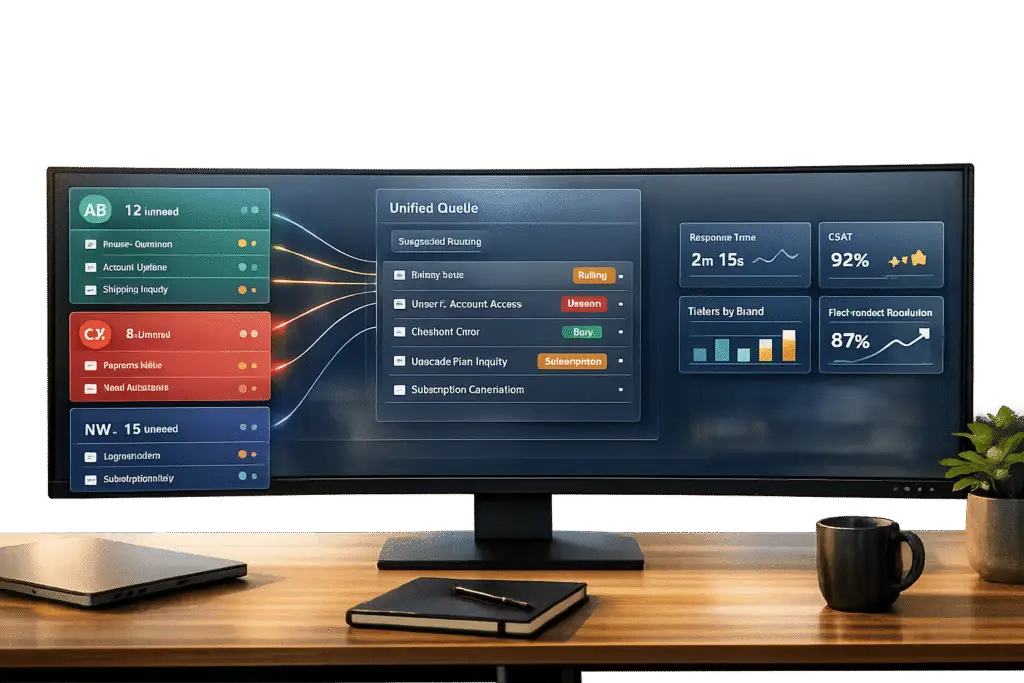
Managing customer support for multiple brands within a single helpdesk can save time and reduce complexity, but it requires careful planning to ensure each brand’s identity is preserved. Here’s how you can centralize operations while maintaining efficiency and brand consistency:
- Separate Email Addresses: Assign unique support email addresses for each brand and forward them to a single platform. This keeps communication organized and brand-specific.
- Automated Routing: Set up rules to route emails to the correct teams based on the brand, ensuring faster responses and fewer errors.
- Custom Templates and Signatures: Use tailored email templates and signatures for each brand to reflect their unique tone and style.
- AI-Powered Tools: Automate email triage, tagging, and sentiment analysis to categorize and prioritize messages effectively.
- Performance Tracking: Monitor key support metrics like response times and customer satisfaction for each brand using dashboards to identify areas for improvement.
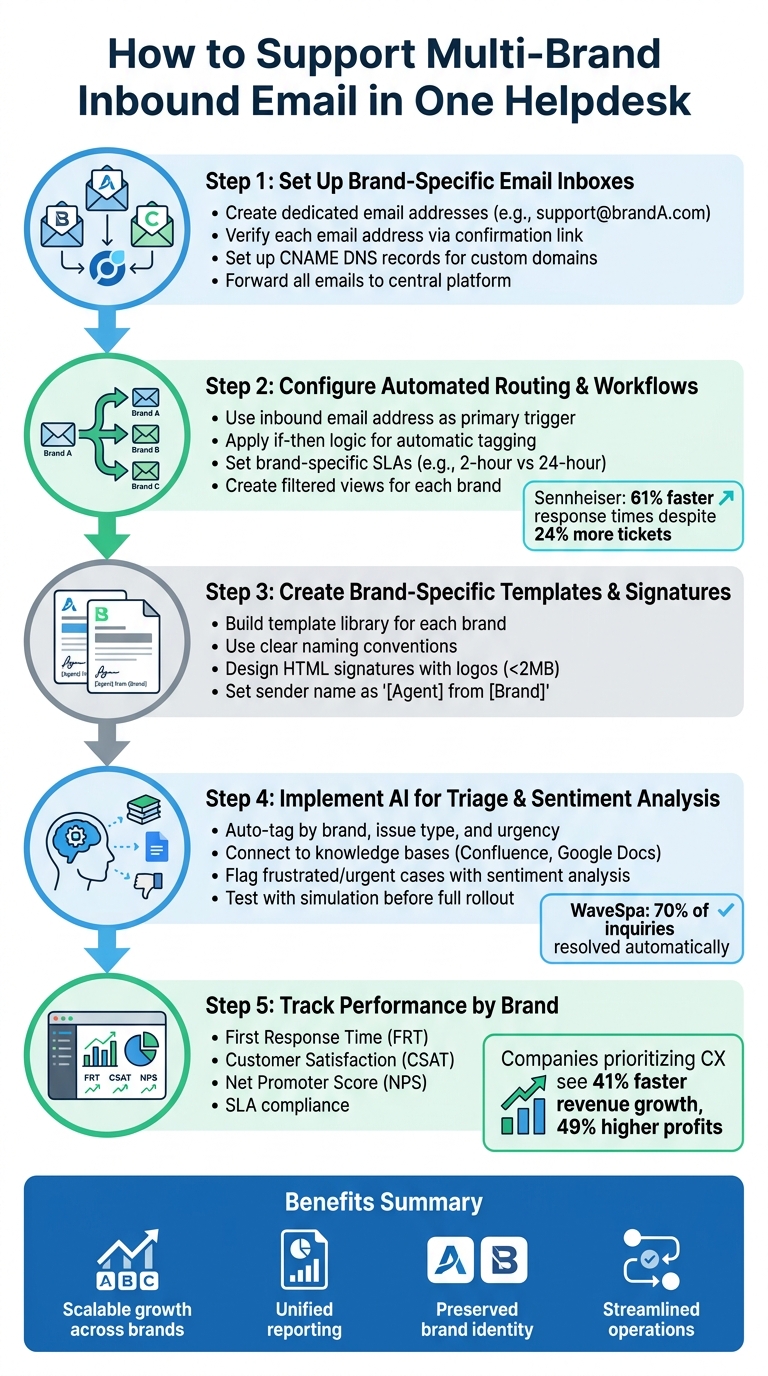
5-Step Process for Managing Multi-Brand Email Support in One Helpdesk
Ep. 29: Setting up a multibrand customer support team (Feat. Fabrice Dowling, Head of Customer Care)
sbb-itb-e60d259
Step 1: Set Up Brand-Specific Email Inboxes and Forwarding
This step lays the groundwork for managing multiple brands seamlessly while ensuring each brand retains its distinct identity.
The key to handling multi-brand email communication is setting up separate email addresses for each brand while funneling all correspondence into a single platform. This way, you maintain professional, brand-specific interactions without the hassle of managing multiple helpdesk systems.
Create Dedicated Email Addresses for Each Brand
Start by assigning a unique support email address to each brand (e.g., support@brandA.com). Avoid using generic addresses, as customers expect communication that reflects the personality and branding of the specific company they’re dealing with.
Each email address should be linked to its corresponding brand profile. This ensures that replies automatically include the correct sender name, email signature, and branding elements. If your brand operates in multiple regions, consider creating localized email addresses like support_uk@brand.com or support_it@brand.com. These can trigger region-specific details like tailored signatures and links to localized terms of service [4].
Don’t forget to verify each email address via its confirmation link. This step is crucial to avoid your emails being flagged as spam [2]. Additionally, if you’re using custom domains, set up CNAME DNS records before creating brand portals. This ensures smooth domain mapping and avoids technical hiccups [2].
Once the brand-specific email addresses are ready, the next task is to bring all these streams into one manageable system.
Centralize Inbound Emails on a Single Platform
After configuring the individual brand email addresses, set up forwarding rules to direct all incoming emails to a central address. This "forward-to" hub allows you to manage communications for all brands from one place while keeping each brand’s identity intact.
Helpdesk platforms typically prioritize the email address in the "To" field when sorting incoming messages. So, if an email is sent to multiple brand addresses (e.g., one in the "To" field and another in "CC"), the system will usually associate the email with the brand in the "To" field [4]. To avoid errors like forwarding loops, be sure to add external brand addresses to the ignored list in your helpdesk settings [4]. This step ensures smooth operation and prevents delivery issues.
Step 2: Configure Brand-Specific Routing and Workflows
Once you’ve centralized your brand-specific email addresses, the next step is to ensure every incoming message reaches the right team. This involves setting up automated rules to guarantee precise ticket delivery. Without proper routing, you risk creating confusion between brands, missing SLAs, and leaving customers dissatisfied when they don’t get the response they expect.
The goal here is to design automated rules that identify which brand a customer is contacting and route the ticket to the correct team. This process should include customized workflows, priorities, and service level agreements tailored to each brand.
Create Automated Routing Rules
The most effective way to handle multi-brand emails is by using the inbound email address as your primary trigger. For instance, when a customer emails support@brand-a.com, your helpdesk should automatically recognize the address, apply the appropriate brand tag, assign the ticket to the right team, and activate any relevant automation.
"Ticket routing automatically assigns support tickets to the appropriate team using predefined rules."
Use if-then logic in your automation system. For example: when an email arrives at support@brand-a.com, tag it as "brand_a", assign it to the designated team, and initiate brand-specific workflows. This trigger-based system ensures accuracy and removes the need for manual sorting.
One key point to remember: if an email is sent to multiple brand addresses (e.g., one in the "To" field and another in "CC"), your helpdesk will typically prioritize the "To" field. To avoid routing conflicts, use simulation tools to test your rules before deploying them. This step ensures your logic functions correctly and prevents misrouted tickets from affecting customers.
Build Custom Workflows for Each Brand
Once routing rules are in place, customize workflows to align with the unique expectations of each brand’s customer base. For example, a luxury brand might require a 2-hour response time, while a budget-focused brand may operate with a 24-hour SLA. Tailor workflows to reflect these distinctions.
Set up automation rules that apply brand-specific dynamic SLAs, escalation policies, and priority scoring. For instance, if you sell on Amazon, one brand might need a strict 24-hour response window, while another can afford a more flexible timeline. Track SLA performance for each brand separately to ensure compliance with marketplace requirements and maintain high service standards [6].
In 2025, the audio company Sennheiser saw a 61% improvement in response times despite a 24% increase in ticket volume by implementing unified multi-brand automation rules tailored to each brand’s SLAs [6]. Similarly, WaveSpa resolved 70% of customer inquiries automatically across its brands by using AI configured with brand-specific knowledge and policies [6].
As your portfolio grows, organize automation rules within your helpdesk to keep workflows streamlined and avoid logic conflicts. Additionally, set up filtered views (custom inboxes) for each brand so agents can focus solely on tickets relevant to their assigned brand. This ensures they always have the right context to provide accurate and efficient support.
Step 3: Create Brand-Specific Response Templates and Signatures
Once your routing rules are in place, it’s time to focus on refining your outbound communication. The goal here is to make sure every email reflects the correct brand identity. Customers expect a seamless experience, and mismatched communication – like a luxury skincare brand using casual language meant for a budget electronics brand – can confuse customers and weaken trust.
Response templates and signatures are key to presenting your brand identity. Each brand should have its own customized set of templates that align with its tone, style, and customer expectations. This goes beyond just adding the right logo – it’s about creating a cohesive experience through language, tone, and design.
Design Email Templates for Each Brand
Start by building a library of email templates tailored to each brand you manage. Many platforms let you assign unique templates to specific mailboxes, so you can adjust the tone, branding, and design for each team [1]. Templates should cover common scenarios like auto-replies, order updates, and troubleshooting guides, all written in the brand’s distinct voice.
For instance, if you oversee both a premium outdoor gear brand and a budget camping supplies brand, their communication styles should reflect their identities. The premium brand might say, "We’re delighted to assist you", while the budget brand could use, "We’re here to help." This ensures each customer interaction feels authentic to the brand they contacted.
To avoid mistakes, organize your templates by brand within your helpdesk. Use clear naming conventions like "Brand-A: Return Instructions" or "Brand-B: Troubleshooting Steps" to help agents quickly find the right one. As your library grows, conduct regular audits using brand filters to ensure tone, formatting, and information stay consistent [3].
Add Custom Email Signatures by Brand
Email signatures are another critical piece of the puzzle. They should be automatically applied based on the brand associated with each customer ticket, rather than relying on a one-size-fits-all default signature. This ensures every email reinforces the correct brand identity.
"Ensure customers corresponding with you by email enjoy a consistent brand experience using multi-brand email."
Use HTML to create polished, brand-specific signatures. Include elements like logos, social media icons, and professional styling. Keep logos in a square format (under 2MB) to ensure they display correctly across all email platforms. Add brand-specific contact details, such as dedicated phone numbers or support URLs, to help customers reach the right team. For brands operating in multiple regions, create localized signatures with the appropriate language, contact numbers, and legal links.
Set the sender name to "[Agent Name] from [Brand Name]" so customers immediately know which brand is responding [4]. If your helpdesk uses a global email template for all brands, avoid including brand-specific visuals like logos or colors in the template itself. Instead, use workflow automation rules to add those details in the signature or message body.
Finally, always test new signatures by sending emails to yourself. This ensures the HTML formatting looks good on both mobile and desktop devices, avoiding any layout issues that could make your brand appear unprofessional.
Step 4: Use AI for Email Triage, Tagging, and Sentiment Analysis
Once your templates and signatures are set, the next hurdle is managing the flood of incoming emails, especially when you’re dealing with multiple brands. Sorting emails manually can quickly become overwhelming. That’s where AI steps in, turning a reactive process into a proactive one.
Modern AI-powered ticket routing and prioritization goes beyond basic keyword matching. It learns from past ticket data to grasp the context and intent behind messages. For example, it can direct shipping-related inquiries to the right team, even if the customer emails the wrong address or leaves out key details [5]. This level of understanding lays the groundwork for automating email categorization and tagging.
Automate Email Categorization and Tagging with AI
AI-powered tools can take over the time-consuming task of sorting through hundreds of emails daily. They automatically tag each message by brand, issue type, and urgency [5][7].
To make this work seamlessly, connect your AI triage system to external resources like Confluence or Google Docs. This integration ensures that technical issues are routed based on the latest documentation. Complex problems can go directly to specialized teams, while routine inquiries are handled by frontline agents [5].
Before rolling out AI triage across all your brands, take advantage of simulation features. These allow you to test the system with historical ticket data, identifying any misrouting patterns before going live [5]. Start small – implement it for one brand first, then scale up as you refine the process.
AI can also take things further with sentiment analysis, which adds another layer of prioritization.
Apply AI Sentiment Analysis to Prioritize Cases
Sentiment analysis enhances triage by identifying the tone and urgency in customer messages. This ensures that frustrated or time-sensitive cases are flagged for immediate attention, helping to protect your brand’s reputation [5].
Step 5: Track Performance Metrics by Brand
After implementing automated triage and sentiment analysis, the next step in refining your multi-brand support strategy is thorough performance tracking. This ensures no brand gets overlooked, helping you identify which ones are thriving and which need improvement.
Set Up Dashboards for Each Brand
Create customized dashboards for every brand in your portfolio. Use automated tagging to categorize emails by brand, keeping your data organized and eliminating the need for manual input.
Design these dashboards to align with each brand’s unique priorities. For instance, premium brands might prioritize metrics like First Response Time (FRT), while budget-friendly brands may focus on meeting SLA targets. Avoid a generic approach – tailor benchmarks to match the service expectations of each brand. These dashboards provide the insights needed to refine and enhance your service delivery.
Monitor Key Metrics Across All Brands
Keep a close eye on metrics like Customer Satisfaction (CSAT) and Net Promoter Score (NPS) for each brand. Tracking these metrics can help you quickly identify underperforming areas. According to Forrester‘s 2024 US Customer Experience Index, companies that prioritize customer experience see 41% faster revenue growth, 49% higher profits, and 51% better customer retention compared to their competitors [8][9]. Considering that over half of customers might switch brands after a single bad experience [9], monitoring these scores is crucial.
Also, track SLA compliance for each brand based on its market positioning and promises [8][10]. Use AI-driven sentiment analysis to identify trends, address product-related issues, and manage potential PR challenges before they escalate [9]. Analyze engagement metrics from brand-specific help centers and knowledge bases to pinpoint areas where customers might face difficulties [2].
Studies show that focusing on customer satisfaction can lead to significant business benefits – up to 80% revenue growth and 60% higher profit margins [9]. By accurately tracking performance, you can make informed decisions, optimize costs, and ensure every brand in your portfolio stays on the right track.
Best Practices for Maintaining Service Quality Across Brands
Managing service quality across multiple brands requires well-planned agent training and ongoing refinement of workflows. Without structured processes in place, maintaining high standards can become increasingly difficult as your brand portfolio grows.
Train Agents to Handle Multiple Brands
Create detailed, brand-specific guidelines within your internal knowledge base. These should define each brand’s voice, tone, and policies, ensuring that agents can deliver responses that align with the unique identity of each brand. Combine these guidelines with scripts to provide consistent and brand-specific support [10]. To streamline operations, set up smart views or brand-specific ticket queues, reducing the need for agents to switch contexts frequently [10]. Collision detection tools can also help by preventing duplicate responses from multiple agents [11]. Additionally, standardized canned responses tailored to each brand’s language and terminology can further enhance consistency while reducing manual effort [4][11].
Effective training and workflow organization can lead to noticeable improvements. For example, Harmony Public Schools saw a significant boost in their email response times under the leadership of Service Desk Manager Martin Nuñez:
"We went from having unread emails with pending requests for three months to requests resolved within a week." [11]
Review and Adjust Workflows Regularly
Even with a solid setup, workflows need regular updates to maintain service quality. Evaluate ticket volumes and response times against benchmarks to identify areas that need attention [12]. Routine audits can refine operations and confirm that performance metrics remain aligned with goals. Automated customer satisfaction surveys sent after ticket resolutions can highlight areas for improvement [10].
Use centralized dashboards to monitor performance and spot bottlenecks. This allows you to reallocate resources as needed [10][11]. For instance, in September 2024, Improved Racing, an automotive parts manufacturer, used brand-specific knowledge bases and smart ticket routing to preserve each brand’s identity while improving support efficiency [10]. Regularly auditing workflows based on reporting data ensures that escalation rules and ticket statuses are adjusted promptly, preventing minor issues from becoming major challenges [10].
Conclusion
Handling multi-brand email support under one helpdesk doesn’t have to be overwhelming. With brand-specific email addresses, smart routing rules, customized templates, and AI tools for triage and sentiment analysis, you can preserve each brand’s identity while keeping operations efficient. These steps lay the groundwork for automation and unified reporting.
Once workflows are in place, AI takes over tasks like routing and prioritization, turning manual efforts into streamlined processes. Sentiment analysis helps identify cases that need immediate attention, while automated tagging, categorization, and summarization simplify managing large volumes of communication by providing clear ticket context in seconds.
This approach offers benefits like scalable growth for multiple brands, secure data handling through permission groups, and unified reporting that tracks response times and customer satisfaction across your portfolio. By consolidating systems, you avoid the hassle of managing separate platforms while still delivering a tailored customer experience for each brand.
For B2B companies dealing with complex accounts and long-term cases, an AI-focused platform designed for these workflows can make a noticeable impact. Supportbench delivers these tools – from brand-specific templates to AI-powered triage – starting at $32 per agent per month, with integrations like Salesforce and JIRA built in.
Whether you’re supporting a few brands or dozens, the right setup and AI tools can streamline your operations and ensure consistently excellent service.
FAQs
How do I prevent forwarding loops and misrouted tickets?
To keep things running smoothly in a multi-brand helpdesk, it’s crucial to establish clear routing and filtering rules. Set up automations and triggers tailored to each brand to ensure tickets are assigned to the right agents or teams. Make sure these rules include conditions to stop tickets from being routed repeatedly. Using AI for email triage and tagging can be a game changer – it helps identify misrouted tickets early, keeping ticket flow accurate and preventing frustrating loops.
What’s the fastest way to keep each brand’s tone consistent?
The fastest way to keep every brand’s tone consistent is by creating brand-specific email templates and employing triggers to personalize outgoing messages. This approach guarantees that all communications stay true to each brand’s unique voice and style. Be cautious about using shared templates that include brand-specific colors or logos, as this can lead to inconsistencies. Automation tools, like triggers, simplify the process by ensuring each message automatically reflects the appropriate brand tone, eliminating the need for constant manual tweaks.
How can I measure CSAT and SLA performance per brand?
To keep tabs on Customer Satisfaction (CSAT) and Service Level Agreement (SLA) performance across multiple brands in a helpdesk, leverage built-in analytics and AI-powered insights. These tools make it easy to gather CSAT scores and track SLAs, such as response and resolution times, for each brand individually. By generating detailed reports, you can dive into brand-specific metrics, spot areas needing attention, and ensure a steady level of service quality across all brands.






