


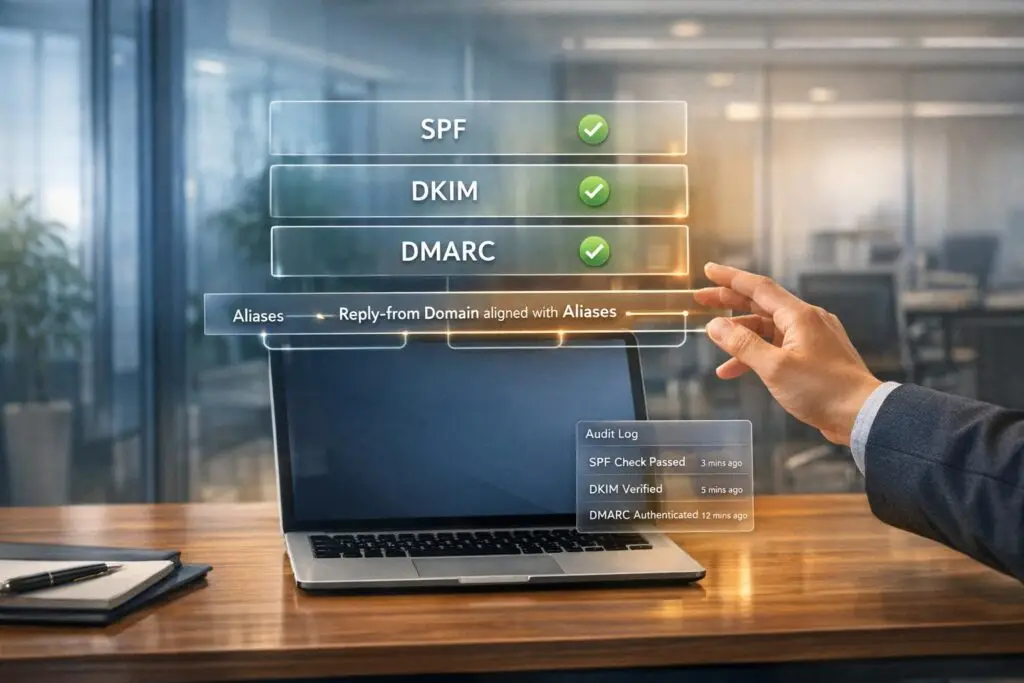
Managing email aliases and reply-from addresses is critical for secure and professional email management. Poor configurations can expose identities, trigger spam filters, and harm domain reputation. Here’s what you need to know:
- Email aliases forward messages to a primary inbox without separate storage or login credentials. They’re cost-effective and ideal for role-based addresses (e.g.,
support@orbilling@). - Reply-from addresses ensure outgoing emails appear professional and align with your domain, reducing risks like spam flags.
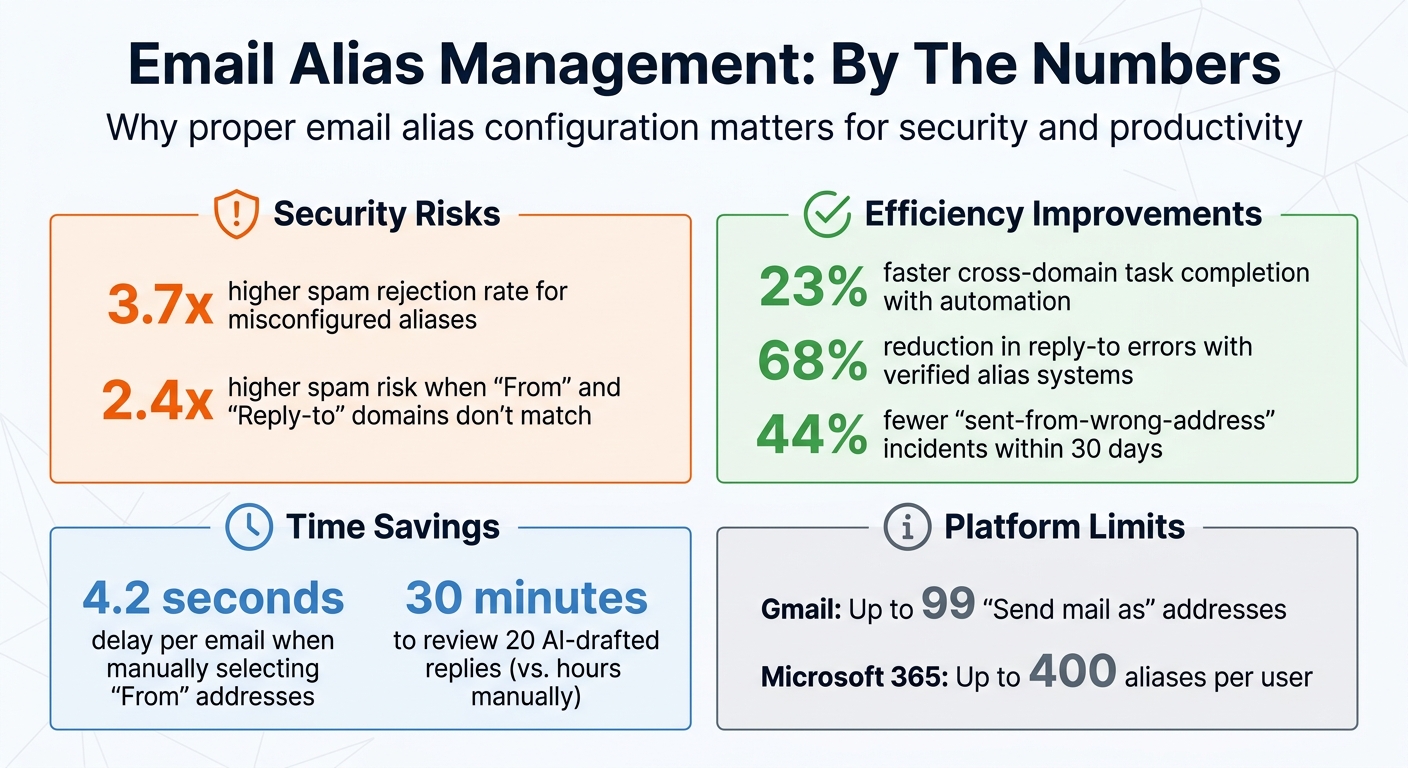
- Misconfigured aliases increase spam rejection rates by 3.7x, while mismatched domains in "From" and "Reply-to" fields face a 2.4x higher spam risk.
- Verified and organized aliases improve efficiency by 23% and reduce errors by 68%.
Key Steps:
- Set up aliases securely in Gmail or Microsoft 365, ensuring proper verification.
- Configure reply-from addresses to align with your authenticated domain.
- Use unique aliases for clients or tasks to isolate breaches and maintain organization.
- Automate routing rules to save time and reduce errors.
- Perform regular security audits to identify stale or misconfigured aliases.
AI tools can further optimize alias management by automating routing, detecting errors, and ensuring compliance. This helps streamline workflows and protects your email ecosystem.
Email Alias Management Statistics: Security Risks and Efficiency Gains
What Email Aliases and Reply-From Addresses Are
Email Aliases Explained
An email alias is like a digital nickname for your primary email address. It lets you receive messages sent to another address without needing a separate inbox or login. For instance, when someone emails "support@yourcompany.com", their message might actually arrive in "john.smith@yourcompany.com", keeping John’s personal email hidden.
"An email alias is an alternate address that receives mail on behalf of a real destination inbox without exposing that inbox publicly." – MailSlurp [8]
Unlike a full mailbox, an alias doesn’t have its own login, storage space, or IMAP credentials. This makes it an affordable option for businesses, especially since platforms like Google Workspace and Microsoft 365 often include aliases at no extra cost. In contrast, full mailboxes can cost anywhere from $6 to $30 per user each month [1][3]. Aliases are particularly useful for managing role-based addresses like "billing@" or "security@", offering a consistent contact point even when internal staff or team structures change [8].
Reply-From Addresses: Maintaining Professional Communication
While aliases manage incoming emails, reply-from addresses ensure that outgoing communication looks polished and professional. The reply-from address is what customers see in the "From" field, helping establish a consistent brand image.
"The From address should match your authenticated sending domain. The Reply-To can route to support or a team inbox." – React Emails Pro [2]
For example, when a customer receives a response from "support@yourcompany.com" rather than an agent’s personal email, it builds trust and presents a unified front. This setup also protects individual email addresses from being exposed, reducing spam and allowing compromised addresses to be deactivated without disrupting the main account [9][10].
On a practical level, manually selecting "From" addresses adds small but noticeable delays – about 4.2 seconds per email. Enforcing proper alias verification can cut down on errors, like sending emails from the wrong address, by up to 44% within a month [4]. In environments where AI handles customer interactions, reply-from addresses ensure automated responses align with your brand while directing replies to the correct team or queue.
sbb-itb-e60d259
How Do I Add an Alias Email Address in M365 and Use It to Send From? (2025/431)
How to Set Up Aliases and Reply-From Addresses Securely
These steps help protect your support operations while keeping communication management efficient.
Setting Up Email Aliases in Gmail and Microsoft 365
The process for creating email aliases varies depending on whether you’re using Gmail or Microsoft 365.
In Gmail, head over to Settings > See all settings > Accounts and Import. Under the "Send mail as" section, click Add another email address, then input your alias and SMTP server details (e.g., smtp.gmail.com). Gmail will send you a verification code or link – make sure you complete this step. If you skip it, Gmail will default to your primary email address when sending messages[4].
"Verified aliases satisfy NIST SP 800-207 Section 5.2.3 (‘Identity-bound messaging’) and ISO/IEC 27001:2022 Annex A.8.24 (‘Secure electronic messaging’). Unverified aliases violate both." – Leo, Smart Home Systems Engineer[4]
For Microsoft 365, admins need to log in to the Microsoft 365 admin center. Navigate to Users > Active users, select the desired user, and click Manage username and email to add a new alias. Once saved, it may take up to 24 hours for the changes to propagate[12][13]. To enable sending from aliases in Outlook, enter the following PowerShell command:
Set-OrganizationConfig -SendFromAliasEnabled $true[12].
Keep in mind that Gmail allows up to 99 "Send mail as" addresses[11], while Microsoft 365 business accounts support up to 400 aliases per user[12].
Once aliases are securely set up, you can move on to configuring reply-from addresses to ensure seamless and secure communication.
Configuring Reply-From Addresses: Security Steps
After setting up aliases, configuring reply-from addresses is crucial for maintaining professional and secure communication.
To ensure email delivery and security, update your DNS records with SPF, DKIM, and DMARC settings. For Gmail aliases, confirm that your domain’s SPF record includes include:_spf.google.com[4]. When linking aliases to third-party tools, always use secure connections – SSL on port 465 or TLS on port 587 – to keep your credentials encrypted during transmission.
In Gmail, changing the "From" address won’t automatically update the "Reply-to" field. To assign a different reply-to address, go to Accounts and Import, click Edit info next to your alias, and select "Specify a different ‘reply-to’ address." This ensures customer replies are directed to the correct team inbox[11].
For Microsoft 365, enable the "Send from alias" feature in the Exchange Admin Center under Settings > Mail flow. This option allows users to select the alias from the "From" dropdown menu[14]. Using unverified aliases or unsupported APIs can increase spam filter rejection rates by 3.7 times[4], so proper verification is critical for maintaining trust and deliverability.
Best Practices for Managing Aliases and Reply-From Addresses
Once you’ve set up your aliases and reply-from addresses, the next challenge is ensuring they’re well-organized, secure, and functional – especially as your support operations grow.
Use Unique Aliases for Each Client or Queue
Creating client-specific or function-specific aliases can help you avoid confusion and make troubleshooting much easier. For instance, you might use acme-support@yourcompany.com for a specific client or set up aliases like billing@, legal@, or escalations@ for different functions. This strategy prevents the chaos of funneling everything through a single inbox, a situation often referred to as "routing debt" – where operational inefficiencies pile up from using one entry point[8][3].
This approach also supports a quick-response "break glass" protocol. If an alias is compromised or starts receiving spam, you can deactivate it and issue a replacement without disrupting your primary inbox or workflows for other clients[5]. Research from Alibaba’s engineering team highlights how verified alias systems with clear roles reduce reply-to errors by 68% compared to manual workflows[4].
"If you cannot log in to the account directly with a unique password, it is an alias." – Allegrow[3]
These steps are key to keeping communication secure and efficient, especially in AI-driven B2B support environments. Once you’ve established unique aliases, the next step is automating email sorting to maximize efficiency.
Set Up Automated Routing Rules
With unique aliases in place, automated routing rules can take your email management to the next level. Relying on manual sorting slows down response times and increases the risk of errors. Automated rules, on the other hand, ensure emails are directed to the right team or agent based on criteria like recipient alias, sender domain, or message content.
For example, Gmail allows you to create filters under Settings > Filters and Blocked Addresses to label, forward, or assign emails automatically. If you’re using Microsoft 365, you can set up Inbox Rules or Transport Rules in the Exchange Admin Center to manage email organization across your team.
It’s also important to implement Sender Rewriting Scheme (SRS) and Authenticated Received Chain (ARC) when forwarding aliases to external addresses or integrating with third-party tools. These safeguards protect your domain reputation and ensure compliance, reducing the likelihood of your emails being flagged as phishing attempts by enterprise security systems[3][6].
Automating routing doesn’t just save time – it can complete cross-domain tasks 23% faster and reduce "sent-from-wrong-address" incidents by 44% within 30 days[4].
Common Alias Management Mistakes and How to Avoid Them
Avoiding errors in alias management is just as important as following best practices. Even with secure setups, poor management can lead to risks that compromise your domain reputation, expose sensitive data, and create compliance issues. Two major pitfalls to watch out for are reusing aliases across multiple clients and neglecting regular security audits.
Reusing Aliases Across Multiple Clients
Using a single alias like support@yourcompany.com for multiple clients might seem like a time-saver, but it introduces serious vulnerabilities.
From a technical standpoint, replying to an alias often defaults to your primary mailbox unless your "Send As" settings are perfectly configured. This can unintentionally reveal personal or direct email addresses to clients, breaking professional boundaries [1]. Worse, when aliases are used for outbound emails, they can create a mismatch between the "From" address and the "Mailed-By" signer. Many enterprise security systems interpret this as DMARC misalignment, flagging it as a potential phishing or spoofing attempt [3].
"Email aliases are forwarding addresses that lack independent login credentials, making them a dangerous ‘efficiency hack’ for outbound sales teams looking to save on seat costs." – Allegrow [3]
There’s also a personnel risk to consider. When an employee leaves and their account is deleted, any aliases tied to that account – and their historical records – can vanish. This can lead to compliance violations and unexpected email bounces [1].
To avoid these pitfalls, consider these steps:
- Use a secondary domain for outbound or client-specific communications to protect your primary domain’s reputation [3].
- For critical functions like
billing@orlegal@, set up full mailboxes instead of aliases. This ensures a proper audit trail and maintains a consistent reply identity [1].
Skipping Regular Security Audits
If reusing aliases creates vulnerabilities, skipping security audits only makes things worse. Regular audits are essential to identify and address risks before they escalate.
Experts recommend performing audits at least once a year, but if your organization handles sensitive data or operates in high-risk environments, you should aim for every 3 to 6 months [17].
"It’s recommended to conduct an email security audit at least once a year to stay ahead of emerging threats. However, some cybersecurity professionals suggest performing audits every 3-6 months, especially for organizations that handle sensitive data." – Darktrace [17]
Here’s what a thorough audit should include:
- Verify that destination mailboxes are still active and assigned to the right recipients.
- Test the entire email path, including forwarding rules and automated replies.
- Use your email client’s "Show Original" feature to check header alignment and ensure the "From" address matches the expected domain.
- Rotate or deactivate temporary aliases created for testing or short-term projects.
Regular audits help you identify stale aliases, reduce the risk of data leakage, and ensure proper authentication alignment [16][17]. By staying proactive, you can minimize your attack surface and maintain better control of your email ecosystem.
How AI Improves Alias and Reply-From Address Management
Managing email aliases manually can slow down support teams and leave room for security vulnerabilities. AI steps in to automate tasks like AI-powered ticket routing, error detection, and real-time monitoring, making the process much more efficient and secure.
AI-Powered Routing and Error Detection
AI doesn’t just rely on the visible To: header for routing emails. Instead, it analyzes the SMTP envelope recipient (RCPT TO) to ensure messages are directed correctly, even when multiple aliases are in play [15]. This approach avoids misrouting caused by depending solely on the visible To: address.
In high-volume scenarios, AI leverages encoded email identifiers (like run_12345@domain.com) to create predictable and traceable routing paths. This method prevents collisions during simultaneous processing and makes it easier to track each message’s journey [15]. Additionally, AI identifies issues like routing loops, where two aliases forward emails back and forth, and silent drops, which occur when emails fail due to DMARC or SPF errors [6].
"To a corporate spam filter, this technical mismatch mimics the behavior of a phishing attack." – Allegrow [3]
Authentication monitoring is another key feature. AI keeps an eye on DMARC misalignments, which happen when the visible "From" address doesn’t match the "Mailed-By" domain signature. By catching these mismatches in real time, AI prevents outbound emails from being flagged as spoofing attempts by spam filters [3]. This proactive monitoring eliminates the need to wait for bounce reports or customer complaints, surfacing issues directly in your dashboard. These tools reduce manual effort and help align with modern B2B support standards, lowering risks and improving efficiency.
AI’s capabilities don’t stop at error detection. It also simplifies the entire lifecycle of aliases, as explained below.
Automated Alias Creation and Monitoring with Supportbench
Platforms like Supportbench take AI’s advantages even further by automating the full lifecycle of an alias – from creation to deactivation – without requiring IT involvement [8]. For example, when a new client is onboarded or a department needs its own queue, the system can automatically generate an alias, apply routing rules, and attach the necessary signature details (like agent name, title, and department) [20].
This automation addresses what’s known as routing debt – when outdated aliases continue pointing to inactive inboxes or accounts of former employees. Supportbench’s AI also tracks follow-ups and drafts replies with 90% accuracy by referencing prior case data [19]. On top of that, it uses programmable match rules to route inbound emails based on sender information, subject lines, or attachment types. Approved messages are sent directly to the right operator queue, cutting out the need for manual triage [18].
Conclusion
Managing secure aliases and reply-from addresses plays a key role in protecting your domain’s reputation, maintaining a professional image, and ensuring smooth operations. It’s crucial to understand the distinction between an alias – essentially a routing pointer – and a full mailbox, which includes storage and credentials. Misusing an alias in place of a full mailbox often leads to unexpected issues that many teams overlook[1].
Regular security audits are another cornerstone of effective email management. These audits help identify stale mappings, DMARC misalignments, and reputation leaks. Misconfigurations are a common cause of deliverability issues, but proper setups combined with routine checks can prevent these pitfalls[3]. Additionally, ensuring your "From" address aligns with your SPF and DKIM authenticated domain minimizes the risk of outbound emails being flagged as phishing attempts.
AI integration takes this a step further by simplifying and accelerating these processes. Tools like Supportbench automate alias management and follow-up tracking, significantly reducing the time spent on manual tasks. For instance, agents can review and approve 20 AI-drafted replies in just 30 minutes – a process that would otherwise take hours without automation[7].
FAQs
When should I use a full mailbox instead of an alias?
When you need dependable outbound email performance, a full mailbox is the way to go. It ensures proper authentication protocols like SPF, DKIM, and DMARC are in place, along with a consistent and verified sender address. This setup is crucial for maintaining a strong sender reputation and avoiding spam filters.
On the other hand, aliases work well for tasks like inbound email routing, collecting tickets, or masking your privacy. However, they don’t have independent credentials or reputations, which can sometimes cause deliverability issues.
For activities like outbound sales, transactional emails, or any situation where sender reputation and deliverability are non-negotiable, full mailboxes are absolutely essential.
How do I make sure my alias “From” address passes SPF, DKIM, and DMARC?
To make sure your alias "From" address complies with SPF, DKIM, and DMARC standards, stick to domains with the right DNS records. Unauthenticated aliases can lead to spam filter issues, so it’s best to avoid them. Here’s what to do:
- Set up SPF: Add a TXT record to your DNS to authorize specific sending IPs.
- Enable DKIM: Publish cryptographic keys in your DNS and digitally sign your emails.
- Add DMARC: Establish policies for handling unauthenticated emails.
For smooth email delivery, use verified mailboxes or secondary domains. This helps sidestep potential authentication problems.
What should an alias security audit checklist include?
To keep your email aliases secure, it’s important to focus on several key areas:
- Inventory Alias Configurations: Start by reviewing all alias setups, including forwarding rules and catch-all addresses. This helps identify any weak points or potential vulnerabilities.
- Check Email Authentication Protocols: Ensure that SPF, DKIM, and DMARC are properly aligned. These protocols play a critical role in preventing email spoofing and unauthorized use.
- Secure Reset and Access Controls: Double-check that password reset processes and access permissions are locked down. This reduces the risk of unauthorized access.
- Review Reply-From Address Settings: Verify that reply-from addresses are correctly configured to avoid miscommunications or potential misuse.
- Monitor for Anomalies: Use automation tools to track unusual activity. Early detection of irregularities can help address issues before they escalate.
By addressing these areas, you can strengthen your email operations and reduce potential risks.






