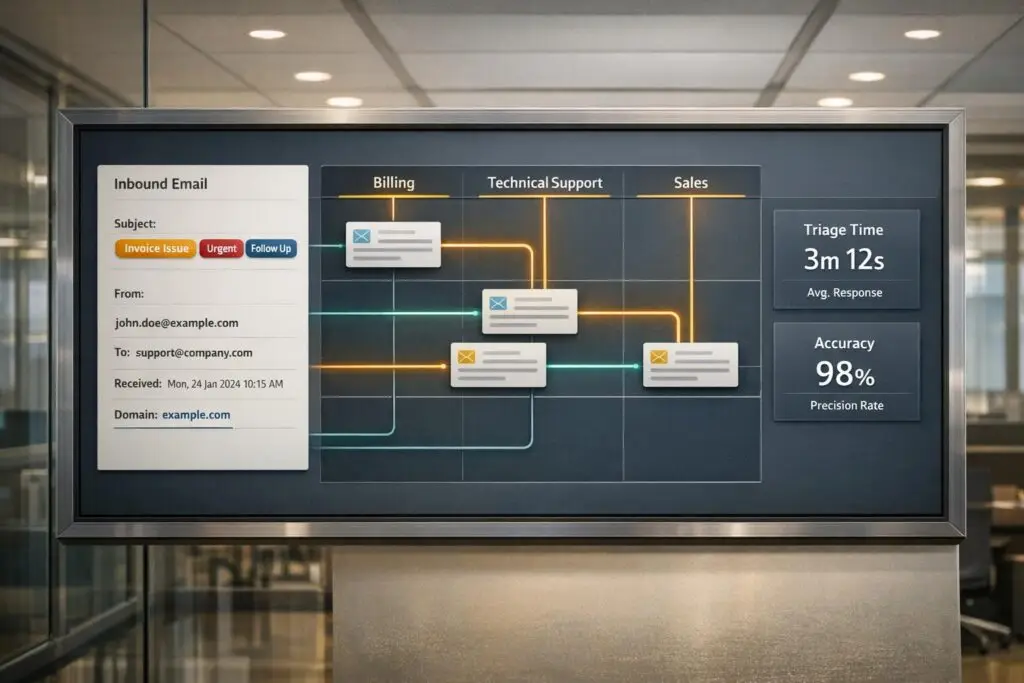
Parsing inbound emails can save your team hours of manual triage by automating how messages are categorized and routed through intelligent email management. Here’s the key takeaway: Extracting structured data from unstructured emails – like subject tokens, headers, and domains – streamlines ticket routing, reduces delays, and improves efficiency.
Key Highlights:
- Subject Tokens: Use regex to identify keywords like "Urgent" or "Order ID" in subject lines for quick routing decisions.
- Email Headers: Analyze metadata (e.g.,
From,To,Received,Authentication-Results) to verify sender authenticity, link replies to threads, and prioritize tickets. - Domains: Classify emails by sender or recipient domains to manage customer priority levels and detect spoofing attempts.
AI tools enhance this process by analyzing email context for intent, urgency, and sentiment, ensuring accurate routing for as little as $0.001 per email. Manual triage is time-consuming, but automated parsing reduces errors, speeds up responses, and ensures emails reach the right person immediately.
Keep reading for detailed strategies and examples to implement these techniques effectively.
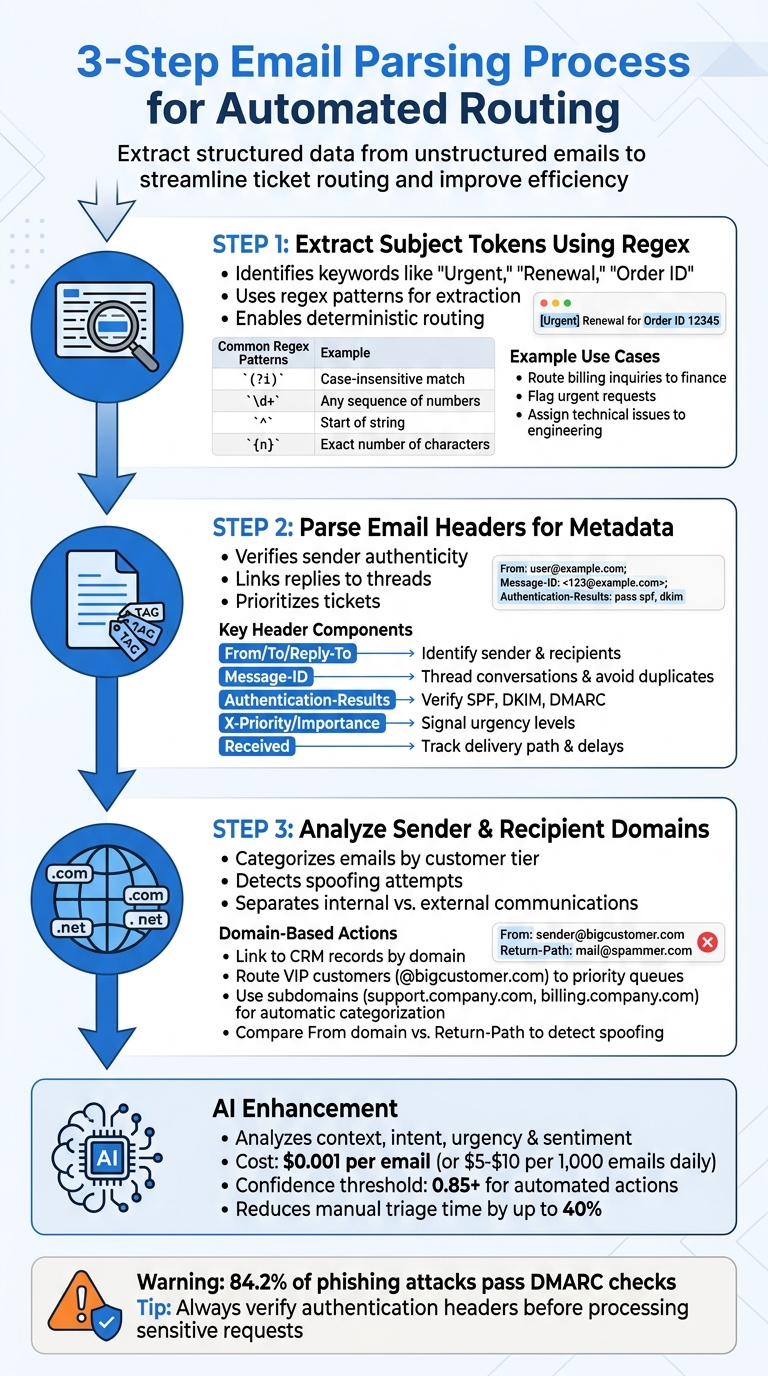
3-Step Email Parsing Process for Automated Routing
Step 1: Extract Subject Tokens Using Regex Patterns
What Are Subject Tokens?
Subject tokens are specific keywords or identifiers in an email’s subject line that help determine routing decisions. For example, terms like "Urgent", "Renewal", or "Order ID", and even alphanumeric patterns such as ORD-12345, can indicate priority, category, or intended destination [3][5].
These tokens allow your system to make quick decisions: directing billing inquiries to finance, flagging urgent requests, or assigning technical issues to engineering – all without needing manual intervention [3].
"Manual email triage slows response times and consumes a significant portion of support agents’ daily workload" [3]
- Neha Gunnoo, Growth and Marketing Lead at Parseur.
Subject tokens enable deterministic routing, which uses predefined keys or tags to decide where an email should go. This process eliminates guesswork, ensuring messages land in the right queue and reducing the time agents spend sorting through emails [5].
Using Regex for Token Extraction
Regular expressions (regex) are powerful tools for finding and extracting specific tokens from email subject lines [6]. By defining search patterns, regex can identify key elements such as order numbers, priority indicators, or other tags. For instance, d{5} matches a five-digit order number, while (?i)(urgent) identifies any variation of the word "urgent" [6].
The (?i) modifier ensures case insensitivity, so patterns like urgent, URGENT, or Urgent are all captured [6]. Similarly, s+ accounts for inconsistent spacing, ensuring patterns like "Order: 123" are matched even if extra spaces are present [6].
Here’s a quick look at common regex patterns and their uses:
| Regular Expression | Meaning | Example Usage |
|---|---|---|
(?i) | Case-insensitive match | (?i)(urgent) matches Urgent, URGENT, etc. |
d | Any digit | d+ matches any sequence of numbers |
| | Either / Or | (order|billing) matches either word |
s+ | One or more whitespaces | Order:s+d+ matches "Order: 123" |
^ | Start of string | ^Ticket matches subjects starting with "Ticket" |
{n} | Exact number of characters | d{6} matches exactly 6 digits |
For precision, use anchors like ^ (e.g., ^RE: to match subjects starting with "RE:") [6]. To handle numeric identifiers such as tracking numbers, specify exact lengths using curly braces – for example, d{10} for a 10-digit ID. This approach minimizes false positives [6]. After extracting tokens, standardize them by converting to lowercase and stripping whitespace to avoid mismatches in automated processes [5].
Once tokens are reliably extracted using regex, they can be applied to streamline routing decisions and support workflows effectively.
Examples of Subject Token Usage
Regex patterns can be tailored to handle specific scenarios. For instance:
- A pattern like
(?i)(renewal|contract)can automatically route subscription-related inquiries to the renewals team. - Use
ORD-d{5}to extract five-digit order numbers and map them directly to helpdesk fields [3][6]. - For priority handling,
(?i)(urgent|critical)flags high-priority messages, ensuring they bypass standard queues and reach senior agents faster [3]. - QA teams can use tags like
[RUN:123]to connect emails with specific test sessions, simplifying workflow tracking [5].
To improve accuracy, combine subject tokens with additional signals like sender domains or email headers [5]. While subject tokens are a powerful tool, they shouldn’t be your only routing method – customers may forward emails or modify subject lines, which can disrupt pattern matching.
"A good key is boring: predictable to generate, strict to parse, and hard to confuse" [5]
- Jason Macdown from Mailhook.
Finally, avoid placing sensitive information in subject tokens, as email subjects can appear in logs [5]. This token extraction process lays the groundwork for more advanced routing strategies covered in later sections.
sbb-itb-e60d259
Step 2: Parse Email Headers for Routing Metadata
Key Components of Email Headers
Email headers act as a roadmap for email delivery and authentication, showing the path the email takes and the security checks it undergoes along the way [7]. The From field displays the sender’s address visible to recipients, which support teams often use to identify where a ticket originated [7][10]. Meanwhile, the To, Cc, and Bcc fields indicate primary and secondary recipients, helping route emails to the correct department or shared inbox [4][11].
The Reply-To field specifies where replies should go, which is especially useful in automated systems where this address may differ from the one in the From field [8][10]. The Return-Path (also known as Envelope-From) shows where bounce notifications are sent and plays a role in verifying SPF records [7][8]. The Received header, when read from the bottom up, reveals the original sender’s IP address and highlights any delays during transit [8][9].
The Authentication-Results header summarizes the outcomes of SPF, DKIM, and DMARC checks, helping teams quarantine emails that fail authentication [7][9]. Spam-related headers like X-Spam-Status or X-Spam-Score provide numerical indicators of whether the email might be spam [4][8]. The Message-ID serves as a unique identifier, crucial for threading conversations, avoiding duplicates, and linking replies to existing tickets [10][11]. Finally, headers like X-Priority or Importance signal urgency levels (e.g., 1 for high priority, 3 for normal), helping prioritize tickets in queues [10].
By understanding these header components, support teams can make better routing decisions for incoming emails.
Using Header Data for Routing Decisions
Email header analysis complements subject token extraction by providing additional insights, such as verifying sender authenticity and identifying delivery issues. For example, comparing timestamps in the Received chain can reveal delays in delivery. Delays exceeding 30 seconds might point to backlogs or extensive scanning processes [15][16].
The Authentication-Results header is essential for verifying the legitimacy of the sender, especially when handling sensitive requests like password resets or billing updates. Look for authentication statuses such as spf=pass, dkim=pass, and dmarc=pass before processing these requests [12][14]. The Message-ID header can help link incoming emails to internal logs or database entries, speeding up troubleshooting [12][13]. Additionally, custom X-Headers can signal specific routing actions, such as escalating high-priority items or flagging potential spam [10][13][4].
Tools and Libraries for Header Parsing
To streamline header-based routing, consider integrating specialized tools and libraries. Python’s email.parser library, along with webhooks from services like Postmark or Mailgun, can convert raw headers into structured JSON for automated decision-making [4][8][11]. For visualizing routing and authentication results, tools like Google Admin Toolbox Messageheader, MxToolbox Header Analyzer, or MailSlurp Header Analyzer are invaluable [12][13][14][8].
You can also use inbound webhooks to automatically parse headers into JSON, enabling support software to automate ticket routing based on metadata [14][4]. While email headers don’t have an official size limit, most mail servers handle headers up to 64KB without issues [10].
Step 3: Analyze Sender and Recipient Domains
Categorizing Emails by Domain
The sender’s domain can act as a key signal for routing emails. For instance, emails from @bigcustomer.com can be directly linked to the right CRM record, account tier, or assigned to a specific agent using support level management [17]. This is especially important in B2B scenarios where strict SLAs are in place [17].
Additionally, categorizing emails based on domains helps confirm sender authenticity, which is critical for routing decisions. Always parse the actual email address enclosed in angle brackets instead of relying solely on the display name. To detect spoofing attempts, compare the From domain with the Return-Path domain when assigning emails to accounts [14]. For example, if an email claims to come from support@trustedvendor.com but the Return-Path indicates a domain like @randomserver.net, this discrepancy should trigger further verification before processing the ticket.
Identifying Internal vs. External Emails
To distinguish internal communications from customer emails, match recipient domains against an internal allowlist [17]. Emails from domains not on this list are automatically classified as external.
To verify the email’s origin, compare the From header with the envelope sender in the Return-Path and inspect the Received headers for unusual relay patterns [14]. This is particularly important since 84.2% of phishing attacks manage to pass DMARC checks, often due to lax or non-existent domain policies [16].
Domain-Based Routing in Practice
Subdomain routing is an effective way to separate inbound email streams. For example, using dedicated subdomains like support.yourcompany.com or billing.yourcompany.com enables automatic categorization based on the recipient address [17]. In high-volume scenarios, you can direct the MX record of a specific subdomain (e.g., in.yourcompany.com) to a processing service that converts emails into structured JSON for quicker routing [2].
Common Pitfalls in Email Parsing and How to Avoid Them
Handling Inconsistent Email Formats
Emails come in all shapes and sizes. Senders often tweak layouts, leave out fields, or switch between plain text and HTML without notice. This unpredictability can wreak havoc on rule-based parsers that rely on fixed patterns [18]. On top of that, emails might use different encodings like Base64, Quoted-Printable, or character sets (e.g., UTF-8 or ISO-8859-1). If these aren’t normalized upfront, you could end up with scrambled data [19].
A practical approach is to group emails by vendor or template, allowing you to create tailored extraction rules [18]. Standardizing fields – like mapping transaction_date and gross_amount – ensures downstream systems can process data consistently [18]. When extracting automation elements like one-time passwords or magic links, focus on the text/plain MIME part. This avoids unnecessary complications like tracking pixels or brittle HTML scraping [19].
"Treat email like an untrusted inbound event, not like a document." – Mailhook [19]
Validation is key. Use strict rules for dates (like ISO formats) and check numeric values for logical bounds. If something doesn’t pass validation, route it to a "needs review" queue with a snippet of the raw email for manual inspection [18].
Avoiding Over-Reliance on Subject Keywords
At first glance, routing emails based on subject keywords seems simple. But it’s a fragile system. Templates change, breaking keyword rules like [RUN:123], and attackers can spoof subject lines to misdirect emails. This leads to inefficiencies – support agents reportedly spend up to 40% of their time manually triaging and routing emails, and brittle subject parsing only adds to the problem [20].
To improve reliability, combine subject keywords with data from email headers, such as In-Reply-To or References. For more deterministic routing, use encoded keys in email addresses (e.g., k_7F3K9Q2@domain.com) [5]. Additionally, create a quarantine process for emails that don’t match expected patterns to avoid silent failures.
"Use keys for determinism, aliases for compatibility, and catch-all only when you also enforce a strict key format." – Jason Macdown, Engineering [5]
AI classification tools can also help. Instead of relying on rigid regex patterns, these tools can detect intent and categorize emails into buckets like "Refund" or "Bug Report." To prevent issues like email looping, verify headers such as Return-Path and filter out auto-responders [21].
Ensuring GDPR and Data Privacy Compliance
Accuracy in parsing is important, but data privacy is non-negotiable. With GDPR in play, organizations must have a lawful basis for processing data – often "Legitimate Interest" for B2B email routing – which requires proper documentation under Article 6 [24][25].
Only extract the data you absolutely need for routing. Avoid collecting unnecessary personally identifiable information (PII). Failure to comply could result in fines of up to €20 million or 4% of global annual revenue, whichever is higher [22][25].
Implement automatic purges for tracking logs and parsed content after the retention period expires [22][24]. If you’re using third-party tools or AI APIs for parsing, ensure there’s a signed Data Processing Addendum (DPA) in place to restrict data use to its intended purpose [23][24]. Systems must also be equipped to handle data access, correction, and deletion requests within one month. In the event of a data breach, reporting is mandatory within 72 hours [25][26].
"GDPR requires ‘data protection by design and by default,’ meaning organizations must always consider the data protection implications of any new or existing products or services." – GDPR.eu [22]
For added security, use HMAC signatures to verify that incoming webhook data is legitimate and hasn’t been tampered with [1]. Standardize data classification to distinguish sensitivity levels (e.g., internal vs. external) and apply fitting security measures automatically [23]. Addressing these challenges not only boosts routing efficiency but also safeguards sensitive customer data.
AI-Driven Automation for Inbound Email Routing
How AI Improves Parsing Accuracy
AI models go beyond just looking at subject line tokens – they analyze the entire context of emails to ensure efficient routing. Using natural language processing, these models can grasp both the intent and context of a message. This means they can accurately sort emails into categories like support, billing, or sales, detect urgency levels (e.g., distinguishing a critical production outage from a casual inquiry), and even assess customer sentiment almost instantly [1].
What’s more, AI doesn’t just classify emails – it extracts key details into structured formats like JSON. Automated actions are triggered only when the model’s confidence score exceeds 0.85 [1][2]. For example, instead of relying on rigid patterns like [RUN:123], an advanced language model can identify refund requests phrased informally. Emails that fall below the confidence threshold are flagged for human review, ensuring that only straightforward cases are automated, reducing the risk of errors. These advanced capabilities are the backbone of tools like Supportbench, which streamline email routing with precision.
AI-Powered Features in Supportbench
Supportbench takes these AI innovations and integrates them seamlessly into its email routing processes. Its auto-tagging feature eliminates the need for manual ticket categorization by tagging incoming emails automatically. Additionally, the predictive CSAT feature evaluates both the content and sentiment of emails, helping teams identify situations that may need proactive attention.
The platform also prioritizes tickets automatically, analyzing the urgency and impact of email content instead of relying solely on keyword-based triggers. For instance, phrases like "production down" or "legal notice" are flagged immediately and routed to the appropriate team, while routine messages follow standard workflows. Supportbench even tracks headers like In-Reply-To and References to maintain thread awareness, ensuring follow-up emails are routed back to the original agent [27].
When emails are handed off to human agents, Supportbench provides contextual summaries that include urgency flags and customer tier information. This allows agents to dive straight into resolving issues without wasting time on triage.
Benefits of AI Automation for B2B Teams
For B2B teams, these AI-powered features translate into immediate operational improvements. By automating triage, teams can process emails faster and allocate resources more effectively. Research shows that AI classification and routing are highly cost-efficient, with per-email processing costs ranging from $5 to $10 for 1,000 emails daily [1].
Manual triage, on the other hand, is slow and often inconsistent. AI automation simplifies this process, freeing teams to focus on solving customer problems rather than sorting through inboxes. This faster triage process also improves key metrics like Time to First Response.
Strategic resource allocation is another major advantage. High-priority issues, such as technical problems, are flagged immediately based on content analysis rather than superficial subject line scanning. This ensures the right person handles the issue from the start, reducing rerouting, minimizing SLA breaches, and boosting first-contact resolution rates. Plus, AI automation scales effortlessly as email volumes grow, making it a practical solution for teams of all sizes.
Conclusion
Parsing emails effectively involves extracting key details – like subject tokens, headers, and domains – to streamline routing. Subject tokens offer instant hints about critical issues. Headers help maintain context by connecting follow-ups to their original threads. Meanwhile, domain analysis helps classify customers by priority, ensuring high-value enterprise accounts are escalated while routine inquiries are routed through standard workflows [27].
However, manual email processing has its limits. It struggles with inconsistent formats, rigid regex rules, and lacks the context needed to accurately identify urgency. In contrast, AI-powered automation evaluates factors like intent, urgency, and sentiment to differentiate between a critical payment issue and a routine billing question [27].
These challenges highlight the importance of smarter triage systems.
"Triage is the missing piece. Not just ‘is this billing or technical?’ but ‘how urgent is this, who specifically should handle it, and can the agent resolve it without involving anyone?’" – Samuel Chenard, Co-founder, LobsterMail [27]
For B2B teams managing 1,000 emails daily, AI-driven routing costs as little as $5–$10 per day – far less than the expense of manual triage [1]. Platforms like Supportbench incorporate features like auto-tagging, predictive CSAT, automated prioritization, and contextual handoffs, allowing teams to focus on solving customer problems rather than sorting through emails.
To optimize your system, adopt a high-confidence threshold (e.g., 0.80+) for automation and route low-confidence emails to human agents for review. This approach improves routing accuracy, reduces triage time, and increases first-contact resolution rates. Implementing these strategies ensures that every email is handled efficiently and reaches the right person without delay.
FAQs
What’s the safest way to combine subject tokens, headers, and domains for routing?
The most dependable way to classify emails is by using a structured, rule-based method. This ensures accuracy and consistency in handling emails. Here’s how it works:
- Extract key elements: Pull out essential details such as subject tokens, headers, and domains. This can be done using AI tools or predefined rules to ensure precision.
- Establish clear rules: Develop specific, deterministic rules to assign emails to the correct queues. These rules might rely on keywords, domain patterns, or aliases for accurate mapping.
- Validate thoroughly: Test and refine these rules to eliminate ambiguity. This step is crucial for maintaining consistent email routing, even in intricate workflows.
By following this method, you can streamline email management and minimize errors.
Which email headers matter most for threading and preventing spoofing?
Email headers play a crucial role in ensuring authenticity and proper threading while also guarding against spoofing attempts. Two key headers stand out:
-
Authentication-Results: This header confirms whether the email passes checks like SPF, DKIM, and DMARC. These protocols are vital for spotting spoofing attempts and verifying the sender’s legitimacy. -
Received: This header logs the journey of the email through various servers. It helps trace the message’s path, making it easier to identify suspicious activity or pinpoint delays.
Together, these headers help maintain email security and ensure messages are threaded correctly.
How do you set an AI confidence threshold without misrouting important tickets?
To determine the right AI confidence threshold, begin with a middle-ground range, such as 70-85%, to strike a balance between automation and accuracy. If the threshold is set too high, you might end up with an overload of tickets flagged for human review. On the flip side, setting it too low could lead to critical tickets being misrouted. Keep an eye on performance metrics regularly and tweak the threshold as necessary to ensure critical issues are routed correctly while still keeping automation running smoothly.