



Keeping support macros accurate as your product evolves boils down to three key practices:
- Use dynamic placeholders: Replace static text with fields like
{{customer.name}}or{{order.status}}. This pulls real-time data from tools like CRMs or order systems, ensuring responses are always up-to-date. - Leverage AI for updates: AI tools can monitor product changes, analyze tickets, and suggest or adjust macros automatically. This reduces manual errors and keeps responses aligned with current policies.
- Schedule regular reviews: Sync macro audits with product release cycles. Allow agents to flag outdated content and test updates in a sandbox environment before deploying them.
Static macros often fail when products change, leading to inefficiencies and customer frustration. By combining dynamic design, AI automation, and structured reviews, you can maintain accurate, efficient macros that support both agents and customers effectively.
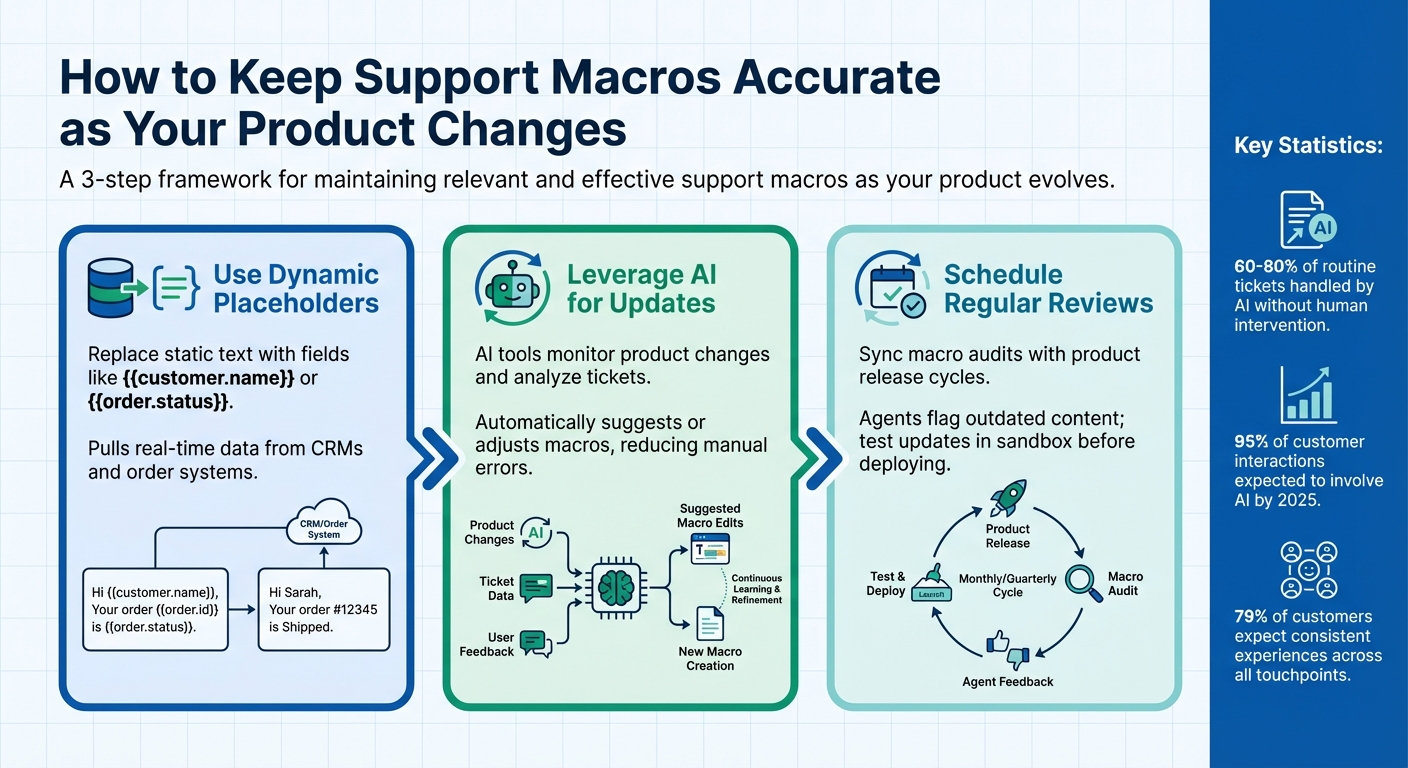
3-Step Framework for Maintaining Accurate Support Macros
Why Static Macros Fail
Static macros fall apart the moment your product evolves. Every update risks turning static macros into liabilities, spreading outdated or incorrect information that frustrates both agents and customers.
They simply can’t keep up in fast-paced environments. Static macros don’t pull live data from tools like your CRM or order management system, leaving agents to juggle between screens just to find order or subscription details. Worse, they can’t adjust to a customer’s tone or sense of urgency, making responses feel cold or robotic – even when technically accurate. As eesel.ai puts it:
"A technically correct answer can still feel robotic and unhelpful if it doesn’t acknowledge the details of their problem".
On the other hand, AI-powered systems are leaving static macros in the dust. Modern platforms now handle 60–80% of routine tickets without human intervention. By 2025, 95% of customer interactions are expected to involve AI. Yet, in 2024, only 1% of business leaders considered their organizations "AI mature". This gap forces teams to wrestle with outdated tools, manual updates, and inaccurate information.
How Macros Become Outdated
Product updates are a major culprit. When features change or pricing shifts, static macros often fail to reflect these updates. Agents may only realize there’s a mismatch after a customer points it out – an embarrassing and avoidable situation. The problem? Macros are often siloed, unable to sync with the latest documentation scattered across Google Docs, Slack, or Confluence.
The issue worsens as companies scale. Macro libraries can balloon into hundreds of templates with cryptic names like "return_policy_v2" or "returns_new_final." Agents waste time searching for the right one – or give up and type responses manually, defeating the purpose of macros altogether. Duplicate templates pile up, making it harder for new hires to navigate the system. This clutter not only slows efficiency but also increases the likelihood of mistakes, costing both time and trust.
What Outdated Macros Cost Your Team
The hidden costs of outdated macros add up quickly. They drag down resolution times, increase escalations, and hurt customer satisfaction scores. If agents have to spend extra minutes editing an outdated macro, any supposed time savings disappear. As eesel.ai notes:
"The tool that was supposed to save time ends up becoming a time-waster itself".
Using the wrong macro can mislabel tickets, creating extra work for other teams to fix the errors. Worse, customers may receive incorrect or conflicting information – like being told about a feature that no longer exists. This damages trust in your brand, especially when 79% of customers expect consistent experiences across all touchpoints.
These challenges underline why static macros are no longer enough. The need for smarter, adaptive solutions is clear, as we’ll explore in the next sections.
sbb-itb-e60d259
How to Design Macros That Adapt
Creating adaptable macros is all about making them flexible enough to pull live data and easy to update. By incorporating dynamic placeholders and sticking to systematic naming conventions, you can reduce manual edits and keep your team operating smoothly. Let’s dive into how these strategies work together.
Add Variables and Placeholders
Placeholders, like {{placeholder_name}}, allow macros to fetch real-time data from ticket fields, user profiles, or external systems. For instance, if a customer’s order ID or account tier changes, the macro automatically updates to reflect the latest details.
Instead of hardcoding specific information, use dynamic placeholders. For example, swap "Your order #12345 has shipped" with {{ticket.order_id}} – this way, the macro adjusts for each case. Connecting your helpdesk to tools like Shopify or your CRM enables placeholders to pull live data, such as order statuses or subscription details, directly into your responses. As eesel AI explains:
"A unified AI platform changes this completely… pulling information from anywhere to put together an accurate, full answer without the agent ever having to switch tabs".
When product details or policies change, you only need to update the source data once, rather than revising every macro that references it. Advanced AI-powered macros can even use "AI Actions" to retrieve up-to-date information from internal wikis or external APIs, ensuring that responses remain accurate and current.
By combining dynamic placeholders with clear organization, you minimize errors, optimize your support workflow, and make updates seamless.
Use Clear Naming Conventions
A disorganized macro library slows down your team and leads to unnecessary confusion. Stevia Putri, Marketing Generalist at eesel AI, emphasizes this point:
"’Should I use "return_policy_v2" or "returns_new_final"?’ isn’t a question your agents should have to waste brainpower on".
Adopt a hierarchical naming structure, like Category::Action::Variant, to keep things clear. For example, a macro named Returns::Refund::Damaged_Item immediately tells agents its purpose and when to use it. This approach scales well as your macro library grows, making it easier for agents to navigate through categories instead of scrolling through an endless list.
Place critical keywords at the beginning of macro names, as agents often filter by typing the first few characters. Regularly delete or deactivate outdated macros to keep search results tidy. Standardizing naming conventions across your team also helps avoid duplicate macros for the same issue. Use the "Description" field to provide additional internal context while keeping macro names short and action-oriented.
These strategies lay the groundwork for AI-driven tools that can further streamline and enhance your macro system. By keeping things organized and adaptable, you ensure your support team can respond quickly and accurately.
Using AI to Maintain Macros
AI tools can take the hassle out of keeping macros up to date by identifying outdated content and generating responses that align with your latest product updates. Instead of relying on agents to catch errors or waiting for admins to manually review macros after every product change, AI can analyze patterns across your knowledge base, product documentation, and ticket history. This process flags areas that need updating and offers real-time suggestions, paving the way for smoother macro updates and more efficient support interactions.
Automate Macro Updates with AI
Modern AI platforms can connect to various data sources – like Confluence, Google Docs, and macro libraries – to monitor product workflows. Machine learning algorithms review ticket subjects and comments to determine which macros are effective and identify where new ones are needed. This process can also pinpoint "knowledge gaps" where customers frequently ask questions that lack corresponding macros or documentation.
For instance, some platforms require a minimum of 150 tickets from the last three months before their machine learning models can begin suggesting new macros to admins. These suggestions are refreshed weekly based on the latest data . Once a new macro is created, it typically takes about two weeks to integrate it into the recommendation system. Tools like Supportbench‘s AI Agent-Copilot take this a step further by scanning historical cases and knowledge bases to automatically suggest updates, enabling agents to resolve issues faster without waiting for scheduled updates.
Generative AI tools can also refine existing macros to make them shorter, more detailed, or better aligned with brand tone. Some platforms even offer a "simulation mode" that tests updated macros against thousands of historical tickets in a sandbox environment. This lets teams predict how changes will perform before they go live, reducing the risk of errors in customer-facing interactions.
By automating macro updates, AI not only keeps content relevant but also equips support teams to provide more accurate, real-time responses.
Generate Dynamic Responses with AI
Static templates can quickly become outdated, but advanced AI features solve this by analyzing case histories, pulling live data from external systems, and generating personalized, up-to-date responses for agents to review . Stevia Putri, Marketing Generalist at eesel AI, puts it this way:
"AI is the modern tool that finally delivers on the original promise of macros, but without all the baggage".
AI copilots draft personalized replies based on ticket history and current documentation. For example, Supportbench’s AI auto-responses create the next message for a customer by analyzing prior cases and available content. Similarly, AI Agent Activity Creation Helpers compile past interactions to suggest logical next steps. This ensures every customer interaction reflects the latest product updates while maintaining the goal of accurate and adaptive support macros.
To get started, focus AI automation efforts on the 10 most common, straightforward questions. This helps build team confidence before tackling more complex or rapidly evolving product areas. Always include a "human-in-the-loop" by having agents review AI-generated drafts to ensure accuracy and consistency with your brand. Lastly, connect all relevant knowledge sources – not just past tickets – so the AI has a comprehensive view of product updates as they happen.
Set Up a Macro Review Process
While AI can handle routine updates, a manual review process ensures you catch what automation might miss. By aligning macro reviews with your product release schedule and giving agents a way to flag issues, you can keep your macros accurate without disrupting daily workflows.
Sync Macro Reviews with Product Releases
Tie your macro audits to your product roadmap to make sure your support resources stay in sync with product updates. Involve teams like engineering, design, and operations during planning sessions so your support team is aware of upcoming changes. As Alex Radu, Product and Marketing Manager at JPMorgan Chase, puts it:
"Since product teams don’t work in isolation, it’s important to have all key stakeholders involved in planning."
Product roadmaps are usually updated monthly or quarterly, so schedule your macro reviews to match those cycles. If product requirements shift, perform an impact analysis to see how those changes affect your current support resources. Before rolling out updates, test the revised macros in a sandbox environment using past support tickets. This helps predict performance and spot errors. Katia Teran, Manager of Product Management at VSCO, highlights:
"The best way to ensure all teams are on the same page is to create a single source of truth that’s readily accessible and easy to consume."
When deploying updated macros, roll them out gradually – start with one team or channel. This lets you monitor performance before scaling up. Once your review process is solid, encourage agents to report any lingering issues promptly.
Let Agents Flag Outdated Macros
Frontline agents are often the first to notice when a macro no longer aligns with current product realities. Make it easy for them to flag outdated content by creating a clear reporting path. Enable macro previews so agents can quickly spot inconsistencies. If they find an issue, they should have a simple way to notify administrators, whether through a dedicated channel, a "flag outdated macro" button, or an internal ticketing system.
Since only administrators can edit shared macros, streamline communication and focus reviews on the most-used responses. Track key metadata – like the macro’s owner, status (Draft/Published/Deprecated), and next review date – to ensure nothing slips through the cracks. Victoria Rönning, Lead Product Manager at Refined, notes:
"Quarterly checks or reviews tied to project cycles help you ensure that dates, ownership, and status fields stay accurate and trustworthy."
If agents create effective personal macros through frequent use, consider cloning and converting them into shared macros for the whole team. This structured approach allows agents to help maintain macro accuracy in real time.
Key Takeaways
Keeping support macros aligned with your evolving product boils down to three main strategies: dynamic design, AI-driven updates, and structured review processes.
Start by crafting macros with dynamic placeholders like {{customer.name}} and linking them to live internal documentation. This ensures updates flow through automatically whenever changes occur.
Next, leverage AI to handle much of the heavy lifting. Machine learning can analyze past tickets to spot recurring response patterns, while generative tools allow you to quickly adjust responses – whether you need to "Expand", "Simplify", or tweak the tone to suit different customer scenarios.
Even with these tools, manual reviews remain critical. Align macro audits with your product release schedule to keep everything consistent. Encourage support agents to flag macros that no longer reflect the latest product updates.
Static macros, which require constant manual updates, often fall short of capturing customer context. In contrast, AI-powered macros pull from integrated knowledge bases and automatically adjust when your documentation changes.
A good starting point? Focus on your top 10 most common customer questions. Combine this with regular human oversight to maintain your brand’s voice. Keep in mind that AI-driven macro suggestions typically refresh weekly, based on the previous week’s data. By blending smart design, automation, and agent feedback, you’ll create a macro library that evolves alongside your product instead of lagging behind.
FAQs
How can dynamic placeholders keep macros accurate as products evolve?
Dynamic placeholders are a game-changer for keeping macros accurate and up-to-date. They work by automatically pulling in real-time data – like customer names, order numbers, or updated product details – whenever the macro is used. Instead of relying on static text, these placeholders act as variables, ensuring responses stay relevant and feel personalized.
Another big perk? They cut down on manual updates. If the source data changes, the placeholders adjust automatically, so you don’t have to fix every macro individually. This not only saves time but also reduces the chance of errors. As your products or services evolve, dynamic placeholders help you maintain consistent and accurate communication effortlessly.
How does AI help keep support macros accurate as products evolve?
AI plays a key role in keeping support macros accurate and up to date by automating updates and simplifying content management. With tools like generative AI, support teams can tweak macro responses effortlessly – whether it’s adjusting the tone, simplifying complex language, or adding extra context. This ensures macros stay relevant and aligned with ongoing product changes.
AI can also dive into historical ticket data to identify trends and suggest new macros or refine existing ones. This makes it easier for teams to adapt to shifting customer needs without starting from scratch.
On top of that, AI-powered tools like real-time suggestions and machine learning algorithms can recommend the best macros during live interactions. This not only cuts down on manual effort but also helps avoid mistakes, keeping your macro library efficient and in sync with your product’s evolution. In short, AI serves as a reliable partner in managing macros, saving time while boosting accuracy.
Why should macro reviews be synced with product updates?
Keeping your macros updated with product changes is essential for delivering accurate and helpful support responses. When macros are outdated, they can provide incorrect or unclear information, leaving customers confused or frustrated – a quick way to damage their experience.
By aligning macro reviews with product updates, you can tackle changes head-on. This means retiring outdated content, adding new details, and ensuring everything stays relevant. The result? Consistent messaging, better support quality, and a team that’s always ready with the latest tools to assist your customers effectively.






