
Your knowledge base is only useful if it stays current and actively used. Here’s how you can ensure it remains relevant:
- Run regular audits: Compare support tickets and search queries to identify gaps or outdated articles.
- Create review cycles: Assign content owners and set automated reminders for updates based on content type.
- Leverage AI: Use AI to suggest updates, draft articles from resolved cases, and monitor performance metrics.
- Standardize structure: Use consistent terminology, modular content, and metadata to improve searchability.
- Track engagement: Analyze search queries, feedback, and usage data to refine content and boost self-service success.
The goal? A well-maintained knowledge base reduces ticket volume, builds trust, and supports both customers and agents effectively.
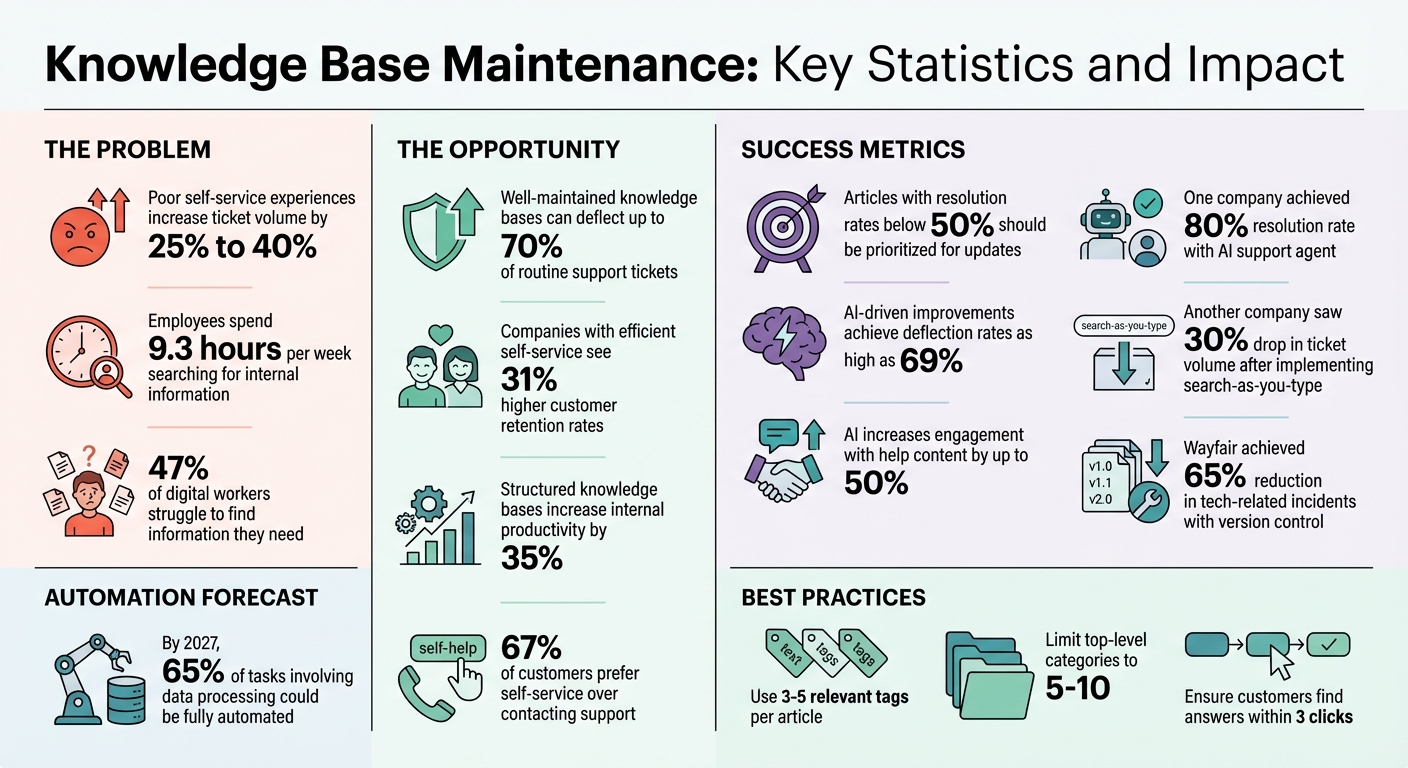
Knowledge Base Maintenance: Key Statistics and Impact Metrics
5 easy tips for maintaining a knowledge base in your IT organization | IT knowledge management
Run Regular Knowledge Base Audits
Keeping your knowledge base up-to-date is essential to maintaining its value. Outdated information can frustrate customers, leading them to abandon self-service and submit support tickets instead. In fact, poor self-service experiences can increase ticket volume by 25% to 40%. This surge in tickets can quickly turn your knowledge base from a cost-cutting tool into a costly problem. Regular audits help you identify gaps and improve your documentation process.
Start by comparing your top 20 ticket categories from the last quarter with your knowledge base topics. This will highlight common issues that may not be adequately addressed. Additionally, review "no results" search queries monthly to understand what customers are searching for but not finding.
Find Content Gaps and Outdated Articles
Use ticket data and search analytics to pinpoint areas where your knowledge base falls short. Create a master list of articles and flag those older than six months for review. Metrics like bounce rates and helpfulness ratings can help you identify underperforming content. For instance, articles with resolution rates below 50% should be prioritized for updates or removal. Test your search tool with the top three customer queries; if the relevant articles don’t appear in the top results, it signals a structural problem. Reviewing the top 50 "zero results" queries each month can also uncover new content opportunities.
Remove Duplicate and Low-Performing Articles
Duplicate articles can confuse users and hurt your SEO. During audits, consolidate overlapping content into a single, well-organized guide. Archive outdated articles for reference. Low-performing articles – those with high exit rates or poor feedback – should either be rewritten or removed. This keeps your knowledge base streamlined and focused on content that customers find useful.
Include Subject Matter Experts in Reviews
Bring in subject matter experts (SMEs), such as product managers or engineers, to review updates. Their expertise ensures technical accuracy and builds accountability. Incorporate their feedback into your workflow using Knowledge-Centered Service (KCS) practices and shared ownership models. This collaboration strengthens the quality of your knowledge base while keeping it aligned with your product and customer needs.
Create Scheduled Content Review Cycles
Regular audits are a good start, but without structured review cycles, content quality can slip through the cracks. Over time, outdated articles erode customer trust and hurt your brand’s credibility. As Mathew Patterson from Help Scout points out:
"If nobody has ownership of the knowledge base, it’s easy for everyone to avoid action".
By setting up scheduled review cycles, you create a consistent process that ensures your content stays accurate and relevant. This rhythm helps prevent maintenance tasks from being overlooked.
Assign Content Owners for Each Article
Every piece of content should have a clearly designated owner responsible for keeping it accurate and up-to-date. Establishing specific roles – Author, Approver, and Publisher – ensures that each article follows a structured path from draft to publication. Assigning clear responsibility not only keeps the content aligned with your goals but also ensures accountability.
Distribute ownership based on expertise. For instance:
- IT can handle technical documentation.
- HR can oversee policy guides.
- Legal can manage compliance-related content .
It’s also smart to tie documentation updates to your product release cycles. When new features are launched, the content owner can quickly make the necessary updates. Tools like status indicators – Work in Progress or Ready for Review – help track accountability throughout the content lifecycle.
Set Up Automated Review Reminders and Expiration Dates
Manually tracking content reviews is inefficient, especially as your library grows. Automating reminders ensures timely updates. Set review frequencies based on how quickly the content changes:
- Fast-changing procedures: Monthly reviews.
- Feature documentation: Quarterly reviews.
- Stable articles: Every six months.
- Policy documents: Annually .
For time-sensitive content, such as product announcements or campaign details, use scheduling tools to automatically unpublish them after their shelf life ends . Performance metrics can also guide decisions – articles with zero views over six months might be consolidated or removed. Additionally, real-time triggers like "thumbs-down" feedback forms can flag content for immediate review when users report issues.
By combining automated reminders with version control, you can ensure your content remains both reliable and traceable.
Use Version Control to Track Changes
Version control is essential for maintaining a clear record of edits. It tracks who made changes, when they were made, and why. This not only builds accountability but also helps identify subject matter experts . It’s a safeguard against errors – if an update introduces a problem, you can quickly roll back to a previous version .
For example, Wayfair implemented version control in their knowledge management system for 11,000 employees between 2025 and 2026. The result? A 65% reduction in tech-related incidents.
To keep things organized, use standardized naming conventions like "DocumentName_Version_Date." Major updates can follow whole numbers (v1.0, v2.0), while minor tweaks use decimals (v1.1, v1.2) . Approval gates are another useful feature – drafts remain in "pending" status until a reviewer signs off. This ensures transparency and compliance, making collaboration smoother and more effective.
Use AI for Automated Updates and Content Suggestions
Keeping your knowledge base up-to-date manually becomes nearly impossible as it expands. AI steps in to simplify this process, analyzing support interactions in real time, spotting content gaps, and even drafting new articles. It ensures your knowledge base stays relevant by addressing potential issues before they affect your customers. From creating articles to updating existing ones, AI makes the entire process smoother and more efficient.
Generate Articles from Resolved Cases with AI
One of AI’s standout features is its ability to turn resolved support tickets into draft articles. By analyzing conversation histories, AI ensures your documentation evolves alongside the challenges your customers encounter.
For example, platforms like Supportbench use generative AI to transform short notes or bullet points from resolved cases into fully structured articles. This saves agents significant time – they provide the raw material, and AI takes care of the formatting, structure, and initial draft. Instead of starting from scratch, agents can focus on refining the content, making the process faster and less labor-intensive.
Get Real-Time Article Suggestions for Agents
AI also assists agents during live support interactions by suggesting relevant articles in real time. This not only speeds up resolution times but also ensures consistent and accurate responses. As agents handle cases, AI analyzes the context of the conversation and surfaces the most relevant resources.
This capability is particularly helpful for newer team members who might lack experience, while also preventing seasoned agents from repeatedly solving the same issues. If recurring problems arise but lack corresponding documentation, AI flags these gaps, allowing the team to prioritize creating new content based on actual customer needs. By tracking failed searches and overlooked articles, AI pinpoints where your knowledge base is falling short.
In addition to real-time suggestions, AI can predict future content needs, helping you stay ahead of demand.
Predict Which Articles Need Updates Using Analytics
AI doesn’t just create content – it ensures existing articles stay effective. By analyzing metrics like bounce rates, low helpfulness ratings, and failed searches, AI identifies which articles need attention. This prevents wasted effort on unnecessary updates and focuses your resources on what truly impacts customers.
"Forethought’s ability to identify content gaps has been incredibly valuable. It’s given us confidence that our knowledge base truly meets our customers’ needs".
The results speak for themselves: AI-driven content improvements have led to deflection rates as high as 69% and increased engagement with help content by up to 50%.
AI also monitors article health using factors like age, last update, and usage frequency. For example, it flags articles with low viewership or those linked to rising ticket volumes for review. This data-driven approach ensures updates are meaningful and aligned with customer needs, rather than being part of a routine checklist.
sbb-itb-e60d259
Standardize Structure and Metadata for Better Search
A knowledge base is only helpful if users can quickly locate the information they need. On average, employees spend 9.3 hours per week searching for internal information, and nearly half (47%) of digital workers struggle to find what they’re looking for. The answer isn’t adding more content – it’s organizing what already exists so it’s easier for both humans and AI to navigate.
A well-organized, searchable knowledge base is crucial for the success of AI-driven support systems. By standardizing structure and metadata, your knowledge base becomes a powerful tool, improving search efficiency for users and AI alike. In fact, structured knowledge bases have been shown to increase internal productivity by 35%. When paired with thorough content reviews, this approach ensures that answers are readily accessible.
Use Modular Content Formats
Break your content into smaller, focused pieces – think of them as "atomic" articles – that tackle specific issues rather than bundling multiple topics into one guide. This format makes searching faster and updating easier. For instance, if a procedure changes, you only need to update one targeted article instead of combing through a long, comprehensive document. AI systems also perform better with modular content, as they can pinpoint exact answers more efficiently.
Reusable content blocks are another game-changer. For example, if certain details, like technical requirements or disclaimers, appear in multiple places, use reusable blocks so updates automatically apply everywhere. This approach reduces the risk of outdated information hiding in overlooked sections.
Apply Consistent Terminology and Automated Tagging
Inconsistent wording – like switching between "password reset" and "password recovery" – can frustrate users and confuse AI systems. A style guide and strict naming conventions help everyone stay on the same page. Define technical terms once, create a centralized glossary, and link to it in articles where specialized language is used. This consistency improves search accuracy for both humans and AI.
Labels such as keywords, categories, and tags are equally important. These elements help search engines filter and retrieve relevant content efficiently. However, avoid overloading your system with tags – three to five relevant tags per article are usually enough to strike the right balance. Similarly, limit top-level categories to 5–10 to keep the interface easy to navigate.
Beyond consistent language, mapping user intent through metadata further sharpens search results.
Add Intent Metadata to Improve Search Results
When users search for terms like "pricing", their needs vary – prospective buyers want one type of information, while current customers need another. Intent-based metadata helps differentiate these scenarios, guiding users to the content that matches their specific needs.
As AI systems advance, this type of metadata becomes even more critical. By 2027, it’s estimated that 65% of tasks involving data processing and information could be fully automated. AI-powered "Answer Engines" rely heavily on structured metadata and consistent terminology to deliver accurate, real-time suggestions. The better your intent mapping, the more effective these systems will be.
"A well-organized knowledge base is a game-changer for customer success teams and end users. But when it’s messy, outdated, or hard to search, it only adds to the chaos." – Eglė Račkauskaitė, Content Creator, Capacity
Track Usage Analytics and Increase Engagement
Structured content and metadata are just the beginning – tracking usage is how you confirm that your knowledge base is pulling its weight. Even AI tools rely on engagement metrics to refine support workflows. A knowledge base only proves its worth when people actively use it. Companies with efficient self-service platforms see 31% higher customer retention rates, and well-designed knowledge bases can deflect up to 70% of routine support tickets. To make this happen, you need to understand how users interact with your content and tackle any obstacles they face.
Monitor Search Queries, Views, and User Feedback
Start by tracking page views and unique visitors to see which topics attract attention and which ones are ignored. Add to this data by analyzing bounce rates, exit rates, and time spent on pages. But remember, traffic numbers alone don’t tell the full story. As Rob Stack from Zendesk‘s Documentation Team explains:
"A pageview doesn’t indicate whether the reader found what they needed in your article".
For instance, if users quickly leave a troubleshooting guide, it’s a sign the content isn’t hitting the mark.
Pay close attention to "zero result" searches – queries that return no matches – because they highlight gaps in your content. Also, review search click-through rates to determine which articles users are choosing and which they’re skipping. High-traffic articles with low ratings are another red flag, pointing to popular topics where your content isn’t delivering. These insights are invaluable for fine-tuning your self-service design.
Encourage Self-Service Through Customer Portals
Did you know that 67% of customers prefer self-service options over contacting support? But if the experience is clunky, it can backfire, causing support tickets to spike by 25% to 40%. The fix? Smart deflection built into customer portals. For example, real-time article suggestions can appear as users type their support requests, addressing issues before they escalate into tickets.
One IT services company using HelpSite revamped its help documentation with a search-as-you-type interface. The result? A 30% drop in ticket volume within the first year. They achieved this by using customer-friendly language – phrases like "change password" instead of "credential update" – and ensuring users could find answers within three clicks. To replicate this success, make sure your search function accommodates labels and synonyms that reflect how customers describe their problems, not just internal jargon.
Embed Knowledge Base Access into Agent Workflows
Your support agents play a dual role as both users and contributors to your knowledge base, but they’ll only engage if it’s seamlessly integrated into their workflows. Embedding KB search and creation tools directly into ticketing systems ensures that documentation becomes a natural part of resolving issues, not an afterthought.
To boost adoption, set clear participation goals. For example, require agents to link or flag knowledge base articles for a percentage of their resolved tickets. Intercom’s 2025 success story is a great example: they achieved an 80% resolution rate with their AI support agent by maintaining an up-to-date knowledge base. This included weekly reviews of 10–15 AI-suggested articles and monthly updates for older content. By making knowledge base upkeep a routine task, they ensured their system stayed relevant. You can measure your own self-service effectiveness by calculating a self-service score: divide total help center sessions by the number of users submitting tickets during the same timeframe. It’s a simple yet powerful way to track your deflection success.
Conclusion
A knowledge base only works if it’s up-to-date and actively used. The strategies outlined here – routine audits, AI-powered automation, and tracking engagement – help minimize mistakes, produce relevant content, and uncover customer pain points before they grow into bigger issues.
Companies that invest in maintaining a "living" knowledge base see real results. For instance, well-maintained systems can deflect up to 70% of routine support tickets. On the flip side, poorly managed self-service options can increase ticket volumes by 25% to 40%. Success stories show that treating documentation as a dynamic system – by conducting weekly content updates and monthly article reviews – leads to stronger support outcomes.
For AI-driven support teams, a knowledge base is more than just a resource for customers – it’s the foundation for training AI agents. Accurate and well-organized content is critical. Without it, AI tools risk providing incorrect answers, which can damage customer trust.
To ensure your knowledge base remains reliable and user-friendly, integrate ownership and automated review processes. Assign clear responsibility for articles, set up automated reminders for biannual reviews, and let agents flag content issues. When your team trusts the knowledge base, they’ll rely on it. When customers can find answers quickly – within just a few clicks – they’ll submit fewer tickets. This approach turns your documentation into a cost-cutting tool that lightens workloads and boosts service quality.
FAQs
How does AI help keep a knowledge base accurate and relevant?
AI has become a game-changer for keeping a knowledge base accurate and up-to-date. By automating critical tasks and offering useful insights, it simplifies what used to be time-consuming processes. For example, AI can analyze support tickets to spot trending issues or frequently asked questions. This ensures your knowledge base stays aligned with what customers actually need.
On top of that, AI tools can identify outdated information or gaps in content and even suggest updates or create new articles to fill those voids. This takes a significant load off support teams, allowing them to focus on more complex tasks.
AI-powered analytics also track how content is performing. They can highlight underused articles or pinpoint sections that need improvement. By automating routine updates and providing real-time suggestions, AI keeps your knowledge base relevant, accurate, and a valuable resource for both customers and support teams.
What’s the best way to organize content in a knowledge base for easy access?
Organizing a knowledge base starts with building a structure that’s clear and easy for users to navigate. Begin by grouping related topics into logical categories and subcategories. This way, users can quickly zero in on the information they need. To maintain consistency, use standardized templates for your articles – this ensures the content is easy to read and follow.
Adding metadata, like tags and labels, can make searching faster and more efficient, helping users find relevant details right away. Keep your knowledge base accurate and helpful by regularly reviewing and updating content based on user feedback or insights from support tickets. Assigning someone to oversee and maintain the knowledge base ensures it stays current and useful.
When done right, a well-organized knowledge base not only empowers customers to solve issues on their own but also lightens the load on your support team by cutting down on repetitive questions.
How often should you review your knowledge base to keep it accurate?
To keep your knowledge base accurate and up-to-date, plan to review its content at least every quarter. These regular check-ins help you spot outdated details, correct errors, and make sure the content matches shifting customer needs and business objectives.
For sections that get a lot of traffic or require frequent updates, you might want to review them monthly. You could also use AI-powered tools to get real-time suggestions and analytics on content use. This way, your knowledge base continues to be a dependable resource for both your customers and support teams.