



Drive-by escalations – when Sales or Executives bypass established support processes with urgent, vague requests – can disrupt workflows, frustrate teams, and lead to burnout. To manage these effectively without creating internal friction, focus on three key strategies:
- Create Clear Escalation Protocols:
- Define roles and responsibilities for handling issues.
- Use an escalation matrix to map out issue types, severity levels, and time-based triggers.
- Set communication guidelines for different urgency levels (e.g., real-time channels for critical issues).
- Leverage AI Tools:
- Use AI to predict and flag high-risk tickets based on sentiment, delays, or repeated transfers.
- Automate ticket prioritization and routing to ensure critical issues reach the right people.
- Implement dynamic SLAs that adjust response times based on customer value and issue severity.
- Train Teams and Secure Leadership Support:
- Train Support, Sales, and Executives on protocols and AI tools.
- Encourage structured handoffs with detailed context to avoid redundant work.
- Gain executive buy-in to reinforce the importance of following escalation processes.
Managing Customer Escalations Effectively
sbb-itb-e60d259
Step 1: Build Clear Escalation Protocols
To tackle the chaos that can arise from unstructured "drive-by" escalations, it’s essential to establish clear, structured protocols. These protocols define who is responsible for handling specific issues, when they should step in, and how communication should flow throughout the process. A well-thought-out escalation framework keeps workflows organized and ensures everyone knows their role.
Define Roles and Responsibilities
Start by assigning clear ownership for different types of escalations. Your protocol should outline whether an issue requires hierarchical escalation – moving up the chain of command – or functional escalation, where the issue is directed to someone with specialized expertise. For example:
- Payment issues: Escalate from front-line finance staff to a senior accountant, and finally to the finance leader.
- System malfunctions: Escalate from an IT specialist to a senior engineer, and then to the head of engineering.
Empower your frontline teams by specifying the actions they can take to address issues independently – like allowing Level 1 (L1) agents to restart services or perform basic troubleshooting. This not only speeds up resolutions but also builds confidence in handling routine problems.
Create an Escalation Matrix
An escalation matrix is a practical tool that maps out issue types, points of contact, and the escalation process with time-based triggers. Here’s an example:
| Issue Type | First Contact | Level 1 (30 min) | Level 2 (1 hr) | Level 3 (3 hrs) |
|---|---|---|---|---|
| System Malfunction | IT Specialist | Senior Engineer | Head of Engineering | CTO |
| Payment/Billing | Finance Member | Senior Accountant | Finance Leader | CFO |
| Customer Complaint | Junior Support | Support Manager | Head of Operations | COO/CEO |
Incorporate severity levels into the matrix to ensure objective handling. For instance:
- SEV1 (Critical): Immediate escalation for system outages affecting over 50% of users.
- SEV2 (Major): Escalation within 15 minutes for major features being down.
- SEV3 (Minor): Escalation within two hours for smaller bugs.
By setting clear severity-based triggers, you reduce subjectivity and ensure consistent responses across the board.
Set Communication Guidelines
Effective communication is the backbone of escalation management. Define channels based on the urgency of the situation:
- SEV1 (Critical): Use real-time channels like phone calls or SMS for immediate attention.
- SEV2 (Major): Notify stakeholders via tools like Slack for quicker collaboration.
- SEV3 (Minor): Keep updates within your ticketing system for routine tracking.
Every escalation should include standardized documentation: a detailed incident description, a timeline of actions, attempted solutions, reasons for escalation, and the impact on customers. For high-severity cases, create a single source of truth – like a dedicated Slack room – and assign someone to document decisions and maintain an accurate timeline. This ensures alignment across teams and reduces repetitive follow-ups.
With these protocols in place, you’re ready to explore how AI-powered ticket routing can take escalation management to the next level.
Step 2: Use AI to Manage Escalations
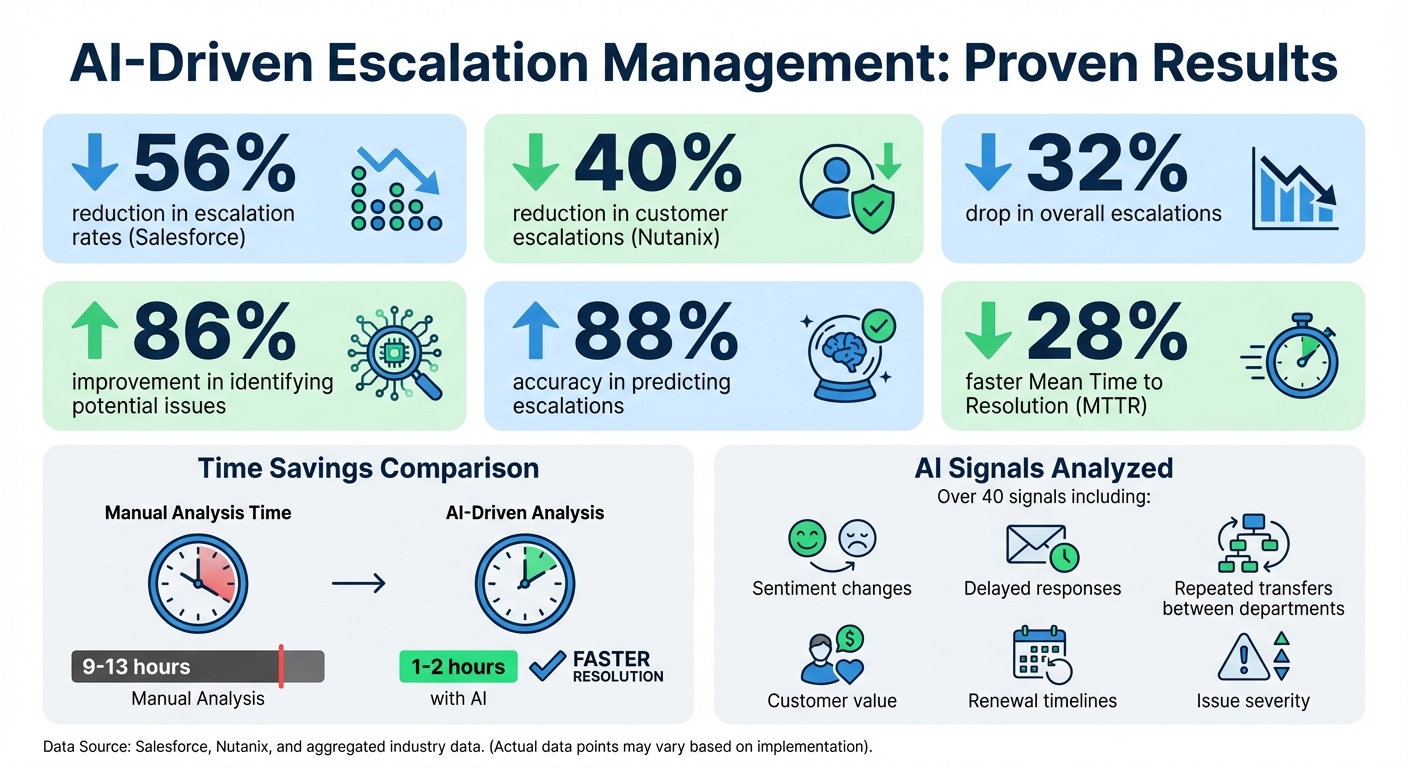
AI-Driven Escalation Management: Key Statistics and Impact Metrics
After setting up clear escalation protocols, the next step is to harness the power of AI to predict and manage escalations before they spiral out of control. Modern AI tools can analyze customer interaction patterns and flag high-risk tickets, giving your team the chance to step in proactively. This predictive capability not only aids in triaging escalations but also helps implement dynamic SLAs that adapt to changing circumstances.
AI-Driven Escalation Prediction
AI tools use machine learning to assess active tickets and determine their risk of escalation. By analyzing over 40 signals – like sudden changes in sentiment, delayed responses, or repeated transfers between departments – AI models can compare real-time data with historical patterns to predict potential issues.
For instance, Salesforce reported a 56% reduction in escalation rates after deploying AI to analyze sentiment and case activity.
"First and foremost, we saw north of fifty percent reduction in our escalations – game changer".
- Katherine Sullivan, SVP Customer Success at Salesforce
Similarly, Nutanix achieved a 40% reduction in customer escalations while maintaining strong satisfaction levels.
When AI identifies a high-risk situation, it triggers proactive measures, such as routing tickets to experts, adjusting response times, or sending internal alerts. Companies adopting this approach have seen a 32% drop in overall escalations and an 86% improvement in the speed of identifying potential issues – reducing manual analysis time from 9–13 hours to just 1–2 hours.
Automate Triage and Prioritization
AI doesn’t stop at predicting escalations – it also automates ticket classification and prioritization. By analyzing the context of each ticket, AI can identify its urgency, sentiment, and impact on the business, ensuring critical issues are routed directly to the right specialists. This eliminates the inefficiencies of traditional round-robin routing.
For example, AI systems can match tickets to agents with the best success rates for specific issue types. They can also auto-tag tickets, update priorities, and adjust SLA targets dynamically as cases progress, ensuring real-time accuracy without the need for manual updates.
"[SupportLogic can] look at the actual content, process it intelligently, and generate alerts and signals to intercept and intervene at the right time".
- Matt Blair, SVP Support and Customer Success at Databricks
This proactive approach shifts the focus from reactive triage to immediate attention for critical cases, freeing your team to concentrate on resolving issues more effectively.
Dynamic SLAs for Escalations
AI-powered dynamic SLAs take customer value, renewal timelines, and issue severity into account to adjust response times. For example, if a high-value customer with an upcoming renewal submits a ticket, the system can tighten the SLA to ensure faster resolution and a better experience.
Beyond ticket routing, AI continuously monitors sentiment and urgency throughout the lifecycle of a case, updating priorities in real time as conditions evolve. This allows teams to act before SLA breaches occur, rather than scrambling to respond afterward. Companies using dynamic SLAs have reported a 28% faster Mean Time to Resolution (MTTR) compared to manual processes.
"Whenever we witness a surge in negative sentiment, our team springs into coordinated action, and the outcomes we achieve are consistently on target".
- Katherine Sullivan, Salesforce
Step 3: Train Teams on Protocols and Tools
Clear protocols and AI-driven processes are only as effective as the people using them. That’s why training is essential – it ensures that Sales, Executive, and Support teams not only understand the systems but also know how to use them effectively. Training isn’t a one-and-done task; it’s an ongoing effort to ensure teams know when to escalate, how to provide structured context, and how to interpret AI-driven signals. Without strong training, even the most advanced systems can’t prevent chaotic, unstructured escalations.
Run Team-Specific Training Sessions
Different teams handle escalations in different ways, so a one-size-fits-all approach won’t cut it. For example:
- Support teams need to learn how to use AI tools for triage and how to interpret escalation risk scores.
- Sales and Executive teams must focus on when not to bypass the system and how to provide structured handoffs, including key customer details to avoid redundancy.
A maturity matrix can help teams transition from reactive, ad-hoc escalations to proactive, trigger-based responses tied to complexity and risk. For instance:
- Train Support teams to recognize triggers like VIP customer status, regulatory concerns, or a pattern of negative sentiment.
- Teach Sales teams how to use internal note triggers that automatically enrich tickets with resources or instructions – such as when a ticket hits five replies combined with negative sentiment.
Research shows that organizations with clear escalation policies resolve incidents 40% faster. To solidify this, consider hosting quarterly "Chaos Days", where simulated failures (like a database outage) test whether your triggers and auto-escalation protocols work as intended.
Train Teams on AI Tools
AI tools can only improve efficiency if your teams know how to use them. Training should focus on helping staff interpret AI signals and follow recommendations like "Next Best Action." These tools, paired with concise context panels, allow teams to assess situations quickly.
For low-confidence AI predictions, implement Human-in-the-Loop (HITL) protocols, where staff review AI recommendations before acting on them. Additionally, train teams to log the outcomes of these interventions. This data can be used to retrain AI models monthly, reducing false positives and improving accuracy over time.
The payoff? AI-assisted workflows can cut manual escalation analysis time from 9–13 hours to just 1–2 hours – a massive 86% reduction. This frees up teams to focus on resolving issues rather than getting bogged down in triage.
Once teams are comfortable with these tools, continuous refinement of protocols becomes key to maintaining high performance.
Review and Update Protocols Regularly
Escalation protocols need to evolve as your business changes. At a minimum, review protocols quarterly and update them during major organizational shifts, such as leadership changes or system upgrades. Perform a full audit of your escalation framework annually, including contact verification and role reassignments.
Use Quality Assurance (QA) assessments to identify coaching needs and track trends in escalation management. Metrics like "Right-Party Escalation %" (how often the correct team receives the issue) and "Containment Rate" (how often the issue is resolved without further escalation) can guide these updates.
After major incidents, conduct a detailed review to pinpoint lessons learned and update protocols accordingly. Table-top exercises, where key roles simulate critical incident timelines, can also help identify decision bottlenecks and ensure your team stays sharp. These practices ensure your escalation processes grow alongside your business needs.
Common Mistakes to Avoid
Even with well-designed protocols, certain missteps can undermine your efforts. Escalation protocols often fail due to errors like insufficient executive support, overly complicated processes, and neglecting collaboration across departments. These issues can derail your system and create the very conflicts you’re trying to prevent.
Missing Executive Buy-In
For escalation protocols to succeed, they need strong backing from leadership. Without this support, protocols often fail. When executives don’t endorse a structured process, decisions are frequently made based on incomplete or biased information from impromptu "drive-by" escalations. This leads to resource allocation that prioritizes loud voices over pressing customer concerns.
A lack of executive buy-in can also foster a culture where employees hesitate to escalate issues, fearing they’ll be seen as failing their team. This stigma suppresses critical problems, frustrates teams, and slows progress. Interestingly, 84% of executives admit to regularly dealing with peers they find "unreasonable", highlighting how essential clear protocols are for avoiding unnecessary conflicts.
To secure leadership support, use impact rubrics to evaluate escalations based on metrics like ARR, frequency, and the severity of workarounds. This approach shifts discussions from subjective opinions to objective, data-driven decisions. Conduct weekly review sessions where top-priority escalations are presented for leadership approval or deferral, ensuring transparency and alignment.
Executives also play a key role in shaping team attitudes. By framing escalations as opportunities for improvement rather than failures, leaders can encourage teams to use the process effectively. When the stigma is removed, escalation protocols can truly thrive.
Making the Process Too Complex
Overcomplication is a major barrier to adoption. If the process is too intricate, teams may avoid using it altogether. Even when they attempt to follow it, excessive complexity can slow response times and delay solutions. Overly complex systems also burden senior leaders, pulling them into issues that could be resolved at lower levels.
Frequent or unnecessary escalations can also damage credibility. If minor issues are escalated too often, management may start ignoring even the critical ones.
"Avoid frequent and unnecessary escalation. If this happens, in fact, a project manager could be seen as an incompetent and the escalation, when real, may not receive the attention it deserves." – Twproject
To streamline the process, apply the One-Sentence Rule: every escalation should be summarized in a single sentence, such as "Because [Event] happened, [Outcome] is at risk by [Date]". Always include 2–3 potential solutions with trade-offs (e.g., "Adjust scope to protect timeline"). Visual tools like diagrams and checklists can also help clarify escalation paths.
Ignoring Cross-Functional Collaboration
Simplicity isn’t enough – collaboration across teams is equally vital. Effective escalation protocols rely on seamless cooperation between departments. When teams like Sales, Support, and Executives operate in silos without a modern support CRM, misrouted escalations, communication breakdowns, and frustrated customers are inevitable. Leadership conflicts can further erode trust and hinder long-term teamwork.
To encourage collaboration, require joint escalations. Disagreeing parties should document their points of contention and attempted resolutions before presenting the issue to leadership together. Use frameworks like DACI (Driver, Approver, Contributor, Informed) to clarify roles and ensure alignment before conflicts escalate.
Involving frontline teams during the protocol design phase ensures the process works in real-world scenarios. Additionally, conducting post-escalation reviews helps identify weaknesses and refine the system for future use. This continuous feedback loop keeps the process relevant and ensures alignment across all teams.
Conclusion
Unexpected escalations don’t have to throw your support operations into chaos or create internal friction. The key lies in blending escalation management system, AI-powered prediction and triage, and ongoing team training. Together, these approaches help avoid crises and keep your support processes running smoothly.
Data highlights the impact: manual escalation analysis time can be slashed by up to 86%, while overall escalation rates drop by 32–45%. AI tools, with their 88% accuracy in predicting escalations, ensure fewer surprises for leadership and free up time for more strategic initiatives.
The balance comes from leveraging AI to handle ticket scoring, sentiment-based routing, and context-rich handoffs, while your team focuses on complex decisions. This way, escalations that reach leadership are already equipped with actionable insights and solutions.
Key Takeaways
- Define clear escalation triggers: Base them on factors like account value, sentiment changes, and SLA breaches – not just on who makes the most noise.
- Use AI-driven triage: Automatically score and route high-risk tickets to prevent escalation. Include structured context (intent, history, sentiment) so teams can act without making customers repeat themselves.
- Secure executive buy-in: Present impact rubrics to shift conversations from opinions to data-driven insights.
- Simplify your process: Follow the One-Sentence Rule for escalations and offer 2–3 potential solutions with trade-offs.
- Foster collaboration: Encourage joint escalations and post-escalation reviews to refine the system continuously.
When escalation becomes a standard part of your workflow rather than a sign of failure, AI, human expertise, and your systems work together seamlessly. This approach not only safeguards customer relationships but also protects revenue. By adopting these strategies, you’ll achieve faster resolutions, happier customers, and a support team focused on meaningful, high-value work.
FAQs
How can AI help predict and manage support escalations more effectively?
AI tools are changing the game for support teams by helping them manage escalations more effectively. Using real-time data and machine learning, these tools can predict potential problems before they even surface. By analyzing things like customer sentiment, ticket history, response times, and how products are being used, AI pinpoints high-risk cases early. This gives teams the chance to step in and resolve issues before they spiral out of control.
On top of that, AI tools can suggest specific actions, like assigning tickets to the most suitable agents or automating follow-ups. This not only simplifies workflows but also speeds up resolution times. By shifting escalation management from reactive to proactive, AI minimizes interruptions, reduces costs, and boosts customer satisfaction.
How can I create an effective escalation protocol to manage issues smoothly?
An escalation protocol is essential for resolving issues quickly and efficiently while keeping workflows intact. To start, define specific criteria for escalation – think about factors like issue complexity, urgency, or customer requests. This clarity helps your team understand exactly when a case needs to be escalated. Then, map out a step-by-step process that specifies who should be involved, when to escalate, and what details are necessary at each stage. Including templates or playbooks can make this process smoother and more consistent.
For added efficiency, leverage AI-powered tools that offer features like sentiment analysis, escalation prediction, and automated workflows. These tools can flag high-risk cases early and cut down on manual tasks. Lastly, make it a habit to review and adjust your protocol regularly. This ensures it evolves with your team’s needs and keeps everyone prepared to handle challenges effectively.
Why is it important to have executive support for managing escalations?
Executive support plays a key role in managing escalations by fostering alignment across the organization and reinforcing a structured approach. When leaders actively back a clear escalation framework, support teams can address issues efficiently without the chaos of last-minute interventions. This approach also promotes a culture rooted in accountability and openness, which helps minimize internal conflicts and political friction.
Leadership involvement also paves the way for adopting advanced tools like AI-driven escalation prediction and dynamic SLAs. These technologies can streamline workflows and significantly improve response times. With leadership ensuring proper integration, these tools empower teams to resolve issues faster, ultimately boosting customer satisfaction.






