In B2B customer support, frustration often hides behind polite communication and subtle cues, making it harder to detect until it’s too late. Unlike B2C, where interactions are shorter and transactional, B2B relationships involve complex contracts and high stakes. A single bad experience can lead to churn, costing companies millions in lost revenue. Research shows 64% of B2B buyers will leave a supplier after just one poor support experience.
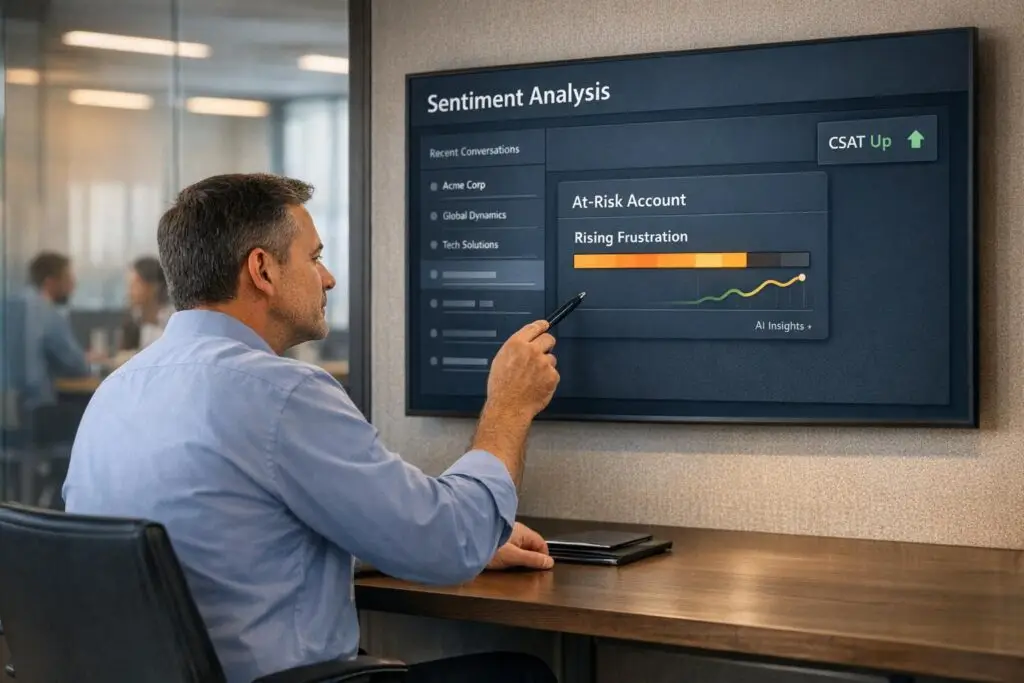
To address this, AI-powered sentiment analysis tools can identify early warning signs like changes in tone, reduced engagement, or passive-aggressive phrases. By analyzing customer messages in real time, these tools help support teams prioritize at-risk accounts and resolve issues before they escalate. Companies using sentiment analysis have reported 20%-32% improvements in metrics like CSAT, CES, and NPS and cost efficiency.
Key Takeaways:
- Why It Matters: Frustration in B2B often goes unnoticed until it’s critical, leading to churn and lost revenue.
- How It Works: AI tools analyze tone, word choice, and context to detect dissatisfaction early, enabling faster resolution.
- Impact: Businesses using these tools see reduced escalations, better customer retention, and higher satisfaction scores.
By integrating sentiment analysis into workflows, B2B teams can shift from reactive to proactive support, ensuring better outcomes for high-value accounts.
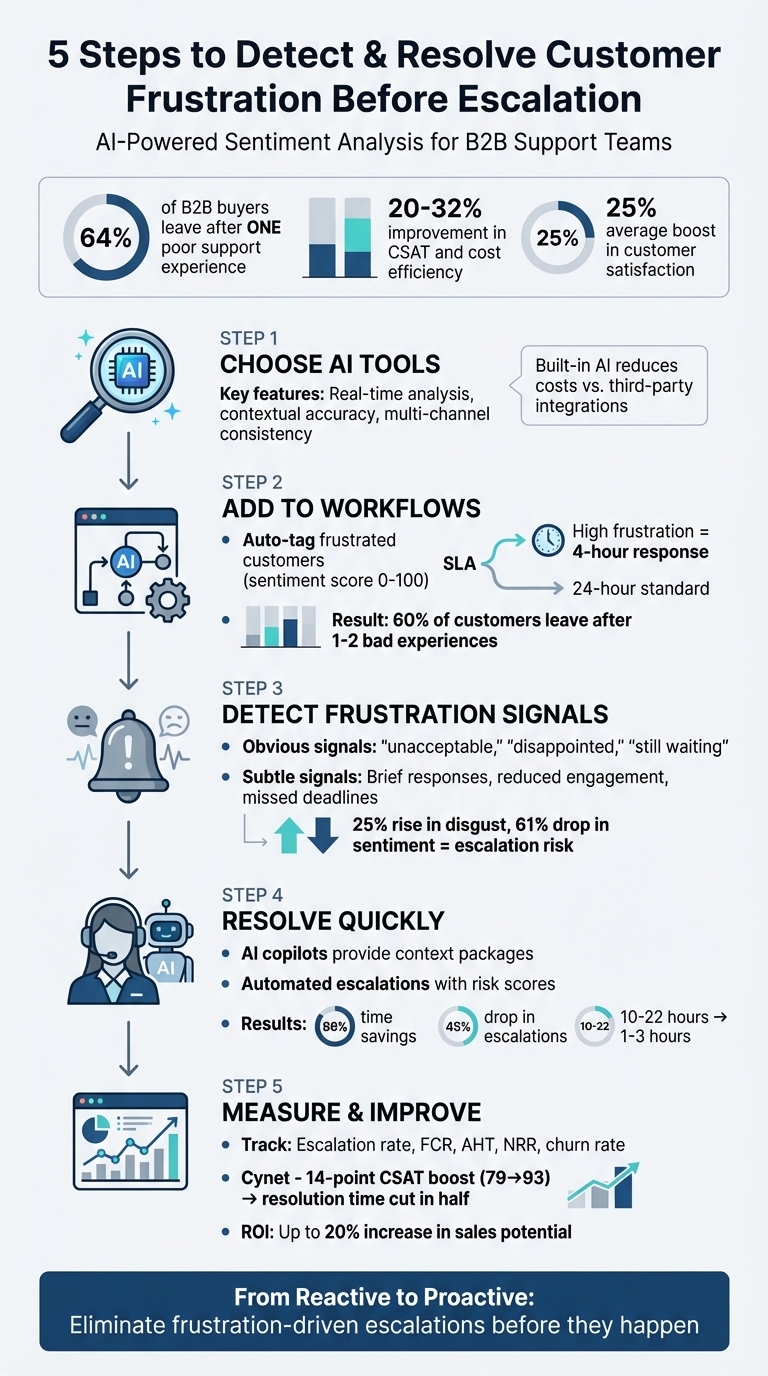
5-Step Process for Implementing AI Sentiment Analysis in B2B Customer Support
Step 1: Choose AI Tools for Sentiment Analysis
When it comes to detecting customer frustration early, picking the right AI tool is critical. The ideal tool should go beyond simple keyword detection and interpret subtle professional cues – like the passive-aggressive undertone in "per my last email." These nuances are essential when deciding what features your sentiment analysis tool needs.
Features That Matter
Your tool should analyze messages in real time and initiate immediate actions, such as re-prioritizing queues or escalating issues. Contextual accuracy is key, and tools powered by transformer-based NLP models excel here. They can pick up on sarcasm, urgency, and industry-specific language far more effectively than basic keyword-matching systems. Avoid tools that miss these subtleties, as they could lead to inaccurate assessments.
Look for tools that can differentiate varying levels of negative sentiment – like distinguishing mild irritation from a situation that could result in customer churn, making it easier to predict customer churn. These tools should also integrate seamlessly with customer metadata. For example, a negative sentiment score from a Tier 1 client generating $500,000 annually should trigger a different response than the same score from a trial user in the mid-market segment. Consistency across communication channels – emails, chats, and voice – is equally important.
"Sentiment analysis is only valuable when it drives meaningful action. The most effective platforms embed sentiment data directly into workflows – not just dashboards" [4].
- Eric Klimuk, Founder and CTO of Supportbench
Why Built-In AI Reduces Costs
In addition to advanced features, cost efficiency is vital for maintaining sustainable operations in B2B environments. Platforms with native AI eliminate the need for third-party integrations, cutting down on complexity and overall costs. Instead of paying for separate sentiment analysis tools or per-call API fees, you get built-in functionality that works seamlessly within your existing workflows. This eliminates extra IT overhead, syncing delays, and the hassle of switching between tabs or systems.
Built-in AI also ensures a unified data architecture, combining real-time sentiment analysis with SLAs, escalations, and reporting. This approach prevents data silos and keeps your team aligned with a single source of truth. With 88% of customers now valuing the experience a company provides as much as its products or services [4], acting on sentiment data immediately – without waiting for integrations – can be the difference between retaining a key account or losing it.
"AI-driven sentiment analysis in customer service is no longer a luxury. It’s a necessity for understanding your customers and delivering the personalized service they demand" [4].
- Alexey Aylarov, CEO of Voximplant
For B2B teams working within tight budgets, selecting a platform where AI is a core feature – not an expensive add-on – makes this essential capability both accessible and sustainable.
sbb-itb-e60d259
Step 2: Add Sentiment Analysis to Your Workflows
Once you’ve selected your AI tool, the next step is to weave it into your daily operations. The aim? Build workflows that instantly detect and respond to frustration signals, ensuring sentiment data directly influences how tickets are routed, prioritized, and resolved.
Auto-Detect and Tag Frustrated Customers
AI tools can analyze incoming messages in real time, assigning each interaction a sentiment score – usually on a scale of 0 to 100. By setting custom thresholds, you can differentiate between mild irritation and customers at serious risk of churning. For instance, messages scoring below 30 might be tagged as "At-Risk Customer", while those scoring between 31 and 70 could remain neutral [5][6].
With automation in place, low-sentiment tickets can be tagged and trigger actions like escalation to senior agents or stricter SLA deadlines. According to CX leaders, sentiment-based insights are the top driver of improvements in CSAT [2]. Automated tagging is at the heart of this process. Considering that 60% of customers say they’d leave a brand after just one or two bad experiences [2], identifying frustration early is a must.
"Sentiment-based ticket prioritization is the automated process of re-ordering a support queue based on the detected emotional tone… so that high-urgency, high-frustration tickets are addressed before routine inquiries." [2]
This tagging system creates the foundation for dynamic SLA adjustments.
Adjust SLAs Based on Sentiment
Traditional SLAs don’t account for emotional urgency. A frustrated customer waiting 48 hours for a response is a recipe for disaster, while a routine inquiry might not need immediate attention. Dynamic SLAs fix this by adjusting response times based on sentiment in real time. For example, if the system detects high frustration, it can elevate the ticket’s priority to "Urgent", reducing the response time from 24 hours to just 4 – or even less [7].
Combining sentiment data with customer metadata allows for smarter prioritization. A negative sentiment score from a Tier 1 client contributing $500,000 annually should trigger an immediate escalation, while the same score from a trial user might follow normal protocols. This layered approach ensures your team focuses on what matters most. Companies leveraging AI in customer service operations report gains of 20% to 32% in CSAT, cost efficiency, and employee productivity [2], and dynamic SLAs play a major role in these results.
Step 3: Detect Frustration Across Communication Channels
Once workflows are in place to respond to sentiment data, the next step is recognizing frustration in B2B interactions. This can be tricky, as professional language often conceals underlying tension. As Kapture CX puts it:
"A message can read as polite while still reflecting deep frustration" [1].
Recognizing Frustration Signals
AI sentiment analysis excels at identifying both obvious and subtle signs of frustration. Clear indicators include words like "unacceptable", "disappointed", or "still waiting." However, in B2B settings, the signs are often more subtle. For instance, being unexpectedly CC’ed on emails, a shift from detailed responses to brief one-liners, or repeated mentions of missed deadlines can signal growing tension despite polite phrasing [1].
Research from IBM sheds light on this. In a study of 10,172 emails tied to 655 industrial support tickets, tools like Watson NLU and SentiStrength were used to spot escalation risks. Escalated tickets showed a 25% rise in disgust and a 61% drop in overall sentiment compared to non-escalated cases [8]. This data helped create predictive models to flag potential issues before they escalated formally.
Another key indicator is reduced communication frequency, sometimes called "dark matter data." A sudden drop in engagement can hint at churn long before a complaint is voiced [10]. This is critical, as 64% of B2B buyers say they would stop buying from a supplier after just one poor support experience [1]. These findings highlight the importance of AI systems that adapt to changing communication patterns and tones.
How AI Interprets Context and Tone
To go beyond surface-level analysis, advanced AI tools evaluate tone, context, and conversation history. For example, multi-turn memory tracks mood changes across an entire interaction rather than analyzing messages individually [1]. This allows AI to detect when a cooperative client starts showing signs of tension or disengagement. A phrase like "Let’s escalate this" might be procedural, but "This is unacceptable" signals a deeper issue [1].
AI also incorporates account-level details – like client tier, contract value, or industry – to prioritize responses. A negative sentiment from a high-value client might trigger immediate intervention, while similar signals from a lower-priority account could follow dynamic SLAs and standard procedures.
Emerging tools are now analyzing more than just text. They assess voice characteristics like pitch and pace, as well as facial expressions during video calls [9]. This multimodal approach captures frustration that might not be evident in written communication, giving teams a fuller emotional picture. This helps ensure proactive and efficient support across all channels.
Step 4: Resolve Frustration Before It Escalates
Once you’ve identified signs of frustration, the next step is to address them swiftly. Spotting the issue is only part of the equation – taking action quickly is where the real difference is made. This ensures potential problems are flagged and resolved before they spiral out of control.
Use AI Copilots to Assist Agents
When a customer is frustrated, the last thing they want is to repeat themselves. AI copilots solve this by creating context packages – brief summaries that highlight the issue, previous solutions attempted, and the customer’s emotional state[12]. With this information, agents can jump into the conversation fully informed, avoiding redundant questions or explanations.
AI copilots also go beyond summaries. They suggest personalized responses that address the customer’s specific situation. Instead of a generic apology like, "I’m sorry for the inconvenience", the AI might propose something more tailored, such as: "I noticed you tried [X] twice, and it didn’t work"[12]. This kind of acknowledgment demonstrates understanding and helps rebuild trust. As AI Shortcut Lab explains:
"Specific acknowledgment – ‘I saw you tried [X] twice’ – signals you have the context. That signal is what rebuilds trust after a frustrating AI interaction."[12]
This level of precision is especially important for high-value accounts, where just one bad experience can drive customers away. In fact, 64% of B2B buyers stop purchasing after a single poor interaction[1]. For cases flagged as "Very Negative", AI can even route tickets directly to senior agents or account managers who are better equipped to handle complex situations[1][11].
Automate Escalations and Predict CSAT
While AI copilots help agents respond in the moment, automated workflows ensure that no risky issue slips through the cracks. AI can assign an escalation risk score by analyzing text, metadata, and historical patterns[13]. For example, if a high-value customer shows repeated signs of frustration over multiple tickets, the system can alert the Customer Success Manager to schedule a proactive follow-up[13].
Predictive CSAT (Customer Satisfaction) models take this a step further by forecasting satisfaction levels based on trends and interaction history. If the system predicts a low CSAT score, it can flag the ticket for immediate action – whether that means escalating it to a specialist or having a manager step in to review the case.
The results speak for themselves. Companies have reported 86% time savings and a 45% drop in escalations using AI-powered workflows[13]. Traditional escalation processes, which often take 10–22 hours, can be cut down to just 1–3 hours with AI[13]. This speed is critical in B2B settings, where 60% of customers will leave a brand after one or two negative experiences[2]. By combining AI copilots with automated workflows, teams can tackle frustration head-on and prevent customer churn.
Step 5: Measure Results and Improve Over Time
Once you’ve implemented proactive frustration resolution, the next step is measuring performance to ensure you’re constantly improving. Sentiment analysis might be the starting point, but tracking the right metrics is how you justify the investment and identify areas for growth. Without clear measurement, proving ROI and pinpointing improvement opportunities becomes a guessing game.
Track the Right KPIs
Focus on metrics that directly influence your business outcomes, not just operational stats. For example, escalation rate is a key indicator – if sentiment analysis is effective, fewer tickets should require senior staff intervention. This means lower costs and quicker resolutions[3]. Routing negative-sentiment tickets to skilled agents can also improve First Contact Resolution (FCR). Additionally, Average Handle Time (AHT) should drop as agents use AI-driven sentiment insights to handle complex interactions more efficiently.
From a business perspective, keep an eye on Net Revenue Retention (NRR) and customer churn rate. Proactive sentiment analysis can lead to better retention and even open up upsell opportunities – real-time sentiment insights have been shown to increase sales potential by up to 20%[3]. While traditional metrics like CSAT and NPS remain useful, sentiment analysis provides an early warning system, flagging issues before they affect those survey scores.
To measure progress, compare these KPIs before and after implementing sentiment analysis.
Compare Before and After Implementation
To show the value of your efforts, establish baseline metrics before rolling out sentiment analysis. Then, revisit those same KPIs three to six months later. Look for improvements in areas like resolution times, escalation volumes, and churn rates. Companies that actively monitor and act on customer sentiment have reported an average 25% boost in customer satisfaction[3].
Automating workflows can take this a step further. For example, set up triggers that send Slack alerts when a VIP customer shows signs of frustration or escalate conversations automatically when sentiment worsens[3]. To calculate ROI, multiply the number of tickets deflected each month by your average cost per ticket. Subtract the AI tool’s cost from the total savings to determine your retention ROI[3]. These calculations not only validate the investment but also guide future refinements to your support strategy.
Conclusion
Spotting frustration early isn’t just about making customers happier – it’s also about protecting your bottom line. As mentioned earlier, even one bad experience can carry a hefty price tag[1]. By automatically prioritizing high-risk tickets and routing them to skilled agents, you can eliminate the guesswork and tackle frustration head-on.
The numbers back this up: companies have reported efficiency gains of 20–32% and a 25% jump in CSAT scores[2][3]. For example, when Cynet adopted sentiment analysis for their support operations, they saw a 14-point boost in CSAT (from 79 to 93) and cut resolution times nearly in half by solving more issues at Tier 1 without escalating them[3]. These results highlight the shift from merely reacting to actively preventing problems.
But the benefits don’t stop with efficiency. Proactive support powered by real-time sentiment analysis uncovers a “satisfaction gap” that traditional surveys often miss. This insight helps identify customers at risk of churning – especially before renewal deadlines – allowing teams to address issues before they escalate further. It’s a game-changer for building stronger, long-term relationships.
To get started, use the AI workflows outlined earlier. Begin with a focused pilot program, leveraging the unstructured customer data already sitting in your helpdesk. Define clear benchmarks like escalation rates, First Contact Resolution, and churn metrics. Combine sentiment scores with account-level data, such as contract value and SLA timelines, to ensure your most important customers get the attention they need. The real win isn’t just faster ticket resolution – it’s eliminating frustration-driven escalations altogether.
FAQs
What data should sentiment analysis use in B2B support?
Sentiment analysis in B2B support thrives on data from customer interactions. This includes details like emails, chats, and call transcripts, as well as metrics such as response times, case history, and behavioral patterns. Contextual signals, like tone and emotional cues, also play a crucial role. Together, these elements help detect frustration or negative emotions early, allowing teams to address issues before they escalate.
How do we set sentiment thresholds without false alarms?
To establish sentiment thresholds that work well and minimize false alarms, it’s essential to calibrate them using historical data and the specific context of your operations. Adjusting thresholds dynamically – such as setting more conservative levels during periods of high support volume – can improve accuracy. AI models play a key role by analyzing factors like emotional tone, word choice, and context to categorize interactions effectively. Ongoing learning and fine-tuning of these models help reduce unnecessary alerts, ensuring that genuine risks are identified while maintaining a balance between sensitivity and precision.
How can we prove ROI from sentiment-based workflows?
Proving ROI from sentiment-based workflows means connecting emotional insights to tangible business results. Focus on metrics like Customer Lifetime Value (CLV), retention rates, and support efficiency to measure success. For example, tracking decreases in escalations, SLA breaches, and resolution times can reveal cost savings. By applying financial analysis – like ROI calculations – you can quantify the benefits of early sentiment detection and proactive issue resolution. This approach showcases how improved customer satisfaction and streamlined operations translate into measurable gains.