



Managing user access in a growing B2B customer portal can be overwhelming. Role-Based Access Control (RBAC) simplifies this by assigning permissions based on roles, not individual users. This approach ensures users only access what they need, improving security and efficiency.
Key Takeaways:
- How RBAC Works: Users are assigned roles (e.g., "Billing Admin", "Technical Lead") that define their permissions, aligning with the Principle of Least Privilege.
- Benefits:
- Stronger data protection through restricted access.
- Easier permission management with predefined roles.
- Faster issue resolution by assigning tasks to users with the right access.
- Implementation Steps:
- Identify roles and responsibilities.
- Define roles and map permissions.
- Set up role assignments and authentication.
- Integrate RBAC with portal features.
- Test, deploy, and monitor for ongoing adjustments.
- Avoid Common Mistakes:
- Don’t grant excessive permissions by default.
- Regularly review and update roles.
- Keep role structures simple to prevent "role explosion."
RBAC is widely used by platforms like GitHub and Slack, which maintain a small number of well-defined roles, proving that simplicity and security go hand in hand. AI tools, like those in Supportbench, further improve RBAC by automating role assignments and detecting unusual access patterns.
Bottom line: RBAC ensures secure, scalable, and efficient access management for B2B customer portals.
Role-based access control (RBAC) introduction and tutorial
sbb-itb-e60d259
Benefits of RBAC for B2B Customer Support
Role-Based Access Control (RBAC) reshapes the way B2B support teams function by tackling three key challenges: safeguarding sensitive data, cutting down administrative workload, and speeding up case resolution. It lays the groundwork for secure and scalable support operations. The advantages – stronger data protection, easier management, and quicker case handling – highlight why RBAC is a game-changer for B2B support teams.
Better Security for Sensitive Customer Data
RBAC enforces the principle of least privilege, restricting access to only the data users need, which minimizes risks if an account is ever compromised. In multi-tenant setups, RBAC ensures strict tenant isolation. For instance, a "Team Admin" role would only have authority within its specific organization, preventing data from crossing into unrelated customer accounts [3].
It also addresses "unintended over-privileged access", where support agents or customer admins might unintentionally gain access to sensitive information they shouldn’t see [3]. By separating duties, RBAC ensures critical actions, like creating and approving payments, are divided between roles. This reduces the chances of internal fraud or errors [6].
Another advantage? RBAC simplifies compliance. Its role-based framework creates clear, auditable records of who accessed what, making security reviews and regulatory audits faster and easier to manage [6]. Leading B2B platforms like GitHub, Slack, and Mercury demonstrate this simplicity by sticking to a small number of well-defined roles – GitHub uses five, while Slack and Mercury operate with just three [4].
Simpler Role and Permission Management
RBAC streamlines user and permission management by enabling delegated administration. This means your customers’ admins can handle tasks like managing users, invitations, and permissions themselves. It reduces the volume of routine support tickets and simplifies onboarding since new users automatically receive permissions based on predefined roles [3][8].
Automated access controls also save time and resources. For example, remediation times can shrink by 90%, and audit preparation can take 25% less time [8]. A smart strategy is to avoid creating overly complex role hierarchies. Instead, use attributes like location or department to define user contexts, keeping the role structure flat and manageable.
Faster Resolution for Complex Cases
RBAC speeds up case resolution by ensuring that issues are directed to agents with the right permissions and visibility. For example, roles like "Team Member" with self-scope, "Team Leader" with team-level access, and "Admin" with company-wide access ensure that agents can act within their defined boundaries [9]. This setup eliminates delays caused by mismatched permissions [9].
For high-stakes support situations, just-in-time (JIT) access allows temporary privilege elevation that automatically expires once the task is completed. This ensures agents can resolve issues without creating long-term security risks [8]. By implementing self-service workflows, data access provisioning times can drop from weeks to just minutes, which directly improves customer satisfaction and speeds up resolutions [8].
How to Implement RBAC in Customer Portals
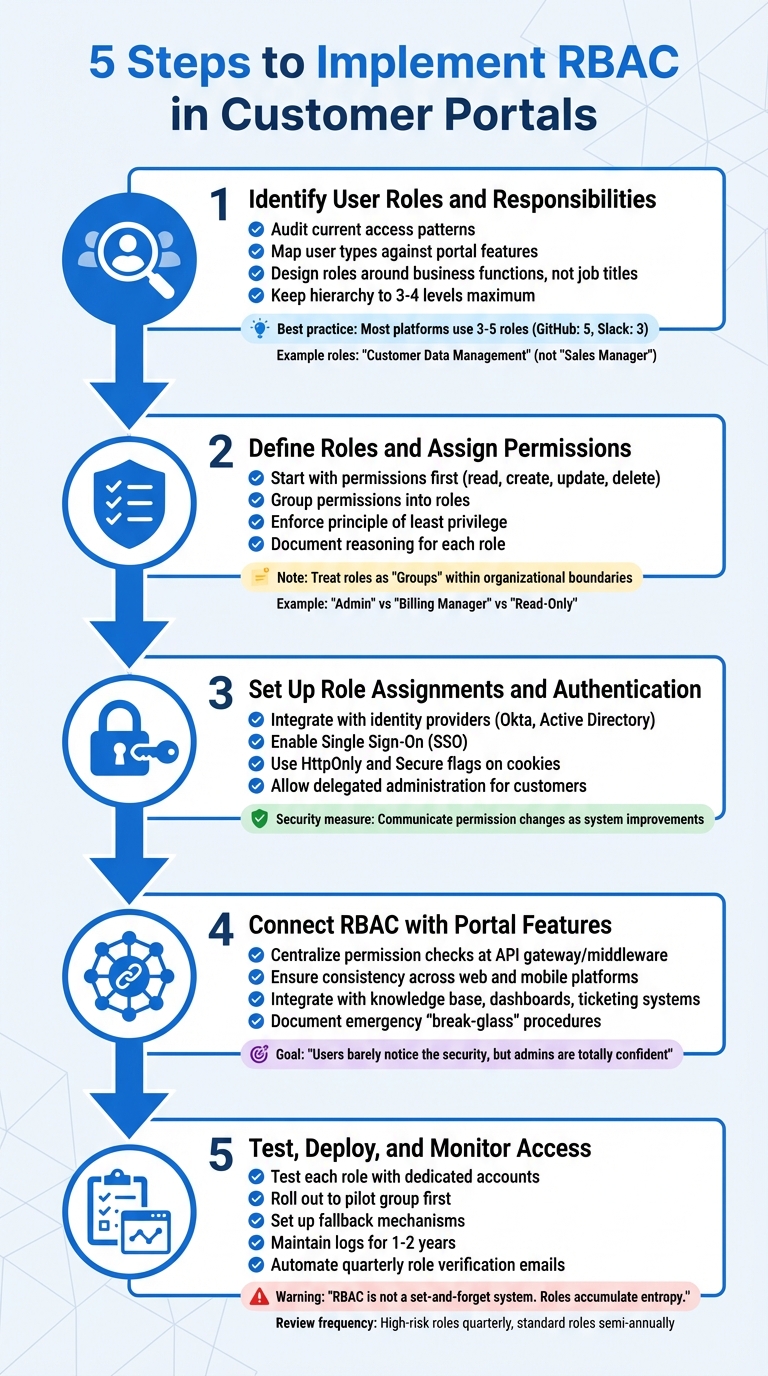
5-Step RBAC Implementation Process for Customer Portals
RBAC offers robust security and streamlined management, making it a smart choice for customer portals. Whether you opt to build a custom system or invest in a dedicated authorization platform (which often saves time and effort), the implementation process follows a logical sequence.
Step 1: Identify User Roles and Responsibilities
Start by auditing current access patterns to eliminate unnecessary privileges. List every feature in your portal, from login pages to admin dashboards. Use a spreadsheet to map user types (e.g., managers, contractors, interns) against these features. For each combination, determine if access is genuinely necessary.
Design roles around business functions, not job titles. As Mathew Pregasen from Oso explains:
"Roles should reflect business functions, not job titles or features" [11].
For example, a role like "Customer Data Management" remains consistent across organizational changes, while a title like "Sales Manager" may vary in scope between departments. Keep the structure simple – most platforms like GitHub and Slack use three to five roles [4].
Limit the role hierarchy to three or four levels to avoid confusion. Collaborate with department heads to ensure roles reflect actual workflows rather than relying solely on IT’s perspective. Once roles are defined, move on to assigning permissions.
Step 2: Define Roles and Assign Permissions
Link roles to specific permissions. Roles serve as user-facing labels (e.g., "Admin", "Billing Manager"), while permissions are the technical actions (like reports::export) that users can perform.
Begin with permissions first. Catalog every possible action in your system – such as read, create, update, delete – before grouping them into roles. This approach prevents "role explosion" and overlapping access [5]. Enforce the principle of least privilege, ensuring users have only the access they need [12]. Document the reasoning behind each role and permission in plain language to simplify audits and avoid privilege creep [10][12].
In B2B settings, treat roles as "Groups" within organizational boundaries. For instance, a user could be an "Admin" in one organization while having "Read-Only" access in another [1][3]. Use database-level policies like PostgreSQL RLS to enforce row-level security, ensuring users see only the data relevant to their organization or region [10].
Step 3: Set Up Role Assignments and Authentication
Synchronize roles and enable secure authentication by integrating with identity providers such as Okta or Active Directory. These tools also support Single Sign-On (SSO), enhancing the user experience [1]. Use HttpOnly and Secure flags on cookies to protect them from JavaScript access and ensure they are transmitted over HTTPS [10].
Allow delegated administration so customers can manage their own users and roles, reducing the burden on your support team [3]. If permissions are adjusted to align with least privilege standards, communicate these changes to users as part of system improvements rather than as a reflection of trust [11].
Step 4: Connect RBAC with Portal Features
Centralize permission checks at the API gateway or middleware level to ensure consistent security enforcement [5]. This approach creates a single point for testing and validation. Make sure permissions are consistent across web and mobile platforms to eliminate potential vulnerabilities [12].
Integrate RBAC with your portal’s knowledge base, dashboards, and ticketing systems, so users only see features and data they’re authorized to access. As SSOJet notes:
"The best apps? Users barely notice the security, but admins are totally confident data’s locked down" [10].
Additionally, document emergency "break-glass" procedures for temporary elevated access during incidents and ensure all actions are logged for later review [11].
Step 5: Test, Deploy, and Monitor Access
Test each role thoroughly using dedicated accounts to confirm proper UI and API restrictions [12]. Pay special attention to edge cases, such as users with multiple roles or unexpected access through role inheritance [11]. Mathew Pregasen highlights the importance of testing:
"The goal of testing is to catch authorization failures before they reach production" [11].
Roll out RBAC changes to a small pilot group first to identify any overlooked issues before a full deployment [11]. Set up fallback mechanisms to quickly revert changes if problems arise [11]. Maintain detailed logs of logins, file access, and permission changes, keeping them for one to two years for compliance and forensic purposes [12].
Automate quarterly emails to managers for role verification, reducing reliance on manual spreadsheets. High-risk roles should be reviewed quarterly, while standard roles can be checked semi-annually [7]. As Sebastian Heinzer reminds us:
"RBAC is not a set-and-forget system. Roles accumulate entropy" [7].
Common RBAC Implementation Mistakes to Avoid
When implementing Role-Based Access Control (RBAC), it’s easy to stumble into common traps that can undermine your entire system. Even a well-planned RBAC setup can run into trouble, often because of rushing the process or making the role structure unnecessarily complex. Recognizing these mistakes early can save you from security vulnerabilities, administrative chaos, and compliance headaches later on.
Giving Too Many Permissions by Default
Granting broad permissions with the intention of restricting them later is a risky shortcut. Over time, this approach often leads to "permission creep", where users accumulate unnecessary access as they change roles or responsibilities. This increases the likelihood of a security breach.
Take the Capital One breach as a cautionary tale. A misconfigured firewall allowed excessive role permissions, enabling an attacker to access sensitive S3 data. The result? Data from approximately 100 million individuals in the U.S. and 6 million in Canada was compromised, leading to $80 million in fines and $270 million in total costs [12][13].
To avoid this, start with restrictive defaults. Assign most roles read-only access and only grant higher privileges – like editing or deleting – when absolutely necessary. Instead of basing permissions on job titles, align them with specific workflows. Using standardized role templates for common functions can help ensure consistency. As Dan Robin from Pebb advises:
"Grant users the absolute minimum level of access they need. Nothing more" [12].
Skipping Regular Role Reviews
RBAC isn’t a "set it and forget it" system. As your organization evolves, roles and permissions can quickly become outdated. Neglecting regular reviews can lead to redundant permissions, which might trip up compliance audits for frameworks like SOC 2, ISO 27001, or HIPAA.
To stay on top of this, schedule periodic access reviews – quarterly for high-risk roles and semi-annually for standard ones. Assign a role owner, such as a department head, who understands the role’s purpose and can identify when updates are needed. Don’t just review individual user assignments; revisit the role definitions themselves to ensure they align with current workflows.
Integrating your RBAC system with an HR platform or Identity Provider can streamline updates when employees join, leave, or change roles. Additionally, prune unused roles regularly. If a role hasn’t been assigned in months, delete it to keep the system manageable. For temporary needs, use time-bound access instead of creating permanent roles that might be forgotten.
Creating Overly Complex Role Structures
Overcomplicating your role hierarchy can backfire. Too much granularity leads to "role explosion", where managing roles becomes as unwieldy as dealing with individual permissions. Simplicity is key.
For instance, major platforms like GitHub manage with just five primary roles (Owners, Members, Moderators, Billing Managers, Security Managers), while others like Slack and Mercury operate with only three [7]. This streamlined approach keeps things efficient and easy to manage.
Start with broad, function-based roles like "HR Admin" or "Support Agent" and refine only when absolutely necessary. If you can’t describe a role in one sentence without diving into technical details, it’s probably too specific [7]. Avoid tying roles to temporary projects or team structures; instead, design them around lasting organizational responsibilities, such as "Finance Manager" or "Platform Engineer."
Another tip: separate roles from resources. Define roles based on responsibilities, and manage access to specific workspaces or data at the resource level. As Sebastian Heinzer puts it:
"RBAC fails when it tries to model the system. It succeeds when it models the organization" [7].
How AI Improves RBAC in Supportbench

Supportbench takes the traditional Role-Based Access Control (RBAC) approach and supercharges it with AI, making access management more flexible and forward-thinking. Where conventional RBAC systems depend on manual setups and fixed rules that can quickly become outdated, Supportbench integrates AI to create a more secure and efficient system.
Automated Role Assignments with AI
Gone are the days of manually assigning roles. Supportbench uses AI to dynamically manage tool access based on user roles [15]. For example, if an agent working on a billing ticket has mismatched permissions, the system immediately flags the issue. Roles in Supportbench are defined by sets of permissions and access levels, controlling everything from ticket updates to report access. These roles can even be restricted to specific divisions, ensuring agents only see cases relevant to their organizational area [14].
AI-Powered Detection of Unusual Access Patterns
One standout feature is Supportbench’s AI-driven anomaly detection, which keeps an eye out for unusual user behavior [16]. By continuously monitoring access patterns, the system can respond instantly to abnormal activities involving sensitive data [16]. Studies show that AI in cybersecurity can cut breach detection times by up to 70% and save organizations as much as $3.81 million in data breach costs when security automation is fully implemented [16].
"Supportbench’s AI-driven features like anomaly detection and automated threat response are pivotal." – Nooshin Alibhai, Founder and CEO of Supportbench [16]
This proactive approach ensures that access policies are constantly refined to keep up with potential threats.
Refining Access Policies with AI Insights
Supportbench’s AI doesn’t stop at detection – it also helps refine access policies as support needs change. By identifying patterns, such as recurring billing keywords, the system can recommend automated ticket routing to specialists and even monitor agent performance to adjust access in real time [18]. Additionally, AI-powered activity logs and real-time monitoring provide valuable feedback for stakeholders, enabling them to tweak permissions as needed [17]. If agents face permission roadblocks that slow down their work, the AI highlights these issues, allowing administrators to make necessary adjustments or create new roles.
"When everyone works efficiently within clearly defined guardrails, you never have to choose between speed and safety as you scale AI operations." – Ian Heinig, Agentic AI Marketer, Sendbird [17]
RBAC Examples for Complex B2B Support Environments
Role-Based Access Control (RBAC) proves its worth in real-world B2B support scenarios. Below are examples of how businesses use role-based permissions to manage intricate team structures, safeguard customer data, and handle escalations efficiently.
Managing Multi-Tier Support Teams
In multi-tier support setups, clearly defined access levels are essential. RBAC organizes agents into roles like Support Manager, Escalation Manager, Support Operations, and Support Executive [19]. Each role gets specific permissions tied to modules such as Accounts (editing customer notes), Agents (viewing metrics), or Cases (modifying cases) [19].
Role hierarchies simplify this even further. For instance, a Team Lead inherits all the permissions of a Support Agent while gaining additional management capabilities [22]. This ensures that when a case moves from Tier 1 to Tier 2, the senior agent already has the necessary access, eliminating delays caused by manual updates. Tenant isolation adds another layer of security, ensuring that a Contributor in one company cannot access data from another [3][21].
"Roles are for your users. Permissions are for your developers/code."
- Andrew Israel, PropelAuth [4]
Setting Customer-Specific Permissions
RBAC also adapts to customer-specific requirements, offering flexibility based on contracts or service levels.
Using tenant scoping, a user can act as an Admin for one organization while being limited to Viewer permissions in another [3][21]. Delegated administration goes a step further, allowing customers to manage their own users and assign roles independently – no intervention from the service provider is needed [20][3].
Roles can be tailored to specific tasks. For example, a "Billing Admin" might handle invoices but won’t have access to support cases or system settings [3]. This avoids what LoginRadius calls "Accidental God Mode", where someone ends up with far more access than necessary [3]. For enterprise clients needing detailed role customization, RBAC offers custom roles that align with existing permissions without overcomplicating the platform [4].
Simplifying Case Escalation Workflows
Escalations often stumble when access permissions don’t align. RBAC addresses this by introducing roles like "Escalation Manager", who has unique permissions to approve, delay, or dismiss escalations [19]. These managers can also use "Acknowledge Sentiment" permissions to signal that a high-priority case is being handled, reducing duplicate efforts [19].
With role inheritance, senior agents gain all lower-tier permissions along with specialized capabilities, such as "Manage Escalations" or "Edit Case" [10]. In multi-tenant environments, escalation workflows remain isolated, ensuring that an escalation manager for one client cannot accidentally interfere with another’s cases [3][21].
"A role isn’t a job title, it’s a contract that says, ‘These are the actions this user can perform inside this organization.’"
- LoginRadius [3]
These examples highlight how RBAC contributes to smoother workflows, better security, and more efficient support operations.
Conclusion: Why RBAC Matters for B2B Customer Portals
RBAC is the backbone of secure and scalable B2B support systems. By enforcing strict access limitations and ensuring tenant isolation, it helps maintain a secure environment for all users [2][3].
One of its key advantages is the way it streamlines operations. With RBAC, customers can manage their own user accounts, freeing up support teams to focus on more complex challenges. Delegated administration reduces the burden of routine tasks, making the entire process more efficient.
"Clean access control doesn’t announce itself. It just works."
- LoginRadius [3]
This efficient management is also a stepping stone toward automation. Tools like Supportbench use AI to automate role assignments, track unusual access patterns, and fine-tune policies in real time. Predefined roles – such as Administrator, Manager, Agent, and Viewer – combined with Division-level restrictions ensure that agents only handle cases within their assigned areas. This eliminates the need for manual configurations while keeping operations transparent through AI-driven activity logs.
RBAC also plays a critical role in avoiding access-related bottlenecks as businesses grow. For instance, Slack’s engineering team tackled overprivileged access by breaking down a single "Admin" role into three specialized roles, ensuring better control [2]. The lesson here is to keep role structures as simple as possible, introduce complexity only when absolutely necessary, and let AI handle the ongoing adjustments. With well-defined roles and guardrails, businesses can achieve both operational speed and strong security.
FAQs
What’s the simplest way to define RBAC roles without creating too many?
To keep RBAC roles manageable, focus on assigning permissions to roles rather than individual users. Group related permissions into a compact set of roles for clarity. Implement hierarchical roles to enable permission inheritance, which reduces the number of unique roles needed while still providing flexibility. This approach simplifies administration and ensures smoother management of typical organizational tasks.
How do I enforce tenant isolation with RBAC in a multi-company portal?
To ensure tenant isolation in a multi-company portal using RBAC, it’s crucial to create roles and permissions tailored to each tenant. This means implementing tenant-specific roles, such as "Tenant Admin", that are scoped to individual tenants. Authorization checks should always validate the tenant context to ensure users can only access their own tenant’s data and resources.
A powerful technique to enforce this separation is row-level security (RLS). RLS restricts access to database rows based on the tenant context, effectively preventing cross-tenant data exposure. Together, these methods uphold strict data boundaries and adhere to established multi-tenant RBAC practices.
When should I use just-in-time (JIT) access instead of a permanent role?
When you need to control standing privileges, lower operational risks, and stick to the principle of least privilege, consider using just-in-time (JIT) access instead of assigning permanent roles. This method works especially well in dynamic or highly sensitive settings where keeping constant access rights to a minimum is crucial.
Related Blog Posts
- How do you set up a customer portal that supports role-based access and multiple customer teams?
- How do you design role-based customer portals for B2B (multiple users, permissions, reporting)?
- How do you handle Salesforce permissions + role-based access when moving to a helpdesk portal?
- Customizing Portals for Strategic Accounts: Why One Size Doesn’t Fit All






