
Switching helpdesk platforms can deliver measurable financial results, with many companies achieving a 300–400% ROI within the first year and payback in just 3–6 months. The decision to migrate isn’t just about cost – it’s about improving efficiency, reducing churn, and driving revenue growth. Here’s what you need to know:
- Hidden Costs of Legacy Systems: Outdated platforms lead to inefficiencies, higher staffing needs, and inconsistent customer experiences. Automation and modern tools can reduce ticket escalations by 16%, improve CSAT by 24%, and save 15–20 agents’ worth of work annually.
- Key ROI Formula:
ROI = (Net Benefits – Total Costs) / Total Costs × 100
Factors include productivity gains, customer retention, and operational cost reductions. - Savings with Automation: AI tools cut Average Handle Time (AHT), automate 60–70% of routine tasks, and reduce costs per interaction from $6–$20 to $0.99–$2.00.
- Retention Impact: A 5% boost in retention can increase profits by 25–95%, making customer satisfaction improvements a priority.
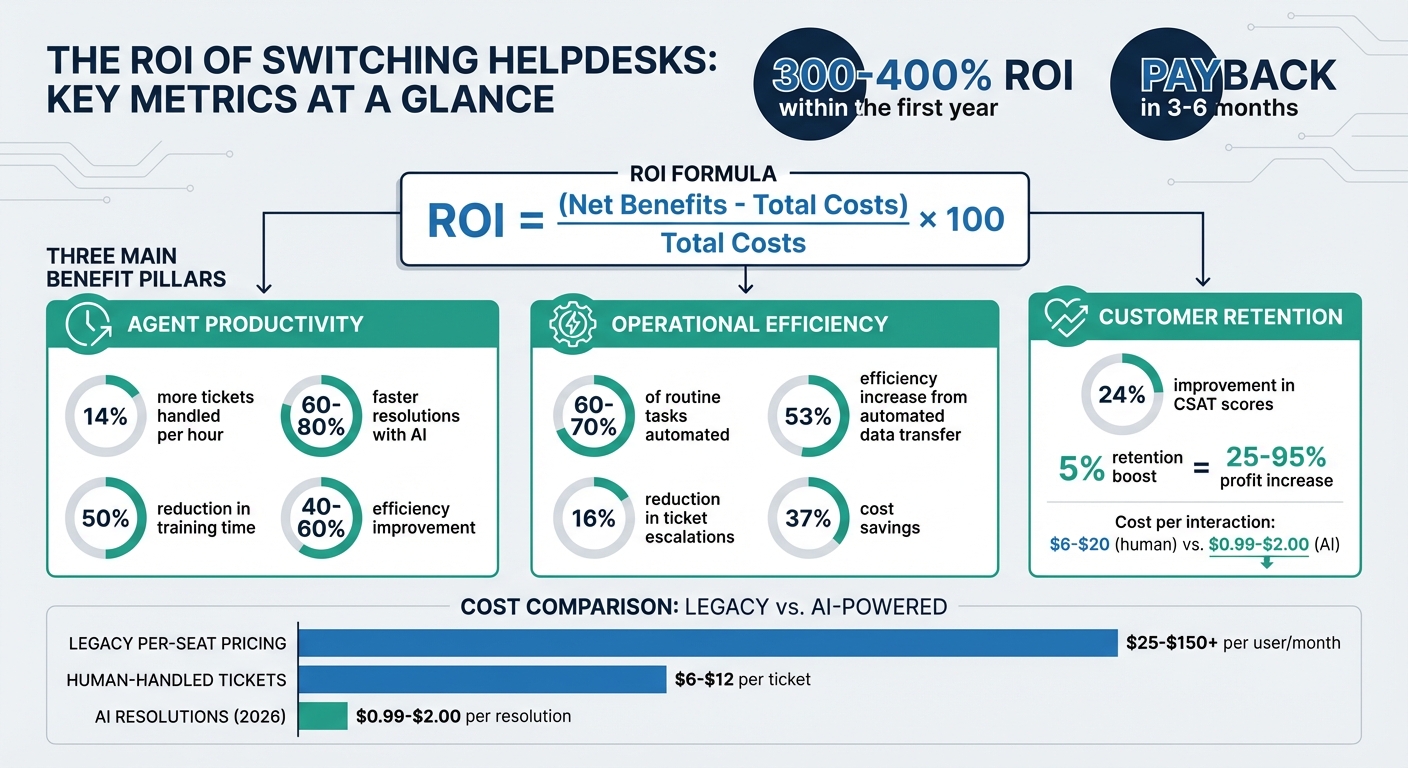
Helpdesk ROI Calculator: Key Metrics and Financial Impact
The Simple ROI Calculator We Use to Scale B2B Businesses
sbb-itb-e60d259
The Basic ROI Formula for Helpdesk Migration
Calculating helpdesk ROI boils down to a straightforward formula:
(Net Benefits – Total Costs) / Total Costs × 100 [5][6]
This formula shows how much return you’re getting for every dollar you invest.
Let’s break it down. Total Costs include more than just the monthly subscription fees. You’ll also need to account for implementation fees, data migration costs, training time, and even hidden charges like per-seat scaling penalties, which can increase as your team grows [6]. On the other hand, Net Benefits reflect improvements in productivity, operational efficiency, and customer retention [5].
For companies in the B2B space, switching from legacy per-seat pricing (which can cost anywhere from $25 to $150+ per user/month) to flat-fee pricing often leads to better ROI [6]. This shift eliminates what’s known as the "success tax" – the extra costs that pile up as your team expands. Hans Dekker from Instantly.ai puts it succinctly:
"Your CFO doesn’t care that your CRM ‘saves time.’ They care about cost per meeting, pipeline coverage, and whether the tool pays for itself before the quarter ends." [6]
Another metric worth noting is the Payback Period, which you calculate by dividing your Total Initial Investment by your Total Annual Gain [1].
With the formula in place, the next step is to dig into the specific costs and benefits tied to migrating from email to a helpdesk.
How to Apply the ROI Formula to Helpdesks
Start by determining your fully loaded agent cost – this includes their salary, benefits, overhead, and training. This hourly rate becomes the foundation for measuring productivity gains. For example, if automation reduces Average Handle Time (AHT) by 10 minutes per ticket and your team handles 500 tickets daily, you can calculate your daily savings by multiplying the hours saved by your agent’s hourly cost [1].
Next, examine deflection value. When AI or self-service tools handle inquiries that would usually require a human agent, you save between $6 and $20 per interaction [1]. By comparison, AI resolutions in 2026 are projected to cost between $0.99 and $2.00, while human-handled tickets range from $6 to $12 [7]. The cost gap is significant.
Another key driver is revenue retention. Use this formula:
(Number of Customers) × (Estimated Churn Rate Reduction) × (Average Customer Lifetime Value) [1]
Even small improvements in retention can have a big impact on your bottom line.
Adoption rates are also critical. If your agents don’t fully embrace the new system, ROI can take a hit. Aim for an adoption rate above 80% [6]. Don’t forget to include change management costs – these typically add up to 10–15% of your implementation expenses [1].
Now that you know how to apply the formula, let’s dive into the factors that influence helpdesk ROI.
What Goes Into Helpdesk ROI
The benefits side of the equation can be grouped into three main categories:
- Agent Productivity: Automation tools that reduce AHT, improve First Contact Resolution (FCR), and speed up onboarding can make a huge difference. For example, AI Copilots that surface relevant knowledge automatically allow agents to handle 14% more tickets per hour and cut training time in half [7].
- Operational Efficiency: Self-service tools, automated ticket handling, and features like intelligent triage and auto-categorization improve efficiency. Automating data transfers during migration can lead to a 53% increase in efficiency and 37% cost savings. Better data access also boosts Customer Satisfaction scores by 24% and reduces escalations by 16% [2].
- Customer Retention: Predictive measures, like analyzing CSAT scores, help you address dissatisfaction before it leads to churn. This is especially important when customers represent high annual contract values.
These improvements not only streamline operations but also highlight the strategic advantages of moving to an AI-driven platform. Additional perks like improved agent morale and stronger brand reputation can lower turnover and reduce training costs.
Here’s a quick breakdown of the key ROI components:
| ROI Component | What It Measures | Impact on Calculation |
|---|---|---|
| Agent Productivity | AHT reduction, FCR improvement, faster onboarding | Lowers labor cost per ticket |
| Operational Efficiency | Deflection rate, automation percentage | Reduces volume requiring human intervention |
| Customer Retention | Churn rate decrease, LTV preservation | Increases long-term revenue |
| Migration Costs | Data transfer, training, setup fees | Increases the initial investment |
| Software Costs | Subscription fees, API costs, per-seat charges | Represents ongoing operational expenses |
Metrics You Need to Calculate ROI
To accurately calculate ROI, you need solid data on your current costs, savings achieved through automation, and the revenue impact of improved customer support. Let’s break these down step by step.
Your Current Helpdesk Costs
Start with a clear picture of your existing helpdesk expenses. This includes fully loaded agent costs – not just salaries but the total cost of employment. For example, a 100-person support team might cost $2,400,000 annually in salaries, plus $720,000 in benefits and overhead, bringing the total to $3,120,000 [3].
On top of that, factor in other expenses like:
- Technology licenses: $120,000 per year
- Training and onboarding: $240,000 annually
- Management overhead: $360,000 annually
These figures provide the baseline for identifying potential savings and revenue gains.
Time and Cost Savings from AI and Automation
AI and automation can significantly reduce costs, and here’s how you can measure those savings:
- Productivity gains: AI copilots can speed up resolutions by 60–80% and enhance agent efficiency by 40–60%. You can calculate the time saved using this formula:
(Time Saved per Interaction in Minutes × Number of Interactions ÷ 60) × Average Agent Hourly Cost [1]. - Deflection value: When AI resolves routine inquiries without human involvement, you save the cost of those interactions. Multiply the number of AI-resolved tickets by your cost per human interaction (typically $6 to $20) to estimate the savings [1].
- Onboarding efficiency: AI tools can cut training time in half, reducing ramp-up costs for new agents [1].
How Customer Retention Affects Revenue
Customer retention is a critical factor in calculating ROI, as even small improvements can have a massive impact. Use this formula:
Customers × Churn Reduction × LTV (Lifetime Value) [1].
To put it in perspective, increasing retention by just 5% can result in a profit increase of 25% to 95% [1]. Advanced platforms with predictive CSAT (Customer Satisfaction) capabilities help identify at-risk customers, allowing you to intervene before they churn. For B2B companies with high annual contract values, saving even one or two contracts can cover migration costs.
Additionally, track metrics like:
- CSAT score improvements: Platforms often report an average 24% increase in CSAT [2].
- Escalation reductions: On average, escalations drop by 16% [2].
These metrics demonstrate how better customer support directly impacts revenue and overall ROI.
How to Build and Use Your ROI Calculator
Building Your Calculator: Step by Step
To get started, you’ll need three critical inputs: the number of customer service agents, total monthly ticket volume, and the fully loaded cost per hour for each agent. For instance, if you have 50 agents managing 10,000 monthly interactions with an average fully loaded hourly cost of $32.50, you’ve got your baseline figures.
From there, factor in migration and implementation expenses. This includes one-time migration fees, subscription costs for the new platform, setup fees, and the time spent on internal training. Then, add efficiency metrics like Average Handle Time (AHT), First Contact Resolution (FCR) rates, and agent onboarding duration. Finally, include revenue-related variables like your current customer churn rate and Average Lifetime Value (LTV) to estimate the potential impact of improved retention.
Use the formula:
[(Total Annual Gain – Total Annual Cost) / Total Annual Cost] × 100% [4].
For productivity savings, calculate the total minutes saved, convert them to hours, and multiply by the average agent cost. To find the deflection value, multiply the number of AI-resolved tickets by the per-interaction cost (typically $6–$20) [1]. Once you’ve run the numbers, compare the results to your current metrics to identify the projected improvements.
Comparing Current vs. Projected Performance
Create a comparison table to clearly show the differences between your current performance and the projected outcomes. Include columns for Metric, Current Value, Projected Value, and Annual Savings in USD. This format makes it easy for stakeholders to see the potential benefits at a glance.
| Metric | Current Value | Projected Value | Annual Savings |
|---|---|---|---|
| Monthly Support Costs | $320,000 | $180,000 | $1,680,000 (44% cut) |
| Tickets Automated | 0% | 65% | |
| Average Response Time | 24 hours | 2 minutes | |
| CSAT Score | 3.2/5 | 4.6/5 | |
| Agent Onboarding Time | 8 weeks | 4 weeks | 50% reduction |
Most companies see a payback period of 3–6 months for support automation, with ROI often reaching 300–400% within the first year [3]. To calculate your payback period, divide your total initial investment by the total annual gain.
Using Industry Benchmarks for Realistic Projections
Industry benchmarks can help fine-tune your ROI calculator. For instance, AI chatbots typically achieve a deflection rate of 30–50% for routine inquiries. Tasks like password resets and basic troubleshooting – often categorized as tier-1 tickets – can take up as much as 60% of a support team’s time, making them ideal for automation.
AI copilots can cut resolution times by 60–80% and improve agent efficiency by 40–60% [1]. Implementations often result in a 53% boost in efficiency and a 37% reduction in costs [2]. On top of that, CSAT scores tend to increase by an average of 24%, while escalation rates drop by 16% [2]. Use these benchmarks as a baseline, then adjust for factors like ticket complexity and your team’s structure.
Getting the Most ROI: Migration and Post-Switch Tactics
Using AI to Streamline Migration
When it comes to migration, the process itself can be a major stumbling block for organizations, often leading to wasted time and resources. But using AI tools during this phase can make all the difference. For example, automated data transfer tools are shown to improve efficiency by 53% compared to manual methods[2]. This frees up your team to tackle more strategic tasks instead of getting bogged down by repetitive data entry.
AI doesn’t just stop at transferring data – it also helps prioritize tasks during the transition. By using sentiment analysis and keyword detection, AI ensures that urgent issues are flagged and addressed promptly, so nothing critical gets overlooked while your team is adjusting to the new system.
One standout feature is AI-powered knowledge base generation. Instead of requiring your team to manually document every solution, AI can analyze resolved cases to suggest new articles, essentially building your knowledge library in real time. This approach aligns with Knowledge-Centered Service (KCS) principles, ensuring that useful solutions are captured and made accessible quickly. Plus, AI Copilots can act as virtual guides for new agents, helping them navigate the system and find answers independently, which significantly cuts down on training time[1].
These AI-driven efficiencies not only reduce labor costs and downtime by 37% but also streamline the transfer of historical support data, leading to a 24% boost in customer satisfaction (CSAT)[2]. While getting the migration right is a critical first step, keeping the momentum going requires a strong focus on post-switch strategies.
Maintaining ROI After the Switch
Successfully migrating to a new system is just the beginning. To sustain high ROI, you’ll need to stay proactive. Data shows that ROI often peaks within 3–6 months of implementation but can drop by 15–30% if left unmanaged[8]. This decline happens when teams fall back into old habits, system usage wanes, and initial gains are lost. To avoid this, track performance weekly rather than monthly, allowing you to catch and address any issues before they become bigger problems.
One key element is ongoing AI retraining. By reviewing interaction logs every quarter and feeding corrections back into the system, you ensure the AI continues to improve. Companies that prioritize proper AI training report 30–40% better results compared to those that treat it as an IT-only task[8]. Additionally, predictive tools like CSAT and CES scores can help identify dissatisfied customers early, enabling your team to take action before they churn. Even a small improvement in retention – just 5% – can lead to a profit increase of 25% to 95%[1].
"For organizations where support quality and accuracy are paramount, simply automating agents away isn’t the goal… The true ROI encompasses empowerment and intelligence."
– Nooshin Alibhai, Founder and CEO of Supportbench[1]
A three-tier support model can help balance efficiency and customer care. In this setup, Tier 1 handles tasks fully automated by AI, Tier 2 involves AI-assisted resolutions for more complex issues, and Tier 3 focuses on high-value or sensitive cases requiring a human touch[8]. This structure ensures that automation is used effectively while maintaining the personal interaction customers value. With this model, you can aim for 40–65% ticket automation while keeping costs per interaction between $0.50 and $1.50 for automated tickets[8].
Finally, consistent performance monitoring is crucial. Using tools like the ROI analysis framework, you can track progress and make adjustments to maintain long-term gains. It’s this ongoing optimization that ensures your investment continues to deliver results well into the future.
Conclusion: Making the Case for a Better Helpdesk Investment
Switching helpdesk platforms isn’t just about cutting costs – it’s about making a smart investment that delivers real results. As discussed earlier, an ROI calculator helps turn guesses into solid business cases. By breaking down cost savings, efficiency improvements, and customer satisfaction boosts, you can present a case that resonates with decision-makers and secures their support [1][2].
The numbers speak for themselves. The data from earlier analysis clearly shows the financial benefits are hard to ignore [2][3].
But it’s not just about the numbers. Upgrading to better tools means more than just saving money – it empowers your agents, speeds up resolutions, and strengthens customer relationships. When you show how improved retention can significantly increase profits, it becomes clear that this isn’t just an operational upgrade; it’s a growth strategy [1].
Now it’s time to put this plan into action. Use the ROI calculator to compare B2B platforms, measure productivity gains, and factor in both tangible costs and less obvious benefits, like happier agents. With these insights, you can confidently revamp your support operations and create long-term value.
This approach proves that modern helpdesk solutions are a key driver of both operational improvement and sustainable business growth.
FAQs
What costs do teams usually forget to include in helpdesk ROI?
Teams often miss the hidden costs that come with software, such as implementation, training, ongoing maintenance, and additional features or tools. These expenses can add up quickly, sometimes driving the total cost to 5–8 times the original subscription price over a five-year period. Taking these factors into account is essential to calculate ROI accurately.
What 3 metrics should I track first to prove ROI quickly?
To show return on investment (ROI) quickly, prioritize three key metrics: ticket deflection rate, assisted resolution impact (such as lowering Average Handle Time), and customer satisfaction scores (like CSAT or CES). These metrics directly reflect efficiency, cost savings, and improvements in customer experience, making it easier to showcase value early on.
How do I estimate churn reduction from better support?
To gauge the impact of reducing churn, tie better support experiences – such as quicker issue resolution, improved self-service options, and higher satisfaction scores (like CSAT and CES) – to customer retention metrics. Monitor how these changes influence attrition rates and revenue over time. By measuring the relationship between support improvements and retention, you can calculate the financial gains from lower churn. This method links the quality of support directly to measurable business results.