


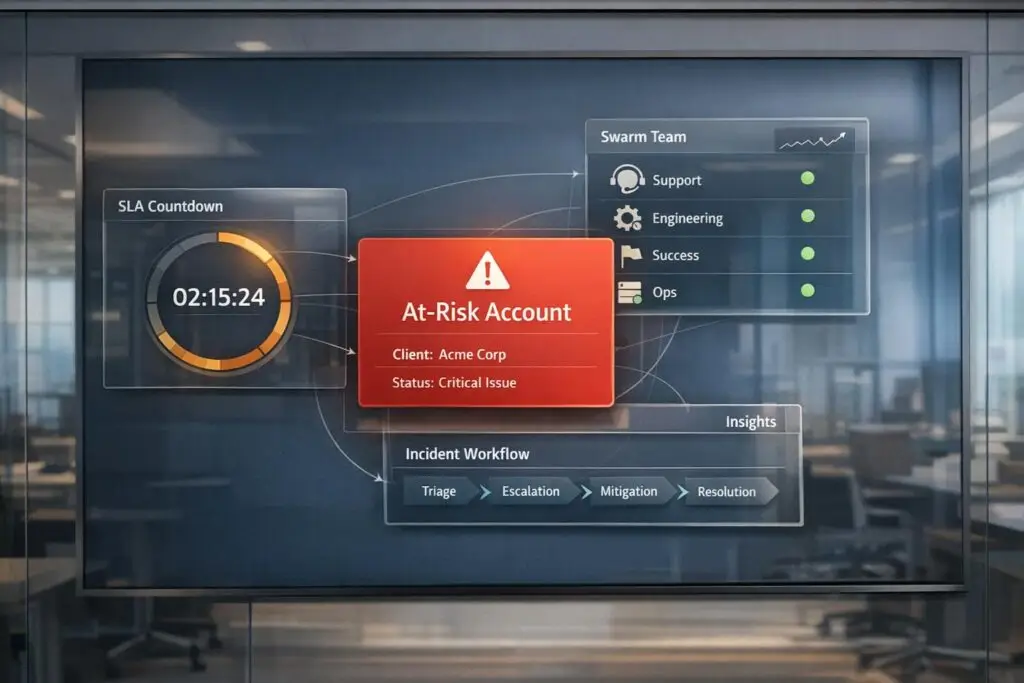
The "Red Account" protocol is a system designed to protect high-value business accounts by identifying and resolving risks before they escalate. Here’s how it works:
- Early Detection with AI: AI tools monitor customer interactions for warning signs like negative sentiment, SLA breaches, or reduced engagement. These tools predict escalation risks with 88% accuracy, reducing formal escalations by up to 50%.
- Cross-Functional Teams: When an account is flagged, a team of specialists – spanning Support, Product, Engineering, and Customer Success – collaborates to address the issue. Clear roles and structured workflows ensure efficient problem-solving.
- Streamlined Processes: AI automates tasks like summarizing issues and routing cases to the right experts, cutting resolution time by 86%. Dynamic SLAs prioritize urgent cases based on customer value and issue severity.
- Preventing Future Issues: AI dashboards track key metrics like churn rates and resolution times. Predictive models continuously improve, spotting risks early and suggesting tailored solutions.
Two ways to build customer service AI (and why it matters now)
sbb-itb-e60d259
How to Identify At-Risk Clients Using AI
Catching potential issues early is the difference between retaining a customer and losing them. Traditional support teams often wait until customers formally raise concerns, but by then, the damage to the relationship is often done. AI flips this process on its head, identifying risk patterns well before customers reach out.
AI tools analyze both structured data (like SLA breaches or reopened tickets) and unstructured signals (such as shifts in tone or frustration markers). This combination allows AI to predict which accounts are likely to escalate with an impressive 88% accuracy [6]. By identifying these patterns early, companies can reduce formal escalations by as much as 50% through timely intervention [2].
Warning Signs That Flag At-Risk Accounts
Not every warning sign is obvious. For example, a seemingly polite phrase like "just checking in again" can mask frustration, something AI can pick up on through sentiment analysis. Patterns in communication often reveal dissatisfaction long before a formal complaint arises. Key indicators include a negative tone over multiple interactions, language suggesting escalation (e.g., "I need to speak to your manager" or "This has been open for weeks"), and an increase in emotional intensity in ticket responses.
Operational red flags also provide clear evidence of risk. These include missed SLA deadlines, tickets being reopened after resolution, frequent handoffs between agents, or long periods of engineering ownership with little communication. A particularly telling sign is when multiple contacts from the same organization report issues at the same time – this "account-level density" often signals broader dissatisfaction. Other triggers include spikes in error rates, slow feature adoption during product launches, and unresolved high-priority issues as a renewal date approaches.
Monika Voorhis from SupportLogic explains it well:
"The vast majority of escalations are operational, not technical. They are failures of the experience, not the code." [2]
One common mistake is equating technical severity with escalation risk. For instance, a P2 bug combined with poor communication can lead to a high-risk escalation, while a P1 outage handled transparently might not. Recognizing these signs is the first step in activating a Red Account protocol.
AI Tools That Predict Account Risk
Once these warning signs are defined, AI tools take over to monitor and analyze them systematically. Unlike quarterly NPS surveys that rely on small samples, AI-powered platforms track 100% of customer interactions – across tickets, emails, and voice channels – in real time [7]. This continuous monitoring generates a real-time health score for each account. Sentiment analysis tools detect subtle emotional shifts, such as confusion or impatience, while escalation agents evaluate every ticket for risk and recommend appropriate next steps. This shifts teams from reacting to problems to proactively addressing them.
Predictive models for CSAT (Customer Satisfaction) and CES (Customer Effort Score) estimate satisfaction and effort levels for every interaction, offering a complete picture rather than a limited snapshot. The efficiency gains are striking: while manual escalation management takes 10–22 hours per cycle, AI-driven workflows cut that time down to just 1–3 hours – a reduction of 86% [6]. Teams can start their day by reviewing AI-flagged accounts, prioritizing them based on factors like ARR and renewal timelines, and routing lower-confidence predictions to Customer Success Managers for manual review. This process not only improves accuracy but also saves time.
Platforms like Supportbench offer Predictive CSAT and CES as built-in features. These tools analyze case histories to flag accounts before satisfaction dips, automate prioritization, and handle issue tagging. This allows support teams to focus on resolving high-risk accounts instead of getting bogged down in administrative tasks.
How to Coordinate Cross-Functional Teams for Red Accounts
When AI flags an account as at-risk, the next step is assembling the right experts – fast. Handling a Red Account isn’t as simple as forwarding a ticket to a manager. It’s about bringing together a cross-functional team that can tackle the issue from every angle: technical, relational, and strategic. Without clear roles and structured handoffs, even urgent cases can get bogged down in miscommunication and delays.
Building the Cross-Functional Team
Every Red Account needs a single point of accountability – a designated owner. This person ensures progress stays on track, roadblocks are removed, and communication flows smoothly across teams. Beyond that, the team operates on a tiered structure:
- Tier 1: Handles initial troubleshooting.
- Tier 2: Brings in specialized technical expertise.
- Tier 3: Engages engineering for complex bugs or systemic issues.
But resolving Red Accounts often requires more than just technical fixes. Specialists from various departments step in based on the situation:
- Customer Success Managers (CSMs): Focus on retention and churn prevention, especially near renewal periods.
- Account Executives (AEs): Handle revenue-related concerns like pricing or contract negotiations.
- Compliance or Security Officers: Address high-risk issues such as GDPR violations or data breaches.
- Engineering Liaisons: Serve as the bridge between support and development for technical challenges.
Role assignments should be driven by objective triggers. For example, tickets containing terms like "lawsuit", "GDPR", or "security breach" should immediately involve Compliance. Tools like Supportbench’s workflow engine make this seamless by automating role assignments. The system uses rules that analyze ticket metadata, sentiment, and keywords, ensuring cases are routed to the right person without manual effort. This automation not only complements AI’s risk detection but also ensures a smooth, proactive response process.
With roles clearly defined, the focus shifts to collaboration and effective escalation handling.
Managing Collaboration and Escalations
Assembling the team is just the beginning. The real challenge lies in keeping everyone on the same page. One of the biggest pitfalls is context loss – when a ticket changes hands, and the new owner has to piece together what’s already been done. This type of redundancy wastes time and frustrates customers, often leading to churn [5].
To avoid this, every handoff should include a standardized summary template. This template should cover:
- A clear description of the issue.
- Troubleshooting steps already taken.
- Results of those steps.
- The specific reason for escalation.
AI can streamline this process. With tools like Supportbench’s AI Agent-Copilot, handoffs are automatically summarized. These tools pull relevant details from previous cases and the knowledge base to create concise, decision-ready briefs. What usually takes 3–5 minutes can be done in under 30 seconds [5]. This keeps the team aligned and reinforces the AI-driven approach to proactive support.
Effective collaboration also relies on a 360-degree view of the customer. Every team member – whether from support, success, or engineering – should have access to the same account history, open issues, and health metrics. Role-based permissions ensure sensitive information, like contract details or legal notes, is only visible to those who need it. Internal tools like Slack or Teams can facilitate quick discussions, but the customer should always hear a unified message. The designated owner should be the one communicating directly with the customer to maintain trust and consistency during a crisis.
"Escalations have a much more significant impact than they realize. It’s a bottleneck that can be removed rather easily." – Tina Grubisa, Value Consultant, Mosaic AI [3]
The ultimate goal isn’t just resolving the issue. It’s also about protecting subject matter experts (SMEs) from burnout by ensuring they only handle cases that are properly triaged and come with complete context.
Step-by-Step Workflow for Resolving Red Accounts
Once the cross-functional team is assembled and communication channels are set up, it’s time to dive into the actual process. Tackling a Red Account requires a streamlined, AI-supported workflow that prioritizes speed and precision to address customer concerns effectively.
The Resolution Workflow
The process kicks off when AI identifies an account as at-risk. At this stage, AI generates a quick "3-second briefing" – a concise summary that outlines the customer’s intent, past interactions, and the current situation [1][5]. The designated owner then reviews and validates this summary. If the issue demands specialized expertise, it’s escalated to the appropriate tier:
- Tier 2: For cases requiring deeper technical knowledge.
- Tier 3: For situations needing direct engineering involvement.
- Management: For conflicts over resources or severe dissatisfaction [9].
AI also ensures the case is routed to the right individual by matching it with the team member’s skill set and workload [1].
Throughout the resolution process, AI provides access to relevant documentation and runbook suggestions to avoid redundant efforts. After the issue is resolved, AI automatically extracts the solution details and updates the knowledge base in a process known as closed-loop knowledge capture [3].
| Step | AI Role | Human Role |
|---|---|---|
| Detection | Monitors sentiment, ARR, and SLA risk signals. | Sets thresholds and defines "Red Account" criteria. |
| Triage | Generates a summary and identifies the correct tier. | Validates the summary and takes ownership. |
| Resolution | Suggests relevant documentation and runbooks. | Applies empathy and handles complex decisions. |
| Post-Resolution | Updates the knowledge base with extracted insights. | Reviews AI-generated content for accuracy. |
Maintaining clear and consistent communication with the customer is absolutely essential. The designated owner should provide regular updates – even if it’s just to say, "we’re still working on this" – to manage expectations and build trust. Internally, standardized handoff templates ensure that every escalation includes a detailed summary, the steps already taken, and the exact reason for escalation [9][1].
Once the resolution process begins, dynamic SLAs and FCR metrics come into play to ensure timely and personalized support for the customer.
Using Dynamic SLAs and First-Contact Resolution
Static SLAs often fail to capture the complexity of Red Accounts. For instance, a high-value customer approaching renewal may need a faster response than a lower-tier account with a minor issue. Leveraging AI’s risk detection capabilities, dynamic SLAs adjust priorities in real-time based on factors like customer ARR tier, lifecycle stage, or the severity of the issue’s impact on their business [9][1].
AI also helps measure first-contact resolution (FCR), a critical metric for preventing repeat escalations. Traditionally, FCR has been hard to track, relying on manual input or customer surveys. Now, AI can analyze closing sentiment and monitor whether the customer follows up within 48 hours for the same issue [3][5]. If they do, it signals that the problem wasn’t fully resolved, prompting further action.
"Nothing erodes B2B customer confidence faster than a critical issue languishing unresolved or being bounced around without clear ownership." – Nooshin Alibhai, Founder and CEO of Supportbench [9]
Dynamic SLAs and FCR detection ensure that Red Accounts receive the focused attention they need, while also preventing team burnout by prioritizing cases that demand immediate action. This approach balances customer satisfaction with operational efficiency.
Monitoring Progress and Preventing Future Issues with AI
Dashboards and KPI Tracking
To make the most of dynamic SLAs and FCR strategies, real-time visibility into Red Account performance is crucial. AI-powered dashboards bring key metrics to the forefront, such as churn prevention rates, mean time to resolution (MTTR), escalation volume trends, and first-contact resolution rates. These dashboards automatically update as cases progress, saving teams up to 10–22 hours a week on manual reporting [6].
But here’s the thing: it’s not just about tracking activities – it’s about understanding intervention effectiveness. Every AI-recommended action, like expert routing, callback scheduling, or resource allocation, should be tagged and connected directly to resolution outcomes [10]. This closed-loop measurement helps identify which strategies deliver results and which need improvement. Companies using this method have reported a 28% faster MTTR and an 18% boost in CSAT for high-risk tickets [10]. Real-time insights like these don’t just measure success – they guide teams toward smarter, proactive solutions.
Preventing Future Escalations with AI
Predictive AI shifts teams from reacting to problems to preventing them. By scoring every incoming ticket for escalation risk, AI evaluates factors like sentiment, SLA status, handoffs, feature adoption gaps, ARR, and renewal windows. This helps spot potential issues before they escalate [6][10]. Over time, these models refine their risk assessments, further reducing escalation incidents.
AI doesn’t stop there. It also recommends "Next Best Actions", offering outreach templates, resolution snippets, and resource allocation strategies tailored to each at-risk account [6]. For lower-confidence predictions, a human-in-the-loop ensures accuracy and minimizes false positives. Monthly retraining based on resolved cases keeps the model aligned with changing customer behaviors [10]. By embedding these predictive tools into workflows, teams strengthen the proactive nature of the Red Account protocol. The result? Escalation analysis time drops by 86%, and escalation rates fall by 32% [6][10].
Common Mistakes and How to Avoid Them
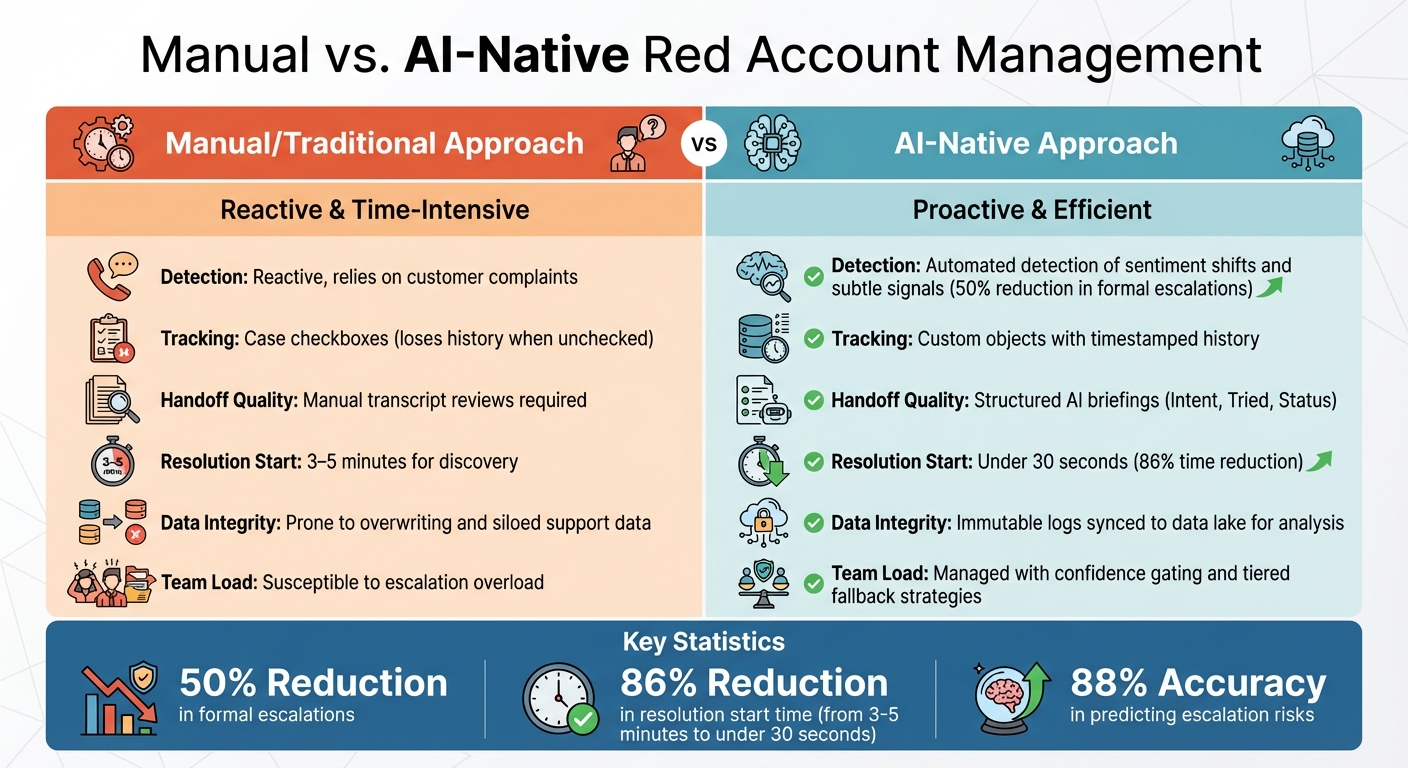
Manual vs AI-Native Red Account Management: Key Differences
Preventing Team Overload and Delayed De-escalation
A major misstep many teams make is not establishing clear criteria for what defines a "Red Account." Without specific triggers – like SLA breaches, noticeable sentiment changes, or critical system outages – issues can either linger unresolved or overwhelm teams with non-urgent cases flagged as emergencies [9][5].
Another frequent error is falling into the CRM "checkbox trap." Many teams rely on a simple "Escalated: Yes/No" field. The problem? Unchecking that box erases the risk history, making it impossible to track recurring issues, measure escalation durations, or assess revenue impacts [2]. A better approach is to use a dedicated Escalation Custom Object that includes immutable timestamps for Open_Date and Closed_Date. This preserves data integrity and allows for meaningful pattern analysis over time [2].
Teams also often neglect to formalize de-escalation workflows. While there’s plenty of focus on initiating a response, the process for returning accounts to standard support once the "Red" status is resolved is often overlooked [9][2]. Without well-documented handoff procedures, accounts can linger in high-priority queues, tying up specialist resources and delaying their availability for actual emergencies.
Now, let’s see how these manual challenges stack up against AI-native solutions.
Manual vs. AI-Native Approaches: A Comparison
These common pitfalls highlight the stark differences between manual processes and AI-native solutions for managing Red Accounts. The key distinction lies in detection speed and data quality. Manual methods depend on reactive flagging, often waiting for customer complaints to surface. In contrast, AI-native systems proactively identify early warning signs – like shifts in sentiment or changes in customer behavior – before complaints even occur [2]. This proactive approach has enabled some organizations to cut formal escalations by as much as 50% [2].
Here’s a side-by-side comparison of the two approaches:
| Feature | Manual/Traditional Approach | AI-Native Approach |
|---|---|---|
| Detection | Reactive, relies on customer complaints [2] | Automated detection of sentiment shifts and subtle signals [2] |
| Tracking | Relies on case checkboxes, losing history when unchecked [2] | Uses custom objects with timestamped history [2] |
| Handoff Quality | Requires manual transcript reviews [5] | Provides structured AI briefings (Intent, Tried, Status) [5] |
| Resolution Start | Takes 3–5 minutes for discovery [5] | Initiates in under 30 seconds [5] |
| Data Integrity | Prone to overwriting and siloed support data [2] | Maintains immutable logs synced to a data lake for analysis [2] |
| Team Load | Susceptible to escalation overload [9][4] | Managed with confidence gating and tiered fallback strategies [4][8] |
Conclusion
With the right steps and safeguards in place, your team can turn risk response into a proactive advantage. Managing at-risk accounts doesn’t have to mean constantly putting out fires. The Red Account protocol shifts your approach from reacting to problems as they arise to preventing them before they escalate. By combining AI-driven early detection with structured, cross-functional collaboration, you can spot sentiment changes and behavioral patterns well before they turn into formal escalations. This helps protect both your revenue and your customer relationships.
Enterprise teams that use predictive AI models have seen formal escalations drop by as much as 50% [2]. Moreover, high-value customers who receive targeted interventions are 25% more likely to renew [5]. These kinds of results can mean the difference between steady growth and losing customers to churn.
The secret lies in building a system where AI takes care of detection, gathers context, and intelligently routes issues, while your team focuses on solving problems and strengthening relationships. To make this work, your cross-functional teams need clear roles, structured handoffs, and consistent tracking. This approach transforms one-off crises into opportunities to improve processes and prevent future issues.
Start by defining your Red Account triggers, use AI tools to streamline handoffs, and create workflows that retain context so customers don’t have to repeat themselves. The goal isn’t to get everything perfect right away – it’s to build a foundation that improves with every resolved case. By adopting these practices, you’ll not only address immediate concerns but also create a smarter, more resilient support system over time.
FAQs
What qualifies as a ‘Red Account’ in our support organization?
A ‘Red Account’ is a term used to describe a client account that’s in a high-risk or escalated state and requires urgent attention. These accounts typically exhibit warning signs such as a surge in support tickets, frequent escalations, negative feedback, or lingering unresolved issues. These are all red flags indicating the possibility of losing the client.
To address these situations effectively, swift action is essential. This involves implementing structured workflows, leveraging AI-powered insights, and taking proactive measures to resolve problems quickly. Doing so can help prevent dissatisfaction and safeguard your revenue.
How do we prevent false positives from AI risk scoring?
To cut down on false positives in AI risk scoring, it’s important to pull together various signals. These might include sentiment analysis, escalation history, ticket frequency, and engagement patterns. By combining these factors, you can create a more complete picture of potential risks.
Make sure to regularly calibrate your models based on real-world outcomes. This helps fine-tune predictions and ensures your system stays accurate. Using a tiered scoring system is also a smart move. It allows you to weigh signals based on their importance, so something like negative sentiment alone doesn’t unfairly skew the results.
Finally, human oversight is critical. Periodically review flagged cases to ensure the system is working as intended. This also gives you the chance to adjust thresholds and maintain the right balance between accuracy and fairness.
Who owns customer communication during a Red Account swarm?
During a Red Account swarm, communication with the customer is handled by the dedicated support or account team. This team follows organized workflows to maintain proactive outreach and resolve issues promptly for clients considered high-risk.






