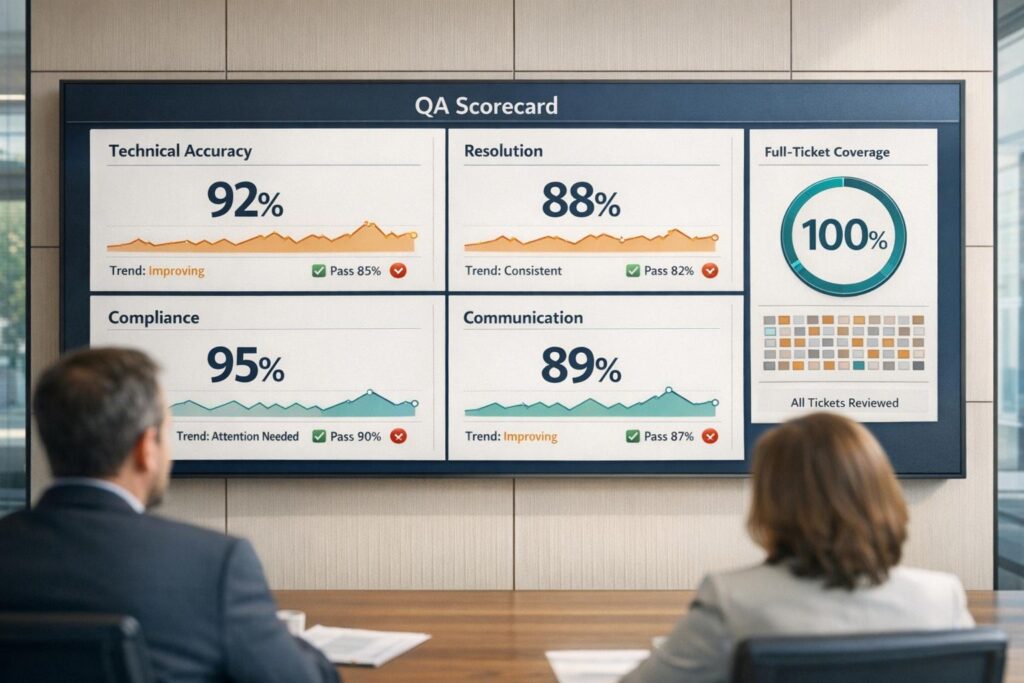
QA scorecards are essential for evaluating technical support performance. They break down customer interactions into measurable criteria, ensuring agents deliver accurate solutions, follow procedures, and communicate effectively.
Key areas to measure include:
- Technical Accuracy: Did the agent resolve the issue correctly and follow troubleshooting workflows?
- Resolution Quality: Metrics like First Contact Resolution (FCR) and efficient escalations.
- Compliance: Adherence to security protocols, proper documentation, and process consistency.
- Customer Communication: Clarity, tone, empathy, and professionalism in interactions. Analyzing these elements often requires advanced sentiment analysis to ensure consistent quality.
Why it matters: Traditional QA methods only review 2-5% of tickets, delaying problem detection. AI-powered QA tools now allow 100% ticket analysis for as little as $0.01–$0.05 per interaction, compared to $4.00 for human reviews. This shift enables faster, more accurate evaluations, improving coaching and overall support quality.
How to build effective scorecards:
- Define clear, measurable criteria (e.g., binary Yes/No for specific actions, numerical scales for subjective elements).
- Organize by workflow stages, such as intake, troubleshooting, resolution, and documentation.
- Customize based on communication channels (phone, email, chat) and support tiers (Tier 1 vs. Tier 2/3).
- Assign weights to prioritize critical metrics like troubleshooting accuracy or compliance.
Consistency is key: Use observable behaviors to reduce subjectivity in scoring. AI tools can help standardize evaluations, flag critical errors, and provide actionable insights for coaching.
The result? QA becomes a daily, data-driven process, enabling teams to address issues quickly and improve customer satisfaction.
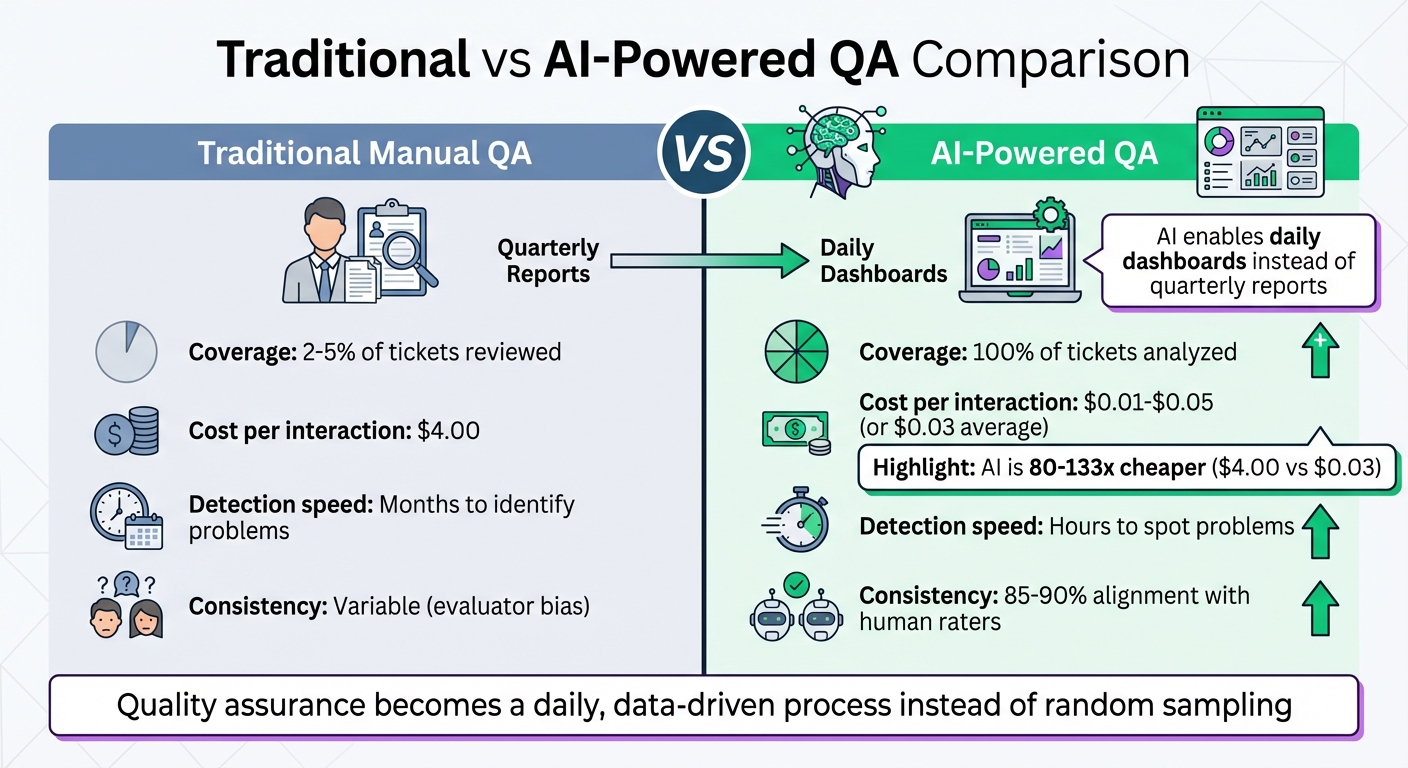
Traditional vs AI-Powered QA: Cost and Coverage Comparison for Technical Support
From Zero to AI Hero: Building a Fully Automated QA Scoring Program
sbb-itb-e60d259
What to Measure on Technical Support QA Scorecards
QA scorecards need to focus on metrics that ensure agents solve issues accurately while maintaining clear and effective communication. This combination directly impacts fewer escalations, better customer retention, and reduced costs.
The best scorecards strike a balance between technical accuracy and quality of human interaction. While getting the technical fix right is crucial, how well agents communicate solutions determines whether customers feel confident and supported. Research shows that 75% of customers are willing to pay more for a good customer experience [2]. For B2B technical support, both aspects are equally important. Below are the key areas to assess when evaluating technical support performance.
Accuracy and Technical Correctness
This metric evaluates whether agents use the correct knowledge and follow established diagnostic procedures. It includes:
- Solution accuracy: Did the agent resolve the issue successfully?
- Product knowledge: Did they reference the right tools or documentation?
- Troubleshooting workflows: Did they follow a structured process instead of guessing?
Many teams prioritize troubleshooting accuracy, sometimes giving it double weight [4]. Mistakes in this area can lead to repeated tickets, loss of customer trust, and unnecessary escalations that strain engineering resources. QA scorecards should track how effectively agents used internal knowledge bases, diagnostic tools, and whether they documented their steps clearly enough for another engineer to pick up the case seamlessly.
Resolution Quality
Resolution quality goes beyond technical correctness to measure efficiency and completeness. Key metrics include:
- First Contact Resolution (FCR): Solving the issue in a single interaction.
- Effective escalations: Following proper protocols when handing off complex cases.
- Comprehensive problem-solving: Addressing all customer concerns in one go.
Resolving issues in one interaction not only reduces customer effort but also lowers ticket volume, allowing agents to focus on more challenging cases. For example, one company used conversation analytics to optimize call routing, cutting 82 seconds off average talk times and enabling a 12% increase in call volume without hiring additional staff [3].
However, efficiency metrics like Average Handle Time (AHT) should not come at the expense of customer satisfaction. As CallMiner highlights:
"Mere low AHT is not the goal: low AHT paired with high customer satisfaction is the objective" [3].
Compliance and Process Adherence
Compliance metrics ensure agents follow required procedures, complete verification steps, and meet regulatory standards. For technical support, this includes:
- Security protocols: Did the agent verify the customer’s identity before accessing sensitive systems?
- Remote access consent: Was permission obtained before taking control of the customer’s environment?
- Accurate documentation: Were error codes, configurations, and resolution steps properly recorded?
Adhering to processes ensures consistency and reduces risks. Skipping verification steps or failing to log details creates gaps that make it harder for other team members to deliver seamless support. Scorecards should track whether agents logged all necessary information, followed change management protocols, and complied with data privacy regulations.
Customer Communication and Empathy
This measures how well agents explain technical concepts, maintain professionalism, and build trust through their communication style. Key elements include:
- Clarity: Did the agent use simple, jargon-free language?
- Tone and professionalism: Was their approach respectful and reassuring?
- Active listening: Did they acknowledge the customer’s frustrations?
- Proactive follow-up: Did they offer additional resources or check if other concerns needed addressing?
In B2B environments, where relationships are key to retention, these communication skills are just as critical as technical expertise. Scorecards should assess whether agents adjusted their communication style to match the customer’s technical understanding, set clear expectations about timelines, and showed genuine concern for the customer’s business needs. Evaluations should also account for the communication channel – phone assessments focus on tone and verbal cues, while chat and email evaluations emphasize grammar, clarity, and response speed [2][3].
By defining clear metrics, QA teams can even leverage AI tools to streamline and improve these processes.
| Aspect | Customer Service QA | Technical Support QA |
|---|---|---|
| Primary Goal | Resolve complaints, answer questions | Diagnose and fix technical issues |
| Key Skill | Empathy and communication | Troubleshooting accuracy + communication |
| Knowledge Base Use | Reference policies and procedures | Follow diagnostic workflows, run tools |
| Escalation | To supervisor for policy exceptions | To higher-tier engineers for complex issues |
| Compliance | Standard disclosures | Security protocols, remote access consent |
| Documentation | Interaction notes | Technical steps, error codes, resolution [4] |
How to Build a Technical Support QA Scorecard
A well-structured QA scorecard can significantly improve performance by connecting clear evaluation criteria with a systematic review process. The idea is to create a tool that agents can easily grasp, evaluators can apply consistently, and managers can use to pinpoint areas for improvement.
Define Clear and Measurable Criteria
Start by breaking down general performance ideas into specific, observable actions. For instance, instead of scoring "good communication", focus on measurable behaviors like "used clear language" or "confirmed customer understanding before proceeding."
Use binary scales (Yes/No) for steps that are either completed or missed, such as identity verification. For more subjective aspects like tone or troubleshooting depth, use numerical scales (e.g., 1–5) with detailed descriptions. For example:
- A score of 5 might mean "went above and beyond by identifying related issues proactively."
- A score of 3 could indicate "met basic requirements but missed deeper opportunities."
To ensure consistency, create a scoring guide that defines what "Exceeds", "Meets", and "Needs Improvement" mean for every criterion. This minimizes scoring differences between evaluators, ideally keeping results within a 5% variance [5]. Before launching the scorecard, involve key stakeholders in its development to ensure practicality. Test it with a small group of agents (10–20%) over three to four weeks to identify any unclear criteria or imbalances in scoring weights.
Once the criteria are clear, organize them to match the different phases of the support workflow.
Organize the Scorecard by Workflow Stage
Arrange your scorecard to follow the natural flow of a support interaction: Intake/Greeting, Issue Discovery, Technical Troubleshooting, Resolution, and Wrap-up/Documentation [4]. This makes it easier for evaluators to track the process and for agents to see where they excel or need improvement.
Each stage should include targeted questions:
- Intake: Did the agent greet the customer professionally and verify their identity?
- Discovery: Did they ask the right questions to uncover the root cause?
- Troubleshooting: Did they follow diagnostic steps and use the correct tools?
- Resolution: Was the issue resolved, or were clear next steps provided for ticket escalation?
- Documentation: Were all steps, error codes, and solutions accurately recorded in the CRM?
Keep the scorecard concise – limit it to six to eight key criteria to avoid overwhelming evaluators. Focus more heavily on stages like troubleshooting and resolution, which directly impact customer satisfaction, assigning them 25–30% of the total score. Stages like greetings and closings, while important, can carry a lighter weight, around 10–15%.
After structuring the scorecard by workflow, adapt it to fit specific channels and levels of support complexity.
Customize Scorecards by Channel and Support Tier
Your scorecard should reflect the nuances of different communication channels and support tiers. For example:
- Phone interactions: Emphasize tone and speed.
- Email and chat: Focus on clarity and precision in written communication.
Support tiers also play a role. Tier 1 agents typically manage high volumes of simpler issues, so their scorecards should prioritize speed, adherence to processes, and first-contact resolution. For Tier 2 and Tier 3 agents, who handle more complex problems, fewer interactions (five to ten per month) should be reviewed, but with a deeper focus on diagnostic accuracy, tool usage, and technical detail [4]. In many cases, troubleshooting accuracy is weighted twice as heavily for higher-tier agents [4].
Once you’ve tailored your scorecards based on these factors, assign weights and set clear performance benchmarks.
Assign Weights and Set Performance Thresholds
Weighting criteria ensures the scorecard aligns with your business goals. For example:
- If reducing repeat tickets is a priority, place more emphasis on troubleshooting accuracy and documentation.
- If compliance is key, give higher weight to process adherence and security protocols.
Set clear performance thresholds to categorize results. For instance:
- Scores of 45–50: "Excellent"
- Scores of 40–44: "Good"
- Scores of 35–39: "Satisfactory"
- Below 35: Requires coaching
Tie these thresholds to specific actions. Agents scoring below 35 might need one-on-one coaching, while those consistently scoring above 45 could earn recognition or advancement opportunities.
If you’re integrating AI into the scoring process, calibrate it by comparing AI-generated scores to 200 human-scored tickets. Once the AI matches human evaluations at least 80% of the time [1], it can reliably guide coaching without requiring constant manual checks.
How to Maintain Consistency in QA Evaluations
Scorecards lose their effectiveness when evaluators interpret criteria differently. For example, one reviewer might rate an agent’s tone as "excellent", while another might see the same interaction as merely "adequate." These inconsistencies lead to unfair performance reviews and undermine trust in the QA process. In technical support QA, consistent evaluations are the backbone of effective coaching and improving processes. The key is to minimize interpretation during evaluations.
Reduce Subjectivity in Scoring
The best way to ensure consistency is to base evaluations on observable, measurable behaviors. Instead of vague questions like, "Was the agent helpful?" define what helpfulness looks like. For instance, ask, "Did the agent confirm understanding before proceeding?" or "Did the agent provide a specific timeline for follow-up?"
Manual QA reviews typically cover only a small portion of calls [6]. In contrast, AI can evaluate 100% of interactions [7], applying a consistent rubric free of fatigue or bias. AI models can detect tone issues, such as condescension or empathy gaps, with 85–90% alignment with human raters [1].
"The future of QA is real-time – setting your agents up for success while they’re on the call, not after it’s over." – Maria Edington, Balto [6]
To further reduce bias, rotate human evaluators regularly and diversify the QA team [3]. Avoid assigning the same evaluators to score the same agents repeatedly, as this could introduce bias rather than consistency.
Once scoring is standardized, the next step is to focus on addressing errors and using evaluations to improve coaching.
Identify Critical Errors and Their Weight
Not all mistakes carry the same weight. For instance, failing to verify a customer’s identity before accessing their account is far more serious than forgetting to offer a follow-up email. Your scorecard should reflect this by flagging critical errors that automatically disqualify an interaction.
Clearly define critical errors, such as security breaches, providing incorrect technical information that could harm customer systems, or failing to escalate urgent issues. These errors should trigger immediate coaching sessions or additional reviews. AI-powered QA tools can flag interactions with low scores, negative sentiment, or poor performance in key areas for human review [1], ensuring critical issues are addressed promptly.
For AI-generated responses, reviewers should also watch for inaccuracies or instances where the AI failed to escalate complex issues to a human [7]. Assign significant weight to these errors so they cannot be outweighed by strong performance in less important areas.
Choose Metrics That Enable Coaching
Every metric on your scorecard should lead to actionable feedback. Metrics must clearly guide agents toward specific behavioral changes. For example, if an agent scores low on "troubleshooting depth", feedback could suggest steps like "use diagnostic logs before recommending reinstallation" or "verify error codes against the knowledge base."
"QA data gives managers the evidence they need to make targeted interventions rather than blanket policy changes." – Decagon [7]
The trend is shifting from quarterly reports to daily dashboards, enabling managers to provide feedback based on precise data patterns [1]. Instead of general advice like "be more empathetic", pinpoint the exact moment in a conversation where acknowledging a customer’s frustration could have changed the outcome. This level of detail requires metrics based on observable behaviors and supported by reliable data.
Using AI to Automate and Scale QA Processes
Manual QA processes typically review just 2–5% of customer interactions, leaving the majority unchecked [1]. AI steps in to bridge this gap by evaluating every single interaction, offering full visibility and actionable insights. Instead of relying on random sampling, AI allows human reviewers to focus on flagged issues, uncovering trends across your entire operation.
Automated Scoring and Sentiment Analysis
AI tools analyze each ticket across multiple factors, including tone, accuracy, completeness, and adherence to processes [1]. They can even detect subtle cues like passive-aggressiveness or a lack of empathy with accuracy levels of 85–90% compared to human reviewers [1]. One major advantage? AI can spot a drop in customer sentiment before a CSAT survey is even submitted.
From a cost perspective, AI offers a significant advantage – scoring a ticket costs about $0.03 compared to $4.00 for a human review [1]. This makes it possible to scale QA processes while keeping costs low. Additionally, AI automates routine checks, like verifying whether an agent confirmed a customer’s identity or included a reference number. These insights pave the way for targeted improvements and better coaching.
Spot Trends and Coaching Opportunities
AI provides a level of coverage that manual sampling simply can’t match. With dashboards that highlight trends – like declining tone scores or underperforming response templates – managers gain a clearer picture of where to focus their efforts [1]. Instead of relying on general impressions, coaching can now be based on specific, data-driven insights. For example, AI can identify ticket types where resolution quality is slipping or highlight team-wide issues that need attention.
This kind of visibility allows teams to refine their processes and improve overall performance.
Scale QA Operations with AI
AI isn’t about replacing human reviewers – it’s about changing how they work. By flagging tickets with unusually low scores or specific quality concerns, AI enables analysts to focus on the most critical interactions [1]. This layered approach ensures human expertise is used where it’s needed most.
Another key benefit? AI scales effortlessly with increased support volume. Whether you’re handling 1,000 or 100,000 interactions per month, the cost per ticket remains consistent. By reviewing every interaction instead of just a small sample, teams gain a competitive edge in delivering high-quality support while keeping operations cost-effective.
Conclusion
Creating effective QA scorecards for technical support means focusing on the essentials: accuracy, resolution quality, compliance, and communication. Tailor these scorecards to fit your specific workflows and support tiers. The ultimate aim? Building a system that encourages proactive coaching and ongoing improvement – not just a tool for documentation.
The move from random sampling to AI-driven 100% interaction coverage represents a major evolution in quality assurance. Traditional QA methods typically review only 2–5% of interactions [1]. With AI, you can analyze every interaction – at a fraction of the cost [1]. Importantly, this isn’t about replacing human judgment. Instead, AI highlights anomalies and patterns, enabling more targeted and impactful coaching. This shift redefines how QA operates.
"Quality stops being a quarterly report and becomes a daily dashboard. You spot problems in hours, not months." – Supp Blog [1]
To ensure your AI scoring system works effectively, start with calibration. Analyze at least 200 tickets that have already been human-reviewed. Fine-tune your rubric until there’s over 80% agreement between your AI and human evaluations [1]. This step guarantees that your automated scoring aligns with your team’s standards and captures the issues that matter most.
FAQs
How many QA criteria should a technical support scorecard include?
A technical support scorecard usually tracks 6 to 10 key metrics. These might include factors like response time, resolution quality, customer satisfaction, and communication skills. The specific metrics chosen depend on the unique needs and complexity of your support environment. This approach ensures the evaluations align with both team performance and the overall goals of the support operation.
How do you weight technical accuracy vs. customer communication?
Balancing technical accuracy and customer communication in a QA scorecard requires aligning with your support team’s objectives.
Technical accuracy focuses on resolving issues correctly, which directly affects metrics like resolution quality and compliance. On the other hand, customer communication – covering aspects like empathy, clarity, and professionalism – plays a key role in driving customer satisfaction and loyalty, often reflected in CSAT scores.
An effective scorecard assigns appropriate weights to these elements based on their importance. AI tools can further enhance this process by dynamically evaluating and fine-tuning these priorities, ensuring continuous improvement over time.
How do you validate AI QA scores against human reviews?
To ensure the accuracy of AI QA scores, incorporate calibration sessions where human reviewers independently score and then reconcile any differences through discussion. This process helps establish clear standards. Additionally, use AI tools to identify potential biases and maintain consistency in key metrics, such as resolution quality and empathy. A standardized QA scorecard combined with regular calibration ensures that the variance stays below 5%, keeping AI evaluations closely aligned with human assessments.