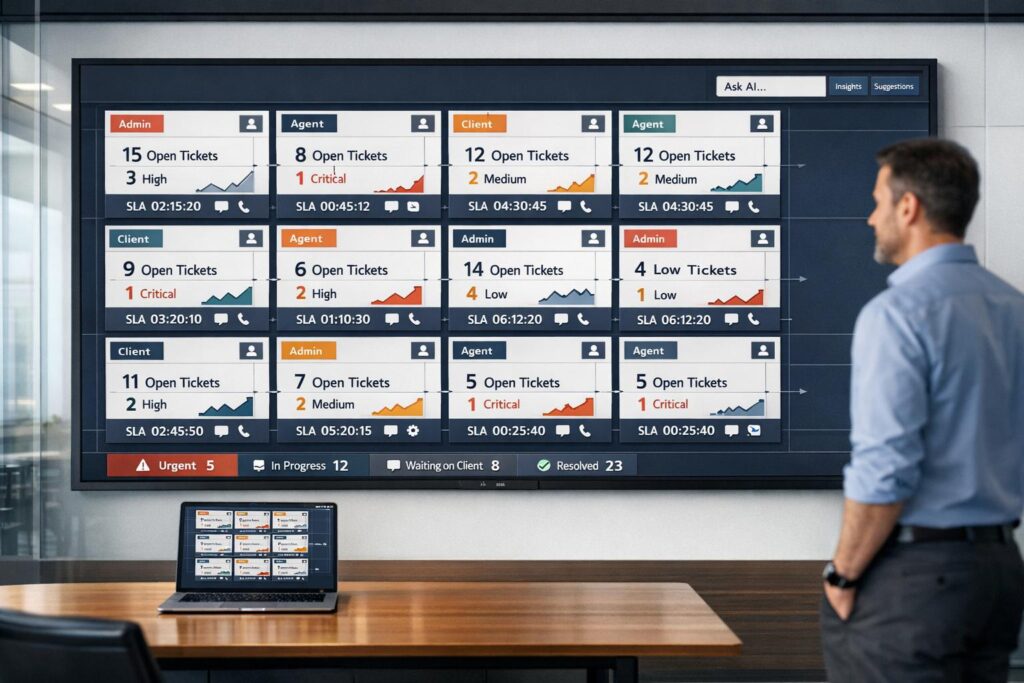
Managing multiple clients effectively requires a well-structured customer portal. Without it, MSPs risk missed tickets, delayed responses, and unhappy clients. A great portal centralizes communication, ticketing, billing, and reporting, helping providers choose the right helpdesk platform for MSPs to deliver better service while scaling operations. Here’s what you need to know:
- Centralized Features: Combine ticketing, billing, and reporting into one platform for easy access.
- Role-Based Access: Use permissions to ensure users only see what they need, boosting security and usability.
- Personalized Dashboards: Tailor views for different client roles (e.g., executives vs. technicians).
- AI-Powered Self-Service: Reduce ticket volumes with searchable knowledge bases and automated responses.
- Multi-Channel Integration: Unite email, chat, and phone support into a single system for seamless communication.
- Dynamic SLAs: Adjust response times based on client needs and urgency.
- Custom Reporting: Provide clear, real-time insights into performance and IT health.
MSPs that implement these strategies can improve client satisfaction, reduce churn, and scale efficiently – all while cutting operational costs. A well-designed portal is no longer optional – it’s the backbone of modern MSP success.
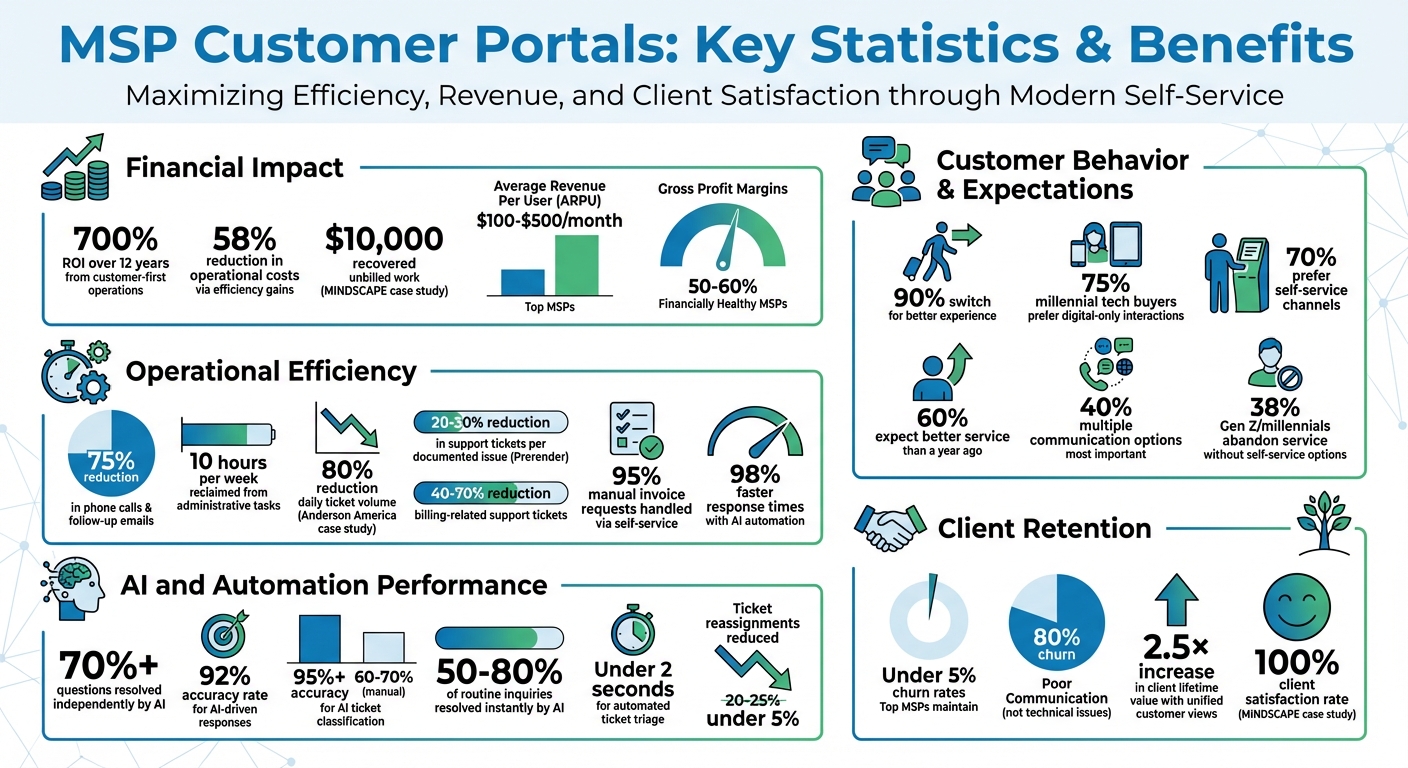
MSP Customer Portal ROI and Performance Statistics
MSP Manager Introduction & Overview
sbb-itb-e60d259
User Segmentation and Role-Based Access Control
Getting user segmentation right is crucial for building a secure and scalable multi-client portal. Without proper access controls, you risk exposing sensitive client data. The objective here is straightforward: users should only access what they need – no more, no less.
Role-based access control (RBAC) is the key to achieving this. It allows you to assign specific privileges to different user types and link those permissions to individual accounts. This not only strengthens security but also creates a more focused and intuitive experience for users. For example, a C-level executive at one client should not have the same dashboard view as a help desk technician at another. When users log in and immediately find what they need, it boosts adoption rates and cuts down on support tickets. This approach also lays the groundwork for streamlined dashboards and AI-driven enhancements discussed later.
Setting Up Role-Based Access for Security
To start, establish at least three core permission levels: Admins, Owners, and Members.
- Admins: Have full control over all settings.
- Owners: Can edit content and customize settings for their specific client segment.
- Members: Have view-only access to relevant resources.
This tiered structure ensures that sensitive configurations – like billing details or security settings – remain protected while still giving client-side managers the flexibility they need.
Automate the linking of user accounts to client resources through email or directory services. This enables instant provisioning for new users and immediate access revocation when needed. For managed service providers (MSPs) handling dozens or even hundreds of clients, automation is a must.
You might also consider adding a restricted administrative area within the portal. This section, accessible only to client-side administrators, could house billing details, invoices, and infrastructure reports. This setup provides transparency for your clients while keeping backend controls out of reach. Implementing single sign-on (SSO) can further simplify access, reducing the need for multiple logins and cutting down on password reset requests. This structured access control is a key element in enabling proactive support, which will be explored further in upcoming sections.
Creating Separate Client Segments
A multi-tenant architecture is essential for isolating client data while sharing infrastructure. This setup allows multiple clients to operate in completely separate virtual spaces, even though they share the same underlying system.
Assigning unique URLs to different client segments ensures a clean separation from the moment users log in. Beyond the technical benefits, this small detail reinforces the perception that your portal is a professional, dedicated tool – not just a generic third-party platform. Pair this with custom branding to make the portal feel like a seamless extension of the client’s internal systems. When the portal looks and feels familiar, adoption becomes almost effortless.
Use a centralized management console to oversee top-level data across all clients while maintaining the ability to securely launch isolated sessions for specific organizations. This "single pane of glass" approach allows your team to monitor performance and identify issues without constantly switching between environments. Tools like Supportbench are designed for this kind of setup, offering role-based security and customizable customer portal features. These features help ensure that each client sees only what’s relevant to them, without requiring costly add-ons or overly complex configurations. This balance of centralized oversight and client-specific isolation sets the stage for advanced analytics and reporting tailored to individual client needs.
Personalized Dashboards and 360-Degree Customer Views
After establishing proper access controls and segmenting clients effectively, the next focus is delivering the right information at the right time. A thoughtfully designed dashboard elevates your portal from just a ticketing tool to a centralized IT hub – eliminating the hassle of jumping between systems to get a full IT picture [1].
By consolidating key data, a unified dashboard reduces the need for constant toggling between platforms. This transparency keeps clients informed without relying on frequent phone calls or email updates.
Building Client-Specific Dashboards
The key to effective dashboards is tailoring them to the needs of different client roles. For instance, an executive might need a high-level overview of SLA performance and IT health, while a help desk manager would benefit from detailed views of ticket queues and technician assignments. Role-based customization ensures that stakeholders see only the information relevant to their responsibilities [1].
To avoid overwhelming clients with raw data, integrate information from PSA tools, billing systems, and communication platforms. Clients should have real-time access to ticket statistics, network performance metrics, and financial details like quote approvals and subscription renewals [1]. This level of transparency demonstrates your value as a strategic partner rather than just a reactive service provider.
Self-service access to performance data, quote tracking, and subscription management meets clients on their terms. Platforms like Supportbench offer customizable dashboards as a standard feature, allowing you to provide 360-degree customer overviews and KPI scorecards without requiring expensive add-ons or complicated setups.
These tailored dashboards naturally flow into a broader, comprehensive view of each customer’s journey.
Using 360-Degree Customer Overviews
Building on customized dashboards, a 360-degree overview consolidates all client interactions into one place, enabling immediate and informed support. This view includes ticket history, contract details, billing records, and a complete timeline of customer interactions. With this information at their fingertips, your team can provide proactive assistance without unnecessary back-and-forth [2].
To make this work effectively, bidirectional integration with your PSA tools is critical. Whether you’re using ConnectWise, Halo PSA, Autotask, or Syncro, any updates in one system should instantly reflect in the other. For example, when a client submits a ticket through the portal, it should automatically populate in your PSA with the correct details – priority, assigned technician, and SLA terms based on their contract.
Visual tools like color-coded badges and progress steppers make it easy to assess ticket status at a glance. For instance, red badges can indicate critical issues, while yellow flags medium-priority tasks. Progress steppers (e.g., New → In Progress → Resolved) let both agents and clients track a ticket’s lifecycle without digging through detailed notes. An activity timeline that logs notes, status changes, and updates in chronological order builds trust by offering a transparent audit trail.
Managed Service Providers (MSPs) that adopt these unified views as part of a strong client experience strategy see a 2.5× increase in client lifetime value [2]. Consolidating customer data not only improves retention but also enables you to deliver proactive, strategic advice based on a complete understanding of the client relationship. Personalized dashboards and unified customer overviews are essential for running scalable, efficient, and forward-thinking operations.
Shared Knowledge Bases with AI-Driven Self-Service
A well-organized knowledge base can significantly reduce ticket volumes while boosting client satisfaction. When customers can find answers on their own – without waiting for support – they enjoy faster resolutions, and your team can focus on tackling more complex technical challenges. For MSPs, the tricky part is creating a knowledge base that serves multiple clients securely while consistently delivering accurate and relevant information.
The solution? Pair a centralized repository with AI tools that go beyond keyword matching to understand user intent. This combination turns static documentation into an interactive, personalized support experience.
Building a Centralized Knowledge Base
Your knowledge base should balance general information that all clients can access with client-specific content protected by role-based permissions. This setup ensures clients only see content that’s relevant to them, safeguarding sensitive information while enhancing usability [7].
Start by identifying the most common support requests and turning them into searchable articles. Use CRM data and call transcripts to pinpoint frequent issues like password resets, software installations, and billing questions [10]. These should be your top priorities. Organize articles with clear categories, tags, and metadata – such as last-updated dates and priority levels – so AI tools can quickly locate the right answers [9].
Integrate your knowledge base with your PSA system to pull real-time data. This ensures clients can find up-to-date details about their contracts or SLA terms without needing to submit a ticket.
A common pitfall is treating the knowledge base as a “set-it-and-forget-it” project. Consider this: knowledge workers spend an average of 8.2 hours per week – or 20% of their workweek – searching for or recreating information [11]. Regular updates and audits are essential to keep your knowledge base accurate and reliable.
Once your centralized repository is in place, it’s time to let AI take your self-service capabilities to the next level.
Using AI to Improve Self-Service
With a solid foundation in place, AI can transform your knowledge base into a dynamic, interactive tool. Instead of relying on users to guess the right search terms, AI tools interpret natural language queries, delivering accurate answers even when users don’t know the exact terminology [12].
For example, Supportbench’s Customer QA Bot uses structured content and FAQs to answer questions automatically. If it can’t find a solution, it escalates the issue by creating a new case and initiating a chat session, ensuring no query goes unresolved. These AI-driven tools can resolve over 70% of customer questions independently, with a 92% accuracy rate [12].
Take Anderson America as an example: under Service Manager Justin Wilder, they implemented an AI-powered knowledge base and saw an 80% reduction in daily ticket volume. Long, static documents were replaced with instant, interactive support, enabling customers to solve issues on their own [12].
AI also ensures your knowledge base stays relevant. It can flag outdated content, identify gaps, and even turn resolved tickets into new articles. Supportbench’s AI KB Article Creation feature, for instance, uses case histories to generate articles complete with summaries, subject lines, and keywords – keeping your repository fresh without manual effort.
This approach delivers a smarter self-service experience. Clients get immediate answers to routine questions, your team deals with fewer repetitive tickets, and your support system becomes scalable as your business grows. With 75% of millennial-aged tech buyers preferring digital-only interactions for routine tasks [1], AI-powered self-service isn’t just a smart investment – it’s what modern clients expect.
Multi-Channel Ticketing and Automation Workflows
Today’s MSP clients expect quick, hassle-free access to support through email, live chat, phone, and portal submissions. But when these channels function independently, it creates inefficiencies for your team and a disjointed experience for clients. The solution? Combine all communication methods into one centralized system and let AI handle repetitive tasks like sorting, routing, and escalating tickets. This approach not only simplifies processes but also enhances every client interaction.
Consolidating Multi-Channel Communication
Centralizing communication channels into a single, branded hub eliminates fragmented client experiences. By integrating email, live chat, and phone support into a unified ticketing system, every interaction is captured and tied to a ticket. This creates a clear audit trail for accountability and ensures no detail slips through the cracks [1][13].
Connecting this system with your PSA or CRM is key. For instance, when a client sends an email, starts a chat, or calls, the system should automatically generate a ticket, link it to their account, and provide the full context – like recent tickets, contract details, and SLA terms. This way, clients don’t have to repeat themselves, and your team has all the information they need to respond effectively. Just as customized dashboards provide better insights, consolidating communication channels ensures every interaction is tied to the client’s profile.
40% of consumers say having "multiple options for communicating" is the most important feature of customer service [1]. For MSPs, poor communication – not technical issues – accounts for 80% of client churn [2]. A unified interface ensures your team stays organized while meeting clients on their preferred platforms.
"One of the biggest wins? Transparency. Clients can check ticket status, submit requests 24/7, and track project milestones in one place." – Bering McKinley [13]
Adding a self-service portal that combines all communication channels not only boosts efficiency but also aligns with the preferences of clients who favor digital-first support options.
Automating Ticket Triage and Escalations
Once communication is unified, automation takes things a step further by streamlining ticket handling. Automated triage can process tickets in under 2 seconds, a huge improvement over manual processes [14]. But it’s not just about speed – AI-driven classification achieves 95%+ accuracy, compared to the 60–70% accuracy of manual efforts [14].
Here’s how it works: Natural Language Processing (NLP) reviews ticket content – whether it’s from an email, chat, or portal submission – to identify the issue type, symptoms, and urgency. The system uses a hierarchy (like Hardware > Server > Failure) to categorize the issue and prioritizes it based on factors such as business impact, technical severity, and SLA terms. Tickets are then routed to the technician with the right skills, availability, and proven track record for similar issues.
This approach reduces ticket reassignments from 20–25% to under 5% [14]. Fewer handoffs mean quicker resolutions and happier clients. For tickets with less than 85% confidence in their classification, the system flags them for human review to maintain accuracy [14].
Escalation automation is another game-changer. Predefined rules can automatically escalate tickets or send alerts when SLAs are at risk of being breached [7][13]. For example, if a VIP client’s ticket isn’t addressed promptly, the system can escalate it to a senior technician and notify the account manager. This ensures critical issues are addressed without delay.
"Automated ticket triage for MSPs eliminates the manual bottleneck that delays every ticket before work even begins." – Mathieu Tougas, Mizo [14]
The impact? AI can resolve 50–80% of routine inquiries – like order status checks or password resets – instantly, freeing up your team to tackle more complex problems [8]. Teams leveraging AI for frontline support have seen response times drop by 98% for automated interactions [8]. This kind of intelligent workflow automation demonstrates how AI can transform MSP support, delivering faster, more efficient service while cutting costs.
Dynamic SLAs and Predictive Analytics for Proactive Support
Building on automated triage and multi-channel consolidation, adjusting your SLAs can elevate your support strategy to a proactive level. Meeting client expectations requires responses tailored to their specific needs and priorities. Relying on static SLAs that treat every ticket the same can lead to friction, especially when managing clients with diverse requirements. By leveraging dynamic SLAs and predictive analytics, MSPs can shift from reactive problem-solving to proactive partnerships, addressing issues before clients even notice them.
Configuring Dynamic SLAs
Dynamic SLAs adapt automatically based on factors like client profile, issue urgency, and the customer’s lifecycle stage. For example, a VIP enterprise account nearing renewal might require a faster response time than standard accounts to ensure a seamless experience during a critical period [7][8]. Similarly, clients in the onboarding phase can benefit from prioritized support to build trust early on [8].
Your support portal should make it easy to configure these parameters. Automated workflows can be set up to alert team leads when SLAs are at risk [7]. This ensures that urgent issues are addressed promptly. When integrated with real-time monitoring systems, your help desk can automatically create tickets based on system health, allowing you to resolve potential problems before they escalate [7].
"The new, younger (millennial-aged), majority buyer of tech and telco products… has different psychology, buying behaviors, and journey… 75% preferring not to interact with a human." – Jay McBain, Chief Analyst, Canalys [1]
This shift to proactive support aligns with evolving customer expectations. In fact, 60% of customers now expect better service than they did just a year ago [1]. Moreover, nearly 90% would switch to a competitor if they found a better customer experience [1]. Dynamic SLAs allow you to meet these expectations by tailoring support to each client’s unique needs.
Using Predictive Analytics to Anticipate Support Needs
Predictive analytics, powered by historical data, helps identify patterns across customer interactions without the need for manual checks. AI-driven tools analyze all interactions to uncover recurring frustrations, language that signals churn risk, or keywords that indicate growing dissatisfaction [8].
For instance, if a client frequently mentions slow response times or uses increasingly frustrated language in their tickets, the system can flag the account for immediate attention. AI-based sentiment analysis detects rising frustration in real time, enabling you to prioritize high-risk tickets and intervene before the client considers leaving [8]. This approach transforms support from reactive troubleshooting to proactive relationship management.
Predictive analytics also works hand-in-hand with personalized dashboards. Monitoring device health, subscription levels, and license usage from a unified interface allows you to anticipate resource needs and address capacity issues before they disrupt service [15].
"Structure creates consistency. When decision-making frameworks, escalation paths, and service standards are documented and followed, customers get reliable experiences that build long-term loyalty." – Cristian Tamas, Siena AI [8]
The benefits are clear. Customer-first operations can deliver up to a 700% ROI over 12 years [1], while teams using autonomous AI for frontline support have seen response times drop by 98% [8]. By combining dynamic SLAs with predictive analytics, MSPs can transition to a proactive, value-driven service model. This makes your portal not just a support tool but a strategic asset for preemptive client care.
Custom Reporting and KPI Scorecards for Client Transparency
Transparent reporting is a game-changer when it comes to building trust and keeping clients on board. When clients can clearly see the value you’re delivering – backed by real, measurable data – they’re far less likely to second-guess your work or consider switching to a competitor. In fact, nearly 90% of customers would switch to another company for a better customer experience [1]. By incorporating custom reporting and KPI scorecards into your portal, you transform it into a powerful tool that demonstrates your value every single day.
Creating Custom Reports for Each Client
Your portal should act as a one-stop hub where clients can track critical metrics like network performance, ticket stats, and infrastructure health. This eliminates the hassle of navigating multiple manufacturer portals and cuts down on the back-and-forth communication that wastes time for both you and your clients.
To ensure security, implement role-based access that restricts sensitive data to authorized client administrators [6]. This setup protects financial details while still giving decision-makers the tools they need to manage IT spending effectively. For instance, offering direct access to invoice histories, real-time payment updates, and upcoming charges can significantly reduce billing-related support tickets – by as much as 40% to 70% [16]. Additionally, self-service portals can handle up to 95% of manual invoice requests by providing clients with permanent online access to their financial records [16].
Make it easy for clients to view invoices, receipts, and historical reports with just a click. Move beyond static monthly reports by offering dynamic, real-time dashboards that provide actionable insights. This shift prioritizes what clients need to see to make informed decisions, rather than just presenting data you think they should have [6].
These custom reports lay the groundwork for KPI scorecards, which turn raw data into clear, measurable insights.
Using KPI Scorecards for Performance Visibility
KPI scorecards provide clients with a transparent view of how your services are performing and where improvements can be made. The key is to focus on metrics that drive action instead of vanity stats. For example, total ticket volume alone doesn’t tell the full story – pair it with resolution times or the impact of automation to highlight your true value [17].
Here are some essential KPI categories to track:
- Service delivery KPIs: Metrics like Average First Response Time and Mean Time to Resolution (MTTR) showcase your team’s efficiency.
- Client satisfaction KPIs: Customer Satisfaction (CSAT) scores and Net Promoter Score (NPS) provide insights into service quality and client loyalty.
- SLA compliance: Tracks how well you meet agreed-upon service levels, which is critical for maintaining client trust.
Top-performing MSPs keep their churn rates below 5% by leveraging data to enhance visibility into their operations [17]. Financially healthy MSPs typically achieve an Average Revenue Per User (ARPU) ranging from $100 to $500 per month, with gross profit margins hovering around 50–60% [17]. Investing in client-focused operations can deliver a 700% ROI over a 12-year span [1].
"Proving the worth of your services can be tough, but not with a client portal. Customized dashboards and detailed reports let clients see the tangible benefits of your work." – CloudRadial [5]
Each KPI should align with a SMART goal – Specific, Measurable, Achievable, Relevant, and Time-bound [17]. For example, you might aim to increase billable utilization from 60% to 75% by Q2, giving both you and your client a clear objective to work toward. Incorporating AI-driven classification can also enhance data accuracy, boosting it from the typical manual rate of 60–70% to over 95% [14]. This ensures your scorecards reflect actual performance and strengthens client confidence in your services.
Common Mistakes and Best Practices for Customer Portals
Even with the best intentions, MSPs can unintentionally limit the effectiveness of their customer portals. A frequent error is focusing solely on ticketing. Many portals only provide a form for submitting tickets, which clients often find less convenient than simply calling or emailing [6]. If the portal doesn’t offer additional value, clients are unlikely to use it, leading to poor adoption rates.
Another big misstep is creating a fragmented user experience. When clients have to navigate multiple platforms to access different features, frustration sets in [1][18]. This defeats the purpose of having a portal. Instead, aim for a single, unified hub where all client information and tools are readily accessible without requiring multiple logins.
Additionally, many MSPs design their portals with internal needs in mind, rather than focusing on what clients actually need [6]. This often results in overly complex interfaces with confusing navigation and scattered tools, which discourages use [18]. Considering that nearly 90% of customers would switch to a competitor for a better experience [1], it’s clear that prioritizing client-centric design is non-negotiable. These insights highlight the importance of refining both the user interface and content management strategies.
Avoiding Overly Complex Portal Designs
When it comes to portal design, simplicity is key. Overloading the interface with too many features or cluttered layouts will drive clients away, no matter how useful the tools might be. The focus should be on prioritizing the features clients use most and making them easy to locate. For instance, clear labels like "My Projects" instead of vague terms like "Initiatives Dashboard" help direct client attention [18]. Including a prominent search bar on every page also allows users to quickly find what they need.
Another effective strategy is context-aware design. Instead of tucking all FAQs into a generic help section, place relevant resources exactly where clients are likely to need them. For example, include billing FAQs directly on the invoice page [18]. This reduces the effort clients need to solve issues and keeps navigation straightforward. Additionally, using role-based access control ensures users only see features relevant to their specific roles, minimizing unnecessary clutter for non-admin users [3][4].
To encourage portal use, offer tangible incentives like faster response times. For instance, in 2023, the digital marketing agency MINDSCAPE introduced a 2-hour SLA for portal-submitted tickets compared to a 24-hour response for email inquiries. This approach helped them save 104 hours annually, recover $10,000 in previously unbilled work, and achieve a 100% client satisfaction rate [18]. When clients see clear benefits such as quicker support, they’re more likely to adopt the portal. A streamlined, client-first design ensures better engagement overall.
Maintaining and Updating Your Portal Regularly
A portal’s value relies on how up-to-date its information is. Outdated articles or broken links can quickly erode client trust. Assigning a dedicated content owner to manage updates is crucial. Conduct a full review every six months to ensure all resources are accurate and relevant [18]. Incorporate portal updates into your regular service changes so that whenever a new feature or workflow is introduced, the portal reflects those updates.
Review support data from the past 3–6 months to identify recurring issues that generate the majority of tickets. Focus on addressing these topics in your self-service library [18]. When Prerender adopted this strategy in October 2025, they saw a 20–30% reduction in support tickets for each issue they documented [18]. This shift also improved the quality of tickets, as clients began asking more complex, meaningful questions instead of basic "how-to" inquiries.
When clients email questions already answered in your portal, respond with a direct link to the relevant resource. Over time, this approach encourages self-service and lightens the support team’s workload. Keep in mind that 70% of customers already prefer self-service channels [18], and 38% of Gen Z and millennial customers will abandon a service issue if self-service options aren’t available [18]. Regular updates and a well-maintained portal are not just helpful – they’re essential for meeting modern client expectations.
Conclusion: Building Scalable Customer Portals for MSP Growth
A well-designed portal is the backbone of sustainable growth for managed service providers (MSPs). By streamlining ticketing, billing, communication, and performance tracking, it eliminates fragmented client experiences and helps build stronger, long-lasting partnerships [1].
The benefits go beyond improving customer interactions – there are clear financial and operational advantages too. For instance, MSPs that use centralized client portals have reported reducing phone calls and follow-up emails by as much as 75% [19]. Additionally, some have seen operational costs drop by 58% while reclaiming around 10 hours per week from administrative tasks [20]. These time and cost savings free up your team to focus on tasks that drive more value.
"A client portal isn’t just a nice-to-have; it’s a must-have for MSPs." – CloudRadial [5]
From the start, it’s important to design with scalability in mind. Features like multi-client segmentation ensure secure data isolation, while AI-powered tools for self-service and proactive monitoring turn your portal into a strategic asset. Instead of just handling tickets reactively, the portal can actively anticipate and address issues in real time [7][5]. Dashboards and reporting tools, as mentioned earlier, further highlight the portal’s role in delivering both automation and transparency [5].
The financial payoff of this approach is hard to ignore. Investing in a robust, customer-focused portal can deliver up to a 700% return on investment over 12 years [1]. As your client base grows, a thoughtfully built portal will scale effortlessly, maintaining top-notch service quality. With a unified customer support platform in place, managing growth shifts from being overwhelming to something you can handle with confidence and control.
FAQs
How do I separate client data while still managing everything in one portal?
To keep client data separate while managing everything in one place, implement account-based views and a multi-tenant architecture. This setup allows you to organize tickets, contacts, and communication history under distinct client records, ensuring each client’s data remains isolated.
Additionally, configure role-based access control (RBAC) and account segmentation. This way, clients can only access their own data, while the managed service provider (MSP) retains centralized control. This approach not only safeguards data privacy and security but also streamlines multi-client management within a single portal.
What roles and permissions should I set up first for a multi-client MSP portal?
To create a secure and well-organized multi-client MSP portal, it’s essential to establish clear roles and permissions. Here are the key components to consider:
- Administrator Role: Grants full control over settings, user management, and configurations, ensuring smooth operation of the portal.
- Client Contacts with Limited Access: Allows clients to view only their own tickets, reports, and data, maintaining privacy and focus.
- Role-Based Access Control (RBAC): Sets specific permissions for internal teams, such as agents or managers, to handle client data securely and efficiently.
This structure promotes clear boundaries, enhances security, and supports growth.
Which portal automations deliver the fastest ticket and cost reduction?
Automating tasks such as password resets, routine access updates, and common troubleshooting can deliver immediate reductions in both ticket volume and costs. These baseline automations have the potential to cut ticket volume by 30-40% while automating up to 70% of repetitive tasks. This not only streamlines operations but also saves time and resources.