MSP Buyer’s Guide · Published March 2026 · Updated June 2026
The best helpdesk software for managed service providers is not a single tool — managed service providers do not all need the same helpdesk. Some teams need an all-in-one platform built around RMM and technician workflows. Others need stronger client-facing support operations with account visibility, dynamic SLAs, escalations, AI assistance, knowledge, and reporting. This guide compares the best helpdesk software for managed service providers in 2026 based on how MSPs actually work — so you can choose the right platform for your service model instead of forcing a mismatch.
The quick answer
There is no single winner for every MSP. The best helpdesk software for managed service providers depends on whether your team is support-operations-first, RMM-first, ecosystem-first, or ITSM-first:
- Supportbench — the strongest fit when your real problem is client-facing support operations: account context, SLA logic, escalation control, knowledge, and reporting. Best for MSPs that have outgrown inbox-style support but do not want enterprise-suite bloat. From $32/agent/month.
- Atera — the clearer option when you want a unified RMM-first operating model with ticketing and patching under per-technician pricing. From $79/technician/month (annual), unlimited devices.
- Zendesk — the safer choice when you want broad, general-purpose customer-service breadth and a massive integration ecosystem. From $19/agent/month, with Suite tiers at $55 and $115.
- Freshservice — worth a close look when you want a more ITSM-shaped, multi-account service desk with unique-agent billing. MSP Core from $49/agent/month (annual).
What’s in this guide
- How we evaluated the best helpdesk software for managed service providers
- The four platforms compared at a glance
- Supportbench — best for account-aware support operations
- Atera — best for RMM-first MSPs
- Zendesk — best for broad ecosystem flexibility
- Freshservice — best for ITSM-style multi-account desks
- Which platform is right for your MSP?
- What to test in a real evaluation
- FAQ
The four platforms compared at a glance
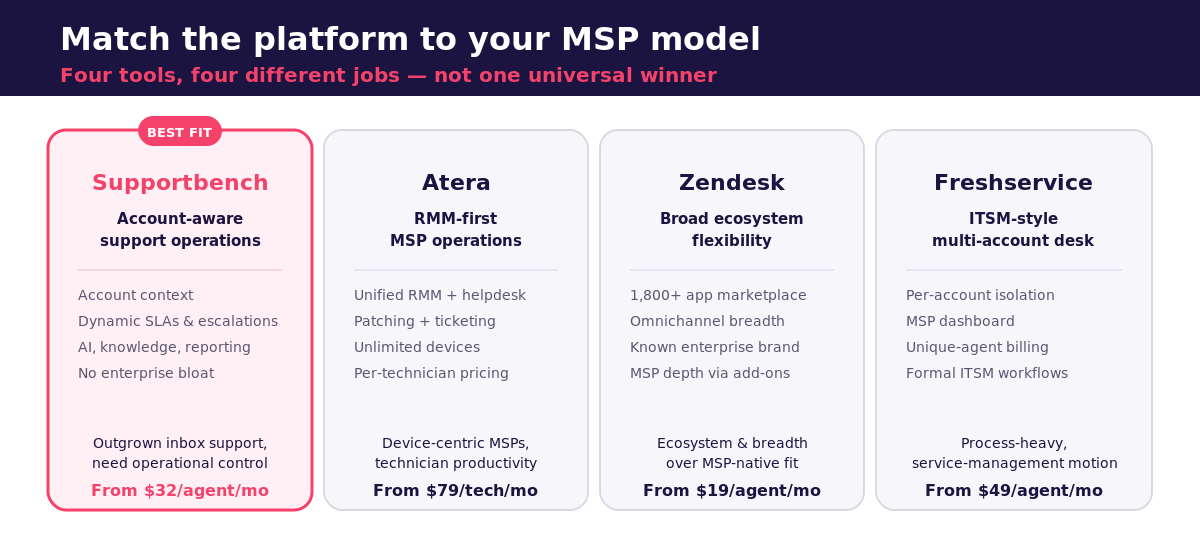
This is the short list of the best helpdesk software for managed service providers in 2026. The goal here is not to crown one universal winner. It is to match a platform to your operating model. This matrix maps each tool to the MSP motion it serves best, not just a price-and-features recap.
| Platform | Best fit category | Starting price | Standout strength | Biggest tradeoff |
|---|---|---|---|---|
| Supportbench | Account-aware support operations | $32/agent/mo | Account context, dynamic SLAs, escalations, AI, reporting — included | Relies on RMM/PSA integrations rather than native device management |
| Atera | RMM-first MSP operations | $79/tech/mo | Unified RMM + ticketing + patching, unlimited devices, per-tech pricing | Less depth for complex client-facing CX governance |
| Zendesk | Broad ecosystem flexibility | $19 / $55 / $115 | 1,800+ app marketplace, omnichannel breadth, known brand | Not MSP-native; multi-client and SLA depth sit behind higher tiers/add-ons |
| Freshservice | ITSM-style multi-account service desk | $49/agent/mo (MSP) | Account isolation, MSP dashboard, unique-agent billing | Process-heavy ITSM shape over high-touch client support |
How we evaluated MSP helpdesk software
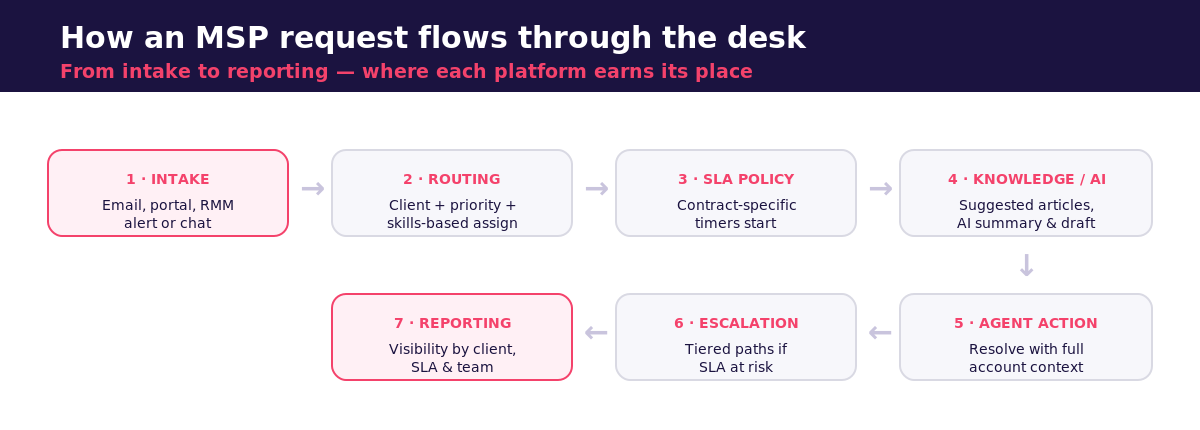
Most “best helpdesk software for managed service providers” lists flatten the category into a feature checklist. We took the opposite approach and judged each platform against the operational problems MSP leaders actually run into when they manage multiple clients at once. The criteria:
- Multi-client management — can the platform keep client data, SLAs, and portals cleanly separated while giving technicians one place to work?
- SLA control — are SLAs contract-specific, tiered, and enforced automatically, or bolted on?
- Escalation workflows — can a Platinum client’s outage escalate differently from a Bronze client’s routine request?
- Email and ticket workflows — does the day-to-day agent experience save time or add clicks?
- AI assistance — does AI improve operations (triage, summaries, sentiment, knowledge) or just deflect chats?
- Knowledge and self-service — can the team reuse knowledge and let clients resolve issues on their own?
- Reporting — does leadership get visibility by client, SLA, and team without a BI project?
- Integration path — how cleanly does it connect to RMM, PSA, and the rest of the MSP stack?
- Pricing model and operational fit — does the billing model match how the team actually works?
Those nine criteria are how we ranked the best helpdesk software for managed service providers below. The honest editorial judgment that follows is built on those criteria, current vendor pricing and documentation, and Supportbench’s own positioning research — not a stitched summary of vendor marketing pages.
1. Supportbench — best for account-aware support operations
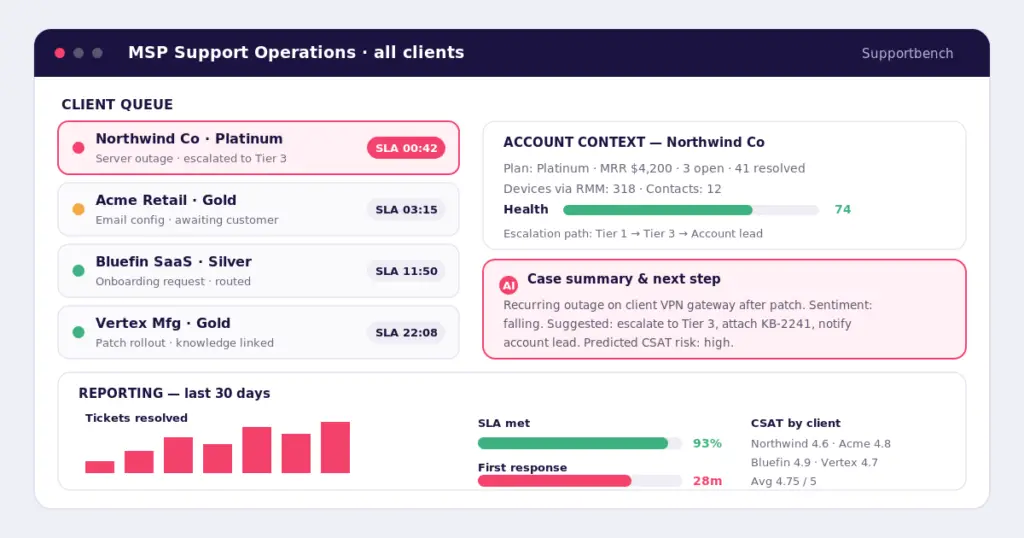
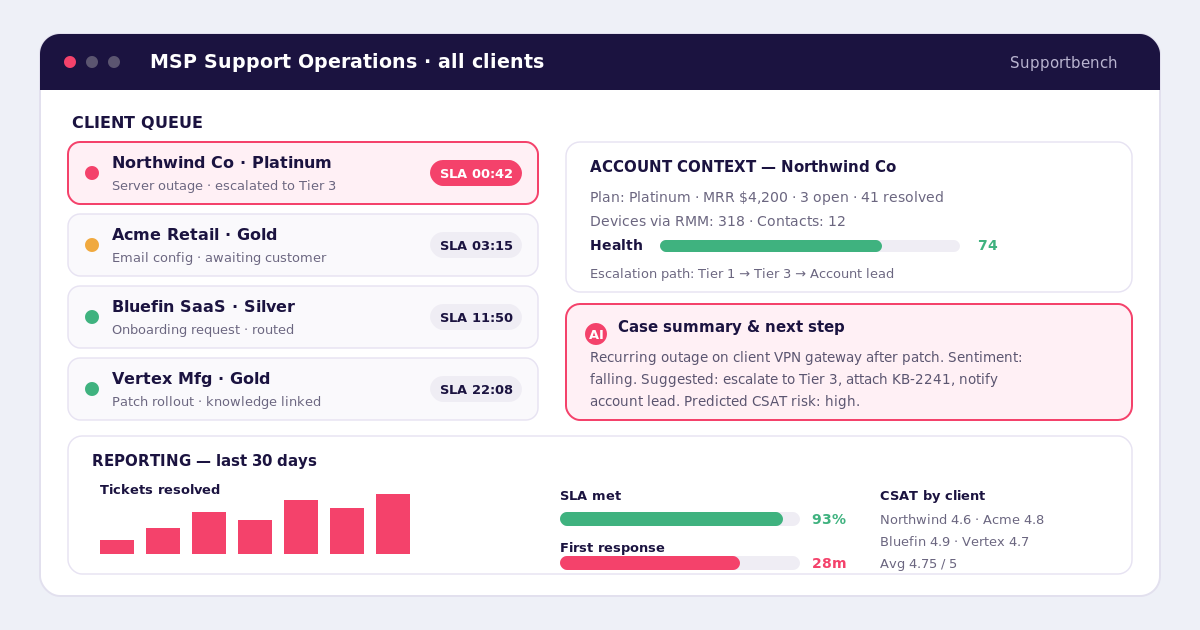
Topping our list of the best helpdesk software for managed service providers, Supportbench is the best fit for MSPs whose support desk has grown beyond ticket intake and now depends on account context, SLA logic, escalation control, knowledge, and reporting. Its product and pricing now lead with account-level customer context, dynamic SLAs, structured escalations, AI assistance, portal and knowledge-base capabilities, reporting, surveys, health scoring, and onboarding in one platform — starting at $32 per agent per month on the Professional plan, with no platform fee.
That makes Supportbench especially strong for MSPs that support higher-accountability client relationships, handle long-running or cross-functional issues, and need a system that gives leaders visibility by company, customer, case, SLA, and team performance. Each client gets complete data separation, tailored SLA policies, branded portals, and team-based access controls, while technicians still work from one centralized view. It is also a strong fit for service organizations that want AI to improve operations rather than just deflect chats: the platform’s AI spans search, FAQ and knowledge bots, article generation, activity and ticket summaries, sentiment analysis, predictive CSAT and CES, smart prioritization, and natural-language reporting.
Pricing: Professional from $32/agent/month (annual); Enterprise $100/agent/month. AI, SLAs, escalations, knowledge base, reporting, and onboarding are included. Startup and non-profit discounts available.
Best for: MSPs whose pain is client support complexity — fragmented history, inconsistent SLA execution, weak escalation visibility, and thin reporting.
Watch for: If your center of gravity is deeply endpoint-centric RMM administration, you may prefer a tool that starts with device management. Supportbench relies on RMM/PSA integrations rather than bundling native monitoring.
2. Atera — best for RMM-first MSPs
Atera is the clearest fit for MSPs that want a platform built natively around technician-led IT operations. It positions its MSP offer as an all-in-one platform with transparent per-technician pricing, unifying RMM, helpdesk, ticketing, and patch management on a shared database so monitoring, tickets, and billing stay in sync. Broader platform messaging emphasizes AI Copilot (now included on every plan), AI agents, customer-portal support, professional-services automation, and unlimited endpoints under a pay-per-technician model.
That makes Atera compelling for MSPs that want one operating system for tickets, devices, automation, and patching rather than a more support-ops-specific platform — and it is particularly attractive for operators who want predictable technician-based economics. The tradeoff is that teams with more complex client-facing support requirements may still want to test whether Atera gives them enough account-level CX control, reporting depth, and collaborative support structure compared with platforms explicitly optimized for support operations. That last point is an editorial inference from Atera’s positioning, not a published Atera claim.
Pricing: Per technician, billed annually — Pro $79, Growth $119, Power $149 per technician/month (monthly $89/$129/$169); Enterprise custom. Unlimited devices and endpoints; AI Copilot included.
Best for: Device-centric MSPs that want unified RMM, patching, and ticketing under one per-technician price.
Watch for: Deep client-facing support governance — tiered SLAs, escalations, account scorecards — may need testing against support-ops-native tools.
3. Zendesk — best for broad ecosystem flexibility
Zendesk is the broad-platform option in this comparison. On its pricing page it positions itself as an AI customer-service solution with a Marketplace of 1,800+ apps, with plans starting at $19 per agent/month for Support Team, $55 for Suite Team, and $115 for Suite Professional, plus Copilot and other add-ons priced separately. It is explicit about the buyer segments for each tier, from teams that have outgrown a shared inbox to teams optimizing operations with advanced automation and AI.
That breadth makes Zendesk attractive for MSPs that want a known brand, a large ecosystem, and strong omnichannel flexibility. But it also means buyers should look carefully at total operating fit and total cost, especially when their needs center on client-specific SLA governance, support-level logic, and account-aware workflows rather than generalized customer-service breadth. Multi-client grouping and advanced automation tend to sit behind higher tiers or paid add-ons, so Zendesk is often the “safe” shortlist option rather than automatically the best operational fit for every MSP.
Pricing: Support Team $19, Suite Team $55, Suite Professional $115 per agent/month (annual); AI Copilot and other capabilities are add-ons.
Best for: MSPs that prioritize ecosystem breadth, omnichannel reach, and a familiar enterprise brand.
Watch for: MSP-specific SLA governance and multi-tenant depth can require higher tiers or third-party apps, raising total cost.
4. Freshservice — best for ITSM-style multi-account desks
Freshservice is the most ITSM-shaped option in this shortlist. Its MSP documentation lets MSPs manage customers either in MSP Mode or in a multi-account configuration where each customer gets its own Freshservice account with complete isolation of data and configuration. An MSP Dashboard gives agents visibility across accounts, and billing is based on the number of unique agents across the account group rather than charging repeatedly for the same agent in multiple environments.
On pricing, the Freshservice for MSPs Core plan lists at $49 per agent/month billed annually, and includes client management, incident management, knowledge base, self-service portal, workflow automator, multiple SLA management, and access controls. Day Passes are available as an add-on for occasional agents (three free at signup), which can suit MSPs with part-time or occasional contributors. Freshservice is a strong candidate when the support motion is process-heavy, structured, and closer to formal service management than high-touch B2B customer support.
Pricing: MSP Core $49/agent/month (annual), billed on unique agents across accounts; Day Passes add-on for occasional contributors.
Best for: MSPs that want formal account isolation, an ITSM operating model, and agent-based multi-account billing.
Watch for: A process-governed ITSM shape can feel heavier than needed for high-touch, relationship-led client support.
Which platform is right for your MSP?
There is no single best helpdesk software for managed service providers — only the best fit for your model. This is where the comparison turns into a decision. Start from your biggest operational pain, not the longest feature list.
| If your biggest pain is… | Lean toward | Why |
|---|---|---|
| Fragmented client history, inbox chaos, inconsistent SLAs, weak escalation visibility, thin reporting | Supportbench | Built for client-facing support operations and leadership visibility without enterprise-suite bloat |
| You want IT operations and technician productivity first — RMM, ticketing, patching, AI under one per-tech price | Atera | Native all-in-one RMM-first operating model |
| You want broad customer-service breadth, a massive ecosystem, and a generalized service stack | Zendesk | Largest marketplace and omnichannel flexibility |
| You want a formal, ITSM-oriented workflow with account isolation and agent-based multi-account billing | Freshservice | Multi-account ITSM with unique-agent economics |
Put plainly: choose Supportbench when the business needs more control over customer-facing support operations without moving into a bloated enterprise stack. Choose Atera when you start from devices and technicians. Choose Zendesk when breadth and ecosystem matter most. Choose Freshservice when you want a formal, account-isolated ITSM motion. Across this roundup of the best helpdesk software for managed service providers, the winning choice is always the one that matches how your team actually operates.
What to test in a real evaluation
Before you buy, test four things against one of your real client workflows rather than a generic feature tour: how well each platform handles multi-client visibility, how flexible SLAs and escalations really are, whether the agent workflow actually saves time, and whether reporting answers leadership questions without turning into a BI project. For Supportbench specifically, make the demo prove account panels, escalations, SLAs, AI-assisted case handling, workflow automation, knowledge reuse, and scorecards against a workflow you run every day. That kind of operational testing tells you far more than a checklist.
Frequently asked questions
What features matter most in the best helpdesk software for managed service providers?
The essentials are multi-client visibility, SLA enforcement, escalation control, agent workflow efficiency, knowledge and self-service, reporting, and a pricing model that matches how your team works. If your MSP is more client-support-heavy than endpoint-heavy, account context and support-operations control matter more than generic ticketing alone.
When should an MSP replace its current helpdesk?
Usually when the team has outgrown inbox-style support, when client-specific workflows and SLAs become hard to manage, or when leadership cannot get reliable operational visibility. Those “outgrown the incumbent” and “the incumbent has become painful” moments are the clearest signals that a more operations-focused platform will pay off.
What is the difference between an MSP helpdesk, a PSA, and an ITSM tool?
In practice, MSP helpdesks focus on ticket handling and customer-service workflows, PSA tools lean toward services operations and billing, and ITSM tools are more process-governed and service-management oriented. Many platforms overlap, which is why operational fit matters more than the label on the box.
Which helpdesk is best for a small MSP versus a larger one?
The best helpdesk software for managed service providers scales differently for each. Smaller, device-centric MSPs often do well with per-technician, unlimited-endpoint pricing that keeps costs predictable as the device fleet grows. Mid-sized and larger MSPs juggling complex, multi-client support usually need contract-specific SLA enforcement, escalation governance, and leadership reporting — the areas where an account-aware support platform like Supportbench is built to scale without forcing costly upgrades.
See if Supportbench fits your MSP
If your MSP has outgrown basic ticketing and now needs client-level context, dynamic SLAs, structured escalations, AI support tools, knowledge, and reporting in one platform, the fastest way to judge fit among the best helpdesk software for managed service providers is with your own data. Book a Supportbench demo and walk through one of your real support workflows with the team — or see transparent per-agent pricing and read customer stories first.