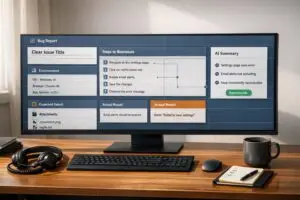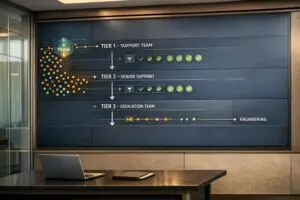
Slack makes collaboration easy, but it’s not built for managing SLAs at scale. Here’s why:
- No SLA tracking tools: Slack lacks automated timers, deadline alerts, and tools to pause timers when waiting for customer replies.
- Fragmented visibility: With multiple channels, conversations get scattered, making it hard to track progress or prioritize high-value customers.
- Weak reporting: Slack’s analytics don’t provide insights into response times, SLA compliance, or performance metrics.
- Manual workarounds fail: Teams resort to spreadsheets or reminders, which break down as the number of channels grows.
Solution? AI-powered platforms are better suited for SLA management. They offer automated tracking, centralized queues, intelligent ticket routing, and detailed analytics – saving time, reducing errors, and improving customer satisfaction.
Slack is great for communication, but for SLA management, it falls short.
Why Slack Can’t Handle SLA Management at Scale
Slack was built for real-time collaboration, not structured support operations. As your customer base grows and the number of Slack Connect channels expands, managing Service Level Agreements (SLAs) through Slack becomes increasingly impractical. The more channels you manage, the harder it gets to track SLAs manually.
Missing SLA Automation and Tracking Features
Slack doesn’t come with built-in SLA tracking tools. It lacks key features like:
- Automated timers that start when a customer sends a message.
- Deadline alerts to warn you when an SLA is close to being breached.
- Timer pauses for when you’re waiting on a customer’s response.
Additionally, Slack’s API imposes strict limits, allowing just one message request per minute (up to 15 messages). This restriction makes it nearly impossible to build custom SLA tracking systems. As Michael Grinich of WorkOS explains:
The new Slack API rate limits are absolutely insane: For accessing messages, you can now only make 1 request per minute, with a maximum of 15 messages… We can’t build internal tools on our OWN data [3].
Without these automation tools, managing SLAs across multiple channels becomes chaotic and unreliable.
Scattered Channels Without Unified Queues
Slack Connect channels operate independently, creating fragmented visibility of customer interactions. There’s no central dashboard to track which requests are overdue or at risk of breaching SLAs. This forces support teams to jump between channels, increasing the likelihood of missing urgent issues.
To make matters worse, Slack doesn’t support tiered prioritization. Every request is treated the same, regardless of the customer’s importance. As Raycast pointed out:
We realized we were treating every issue with the same priority, which wasn’t efficient or scalable [2].
For organizations managing more than 20 channels, this lack of prioritization and unified tracking often leads to missed messages and unmet SLAs.
| Symptom | Root Cause | Impact |
|---|---|---|
| Messages get buried | No unified queue or prioritization | Missed SLAs; high-value customers may suffer |
| Lack of response tracking | Slack isn’t a dedicated ticketing system | Difficulty measuring performance effectively |
| Context switching | Operating across multiple tools | Slower resolutions and agent fatigue |
| Uniform prioritization | No tier-based prioritization | Critical issues may not get timely attention |
Weak Reporting and Analytics for SLA Compliance
Slack also falls short when it comes to reporting and analytics. Its native tools don’t provide insights into critical support metrics like first response times, resolution rates, or SLA compliance [2]. This lack of visibility makes it tough to:
- Spot process inefficiencies.
- Coach agents to improve performance.
- Prove SLA adherence to customers.
Without robust analytics, many teams resort to manual workarounds, such as spreadsheets, which are time-consuming to maintain and prone to errors. These limitations make it clear that Slack isn’t equipped to handle SLA management at scale.
sbb-itb-e60d259
Real Examples of SLA Management Problems in Slack
Slack’s SLA challenges can significantly impact B2B support, especially at scale. Here’s a closer look at some real-world scenarios that highlight these issues.
Missed SLAs from Lost Requests
Managing over 50 Slack Connect channels is no small feat. Requests can easily get buried in the noise, and without a centralized queue, channels become siloed. This isolation increases the likelihood of SLA breaches, especially when there are no automated alerts to flag issues in real time.
Take Granola, for example. Before January 2026, they relied on a shared Google inbox to manage customer communications. But after their Series A funding, the sheer volume of threads became unmanageable [2]. Similarly, Axiom faced challenges when customer inquiries were scattered across multiple channels. This disorganization led to missed requests and inconsistent response times [2].
These delays are a big deal. Studies show that 90% of customers expect an immediate response, and 60% anticipate replies within just 10 minutes [1]. Now imagine a high-value customer reaching out during off-hours. If their message sits unnoticed until the next business day, it’s essentially a customer service SLA failure. These lapses not only hurt response times but also chip away at customer trust.
Manual Workarounds That Break Down
In an effort to avoid losing requests, teams often turn to manual tracking systems. Notion boards, spreadsheets, pinned messages, or Slack’s /remind command are common tools. But while these solutions may work for smaller operations, they quickly crumble when the number of channels exceeds 10–20 [2].
Northflank learned this the hard way. Before adopting a structured system, they juggled support through email and Slack, which led to a chaotic, unmanageable workflow:
We were constantly losing track of conversations [2].
After streamlining their processes, they reported a 50% improvement in response times [2]. However, this underscores a key point: manual methods lack the precision of automated systems. Without tools to start SLA clocks when a customer messages or pause them when awaiting a reply, teams are left playing catch-up. Missed breaches are only discovered after the damage is done, further eroding customer confidence.
Better Ways to Manage SLAs
Modern SLA management tools address the shortcomings of platforms like Slack by introducing advanced customer segmentation and automation powered by AI. These tools are designed to tackle operational challenges and streamline service delivery.
Dynamic SLAs for Different Customer Needs
One of the key features of modern SLA tools is the ability to create dynamic SLAs that cater to different customer segments, such as VIPs, Enterprise clients, or Standard users. This segmentation allows businesses to set tailored response and resolution times, ensuring each customer group receives appropriate attention. For instance, if a customer is nearing their renewal date, the system can automatically tighten SLA targets to provide a better experience during this crucial period. Additionally, modern platforms can pause SLA timers during holidays or outside business hours, adjusting based on the customer’s time zone [1]. This prevents metrics from being skewed by circumstances beyond the team’s control.
These personalized strategies are further enhanced when combined with AI-driven tools that bring efficiency and precision to SLA management.
AI-Powered SLA Solutions for Better Efficiency
AI takes SLA management to a new level by automating processes and reducing human error. It constantly analyzes signals related to time, customer behavior, and context to prioritize tasks dynamically [6][4]. For example, AI can differentiate between a simple "Thank you!" message (which doesn’t require action) and a query that needs follow-up, ensuring SLA timers only run for actionable items [1]. It can also predict potential SLA breaches by considering factors like staffing levels and ticket complexity, triggering proactive escalations before deadlines are missed [6]. This approach helps teams avoid "silent breaches" and enables them to act before issues escalate.
A real-world example of AI’s impact comes from Slack’s Customer Experience team in 2025. Led by Senior Director Kevin Albers, they developed the #help-ce bot, a custom app designed to handle thousands of daily queries. The bot used emoji-based workflows – such as the :team-product-specialists: emoji – to automatically route technical issues to the right specialists. This innovation allowed the team to resolve over half of their issues internally, reducing escalations to the engineering team by 60% [5]. As Albers explained:
"At the end of the day, most humans don’t want to ask for help; they want to find answers on their own." [5]
What to Look for in SLA Management Tools
To fully benefit from dynamic and AI-powered solutions, it’s essential to choose the right SLA management platform. A good tool should simplify processes and scale effortlessly. Here are some key features to look for:
- Real-time alerts: Systems should notify teams before an SLA breach happens, enabling proactive responses rather than reactive fixes [1][4].
- Automated escalation workflows: These should trigger specific actions – like paging on-call engineers or creating incident tickets – when SLA thresholds are met, addressing common automation gaps in platforms like Slack [1][5].
- Unified triage channels: Instead of juggling multiple Slack Connect channels, teams can use a single channel with color-coded statuses to track all active requests in one place [1][5].
- Comprehensive dashboards: Look for tools that offer live compliance tracking, exportable reports, and detailed insights into breach patterns. These analytics help transform SLA management from a chaotic process into a structured, scalable operation.
With these features, businesses can shift from firefighting SLA breaches to maintaining predictable and efficient workflows.
Why AI-Native Platforms Work Better for SLA Management
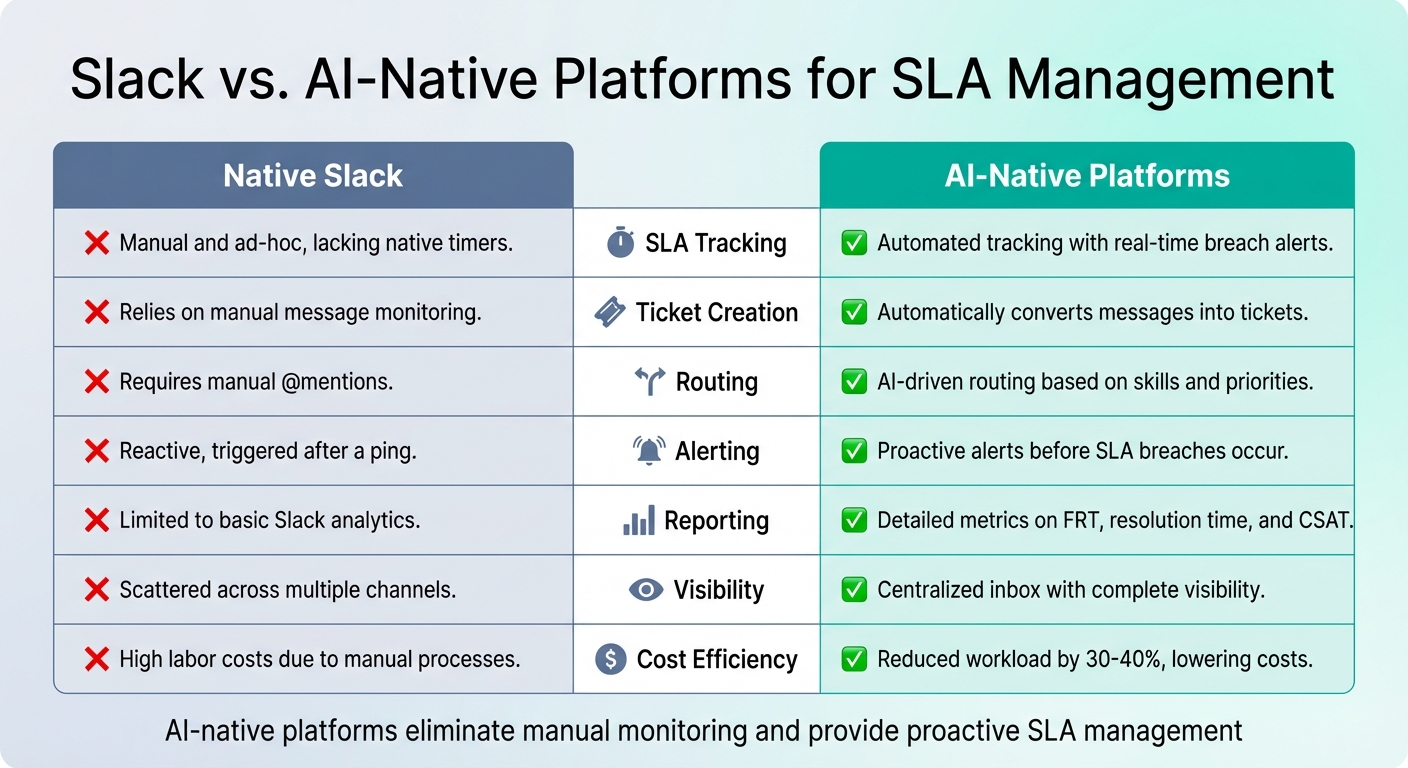
Slack vs AI-Native Platforms for SLA Management Comparison
AI-native platforms bring a new level of efficiency to SLA management, surpassing the capabilities of tools like Slack by automating key support functions. Built specifically to handle the demands of B2B support at scale, these platforms address the limitations of Slack and streamline the entire process.
Slack vs. AI-Native Platforms for SLA Management
When comparing Slack to AI-native platforms, the differences are striking. Here’s a side-by-side look:
| Feature | Native Slack | AI-Native Platforms |
|---|---|---|
| SLA Tracking | Manual and ad-hoc, lacking native timers | Automated tracking with real-time breach alerts |
| Ticket Creation | Relies on manual message monitoring | Automatically converts messages into tickets |
| Routing | Requires manual @mentions | AI-driven routing based on skills and priorities |
| Alerting | Reactive, triggered after a ping | Proactive alerts before SLA breaches occur [1][4] |
| Reporting | Limited to basic Slack analytics | Detailed metrics on first response time (FRT), resolution time, and CSAT |
| Visibility | Scattered across multiple channels | Centralized inbox with complete visibility [8] |
| Cost Efficiency | High labor costs due to manual processes | Reduced workload by 30-40%, lowering costs |
This comparison underscores why AI-native platforms are a game-changer for organizations looking to scale support operations efficiently.
AI-native platforms eliminate the need for constant manual monitoring. They automatically detect and convert customer messages into trackable tickets, ensuring nothing is missed. When an SLA is at risk of being breached, the system sends proactive alerts, giving teams the chance to act before deadlines are missed [1][4].
Routing is another area where these platforms shine. Instead of relying on @mentions and hoping the right person notices, AI-powered routing and prioritization assigns tickets based on agent expertise and prioritizes high-value customers. This ensures that even during peak periods, no request slips through the cracks.
The Financial Return of AI in SLA Compliance
The financial benefits of AI-native platforms go well beyond reducing manual tasks. By automating repetitive processes and increasing first-contact resolution rates, these platforms transform the economics of customer support.
AI agents can autonomously handle 55% to 85% of customer ticket volume, significantly lowering the cost per interaction [10]. These systems don’t just answer basic questions – they analyze customer sentiment and ticket urgency to adjust SLA priorities and workflows dynamically. For example, they can predict SLA breaches by factoring in staffing levels and ticket complexity [6].
The time savings are substantial. Users report saving an average of 97 minutes per week with AI features like automated conversation summaries and search tools [9]. On an organizational scale, 27% of businesses spend four to seven hours each month compiling manual reports – time that AI-native platforms can eliminate entirely [7].
Advanced features, such as predictive CSAT and first contact resolution (FCR) detection, provide actionable insights that were previously hard to measure. For instance, Supportbench uses AI to predict customer satisfaction scores and determine whether a case was resolved on the first contact – one of the trickiest metrics to track accurately. These insights allow teams to refine workflows and address potential issues in real time.
AI also boosts agent productivity. With 60-80% accuracy in suggesting the next best action, agents spend less time searching for solutions and more time resolving issues [10]. Combined with automated knowledge base creation and sentiment-based prioritization, the result is clear: faster responses, higher quality support, and reduced operational costs – all while staying compliant with SLAs.
Conclusion
Slack was never intended to handle SLA management, and trying to make it fit that role often leads to more headaches than solutions. Without features like built-in tracking, automated ticket routing and prioritization, or unified queues, support teams are left scrambling to patch these gaps with manual processes. As ticket volumes grow, these workarounds inevitably crumble under the pressure.
Slack’s scattered channels and lack of real-time alert systems only add to the challenge, making efficient SLA management nearly impossible [1]. This shortfall highlights the pressing need for a different approach.
AI-native platforms are reshaping the way B2B support functions, offering a glimpse into what’s possible. The numbers speak for themselves: studies reveal that AI-native systems can manage up to 60% of tickets – equivalent to the workload of 10 agents – while significantly cutting resolution times [2]. For example, n8n’s AI agent handles the workload of 10 agents at a fraction of the cost [2]. Tinybird achieved remarkable results by slashing its first response time from 1 hour to just 12 minutes and reducing resolution times from 6 days to 2 hours [2]. Looking ahead, Gartner projects that by 2029, AI will autonomously resolve 80% of routine customer service issues [2].
Modern support teams need tools built for today’s demands. Platforms like Supportbench provide a comprehensive solution, offering automated SLA tracking, intelligent ticket routing, predictive analytics, and AI-powered resolutions – all in one place. The payoff? Faster response times, reduced costs, and support teams that can scale without burning out.
FAQs
When does Slack stop working for SLA management?
Slack starts to falter in managing SLAs when support operations outgrow its structure, typically when handling between 20 and 50 channels or conversations. While it’s excellent for real-time communication, it wasn’t built to handle tasks like automated tracking, prioritizing requests, or generating reports. As ticket volumes rise, teams often resort to clunky workarounds or unreliable integrations to keep up. This can result in missed deadlines, forgotten tickets, and a lack of real-time visibility into SLA compliance.
How can we prioritize VIP customers in Slack support?
To give VIP customers the attention they deserve, you can leverage AI-driven SLAs and automation workflows. AI tools can evaluate factors like customer value, sentiment, and urgency to dynamically adjust priorities. This means VIPs get faster responses without needing manual intervention.
Automated alerts are another key feature. These notifications help teams stay ahead of SLA deadlines, reducing the risk of breaches. Plus, workflows can step in to reroute urgent cases or trigger escalations, ensuring critical issues are handled promptly.
By automating these processes, you maintain consistent prioritization at scale, keeping VIPs satisfied and improving retention – all without the hassle of manual triage.
What should an AI-native SLA tool do that Slack can’t?
An AI-driven SLA tool offers advanced features that Slack simply doesn’t. For instance, it can dynamically adjust response times by analyzing factors like customer value, sentiment, and the complexity of an issue. This level of adaptability ensures a more tailored and effective approach to service management.
Beyond that, such a tool can predict potential SLA breaches using AI-powered insights. This allows teams to intervene before problems escalate. It also automates critical processes like escalations and re-routing, ensuring urgent cases reach the right agents without delay. These capabilities not only cut down on manual work but also help prevent missed SLAs.
Slack, while useful for communication, lacks the design and functionality to handle these advanced SLA management requirements, making it less suitable for large-scale operations.
Related Blog Posts
- Slack Channel Fatigue: Why Your Support Agents Are Burning Out
- Visibility Gaps in Slack Support: What VPs Miss When Data Stays in Channels
- Slack vs. The Customer Portal: Why Enterprise Clients Demand a Proper Dashboard
- Reporting Black Holes: The Difficulty of Extracting Metrics from Slack Conversations