
LegalTech tools are transforming how law firms manage sensitive data while improving efficiency. But with new AI tools come risks – like data breaches, AI "hallucinations", and ethical pitfalls. Here’s what you need to know:
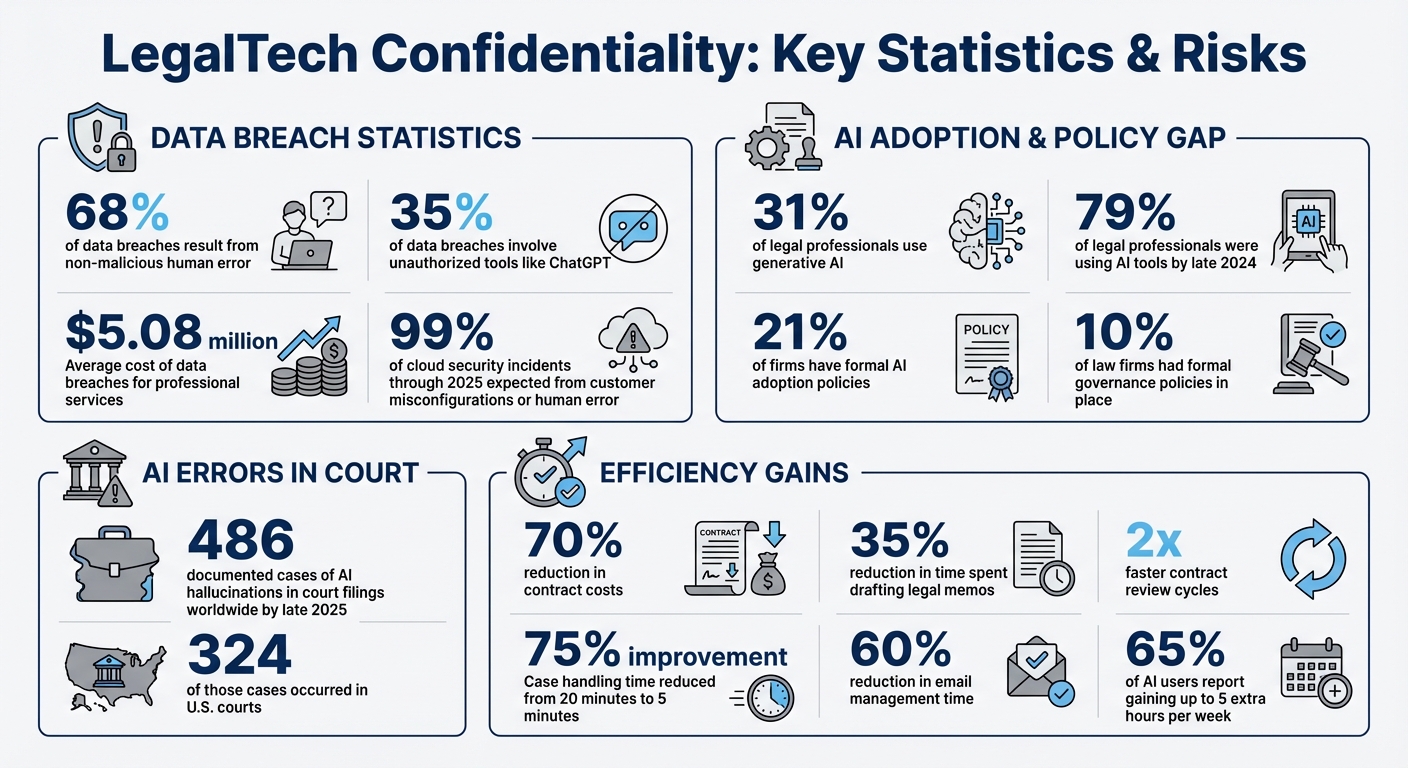
- Confidentiality Risks: 68% of data breaches result from human error, and 35% involve unauthorized tools like ChatGPT. Firms must prevent accidental disclosure of sensitive client data.
- Ethical Standards: Lawyers must comply with ABA rules (1.6 and 5.3) and state-specific regulations, ensuring AI use doesn’t compromise client confidentiality.
- AI Challenges: AI tools can misinterpret or mishandle data. For example, 486 cases of AI errors in court filings were reported globally by late 2025.
- Secure Workflows: Use encryption, data segregation, and role-based access to protect client information. AI tools should operate within secure environments, like private clouds or on-premises systems.
- Case Management: Automate triage and escalation while keeping humans in the loop to maintain ethical standards and ensure accuracy.
- Policy and Training: Establish clear AI usage policies, vet vendors for compliance, and train staff to verify AI outputs.
The key is balancing innovation with strict safeguards to protect client trust and meet legal obligations.
LegalTech Confidentiality Risks and AI Adoption Statistics
7-Step AI Compliance Checklist for Law Firms (Protect Your License!)
sbb-itb-e60d259
Key Confidentiality Risks and Challenges
LegalTech support teams face serious confidentiality challenges. Balancing AI-native workflows with strict confidentiality standards requires a clear understanding of both procedural and technological risks. Consider this: 68% of data breaches stem from non-malicious human error – like an employee accidentally pasting privileged information into a public AI tool [13]. The financial toll of such breaches for professional services organizations averages an eye-watering $5.08 million [13]. Even worse, breaches often remain undetected for months, allowing risks to snowball and damage to multiply. Utilizing AI case summarization can help teams quickly identify these risks before they escalate.
Internal risks are equally pressing. For example, unauthorized tools like ChatGPT account for 35% of data breaches [13]. Meanwhile, although 31% of legal professionals use generative AI, only 21% of firms have formal AI adoption policies [13]. This policy gap creates a risky environment where even well-intentioned staff might inadvertently compromise sensitive client information.
These risks highlight the importance of adhering to both ethical and legal standards to safeguard confidentiality.
Ethical and Legal Obligations
Ethical and legal responsibilities set a high bar for confidentiality. The ABA Model Rule 1.6 requires "reasonable efforts" to prevent unauthorized access to client data, while Rule 5.3 makes firms accountable for ensuring that non-lawyer assistants and third-party vendors comply with these standards [17, 18]. The ABA also issued Formal Opinion 512, which categorizes generative AI tools as non-lawyer assistants. This means lawyers must supervise their use and independently verify all AI-generated outputs [11, 18].
State-specific rules add even more layers of complexity. For instance:
- California requires anonymizing client data before using AI and prohibits billing clients for time "saved" by AI [10].
- Florida recommends obtaining informed client consent before sharing confidential data with third-party AI tools [10].
- Massachusetts mandates express client consent for handling particularly sensitive information [10].
- New York emphasizes that lawyers must ensure their cloud service providers have enforceable confidentiality agreements [10].
Failing to meet these obligations can lead to severe consequences. In June 2023, attorneys Steven Schwartz and Peter LoDuca were fined $5,000 in Mata v. Avianca (S.D.N.Y.) for submitting fake case citations generated by ChatGPT [10]. A federal judge in Johnson v. Dunn (N.D. Ala.) went even further in July 2025, disqualifying attorneys entirely for not verifying AI-generated outputs [10]. By late 2025, there were 486 documented cases of AI hallucinations in court filings worldwide, with 324 occurring in U.S. courts [10].
Beyond ethical considerations, technology-related risks further complicate the management of confidential data.
Technology-Related Risks
Consumer-facing AI platforms bring their own set of dangers. These tools often log user prompts or integrate them into training data, which could expose client strategies or privileged information [13]. OpenAI CEO Sam Altman acknowledged this challenge:
"People talk about the most personal sh** in their lives to ChatGPT. […] And right now, if you talk to a therapist or a lawyer or a doctor about those problems, there’s legal privilege for it. […] We haven’t figured that out yet for when you talk to ChatGPT." [12]
Even enterprise-grade tools carry risks. Vendors might revise their terms of service to allow customer data to be used for model training, or they might subcontract tasks to entities with weaker security protocols [11]. For example:
- In March 2024, a Microsoft Azure OpenAI security loophole allowed internal employees to review prompt and response logs as part of abuse monitoring [11].
- In July 2025, a federal judge ordered OpenAI to preserve all user logs indefinitely, even for users who had requested deletion. This ruling demonstrated that "deletion" controls can be overridden by legal requirements [11].
Here’s a quick comparison of risks between consumer AI tools (like free ChatGPT) and enterprise AI solutions (such as CoCounsel or Harvey):
| Risk Type | Consumer AI (Free ChatGPT) | Enterprise AI (e.g., CoCounsel, Harvey) |
|---|---|---|
| Data Usage | May be used to train models | Contractual "no-training" guarantees |
| Confidentiality | No legal privilege | Strong contractual protections |
| Security | Standard public cloud | Private environments and firewalls |
| Retention | Logs may be retained indefinitely | Zero data retention policies |
The Texas Bar Ethics Opinion 705 sums it up well:
"Sharing sensitive client information with non-enterprise AI platforms… risks unauthorized disclosure. This violates the attorney’s strict duty of confidentiality." [11]
Adding to this, 99% of cloud security incidents through 2025 are expected to result from customer misconfigurations or human error [13]. The takeaway? The technology itself isn’t inherently risky – it’s how it’s configured, deployed, and monitored that determines whether it protects or exposes client information. For complex security concerns, having a defined customer support escalation process ensures that potential breaches are handled by the right experts immediately.
Building Secure Data Handling Workflows
Creating secure workflows starts with a solid system design. For example, in early 2025, Data Pro Software Solutions implemented a Private LLM for a group of law firms. By deploying the system on-premises and securing it with AES-256 encryption, these firms saw a 35% reduction in time spent drafting legal memos and contract review cycles that were twice as fast – all within 90 days and with zero incidents of unauthorized data access [14].
Achieving these outcomes requires careful decisions about where data is stored, how it moves, and who has access to it. The objective is clear: make unauthorized access technically impossible, not just barred by contracts.
Data Segregation and Anonymization
To address confidentiality concerns, LegalTech teams must minimize data exposure from the start. The best approach isn’t just about protecting data – it’s about limiting how much data enters AI systems in the first place. Deploying AI systems within a Virtual Private Cloud (VPC) or on-premises ensures client data never leaves internal systems [14][15].
A practical example of this is implementing Retrieval-Augmented Generation (RAG), which allows AI to access only the necessary snippets of information while keeping full documents secure in the Document Management System (DMS) [3]. In 2025, a mid-size law firm used this method for summarizing deposition transcripts. By breaking files into smaller chunks and using RAG to retrieve specific passages with paragraph-level citations, they ensured privileged documents stayed protected and met their stringent security requirements [3].
Before feeding data into AI models, it’s essential to run it through automated redaction pipelines. These pipelines strip out sensitive details like Social Security numbers, personally identifiable information (PII), and matter IDs [3]. Think of this as a security checkpoint: if sensitive data can’t be safely removed, it shouldn’t enter the AI workflow at all. Additionally, implementing namespace and workspace isolation ensures that each matter or practice group operates in its own sealed environment. This prevents cross-tenant data retrieval and ensures one client’s data doesn’t influence another’s AI results [17][3].
For firms working with international clients, pinning data processing to specific geographic regions is critical. For instance, in late 2025, a UK-based law firm serving German clients used Azure OpenAI with region pinning to Germany West Central. They blocked all non-German data transfers using Azure Firewall and relied on private endpoints to keep processing within the region [3].
Once data is segregated and anonymized, encryption and access controls provide the next layer of defense.
Encryption and Access Controls
Encryption acts as a final safeguard, but it’s most effective when combined with other measures. Use AES-256 encryption for data at rest and TLS 1.3 for data in transit [16]. To prepare for future threats, leading LegalTech platforms in 2026 are adopting post-quantum cryptographic standards [16]. Implementing Customer-Managed Keys (CMK) for storage accounts and vector databases ensures firms maintain full control over encryption [3].
Private endpoints are essential to keep data traffic off public networks, and matter-ID-linked access controls add an extra layer of security [3]. For example, in December 2025, an Am Law firm secured its AI workflows by linking each workspace to a matter-specific security group. Prompts required a matter ID that matched the user’s group claims, and unauthorized attempts to access documents outside the assigned matters were blocked during a red team security test [3].
Authentication is another critical area. Enforce Entra ID SSO/MFA and require phishing-resistant MFA methods like FIDO2 for administrative accounts [3]. Apply least-privilege Role-Based Access Control (RBAC) so users can only access the data necessary for their roles. If a user loses access to a DMS matter, their AI retrieval permissions for that corpus should be revoked automatically [3]. For administrative tasks, adopt Just-In-Time (JIT) elevation with approval processes instead of granting permanent high-level access [3].
Finally, maintain detailed audit logs for every AI interaction. These logs should include metadata like user IDs, matter IDs, timestamps, token counts, and hashes, but avoid logging sensitive client content [14]. As one legal AI expert put it:
"If someone loses DMS access, they lose AI retrieval on that corpus instantly." – CaseClerk/LegalSoul [3]
Case Triage and Escalation Management
Efficient triage is essential for routing sensitive cases to the right people while maintaining strict confidentiality. Once secure workflows are in place, the next challenge is ensuring that cases are assigned promptly and appropriately. In LegalTech support, this isn’t just about speeding up processes – it’s about making sure that privileged information is handled only by authorized personnel. Poor triage can result in critical regulatory matters being overlooked, while routine tasks clog up the schedules of senior counsel.
A structured intake process, combined with AI-assisted prioritization and multi-level escalation tracking, can address these challenges. These workflows not only reduce handling time but also ensure consistent responses and provide the documentation needed to meet regulatory standards.
Automated Case Prioritization and Assignment
Manual triage often leads to delays and inconsistencies. In fact, 87% of legal requests are submitted through unstructured channels like email[24]. This can result in missed deadlines, communication gaps, and overlooked cases. AI-powered intake systems solve these problems by standardizing how cases are captured and automatically assigning them based on factors like risk, complexity, and team capacity.
For example, a mid-sized employment firm revamped its intake process in 2025 using an n8n orchestration workflow. AI tools classified incoming inquiries, extracted key details, and reduced intake handling time from 20 minutes to just 5 minutes per case – a 75% improvement[7]. Natural Language Processing (NLP) was used to identify parties, jurisdiction, and urgency, assigning priority levels based on predefined risk criteria. Importantly, a human reviewer approved each case before it was officially opened, adhering to the lawyer-in-the-loop (LITL) principle[7][6].
Corporate legal teams can benefit from tools like Checkbox, which centralizes requests from platforms such as Slack, Microsoft Teams, and email. This ensures sensitive data is accessible only to authorized personnel while maintaining an audit trail of all assignment decisions[18]. Similarly, CaseStatus Triage CI uses a "Client Intelligence" agent to analyze caseloads for sentiment and engagement patterns, automatically flagging high-priority cases on a dedicated dashboard[23].
Before implementing automation, it’s essential to map out existing workflows. Documenting manual steps helps identify repetitive, low-risk tasks suitable for automation and highlights areas where AI should provide recommendations rather than make decisions[8][6]. To maintain accountability, every AI-driven assignment or priority change should be logged with timestamps and the ID of the human reviewer[8][7].
Once cases are prioritized, a well-defined escalation framework ensures high-risk issues are reviewed by senior personnel.
Multi-Level Escalation Tracking
A tiered escalation system with clear approval authorities – such as Internal Support, Senior Specialist, and Vendor Management – ensures that high-risk or high-value matters receive the attention they need. Routine or low-risk requests, on the other hand, can follow a more streamlined process.
Service Level Agreements (SLAs) are crucial for managing escalations. Automated reminders and escalation rules integrated into workflows prevent delays and ensure predictable turnaround times[18][20]. For instance, if a regulatory case misses its SLA review, the system can escalate it to a senior attorney and log the event for compliance purposes[9]. These audit trails align with the documentation standards discussed earlier in secure data handling.
A notable example of the importance of verification workflows occurred in February 2026, when the U.S. Court of Appeals for the Fifth Circuit fined an attorney $2,500 for submitting a brief containing fabricated citations generated by AI[19]. This highlights the need for robust verification processes and comprehensive audit trails in LegalTech.
AI sentiment analysis can also play a key role, detecting frustration in client communications and triggering immediate de-escalation actions or transfers to senior staff[21]. Many support platforms offer features to add notes, track escalations, adjust case levels, and categorize cases for compliance reporting.
To avoid delays, backup contacts should be documented for every escalation level. This ensures continuity when primary contacts are unavailable[9][22]. Regular audits of user permissions can further strengthen role-based access control, ensuring staff responsibilities remain aligned with their access rights[9].
"All our teams know there’s an easy way to submit requests to Legal. We’re now getting looped in early, so we’re able to get ahead of the game. Legal doesn’t have that perception of being a blocker or reactive." – Brenda Perez, Senior Legal Operations Manager, Apollo.io[20]
Using AI for Confidential Case Automation
After setting up triage and escalation workflows, the next logical step is using AI to automate routine tasks while keeping confidentiality intact. This requires AI to function within your firm’s infrastructure, avoiding the need to send sensitive data to external cloud platforms. By doing so, legal teams can improve efficiency without sacrificing control over client information. Secure data workflows form the backbone of this approach, ensuring both productivity and confidentiality.
To achieve this, Retrieval-Augmented Generation (RAG) can be used to access only permissioned data from internal systems, eliminating the risk of external data uploads[3][8]. Platforms like Azure OpenAI and ChatGPT Team offer assurances that prompts and outputs are not used to train their models, providing an extra layer of security[3][4][2]. For firms requiring even tighter controls, on-premise solutions – such as Llama 4 and vector databases like Qdrant – ensure data never leaves internal servers[25][15].
Additionally, automating redaction processes can help remove personally identifiable information (PII), protected health information (PHI), and client identifiers before any data is processed. Network isolation tools can also block public internet access, adding another safeguard[3][2]. Role-Based Access Control (RBAC) further enhances security by tying AI access to specific matter IDs[3][25][2].
AI can draft and triage tasks, but having a lawyer review and approve final outputs ensures professional responsibility remains intact. This hybrid approach balances efficiency with accountability, a critical factor as 80% of Fortune 1000 legal leaders anticipate generative AI will reduce outside-counsel billing. Deloitte also estimates up to 40% cost savings from using generative AI in specific workflows[6][1].
"Confidentiality is not an obstacle. It is the compass guiding responsible innovation." – Jeff Johnson, Chief Innovation Officer, Purpose Legal[1]
AI-Powered Document Handling and Summaries
AI can significantly cut down on document review time, but only if workflows are designed to prevent data leaks. One effective strategy is to link all AI activities and data retention to specific matter IDs, purging related AI artifacts once a matter is closed, in line with the firm’s records schedule[26][2]. This ensures compliance with retention policies and avoids cross-matter data exposure.
Firms are also adopting separation models to enhance security. These models isolate encrypted archives from active processing environments, ensuring that only documents under active review are embedded and searchable. This prevents unauthorized access to closed or unrelated matters[17]. Using legal-specific embeddings helps AI differentiate key legal terms, resulting in more accurate document summaries[17].
For example, Purpose Legal’s technology can process up to 900,000 documents per hour from cloud storage solutions[1]. However, speed alone isn’t enough – security measures like automated redaction tools are essential to strip out PII and privileged markers before data is sent to large language models (LLMs)[1][2].
Supportbench‘s AI streamlines case management by generating concise summaries as tickets open, documenting activity, and finalizing overviews when cases close. These summaries are created using permissioned data within the platform, ensuring no client information is exposed to external APIs. The platform’s AI Agent-Copilot also searches internal knowledge bases and previous cases to provide relevant answers, helping agents resolve issues faster without sifting through countless tickets.
When implementing AI for document handling, start with admin-heavy tasks like client intake forms, triage routing, and standardized file naming. Use placeholder prompts (e.g., "[Client Name]") instead of actual identifiers to minimize the risk of accidental disclosure[26].
AI-Driven Knowledge Base Creation
Creating a comprehensive knowledge base can be a daunting task, but AI simplifies the process by turning case histories into reusable articles – provided confidentiality is maintained. Sensitive client details must be stripped out before articles are published, even for internal use.
One effective method is domain-specific fine-tuning. Training models on a firm’s anonymized documents, internal memos, and jurisdictional preferences ensures the AI reflects the firm’s specific legal style and logic[14]. Incorporating human-in-the-loop feedback, where attorneys review and correct AI outputs, further improves accuracy over time[14].
Supportbench, for instance, offers an AI feature that generates knowledge base articles from case histories. Teams can select a case representing a strong problem-solution pair, and the AI drafts the article, including the subject, summary, and keywords. This feature integrates with the platform’s role-based access controls, ensuring only authorized personnel can create or view sensitive articles.
For firms seeking tighter control, self-hosted platforms like n8n allow workflows to run on internal servers, keeping client documents within the firm’s infrastructure. The cost of maintaining such infrastructure is often less than hiring a full-time paralegal, making it a practical option for smaller firms[15].
When creating knowledge base content, always verify citations independently. General-purpose models can sometimes "hallucinate" or generate incorrect information[27][29]. A robust verification process and comprehensive audit trails are essential for maintaining accuracy.
"AI doesn’t fix a messy process; it often automates the mess." – Promise Legal[6]
Internal AI Tools for Agent Support
Internal-facing AI tools provide secure access to knowledge without risking exposure of sensitive data. These tools operate within a firm’s firewall, querying only internal documents and knowledge bases. They are designed with strict non-retention measures, ensuring prompts and outputs are not stored or used for model training[26][2].
Supportbench’s AI Agent Knowledgebase AI Bot exemplifies this. It queries the entire knowledge base to provide answers based on both internal and external articles. Agents can quickly find precedents, policy guidance, and troubleshooting steps without leaving the platform. The bot respects role-based access controls, so agents only access content they are authorized to view. Separate client-facing bots pull information exclusively from approved public articles, maintaining confidentiality and protecting privileged communications.
Privilege mode is another best practice. Internal AI tools should be configured to disable external browsing, prevent public sharing, and set zero-retention for sensitive queries[26]. Using Single Sign-On (SSO) and System for Cross-domain Identity Management (SCIM) ensures that AI access is immediately revoked when a user leaves the firm[26][2].
As of 2025, 31% of lawyers already use legal generative AI tools, with 45% of them engaging daily[28]. Among these users, 65% report gaining up to five extra hours per week[28]. These productivity gains are only sustainable if workflows remain secure, auditable, and ethically sound.
"The future of law isn’t in the cloud – it’s in your control." – Dean Taylor, Esq.[15]
Documenting Policies and Ensuring Compliance
Clear, written policies are the backbone of defensible automation, especially when it comes to securing sensitive data and ensuring compliance. By late 2024, 79% of legal professionals were using AI tools, yet only 10% of law firms had formal governance policies in place[33]. This gap leaves firms vulnerable as courts and state bars increasingly hold lawyers accountable for AI-generated mistakes. Without written policies, a defensible workflow is impossible.
AI Playbooks and Policy Documentation
Effective policies outline what your firm will Allow, Block, Require, and Log[30]. Start by creating an approved tools list that specifies which platforms can be used for client work and which are strictly off-limits. For instance, a "Red List" should ban entering privileged strategies, non-public pricing information, PII, and trade secrets into any AI tool[34]. This provides clear boundaries to prevent accidental data exposure.
A tiered approval system can help manage tools based on risk levels:
- Red-tier tools: Completely banned for client data.
- Yellow-tier tools: Require oversight, such as department head approval for tasks like legal research or contract analysis.
- Green-tier tools: Approved for administrative tasks like scheduling or internal knowledge management[33].
Assign specific roles to enforce these tiers. For example, a General Counsel or Risk Partner can act as the Policy Owner, IT/Security can oversee tool approvals, and Practice Leads can manage workflows within their teams[30].
Every AI tool should be documented in detail, including its purpose, data sources, limitations, and version history. Use "Model Cards" or "AI Playbooks" to maintain these records[35][32]. This level of documentation demonstrates due diligence if clients or regulators question your AI usage. Platforms like Supportbench simplify this by maintaining audit logs that tie every AI-assisted action to specific user permissions.
"A policy that reads like etiquette will not survive connectors, transcription bots, draft generation, and agent-style workflows that move client data fast." – Jon Dykstra, Founder, Jurvantis.ai[30]
Once your internal policies are in place, extend these controls to vendor relationships for a more secure operation.
Vendor Due Diligence and Compliance Monitoring
Vendor vetting is non-negotiable. Require vendors to meet SOC 2 Type 2 or ISO 27001 standards and sign BAAs or DPAs[32][33]. These agreements must include clauses ensuring client data isn’t used to train AI models and granting your firm audit rights. IBM reported in 2025 that 13% of organizations experienced data breaches involving AI models, and 97% lacked proper access controls[31]. Vendor compliance isn’t a one-time task – it requires ongoing attention.
Set up quarterly policy reviews to monitor changes in vendor privacy policies and tool settings, which can often change without notice[31]. Include "AI Riders" in contracts to enforce no-training commitments and require proof of compliance certifications[35][6]. Platforms like Supportbench enhance security with role-based access controls and data segregation, ensuring only authorized personnel can access sensitive information.
To catch unauthorized tools, monitor for "shadow AI" by reviewing audit logs and network activity[30][35]. If employees use unapproved consumer-grade AI platforms for client work, it compromises your safeguards. Block unapproved domains at the network level and enforce the approved tools list through IT controls.
Strong vendor oversight works hand-in-hand with internal policies, setting the stage for effective training and monitoring.
Team Training and Output Monitoring
Relying solely on training completion rates isn’t enough – monitor staff behavior instead[30]. Implement mandatory verification gates for all AI outputs as part of your workflow. These gates include:
- Citation Gate: Verify outputs against primary sources.
- Fact Gate: Confirm accuracy against the record.
- Instruction Gate: Ensure the output aligns with the assignment[30].
These checks should be embedded in workflows, not left to individual discretion. Regular spot-checks of AI-generated drafts can ensure staff follow these protocols. Research from Stanford HAI found hallucination rates of 34% in Westlaw‘s AI-Assisted Research and 17% in Lexis+ AI, proving even enterprise tools need human oversight[33].
Train staff to use neutral placeholders – like "Client A" – instead of real client names to maintain confidentiality[31][34]. A 30-day implementation plan can help establish these controls. For example:
- Week 1: Publish the approved tools list and block unapproved tools.
- Weeks 2–4: Roll out staff training and enforce citation-verification rules[5].
This phased approach ensures policies are practical under tight deadlines, not just theoretical.
"Responsibility stays with the lawyer, and controls have to live in workflow, tool settings, and review steps that hold under deadline pressure." – Jurvantis.ai[5]
Conclusion
Confidentiality and efficiency aren’t opposing goals in LegalTech support – they’re complementary needs that must work together. Treating them separately can lead to either slow processes or insecure, rushed workflows. The solution lies in secure-by-design automation, where workflows are built from the ground up with features like data segregation, zero-training AI, and lawyer-in-the-loop verification.
The numbers speak for themselves. AI-powered tools can slash contract costs by up to 70%, reduce case handling times from 20 minutes to just 5 minutes, and cut email management by nearly 60%[4][7][8]. These savings come from automating repetitive tasks, while human expertise remains central to critical decision-making.
But automation alone isn’t enough. Comprehensive policy documentation and team training are essential. As Jon Dykstra, Founder of Jurvantis.ai, explains:
"Responsibility stays with the lawyer, and controls have to live in workflow, tool settings, and review steps that hold under deadline pressure"[5].
Clear policies outline acceptable practices, vendor contracts enforce zero-training commitments, and verification gates ensure AI outputs meet professional standards before reaching clients.
Modern platforms streamline operations by centralizing records and automating workflows. For instance, tools like Supportbench eliminate inefficiencies by organizing matter records, automating case routing based on risk or type, and maintaining detailed audit logs tied to user permissions. Role-based access and multi-tenant isolation ensure sensitive data remains secure and accessible only to authorized users[4][9]. These measures allow firms to integrate AI-driven workflows without sacrificing security.
The move to AI-native workflows isn’t about replacing lawyers – it’s about enabling them to focus on high-value work while automation takes care of routine tasks like classification, data extraction, and routing[7][8]. Firms that adopt these systems today are better equipped to meet tighter service-level agreements, reduce billing scrutiny, and deliver the secure, responsive service that corporate clients now demand as the norm.
FAQs
What AI tasks still require lawyer review?
AI tasks that need a lawyer’s review often involve validating intricate AI-generated review protocols, verifying sources, ensuring confidentiality, and upholding ethical standards. These measures are essential to maintain accuracy, comply with regulations, and align with professional responsibilities.
How can we prevent staff from using unapproved AI tools?
To ensure staff avoid using unapproved AI tools, start by creating a clear and detailed AI use policy. This policy should outline which tools are approved, the necessary controls, and the steps for obtaining authorization if exceptions are needed. Make the approved tools easily accessible and set them as the default choice to discourage unauthorized alternatives.
Integrate workflow guardrails and oversight measures into your processes, particularly those with legal implications, to maintain compliance. Additionally, establish a system for regularly monitoring and documenting tool usage. This not only reinforces adherence but also promotes accountability across the board.
What should we require in AI vendor contracts?
When drafting AI vendor contracts, it’s crucial to include specific provisions that address confidentiality, data security, and compliance. These agreements should clearly define ownership and data use terms to prevent any misuse or unauthorized exploitation of data.
Incorporating confidentiality clauses is essential to protect sensitive information shared between parties. Additionally, the contract should outline robust security measures, such as encryption protocols, access controls, and other safeguards to ensure data remains secure.
It’s equally important for vendors to adhere to relevant privacy laws. This includes implementing protections like network isolation and effective key management systems, which not only shield client data but also maintain the integrity of operations.