


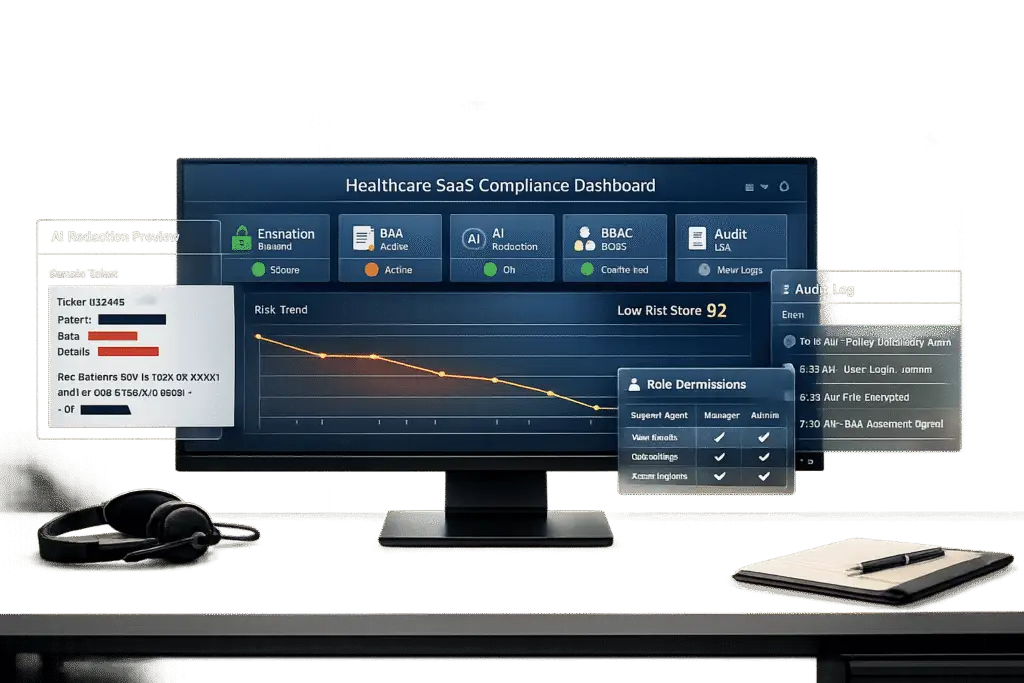
HIPAA compliance is non-negotiable for healthcare SaaS providers managing patient data. Mishandling Protected Health Information (PHI) can lead to fines of up to $1.5 million per violation category annually, reputational damage, and costly breaches – averaging $10.22 million in 2025. To stay compliant, your support tools must meet strict legal, technical, and operational requirements.
Here’s what you need to know:
- Core Security Features: Use AES-256 encryption, TLS 1.2+ for data in transit, role-based access control (RBAC), multi-factor authentication (MFA), and immutable audit logs.
- Operational Safeguards: Avoid unencrypted email/SMS for PHI, automate data redaction, and use secure portals for patient communication.
- Business Associate Agreements (BAAs): Vendors handling PHI must sign a BAA outlining their compliance responsibilities.
- AI Tools: Choose AI systems that redact PHI, prevent data retention, and provide real-time compliance monitoring.
- Unified Platforms: Consolidate communication channels to simplify compliance and reduce risks.
Why it matters: Compliance failures can result in steep penalties, long-term reputational harm, and operational disruptions. By integrating secure tools, signing BAAs, and leveraging AI, you can protect sensitive data while improving support processes.
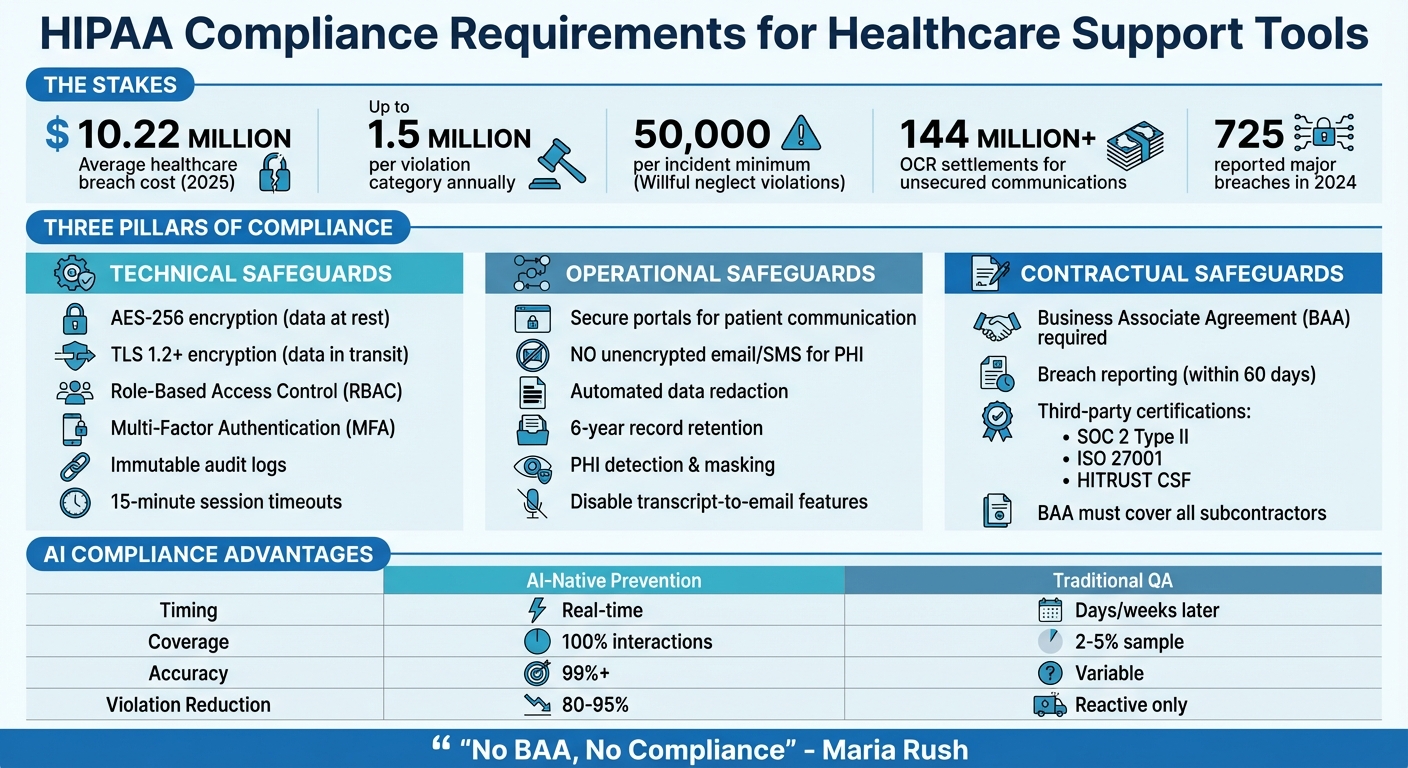
HIPAA Compliance Requirements for Healthcare Support Tools
The Ultimate Tier List of HIPAA Compliant Cloud Security Services
sbb-itb-e60d259
HIPAA Requirements for Support Tools
If your support platform handles PHI (Protected Health Information), it must strictly adhere to HIPAA’s technical, operational, and legal requirements. These safeguards are non-negotiable to avoid hefty penalties. The Office for Civil Rights (OCR) has imposed settlements exceeding $144 million for unsecured patient communications. Plus, willful neglect violations that remain unaddressed come with fines of at least $50,000 per incident [4]. Below, we’ll break down the essential security features, operational safeguards, and contractual steps needed for compliance.
Required Security Features
To ensure secure data handling, your platform must implement AES-256 encryption for data at rest and TLS 1.2 or higher (preferably TLS 1.3) for data in transit [8][9]. Role-Based Access Control (RBAC) is another must-have, limiting access to only the PHI necessary for specific tasks. This aligns with HIPAA’s "minimum necessary" standard [8][9]. Every interaction with PHI should be tracked through immutable audit logs, recording details like who accessed, edited, or deleted data, alongside unique user IDs and timestamps [7][3].
Multi-factor authentication (MFA) is critical for all accounts accessing PHI to guard against credential theft [9][7]. Additionally, session timeouts should be set to 15 minutes of inactivity to minimize the risk of unauthorized access [3].
Operational Safeguards for PHI
Technical measures alone aren’t enough – operational processes must also limit PHI exposure during daily workflows. Instead of using unencrypted email or SMS, rely on secure portals or authenticated in-app messaging for patient communication [7]. If notifications via email or SMS are unavoidable, only include minimal details along with a short-lived, authenticated link to a secure portal [7].
Disable transcript-to-email features, as these can unintentionally send unencrypted PHI to standard email addresses [1]. Use tools that automate data deletion schedules and implement redaction workflows to reduce PHI storage within your systems. Modern AI tools can even detect and mask PHI in chat logs and support tickets before storage or analysis [7][3]. Lastly, maintain documentation and audit logs for a minimum of six years to comply with HIPAA retention rules [9][3].
Business Associate Agreements (BAAs)
Contractual safeguards are just as critical as technical and operational ones. Any vendor managing PHI on your behalf is classified as a Business Associate and must sign a Business Associate Agreement (BAA) before handling any patient data [8][3]. As Maria Rush aptly states:
"No BAA, no compliance" [1]
A BAA is a binding contract that outlines PHI usage, mandates strict safeguards, and details breach notification procedures. It also ensures that HIPAA obligations extend to the vendor’s subcontractors [8][3].
A compliant BAA should include key provisions like breach reporting timelines (no later than 60 days after discovery), protocols for data return or destruction when the contract ends, audit rights, and clear "minimum necessary" guidelines [8][3]. Don’t just accept a vendor’s standard BAA template – verify their compliance through third-party certifications like SOC 2 Type II, ISO 27001, or HITRUST CSF attestations [7][3].
Keep in mind that HIPAA compliance often comes with premium pricing. For example, HubSpot limits HIPAA features to its Enterprise plans, Intercom requires its "Expert" plan for BAA coverage, and Kustomer mandates Enterprise or Ultimate tiers plus a specific HIPAA add-on [3].
How to Choose HIPAA-Compliant Support Tools
When selecting a support platform, it’s crucial to strike a balance between security, ease of use, and affordability – while ensuring essential HIPAA features are included. Many vendors restrict HIPAA compliance to their highest-priced plans. For instance, HubSpot ties it to Enterprise plans, Intercom requires its "Expert" tier, and Kustomer adds HIPAA compliance only to Enterprise or Ultimate tiers with an additional HIPAA-specific add-on [3]. Carefully evaluate whether the compliance features you need are offered at a price that aligns with your budget as your organization grows. Keep in mind, the risks of non-compliance far outweigh minor pricing differences. These factors should guide your decision-making process when evaluating tools for HIPAA compliance.
Verifying Security Certifications
Don’t just take a vendor’s word for it – verify their claims through third-party certifications. Look for credentials like SOC 2 Type II, which ensures the vendor has consistently maintained security controls over a defined period (usually 6–12 months) [10][6]. Another key certification is HITRUST CSF, which is highly respected in healthcare for combining requirements from HIPAA, NIST, and ISO into one rigorous framework [7][6]. If the platform uses AI to process Protected Health Information (PHI), check for ISO 42001, which addresses AI governance and security standards [6].
"Top-tier HIPAA compliance software doesn’t take a one-size-fits-all approach – it adapts to the unique requirements of covered entities… and your solution should reflect that nuance."
Additionally, don’t overlook the vendor’s subcontractors. Even if you have a Business Associate Agreement (BAA) with the vendor, it won’t protect you if their cloud hosting provider or AI service isn’t also HIPAA-compliant. Be sure to ask whether the BAA extends to all downstream partners [6].
AI Features That Support Compliance
Once you’ve confirmed security certifications, focus on AI features that actively protect PHI. Many consumer-grade AI tools retain user inputs, which can lead to PHI exposure. Violations can cost up to $50,000 per incident, with an annual cap of $1.5 million [6][3]. Instead, choose platforms with automated PHI redaction to mask sensitive data before it’s processed [6][7].
Agentic AI is particularly suited for healthcare environments because it relies on deterministic, policy-driven workflows. Unlike generative AI, it processes raw data in-memory without storing it, reducing risks like data retention or "hallucinations." This approach ensures clear audit trails and minimizes compliance concerns [6].
AI tools can also streamline operations by securely routing tickets based on user intent, ensuring PHI is accessed only by authorized personnel. This helps enforce the "Minimum Necessary" rule, a cornerstone of HIPAA compliance [4][3]. It’s worth noting that nearly 90% of healthcare leaders now view AI as essential for improving patient access and operational efficiency – provided it operates within proper compliance frameworks [6].
Integration and Scalability Requirements
A HIPAA-compliant support tool must integrate seamlessly with your existing healthcare systems. While encryption and BAAs are critical for protecting PHI, integration ensures compliance remains consistent as your organization expands. Look for platforms that support standards like HL7 v2, FHIR APIs, and SMART on FHIR for secure Electronic Health Record (EHR) integration [7]. For identity management, confirm compatibility with your Identity Provider (e.g., Okta, Microsoft 365, or Google Workspace) using SAML for centralized user deprovisioning and multi-factor authentication [7][6].
Scalability also means maintaining a unified security framework as ticket volumes increase. Avoid "security fragmentation" by choosing platforms that consolidate multiple communication channels – email, live chat, SMS, voice, and social media – under one HIPAA-compliant infrastructure [3][4]. For example, Canadian Blood Services uses a single messaging platform to manage sensitive patient communications at scale while maintaining compliance [3][4]. Lastly, verify that the vendor’s BAA covers third-party integrations, such as Salesforce or Slack, to ensure there are no gaps in compliance [3][4].
Setting Up HIPAA-Compliant Support Operations
Once you’ve chosen a platform, it’s critical to configure it to safeguard PHI right from the start. The first step is signing a Business Associate Agreement (BAA) before handling any patient data or enabling features. This legal agreement outlines the vendor’s responsibilities for PHI protection and specifies liability boundaries [12][8].
Next, take inventory of all PHI entry points within your support system. Identify and document sources like patient portals, EHR integrations, and email. Assign sensitivity labels to these entry points to ensure appropriate security workflows are automatically triggered [5]. For instance, a billing inquiry may require different encryption measures compared to a clinical question. Platforms with HIPAA-specific modes allow you to designate PHI fields for advanced encryption and disable non-compliant features, such as standard push notifications, unmasked AI processing, or unsecured CSAT survey distribution [12].
"Assume PHI will flow through AI. Design for it from day one."
Finally, review your data migration practices to ensure they meet these rigorous standards.
Secure Onboarding and Data Migration
Migrating historical data introduces risks, so it’s essential to use encrypted imports and strict controls to prevent PHI leaks. Employ TLS 1.3 for data in transit and AES-256 encryption for data at rest, including backups and snapshots [8][13]. Before launching, conduct PHI routing tests to confirm sensitive data isn’t inadvertently sent through unsecured channels like standard email [12]. To further reduce risks, keep PHI out of development or testing environments by using masking or de-identification techniques [8]. If your platform incorporates AI for tasks like ticket routing, ensure redaction occurs before data reaches the AI model, minimizing unauthorized exposure [14].
Configuring Workflows and Permissions
After securing your data, focus on setting up workflows and permissions to maintain PHI protection. Role-Based Access Control (RBAC) is essential, limiting access to only the data each role (e.g., billing, clinical, support) needs to perform their tasks [15][8]. This aligns with the "minimum necessary" rule. Additionally, implement Multi-Factor Authentication (MFA) and automatic session timeouts to secure unattended workstations [8][7]. Configure your platform to flag tickets containing PHI and route them exclusively to HIPAA-trained agents [5]. For emergencies, establish "break-glass" protocols that provide temporary elevated access while generating detailed audit logs [15][13].
| Workflow Component | HIPAA Configuration Requirement | Compliance Benefit |
|---|---|---|
| User Access | Role-Based Access Control (RBAC) | Enforces the "Minimum Necessary" rule |
| Authentication | Multi-Factor Authentication (MFA) | Prevents unauthorized access from stolen credentials |
| Session Management | Automatic Timeouts | Protects PHI on unattended workstations |
| Data Entry | Field-level Masking/Redaction | Limits exposure of sensitive identifiers |
| Auditability | Immutable Audit Logs | Provides evidence for forensic investigations |
Training Teams on Compliance
Even with the best technical safeguards, your team’s knowledge and behavior are what ultimately ensure compliance. Offer role-specific onboarding and annual training sessions [8][13]. Support staff should be trained on identity verification, redaction workflows, and maintaining ticket hygiene – like avoiding PHI in subject lines or using unsecured SMS for patient communication [1][7]. Reinforce this training with micro-learning modules and hands-on drills rather than relying solely on annual sessions [8]. Track completion rates, require signed attestations, and enforce a formal sanctions process for noncompliance [8][13]. The OCR breach portal reported 725 major healthcare data breaches in 2024 alone [5]. As Maria Rush aptly notes:
"Software is only as safe as the person using it."
- Maria Rush [1]
Using AI-Native Tools for HIPAA Compliance
AI-native tools are changing the game for healthcare SaaS by offering real-time compliance monitoring and operational improvements. Unlike traditional methods that review only 2% to 5% of support interactions after the fact, these tools allow for 100% coverage and can cut HIPAA violations by an impressive 80% to 95% through live prevention measures [16]. The difference lies in timing: instead of identifying issues days or weeks later, AI steps in during the interaction itself.
A growing trend in the industry is "Agentic AI", which relies on deterministic, policy-driven workflows rather than probabilistic text generation [6]. This approach reduces the risk of AI errors, such as "hallucinating" medical advice or bypassing security protocols. Ryan Kelly, CTO at Capital Rx, highlights the value of this proactive approach:
"We’re able to get ahead of very expensive data exposure incidents that could violate HIPAA requirements, which can run easily to thousands of dollars per member record affected." [17]
Modern AI tools also prioritize privacy by processing Protected Health Information (PHI) in memory and discarding it immediately [6][19]. This ensures sensitive data doesn’t get stored in global AI models, a critical safeguard against breaches. These real-time interventions pave the way for better compliance and auditing, as explored below.
Automated Compliance Checks with AI
Real-time detection of PHI is at the heart of AI compliance systems. Machine learning algorithms analyze patterns in conversations, identifying sensitive information like patient names, Social Security numbers, and medical record numbers [16]. When PHI appears in non-secure channels, the system takes immediate action – redacting, quarantining, or deleting the data before it can be exposed. It also prompts agents with reminders to confirm caller identity and disclose only the "minimum necessary" information, achieving over 99% accuracy. This level of precision helps avoid costly violations, which can result in fines ranging from $100 to $50,000 per incident, with annual penalties maxing out at $1.5 million [16].
Advanced systems take this a step further with semantic PHI discovery. By understanding context, they trigger encryption or quarantine protocols while reducing false positives compared to basic keyword detection [2]. This ensures compliance without unnecessary interruptions.
Audit-Ready Reporting and Metrics
AI-native platforms simplify audit readiness by generating tamper-proof logs that record every interaction – tracking prompts, outputs, actions, and justifications in an immutable format [2]. Supervisors can monitor live compliance alerts through real-time dashboards, allowing them to intervene immediately if an agent overrides a compliance prompt. This shifts audit preparation from a last-minute scramble to an ongoing, manageable process [16].
Beyond compliance, these platforms can analyze case histories to track First Contact Resolution (FCR) and even predict customer satisfaction metrics like CSAT and CES scores before surveys are completed [18]. By streamlining these processes, AI tools not only ensure compliance but also enhance overall efficiency.
AI Copilots for Workflow Optimization
AI copilots are transforming workflows by boosting productivity while staying within strict regulatory boundaries. These copilots assist agents by summarizing tickets, suggesting help articles, and drafting responses – all under human oversight [2][18]. Screen-aware copilots, activated with shortcuts like CTRL + ENTER, deliver instant answers directly within electronic medical record (EMR) systems or practice management software. This eliminates the need for complex backend integrations and delivers immediate value [19].
The impact is clear: healthcare organizations using these tools have reported a 283% ROI within six months and up to a 90% reduction in staffing costs [19]. These systems also improve operational efficiency by 47% and cut time spent on routine tasks by 56%. Integrated knowledge bases further reduce resolution times by up to 25%, addressing the common issue of administrative tasks consuming about 45% of healthcare staff time [18][19].
| Feature | AI-Native Prevention | Traditional Post-Call QA |
|---|---|---|
| Timing | Real-time | Days or weeks later |
| Coverage | 100% of interactions | 2–5% random sample |
| Accuracy | 99%+ | Variable |
| Audit Trail | Comprehensive/Automated | Incomplete/Sample-based |
| Primary Goal | Prevention of violations | Detection of violations |
It’s important to remember that compliance is a shared responsibility. Your AI vendor handles infrastructure security, such as encryption and physical safeguards, while you are responsible for managing access, configuring the system correctly, and ensuring all AI processors are covered by a signed Business Associate Agreement (BAA). Always use AI tools backed by a signed BAA [6].
Common Mistakes and How to Avoid Them
Healthcare SaaS companies, even with the best intentions, can make costly errors when implementing support tools. These mistakes can lead to penalties starting at $50,000 per incident [4][3]. Learning from others’ missteps can help you steer clear of similar issues.
Avoiding Non-Compliant Integrations
Don’t fall into the trap of thinking a single BAA (Business Associate Agreement) covers all third-party integrations. Any tool – whether it’s a CRM, analytics platform, or messaging service – that interacts with PHI (Protected Health Information) needs its own BAA [3][20]. This responsibility extends to subcontractors and offshore support teams working for your vendors [8].
Make sure to disable features that could send PHI through unsecured channels, like internal chats or transcript-to-email functions [4][1]. Another common mistake is storing PHI in standard ticket fields instead of encrypted custom fields, which increases vulnerability [4]. Najam Ahmed from Comm100 highlights this issue:
"Without a signed BAA, using any ticketing system with patient data violates HIPAA regardless of the platform’s technical security." [4]
The numbers are stark: between 2018 and 2024, breaches involving business associates surged by 337% [22]. One example is the February 2024 Change Healthcare breach, which impacted 190 million individuals and underscored the risks of poor vendor oversight [22].
Consolidating your tools could be a smart move to simplify compliance and reduce these risks.
Unified Platforms vs. Multiple Tools
Relying on separate tools for email, chat, and SMS can create fragmented compliance processes [4]. Each tool often requires its own BAA, security setup, and audit trail, which increases the chances of human error and makes it harder to maintain the six-year immutable records HIPAA demands [5][3].
The financial impact is clear: OCR settlements for communication-related security failures have topped $144 million [4]. On average, healthcare breaches take 279 days to detect and contain, with costs projected to hit $10.22 million per incident by 2025 [5]. A unified support platform can address these challenges by standardizing encryption, access protocols, and data handling across all channels. This approach reduces the risk of mismatched configurations, orphaned data, and manual errors [4].
| Risk Factor | Fragmented Tools | Unified Platform |
|---|---|---|
| BAA Coverage | One per tool/integration | Single, comprehensive BAA |
| Encryption Consistency | Varies by tool | AES-256 across all channels |
| Audit Trail | Multiple sources with gaps | Single source of truth |
| Potential Exposure | Expands with each tool | Minimized perimeter |
| Data Handling | High risk of misrouting | Automated workflows |
Regular audits are another critical step to ensure your compliance efforts stay on track.
Regular Compliance Audits and Updates
HIPAA compliance isn’t a "set it and forget it" process. As Amit Gupta, Founder & CEO of Konfirmity, explains:
"A point-in-time compliance checklist no longer suffices. Attackers target hospitals and insurers with ransomware, phishing and supply chain exploits, and regulators respond with tougher audits." [5]
In January 2025, HHS introduced a new audit program focused on hacking and ransomware readiness for covered entities and business associates [5]. With 725 major healthcare breaches reported in 2024 alone [5], regulatory scrutiny is more intense than ever.
Conduct annual third-party HIPAA audits to review your systems, policies, and controls [4][3]. Mock audits can also help you prepare by testing the quality of your evidence – like logs, training records, and signed BAAs – before an official inspection [21]. Keep your audit records for at least six years and review them periodically to ensure compliance.
As Gupta points out:
"Security that looks good on paper but fails under pressure is a liability." [5]
Conclusion
Ensuring HIPAA compliance requires more than just checking off a list – it’s about maintaining strong support systems and consistent operational vigilance. As Joe Braidwood, CEO of GLACIS, emphasizes:
"HIPAA compliance is not a product attribute – it’s an operational state that depends on how AI is deployed, configured, documented, and monitored." [24]
The stakes couldn’t be higher. With healthcare data breaches averaging $10.22 million per incident and 725 large-scale breaches reported in 2024, safeguarding PHI is critical. Every tool managing PHI must come with a solid BAA and robust security features like AES-256 encryption, role-based access controls, and six-year immutable audit trails [5][3].
AI-native platforms simplify compliance by embedding it directly into daily operations. These tools automate tasks like PHI redaction, enforce least-privilege access policies, and create audit-ready logs without requiring manual oversight [2]. They can manage 70–80% of routine inquiries while maintaining a strong compliance framework [4][23].
Beyond automation, consolidating communication channels into a unified platform further eases compliance management. By integrating email, chat, and SMS under a single BAA, organizations reduce complexity and improve oversight [3][4]. With civil penalties for willful neglect reaching $2.1 million annually [24], fragmented tools can cost far more than investing in a purpose-built solution.
FAQs
How do I know if my support tickets contain PHI?
To determine if your support tickets include Protected Health Information (PHI), look for sensitive details safeguarded under HIPAA. This might include patient names, medical records, diagnoses, or treatment specifics. You can rely on manual reviews or automated tools to identify and flag PHI within tickets. Additionally, training your team to spot PHI and implementing secure, HIPAA-compliant systems with built-in detection capabilities can make this process more efficient while maintaining compliance.
What should I ask a vendor before signing a BAA?
Before entering into a Business Associate Agreement (BAA), it’s crucial to ask the vendor some important questions to confirm they align with HIPAA requirements and prioritize data security. Here are key points to address:
- Do you provide a signed BAA? Confirm that the vendor is prepared to sign a BAA, as it’s a fundamental step in ensuring HIPAA compliance.
- Is the BAA compliant with HIPAA requirements? Verify that the agreement meets all the necessary legal and regulatory standards.
- What are your breach reporting obligations? Understand how the vendor handles reporting breaches and whether their process aligns with HIPAA mandates.
- How do you secure PHI? Ask about the measures they have in place to protect Protected Health Information (PHI), including encryption and access controls.
- Is the BAA up-to-date with current HIPAA regulations? Ensure the agreement reflects the most recent changes in HIPAA laws and guidelines.
These questions help confirm that the vendor is equipped to handle PHI securely and in compliance with HIPAA standards.
How can AI prevent HIPAA violations in real time?
AI helps healthcare organizations avoid HIPAA violations by monitoring interactions – such as calls, chats, and support tickets – for compliance risks in real time. It identifies potential mishandling of protected health information (PHI), automates compliance checks, and ensures data is routed securely. These tools also generate audit-ready reports and send real-time alerts, enabling teams to quickly address issues, minimize human error, and safeguard PHI to prevent expensive breaches.
Related Blog Posts
- How do Canadian data residency requirements affect helpdesk selection?
- What security requirements matter for Canadian public sector SaaS (ITSG-33 explained)?
- What is “Protected B” data residency – and does your helpdesk need it?
- Zendesk Enterprise vs. Supportbench Enterprise: A Security and Compliance Audit






