
Your knowledge base (KB) can either save time or create chaos. Without regular maintenance, it turns into a cluttered mess of outdated and incorrect information, leading to wasted time, mistrust, and inefficiency. Here’s what you need to know:
- The Problem: Employees lose over 35% of their workday searching for or recreating information. Poor documentation costs companies $12.9 million annually, while 40% of AI support systems fail due to bad KB content.
- The Solution: Regular KCS knowledge base audits, clear ownership, and AI tools can prevent content decay and improve accuracy. By prioritizing high-impact articles and automating updates, you can reduce support volume, save costs, and boost productivity.
- The Results: Companies with strong KB governance report a 35% drop in support tickets, higher success rates, and better customer satisfaction.
Start by auditing your KB, assigning ownership, and leveraging AI for updates. Measure success with metrics like ticket deflection rates, content freshness, and search performance. A well-maintained KB isn’t just helpful – it’s essential for scalable, accurate support.
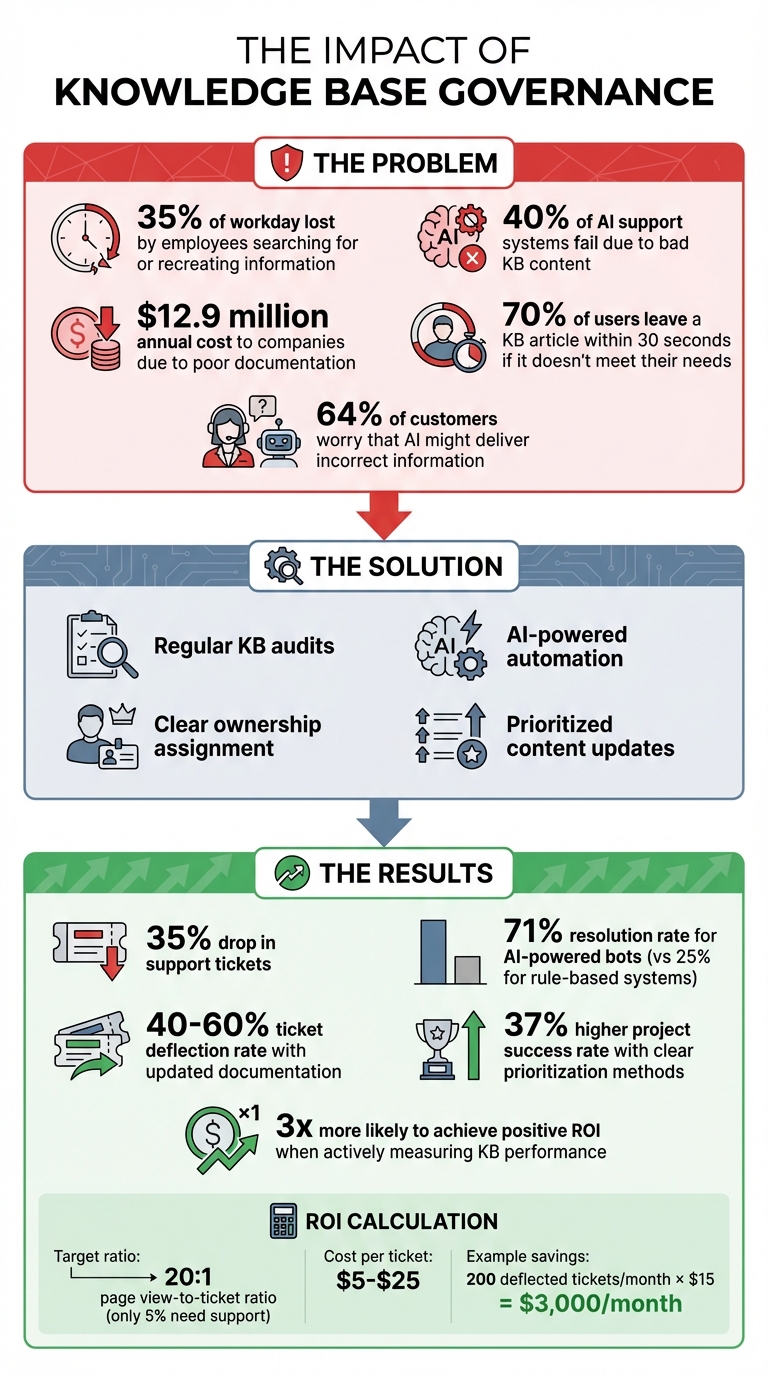
Knowledge Base Governance Impact: Key Statistics and ROI Metrics
How to Audit Your Knowledge Base
Keeping your knowledge base (KB) in top shape requires regular audits to identify broken links, missing information, or duplicate content. Think of it as creating a detailed map of your content before starting any improvements. As Nooshin Alibhai, CEO of Supportbench, explains:
A knowledge base is a garden; it needs constant tending. [1]
Catalog and Analyze Your Content
Start by creating a centralized inventory of all your KB articles. This list should include details like the title, URL, content owner, type of content, and the last update date [3]. This document will serve as your guide throughout the audit process.
Next, dive into usage data to see what’s working and what’s not. Look at your "most viewed" articles to ensure they remain accurate and useful, while "least viewed" articles might signal redundancy or poor accessibility. Pay close attention to failed search terms, as they highlight what users are looking for but can’t find [4]. A striking statistic to keep in mind: 70% of users leave a KB article within 30 seconds if it doesn’t meet their needs [4].
Don’t stop there – review support ticket data to spot recurring issues. Set up a system for flagging problematic articles, whether it’s through a Slack emoji, a help desk tag, or an internal email. This way, both agents and customers can easily report content that’s outdated, unclear, or incorrect.
These steps will give you the insights you need to decide what to address first.
Prioritize What to Fix First
Not all content issues are equally urgent, so it’s smart to use a risk-based prioritization method. Break down your KB articles into categories based on their importance [3]:
| Risk Tier | Content Examples | Recommended Review Cadence |
|---|---|---|
| High | Policy, Billing, Security, Legal | 30–60 days |
| Medium | Core workflows, Troubleshooting | 90 days |
| Low | Evergreen FAQs, General Concepts | 180 days |
Focus your efforts on high-traffic articles first, especially those tied to frequently updated product features. Tools like an Impact vs. Effort Matrix can help you sort your findings into actionable categories:
- Quick Wins: High impact, low effort
- Major Projects: High impact, high effort
- Easy Fixes: Low impact, low effort
- Low Value: Low impact, high effort
Start with quick wins – they’re cost-effective and deliver immediate results. Research shows that projects using clear prioritization methods are 37% more likely to succeed [4].
sbb-itb-e60d259
Setting Up Ownership and Governance Policies
Once you’ve audited and prioritized your knowledge base (KB), the next step is to enforce policies that prevent it from falling into chaos again. Without clear ownership and governance, even a well-organized KB can quickly deteriorate. To avoid this, assign specific roles and establish regular reviews to maintain the progress you’ve made.
Assign Content Owners and Define Roles
Every article in your KB needs a clear owner – whether that’s a single person or an entire team – who is responsible for keeping it accurate and up to date. Articles without assigned owners often get neglected, leading to outdated or incorrect information. As Fitgap wisely put it:
"If no one is accountable for an article, it will only be updated when something breaks loudly." [3]
Start by mapping your KB categories to the teams most familiar with them. For instance:
- Billing-related articles: Hand these to your finance team.
- Security documentation: Your IT department should take charge.
- Product how-tos: Assign these to your product operations team.
Make use of metadata fields to track key details, such as the article owner’s name, the last review date, and indicators of content freshness [5].
Implement strict role-based permissions to control who can edit and publish. For example, only designated owners should have publishing rights, while support agents can flag issues via an approval process. This prevents unauthorized edits and ensures sensitive internal processes aren’t accidentally exposed to customers. Such measures are vital, especially when 64% of customers worry that AI might deliver incorrect information [5].
Once ownership is established, it’s time to set up a structured review process to keep everything current.
Create Regular Review Schedules
Scheduled reviews are essential for catching outdated content. Even if updates are triggered by changes elsewhere, routine check-ins serve as a safety net to ensure nothing slips through the cracks. The frequency of these reviews should depend on how critical the content is.
To manage this, create a tracking system that includes each article’s owner, its risk level, and the next scheduled review date [3]. Use workflow tools to assign and monitor review tasks with specific deadlines – such as two days for policy updates and five days for how-to guides [3]. Many teams find it helpful to hold weekly review meetings (30–45 minutes) with support agents, content owners, and product operations to tackle common escalation issues and address "no-answer" search queries [5].
The best strategy combines both calendar-based and change-driven reviews. Keep an eye on upstream sources like release notes, pricing updates, and policy changes, and trigger immediate reviews when these materials are updated [3]. As Ameya Deshmukh from Everworker aptly explains:
"Freshness is an operations problem as much as a content problem." [5]
Using AI for Knowledge Governance
Once you’ve assigned ownership and set up review schedules, the next challenge is keeping things running smoothly without overwhelming your team. Manual content audits can take anywhere from 4 to 20 hours each month. With AI stepping in, that time can drop to just 2–5 hours by automating tasks like identifying outdated content, spotting gaps, and even drafting new articles based on customer interactions [6].
The key is to use AI where it genuinely adds value, rather than creating unnecessary complexity. As Ameya Deshmukh from EverWorker points out:
"The fix isn’t more prompts. The fix is a system that treats knowledge like a product: curated inputs, controlled behavior, measurable outputs, and continuous improvement." [5]
Let’s break down how AI can simplify two of the most time-consuming aspects of knowledge governance: auditing your existing content and keeping it updated as your product evolves.
Automate Content Audits and Relevance Scoring
AI can monitor your knowledge base (KB) in ways that manual processes just can’t match. Instead of waiting for someone to notice that an article is outdated, AI tools can integrate with your codebase to flag changes in features or parameters immediately [6]. For SaaS teams rolling out 4–8 updates weekly – impacting 16–40 articles each month – this automation stops documentation issues from piling up [6].
AI also performs gap analysis by scanning support tickets for recurring issues, such as integration errors, and flags these for prioritized content creation [6][2]. This is especially useful for B2B teams managing complex workflows with multiple steps.
The results speak for themselves. Research shows that 40% of AI customer service implementations fail within 90 days due to poor documentation quality [2]. However, when documentation is up-to-date, it can deflect 40–60% of support tickets [6]. AI-powered bots paired with strong documentation achieve a 71% resolution rate, compared to just 25% for older rule-based systems [2].
Supportbench takes this further with AI-driven tools like predictive CSAT and CES scoring. These scores help identify unresolved cases likely to generate negative feedback, often signaling missing or unclear KB content. The platform also uses AI to auto-tag cases and track first-contact resolution (FCR), showing which articles solve problems effectively and which ones need improvement.
Another game-changer? AI can automatically update screenshots when your product’s interface changes – a tedious task that’s often neglected by B2B teams [6]. Beyond audits, AI also helps create and update content proactively.
AI-Powered Article Creation and Updates
Building on automated audits, AI transforms your KB by drafting new content and refining existing articles. Instead of reacting to issues, AI enables proactive governance by analyzing 90 days of solved tickets to create articles addressing common problems [6]. For example, if your team frequently guides customers through the same multi-step process, AI can turn that expertise into a structured KB article with sections like "Symptoms", "Cause", and "Resolution", making it easier for future customers to self-serve.
Supportbench enhances this with AI KB Article Creation from Case History. If a case provides a good problem-solution example, the platform uses all related interactions to draft an article, pre-filling details like the subject, summary, and keywords. This allows support teams to scale their knowledge without starting from scratch.
AI also keeps an eye on upstream sources like changelogs, release notes, and internal threads, automatically flagging affected articles and drafting updates [6]. This is especially useful for B2B teams managing intricate products where a single release can impact multiple articles. Instead of manually cross-referencing every update, AI simplifies the process by identifying what needs attention.
That said, human oversight remains essential. Most AI governance systems rely on a "draft and approve" workflow, where AI-generated content is clearly labeled and requires human review before publication [6]. This is critical because 64% of customers worry that AI might provide incorrect information [5]. In B2B settings, even one inaccurate article can harm trust or lead to costly escalations.
Supportbench’s AI Agent-Copilot supports this process by pulling insights from past cases and internal or external knowledge bases to suggest accurate answers and improvements. It also offers AI-driven knowledge base templates and an AI Custom Knowledge Base Bot that reads your entire external KB to answer customer questions accurately – while keeping internal content secure.
The outcome? B2B teams can maintain a high-performing KB without adding headcount or overloading their current support staff. As Wilson Wilson from Ferndesk puts it:
"When your documentation is always outdated, an outdated Getting Started guide is worse than no guide at all." [6]
AI governance tools help solve this by making up-to-date documentation the norm, not the exception.
How to Measure Knowledge Governance Success
Once you’ve refined your knowledge base (KB) governance, the next step is figuring out how well it’s working. The key is to track specific metrics that tie directly to your goals – things like cutting costs, boosting agent efficiency, and improving customer satisfaction. Without solid data, proving ROI or identifying what’s working becomes a guessing game.
Key Metrics to Track
Start by looking at the ticket deflection rate, which measures how many users solve their issues through self-service without contacting support. A strong KB should aim for a 20:1 page view-to-ticket ratio, meaning only 5% of visitors need further help [8]. To calculate savings, multiply the number of deflected tickets by the average ticket cost (usually $5–$25) [9].
First-contact resolution (FCR) is another critical metric. It tells you if your articles are solving problems outright or just delaying them. A drop in FCR after governance updates might mean your content is accurate but lacks the context users need. Pair FCR with average resolution time to see if agent workloads are actually decreasing.
Next, check search performance. Track failed searches and identify gaps in your content. As Arush Balyan from DevRev points out:
Plugging these search gaps is likely the lowest-hanging fruit in terms of improving consumer self-serve! [7]
If users search for terms like "API timeout errors" and find no results, it’s a clear sign that content needs to be created.
Content freshness is also crucial. Monitor the average age of your articles and how often they’re updated. Flag anything that hasn’t been reviewed in over a year – especially in B2B scenarios where 81% of customers try self-service first [7]. Finally, track user ratings and Customer Effort Score (CES) to see if users trust your documentation. If users repeatedly submit tickets on topics already covered, it might point to a trust issue rather than missing content.
| Metric Category | Key KPIs | Operational Goal |
|---|---|---|
| Self-Service Success | Ticket Deflection Rate, Self-Service Completion Rate | Cost Reduction & Scalability |
| Content Quality | Content Freshness, Article Ratings, Average Article Age | Accuracy & Trust |
| Search Performance | Search Gaps (No Results), Search CTR, Failed Searches | Discoverability |
| Support Efficiency | First-Contact Resolution (FCR), Avg. Resolution Time | Agent Productivity |
| User Experience | Customer Effort Score (CES), Time on Page, Pages per Session | Customer Satisfaction |
These KPIs provide a clear picture of how your KB is performing.
Compare Before and After Results
Before you roll out governance changes, establish a 60–90 day baseline. Track metrics like page views, failed searches, ticket volume, and resolution times during this period. This "before" snapshot will serve as a benchmark to measure the impact of your improvements.
Once the changes are live, monitor these metrics monthly and look for patterns over a rolling 3-month window [8]. After major updates, experts suggest waiting 1–2 months before re-evaluating to confirm their effectiveness [8]. Use dashboards to visualize trends – line charts work well for tracking deflection rates, while KPI tiles can highlight key wins like faster resolution times.
To calculate ROI, use this formula:
(Deflected Tickets × Avg. Cost Per Ticket) + (Time Saved Per User × Hourly Value × Affected Users) – Operational Costs [9]. For example, if governance deflects an extra 200 tickets per month at $15 each, the savings quickly add up. Plus, better documentation that reduces agent workload adds even more value.
Organizations that actively measure their knowledge management performance are three times more likely to achieve positive ROI [4]. By showing tangible improvements in metrics like ticket deflection and resolution times, you make a strong case for continued investment in your knowledge base.
Conclusion
Managing your knowledge base is an ongoing process – it’s not a "set it and forget it" system. As we mentioned earlier, think of it like a garden: it needs regular care and attention to thrive [1].
To keep your knowledge base effective, focus on a few key practices: conduct regular audits, assign clear ownership, leverage AI for updates, and track performance with defined metrics. Many knowledge base issues arise from content that’s too internally focused, difficult to search, or lacks clear accountability. Avoiding these common pitfalls takes consistent effort and the right support tools.
In B2B support, the stakes are especially high. Customers expect precise, role-specific documentation that helps them solve complex problems quickly. A well-maintained knowledge base can work around the clock, reducing repetitive questions and freeing up your team to handle more strategic tasks.
While AI can simplify updates, it’s not a complete solution. Human oversight, consistent review schedules, and treating your knowledge base as a long-term investment are all critical elements of success.
Start small: document your top 10–20 FAQs [1], assign ownership for each section, and review failed searches to identify gaps. Over time, establish a steady rhythm of updates, reviews, and performance tracking. With this approach, your knowledge base will become a reliable resource for both your team and your customers.
FAQs
Who should own each KB article?
Each Knowledge Base (KB) article should have a clear owner who takes responsibility for its accuracy, relevance, and timely updates. This role often falls to a Content Owner, such as a subject matter expert (SME) or a knowledge manager, depending on the organization’s structure. Assigning ownership ensures the content remains up-to-date and accurate, avoids outdated information, and promotes accountability – key factors in maintaining a trustworthy and effective knowledge base.
How often should we review KB content?
The frequency of content reviews hinges on how crucial and frequently used the material is. Articles with a significant impact or heavy traffic should be reviewed monthly. For less critical content, a review cycle of 6 to 12 months is typically sufficient. Leveraging AI tools can help identify outdated information and trigger reviews based on performance metrics. Setting a regular review schedule aligned with the content’s importance ensures your knowledge base remains accurate and up-to-date.
What should AI automate vs. humans approve?
AI can take on routine tasks such as drafting content, updating existing materials, and performing audits. For example, it can write initial article drafts, identify outdated sections, and recommend updates – saving time and cutting down on repetitive work.
However, human oversight is essential. Reviewing AI-generated content ensures it’s accurate, aligns with compliance standards, and maintains the right tone. This teamwork between AI and humans helps uphold the quality and reliability of your knowledge base.
Related Blog Posts
- How do you convert solved tickets into knowledge base articles at scale?
- How do you keep your knowledge base from becoming outdated and ignored?
- How do you manage knowledge governance (ownership, review cycles, and “KB debt”)?
- How do you run a content review process for KB articles (owners + SLAs + audits)?