Struggling with complex B2B support issues? A standardized knowledge base (KB) template can save time, reduce errors, and align your teams for faster resolutions. Here’s what you need to know:
- Why templates matter: They simplify multi-stakeholder processes, preserve critical knowledge, and improve collaboration across teams.
- Key benefits:
- Reduce support tickets by 20–40%.
- Speed up new hire onboarding by 30–60%.
- Cut content creation time by 60%.
- What to include in your KB template:
- Problem details (error codes, logs).
- Prerequisites (permissions, tools, roles).
- Step-by-step resolution with expected results.
- Escalation paths and rollback plans.
- Metadata for easy search and AI optimization.
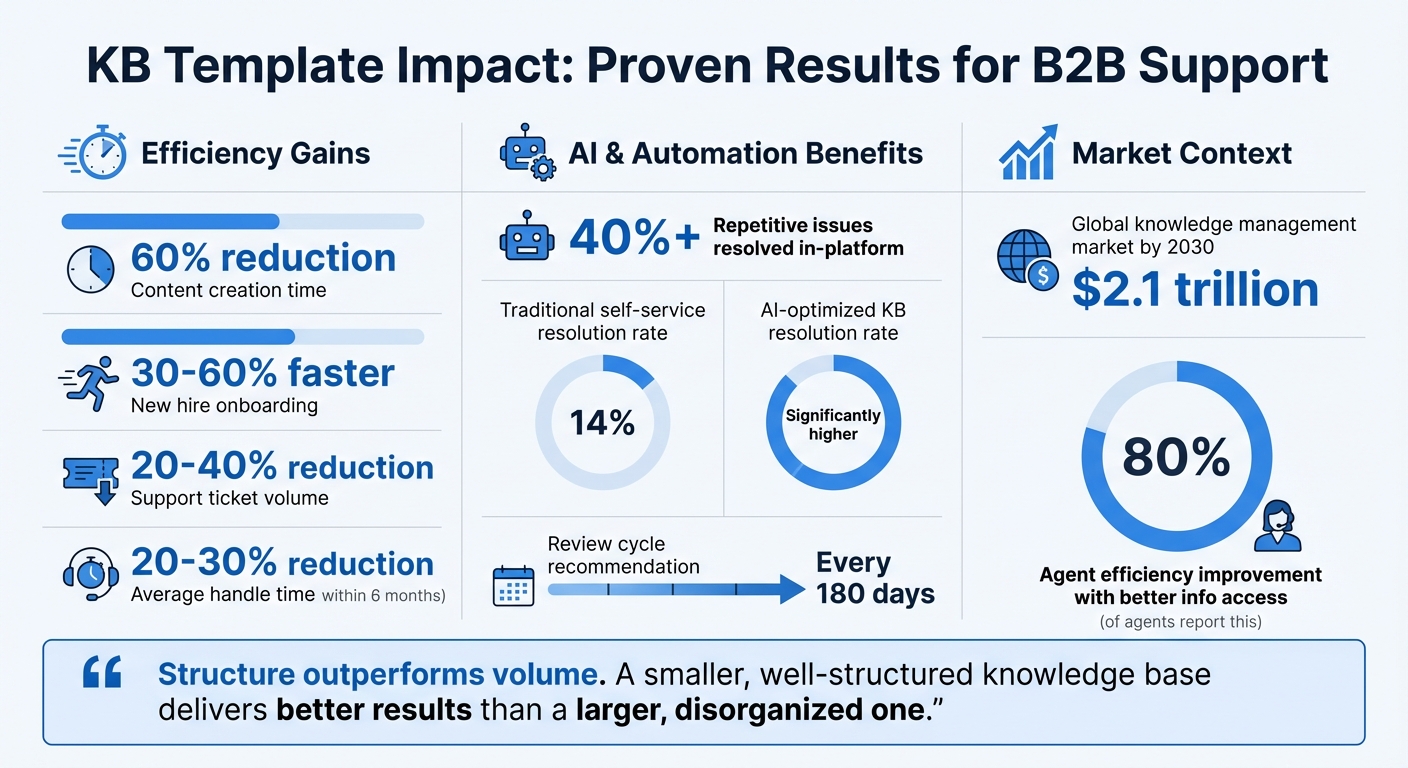
KB Template Benefits: Key Statistics for B2B Support Efficiency
Why Complex B2B Issues Need a KB Article Template
B2B support often involves multiple decision-makers, critical accounts, and lengthy issue resolution processes. Without a clear, standardized approach, important details can get lost, leading to delays and frustrated customers. A unified, templated system can help prevent these problems.
The Case for Standardized B2B Knowledge Management
When multiple departments are involved in resolving an issue, there’s a real risk of losing important institutional knowledge. For example, if a key engineer with expertise in a specific integration workflow leaves the company, their knowledge could disappear with them [3]. Standardized knowledge base (KB) templates help capture and document these details, ensuring they’re available for future use. This approach also helps bridge gaps between departments, creating a shared resource that everyone can access.
Templates can be tailored to suit different types of users. For instance, technical teams might need detailed API references or system architecture diagrams, while account managers often require summaries of business impacts and clear escalation steps. A well-designed template can layer this information, making it accessible to both technical and non-technical audiences [2]. In industries like finance or healthcare, where compliance is crucial, these templates also provide the necessary audit trails and version histories [3].
By creating a structured system, templates not only preserve knowledge but also improve how teams collaborate and solve problems.
What a Good KB Template Delivers
Using templates delivers clear benefits, such as cutting content creation time by 60% [2], helping new hires ramp up 30–60% faster [3], and reducing support ticket volume by 20–40% [3].
Templates also play a key role in AI-driven tools. By organizing information in a structured way, they allow retrieval-augmented generation (RAG) systems to deliver precise answers. As Typewise explains:
"Structure outperforms volume. A smaller, well-structured knowledge base can deliver better results than a larger, disorganized one" [1].
This structured approach doesn’t just improve AI performance; it also helps human teams work more efficiently.
For high-value accounts with long case timelines, templates prevent information from slipping through the cracks. By standardizing metadata – such as tagging articles by audience, product area, severity, and review date – agents can quickly find relevant context, even months into a case [3]. Regular 180-day review cycles ensure the information stays accurate, which is especially important for long-term B2B processes [3]. This kind of system helps maintain strong relationships with key customers while keeping operations running smoothly.
sbb-itb-e60d259
KB Template Structure for Multi-Stakeholder B2B Issues
A well-organized template ensures everyone involved knows their role and can follow a clear path to resolve issues. Each section serves a distinct purpose, creating a unified reference for all teams. This structure is especially valuable in complex B2B scenarios, where multiple stakeholders need to stay aligned from start to finish.
Problem Statement and Symptoms
Start with the customer’s description of the issue. This helps AI retrieval systems match future searches to the right article [1]. Be specific – include error codes, logs, and system states. For instance, instead of saying, "SSO login fails", detail it as: "Users encounter error code AUTH_502 when using SSO login via Okta, with a timestamp mismatch recorded in /var/log/auth.log." This level of detail speeds up identification for both human agents and AI tools.
Prerequisites and Stakeholder Roles
List everything required before tackling the issue. This might include access permissions, tools, and version details (e.g., "Billing v3.2+" or "Admin-level API credentials"). Clearly define roles for the resolution process:
- Incident Commander: Oversees the resolution.
- Scribe: Documents every step.
- Communications Lead: Keeps stakeholders updated [3].
Step-by-Step Resolution Process
Provide clear, numbered steps for resolving the issue. Use specific headings like "Set up SSO" rather than vague titles such as "SSO Overview." After each step, include a brief "Expected Result" to confirm progress. For example: "Run the sync command. Within 2 minutes, the dashboard should display ‘Status: Active.’" These checks help users avoid proceeding with incomplete or incorrect steps.
Troubleshooting Exceptions and Escalations
Include guidance for handling edge cases and a clear escalation process. Clearly outline which issues can be resolved independently and which require escalation [5]. Provide a pre-formatted "Contact Support" template for users to copy into a ticket, ensuring all necessary details are included [3]. Additionally, include a "Rollback Plan" to outline reversion steps and their potential impacts – critical for production systems or key integrations.
When standard steps fail, users should immediately consult this section for when and how to escalate issues.
Resolution Verification and Follow-Up
End with a verification step to confirm the issue is resolved. For more complex cases, include a post-incident Root Cause Analysis (RCA) template to document findings and prevent recurrence. For example: "Monitor logins for 24 hours to confirm all users can access the system without issues. Record any lingering problems in the RCA template."
Metadata and AI Optimization Fields
Adding structured metadata ensures articles are easily searchable and optimized for AI tools. Key fields include:
- Canonical Question: The main query the article addresses.
- Synonyms and entities: Include related terms like SKUs or feature names.
- Audience Tags: Specify whether the content is for admins, agents, or another group [1].
Use stable, machine-friendly labels like # Problem: and # Resolution:. As Typewise puts it:
"If you want retrieval augmented generation (RAG) to deliver precise answers, your knowledge base must follow a strict template. Think of each article as an API response" [1].
Automate workflows to flag articles for review every 180 days, ensuring metadata and content stay up-to-date [3].
| Template Section | Purpose | Key Elements |
|---|---|---|
| Problem Statement | Define and align on the issue | Error codes, logs, system states |
| Prerequisites | Outline requirements before starting | Permissions, tools, versions, roles |
| Resolution Steps | Provide actionable fixes | Numbered steps, expected results |
| Escalation Path | Manage unresolved issues | Contact details, logs, rollback plan |
| Metadata | Improve search and AI performance | Canonical question, audience tags, synonyms |
KB Template Examples for Complex B2B Issues
Real-life scenarios highlight how the template can be applied to tackle intricate B2B challenges. These examples build on the previously described template, showcasing its use in practical, real-world contexts.
Example 1: SLA Escalation in Manufacturing
In the manufacturing world, downtime translates directly into significant expenses. An SLA escalation article for this industry should serve as both a guide and a record, ensuring teams consistently follow a standardized approach [3] [6].
Problem Statement and Symptoms: "Production line B-7 stopped. Monitoring dashboard shows ‘Error 409: Sensor Timeout’ in /var/log/production.log. Line throughput dropped from 120 units/hour to zero at 2:47 PM EST."
Prerequisites and Stakeholder Roles: Confirm admin access to the plant monitoring system (v4.3+). Make sure the necessary roles are assigned: Incident Commander (plant supervisor), Scribe (shift lead), and Vendor Liaison (if third-party software is involved) [3] [4].
Step-by-Step Resolution Process: Start by verifying the alert on the dashboard. Identify whether the issue stems from internal hardware or vendor software, and then carry out the fix. Each step should include an "Expected Result." For instance, "Within 2 minutes of resetting the sensor array, the dashboard should display ‘Status: Active,’ and throughput should return to at least 115 units/hour." This structured approach aligns with scalable, AI-driven support practices.
Troubleshooting and Escalation: If resetting the sensor fails after two attempts, escalate immediately using the designated contact template. Include a Rollback Plan with steps to revert to manual line control, ensuring minimal disruption to production [3].
Resolution Verification and Follow-Up: Monitor the line for 24 hours to confirm stable operation. Use the Root Cause Analysis (RCA) template to document findings, such as outdated sensor firmware, and assign follow-up actions to prevent the issue from recurring [3].
| Template Component | Manufacturing SLA Application |
|---|---|
| Scope | Production lines B-7 through B-12, sensor firmware v4.3+ |
| Roles | Incident Commander, Scribe, Vendor Liaison, Plant Manager |
| Preconditions | Downtime exceeding 15 minutes triggers escalation |
| Step Sequence | 1. Confirm alert; 2. Isolate component; 3. Execute fix |
| Verification | Dashboard confirms throughput is ≥115 units/hour |
| Rollback | Revert to manual line control if automated fix fails |
| Post-Incident | RCA template with ownership of follow-up actions |
Example 2: Multi-Team Integration Failure in Logistics
Integration breakdowns between internal systems and third-party software can disrupt shipments and delay deliveries. A well-crafted KB article must clearly define team responsibilities and provide precise field mappings to restore the data flow [7] [3].
Problem Statement and Symptoms: "Shipment sync failing between internal WMS and third-party carrier API. Error log indicates ‘Error 409: Conflict’ and a timestamp mismatch in /api/v2/shipments. No tracking numbers generated for orders placed after 9:00 AM EST on 4/6/2026."
Prerequisites and Stakeholder Roles: Ensure API admin access for both the WMS and carrier platform. Confirm the required roles: Engineering Lead (internal API owner), Operations Manager (logistics workflow), and Vendor Contact (third-party support) [7] [3].
Step-by-Step Resolution Process: Check API connectivity and field mappings. Verify that the "shipment_date" format adheres to ISO 8601 (YYYY-MM-DD) in both systems. If the carrier API uses a different format, apply the documented transformation rule. After fixing the mapping, trigger a manual sync to ensure tracking numbers are generated within 5 minutes [3]. This structured approach aligns with scalable, AI-driven support practices.
Troubleshooting and Escalation: If syncing continues to fail, investigate environment-specific issues (e.g., Production vs. Staging) and escalate to the vendor’s integration support team [4]. Include a Rollback Plan that outlines steps to revert to the previous API version and manually input tracking numbers to keep shipments moving [3].
Resolution Verification: Confirm that all orders from 4/6/2026 have tracking numbers and that new orders sync automatically. Monitor the integration for 48 hours and document any remaining issues in the post-incident report [3].
"The internal knowledge base documents how the product actually works in practice, including the edge cases, the undocumented behaviors, the known bugs with their workarounds, and the escalation paths." – Yaro Labs [7]
These examples illustrate how a standardized KB template can simplify resolving complex issues and improve team collaboration. By detailing error codes, role assignments, and verification steps, these articles enable junior agents to handle problems that might otherwise require senior intervention – cutting average handle time by 20–30% within six months [7].
Common Mistakes in Complex KB Articles and How to Fix Them
These errors don’t just waste time – they can weaken the overall impact of your knowledge base.
Including Too Much Unnecessary Detail
One frequent misstep is burying the solution under a mountain of irrelevant background information. If an article dives too deeply into the history of a feature before addressing the actual problem, readers might give up. Using progressive disclosure – organizing content with clear headings and collapsible sections – can help. This method ensures that beginners aren’t overwhelmed by advanced technical details[2]. Keep summaries focused on solving the issue with a concise overview, skipping unnecessary context[2]. A smaller, well-structured knowledge base often outperforms a larger, cluttered one, making it easier for both humans and AI systems to find accurate information[1].
Missing Stakeholder-Specific Context
Another common issue is failing to tailor content for specific audiences. Mixing instructions meant for different roles – like combining admin-level steps with end-user troubleshooting – creates confusion. For instance, if a user without admin permissions tries to follow admin instructions, or if a developer gets customer-facing steps, resolution times can double[4]. Adding audience metadata to every article – clearly labeling it for Customers, Agents, Admins, or Developers – can prevent this confusion[1][3]. In AI-driven systems, missing context like "Admin-only" can lead to the AI delivering incorrect guidance to non-admin users[4]. In fact, 80% of customer support agents say better access to role-specific information would improve their efficiency significantly[2].
Not Updating Articles Regularly
Even the best-organized knowledge base can fail if its content is outdated. As systems, policies, or product interfaces evolve, outdated articles can mislead users. In AI-powered environments, outdated information retrieved by RAG pipelines can result in errors, unnecessary escalations, and even hallucinated responses[4][1]. To avoid this, set up mandatory metadata fields like last_reviewed_date, owner, and content_lifecycle. Automate alerts to flag content for review every 180 days[3][4][1]. Establish review timelines – critical runbooks should be updated within 7 days, while general articles can follow a 90-day cycle. Companies that keep their self-help content current can reduce support ticket volumes by 20–40%[3].
"Automation is only as good as the knowledge it sits on." – Enjo.ai[4]
Using AI for Template-Based KB Creation
AI has transformed the way knowledge bases (KBs) are created, making the process faster, smarter, and more efficient. With the global knowledge management market projected to hit $2.1 trillion by 2030, much of this growth is fueled by generative AI advancements[2]. This isn’t just about speeding up content creation – it’s about creating machine-readable systems that enable quick issue resolution across workflows. AI doesn’t just assist in drafting; it also organizes and maintains KB articles with remarkable efficiency.
AI-Powered Drafting and Summarization
Modern AI tools can analyze resolved tickets and determine whether they should be turned into KB articles. In under two minutes, AI generates a structured draft that includes a problem statement, resolution steps, and metadata. This reduces content creation time by up to 60%[2]. For example, agents who previously spent 30–45 minutes crafting an article can now focus on reviewing AI-generated drafts instead.
Take Supportbench’s AI KB Article Creation from Case History feature – it automatically extracts the subject, summary, and keywords by analyzing all interactions within a case. This makes it easier to convert complex resolutions into reusable documentation. AI also improves how articles are indexed and retrieved, ensuring they’re both accessible and actionable.
Improving Article Search with AI Metadata
AI doesn’t stop at drafting – it also makes articles easier to find. Automated entity extraction identifies official product terms, SKUs, and even customer-specific jargon, enhancing search filters and retrieval accuracy[1]. AI assigns role-based metadata (e.g., admin, end-user, agent) and problem-specific tags (like error codes or system states) to ensure the right users access the right solutions[1][4].
For instance, instead of returning a generic article on "integration failure", AI can refine results to something like "API auth fails in v3.2 for admin users in logistics environments." This level of precision is particularly valuable for Retrieval-Augmented Generation pipelines, where documentation is broken into focused, machine-readable chunks of 150–300 words[1]. By leveraging these AI-native knowledge bases, teams can resolve over 40% of repetitive issues directly within platforms like Slack or Teams – without users needing to open a separate article[4].
Automating Updates and Continuous Improvement
Even the most well-written KB articles can become outdated over time. AI steps in by tracking key metadata – such as owner, review_date, and version – to flag content that needs updates[1][4]. Poor maintenance is a common issue, with traditional self-service systems resolving only 14% of customer problems[8]. AI combats this by monitoring for stale content and suggesting updates based on metrics like staleness rate (percentage of outdated documents) and hallucination rate (AI-generated replies lacking valid citations)[1].
As one expert from myNeutron aptly noted:
"Your AI knowledge base is only as good as its maintenance." – myNeutron[8]
Conclusion
The earlier sections illustrate how using standardized, AI-optimized knowledge base (KB) templates can significantly enhance support efficiency. By creating consistency in KB articles, everyone benefits – faster resolutions, clearer communication, and fewer misunderstandings.
But this isn’t just about tidying up information. Think of a structured KB template as the backbone of a scalable support system. When KB articles are designed like APIs – with predictable formats and stable fields – they become a resource that both humans and AI can depend on.
The numbers back this up: template-driven KBs can cut content creation time by 60% [2] and reduce support ticket volumes by as much as 40% [3].
These templates turn your KB into a powerful operational tool, delivering precise answers directly within workflows – whether that’s through messaging platforms or embedded in your product. As Typewise aptly states:
"Structure outperforms volume. A smaller, well-structured knowledge base can deliver better results than a larger, disorganized one." [1]
The benefits go beyond efficiency. Start by focusing on the most common, high-impact support issues. Redesign templates for your top 30 support topics before expanding this approach across the entire KB [1]. Add metadata filters – such as product area, version, and audience – to help AI systems surface the right solutions. Also, set automated review cycles for articles that haven’t been updated in 90–180 days to keep content fresh [3].
Support operations are evolving. Users no longer want to dig through multiple articles – they expect quick, accurate answers delivered right where they need them. By adopting a template-based, AI-powered strategy, you’re not just improving efficiency. You’re also safeguarding institutional knowledge, speeding up onboarding by 30–60% [3], and creating a system that grows smarter with every resolved case.
Consistent use and regular updates to your KB will keep these improvements going strong.
FAQs
How do I choose which issues to template first?
When deciding where to focus your efforts, target issues that come up often, are particularly tricky, or involve multiple people working together. Start by identifying the problems your team spends the most time addressing or those that require input from various stakeholders. Prioritize challenges that are widespread, have significant consequences, or demand thorough, step-by-step solutions. Tackling these areas first can streamline support processes, cut down on resolution times, and create more consistent and reliable documentation.
What metadata fields are most important for AI search?
Key metadata fields for AI search include:
- Entity recognition: Helps identify and categorize key terms or concepts within content.
- Citation links: Provides references or sources to validate information.
- Owner and review dates: Tracks who is responsible for the content and when it was last reviewed.
- Error codes: Flags issues or inconsistencies within the data.
- Synonyms and entities: Connects related terms and concepts to improve search results.
- Region and language: Ensures content is tailored to specific geographical and linguistic needs.
- Versioning: Keeps track of content updates and changes over time.
- Product area: Links the content to relevant products or services.
- Audience: Aligns content with the intended user group.
These fields enable AI systems to better extract and reference business information, making searches more relevant and efficient.
How do we keep KB articles from going stale?
To prevent KB articles from becoming outdated, it’s important to schedule regular reviews. This ensures the content remains accurate and useful. AI tools can be a big help here – they can spot outdated or incorrect information, making updates easier and faster. Assigning clear ownership for maintaining content is another key step. When everyone knows their role, it’s easier to keep things organized. Using structured templates can also simplify the revision process. Together, these strategies ensure your knowledge base stays current and effective, which boosts support efficiency.