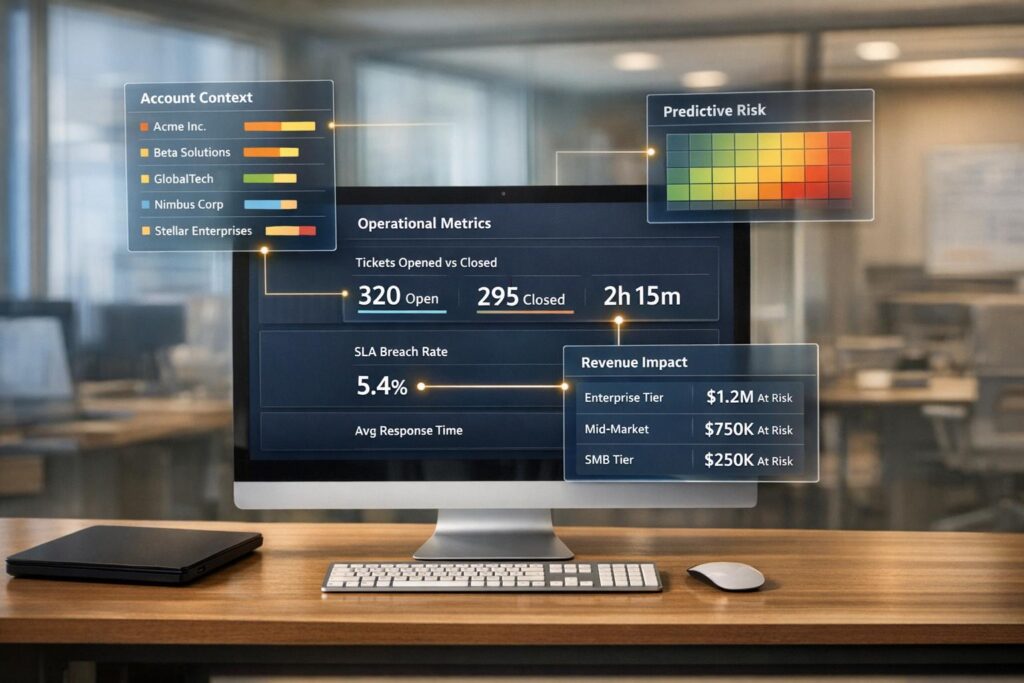
Jira Service Management (JSM) works well for IT teams but struggles with customer-focused metrics needed for B2B support. Support Operations (Support Ops) reporting fills these gaps by prioritizing customer insights like sentiment analysis and account-level performance, which JSM lacks.
Key Takeaways:
- JSM Strengths: ITIL-aligned workflows, internal IT metrics, and automation for IT processes.
- JSM Weaknesses: Limited B2B segmentation, manual reporting for advanced insights, and basic customer satisfaction (CSAT) tracking.
- Support Ops Strengths: Real-time customer metrics, predictive insights, and multi-stakeholder visibility.
- Support Ops Weaknesses: Lacks ITIL compliance modules, making it less suitable for internal IT needs.
Quick Comparison:
| Feature | Jira Service Management (JSM) | Support Ops Reporting |
|---|---|---|
| Primary Focus | Internal IT workflows | B2B customer support |
| Setup Complexity | Moderate (requires JQL) | Low (no-code dashboards) |
| Key Metrics | SLA, CSAT, resolution times | Sentiment, renewal risks |
| AI Features | Automation, sentiment analysis | Predictive CSAT, anomaly detection |
To bridge the gaps in JSM, integrating AI-powered tools can enhance customer insights, automate reporting, and improve decision-making.
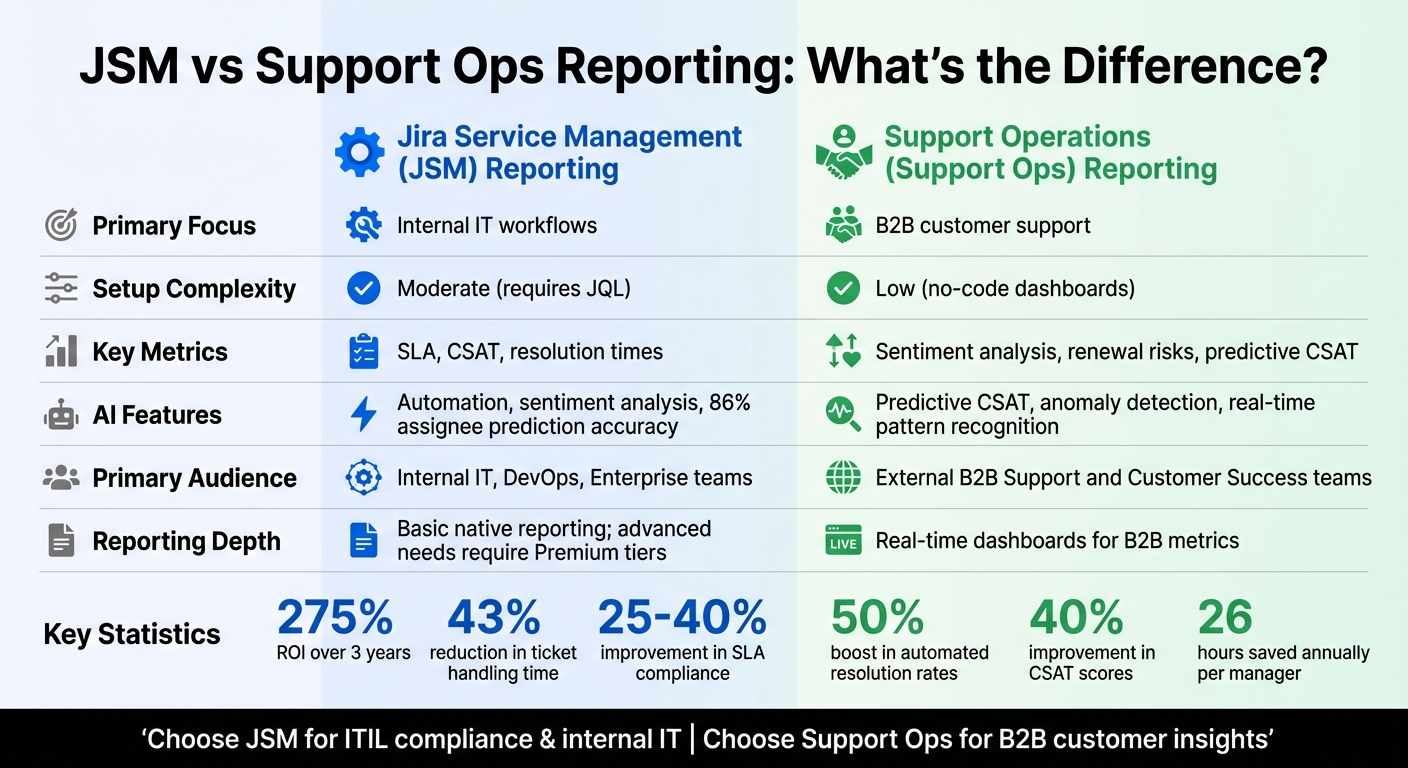
JSM vs Support Ops Reporting: Feature Comparison for B2B Support Teams
1. Jira Service Management (JSM) Reporting
Reporting Capabilities
Jira Service Management (JSM) offers a variety of built-in reports, such as workload tracking, customer satisfaction (CSAT), and deflected versus resolved requests. These are accessible through dashboards and Atlassian Analytics. However, when it comes to detailed B2B segmentation, JSM falls short, often requiring teams to export data using JQL for deeper analysis. The "Customer Service Overview" dashboard provides support managers with a broad view of trends across projects.
For teams on Cloud Enterprise plans, Atlassian Analytics adds another layer of functionality. It enables cross-product data visualization, pulling together information from development and operations teams. The visualSQL builder allows for creating custom reports, while integration with third-party sources like Snowflake, Amazon Redshift, and Microsoft SQL Server enriches reporting capabilities.
Despite these features, multi-account environments often face challenges due to the manual effort required for advanced reporting. That said, JSM strengthens its reporting with AI-powered insights.
AI-Driven Insights
Atlassian Intelligence introduces tools like automated summaries of work items, customer sentiment analysis, and performance tracking for AI-driven virtual agents. These include metrics like containment and resolution rates for AI-handled issues. For example, in February 2025, Canva streamlined its incident reporting process with JSM, saving its engineering team considerable time. The system automatically generates incident reports and tracks action items as soon as a ticket is closed.
"Jira Service Management is saving us a significant amount of time. Once an incident ticket is closed, it’ll run an incident report and create action items that are tracked… If we didn’t have that automation set up, it would have all been a manual process." – Andrew Toolan, Software Engineer, Canva
The AI suggestions panel adds even more functionality by offering real-time recommendations and assigning tasks predictively. It identifies the top five assignees with 86% accuracy, which directly contributes to improved SLA compliance. Teams that implement SLA tracking through JSM report a 25–40% improvement in compliance rates within six months.
These AI-driven features have a measurable impact on customer success metrics, which are explored next.
Customer Success KPIs
JSM tracks critical metrics like average CSAT ratings, resolution times (90th percentile), and SLA breach percentages. One standout metric is "AI containment", which measures the percentage of issues resolved without human intervention. However, the built-in CSAT reporting tool has limitations – it lacks the ability to filter by specific organizations, agents, or custom time periods. To address this, many teams turn to external BI tools or third-party AI integrations. These tools can calculate "True CSAT" by analyzing conversation sentiment over time, rather than relying solely on survey responses.
Another feature of JSM is its ability to flag "stuck" requests – those that remain in the same status for seven or more days – highlighting areas where customer dissatisfaction may arise. While JSM performs well in tracking short-term satisfaction, it struggles to provide insights into long-term customer relationships. This is where more comprehensive Support Ops reporting tools excel.
Automation and Scalability
JSM’s automation capabilities significantly reduce ticket handling time, cutting it down by 43%. For example, in 2025, Thumbtack integrated JSM with Okta and Workday to automate employee lifecycle events. This integration fully automated processes like onboarding and offboarding, saving the team 250 hours annually. Additionally, JSM’s virtual service agent manages up to 75% of internal requests, achieving an average satisfaction score of 4.5 out of 5.
Organizations that adopt JSM report a 275% ROI over three years. However, there are some gaps. JSM lacks built-in tools for resource management, such as tracking individual workloads or managing project budgets. Teams often need to rely on third-party tools like Epicflow to fill these gaps. For companies managing complex B2B support operations with multiple stakeholders, these limitations can create reporting challenges that require manual fixes or additional software.
sbb-itb-e60d259
2. Support Operations (Support Ops) Reporting
Reporting Capabilities
Support Operations reporting offers a broader perspective compared to JSM. It doesn’t just track ticket volume and resolution times; it integrates account tiers, contract details, and recent sales activity directly into the support framework. This gives agents a complete view, including renewal statuses, infrastructure specifics, and other key customer insights.
One standout feature is Contact Reason Analysis, which evaluates how well individual use cases and knowledge sources perform. It pinpoints which articles lead to automated resolutions and which ones trigger escalations. Another useful tool is Automation Reports, which dive into historical CRM data to identify common questions and estimate future automation opportunities.
Unlike JSM’s project-specific dashboards, Support Ops reporting emphasizes bi-directional synchronization with CRMs. Metrics such as CSAT scores, resolution times, and AI-generated summaries automatically flow to Sales and Customer Success teams, ensuring everyone stays aligned.
AI-Driven Insights
AI plays a pivotal role in transforming raw data into executive summaries that highlight trends and actionable insights. Instead of manually combing through ticket data, LLMs generate concise summaries, saving support managers an estimated 26 hours annually in administrative tasks.
AI also powers real-time pattern and anomaly detection, identifying recurring issues or deviations like sudden spikes in ticket volume or changes in customer sentiment. This allows teams to tackle potential problems before they escalate.
In November 2025, Atlassian’s engineering team, led by Abhishek Rana and Rajat Gupta, introduced a revamped AI architecture for the JSM Virtual Agent. By adopting a Unified Orchestrator and leveraging Retrieval-Augmented Generation (RAG) with a cross-encoder ranking mechanism, they achieved a 50% boost in automated resolution rates and a 40% improvement in CSAT scores. The system now supports over 20 languages and manages nearly half of all chat queries without human involvement.
"Integrating your AI-powered helpdesk deeply with Salesforce isn’t just a technical task; it’s a strategic necessity." – Eric Klimuk, Founder and CTO, Supportbench
These AI-driven enhancements ensure actionable insights reach all relevant teams, even in complex multi-stakeholder environments.
Multi-Stakeholder Metrics
Support Ops reporting is tailored for multi-stakeholder visibility. Sales teams can access updates on recent support issues, Customer Success Managers receive health indicators, and leadership gains insights like predictive churn risk scores. This contrasts with JSM’s narrower focus, providing each stakeholder with data they can act on.
Advanced platforms also track granular AI performance metrics, such as "Understood conversations" (aligned with specific use cases), "Assisted conversations" (AI involvement without full resolution), and "Handled conversations" (fully automated resolutions). They even include LLM Reasoning Data, offering AI-generated explanations for why certain conversations were resolved automatically.
Customer Success KPIs
Support Ops platforms measure Bot Satisfaction (BSAT) scores by dividing 4-5 ratings by the total number of responses. They also monitor "Informed" resolution states, where AI provides guidance even if the issue isn’t fully resolved. This level of detail helps refine knowledge bases and improve future automation efforts.
Automation and Scalability
Support Ops platforms employ simulation modes to test AI performance using historical tickets before going live. These simulations reveal how the system would respond, highlight knowledge gaps, and ensure accuracy. This process validates AI readiness and identifies areas for improvement.
Unified orchestrators maintain consistent responses and reporting across platforms like Slack, Microsoft Teams, and web portals, ensuring data stays cohesive. Meanwhile, AI Triage automatically tags, routes, and prioritizes tickets based on sentiment and intent, improving workload distribution and resolution tracking.
"A Copilot becomes vastly more helpful when it knows the customer’s specific environment… their support level, or recent issues logged by their Customer Success Manager." – Eric Klimuk, Founder and CTO, Supportbench
Pros and Cons
Here’s a breakdown of how JSM and Support Ops reporting stack up, highlighting their strengths and limitations for different use cases.
JSM is tailored for internal IT and compliance-focused teams, offering ITIL-aligned metrics for incident, problem, change, and asset management. Its integration with the Atlassian Data Lake makes it a solid choice for technical reporting needs. However, the platform’s basic native reporting can fall short for advanced users. To unlock its full potential, significant customization is often required, including admin permissions and proficiency with JQL. Notably, JSM lacks built-in asset reporting, leaving advanced users seeking more than its default features can provide [5, 31, 32].
On the other hand, Support Ops platforms cater to external B2B support teams, focusing on customer experience metrics like sentiment analysis, CSAT prediction, and real-time health indicators. These tools are designed for ease of use, featuring no-code dashboards that even non-technical users can set up quickly. AI-driven insights – such as automated summaries and anomaly detection – are seamlessly embedded into daily workflows, reducing manual effort and saving time. However, these platforms typically don’t include ITIL compliance modules, making them less suitable for structured internal IT operations. Pricing also differs, with JSM’s advanced analytics locked behind higher-tier plans, whereas Support Ops platforms often provide core AI features at a lower entry point.
| Feature | JSM Reporting | Support Ops Reporting |
|---|---|---|
| Primary Audience | Internal IT, DevOps, and Enterprise teams | External B2B Support and Customer Success teams |
| Setup Complexity | Moderate to High; requires JQL and admin permissions | Low; no-code dashboards with intuitive setup |
| Core Strength | ITIL-aligned workflows and integrated cross-team data | Real-time B2B metrics and customer insights |
| AI Integration | Focused on platform setup and IT workflows | Embedded directly into daily workflows |
| Reporting Depth | Basic native reporting; advanced needs require Premium tiers | Real-time dashboards for B2B metrics |
If your priority is ITIL compliance and internal workflow integration, JSM is the better fit. For real-time B2B customer insights, Support Ops platforms are the way to go. These distinctions pave the way for exploring AI-powered solutions to address any remaining gaps.
How to Fill JSM Reporting Gaps with AI
JSM is great for handling internal IT needs, but it falls short when it comes to delivering the kind of deep customer insights that modern B2B support teams rely on. That’s where AI-native platforms step in. They embed tools like predictive metrics, dynamic SLAs, and automated quality assurance directly into workflows – no need for expensive upgrades or complicated query setups.
Predictive CSAT and sentiment analysis go far beyond the standard survey methods. While JSM does offer real-time sentiment detection for individual tickets, AI-powered tools take it a step further. They provide predictive scores that can flag potential churn risks well in advance. With 88% of organizations already using AI for service management and 89% planning to expand their AI investments, these tools are becoming essential. Predictive insights also make it easier to create more responsive service level agreements.
Dynamic SLAs are a game-changer. Instead of sticking to fixed timers, these SLAs adjust based on urgency, customer importance, or even sentiment changes. For instance, if a customer’s sentiment drops just before their renewal date, the SLA can automatically tighten to ensure quicker responses. Traditional JSM SLAs, by contrast, often require manual adjustments and don’t adapt to changing ticket contexts. Dynamic SLAs work hand-in-hand with predictive sentiment tools, ensuring your metrics stay relevant as customer needs shift.
AI-driven case summaries and automated QA simplify multi-stakeholder workflows. AI co-pilots can instantly generate summaries and suggest solutions by pulling from past cases and knowledge base content, cutting down on manual review time. Automated QA tools evaluate tickets against quality standards, offering a complete dataset instead of relying on random sampling. In real-world use, these AI-powered solutions have been shown to reduce ticket handling times by 25% to 35%.
To start closing these reporting gaps right away, consider enabling AI triage to categorize tickets, using sentiment monitoring to highlight high-risk accounts, and setting up workflows that turn resolved cases into knowledge base articles. These steps not only improve reporting accuracy but do so without adding unnecessary complexity. It’s a straightforward way to get more actionable insights and better outcomes from your support system.
Conclusion
AI-native solutions are becoming a game-changer for modern B2B support operations, addressing challenges that traditional tools like JSM often fail to resolve.
While Jira Service Management (JSM) works well for internal IT teams requiring ITIL-aligned workflows, it falls short when B2B support leaders need customer-specific visibility or predictive insights. JSM’s project-centric design makes it difficult to track customers across multiple service desks, as noted by Christopher Berry Dunford in the Atlassian Community:
"You want to avoid the watermelon effect, in which good, ‘green’ metrics hide the true, ‘red’ state of your operation".
This "watermelon effect" highlights a critical risk – teams may hit their SLA targets but fail to notice underlying customer dissatisfaction. Without tools that align with customer-focused metrics, early warning signs of frustration can easily go unnoticed.
Adding to the complexity, JSM’s reporting capabilities are rigid and often require third-party apps or tools like Power BI to bridge the gaps. For already stretched teams, this added layer of complexity can be a major obstacle.
AI-native platforms like Supportbench solve these challenges by offering predictive and dynamic features directly integrated into daily workflows. These platforms provide tools like predictive CSAT and sentiment scoring, and automated quality assurance right out of the box. No need for complex setups, JQL queries, or costly add-ons. Features such as real-time customer-centric dashboards and AI-driven ticket summaries are built into the platform, offering instant visibility into high-risk accounts and stakeholder performance.
For teams operating in complex B2B environments, transitioning to an AI-native platform ensures actionable insights without unnecessary overhead. Supportbench, for instance, provides enterprise-grade reporting and AI tools at a fair, scalable price – starting at $32 per agent per month when billed annually. It’s a solution designed to grow with your team while keeping operations streamlined and customer-focused.
FAQs
Which customer metrics are hardest to report on in JSM?
Jira Service Management (JSM) can fall short when it comes to metrics that require deeper segmentation or advanced analysis. For instance, breaking down CSAT scores by project, request type, or organization often requires relying on external tools.
Similarly, if you’re trying to monitor SLA performance or dive into multi-dimensional insights – like analyzing asset management data or evaluating team workloads – you might face challenges. JSM’s built-in reporting tools lack the granularity and cross-data analysis capabilities needed for more complex operational needs. This often leaves teams turning to custom integrations or third-party solutions to fill the gaps.
How can I get account-level support reporting without heavy JQL?
AI-powered tools make it possible to generate account-level support reports without the hassle of mastering complex JQL. These tools automatically build detailed dashboards and provide insights directly from your support tickets. By simplifying the reporting process, they remove the need for manual queries and deliver clear, actionable data that aligns perfectly with your support team’s needs.
What’s the fastest way to add predictive CSAT and churn risk reporting?
The quickest way to set up predictive CSAT and churn risk reporting is by leveraging AI-powered tools. These tools dive into ticket data and customer sentiment in real time, eliminating the need for traditional surveys. By tracking metrics like resolution scores and customer satisfaction, they offer actionable insights that help fine-tune support operations with speed and precision.