Switching to Jira Service Management (JSM) requires a clear plan to avoid disruptions. Here’s what you need to know:
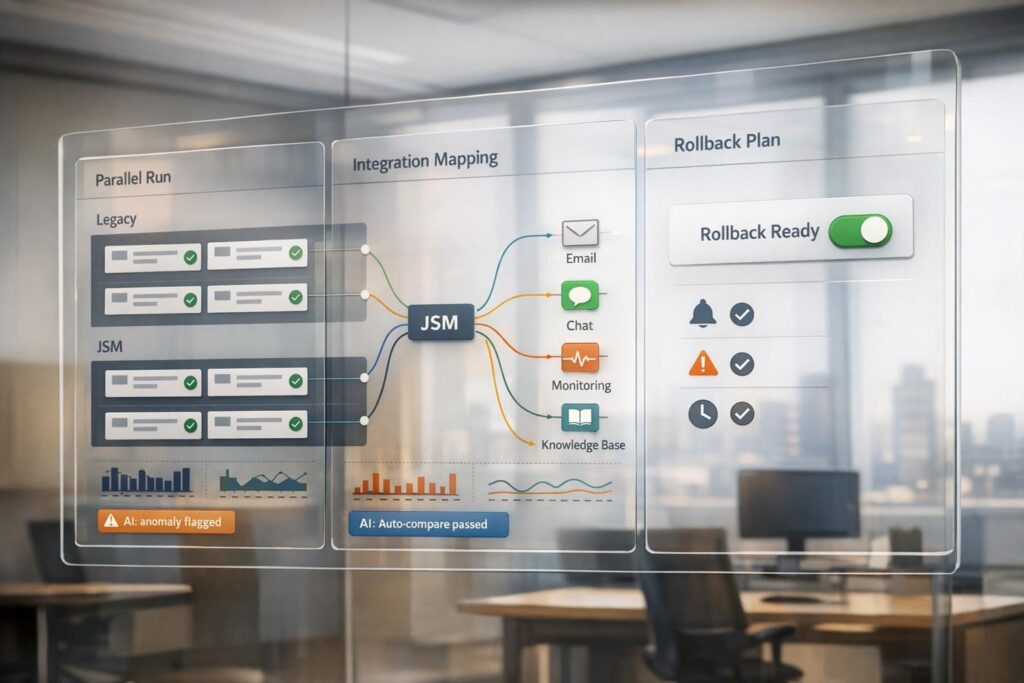
- Parallel Run: Operate JSM alongside your current system to test workflows, automation, and SLA tracking. This minimizes risks and ensures business continuity during migration.
- Integration Management: Map data, reconfigure tools like Slack or Teams, and sync users to maintain seamless connections between JSM and your existing tech stack.
- Rollback Plan: Prepare for potential issues with clear triggers (e.g., notification failures, integration gaps). Running systems in parallel ensures you can revert without losing data.
Key example: Vera Bradley’s 2025 migration reduced ticket triage time by 50% by running JSM and their legacy system together before fully transitioning. With AI tools for testing and monitoring, they ensured a smooth switch.
This guide covers the steps, tools, and metrics needed for a successful JSM migration.
Transition to Jira Cloud: Your practical migration blueprint
sbb-itb-e60d259
How to Execute a Parallel Run in JSM Migration
JSM Migration Cutover Strategy: 3-Phase Parallel Run Process
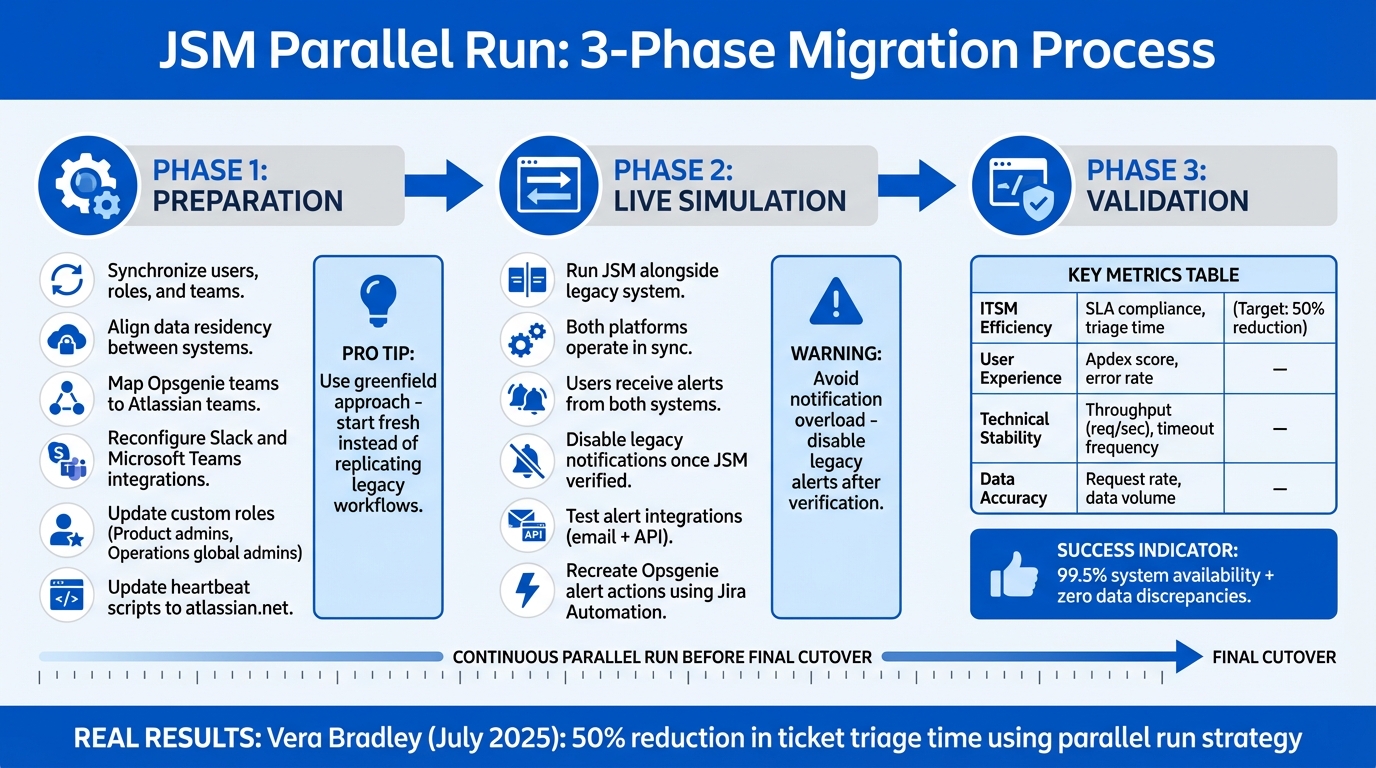
A parallel run involves operating JSM Cloud alongside your existing ITSM platform to test automation, ticket workflows, and SLA tracking in a live environment. This method helps maintain business operations during the transition, minimizes disruptions, and allows teams to identify and resolve issues like data synchronization errors or notification gaps before fully switching over. For Opsgenie-to-JSM migrations specifically, responders receive alerts in both systems until the legacy platform is decommissioned. Below, we’ll break down the preparation, live simulation, and validation stages required for a successful parallel run.
Stephen Laurin, Service Management Practice Team Lead at Adaptavist, highlights why this approach works:
"To minimise disruption, Vera Bradley ran JSM Cloud in parallel with their legacy platform. This allowed them to validate automation logic, ticket flows, and SLA tracking before making the switch – ensuring continuity for both corporate and retail users."
This strategy contributed to Vera Bradley achieving a 50% reduction in ticket triage time. Beyond technical testing, it also gave their team the opportunity to build confidence and expertise in the new system.
Preparation Phase: Setting Up Mirrored Environments
Before starting, you’ll need to synchronize users, roles, and teams between your legacy platform and JSM. For Opsgenie-to-JSM migrations, Opsgenie teams automatically map to Atlassian teams, and on-call schedules transfer seamlessly to avoid operational disruptions.
One critical step is ensuring data residency alignment between both systems. Conflicts can arise if your legacy platform and JSM are not in the same data residency region. Once aligned, most integrations – such as email, APIs, and incoming call routing – will sync without changes. However, tools like Slack and Microsoft Teams require manual reconfiguration in JSM, offering an opportunity to streamline workflows and eliminate unnecessary complexity.
Rather than replicating outdated workflows, consider starting fresh. Vera Bradley adopted a “greenfield” approach in July 2025, opting to align with ITIL best practices using JSM’s out-of-the-box features instead of rebuilding legacy customizations. Reflecting on their old system, Ashley Harman, Senior Manager of PMO at Vera Bradley, shared:
"When it was originally implemented, we put a lot of customisations in there which made it difficult to have it be malleable as our processes changed."
Also, check for custom roles in your legacy system that may not exist in JSM. These users might need manual reassignment as "Product admins" or "Operations global admins" to retain access. If your system uses heartbeats for monitoring, update scripts to point to Atlassian servers (atlassian.net) instead of legacy ones (opsgenie.net).
Live Simulation Phase: Running JSM Alongside Legacy Systems
Once the environments are mirrored, the live simulation phase allows you to test JSM in real-world conditions while keeping the legacy system as a safety net. During this phase, both platforms operate in sync, and users receive alerts from both systems. This ensures JSM can handle production scenarios without risking service interruptions.
To avoid notification overload, disable notifications in the legacy system’s mobile or web apps once JSM’s alerts are verified. Responders should double-check notification settings and contact methods in the Jira Cloud mobile app while still receiving legacy alerts to ensure complete coverage.
Alert integrations, whether via email or API, should support both the legacy domain and the new Atlassian domain during this transition. Note that Opsgenie alert actions and incident rules won’t transfer automatically. You’ll need to recreate these using Jira Automation templates with appropriate triggers, conditions, and actions.
Validation Phase: Measuring Performance Metrics
The validation phase ensures JSM meets operational standards before the final cutover. This involves comparing real-time data from both systems to identify discrepancies. Key areas to monitor include functional accuracy (automation, ticket flows) and technical performance (SLA tracking, response times).
Focus on these metrics to validate JSM’s readiness:
| Metric Category | Key Performance Indicators | What You’re Validating |
|---|---|---|
| ITSM Efficiency | SLA compliance rate, triage time | JSM maintains or improves service delivery speed |
| User Experience | Apdex score, error rate | System is responsive and reliable for end-users |
| Technical Stability | Throughput (req/sec), timeout frequency | System scalability and stability under load |
| Data Accuracy | Request rate, data volume | No discrepancies in data synchronization |
Modern APM tools equipped with machine learning and AIOps can automate anomaly detection and root-cause analysis, significantly reducing manual efforts during this phase. Integrating server-side tools like PerfMon or Dynatrace with client-side metrics helps pinpoint whether issues stem from application code or infrastructure.
Vera Bradley’s parallel testing phase also helped establish an internal Center of Excellence to manage the platform post-launch. Ashley Harman emphasized the importance of this preparation:
"Because intentional training time was built in… it went so smoothly. We had all that knowledge for how to make this tool work best for us."
How to Maintain Integrations During JSM Cutover
When transitioning to Jira Service Management (JSM), keeping integrations intact is crucial. These integrations serve as the backbone connecting JSM to your broader tech ecosystem. If they falter, you risk losing data, sending duplicate notifications, or creating confusion across teams. The goal is simple: ensure smooth synchronization between your legacy systems and JSM so that service delivery continues without a hitch.
One of the biggest hurdles is dealing with mismatched fields and schemas between platforms. For instance, field names like "Steps to reproduce" in one system and "Observed behavior" in another can create bottlenecks. Additionally, rapid growth often results in siloed tools and processes, leading to redundant data entry and inconsistent reporting. Tackling these issues requires careful planning, data mapping, and leveraging advanced tools to manage integrations effectively.
Mapping and Synchronizing Data Across Platforms
To maintain seamless synchronization, ensure that every issue event is preserved in its original order. Start by mapping both core and custom fields between JSM and your legacy systems. For workflows, define clear mappings – such as aligning "To Do" in one system with "New" in another – so tickets transition accurately across platforms. User synchronization is equally important. Use email-based lookups to match users (both reporters and assignees), and for missing users, assign a default "proxy" user to maintain data integrity.
For more complex scenarios, script-based synchronization tools are highly effective. These tools can handle conditional logic beyond the capabilities of native integrations. For example, they can convert strings into dates, filter transitions based on issue types, or limit file transfers by size or type. Additionally, configure comment visibility settings carefully to ensure internal and public comments remain distinct.
If migrating from tools like Opsgenie, make sure to transfer teams to Atlassian teams to retain organizational visibility.
Using AI for Integration Testing and Optimization
Once you’ve mapped your data, AI can take integration testing to the next level. AI-driven testing automates the process, helping to fine-tune alert rules and ensure compatibility with legacy systems. Use JSM’s framework to define precise incoming and outgoing rules that prioritize critical alerts while reducing unnecessary noise. Remember, JSM processes rules in order, stopping at the first match. So, place high-priority filters, like "Ignore", at the top of your rule list. For large-scale migrations, tools like the Atlassian Operations Terraform Provider can help manage teams, schedules, and integrations as code during the cutover.
| Integration Method | Features | Use Case |
|---|---|---|
| Native JSM Integrations | Centralized alert bucket, incoming/outgoing rules, action filters | Standard IT tool connections (e.g., Slack, MS Teams) and centralized alerting |
| Third-Party Sync Tools | Groovy scripting, transactional engine, cross-instance sync | Complex field mapping, multi-vendor collaboration, and maintaining data integrity |
| Jira Automation | Trigger-condition-action rules, template library, global or team scope | Recreating incident workflows and automating alert responses |
For instance, Western Digital integrated Jira with CloudFix to automate AWS cost optimization. This setup saved the company $450,000 in AWS costs within six weeks, all without disrupting services. Jeremy Anderson, Cloud Architect at Conn’s HomePlus, shared:
"CloudFix saves us a tremendous amount of money with very little effort. Most of the other AWS cost savings tools we tried promised this, but CloudFix actually delivered."
Finally, ensure long-term compatibility by transitioning from legacy APIs to the Jira Service Management Ops REST API. Starting February 2026, JSM plans will shift to the "Atlassian Service Collection", introducing new AI agents and a Customer Service Management app. This change could impact how integrations are licensed and managed. Comprehensive integration testing will also help establish a reliable rollback strategy in case any disruptions arise.
How to Design a Rollback Plan for JSM Cutover
A rollback plan is your safety net during a JSM migration. Once you shut down your legacy system for good, there’s no reversing that decision. Running both systems in parallel ensures data and alerts stay in sync, making it easier to revert if necessary. To prepare, define clear rollback triggers, execute the steps systematically, and use the experience to refine future migrations.
Defining Rollback Triggers
Knowing when to halt a cutover is critical. Several key triggers signal the need for a rollback:
- Notification Failures: If emails from
no-reply@jsm-notifications.atlassian.netare blocked or filtered, your team won’t receive alerts. Before going live, whitelist this domain and confirm responders get notifications through the Jira Cloud mobile app. - Integration Gaps: Some integrations, like Campfire, XMPP, and Logentries, are no longer supported in JSM (around 24 outdated integrations). If critical tools fail to sync, service disruptions may follow.
- Heartbeat Failures: Monitoring pings must reach Atlassian’s new servers (
atlassian.netinstead ofopsgenie.net). If they don’t, monitoring systems are compromised. - Permission Issues: If Opsgenie admins aren’t assigned "Product Admin" roles in JSM, they could lose key permissions, being downgraded to "Operations Global Admin" or "User."
- Automation Gaps: Opsgenie alert actions and incident rules don’t migrate automatically, potentially leaving operational gaps.
| Rollback Trigger | Impact | Mitigation Action |
|---|---|---|
| Notification Failures | Teams miss alerts | Whitelist jsm-notifications.atlassian.net and confirm mobile notifications |
| Integration Gaps | Critical tools fail to sync | Identify gaps early and apply manual workarounds |
| Heartbeat Failures | Monitoring systems stop functioning | Update scripts to point to atlassian.net before switching over |
| Permission Issues | Admins lose critical management abilities | Assign "Product Admin" roles in JSM before the cutover |
| Automation Gaps | Missing alert actions and rules | Recreate them manually using Jira Automation templates |
Once these triggers are clearly outlined, you’re ready to act swiftly and effectively if a rollback becomes necessary.
Step-by-Step Rollback Procedures
If you need to roll back, the first step is to delay decommissioning your legacy system. This ensures it’s still accessible for operations during troubleshooting. Since both systems have been running in parallel, the legacy platform should still hold up-to-date data and configurations.
Next, re-enable any legacy notification methods. For example, if the Opsgenie mobile app was disabled, turn it back on so responders can receive alerts through the original system. Direct your team to manage alerts using the legacy platform until the new system is stable.
Check for data residency alignment. If regions are misaligned, you may need support intervention to re-sync data. Finally, document every step of the rollback. Use tools like JSM’s "Post Incident Analysis Report" and "Infrastructure Health Report" to track service health and identify the root causes of the failure.
Post-Rollback Analysis and Continuous Improvement
After a rollback, take the time to analyze what went wrong instead of rushing to retry the cutover. JSM supports detailed Post-Incident Reviews (PIRs) and linked alerts, which help uncover why the cutover failed. Atlassian Analytics can provide deeper insights and assist in creating a thorough postmortem report.
Leverage AI tools to anticipate future risks. built-in AI capabilities can categorize issues and assess change risks, helping you spot potential problems before your next attempt. For instance, if you missed updating heartbeat scripts, create a mandatory checklist to ensure all scripts point to atlassian.net next time.
Lastly, refine your cutover plan based on lessons learned. If issues arise with chat integrations like Slack or Microsoft Teams because they were manually copied, add validation steps to your process. Each rollback should be viewed as an opportunity to improve and make your next migration even smoother.
AI-Driven Monitoring and Optimization for Cutover Success
AI-powered tools are game-changers when it comes to ensuring smooth JSM cutovers. They’re designed to catch and flag issues before they escalate. Using predictive analytics, these tools scan for patterns, immediately identifying anomalies. This allows teams to take action proactively, especially when running parallel systems or monitoring for integration hiccups and automation breakdowns.
Atlassian Intelligence, available in JSM Premium and Enterprise editions, takes this a step further by clustering similar incidents and prioritizing them using historical data. For example, during a cutover, critical issues like gaps in heartbeat monitoring are instantly routed to the correct team. The AI leverages Retrieval-Augmented Generation (RAG) to search Jira tickets and knowledge bases, delivering precise solutions without the misleading results often seen in less specialized AI tools. To maintain accuracy, Chain-of-Thought (COT) detectors actively filter out unreliable AI-generated responses, ensuring your system’s data remains reliable.
"Adaptavist was willing to be that thought leader and show their expertise on Atlassian tooling to really make sure we were not just thinking in the now." – Ashley Harman, Senior Manager, PMO, Vera Bradley
Beyond monitoring, AI enhances operational efficiency with Virtual Service Agents. Tools like Atlassian Rovo can handle up to 75% of internal service requests, significantly reducing ticket volume during transitions. These AI chatbots tackle routine tasks like password resets or software installations, freeing up your team to focus on more complex cutover challenges. Companies using JSM Virtual Agents have seen a 40% boost in Customer Satisfaction (CSAT) scores and a 50% increase in resolution rates. When a chatbot encounters a more intricate issue, it seamlessly hands off the conversation – complete with context and history – to a human agent, ensuring minimal downtime and confusion.
Another standout feature is sentiment analysis, which tracks the emotional tone of user feedback in real time. If sentiments turn negative, the system flags these issues for immediate attention. Combined with smart triage, which predicts the top five most likely ticket assignees with 86% accuracy, the system ensures critical problems are routed to the right experts without manual effort. AI-powered runbooks then offer dynamic, step-by-step guidance tailored to live signals and past cases, turning incident management into a streamlined, coordinated process.
These AI-driven tools don’t just enhance monitoring – they actively support your broader cutover strategy by enabling early detection of issues and ensuring rapid resolutions. Together, they help create a smooth transition while mitigating risks at every step.
Conclusion: Key Takeaways for a Successful JSM Cutover
Pulling off a smooth JSM cutover depends on three main factors: parallel runs, integration continuity, and a well-prepared rollback plan. Running both the old and new systems side by side helps identify and resolve discrepancies early on. For instance, during a migration in July 2025, this approach cut ticket triage time by 50% – a clear win for efficiency.
Integration testing plays an equally important role. Using CI/CD tools for automated risk assessments and deployment gating ensures that any potential issues are addressed before changes go live. Early planning is key – map out configuration items and set clear exit criteria, like achieving 99.5% system availability and eliminating data discrepancies, so your team knows exactly when the cutover is successful.
These thorough tests also set the stage for AI-driven enhancements. Predictive analytics powered by AI can flag anomalies in real time, while AI Virtual Agents can handle routine post-migration queries. This allows your team to dedicate their energy to solving more complex challenges.
"The primary goal is to validate that the new system is accurate, reliable, and capable of fully replacing the old system without causing disruptions."
- Neeta Sahay, Engineering Manager
FAQs
How long should a JSM parallel run last?
When running a JSM parallel operation, it’s crucial to continue until the new system proves stable and performs as expected. This phase usually spans anywhere from a few weeks to a couple of months, influenced by how complex the deployment is and what the organization requires. Throughout this time, prioritize comprehensive testing and constant monitoring to catch and resolve any issues early, reducing potential risks.
What’s the simplest way to prevent duplicate alerts during cutover?
To avoid duplicate alerts during a Jira Service Management (JSM) cutover, it’s important to sync alerts with your existing service and software projects. This approach consolidates alert management, helping to minimize redundant notifications during the transition process.
You can also take advantage of JSM automation rules to check for existing incidents before triggering new alerts. By setting up automations to filter duplicates based on factors like alert status or age, you can simplify incident management while reducing the need for manual intervention.
What exit criteria should we use to decide “go-live” vs. rollback?
When determining whether to proceed with a go-live or initiate a rollback during a JSM cutover, it’s crucial to set clear and measurable criteria upfront. First, confirm that all testing has been completed successfully, ensuring no major issues remain. Verify that data migration is accurate and that all integrations are functioning as intended without any errors.
User acceptance testing (UAT) plays a key role here – it should demonstrate that end-users can perform their tasks efficiently and that all pre-defined success metrics are achieved. However, if critical issues arise that could jeopardize operations, the rollback plan should be executed promptly. This ensures a return to the previous stable environment, helping to reduce disruption and maintain business continuity.
Related Blog Posts
- How do you run a parallel cutover from Service Cloud (agents + customers + reporting)?
- What does a safe Pylon cutover look like (parallel run + training + rollback)?
- How do you migrate away from Jira Service Management without losing ticket history?
- How do you migrate portals and forms from JSM to a better customer portal experience?