


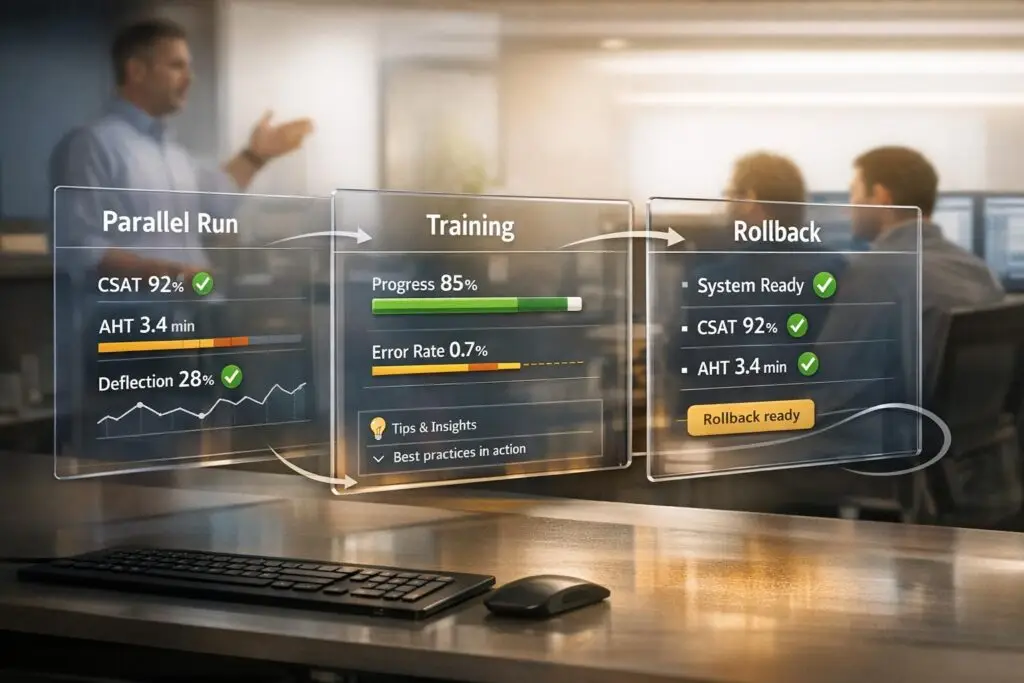
A safe Pylon cutover ensures a smooth transition from legacy systems to Pylon’s omnichannel platform without disrupting customer support. The process hinges on three key steps:
- Parallel Run: Operate both systems simultaneously for 2–4 weeks to test Pylon’s performance, fine-tune configurations, and ensure no customer messages are missed. Focus on routing low-risk tickets to Pylon while maintaining complex cases in the legacy system.
- Training: Equip your team with hands-on experience during the parallel phase. Tailor training for different roles – agents focus on using AI tools, while admins set up workflows and triggers. Use simulations and certification checkpoints to build confidence.
- Rollback Strategy: Prepare a clear plan to revert to the legacy system if performance drops below pre-defined thresholds (e.g., SLA breaches, data issues, or spikes in support volume). Test the rollback process in advance to ensure swift action if needed.
The goal is to maintain business continuity while improving efficiency. Success metrics like response times, resolution parity, and customer sentiment guide the process. By combining careful planning, targeted training, and a safety net, the transition protects customer trust and operational stability.
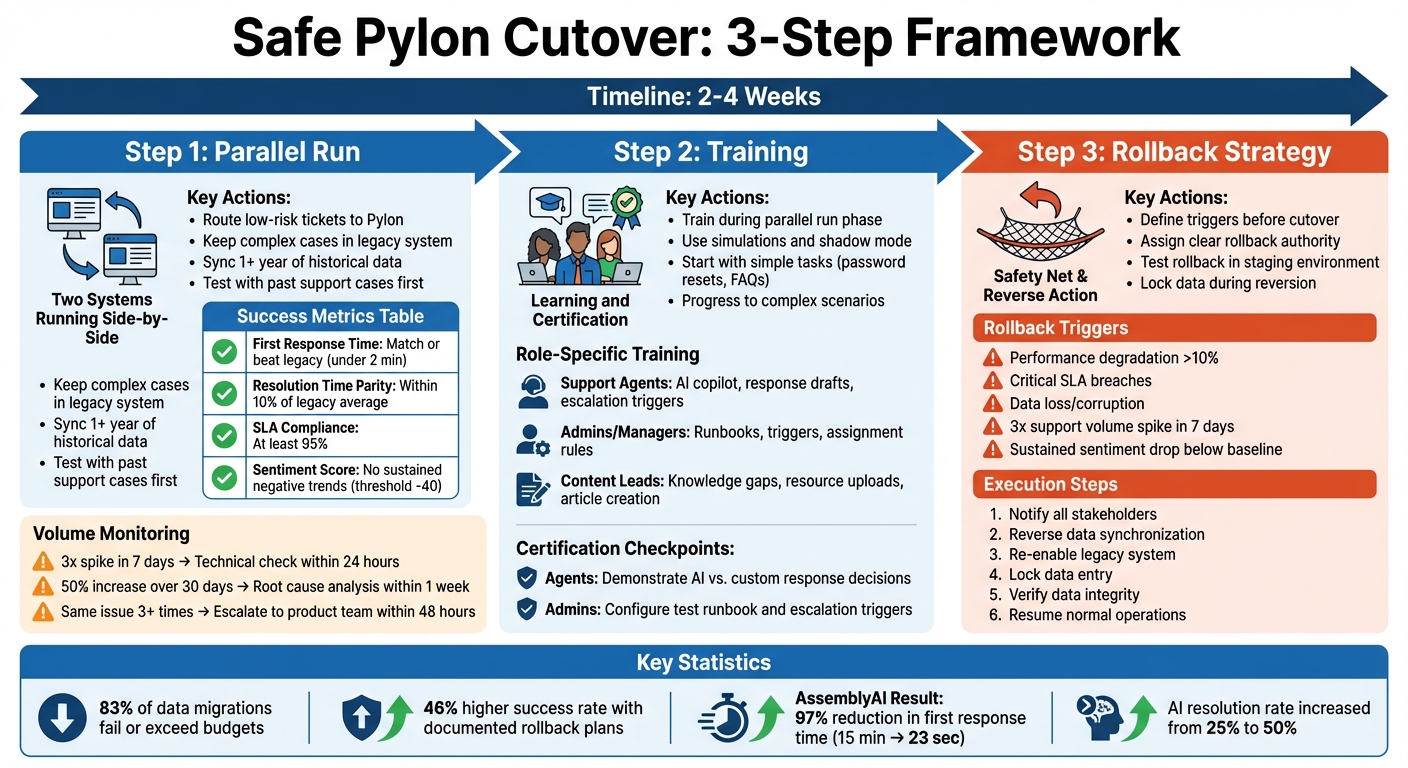
Safe Pylon Cutover Process: 3-Step Framework with Parallel Run, Training, and Rollback Strategy
Oracle ERP Go-Live Is Where Projects Die (Here’s How to Get It Right)
Running Pylon in Parallel with Your Current System
Running Pylon alongside your current system for 2–4 weeks allows you to test its accuracy, fine-tune AI configurations, and identify any integration hiccups. This method ensures your existing operations remain intact while your team gets hands-on experience with Pylon’s omnichannel workflows, AI-powered triage, and automated resolution capabilities.
The idea isn’t to operate two full systems indefinitely. Instead, this creates a controlled test environment. During this phase, Pylon handles specific types of tickets – typically high-volume, low-risk ones like password resets or common integration queries – while your legacy system manages more complex cases. This approach helps you compare performance without disrupting customer relationships.
How to Set Up the Parallel Run
Begin by connecting your existing communication channels to Pylon. For Slack and Microsoft Teams, use OAuth to enable a bidirectional sync, allowing your team to work in familiar tools while Pylon processes tickets in the background. For email support, set up forwarding rules or aliases to mirror incoming messages in both systems during the test.
Prepare Pylon by syncing at least one year of historical data. This includes past conversations, customer records, and support interactions, enabling the AI to learn from previous resolutions and recognize recurring patterns. Additionally, upload your knowledge base articles, runbooks, and response templates to ensure the AI aligns with your brand’s tone and guidelines.
Before handling live tickets, test Pylon using historical data. Run past support cases through the system to compare its AI-generated responses with those provided by your agents. This helps identify training gaps, missing documentation, or mismatched workflows. During the live run, configure the AI to handle only high-confidence cases while automatically escalating ambiguous or sensitive issues to human agents.
Start the live phase by routing non-critical tickets to Pylon while your legacy system continues managing more complex cases. For example, AssemblyAI used this approach for developer support inquiries, which require quick, technical responses. Lee Vaughn, their Manager of Support Engineering, shared how they reduced first response time by 97%, from 15 minutes to just 23 seconds, using AI agents and runbooks for intricate edge cases:
"Our customers are developers who expect quick, actionable support. We needed a way to meet them where they work without slowing down."
– Lee Vaughn, AssemblyAI
With historical data testing complete, the next step is setting clear success metrics for the live run.
Setting Success Metrics and Timelines
Define success criteria before starting the parallel run to ensure clear goals. The primary target is achieving functional parity, where Pylon matches your legacy system in accuracy, reliability, and customer satisfaction. Key metrics to monitor include first response time (FRT), average resolution time (ART), and SLA compliance (e.g., responding within one hour or resolving tickets within 24 hours). Use AI-powered sentiment analysis to detect any negative trends that might indicate issues with the system.
Plan for a 2–4 week parallel run during a busy period to test the system under realistic conditions. Running it through at least two or three support cycles ensures you capture both weekly and monthly patterns, including peak volume days. Set measurable exit criteria, such as achieving 95% resolution time parity and 90% SLA compliance for two consecutive weeks, to determine when it’s safe to move forward with the full cutover.
| Metric | Target During Parallel Run |
|---|---|
| First Response Time | Match or beat legacy system (e.g., under 2 minutes) |
| Resolution Time Parity | Within 10% of the legacy system’s average |
| SLA Compliance | At least 95% for defined response/resolution windows |
| Sentiment Score Stability | No sustained negative trends (threshold around -40) |
After establishing these metrics, ongoing monitoring will help refine the system during the live run.
Monitoring and Making Adjustments
Use AI tools to identify discrepancies between systems during the parallel run. Employ error monitoring tools like Sentry to log technical issues. Pay attention to ticket volume patterns, as unexpected surges may indicate configuration problems. For instance:
- A threefold spike in tickets within seven days should prompt an immediate technical review.
- A 50% increase sustained over 30 days warrants a root cause analysis within a week.
- If the same issue is reported more than three times, escalate it to the product team for resolution within 48 hours.
| Volume Pattern | Recommended Action |
|---|---|
| 3x spike in 7 days | Immediate technical check-in within 24 hours |
| 50% increase sustained over 30 days | Conduct root cause analysis meeting within 1 week |
| Same issue reported more than 3 times | Escalate to product team for fix within 48 hours |
Gather weekly feedback from agents through check-ins or surveys to identify any friction points. If agents notice frequent misclassification of specific ticket types, refine the training data or adjust triage rules. Similarly, if escalations fail to preserve full conversational context, update the handoff workflow to ensure customers don’t have to repeat themselves.
Categorize any discrepancies into four types: data entry errors (fixable through better import scripts), explainable differences (like minor formatting variations), rule creation issues (stemming from incorrect automation logic), and unexplainable errors requiring deeper investigation. Prioritize resolving the most impactful issues first, then re-test in Pylon’s development environment. Weekly optimization sessions can help fine-tune runbooks, workflows, and AI configurations, ensuring a smooth transition to the next phase.
Training Your Team on Pylon
To ensure a smooth transition to Pylon, it’s crucial to get your team comfortable with the platform’s features. The focus should be on building confidence through hands-on practice with its AI-powered tools. Start training during the parallel run phase, allowing your team to work on real tickets in a low-pressure environment. This practical experience ensures that when Pylon goes live, your team is already familiar with its functionality.
Review and update your knowledge base to ensure the AI has access to accurate and current information. Address any inconsistencies and add date stamps to your sources. This step is essential because the AI’s ability to assist your team effectively depends on the quality of the information it learns from.
Pre-Cutover Simulations and Practice Sessions
Use insights from the parallel run to design training simulations tailored to your team’s needs. During Pylon’s "Test" phase, run simulations before customers interact with the system. Agents can practice by comparing AI-generated responses to historical human resolutions. This "shadow mode" approach helps identify gaps in training data and refine workflows before the system goes live.
Start with straightforward, high-volume tasks like password resets or frequently asked questions about integrations. These scenarios are ideal for building confidence without overwhelming the team. Gradually introduce more complex troubleshooting scenarios. Set the AI to operate independently only when it reaches high confidence levels, while routing uncertain cases to human agents.
Creating Training for Different Roles
Training should align with the responsibilities of each role. For instance, support agents need to focus on using the AI copilot to draft responses and manage conversations. They should also learn when to escalate issues – such as when a customer is frustrated or when sensitive account matters arise.
Admins and managers, on the other hand, need to concentrate on creating runbooks, configuring resources like knowledge bases, and setting up triggers for automated assignments and escalations. They should also use Pylon’s "Knowledge Gaps" feature to identify missing documentation, which helps improve the system’s accuracy over time.
| Training Focus | Key Features | Target Role |
|---|---|---|
| AI Assistance | Response drafts, issue summaries, suggested resources | Support Agents |
| Workflow Design | Runbooks, Triggers, Assignment Rules, Escalation logic | Admins/Managers |
| Knowledge Management | Knowledge Gaps, Resource uploading, Article creation | Content Leads/Admins |
Establish clear guidelines for when team members should rely on AI suggestions versus crafting custom responses. For sensitive or complex situations, agents should know when to prioritize a more empathetic, human approach. Involve the team early in the adoption process to build trust and emphasize that the AI is there to assist, not replace, human expertise.
Using Certification Checkpoints
Before going live, test role-specific skills with certification checkpoints. For agents, this means demonstrating they know when to use AI-generated responses and when to intervene with a personalized approach. For admins, it involves successfully configuring a test runbook and setting up escalation triggers to route tickets appropriately.
Start with a small pilot team to test the AI copilot, gather feedback, and refine training materials. Define clear thresholds for when the AI should escalate to a human – such as when sentiment scores drop below -40 or when the same issue is reported multiple times. Teach the team to monitor these signals and act accordingly. Create a feedback loop where agents regularly review AI drafts, make corrections, and help the system improve over time. This ensures the AI becomes more accurate and aligned with your team’s needs.
sbb-itb-e60d259
Planning Your Rollback Strategy
Even with meticulous preparation, unexpected issues during cutover can arise, making a rollback plan critical. This plan works hand-in-hand with your parallel run and training strategies, ensuring that customer operations remain protected if challenges occur. Essentially, it’s a documented protocol to revert to your previous system if Pylon doesn’t meet key thresholds or if the outage window surpasses acceptable limits. Consider this: 83% of data migration projects either fail outright or exceed budgets and timelines, 23% of organizations report data loss during migration, and 90% of businesses fail within a year if they can’t restore operations within five days after a major disaster.
The cornerstone of a successful rollback strategy is removing emotions from the equation. Before cutover, establish clear, measurable triggers that automatically initiate a rollback. This ensures quick, decisive action during crises. Organizations with documented rollback plans see 46% higher migration success rates than those without.
"A rollback plan is an essential component of crisis management – being able to quickly restore service demonstrates a commitment to customer experience and operational excellence." – Manifestly Checklists
Your rollback plan must assign clear roles, including a primary resource owner and a backup for each task, to maintain accountability under pressure. Test the rollback process in a staging environment to confirm its effectiveness. During an actual rollback, lock data to prevent inconsistent records. Afterward, conduct a forensic review to pinpoint what went wrong and refine your cutover strategy for future attempts.
When to Trigger a Rollback
Set specific, measurable rollback triggers in advance – avoid relying on intuition. For instance, minor performance dips (around 5%) might be acceptable, but a degradation exceeding 10% should trigger a rollback. Other critical triggers include:
- SLA breaches: When response times exceed acceptable limits.
- Data integrity issues: Missing or corrupted customer records.
- Security vulnerabilities: Exposure of sensitive information.
Keep an eye on support ticket trends. A sudden spike – such as a threefold increase within seven days – often signals major onboarding or technical issues that require immediate attention. Additionally, Pylon’s AI-powered sentiment analysis can help monitor customer feedback across platforms, flagging issues when sentiment scores drop consistently below your baseline.
| Trigger Condition | Threshold | Required Action |
|---|---|---|
| Performance degradation | >10% decrease | Initiate rollback immediately |
| SLA breach | Critical tickets unresolved | Escalate to leadership for decision |
| Support volume spike | 3x increase in 7 days | Executive sponsor check-in |
| Data discrepancies | Significant data loss/corruption | Halt cutover and begin rollback |
| Sentiment drop | Sustained negative trend | Assess root cause and consider rollback |
Ensure authority to initiate the rollback is clearly assigned, typically to a technical lead or operations manager, so decisions can be made promptly without unnecessary delays.
How to Execute a Rollback
A rollback procedure should be a detailed, step-by-step guide that anyone on the team can follow under pressure. Start by notifying all stakeholders about the rollback, ensuring transparency to maintain trust and set realistic expectations for service restoration.
The technical process involves reversing data synchronization between Pylon and your legacy system, followed by re-enabling full functionality of the legacy system. For Pylon migrations, include "external ticket IDs" in communications to streamline data restoration. Where possible, automate the reversion process using Pylon’s API tools and integrate rollback steps into your CI/CD pipelines to reduce errors and speed up execution.
During the rollback, leverage Pylon’s AI agents and runbooks to handle routine inquiries, minimizing manual workload. Ensure the legacy system retains recent data to make the transition back smoother. Lock data entry during the rollback to avoid conflicts or duplicate records.
Once the legacy system is operational again, verify data integrity by running validation checks against your pre-cutover baseline. Confirm that customer records, ticket histories, and configuration settings are intact. Only after completing these checks should normal support operations resume, along with communication to customers that services have been fully restored.
Analyzing Rollback Results
After completing a rollback, immediately review the outcome to improve future cutovers. Conduct a forensic review within 48 hours to identify the root cause of the failure. Was it due to insufficient training, technical bugs, data migration errors, or unrealistic expectations? Document what went wrong, missed warning signs, and how the situation could have been handled better.
"A successful go-live takes months and months of hard work. The literature suggests the mantra is ‘test, test, test’!" – Start with Data
Use these insights to refine your cutover strategy. If performance issues triggered the rollback, consider adjusting infrastructure or optimizing Pylon’s configuration. If team readiness was the problem, extend training or add more practice sessions. For data discrepancies, review migration scripts and add extra validation checkpoints.
Create a lessons-learned document outlining specific improvements for the next cutover attempt. Include updated triggers, refined success metrics, additional testing scenarios, and process changes to avoid repeating the same mistakes. Share this document with stakeholders to ensure everyone is aligned. Remember, a rollback isn’t a failure – it’s a proactive step that shows your commitment to safeguarding operations and customer trust.
Common Mistakes and How AI Helps
Mistakes to Avoid During Pylon Cutovers
Cutover issues often arise from poor communication and inadequate testing. Skipping user acceptance testing or neglecting to check file integrity and permissions before going live can lead to serious problems like data corruption or access errors that only become apparent after the cutover is complete.
Relying on manual processes during a cutover introduces risks of human error and slows down recovery times. Teams using spreadsheets or manual data entry to track migration progress often face inconsistencies that can snowball into significant challenges. Another common misstep is isolating support data instead of integrating it into your broader customer success framework. This siloed approach creates blind spots, making it harder to assess how the cutover impacts overall customer satisfaction.
Understanding these potential pitfalls highlights why AI support is so valuable, as explored in the following section.
How AI Supports the Cutover Process
When paired with robust parallel testing and thorough training, AI becomes a game-changer for navigating Pylon cutovers. It automates repetitive and error-prone tasks, reducing mistakes like misrouted tickets and manual data entry errors. For example, automated triage and routing systems analyze ticket content, customer history, and urgency to assign issues to the right team member. This eliminates the 35% of tickets that are typically misrouted in manual workflows. Sentiment-aware monitoring also scans interactions across platforms like Slack, email, and chat to detect frustration or emotional tone shifts.
In June 2025, AssemblyAI transitioned to Pylon’s AI-powered support platform under the leadership of Lee Vaughn, Manager of Support Engineering. This move increased their AI resolution rate from 25% to 50%, enabling round-the-clock support while managing edge cases more effectively – without adding to their team size.
"Runbooks have helped us handle weird edge cases much more intelligently. Instead of failing the conversation, the agent now guides customers to the right resources automatically." – Lee Vaughn, Manager of Support Engineering, AssemblyAI
AI copilots also streamline team workflows by summarizing lengthy conversation threads and complex B2B issues, making it easier for agents to pick up where others left off during handoffs or parallel tests. Additionally, AI tools can identify knowledge gaps by analyzing support history and flagging topics that lack sufficient documentation. This helps teams create content that proactively addresses common issues, reducing ticket volume during the cutover process. Start by using AI to draft reply suggestions and auto-tag tickets, then gradually expand to fully autonomous resolutions using runbooks.
Measuring Efficiency Gains After Cutover
The benefits of AI become even clearer in post-cutover operations. AI-driven platforms typically achieve 60% higher ticket deflection rates and cut response times by 40% compared to traditional help desk systems. Automation reduces the average cost per ticket by half, from $22 to $11. Agent productivity also sees a significant boost, with the number of tickets handled per agent rising from 12 to 23 per day – a 92% increase.
AI also introduces predictive capabilities that were not possible with older systems. For example, combining sentiment analysis with support volume trends allows teams to generate churn probability scores (ranging from 0-100%), helping identify at-risk accounts during the transition period. Modern AI agents can autonomously resolve 40-60% of B2B support tickets, freeing up human agents to tackle more complex, high-priority issues requiring strategic decision-making. Even a modest 5% improvement in customer retention driven by better support workflows can boost profits by over 25%.
During the first month after the cutover, reviewing AI-generated drafts and conversation logs weekly is crucial. This practice helps identify patterns of failure and refine training data, ensuring the system continuously improves and delivers even greater efficiency over time.
Conclusion
Executing a safe Pylon cutover demands careful attention to parallel operations, thorough team training, and a well-thought-out rollback plan. These elements work together to reduce potential disruption and ensure your team feels prepared to handle the transition with confidence.
The best cutovers feel seamless because every aspect is meticulously planned in advance. Start by defining clear success metrics, involve a pilot group for user acceptance testing, and keep your legacy system in read-only mode for 24 hours after the cutover as a precautionary measure. This strategy offers both technical safeguards and peace of mind, ensuring your team is ready for any challenges that might arise.
Platforms like Pylon make this process easier by automating tasks prone to human error, offering real-time visibility across support channels, and even monitoring sentiment to flag at-risk accounts before issues snowball. Even small improvements in retention during this transition can have a notable impact on profitability. Ultimately, the cutover phase proves whether the new system delivers measurable efficiency improvements while maintaining a strong customer experience, setting your support operations up for long-term success in today’s B2B landscape.
FAQs
What steps can we take to ensure a smooth and safe Pylon cutover?
A successful Pylon cutover hinges on meticulous planning, open communication, and solid preparation. Start by crafting a comprehensive cutover plan. This should detail every step of the process, define roles and responsibilities, and include backup measures like rollback procedures to handle any unexpected challenges.
Running a parallel system is a must. This approach lets the new system operate alongside the old one, helping you spot and address potential issues early while ensuring data remains accurate before the full transition. At the same time, make sure your team is trained on the new workflows and AI tools so they feel confident and ready to handle the change.
Don’t forget to keep stakeholders and customers in the loop. Share updates about the process and flag any possible disruptions ahead of time. Clear communication helps set expectations and avoids unnecessary confusion. With these strategies, you can minimize disruptions and ensure a smoother transition.
How can we handle performance issues with Pylon during the cutover?
If Pylon’s performance takes a hit during the cutover, having a rollback plan in place is essential. This plan acts as your safety net, allowing you to quickly return to a stable state while keeping disruptions and downtime to a minimum. It should clearly outline how to spot issues, execute the rollback swiftly, and keep stakeholders informed throughout the process.
To avoid last-minute surprises, schedule a dress rehearsal before the actual cutover. This gives your team the chance to test systems, uncover potential problems, and fine-tune procedures ahead of time. Should unexpected performance issues crop up, you can immediately activate your rollback plan to ensure operations and customer support remain uninterrupted. By thoroughly testing and preparing these steps, you set the stage for a smoother and more secure transition.
How does AI improve the Pylon cutover process for efficiency and reliability?
AI enhances the Pylon cutover process by simplifying key phases like the parallel run, training, and rollback, making transitions smoother and more reliable.
During the parallel run, AI keeps an eye on real-time data and workflows, ensuring the old and new systems work together seamlessly. This minimizes disruptions and helps teams catch and fix potential problems early, boosting confidence in the process.
When it comes to training, AI speeds up team readiness by offering smart guidance, tailored learning experiences, and quicker knowledge sharing. This shortens onboarding time and equips teams with the skills they need more efficiently.
For rollbacks, AI constantly monitors system performance to spot irregularities. This allows teams to make quick decisions and even automate rollbacks if needed, keeping downtime to a minimum and ensuring a safer transition.
By weaving AI into the cutover process, organizations can achieve a smoother, more controlled, and reliable shift between systems.
Related Blog Posts
- Help Desk Migration Checklist: How to Switch Platforms Without Downtime
- How do you run a parallel cutover from Service Cloud (agents + customers + reporting)?
- Freshdesk migration checklist: timeline, risks, and rollout plan
- How do you migrate away from Pylon without losing shared inbox history and customer context?






