
Switching helpdesk systems is a complex and high-stakes process that requires careful planning to avoid disruptions, data loss, and compliance issues. Your helpdesk stores essential information like tickets, customer histories, and workflows, making its migration a critical project. Here’s what you need to know:
- 83% of data migration projects fail or exceed budgets and timelines due to hidden complexities, not technical skills.
- Risks include data loss, broken ticket relationships, compliance breaches, and downtime.
- The planning phase accounts for 60% of the migration effort, ensuring smoother execution.
- A successful migration depends on choosing the right tools, ensuring data accuracy, and maintaining ticket relationships.
Key Steps for a Smooth Migration:
- Plan Thoroughly: Clean up data, define goals, and configure the new system in advance.
- Choose the Right Tools: Use migration tools designed for helpdesk systems that preserve data integrity and relationships.
- Test Before Full Migration: Run a pilot migration to identify and fix issues early.
- Minimize Downtime: Use features like Delta Migration to ensure no updates are lost during the transfer.
- Validate Post-Migration: Check data accuracy, test workflows, and retrain agents.
Switching helpdesk platforms is not just an IT task – it’s a transformation that impacts your team and customers. With the right approach, you can avoid common pitfalls and achieve a smooth transition.
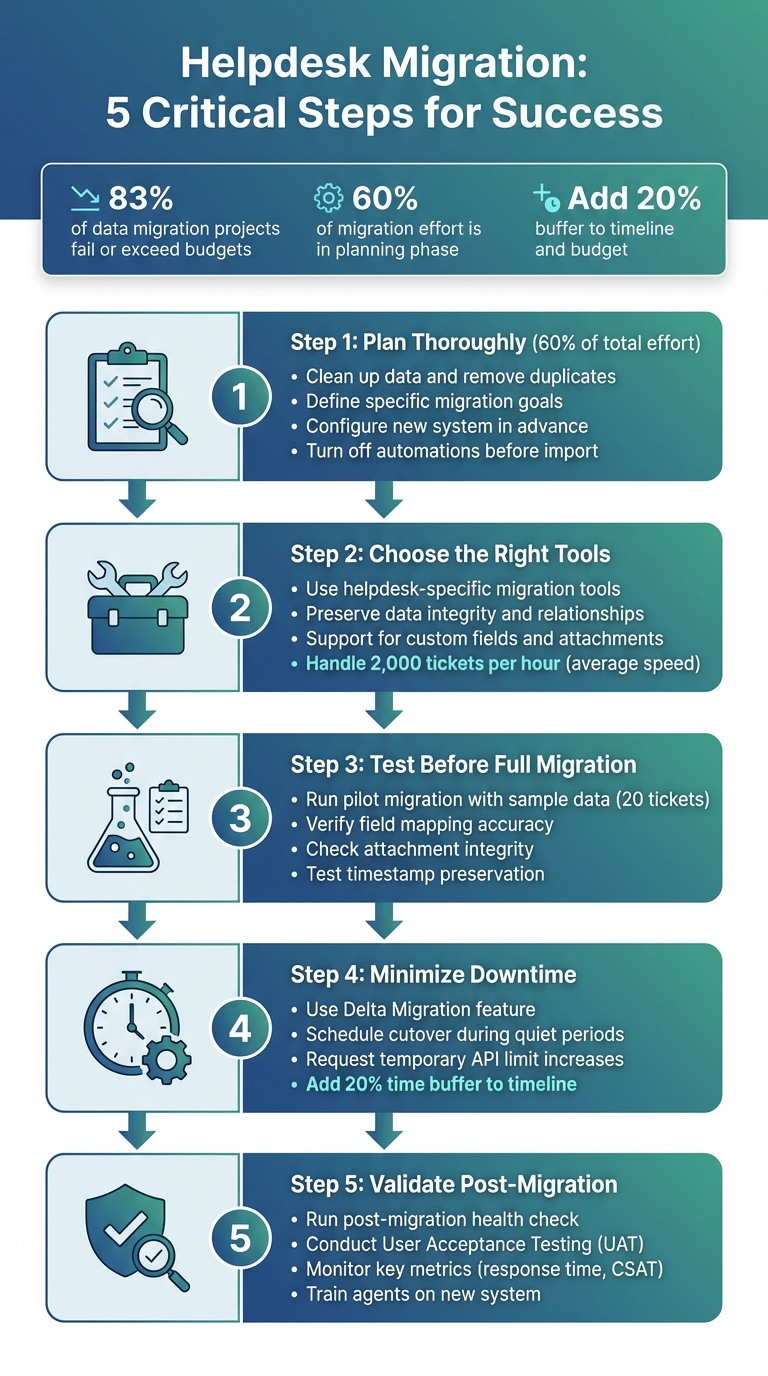
5-Step Helpdesk Migration Process: From Planning to Validation
Why Helpdesk Migrations Are More Complex Than Expected
Migrating a helpdesk isn’t just about transferring data from one platform to another. Helpdesks are dynamic systems, packed with interconnected data like tickets, customer profiles, agent details, attachments, and threaded conversations. If even one connection is disrupted, it can lead to corrupt historical records or even compliance violations.
Adding to the complexity, helpdesks don’t pause during migration. Tickets continue to update, creating what’s often called "data limbo." Without a Delta Migration to capture these changes, new updates might be left behind [4][6]. Then there’s the issue of inconsistent terminology between platforms – what one system calls "Solved", another might label "Closed." These small differences can wreak havoc on automations and lead to unpredictable data outcomes [2]. With so many moving parts, it’s no surprise that migrations often hit unexpected roadblocks.
Common Problems That Derail Migrations
One of the biggest challenges is data loss. Many generic migration tools overlook critical elements like inline images, call recordings, and internal notes. These aren’t just extras – they’re essential for maintaining compliance and giving agents full customer context.
Another frequent issue is broken ticket relationships. When a ticket gets disconnected from its associated customer account, agents lose the ability to see the full history of interactions. As Eric Klimuk, Founder and CTO of Supportbench, explains:
"Mismatched relationships are one of the most common sources of integrity issues in poorly executed migrations" [1].
This forces agents to waste valuable time hunting down missing context, which can slow down resolution times and frustrate customers.
Then there’s the risk of system downtime and automation chaos. Forgetting to turn off automations in the new system before importing data can lead to disaster. Imagine customers receiving thousands of outdated "ticket created" notifications for issues that were resolved months ago [6][2]. One small oversight can flood inboxes and damage customer trust in a matter of hours.
Lastly, agent productivity crashes are a common side effect of poorly planned migrations. A "big bang" approach – where everything switches over at once – leaves agents juggling a new interface while managing live customer issues. This slows down response times and can hurt customer satisfaction.
These problems don’t just cause headaches – they also drive up costs.
The Real Cost of Migration
Professional services fees often spiral beyond initial estimates. Vendors may charge extra for tasks like data mapping, configuring custom fields, and fixing post-migration issues. These add-ons can quickly double or triple your expected costs.
On top of that, internal time requirements can become a massive hidden expense. Running parallel systems – paying for two helpdesk subscriptions simultaneously – is another common cost driver, especially if the transition takes weeks or months. Don’t forget the expense of temporarily increasing API limits to speed up data transfers [6][2]. Then there’s agent retraining, troubleshooting, and other post-migration adjustments [7][8]. When all is said and done, your total investment can easily exceed your original budget by 50% or more.
These challenges highlight why many experienced teams build a 20% buffer into both their timeline and budget from the outset [3]. It’s not a matter of if unexpected costs will arise – it’s about being prepared when they do.
Given all these complexities, it’s clear why choosing a migration tool designed specifically for helpdesk transitions is essential for minimizing risks and ensuring a smooth process.
What a Migration Tool Should Handle
Generic migration tools often miss the intricate details of helpdesk systems, where tickets, customers, agents, and workflows are interconnected. These systems rely on these relationships to operate smoothly.
An effective migration tool does more than just transfer data – it safeguards relationships, ensures historical accuracy, and maintains the operational framework that keeps your support team efficient. This requires tools that not only move data but also retain its context and connections.
Preserving Data and Record Relationships
A solid migration tool should handle core ticket data like subjects, statuses, priorities, and full conversation histories, including both public comments and private internal notes [6][9]. But moving this data alone isn’t enough. Metadata and timestamps – such as creation dates, update logs, and user IDs – must also stay intact [1][2]. Without these, audit trails break, reporting becomes unreliable, and compliance risks increase.
Maintaining relationships between records is equally vital. If a ticket is disconnected from its associated customer account or agent profile, the context is lost, frustrating agents and harming the customer experience. A good tool migrates users and agents first, then links tickets to those records to ensure continuity [2].
Custom fields often add complexity. Many B2B teams rely on unique data like contract IDs, product versions, or escalation tiers stored in custom fields. A migration tool must support these fields and map them accurately to the new system to avoid losing critical operational details [2][9].
Attachments and media are just as important. This includes file attachments, inline images, and specialized content like call recordings (commonly stored as MP3 files). Generic tools often fail to migrate inline images or link recordings to the correct tickets, leaving agents scrambling to piece together conversations [2][9].
Migrating SLAs, Workflows, and Automation
Operational logic – such as SLAs, workflows, and automation rules – is another critical component. These elements determine how tickets are prioritized, routed, and escalated. If they aren’t migrated correctly, your team could face disruptions in the new system.
A migration tool should allow field-level mapping to align statuses, priorities, groups, and custom fields between platforms. For example, one system might label a resolved ticket as "Solved", while another calls it "Closed" [5][6]. Additionally, the tool should let you disable automations in the target system before importing data. This prevents outdated notifications, like "ticket created" emails for cases already resolved, from being triggered [2][5].
Advanced tools often include a Delta Migration feature, which captures new or updated records in the source system while the main migration is ongoing. This ensures no data is lost during the final transition, even as your team continues working in the old system [2][6]. Beyond this, consider how the tool handles knowledge base content and external integrations to fully support your operations.
Moving Knowledge Base Content and Integrations
Your knowledge base is a critical resource for both customers and agents. A capable migration tool should transfer not only the articles but also their structure – categories, folders, sections, and internal cross-links between articles [2][9].
If articles reference each other or include related links, those connections must remain intact to avoid confusion and manual fixes. This also applies to translations and multi-language content, which are essential for global B2B support teams [2][5].
External integrations further complicate migrations. Many support teams rely on connections to CRMs, project management tools, or analytics platforms. A migration tool should handle linked data – like Jira task IDs or Salesforce account URLs – and ensure that dashboards and reporting tools function seamlessly in the new system [6][8].
| Data Category | Specific Data Types to Handle |
|---|---|
| Tickets/Cases | Subject, Description, Status, Priority, Tags, Custom Fields, Ticket IDs [6][9] |
| Communications | Public Comments, Private Notes, Inline Images, Attachments, Call Recordings [2][9] |
| People/Orgs | Agent Profiles, Customer Contacts, Organizations/Companies, User Permissions [1][2] |
| Knowledge Base | Articles, Categories, Folders, Content Translations, Internal Article Links [2][9] |
| Workflows | Macros/Saved Replies, SLAs, Automation Rules, Group Assignments [2][8] |
In short, a migration tool designed specifically for helpdesk transitions understands the intricate relationships within support systems. It doesn’t just move data; it preserves the structure, logic, and context that keep your support operations running smoothly.
How to Evaluate Migration Tools
Migration tools come in all shapes and sizes. Some are built for straightforward data transfers, while others are tailored to handle the complex needs of B2B helpdesk systems. Choosing the right tool can make all the difference between a smooth transition and a drawn-out process filled with data gaps and frustrated team members.
When weighing your options, focus on three key areas: data accuracy and completeness, downtime and parallel system requirements, and vendor support and customization options. These factors play a crucial role in ensuring your migration doesn’t disrupt your ability to serve customers.
Checking Data Accuracy and Completeness
How can you be sure your migration was successful? A good migration tool should offer detailed audit trails and reports that outline which records were successfully transferred, which failed, and why. Without this level of insight, you might not even realize if important data is missing in the new system.
Look for tools that allow you to run a demo or test migration. By transferring a small sample of real data – such as 20 tickets and a few knowledge base articles – you can verify field mapping, attachment integrity, and formatting before committing to a full migration. Catching issues early saves time and money, especially since most migration work happens during the planning and preparation stages before any data actually moves [2].
Also, check if the tool supports data transformation. For example, can it convert date formats to MM/DD/YYYY, standardize currency codes to USD, or rename fields during the transfer? These features ensure your data is ready to use immediately in the new system, sparing you from extensive manual cleanup later.
Understanding Downtime and Parallel System Requirements
While data accuracy ensures your information stays intact, minimizing downtime is critical for maintaining customer service. If your helpdesk goes offline during migration, agents can’t work, and customers can’t reach you. The right migration tool should reduce this risk as much as possible.
One key feature to look for is Delta Migration, which tracks and transfers changes made in the source system during the migration process. This allows your team to keep working in the old system while the migration runs in the background [2][6].
Speed is another factor. Helpdesk migrations typically process about 2,000 tickets per hour, though this depends on the API limits of your source and target platforms [2]. To speed things up, you can request temporary API limit increases from your vendors [2][6].
If the tool requires running both systems in parallel, be prepared for added complexity. You’ll need to monitor both platforms, train agents on which system to use, and disable automations in the new system to prevent duplicate notifications or conflicting workflows. It’s also wise to add a 20% time buffer to vendor timelines, especially since 83% of data migration projects either fail or exceed their budgets and schedules [3].
Vendor Support and Customization Options
Even the best migration tool won’t help much if you don’t know how to use it effectively. For teams with complex helpdesks – like those with custom fields, intricate automations, or large knowledge bases – professional services often deliver better results than DIY tools [11].
Check if the vendor offers onboarding assistance to help fine-tune ticket flows, automation logic, and SLA compliance during the rollout [8]. Many vendors provide tiered support options, such as Standard self-service, Premium with expert mapping reviews, and Signature for fully managed migrations [5][6]. If you’re in a regulated industry, confirm that the vendor complies with standards like GDPR, HIPAA, SOC 2 Type II, and ISO 27001 [10][11].
Customization is another critical factor. Tools with an API-first design let you extend their functionality, whether by building custom integrations or managing unique data transformations [12]. If your team lacks expertise in data mapping and validation, consider hiring a professional migration service to avoid costly mistakes [11].
"You aren’t just getting a tool; you are getting a guaranteed outcome."
– ClonePartner [11]
Strong vendor support not only simplifies the migration process but also ensures your operations stay on track. Finally, consider the total cost of ownership. Some platforms charge hefty fees for migrations, while others – like Supportbench – offer turnkey migrations at no extra cost for new customers. They handle platforms like Zendesk, Freshdesk, Zoho Desk, and more with minimal effort. When comparing tools, factor in not just licensing fees but also the time saved, staff resources needed, and the quality of vendor support [10].
sbb-itb-e60d259
How to Plan a Migration That Minimizes Disruption
A helpdesk migration isn’t something you can just wing. It takes careful planning, realistic timelines, and a solid grasp of potential pitfalls. The difference between a smooth transition and a complete mess often boils down to the effort you put into preparation.
"The single biggest difference between a nightmare migration and a dream transition? Planning. Not just a checklist, but deep, thoughtful, ‘what-if’ planning." – ClonePartner [3]
Treat your migration like a business project, not just an IT task. The goal isn’t merely moving data from one system to another – it’s about maintaining service quality, protecting customer relationships, and ensuring your team is set up for success in the new environment. With high failure rates and common delays, thorough preparation is a must.
Preparing Before Migration
Before you even think about migrating, start by organizing your data. Audit and clean up your records – remove duplicates, outdated entries, and formatting inconsistencies. Doing this upfront saves you time and prevents errors when your data lands in the new system [1].
Define a specific goal to guide your decisions. For instance, you might aim to reduce ticket resolution time by 30% or cut agent onboarding from two weeks to three days. A clear objective helps you make smarter choices throughout the migration process.
Next, configure your new system before transferring any data. Set up custom fields, macros, and agent profiles so the system is ready to handle incoming information [2]. To avoid errors during the import, make fields optional at first [2]. Also, turn off automations and notifications to prevent unwanted emails from being sent to customers or agents as historical tickets are imported [2][13].
Request temporary API limit increases from your source and target vendors [13]. This can speed up the transfer process and avoid bottlenecks. Keep in mind, about 60% of the total migration effort happens during the preparation phase [2], so it’s worth investing time here.
Run a pilot migration with a small sample – like 20 tickets and a few knowledge base articles [2]. This allows you to test field mapping, verify attachment transfers, and ensure timestamps remain accurate. It’s much easier to fix issues now than after transferring thousands of tickets.
Once you’ve cleaned your data and set clear goals, it’s time to outline your migration strategy.
Phased Migration and Cutover Strategy
When it comes to migration, you have two main options: Big Bang or Phased Migration. A Big Bang approach moves everything at once. It’s quicker and cheaper upfront but comes with higher risks [1]. On the other hand, Phased Migration involves transferring data in batches, allowing for testing and troubleshooting while running both systems in parallel [1]. For teams with complex workflows, phased migrations often lead to better outcomes, even though they require more planning.
In a phased approach, you can use Delta Migration to capture updates made to tickets after the initial transfer [2][13].
Timing is everything. Schedule your final cutover during quiet periods, like weekends or holidays, to minimize disruptions [8]. Send reminders to your team the day before to ensure no one accidentally works in the old system during the transition [2].
Always have a rollback plan in place. This could involve reactivating access to the old system or using backup email routing if critical issues arise [8][1]. Build extra time and budget into your plan to handle unexpected challenges [3].
Once the cutover is complete, shift your focus to validating data and training your team.
Validating Data and Training Agents After Migration
After the migration, run a post-migration health check to ensure everything transferred correctly. Verify ticket comments, attachments, custom field values, and relational data, like links between users and tickets [1][2]. Confirm that tickets are assigned to the right agents and workflows are functioning as expected.
Conduct User Acceptance Testing (UAT) by having power users and frontline agents test key workflows in a sandbox environment [8][3]. Ask them to process their most common ticket types to identify any usability issues that might have been overlooked during technical audits.
Update internal links, macros, and templates that point to your old knowledge base. This ensures agents don’t accidentally send customers broken links during their first week in the new system [13].
Monitor key metrics from day one. Track response times, resolution rates, and customer satisfaction (CSAT) scores to compare performance with your old system [8]. Catching and resolving configuration issues early – like SLA timers not working or tickets routing incorrectly – can save you from bigger headaches later.
These steps validate that your careful planning has minimized disruptions.
In July 2025, Rossi Residencial, a Brazilian construction company, completed a phased migration of four SAP environments to a Google Cloud-based platform. Thanks to detailed pre-migration assessments, the project achieved zero downtime, cut infrastructure costs by 50%, and avoided any unavailability incidents [1].
"A successful data migration isn’t just a technical achievement – it’s also a communication project. People are affected: employees, customers, and stakeholders." – Eric Klimuk, Founder and CTO of Supportbench [1]
Prepare your team by distributing documentation, FAQs, and hosting training sessions before the go-live date [8]. Set up a feedback channel or an "A-Team" to address issues like broken links or missing attachments immediately after launch [1][3].
How Platform Choice Affects Migration Success
Choosing the right platform is just as critical as solid migration planning when it comes to ensuring a smooth transition. The platform you select not only determines the features you’ll have access to after the migration but also shapes the entire migration process. Some platforms treat migration as an afterthought, leaving you to patch together third-party tools or pay for costly professional services. Others take a more integrated approach, embedding migration support into the onboarding process to minimize risks and avoid unexpected expenses.
Opting for a platform with dedicated migration tools can save you from the headaches of manual scripts or middleware, which often lead to data integrity problems. For instance, platforms that cater to B2B migrations understand the importance of preserving relational data – like ensuring tickets remain connected to the right users and organizations – while maintaining these vital connections.
Another key factor is having access to a sandbox or staging environment. Before diving into a full cutover, it’s essential to test workflows, verify field mappings, and identify usability issues in a safe space. Platforms that skip this step often leave teams unprepared, increasing the likelihood of post-launch problems. A staging environment not only simplifies the migration process but also lays the groundwork for smoother day-to-day operations moving forward.
Platforms That Include Migration Support
Migration support costs can vary widely between platforms. Some vendors see it as an opportunity to charge extra, adding hefty fees for professional services or requiring third-party tools that charge based on the number of records being migrated.
Supportbench, however, takes a different approach. The platform offers turnkey migrations from Zendesk, Freshdesk, Zoho Desk, and other major helpdesk systems at no extra cost. This means migration support is a built-in part of the onboarding process, not an upsell. The process is designed to preserve historical data, maintain relational integrity, and significantly reduce the manual effort required from your team.
When evaluating platforms, it’s important to ask upfront: Does migration support come included, or is it an additional cost? Hidden fees can pile up quickly, especially if you’re migrating tens of thousands of tickets, attachments, or knowledge base articles. Platforms that bundle migration support eliminate this uncertainty, allowing you to focus on executing a successful transition rather than negotiating extra fees.
AI Features That Speed Up Post-Migration Adoption
Even after a smooth migration, your team will face a learning curve as they adapt to new workflows and tools. This is where platforms with built-in AI features can make a big difference, helping teams hit the ground running while maintaining service quality.
Supportbench’s AI Agent-Copilot is a standout feature, enabling agents to resolve cases faster by automatically suggesting relevant answers from past cases and the knowledge base. Instead of wasting time searching through documentation or relying on senior colleagues for guidance, agents get real-time, intelligent recommendations. Additionally, the platform’s AI auto-responses draft replies based on case history, reducing repetitive typing and speeding up response times.
AI-powered automation further eases the transition by taking over tasks like case prioritization, tagging, and issue type assignment – freeing up agents to focus on learning the system and serving customers. For managers, features like AI Predictive CSAT and CES provide immediate insights into customer satisfaction during the transition, helping them address potential problems before they escalate.
What’s more, these AI capabilities are integrated into the platform from day one. There’s no need to wait months for configuration or to purchase additional modules. This allows your team to start reaping the benefits immediately after migration, reducing disruptions and ensuring a smoother path to achieving your performance goals.
Conclusion
Migrating a helpdesk system is no small feat. In fact, 83% of data migration projects either fail outright or go over budget and past their deadlines [3]. The key to avoiding these pitfalls lies in detailed planning, using the right tools, and working with a platform that treats migration as a collaborative effort rather than a sales opportunity.
As we’ve covered, early and meticulous planning is the backbone of any successful migration. A clear and structured approach ensures you’re ready to tackle challenges head-on, leaving no critical steps to chance.
Beyond planning, choosing the right customer support software can make or break your project. Tools that offer seamless migration support – without hidden fees or unnecessary complications – help keep your project on track. For example, platforms like Supportbench provide built-in migration assistance at no extra cost, eliminating surprises and allowing you to focus on execution. Features like AI integration further simplify the process, enabling your team to adapt quickly while maintaining service quality from day one.
Migration doesn’t have to feel like a roll of the dice. With careful preparation, the right tools, and a platform designed for B2B support systems, you can transition smoothly and confidently. By aligning every step with your goals, you’ll avoid the common pitfalls of downtime, data loss, and budget overruns, ensuring your team is set up for success.
FAQs
What are the biggest risks when migrating to a new helpdesk system?
Migrating to a new helpdesk system brings its fair share of challenges, and if not handled carefully, it can disrupt service quality and daily operations. Here are some of the most common issues teams face during this process:
- Data loss or corruption: Critical customer records, ticket histories, or attachments can go missing or become corrupted during migration. This can leave agents with incomplete case histories and even lead to compliance headaches.
- Broken workflows and links: When data mappings aren’t done correctly, relationships between tickets, contacts, or automated processes like SLAs can break. This can throw off workflows, leaving both agents and customers frustrated.
- Downtime or service interruptions: Without proper planning, migrations can lead to system outages. This not only risks missed SLAs but also damages customer trust.
Understanding these risks upfront gives teams the opportunity to plan better, double-check data integrity, and ensure the transition is as seamless as possible for both customers and agents.
How do I ensure my data remains accurate and complete during a helpdesk migration?
To ensure data accuracy and completeness during a helpdesk migration, it’s crucial to transfer every ticket, comment, attachment, user record, SLA, and piece of metadata without any loss, duplication, or broken connections. This becomes especially important in B2B settings, where historical data often plays a key role in compliance, audits, and reporting.
Start by building a detailed inventory of the data you’re migrating. Identify what needs to be moved and why it’s essential. Using a migration tool specifically designed for support data is a smart move. These tools handle the complexities of ticket histories, threaded comments, and SLA timestamps. Before diving into the full migration, run a pilot test. This allows you to compare record counts, relationships, and key metrics between your old and new systems, ensuring everything aligns. To minimize disruptions, consider breaking the migration into phases. This way, you can address any issues as they arise before completing the full transition.
With careful planning, thorough validation, and the right tools, you can carry out a successful migration while maintaining both service quality and data integrity.
What key features should I consider when choosing a migration tool for helpdesk systems?
When picking a migration tool for your helpdesk system, focus on features that guarantee data accuracy, smooth transitions, and cost-effectiveness. The right tool should manage all critical data – like tickets, comments, attachments, users, SLAs, custom fields, and metadata – while ensuring that relationships such as parent/child tickets and workflows remain intact. Automated validation to check data accuracy before going live is also a must-have.
Key features to look for include field mapping, incremental sync, and dry-run modes for safe testing. Tools that handle bulk attachment transfers, preserve user roles, and ensure SLA automation transfer are essential to minimize downtime and avoid disruptions. Opting for a tool with built-in support and clear pricing – such as zero-cost migration services – can make the process easier while helping you avoid unexpected costs.