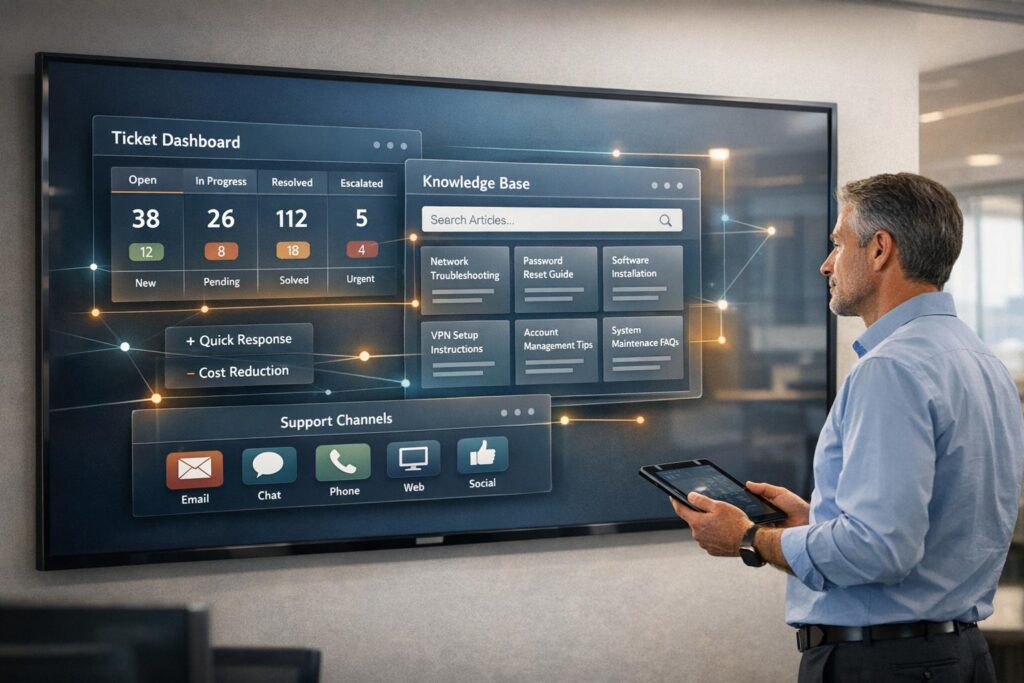
A help desk is a central hub for managing customer or employee support requests. It combines software, processes, and people to ensure inquiries are resolved efficiently. Modern help desks go beyond traditional reactive approaches by using AI, automation, and self-service tools to handle requests faster and reduce workload.
Key Highlights:
- Ticketing System: Logs, prioritizes, and routes requests.
- Multi-Channel Support: Handles inquiries via email, phone, chat, and social media.
- Self-Service Options: Knowledge bases resolve up to 25% of issues without agent involvement.
- AI Integration: Automates tasks, provides predictive analytics, and reduces response times.
- Cost Savings: AI-driven tools cut Average Handle Time (AHT) by 10% and reduce operational expenses.
AI-powered help desks outperform older systems by offering faster resolutions, handling higher volumes without increasing staff, and improving customer satisfaction. For example, AssemblyAI reduced their first response time by 97% and doubled automated ticket resolutions.
Help Desk AI: How AI is Transforming Help Desk Support
sbb-itb-e60d259
What Is a Help Desk?
A help desk serves as a central hub that combines software, processes, and people to address support requests. In the B2B world, help desks play a critical role in tracking account health, ensuring compliance with SLAs, and improving client retention rates[3]. This sets them apart from B2C support systems, which tend to focus more on managing high volumes of requests quickly rather than fostering deeper relationships.
It’s important to distinguish a help desk from other tools like service desks and CRM systems. While service desks take a more proactive approach by handling a wide range of IT service requests, help desks are more reactive, focusing on resolving specific issues. CRM systems, on the other hand, are geared toward sales and lead management rather than support[5]. Knowing these differences helps businesses select the right solution for their needs.
Core Components of a Help Desk
Modern help desks rely on several key features that work together to streamline support processes. At the heart of these systems is ticket management, which logs, tracks, prioritizes, and routes every incoming support request.
Another essential feature is multi-channel intake, which allows customers to reach support through various channels like email, phone, chat, social media, or web forms. All these requests flow into a single, unified system. Agent workflows ensure that issues are escalated appropriately – simple problems are resolved quickly, while more complex ones are directed to specialized teams[4].
A knowledge base is another critical component, offering users self-service options through documentation and troubleshooting guides. In fact, up to 25% of tickets can be resolved this way, saving both time and resources[1]. Lastly, reporting tools provide insights into important metrics such as resolution times, ticket volume, and customer satisfaction. These analytics are especially crucial in B2B settings, where Customer Success Health Scoring and metrics like NPS and CSAT are often integrated[3].
Building on these foundational elements, many help desks are now incorporating AI to make support operations even more efficient.
The Shift to AI-Powered Platforms
Traditional help desks operated reactively, addressing issues only after they were reported. Modern AI-powered platforms have flipped this model by using automation to handle routine tasks like ticket categorization and initial responses. This frees up agents to focus on more complex challenges.
AI also brings predictive analytics into the mix, which can identify patterns and potential issues before they escalate into bigger problems. This proactive approach can significantly improve support outcomes.
The benefits are clear. For instance, chatbots integrated into help desk systems can reduce Average Handle Time by 10%. It’s no surprise that 58% of IT decision-makers have already adopted or are in the process of implementing chatbot technology for support[1]. These AI-driven tools don’t replace human agents but instead enhance their capabilities. Features like sentiment analysis, automated triage, and intelligent routing ensure that each issue is handled by the most qualified team member.
Core Functions of a Help Desk
At the heart of any effective B2B support operation lies the help desk, a central hub that ensures customer issues are resolved promptly while fostering strong professional relationships. From managing tickets to leveraging AI insights, the help desk plays a crucial role in keeping things running smoothly.
Ticket Management and Workflow Automation
Every customer request – whether it comes via email, phone, chat, or web forms – is turned into a ticket. These tickets are systematically logged, categorized, and directed to the appropriate team or agent. Factors like issue type, customer priority, and SLA (Service Level Agreement) requirements determine how tickets are routed. In B2B environments, this streamlined system ensures every agent can access a customer’s full history, enabling consistent and informed support across all interactions[6].
Workflow automation takes this a step further by simplifying repetitive tasks. It categorizes tickets, adjusts SLAs dynamically, and reduces human error. Features like auto-triage use keywords or patterns to identify and prioritize urgent requests, ensuring that high-priority clients get the attention they need without delay.
Self-Service and Knowledge Base Integration
Many customers prefer solving issues on their own, which is where self-service portals and integrated knowledge bases come into play. By providing access to resources like troubleshooting guides, error code explanations, and product documentation, customers can often resolve their problems quickly and independently. This not only saves time but also reduces the overall ticket volume for support teams[1].
To make this approach successful, businesses need a well-maintained, dynamic knowledge base. Using Knowledge-Centered Service (KCS) methodologies, agents can update documentation as part of their workflow rather than treating it as an afterthought. This ensures the information stays accurate and relevant, helping future customers who encounter similar issues find reliable solutions.
AI-Powered Insights and Predictive Metrics
AI is transforming help desks by introducing predictive insights that enhance service quality. Many organizations are now using AI-driven tools to optimize their support operations. These tools analyze patterns, anticipate potential issues, and provide actionable insights, all while integrating seamlessly with established SOPs. This combination of AI and automation helps maintain a reliable support process and strengthens trust with B2B clients[6].
Key Benefits of Implementing a Help Desk
A well-implemented help desk can transform how businesses operate by increasing efficiency, cutting costs, and building stronger customer relationships. It provides a streamlined system that turns routine issue tracking into opportunities for strategic growth.
Faster Resolution Times and Lower Costs
In today’s fast-paced support landscape, speed and cost control go hand in hand. Self-service tools, for instance, can reduce ticket volume by about 25%, allowing agents to focus on solving more challenging cases that require their expertise[1]. This reduction in ticket load not only improves efficiency but also frees up resources for higher-value tasks.
Automation plays a critical role in cost reduction. By cutting Average Handle Time (AHT) by 10%, automation significantly lowers operational expenses[1]. These tools reduce the cost per ticket while ensuring quality resolutions, directly benefiting the company’s bottom line.
Better Customer Satisfaction and Retention
Consistency is the cornerstone of customer trust, and a help desk ensures that customers receive the same high-quality service across every channel – whether they reach out via email, chat, or phone. When agents have access to complete customer histories through CRM integrations, they can tailor interactions and avoid repetitive questions. This seamless experience strengthens customer relationships.
The financial rewards of improved retention are substantial. Studies reveal that a 5% increase in customer retention can boost profits by over 25%[2]. Satisfied customers are more likely to renew contracts, expand their purchases, and require less ongoing support. By reducing friction, help desks enhance both Customer Satisfaction (CSAT) and Customer Effort Scores (CES), ensuring quicker resolutions and smoother interactions for everyone involved.
These improvements not only reduce costs but also build lasting customer loyalty.
Scaling Support Without IT Dependency
Modern help desks powered by AI make it easier to scale support operations without needing to add more agents. Unlike traditional models that required hiring additional staff to manage increased ticket volumes, AI-driven platforms can handle thousands of interactions simultaneously. This capability is particularly valuable during seasonal spikes, product launches, or periods of rapid growth, eliminating the scramble to onboard and train new team members[7].
Cloud-based systems further enhance flexibility. There’s no need for IT teams to manage hardware, provision servers, or maintain infrastructure. Businesses can scale up during busy periods and scale down when demand decreases, paying only for what they use. With 92% of companies aiming to cut tech costs by 2025[8], this adaptability has become crucial for staying competitive. Platforms like Supportbench empower support teams to manage enterprise-level tools without relying heavily on IT resources.
Help Desk vs. AI-Powered Platforms
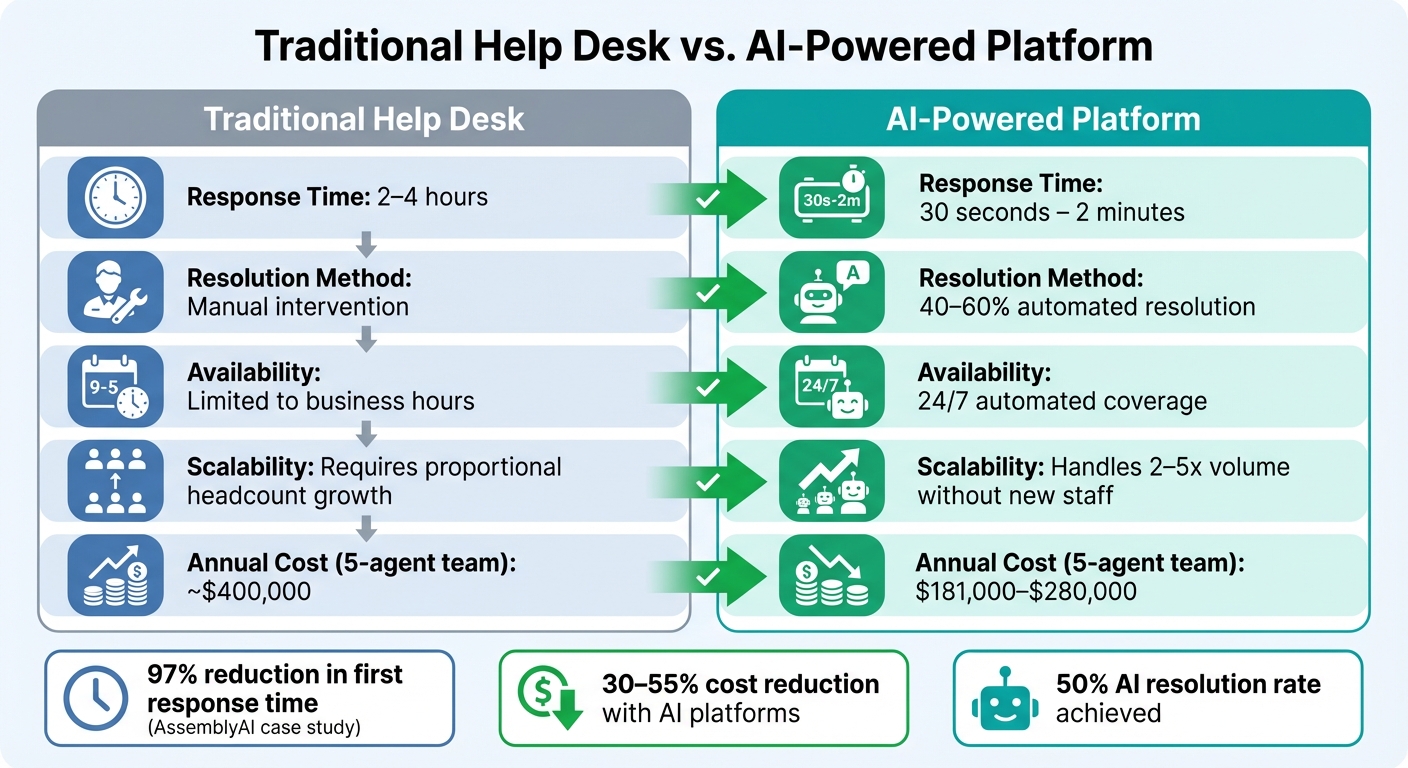
Traditional Help Desk vs AI-Powered Platform Comparison
Traditional help desks often fall short when compared to modern AI-powered platforms. They rely heavily on manual processes and disconnected tools, which force agents to juggle between channels and lose track of important context. This inefficiency means customers frequently have to repeat themselves, leading to slower resolutions. When ticket volumes surge, businesses are left with no choice but to hire more staff, and even then, average response times can stretch to 2–4 hours[9].
AI-powered platforms, on the other hand, eliminate these inefficiencies by automating and streamlining support workflows. These systems integrate automation and predictive intelligence directly into the process. Take AssemblyAI as an example: under the guidance of Support Engineering Manager Lee Vaughn, they slashed their first response time from 15 minutes to just 23 seconds – a massive 97% improvement. They also doubled their AI resolution rate from 25% to 50%, providing around-the-clock support without increasing staff[9].
"Our customers are developers who expect quick, actionable support. We needed a way to meet them where they work without slowing down."
– Lee Vaughn, Support Engineering Manager, AssemblyAI[9]
AI solutions stand out by autonomously handling 40–60% of B2B support tickets, freeing up human agents to tackle more intricate issues. They consolidate all communication channels into a single, context-rich inbox while AI copilots assist by summarizing conversations, drafting replies, and highlighting relevant resources. This combination of efficiency and continuous availability is crucial for enterprises striving to maintain high service standards.
The financial benefits are equally compelling. AI-powered platforms typically cost between $181,000 and $280,000 per year – offering a 30–55% reduction in operational costs compared to traditional systems[9]. Platforms like Supportbench also come equipped with advanced features such as predictive CSAT/CES scoring, automated ticket triage, and dynamic SLA management right out of the box, with no additional expenses.
Here’s a quick comparison of how traditional help desks stack up against AI-powered platforms:
| Feature | Traditional Help Desk | AI-Powered Platform |
|---|---|---|
| Response Time | 2–4 hours[9] | 30 seconds – 2 minutes[9] |
| Resolution Method | Manual intervention | 40–60% automated resolution[9] |
| Availability | Limited to business hours | 24/7 automated coverage[9] |
| Scalability | Requires proportional headcount growth | Handles 2–5x volume without new staff[9] |
| Annual Cost (5-agent team) | ~$400,000[9] | $181,000–$280,000[9] |
This shift toward AI-driven platforms underscores a broader move toward smarter, more scalable support solutions for B2B organizations.
Real Examples of Help Desk Implementation
Real-world cases show how help desk systems, especially those powered by AI, are transforming support operations across industries.
Scaling Support for High-Peak Periods
In February 2025, Sybo, the gaming company behind popular mobile titles, faced a surge in customer requests during a high-demand period. Instead of hiring more staff, they integrated Helpshift‘s SDK messaging directly into their game. This allowed players to get support without leaving the app. The result? Support time dropped by an impressive 86%, and customer satisfaction scores jumped from 3.8 to 4.3[10].
Bytro Labs tackled the challenge differently. They converted 17,000 monthly support tickets into a searchable knowledge base. This approach helped them manage peak periods effectively while keeping staffing needs minimal[10].
Reducing Downtime with SLA Enforcement
For enterprise IT teams, help desk platforms are essential in preventing minor issues from turning into costly outages. These systems automate SLA (Service Level Agreement) tracking, ensuring response times are met and compliance is maintained. Combined with tiered support structures – where Level 1 handles basic tasks like password resets and Level 3 deals with complex technical challenges – issues are routed to the right experts quickly[12].
Real-time dashboards give managers a clear view of SLA compliance, helping them spot and resolve bottlenecks before they affect users. Some organizations have reported SLA compliance rates reaching 90% after implementing structured help desk reporting. These same systems have also cut administrative reporting time by 70%, allowing technical teams to focus on preventing problems instead of documenting them[11].
This efficiency highlights how help desk systems can be just as effective internally as they are for customer-facing operations.
Centralizing Internal Support Operations
Jam City offers a great example of how help desks can automate and streamline internal workflows. By replacing fragmented email communication with a unified messaging system, they reduced ticket volume by 30% while doubling customer satisfaction scores[10]. This shift showcases how integrating AI-powered tools can create smoother workflows for both internal and external support.
Some companies are expanding help desk use beyond IT to create "business help desks." By integrating platforms like Slack and Microsoft Teams, employees can submit support tickets without leaving their primary tools. AI copilots further enhance efficiency by summarizing requests and suggesting relevant knowledge base articles. Huuuge, a gaming company serving players in 195 countries, implemented Language AI to enable English-speaking agents to assist in 36 languages. This change reduced response times by 21% and allowed them to centralize support operations without hiring region-specific staff[10].
These examples highlight how help desk systems are not just about solving problems – they’re about creating smarter, more efficient workflows that benefit both customers and employees.
Conclusion
Help desk systems have come a long way, evolving from basic ticketing tools into AI-driven platforms that reshape how support teams operate. These modern solutions speed up resolution times, reduce expenses, and increase customer satisfaction. In fact, 58% of IT decision-makers have already embraced chatbots [1], and AI has been shown to cut the time spent on routine tasks by as much as 60% [12].
Examples from real-world use show that success hinges on adopting systems designed to work smarter, not harder. Older, legacy help desk tools often fall short of meeting today’s demands. To keep up, organizations need platforms that seamlessly integrate AI into case management, knowledge building, and automating support workflows – without requiring heavy IT involvement for setup or upkeep.
Supportbench is tackling these challenges directly. Starting at $32 per agent per month, it offers enterprise-level features like advanced AI, dynamic SLAs, predictive CSAT/CES scoring, and comprehensive 360-degree customer insights. This gives support teams the tools they need to scale effectively while delivering reliable, effortless service that helps maintain retention rates above 90% [6].
The real question isn’t whether to switch to an AI-powered help desk – it’s whether you’re ready to lower costs, improve service quality, and strengthen your customer relationships.
FAQs
How can AI-powered help desks enhance customer satisfaction?
AI-driven help desks enhance customer satisfaction by delivering quick, precise, and tailored support. They tackle routine inquiries immediately, cutting down on wait times and ensuring customers receive timely assistance.
By taking over repetitive tasks, AI frees up human agents to concentrate on handling more challenging problems. This blend of speed and personalization often results in better customer satisfaction scores (CSAT).
What’s the difference between a help desk and a service desk?
The key distinction between a help desk and a service desk lies in their scope and functionality. A help desk is designed to address specific technical problems or answer questions for both customers and employees. Its role is largely reactive, focusing on tasks like troubleshooting, managing support tickets, and escalating issues when necessary.
A service desk, however, operates on a larger scale with a more proactive mindset. It aligns with ITIL best practices to handle not just incident resolution but also service requests, change management, and problem management. Service desks are built to oversee the entire service delivery process. They often come equipped with features like asset tracking, SLA monitoring, and data analytics, making them a robust tool for managing IT and business operations. By comparison, help desks are simpler and prioritize immediate support and problem-solving.
How does a knowledge base help reduce the workload for support agents?
A knowledge base empowers customers to solve common issues independently, cutting down the need to reach out to support. By tackling repetitive questions, it can reduce ticket volume by as much as 35%, freeing up agents to handle more pressing or intricate concerns.
This approach boosts efficiency and delivers quicker solutions, which naturally leads to happier customers. Plus, maintaining a solid knowledge base over time can trim operational costs and ease the burden on support teams.