


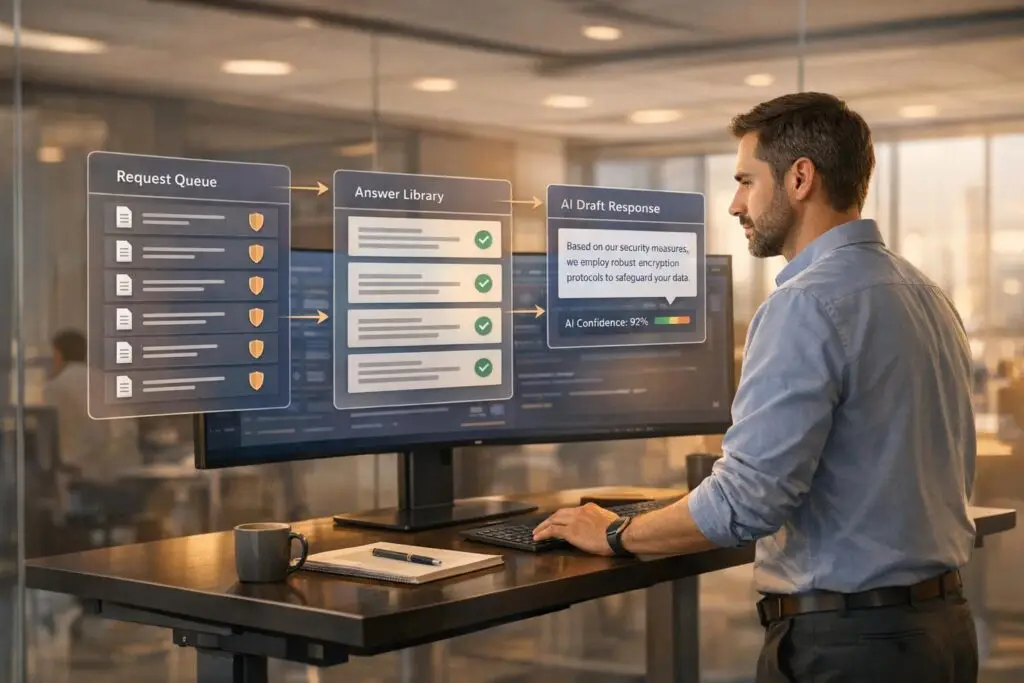
Security questionnaires are essential in B2B procurement, especially for support platform vendors handling sensitive data. They assess your security practices, compliance, and risk management. Efficiently managing these questionnaires can save time, reduce costs, and build trust with potential customers.
Key Takeaways:
- Why they matter: 84% of organizations use security questionnaires to evaluate vendors, with breaches costing an average of $4.4M.
- Common challenges: Vendors spend up to 23 hours weekly on these, often facing disorganized processes and inconsistent answers.
- Steps to streamline:
- Centralize requests and documents in a single system.
- Prioritize questionnaires by deal size and deadlines.
- Build a database of pre-approved, accurate answers.
- Assign clear roles across teams for efficient collaboration.
- Use AI tools to automate repetitive tasks and speed up responses.
- Avoid pitfalls: Inconsistent answers and missed deadlines can damage credibility and cost deals.
By organizing your process, leveraging technology, and ensuring accuracy, you can handle security questionnaires efficiently and demonstrate your commitment to data protection.
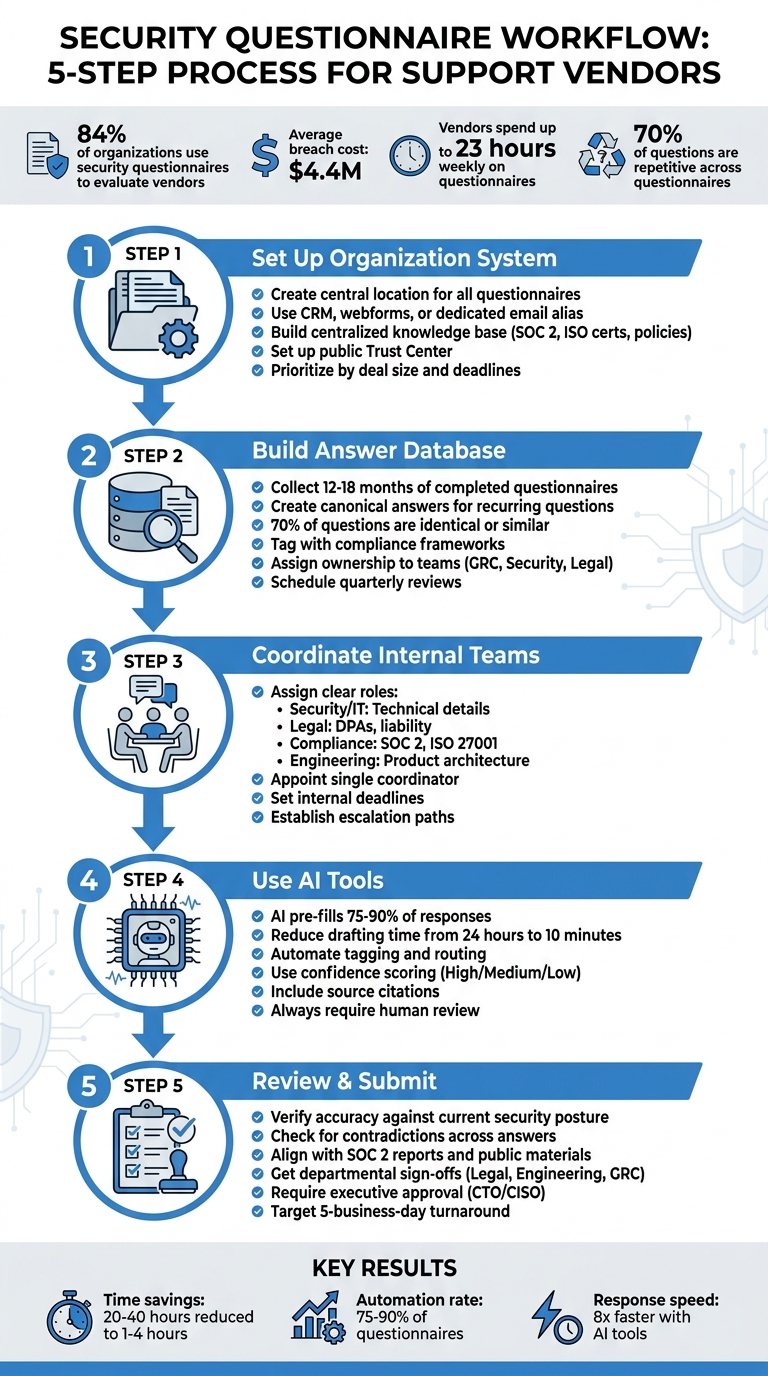
5-Step Process for Managing Security Questionnaires Efficiently
Step 1: Set Up a System to Organize Incoming Questionnaires
Create a Central Location for All Questionnaires
Managing security questionnaires effectively starts with centralizing all incoming requests. If submissions are scattered across different platforms or email threads, it’s easy for things to slip through the cracks. A centralized system ensures consistency and reduces confusion.
Start by implementing an intake process that collects key details about each request. Use tools like your CRM (e.g., Salesforce or HubSpot), create webforms on your trust page, or set up a dedicated email alias – like security-questionnaires@yourcompany.com – to funnel all requests into one place [10]. This approach helps you track who submitted the request, when it’s due, and which deal it’s tied to.
Next, establish a centralized knowledge base to store all your security-related documentation. This should include SOC 2 reports, ISO certifications, privacy policies, penetration test summaries, and even responses to past questionnaires [3][9][6]. By keeping everything in one up-to-date repository, you eliminate the risk of sending outdated or conflicting information. For example, if your legal team updates the Data Processing Agreement or your engineering team makes changes to infrastructure documentation, everyone can access the latest version immediately.
Consider setting up a public-facing Trust Center where prospects can directly download standard documents like your SOC 2 report or security policies. This simple step can reduce the number of incoming questionnaires, as many buyers will find the answers they need without having to submit a formal request [3][9][10].
With your centralized system in place, the next step is to figure out how to prioritize these requests.
Prioritize Requests by Business Impact
After centralizing your questionnaires, the focus shifts to prioritizing requests based on their business impact. Not all questionnaires are created equal, so it’s essential to allocate your team’s time wisely. For instance, a $500,000 enterprise deal closing in two weeks deserves more attention than a $5,000 pilot [9].
To prioritize effectively, consider factors like deal size, deadlines, and the strength of the client relationship. Requests can also be categorized by format and complexity to estimate how much time they’ll take. Standard formats like SIG or CAIQ might need 2–4 hours, while custom questionnaires with over 100 questions could take anywhere from 1 to 3 days [8].
"A perfect questionnaire delivered two weeks late is worth less than a good questionnaire delivered on time." – Concerto Compliance [8]
To keep everything running smoothly, assign a central coordinator – someone in Security, Compliance, or GRC – to oversee the intake process and manage routing [8]. This person ensures nothing gets lost in email threads or delayed while teams debate who should handle specific sections. Having a single point of accountability streamlines the process and keeps everyone on track.
sbb-itb-e60d259
Step 2: Build a Database of Pre-Approved Answers
Document Answers to Common Security Questions
Once you’ve sorted your incoming security questionnaires, the next step is to cut down on repetitive tasks. Why? Because security questionnaires tend to repeat themselves – a lot. In fact, about 70% of the questions are either identical or ask for the same proof, just in slightly different formats like SIG or CAIQ [4]. A centralized database of pre-approved answers can save you from rewriting the same responses over and over.
Start by collecting 12 to 18 months’ worth of completed questionnaires [8]. Go through them to spot recurring questions and group them into categories like access control, encryption, incident response, vendor management, and so on. Then, for each question, craft a "canonical" version. For example, you might notice variations of "Do you encrypt data at rest?" Instead of answering each variation separately, create one detailed answer that covers them all [12].
Be specific in your responses. Instead of a vague "Yes, we encrypt data", say something like, "We use AES-256 encryption at rest via AWS KMS" [8]. Detailed answers like this not only build trust but also reduce follow-up questions. Tag each answer with the relevant compliance framework and link it to supporting evidence, such as policy clauses or sections from audit reports [5][8].
Assign ownership for different parts of the database to ensure accountability. For example, GRC leads can oversee policy-related answers, security architects can handle technical details like encryption, and legal counsel can review data processing agreements [5]. Mark each entry with an owner and the date it was last approved. This helps prevent outdated or inconsistent responses, which can be a big issue [9][1].
Include notes for conditions where the answers apply. For instance, specify if a response is relevant only to "Enterprise" product tiers or specific hosting environments like "Cloud-hosted vs. Self-hosted" [12]. And don’t just leave "Not Applicable" as a standalone answer – explain why a control doesn’t apply to your architecture to show thoroughness [4]. With a solid database in place, keeping your answers updated and consistent becomes much easier.
Keep Responses Accurate and Consistent
Once your database is set up, keeping it accurate is key. Outdated information can raise red flags and erode trust during buyer reviews. To avoid this, schedule quarterly reviews to update answers, especially after major product changes, infrastructure updates, or new certifications like SOC 2 [4][5].
Set up a feedback loop to capture answers created during live responses. If a team member drafts a new or uniquely phrased answer, vet it and add it to the central library [12][5]. This keeps your database evolving alongside your business and ensures edge cases are covered. Use version control with "last updated" timestamps to maintain transparency [12][1].
"Catalog the answers you are providing to help ensure consistent information is provided, review that information on a regular basis and add new answers as you see new questions." – David Levine, Vice President of Information Security & CISO, Ricoh [11]
Avoid relying on spreadsheets – they’re difficult to search and don’t track changes effectively. Instead, opt for tools like Notion, which offer automatic timestamps and better search functionality, or specialized AI tools that can deduplicate answers based on meaning, not just keywords [12]. This approach ensures your database stays a reliable resource for your team.
Step 3: Coordinate with Internal Teams
Assign Clear Roles and Responsibilities
To deliver timely and accurate responses to security questionnaires, internal coordination is absolutely essential. These questionnaires often involve a wide range of topics – technical infrastructure, legal requirements, compliance certifications, and product-specific security measures. Since no single person or team can cover all these areas, assigning clear ownership from the start is critical.
Use a responsibility matrix to designate which team handles specific question categories. For example:
- Security and IT teams: Handle technical details like encryption standards, multifactor authentication, and vulnerability management.
- Legal team: Address issues such as liability caps, data processing agreements, and breach notification protocols.
- Compliance or GRC officers: Focus on standards like SOC 2 and ISO 27001.
- Engineering and product teams: Provide insights into secure development practices and product architecture.
Additionally, appoint a single coordinator – such as a security leader or compliance manager – to oversee the process and ensure consistency. This person will act as the central point of contact, keeping the process streamlined.
For instance, HR might handle questions about employee background checks, while your security architect would tackle queries around encryption key rotation. Assigning tasks this way ensures no area is overlooked. To keep the process moving, set internal deadlines for each section, especially for questionnaires tied to high-value deals.
"When Sales says ‘enterprise-grade controls’ and Engineering says ‘in-progress hardening,’ the buyer sees risk, not nuance." – Kioptrix
For high-priority situations, establish clear escalation paths. Define which executive has final approval authority and identify who should step in when a questionnaire is delaying a deal that requires a fast turnaround – such as within 48 hours. A 2025 case study highlighted how delegating evidence collection to operations teams allowed executives to focus on strategic decision-making.
Improve Communication Between Departments
Once roles are assigned, effective communication between departments becomes the backbone of a smooth process. Without it, even the best assignments can stall.
Security questionnaires often require 10–18 hours of manual effort, much of which is spent chasing down experts for answers. Real-time collaboration tools can make a big difference here, helping teams track progress and cut down on inefficiencies.
Start by triaging questions into categories like "documented", "needs research", or "requires new controls." This prevents experts from being overwhelmed and ensures that the most pressing issues are addressed first.
In April 2026, AI tools began drafting responses with integrated source citations. This allowed security and engineering teams to review and refine content, rather than starting from scratch. The result? Less back-and-forth and fewer delays caused by endless email chains and scattered spreadsheets.
Finally, maintain a centralized knowledge base to ensure consistent answers across all departments. For controls that are in place but not yet fully documented, provide a clear timeline, such as, "Policy will be provided by January 20." Avoid vague or incomplete responses, as they can erode buyer confidence. This level of organization shows potential customers that your company is serious about security and well-prepared to meet their needs.
Step 4: Use AI Tools to Speed Up Drafting and Automation
Generate Responses with AI
With centralized systems and pre-approved answers in place, AI tools can dramatically speed up response drafting. Instead of digging through old spreadsheets or policy documents, AI uses natural language processing to identify and match similar questions to the same standardized answer. For example, the system can recognize that "How is data secured at rest?" and "Describe your encryption standards" both require the same response, even though the wording differs.
The best AI platforms integrate seamlessly with your existing knowledge repositories – like Google Drive, Confluence, SharePoint, Slack, or past RFP responses – and automatically pull relevant information. These tools can pre-fill 75%–90% of responses using resources like SOC 2 reports, security policies, and archived answers. A standout example: In 2026, Observe Inc. reduced the time to draft initial responses to just 10 minutes, saving 24 hours of manual labor per questionnaire [Source: SiftHub Case Studies, 2026].
Another helpful feature is confidence scoring. Advanced AI tools assign ratings – High, Medium, or Low – to their generated answers. Responses with high confidence (e.g., 90% or higher) typically need only a quick review, while low-confidence responses signal the need for input from a subject matter expert. Each AI-generated answer also includes citations (e.g., policy name, section, or page number) to make verification fast and easy.
For companies using support tools like Supportbench, AI Agent-Copilot can analyze previous cases, internal knowledge bases, and external resources to assist agents in resolving issues more efficiently. This same functionality applies to security questionnaires: AI drafts answers based on verified internal sources, ensuring consistency while minimizing errors.
But AI tools don’t just stop at drafting – they also take on repetitive tasks through automation.
Automate Repetitive Work
AI can take over the tedious, time-consuming tasks that often bog down workflows. For instance, AI-powered ticket routing and prioritization can categorize questions by domain – such as Legal, InfoSec, or Engineering – and send them directly to the right expert for final review, cutting out the back-and-forth of figuring out who should handle what.
Browser extensions and "portal agents" are especially helpful for vendors dealing with questionnaires on third-party platforms like OneTrust, ServiceNow, or Coupa. These tools can automatically populate form fields, eliminating the need for manual copy-pasting. Companies using this type of automation often report a 75% to 90% reduction in the time it takes to complete questionnaires.
Take Allego, for example: By implementing AI-driven questionnaire automation, they saved over 14 hours per project and sped up their response process by 8x, automating 90% of incoming security questionnaires [Source: SiftHub Case Studies, 2026]. Similarly, Superhuman used a Slack bot to handle 50% of sales team queries, saving more than 8 hours per week and achieving 75% automated RFP completion [Source: SiftHub Case Studies, 2026].
That said, automation doesn’t mean cutting out human oversight. AI-generated responses should never be auto-submitted. Every response must go through a human review to ensure it meets customer-specific needs and accounts for recent updates, such as policy changes. Think of your knowledge base like software code – schedule quarterly reviews to prevent the AI from pulling outdated information (e.g., a 2024 policy for a 2026 questionnaire). By balancing automation with human expertise, you can harness AI’s efficiency without compromising accuracy.
Automate Security Questionnaires & Respond 90% faster with AI | Conveyor
Step 5: Review and Submit Your Responses
With your responses drafted and automated, the final step is to conduct a thorough review before submission.
Check for Complete and Accurate Information
Your responses in the questionnaire aren’t just answers – they’re contractual representations. Any inaccuracies could lead to legal trouble down the line [7][2]. Double-check that every answer reflects your current security posture, not an idealized future state. For instance, if you claim 100% multi-factor authentication (MFA) enforcement but the actual implementation rate is only 60%, you could be exposing yourself to liability if a breach occurs later [2].
Take advantage of your centralized database and AI-assisted drafting to systematically verify the accuracy and completeness of each response. Avoid leaving any question marked as "N/A" without context. Instead, provide a short explanation if a control doesn’t apply to your business (e.g., "We are a cloud-based SaaS platform with no physical infrastructure") [4]. This approach demonstrates diligence and prevents buyers from assuming you overlooked the question.
"The goal isn’t to write better answers. It’s to be so secure that truthful answers are the only kind you can give." – Zip Security [2]
Consistency is just as critical as accuracy. Go through the entire document to identify and resolve any contradictions – an answer to question 180 might unintentionally conflict with your earlier response to question 18 [4]. Additionally, ensure your responses align with other documents like SOC 2 reports, previous questionnaires, or public-facing security materials [2][6]. Inconsistencies can raise red flags with buyers and potentially derail enterprise deals during procurement reviews [1][2].
Get Final Approval Before Submission
Once your responses are verified, the next step is to align all departmental reviews for a unified final approval. A human reviewer should always conduct a final pass before submission [2]. Assign technical questions to engineers, compliance issues to your GRC (Governance, Risk, and Compliance) team, and contractual terms to legal counsel. Avoid having sales teams estimate technical standards – they’re not the right experts for this [1][6]. Use a responsibility matrix to clearly define accountability for each question type.
| Stakeholder | Responsibility Area | Critical Verification Task |
|---|---|---|
| Legal Counsel | Liability & DPA | Review contractual obligations and breach notification timelines [13]. |
| Engineering/CTO | Technical Implementation | Verify encryption protocols, network architecture, and access controls [5][13]. |
| GRC / Compliance | Policy & Governance | Ensure responses align with certifications like SOC 2 or ISO 27001 [5]. |
| Product Manager | Product Features | Confirm functionality of role-based access controls and product-specific security [5]. |
For the final review, assign someone from the security or compliance team – not sales – to ensure tone and quality [8]. This person should confirm that every answer is backed by current evidence, such as recent penetration test results or SOC 2 reports [4][2]. Finally, require a senior executive, like a CTO or CISO, to give the final sign-off before submitting the document to the client [5][11].
Mistakes to Avoid When Responding to Security Questionnaires
Vendors can make serious missteps that hurt their credibility and jeopardize deals. Knowing these pitfalls is essential to maintaining professionalism and securing enterprise business.
Providing Inconsistent Answers
Inconsistent answers can quickly erode trust. For instance, if one team tells a prospect that your company enforces strict multi-factor authentication while another claims it’s optional, it raises red flags. It suggests your organization might not fully understand or consistently implement its own security measures. This not only undermines trust with potential buyers but could also lead to legal issues – especially since responses to these questionnaires often become part of contractual agreements.
To avoid this, maintain a centralized master answer library. Update it quarterly and assign a dedicated security owner to oversee it. This ensures consistency across all responses and reduces the risk of legal complications.
But consistency isn’t the only thing that matters – timely submissions are just as important.
Missing Submission Deadlines
Accuracy is critical, but meeting deadlines is equally important when it comes to securing deals. Delays in responding are one of the most common reasons vendors get disqualified during the procurement process. If your team takes three weeks to respond while a competitor delivers in five days, it signals inefficiency.
"Missing the deadline kills the deal." – Lora Vaughn [4]
Enterprise procurement often follows strict timelines. A late response could push a deal into the next quarter – or worse, take you out of the running altogether. Security questionnaires can take anywhere from 12 to 40 hours to complete, making it crucial to prioritize deadlines.
To stay on track, create a triage system that ranks incoming questionnaires based on business impact and deal size. Aim for a five-business-day turnaround as your standard [14]. Use your pre-approved answer library to handle about 80% of the questions upfront, and only escalate complex or highly technical items to your engineering team. A timely response, even if not perfect, is far better than a flawless one that arrives too late [8].
How AI Improves Security Questionnaire Workflows
AI takes existing automation strategies to the next level by simplifying workflows, uncovering insights, and improving communication with customers. By cutting out repetitive tasks and focusing on key insights, vendors can tackle security questionnaires faster and with greater accuracy.
Use Sentiment Analysis to Improve Customer Communication
Sentiment analysis helps vendors understand the tone behind customer questions. For instance, comparing a question like "Describe your cryptographic standards" to "Do you encrypt data at rest?" reveals subtle differences in technical focus. AI can detect these nuances and classify the sentiment as Positive, Neutral, Negative, or Mixed[19].
This matters more than ever, as nearly 60% of organizations now rely on AI to evaluate vendor responses[15]. If sentiment tracking shows that a prospect finds your security posture accurate but not compelling enough, you can adjust by sharing customer success stories or verified audit results to build trust[19].
But sentiment analysis isn’t the only way AI simplifies the process. It also automates content creation.
Create Case Summaries and Knowledge Articles Automatically
AI-powered tools can summarize support tickets and update your knowledge base using knowledge-centric support tools[18]. Instead of manually logging every certification renewal or procedural change, AI extracts key details from closed cases and turns them into searchable articles with just one click.
These platforms can also sync with your document repositories to pull up-to-date information from security policies, audit reports, and technical specs[16][17]. This ensures your case summaries always reflect the latest data.
On top of that, AI uses confidence scoring to refine responses. Answers with high confidence (90% or above) typically need a quick review, while low-confidence responses flag experts for a deeper dive[16][17]. This method allows your team to focus on the critical 20% of tasks, while the other 80% – the repetitive work – is automated[3].
Conclusion: Build Customer Trust with Better Questionnaire Management
Security questionnaires are more than just forms – they’re a reflection of your trustworthiness. How quickly and accurately you handle them speaks volumes about your efficiency. For example, a vendor taking three weeks to answer 200 questions can raise serious doubts about their ability to manage sensitive customer data effectively[2].
As discussed earlier, leveraging AI tools can turn these challenges into opportunities. By centralizing your knowledge base, aligning teams, and automating response drafts, you can slash response times from 20–40 hours to just 1–4 hours[2]. That kind of efficiency not only speeds up deal closures but also showcases the operational discipline customers expect from a reliable support platform vendor.
Speed alone isn’t enough – consistency is equally critical. When different departments provide conflicting answers, prospects notice, and those discrepancies can lead to legal risks if the responses are tied to contractual obligations[7]. A unified, central source of truth ensures that every team delivers consistent, approved answers. This approach eliminates confusion and reinforces your dependability as a vendor.
The ultimate goal isn’t just about crafting better responses – it’s about creating systems so reliable that accurate and verifiable answers are the standard[2]. By centralizing your processes and using AI-driven automation, you transform what was once a tedious task into a powerful demonstration of your platform’s security and reliability. Take these steps, and security questionnaires will no longer feel like a burden but instead serve as proof of your commitment to protecting customer data at scale.
FAQs
What’s the fastest way to triage and prioritize incoming security questionnaires?
To efficiently manage and prioritize security questionnaires, start by reviewing the entire set to categorize the questions. Separate them into three groups: straightforward questions, those requiring deeper research, and ones that don’t apply. Tackle the simple questions first, then mark the more complex ones for further investigation.
Creating a master response library with pre-validated answers can save time and effort for future questionnaires. Additionally, using AI tools can help streamline the process, ensuring that critical questions are handled consistently and efficiently.
How do we keep answers consistent and up to date across Security, Legal, and Engineering?
To keep Security, Legal, and Engineering teams on the same page, rely on a centralized, AI-powered knowledge base filled with legally-reviewed and technically verified information. Automating the process of updating and approving responses helps minimize mistakes and ensures the information stays up-to-date. Regular updates to the repository are crucial as standards and requirements change. Encourage teamwork by using shared platforms and establishing clear workflows, ensuring transparency and smooth coordination across all departments.
How can we use AI to speed up questionnaires without risking inaccurate submissions?
AI simplifies handling security questionnaires by automating the process of generating responses. It pulls from verified sources like past questionnaires, centralized knowledge bases, and documents such as SOC 2 reports to ensure consistent and accurate answers. Additionally, automated workflows can draft responses, which are then reviewed by humans to maintain precision. Some AI tools even populate web portals directly, minimizing errors and saving valuable time. This combination of automation and human oversight strikes a balance between efficiency and compliance.
Related Blog Posts
- How can vendors qualify for Canada’s federal SaaS supply arrangement (SaaSSA)?
- What security requirements matter for Canadian public sector SaaS (ITSG-33 explained)?
- How do you evaluate “foreign access risk” when choosing a US vs non-US helpdesk?
- How do you run a helpdesk RFP for Canadian organizations (scorecard + requirements)?






