
Decision trees simplify complex workflows by guiding users step-by-step through "if-this-then-that" logic. When done right, they reduce Average Handle Time (AHT) by 15%, speed up agent onboarding by 40%, and cut call volumes by up to 46%. But poorly designed trees confuse users, leading to frustration and inefficiency.
Here’s how to get it right:
- Define a clear purpose: Focus on solving one specific problem, like troubleshooting, billing, or product setup within your knowledge base.
- Know your audience: Use plain language for customers and concise steps for agents.
- Keep it simple: Limit choices to 2–4 options per step to avoid overwhelming users.
- Write actionable content: Avoid jargon and ensure every path leads to a clear resolution.
- Test and update regularly: Validate with real cases, track metrics like resolution accuracy, and refine based on user feedback.
- Leverage AI: Use AI tools to generate, test, and maintain decision tree logic efficiently.
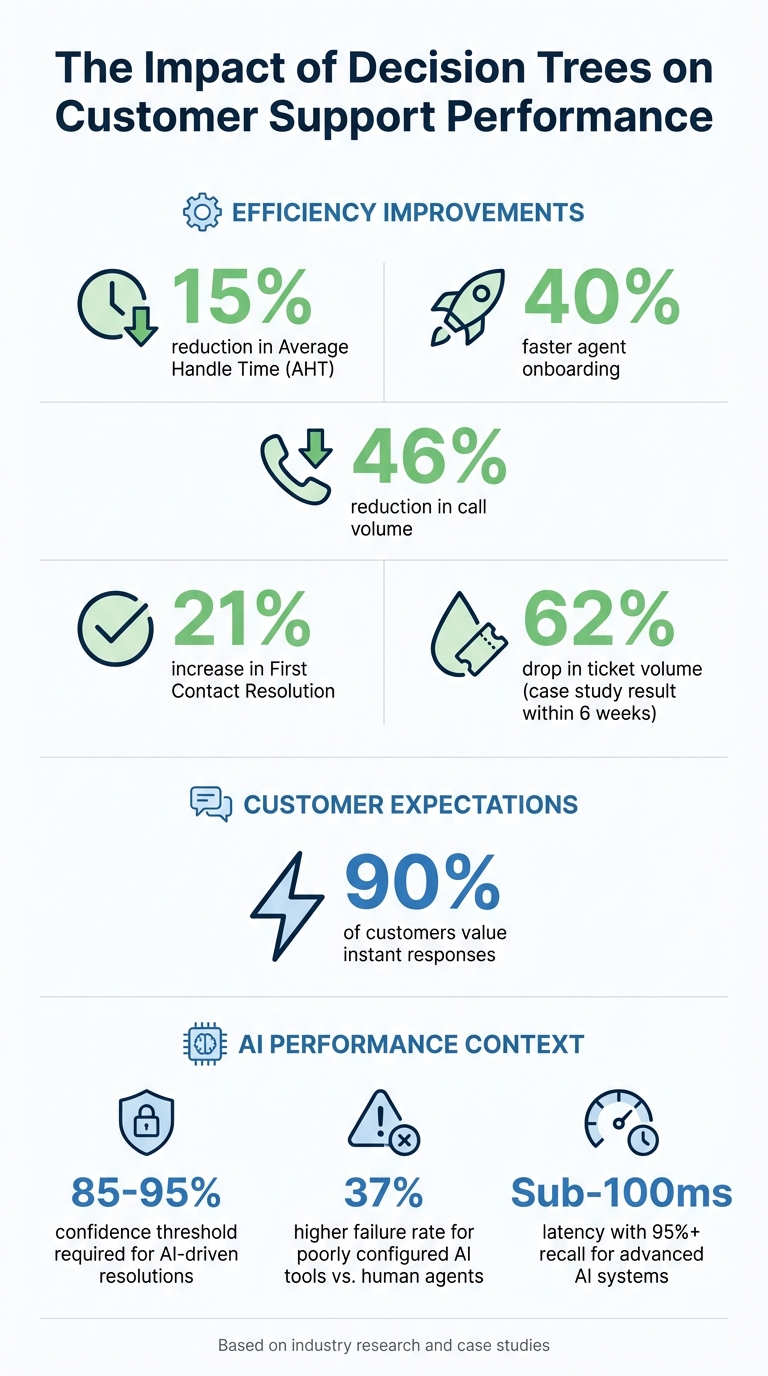
Decision Tree Impact: Key Performance Metrics and Benefits
Using Decision Trees in your Knowledge Base for Customer Service
sbb-itb-e60d259
Define the Purpose and Scope of Your Decision Tree
Before diving into building your decision tree, it’s crucial to pinpoint a single, specific problem you aim to solve. Keeping the scope narrow helps maintain simplicity and clarity in your workflow.
Start by identifying the exact decision or outcome you want users to achieve. Some common use cases include:
- Technical troubleshooting: For example, diagnosing why a device won’t power on.
- Billing and account management: Guiding users through tasks like updating credit card details or unlocking accounts.
- Product onboarding: Helping new users activate features or complete setup.
- Escalation and compliance: Routing critical issues, such as data breaches, to the right senior team member.
Each of these scenarios requires its own decision tree with a distinct root node – a clear starting point that represents the problem or question users begin with.
Identify Your Target Audience
The way you design your decision tree should align with the needs of your audience. For example:
- Agent-facing trees: Use concise, technical steps or shorthand that support agents will easily understand.
- Customer-facing trees: Avoid technical jargon and use plain language to explain each step and outcome clearly.
To make your decision tree truly effective, collaborate with support agents and subject matter experts during the planning phase. They can help you identify the most frequent and critical scenarios users encounter. This approach ensures the tree is practical and addresses actual challenges, not just hypothetical ones. Knowmax highlights that decision trees are especially helpful for "less tech-savvy users", as they simplify troubleshooting by guiding them step-by-step without overwhelming them.
Once you’ve defined your audience, focus on creating a single, streamlined workflow.
Focus on One Workflow or Question
Each decision tree should tackle just one workflow or question. This narrow focus prevents redundancy and ensures clarity across your knowledge base. Emil Hajric, Founder of Helpjuice, puts it this way:
By presenting a series of questions with branching answers, you can lead users to tailored responses, enhancing their experience and helping them find solutions more efficiently [7].
Interactive decision trees simplify complex systems by showing users only the path relevant to their situation. This not only reduces cognitive load but also speeds up resolution times.
To keep your decision trees organized and easy to navigate, categorize them within your knowledge base. Only create node splits when they lead to unique, actionable outcomes.
Defining a focused purpose and scope from the start ensures your decision trees streamline support processes and improve user experiences efficiently.
Structure Decision Trees for Easy Navigation
Once you’ve established a clear workflow, the next step is creating a structure that’s easy to follow. A well-designed decision tree relies on three key node types: root nodes to define the main issue, branch nodes to provide conditional choices, and leaf nodes to outline final outcomes. These nodes work together to guide users seamlessly through the process. Let’s break down how to write effective knowledge base articles using these nodes.
Use Root, Branch, and Leaf Nodes Effectively
Each type of node plays a unique role in leading users to a solution. The root node should clearly state the primary problem in simple terms. For example, it might say, "Device won’t power on" or "Unable to process payment." From there, branch nodes guide users with direct, actionable questions like, "Is the power light on?" [10].
Leaf nodes are where users find the final answer. These nodes should always offer a specific resolution – whether it’s a step-by-step fix, instructions to escalate the issue, or a link to more resources. Avoid leaving users at a dead end. If multiple branches lead to the same outcome, such as "Contact Support", consolidate them into a single exit point. To make your logic even clearer, use visual aids like flowchart-style diagrams. Distinguish between informational boxes (for statements) and decision boxes (for questions) to help users understand the context of each node [3][5][8].
Keep Choices Simple: 2–4 Options Per Branch
To keep your decision tree user-friendly, limit the number of options at each decision point. Too many choices can overwhelm users, making it harder for them to decide. Research from DeciZone highlights that "deciding between similar choices increases cognitive load." To avoid this, stick to 2–4 mutually exclusive options per branch, and keep the wording concise. If users need additional context, include a statement box before the branch node to provide clarity [8].
This approach isn’t just about simplicity – it delivers real results. Organizations that adopt well-structured decision trees have seen a 15% reduction in Average Handle Time and a 46% decrease in call volume [3]. A carefully organized decision tree not only reduces confusion but also helps users reach solutions faster.
Write Clear and Actionable Content
The words you choose for your decision tree can make or break the user experience. Every question and instruction needs to be direct, specific, and easy to understand. Avoid using technical jargon or terms that might confuse your audience. Instead, stick to plain, straightforward language that leaves no room for doubt. The goal? To ensure users can move through each step without hesitation or second-guessing. This clarity is the backbone of effective, actionable support, as we’ll explore further.
Avoid Jargon and Vague Language
Your writing should match the knowledge level of your audience. For instance, if your decision tree asks, "Is the API endpoint responding?" but your users don’t know what an API is, they’ll likely feel lost. Swap out technical terms for simpler, more relatable phrases like, "Contact a specialist" or "Speak with our technical team." Jonathan Bar, Founder of Corebee, emphasizes this point:
The knowledge base is the real product. Messy, contradictory docs make AI confidently wrong [6].
Even if your decision tree is well-structured, unclear language can still mislead users. Once you’ve removed jargon, test the decision tree with real users to ensure the language is as clear as it needs to be.
Test Questions with Real Users
No matter how carefully you craft your content, you won’t know if it works until actual users try it out. Testing is essential to confirm that your phrasing leads users smoothly to solutions. To do this, review recent support tickets related to the topic and run them through the decision tree. Are the questions aligned with how users actually phrase their issues? Do they guide users to the right answers?
Pay close attention to where users drop off – these are the nodes where they abandon the process. For example, one SaaS founder experienced a 62% drop in ticket volume over six weeks after shifting from sending article links to providing direct answers within a automated workflow [6]. The content itself didn’t change, but presenting it in a clearer, more actionable way made all the difference.
Watch for signs of confusion, such as hesitation or incorrect choices. These moments are opportunities to refine your language and improve the decision tree’s effectiveness. Clear, user-focused language not only reduces frustration but also delivers tangible benefits like shorter handling times and fewer support calls.
Map Each Path to a Clear Outcome
A decision tree only works if every path leads to a meaningful result. Each branch needs to end with a specific action or resolution – whether it’s a troubleshooting fix, an escalation to the support team, or a link to a detailed knowledge base article. Without clear endpoints, users can hit dead ends, get frustrated, and abandon the process entirely. This defeats the whole purpose of having a decision tree. By ensuring every path is mapped to a clear outcome, you create actionable branches that guide users toward effective resolutions.
This clarity doesn’t just help users – it also improves how your AI-powered support system performs. Decision trees have been shown to increase First Contact Resolution by 21% [11] and reduce call volume by up to 46% [3]. When each pathway delivers value, users are empowered to solve their own issues without needing further assistance.
Connect Each Branch to a Specific Result
Every branch of your decision tree should lead to a concrete outcome. Using "if/then" logic ensures that every choice a user makes results in a clear next step. For instance, if a user selects "billing issue", the tree could ask whether the charge is incorrect or missing. Based on their response, they might be directed to a refund request form or a payment verification article.
To make these pathways effective, link endpoints to a variety of resources, such as:
- Knowledge base articles
- Video walkthroughs
- Pre-filled forms
- Escalation paths with clear instructions for next steps
This approach not only improves user experience but also has measurable benefits. For example, it can reduce call volume by up to 46% [3] and cut Average Handle Time (AHT) by 15% [3]. When users know exactly what to do at the end of each path, they’re more likely to resolve their issues quickly and independently.
But even with a well-designed tree, it’s essential to identify and address any points where users might get stuck.
Find and Fix Dead-End Paths
Dead ends undermine the effectiveness of a decision tree. These occur when a branch doesn’t lead to a useful resolution or leaves users without a clear next step. To spot these problem areas, use analytics to monitor where users drop off. High abandonment rates at specific nodes often point to dead ends or confusing pathways that fail to deliver a solution [4].
To prevent this, test every pathway against historical support tickets and visualize the tree’s flow with an easy-to-use drag-and-drop editor [5][13]. Have experienced agents and managers audit the tree to ensure all logical scenarios are addressed. As PixieBrix explains:
The tree guides them through questions and branches until they reach the right answer, article, or next step. This increases the chance of resolution without submitting a support ticket. [4]
Regular reviews – at least once a quarter – are essential for refining the tree’s logic and addressing gaps where users fail to find resolutions. If the tree becomes too complicated, consider breaking it into smaller, more focused trees. The key is to ensure that every user who enters the decision tree exits with a solution or a clear path forward. This strategy not only enhances operational efficiency but also boosts user satisfaction.
Test and Validate Your Decision Trees
Creating a decision tree is just the beginning. The real challenge lies in ensuring it functions effectively when real users interact with it. If you skip proper testing, you risk deploying a tool that confuses customers, delivers incorrect answers, or amplifies frustration instead of solving problems. Testing and validation aren’t one-and-done tasks – they’re ongoing efforts to refine and improve the tree’s logic over time.
A well-tested decision tree, paired with consistent metric tracking, is key to ensuring reliability. Consider this: poorly configured AI-powered support tools are 37% more likely to fail at resolving issues compared to human agents [6]. That’s why it’s crucial to test decision trees in real-world scenarios and measure their performance to ensure they genuinely enhance support outcomes.
Test Against Real Support Cases
The best way to validate your decision tree? Test it against actual support tickets. Start by pulling the last 50 support tickets from your system and manually walking through each one using the decision tree [6]. This helps you confirm whether the tree’s logic leads to the correct resolution or exposes flaws like incorrect pathways, conflicting answers, or unresolved issues.
For instance, if a customer asks, “Where’s my invoice?” versus “Download last month’s bill,” the tree should guide both queries to the same resolution [6]. If it doesn’t, you’ve identified a gap that needs fixing.
It’s also helpful to compare how agents handle support cases versus how the decision tree expects them to proceed [3]. If agents frequently deviate from the tree’s pathways, it could indicate missing branches or unclear options. Involving real users in testing can also reveal confusing points [4]. To keep improving, enable support agents to report pathway errors as they encounter them [2]. This creates a feedback loop that helps refine the tree’s logic.
Jonathan Bar, Founder of Corebee, offers a key takeaway on building trust with decision trees:
Don’t write a script for what the bot should say. Write rules for when the bot should stop talking and hand off. The resolution part handles itself if your docs are good. The escalation part is what determines whether customers trust you or leave. [6]
Before diving into testing, review your knowledge base for efficient customer support to identify inconsistencies. Conflicting or messy documentation can lead to decision trees giving “confidently wrong” answers [6]. Also, set system confidence thresholds – if confidence in a pathway drops below 85-95%, the system should escalate the issue to a human rather than guessing [6].
Use these insights to fine-tune your decision tree before moving on to performance tracking.
Track Performance Metrics
Once you’ve tested your decision tree with real cases, the next step is to measure its performance. Start with resolution accuracy, which tracks the percentage of interactions that lead to a successful resolution without needing escalation or additional help [1][9]. This metric is your primary indicator of the tree’s effectiveness.
Another key metric is time-to-resolution (TTR). A well-designed decision tree should reduce the time users spend on each step and the overall time it takes to solve their issue [1][2]. If users are stuck on a particular step longer than average, it’s a sign that the language or options on that node might need simplification [1]. Considering that 90% of customers value instant responses, delays at any step can be a red flag [1].
You should also monitor support escalation reduction to see if the decision tree is successfully lowering ticket volumes for covered issues [9]. For example, one SaaS team saw a 62% drop in ticket volume within six weeks after switching from knowledge base links to guided, direct answers in their decision tree [6]. That’s the kind of result a well-optimized tree can deliver.
Detailed analytics can further enhance your understanding of user behavior. Track patterns like where users get stuck, which paths they follow most often, and where they abandon the process. High drop-off rates at specific points often signal dead-ends or confusing options [4]. Review conversations that ended with fallback messages like “I didn’t understand that” to pinpoint where the tree failed [6].
Lastly, gather direct feedback from both agents and customers about the tree’s content and usability [1]. While metrics show you what happened, feedback helps you understand why. To keep everything aligned with your current products and policies, schedule a comprehensive review of all decision tree logic every six months [2].
Keep Decision Trees Updated
A decision tree that worked seamlessly six months ago can quickly become outdated if your product, policies, or workflows shift. Even small adjustments in workflows can throw off the logic, making regular reviews a must [12]. Without these updates, you risk leading customers through outdated processes, causing frustration instead of solutions.
Treat your decision tree as a living document that evolves alongside your workflows [8]. Regular updates ensure it stays relevant and effective. To avoid outdated paths, assign clear responsibility for maintaining and updating the tree.
Assign Someone to Own Updates
Appoint a knowledge manager or subject matter expert (SME) to oversee updates to the decision tree as part of a knowledge-centric support strategy [8][2]. Make it easy for frontline agents to flag errors or suggest changes when they encounter issues during live cases [2].
Jubina Prabhakaran from Document360 emphasizes this point:
Empower your agents to make changes to the knowledge base themselves when they spot an error. [2]
Establish structured feedback loops so team members can share input directly with the designated owner [8]. Some platforms even allow users to provide feedback on specific nodes or steps within the tree, offering precise context for updates. This creates a system of continuous improvement, where problems are addressed quickly rather than piling up over time.
Review Decision Trees Regularly
Building on earlier testing protocols, schedule periodic reviews to keep your decision tree aligned with current workflows. Aim to review the tree’s logic every six months. Work with SMEs during these reviews to confirm the tree reflects real-world scenarios, remove unnecessary branches, and ensure it aligns with any policy changes [15].
Creately highlights the importance of simplifying decision trees:
Pruning improves a decision tree by removing branches that add complexity without meaningfully improving accuracy. This simplifies the model, reduces overfitting, and helps it perform better on new data. [12]
Before implementing updates, clean your data by eliminating inaccuracies [15]. Test any changes against a validation dataset of recent support cases to confirm the revised logic still delivers accurate resolutions [14]. If agents are spending disproportionate time on one specific decision tree, prioritize that workflow for a deep dive and optimization [1].
Use AI to Build and Maintain Decision Trees
AI brings a more efficient approach to creating and managing decision trees, replacing the need for manual flow-building methods. By analyzing past support cases and using your knowledge base (KB), AI can automatically map logical paths. This shift is already happening, as major platforms move from traditional if/then logic to dynamic rules and system prompts [6].
Your KB serves as the foundation for AI-driven workflows. AI uses the information in your KB to determine logical steps, grouping similar requests – like "where is my invoice" and "download bill" – into unified decision paths [6]. Jonathan Bar, Founder of Corebee, puts it this way:
Don’t write a script for what the bot should say. Write rules for when the bot should stop talking and hand off. The resolution part handles itself if your docs are good. [6]
Before integrating AI, ensure your KB is accurate and free of errors. Start small by focusing on 2–3 high-traffic intents instead of trying to automate everything at once. Set a confidence threshold of 85% to 95% for AI-driven resolutions, with anything below that triggering human intervention [6].
Generate Content from Past Cases
AI can pinpoint frequent customer intents by reviewing conversation logs and support tickets, identifying common root nodes like billing, technical issues, or account access [6]. Instead of manually crafting every branch, let AI generate responses based on your KB. To test these AI-generated paths, run your last 50–100 support tickets through the system to confirm that it leads to accurate resolutions or escalations. Tools like Supportbench‘s AI Agent-Copilot can pull from both internal and external KBs, helping agents resolve issues faster while refining decision tree logic based on real-world patterns.
Automate Testing for Accuracy
AI plays a crucial role in testing decision trees. It validates pathways, flags missing branches, and ensures consistent language throughout the tree. Use real support cases as "ground truth" to avoid designing overly narrow solutions, and let AI identify vague wording or problematic clauses that could lead to errors [18] [19]. Adnan Masood, PhD, Microsoft Regional Director, highlights this point:
Generative AI without reliable context is a liability. [17]
When validating a decision tree, have AI explain its reasoning to ensure transparency and correctness [18]. Additionally, track user behavior – like time spent on steps or drop-off points – to identify areas where logic might be unclear. Advanced AI retrieval systems can achieve sub-100 ms latency with over 95% recall, making the testing process both fast and reliable [17]. These insights feed directly into ongoing improvements for your decision tree logic.
Update Decision Trees with AI Suggestions
AI doesn’t just help maintain decision trees – it actively suggests updates as your support needs evolve. By analyzing your existing trees, AI can identify overlooked scenarios or branches based on KB context [16]. It can also simulate "what if" scenarios to show how changes impact outcomes. Miro describes this process:
AI Sidekicks act like an extra teammate, answering questions about risk patterns, suggesting branches you might have missed, or comparing different paths. [16]
Review AI transcripts weekly to identify gaps in logic and update your KB as needed [6]. Tools like Supportbench’s AI-driven knowledge base templates further simplify this process by suggesting updates based on workflow changes or new customer behaviors. Combining AI insights with human review ensures that updates remain aligned with your brand’s tone and meet user expectations [20] [16].
Conclusion
Building effective decision trees starts with a clear goal, a logical structure, and straightforward language to help users find the right solutions. Keeping these trees up to date is equally important, as products and workflows change over time.
AI is reshaping how B2B support teams operate. Instead of manually creating every branch and testing each outcome, AI can analyze past support cases, generate content from your knowledge base, and even identify logical gaps automatically. Teams using AI-driven decision trees have reported a 46% reduction in call volume and a 15% decrease in Average Handle Time [3]. These numbers highlight how AI can drive real improvements in efficiency and customer experience. By integrating AI, businesses can merge essential support tools with advanced, data-driven approaches.
The move from static troubleshooting guides to dynamic workflows is well underway. Research from ACM notes that "Generative AI enables expert-guided prompt-based collaboration, accelerates parts of workflows, and allows prompt-guided design space exploration" [18]. This kind of innovation encourages teams to combine rapid prototyping with ongoing refinement.
Start by focusing on your most frequent support scenarios, test the system with real-world cases, and let AI manage the repetitive tasks like validation and updates. The goal is to create a system that evolves over time, consistently leading customers to the best solutions.
FAQs
How do I choose the right starting question for a decision tree?
To pick the best starting question, aim for one that is both clear and relevant to the user’s main concern or objective. Your question should steer users in the right direction while covering common situations. For instance, a question like, "What issue are you experiencing?" strikes the right balance – it’s specific enough to provide direction but broad enough to apply to a variety of scenarios. This approach ensures users understand the process and reduces any potential confusion in your decision tree.
When should a decision tree escalate to a human agent?
When a decision tree can’t solve a problem or meets specific criteria for escalation, it should pass the case to a human agent. Examples of such scenarios include high-priority cases, complicated issues, or situations that demand human judgment – like those involving urgency or ambiguity. This process ensures a smooth transition, especially when the decision tree identifies complexity, priority, or customer feedback signaling the need for personalized help.
What data should I track to know if a decision tree is working?
To evaluate how well a decision tree performs, focus on a few key metrics: user guidance accuracy, successful resolutions, and engagement levels. Keep an eye on user feedback and interaction patterns to spot any confusing paths or dead ends in the tree.
You should also pay attention to escalation rates to human support – this can help you understand if the decision tree covers enough ground or if it leaves users stuck. Some of the most telling indicators include the rate of successful resolutions, user satisfaction scores, and how often users are steered in the right direction. These insights will help fine-tune the decision tree for better results.