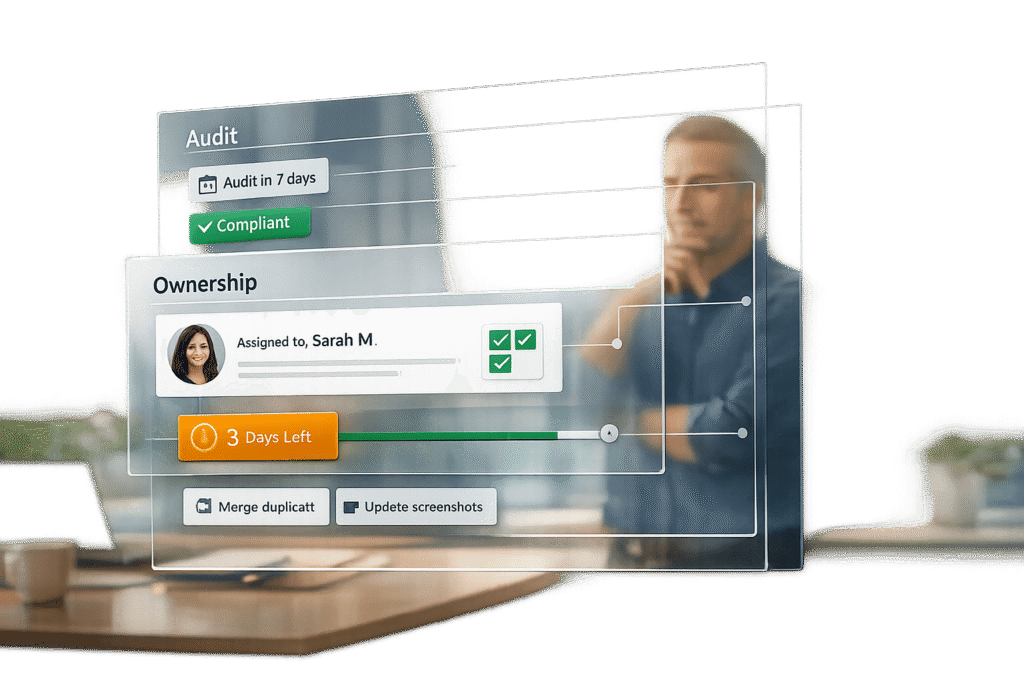
Keeping your knowledge base (KB) accurate and up-to-date is critical for reducing support tickets, improving customer trust, and ensuring team productivity. Here’s how you can do it:
- Assign Ownership: Every article needs a dedicated owner responsible for its accuracy and updates. Roles include:
- Content Owner: Approves changes and aligns content with business needs.
- SME (Subject Matter Expert): Ensures technical accuracy.
- Author: Drafts content using templates.
- Knowledge Manager: Oversees governance and platform policies.
- Set SLAs (Service Level Agreements): Define deadlines for reviews and updates:
- High-priority updates: 24 hours.
- Technical reviews: 48–72 hours.
- General audits: Every 6–12 months.
- Conduct Regular Audits: Use metrics like traffic, user feedback, and ticket correlation to prioritize updates. Focus on:
- High-traffic articles with low ratings.
- Outdated or underperforming content.
- Articles flagged by support agents.
- Leverage AI: Automate tasks like detecting outdated content, suggesting updates, and drafting articles based on support data.
Quick Tip: High-impact articles (e.g., top 20 most-viewed) should be reviewed monthly, while general knowledge can follow a 6-month schedule. AI tools can reduce manual review time by up to 70%.
The Bottom Line: A structured review process with clear ownership, timely updates, and regular audits ensures your KB stays reliable and relevant. This improves efficiency, reduces costs, and enhances customer satisfaction.
Knowledge Base Article lifecycle management using Jira Service Management
sbb-itb-e60d259
Assigning KB Article Ownership
Assigning ownership is the key to turning your knowledge base (KB) into a reliable, up-to-date resource. Without clear accountability, content often becomes outdated, inconsistent, or even contradictory. By assigning specific individuals to oversee articles, you avoid the classic trap where "everyone is responsible, so no one takes action".
Each role in the process plays a distinct part. The Content Owner ensures the article aligns with business goals and approves final changes. The Subject Matter Expert (SME) checks for technical accuracy, while the Author focuses on drafting the initial content. Confusing these roles can lead to delays or errors. It’s important to note that the owner doesn’t need to write the article – they’re responsible for keeping it accurate over time.
How to Choose the Right Owners
Ownership should be based on expertise, not just availability. For example, HR policies should be owned by the Head of HR, product documentation by Product team leads, and IT troubleshooting guides by IT managers. This approach ensures accountability is placed with those closest to the information, avoiding bottlenecks and tapping into real expertise.
For larger organizations, forming a Knowledge Council can be a smart move. This group, made up of representatives from teams like Support, IT, HR, and Product, handles strategy and resolves disputes over ownership. To keep things organized, align ownership with your KB’s structure (e.g., Product > Module > Topic). Every article should have both a primary owner and a backup to ensure someone is always available to maintain it.
What Owners Are Responsible For
With roles clearly defined, owners are equipped to manage the full lifecycle of an article. Their responsibilities include approving new drafts, scheduling regular reviews (every 6–12 months is common), and monitoring performance metrics like views, user ratings, and search success. They also keep an eye on feedback from support tickets and user comments, making updates when customer pain points arise.
"The KB owner is the contact for the team and can ensure that content is created and is consistent." – Jennifer Rowe, Zendesk Documentation Team
Feedback loops should be built into your system. For instance, articles with low helpfulness ratings or frequent downvotes should automatically alert the assigned owner for review. Setting a "Freshness Date" (typically 90 to 180 days after publication) can trigger automated reminders for updates, reducing the risk of content becoming stale.
| Role | Primary Responsibility | Responsibility Level |
|---|---|---|
| Content Owner | Ensures alignment with business goals and approves final changes | High (Accountable for the asset) |
| SME | Verifies technical details and addresses content gaps | Medium (Accountable for accuracy) |
| Author/Creator | Drafts content following templates and style guides | Low (Accountable for production) |
| Knowledge Manager | Manages platform, taxonomy, and governance policies | High (Accountable for the system) |
Setting SLAs for KB Content Reviews
Once ownership responsibilities are clear, service level agreements (SLAs) ensure updates happen on time by setting measurable deadlines. Without SLAs, content can quickly become outdated, and accountability fades. The trick is tailoring SLAs to the type of content. Compliance-based content – covering legal, regulatory, or security topics – needs strict review schedules. Meanwhile, experience-based content like troubleshooting tips or general FAQs can follow more flexible, demand-driven timelines.
SLAs should include both periodic audits and updates triggered by changes. For instance, a compliance article might need reviewing every six months, while a stable FAQ could be fine with an annual review. Although most enterprise systems default to a one-year "Next Review Date", this should be adjusted based on how quickly the subject matter changes.
Automation is key to keeping SLAs effective. Configure your system to send automatic notifications to content owners five days before a review is due, with daily reminders continuing for five days after the deadline. This ensures reviews aren’t missed and keeps accountability in check.
Creating Review and Approval Timeframes
Clear deadlines for each stage of the review process help streamline the workflow. For example:
- SME (Subject Matter Expert) technical reviews for high-priority articles should have a 48 to 72-hour window to confirm accuracy before publication.
- High-priority updates, such as those addressing critical bugs or trending issues, need a 24-hour turnaround to maintain rapid response times.
- Initial draft reviews typically require 3 to 5 business days to move from creation to approval.
These timelines ensure that articles meet the expectations of support teams.
| SLA Component | Example Timeframe | Goal Alignment |
|---|---|---|
| SME Technical Review | 48 – 72 Hours | Ensures technical accuracy and reduces escalations |
| High-Priority Update | 24 Hours | Supports quick resolution of critical issues |
| Quarterly Refresh | Every 90 Days | Keeps volatile product areas up to date |
| Standard Audit | 6 – 12 Months | Maintains long-term knowledge base health |
| Initial Draft Review | 3 – 5 Business Days | Speeds up time-to-market for new content |
When launching a new knowledge program, reviews should be frequent – weekly, in many cases – to address learning curves and fix early quality issues. Over time, as processes mature, these reviews can shift to monthly or quarterly schedules. Use visible status indicators like "Pending Review", "Due Review Date", and "Overdue Review Date" in your knowledge system to track SLA compliance.
Matching SLAs to Support Team Goals
SLAs should align directly with measurable support objectives. For example, to improve first-contact resolution (FCR), mandate immediate updates to articles when a support ticket highlights a documentation error or gap. If the goal is to reduce escalations, prioritize the 48-hour SME review window for high-traffic articles to ensure technical accuracy.
"Reuse accuracy is more important than reuse rate." – Consortium for Service Innovation
To make knowledge data useful for product management, aim for article link rates above 60% and link accuracy over 90%. If tracking redundancy rates – often 65% to 90% of total incident volume – use SLAs to ensure articles are reused and reviewed during every customer interaction.
Adopt the "Reuse is Review" approach: each time a support agent uses an article, they verify its accuracy. This method turns every interaction into a mini-audit, reducing the need for large-scale periodic reviews while keeping SLAs practical. Additionally, tie article publishing rights to a competency program. Knowledge workers who fail to meet quality SLAs consistently may lose their ability to publish without oversight.
Building a Step-by-Step Review Process
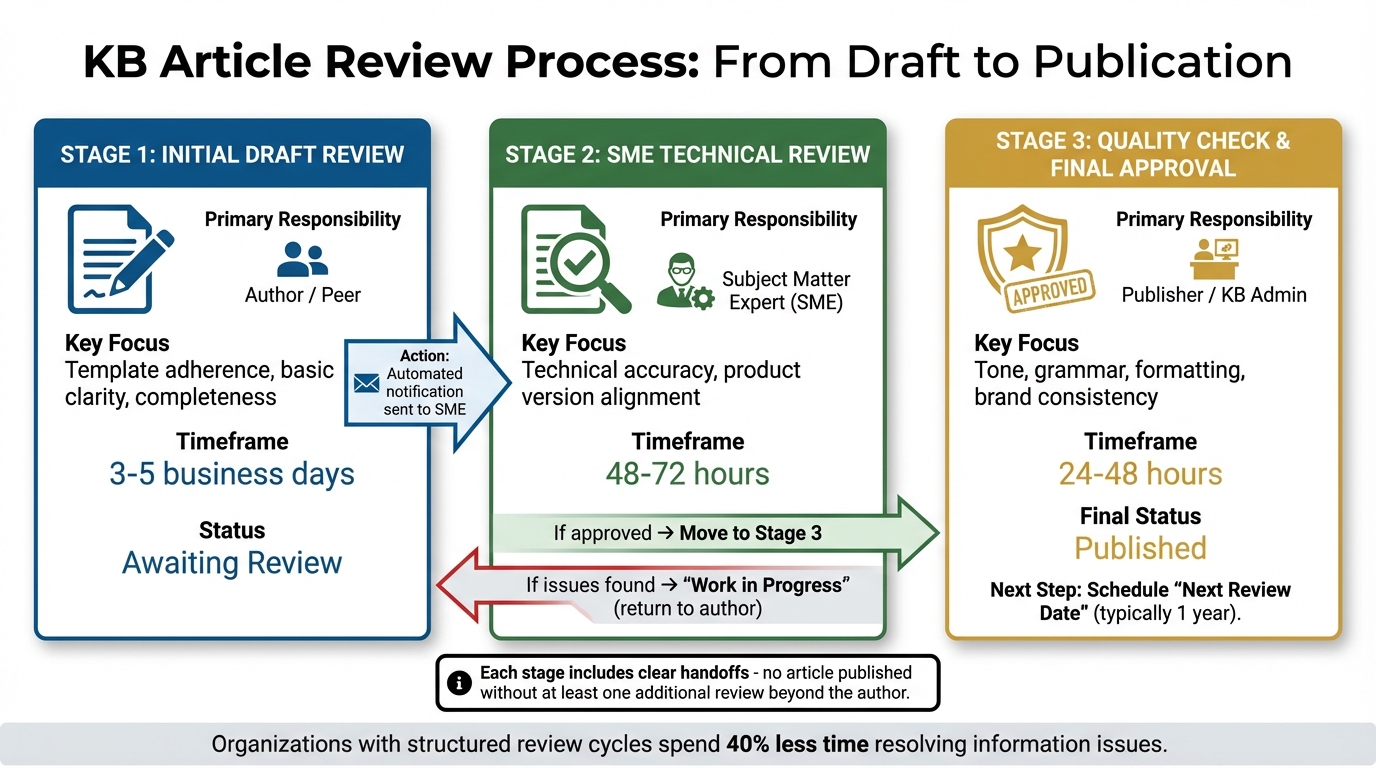
Knowledge Base Content Review Process: 3-Step Workflow with Roles and Timelines
Creating a repeatable workflow is essential to avoid mistakes and delays. A solid review process involves three distinct stages: drafting, technical verification, and quality approval. Each stage includes clear handoffs, ensuring no article is published without at least one additional review beyond the author. Status indicators help track progress, while automated notifications alert the next reviewer when it’s their turn. This structured workflow, paired with defined responsibilities, service-level agreements (SLAs), and regular audits, ensures that knowledge base (KB) content remains accurate and reliable. It’s a cornerstone of maintaining high-quality KB content, which is critical for effective customer support.
"If you don’t designate people to write content for your KB, then chances are no one will write content for your KB." – Jennifer Rowe, Zendesk Documentation Team
This structured process is especially important when you consider that nearly 29% of employees struggle to find the information they need from existing resources.
Step 1: Create Draft and Complete Initial Review
Every article should address real support needs, which can stem from trending tickets, FAQs, or product updates. Support agents play an important role here, tagging tickets with custom fields during customer interactions to identify potential topics. Once a topic is chosen, authors use standardized templates – like PERC (Problem, Environment, Resolution, Cause) for troubleshooting or Question-Answer-Overview for FAQs – to ensure consistency.
During this stage, authors focus on verifying basic details. They check that all template fields are completed, hyperlinks work, and the content directly addresses the identified issue. Once the draft is ready, it moves to "Awaiting Review" status, triggering an automatic notification to the assigned Subject Matter Expert (SME). This initial peer review helps catch common errors, such as formatting issues or incomplete drafts, before moving on to technical validation.
After this step, the article is ready for SME review.
Step 2: SME Technical Review
The SME ensures the article accurately reflects current product features and that instructions work as intended. Their primary goal is to confirm technical accuracy, relevance, and completeness – without altering the content’s tone or style. SMEs also verify that the article fully resolves the issue identified in the original support ticket.
"SMEs essentially act as quality control for subject accuracy… their sign-off confirms the knowledge base is accurate, not just published." – Knowledge-base.software
If the SME identifies issues, they leave detailed feedback through the system’s activity log or in-line comments. The article is then returned to "Work in Progress" status for revisions. Some systems allow SMEs to make minor edits, like fixing typos or formatting, which can save time.
Once all technical details are verified, the article moves to the final stage for quality and style checks.
Step 3: Quality Check and Final Approval
At this stage, a Content Owner or Knowledge Manager reviews the article for clarity, grammar, and alignment with brand tone and style guidelines. This includes checking formatting consistency, verifying functional hyperlinks, ensuring screenshots are up-to-date, and confirming the use of proper terminology. The reviewer also ensures that links to relevant resources are included.
To maintain strict quality control, only a select group has the authority to publish articles. Once approved, the article is marked as "Published" and made accessible to its audience. The system then schedules a "Next Review Date", typically set to one year but adjustable based on how often the content needs updates. This recurring review cycle is crucial, especially in industries where outdated information can lead to significant costs – over $500,000 annually in high-tech sectors.
| Review Stage | Primary Responsibility | Key Focus Area | Typical Timeframe |
|---|---|---|---|
| Initial Review | Author / Peer | Template adherence, basic clarity, completeness | 3 – 5 business days |
| SME Review | Subject Matter Expert | Technical accuracy, product version alignment | 48 – 72 hours |
| Quality Check | Publisher / KB Admin | Tone, grammar, formatting, brand consistency | 24 – 48 hours |
Running Regular Audits and Maintenance
Publishing an article is just the beginning. Maintaining your knowledge base (KB) is an ongoing task because even the most well-crafted content can become outdated as products evolve, features change, or customer needs shift. Without regular audits, you risk letting outdated screenshots, deprecated features, or broken links creep in – confusing customers and increasing support tickets. Considering that 67% of customers prefer self-service over speaking to a support representative, outdated content can directly hurt satisfaction and increase support costs. This is why continuous upkeep should work hand-in-hand with the structured review process mentioned earlier.
Sticking to the ownership and SLA guidelines you’ve already established ensures your KB stays accurate and aligned with customer needs. A metrics-driven audit schedule is the key to prioritizing high-impact content while keeping everything up-to-date.
Using Metrics to Prioritize Audits
Not all articles are created equal, and some demand more attention than others. High-traffic articles with low helpfulness ratings should take priority because they have the most immediate impact on support efficiency. To determine which articles to address first, track these four key indicators:
- Page views
- Bounce rates
- User feedback scores (e.g., thumbs up/down ratings)
- Time on page
Articles with helpfulness ratings below 80% or high bounce rates are clear signals of a mismatch between customer expectations and the content provided.
Search analytics also provide valuable insights. Monthly reviews of "no results" search queries highlight content gaps where customers are searching for help but finding nothing. Additionally, test your top three customer queries in the KB search. If the correct articles don’t show up in the top three results, it’s a sign those topics need immediate attention.
Another critical metric is ticket correlation. Cross-reference your top 20 ticket categories with existing KB articles to identify missing or underperforming documentation. If tickets keep piling up for a topic that already has an article, it’s a major red flag. Either the content isn’t discoverable, or it’s not solving the problem. Poor self-service experiences can increase ticket volume by 25% to 40%, making this metric essential for reducing costs.
To manage workload efficiently, consider a tiered audit system:
- Tier 1: High-traffic articles with low ratings or critical process documentation – these need immediate attention.
- Tier 2: Moderately trafficked articles with formatting issues.
- Tier 3: Low-traffic content with minor tone or style inconsistencies.
This approach ensures your team focuses on the updates that deliver the biggest impact first.
How Often to Audit Based on Content Type
Different types of content require different review schedules. High-impact articles and your top 20 most-accessed pieces should be reviewed monthly because they handle the majority of user queries and have the greatest influence on ticket deflection. Product-linked content tied to specific features needs quarterly reviews, especially after releases or UI changes. General knowledge articles should be reviewed every six months, while evergreen policy content can follow an annual schedule.
To streamline this process, flag articles older than six months for immediate review. Outdated screenshots or deprecated features can confuse customers, so it’s important not to let these slip through the cracks. Many modern AI-powered knowledge base platforms allow you to set up verification rules that automatically mark articles as "unverified" after three to six months, prompting mandatory owner reviews. Be ready to override these schedules when significant product updates or policy changes occur.
| Content Type | Audit Frequency | Primary Trigger |
|---|---|---|
| High-Impact / Top 20 | Monthly | High view count, ticket deflection data |
| Product-Linked Content | Quarterly | Feature releases, UI updates |
| General Knowledge | Every 6 months | Age-based flagging |
| Evergreen / Policy | Annually | Scheduled calendar review |
| Underperforming | Immediate | Low helpfulness ratings, high bounce rate |
Empower your support agents to flag articles during customer interactions. Using custom ticket fields or tags, they can quickly identify when documentation no longer matches reality. This approach complements AI-driven workflows that automate staleness detection and trigger reviews, reinforcing the AI-native support processes outlined earlier.
Organizations with structured content review cycles spend 40% less time resolving information-related issues. Regular audits aren’t just about keeping content fresh – they’re an investment in reducing ticket volume and boosting customer satisfaction.
Using AI to Automate Reviews and Ownership
AI integration takes the structured review process to the next level by simplifying ownership and audit tasks. Manual reviews can drain resources from support teams, but AI steps in to handle the heavy lifting. It identifies outdated content, recommends updates, and enforces SLAs – all without needing constant human oversight. By automating research and drafting, AI allows subject matter experts (SMEs) to focus on reviewing and approving content rather than starting from scratch. This approach builds on the existing framework for ownership, SLAs, and audits.
When connected to support ticket history, AI becomes even more precise. For instance, it can detect when agents frequently provide solutions that contradict official knowledge base (KB) articles, flagging those articles as outdated. It also identifies knowledge gaps by analyzing incoming customer queries. If customers repeatedly ask questions that aren’t addressed in the KB, AI initiates a draft creation workflow. This process can cut manual content review time by up to 70%, enabling your team to prioritize strategic improvements over repetitive tasks.
When an article is flagged, the system automatically notifies the assigned owner via email, ensuring no updates are overlooked. Companies using AI-enhanced knowledge bases have reported a 35% drop in overall support volume.
AI-Generated Article Summaries and Update Suggestions
AI doesn’t just flag problems – it also generates article drafts by analyzing support ticket data and internal communications like Slack or Microsoft Teams. For example, if agents repeatedly provide the same solution to a recurring issue, AI compiles that information into a draft, written in your brand’s tone and complete with keyword suggestions and summaries. This can reduce manual writing time by as much as 80%. Combined with a step-by-step review process, these tools lighten the workload while maintaining top-notch content quality.
AI also offers behavior-based suggestions to improve efficiency. If it notices a surge in password reset requests, for instance, it might recommend creating or updating a KB article to address that trend. Additionally, it keeps an eye on product updates and policy changes, triggering reviews across related content to ensure everything stays consistent.
Automated Staleness Detection and Review Triggers
AI-driven staleness detection continuously monitors content performance and compares it to actual usage. One method, contradiction analysis, flags articles when support agents advise customers to disregard specific guides. Another, gap analysis, identifies common ticket topics that lack corresponding KB articles and triggers a draft creation workflow.
"The AI journalist goes out, finds stories, writes drafts, and brings them to you for review and approval."
- Taylor Halliday, Ravenna
Automated verification rules enhance accountability by marking articles as unverified based on set timeframes or specific labels. For companies managing large volumes of content, this automation is crucial for controlling costs and maintaining a positive customer experience. By automating detection and enforcement, AI helps protect both your budget and your reputation.
These AI-powered strategies seamlessly integrate with the broader content management approach, ensuring your knowledge base remains accurate, efficient, and up to date.
Conclusion
A well-structured content review process transforms your knowledge base (KB) from a static repository into a dynamic tool that drives operational efficiency. By assigning ownership, setting clear SLAs, and conducting regular audits, you can avoid the costly effects of content decay – estimated to cost companies $12.9 million annually. The payoff? Faster resolutions, happier customers, and a support team that spends more time solving problems instead of hunting for answers.
The impact of this approach is measurable. Employees spend 21% of their time searching for information and 14% recreating it. Companies that leverage AI to activate their knowledge report a 47% higher success rate in meeting goals and experience a 23% boost in productivity.
"We now have a reliable and useful knowledge base, making it easy to share knowledge across the team. We no longer have staff waiting on busy managers for an answer, Question Base is there in seconds."
- Monica Limanto, CEO, Petsy
Features like automated staleness detection, gap analysis, and verification reminders ensure your KB remains accurate and relevant without adding extra burden to your team. Top-performing support teams view documentation as a critical operational tool rather than an afterthought.
FAQs
How can I assign the right owner for each knowledge base (KB) article?
Assigning the right person to oversee each knowledge base (KB) article is key to ensuring the content stays accurate, current, and useful. The ideal owner should have a solid understanding of the topic, take responsibility for maintaining the article’s quality, and work closely with subject matter experts (SMEs) or support teams when updates are needed.
When choosing an owner, make sure they are clearly accountable for tasks like regularly reviewing the content, updating any outdated details, and following your organization’s standards. This responsibility can fall to a dedicated team member or someone juggling multiple roles, as long as they prioritize keeping the knowledge base relevant and reliable. To make their job easier, regular audits and clear workflows can help maintain a well-structured and dependable knowledge base.
What are the best metrics to use when prioritizing KB article audits?
To audit KB articles efficiently, start by focusing on key performance metrics that indicate how well the content is working for your audience. Metrics like page views and search queries can show which articles are getting the most attention or are frequently sought after. At the same time, keep an eye on ticket deflection rates – these reveal how effectively your articles are helping users solve problems without needing to contact support. Another important metric is article helpfulness ratings, which provide insight into how satisfied users are with the information provided.
To maintain consistency and accuracy, leverage tools or structured workflows to spot outdated information, duplicate entries, or inconsistencies across your content. By regularly tracking these metrics and addressing issues, you can ensure your knowledge base stays relevant, effective, and aligned with your support objectives.
How can AI improve the content review process for knowledge base articles?
AI can transform the way knowledge base (KB) articles are reviewed by taking over repetitive tasks and offering practical insights. For example, it can pinpoint outdated or incorrect information, spot gaps in the content, and even recommend updates based on customer feedback. This means your KB can stay accurate and relevant without requiring constant manual intervention.
On top of that, AI tools can simplify audits by ensuring consistency in tone, style, and accuracy across all articles. This frees up content teams to focus on bigger-picture improvements rather than getting bogged down in tedious reviews. By automating these aspects, AI not only enhances the quality of your KB but also minimizes errors and ensures your content aligns with the goals of customer support.