



Want your support platform upgrade approved? Build a business case that speaks the language of ROI.
Supportbench offers a modern solution for outdated support systems, addressing common pain points like escalating costs, inefficient ticket routing, and lack of AI tools. By focusing on measurable outcomes – like reducing Average Handle Time (AHT), improving customer retention, and cutting operational costs – this guide walks you through creating a data-driven case to secure stakeholder buy-in.
Key Takeaways:
- Problems with Legacy Systems: Hidden costs, slow resolutions, and fragmented tools hinder efficiency and customer satisfaction.
- Supportbench’s Edge: Built-in AI, account-centric management, and flat-rate pricing deliver measurable results.
- ROI Potential: Examples show up to 492% ROI in Year 1, with investment payback in just two months.
- How to Build Your Case:
- Identify pain points (e.g., slow response times, high churn).
- Tie issues to business goals (e.g., cost savings, improved retention).
- Calculate ROI using metrics like AHT reduction and ticket deflection.
- Address stakeholder objections (e.g., costs, IT involvement) with clear solutions.
- Present a phased rollout plan with success metrics.
This template equips you to present a clear, actionable plan that aligns Supportbench’s features with business priorities, ensuring your proposal resonates with decision-makers.
Measuring the ROI of Your B2B SaaS Product
sbb-itb-e60d259
Step 1: Find Your Pain Points and Business Needs
Start by identifying the specific, measurable problems in your current support operations that drain time and resources. Dig into where your team spends the most time, where customers face roadblocks, and which manual processes are slowing everything down.
Review Problems in Your Current Support Operations
To uncover the real issues, spend a day tracking your agents’ workflows. Pay attention to how much time they lose switching between tools, manually tagging tickets, or sifting through fragmented knowledge bases. Research shows that agents spend 31% of their time simply searching for resolutions [9] – time that could be better spent engaging with customers.
Focus on inefficiencies like tool-switching across multiple platforms [4], manual triage and tagging that drag down First Contact Resolution (FCR) rates [5], and poor team handoffs that cause delays or lost cases during escalations [4]. Go a step further by speaking directly with your agents. Ask them about the repetitive tasks that sap their energy or the information gaps that slow them down when helping customers.
Dive into your support data to spot recurring themes. If you see the same complaints pop up repeatedly, it’s a sign of a deeper, systemic issue rather than a one-off problem [5]. Look for red flags in your metrics – like resolution times stretching beyond 24 hours, low FCR rates, or high ticket volumes requiring multiple back-and-forth exchanges. These indicators can highlight exactly where your current system is falling short.
| Pain Point Category | Common B2B Examples |
|---|---|
| Financial | Budget limitations, unclear ROI, high recurring costs [4][6] |
| Productivity | Manual tasks, constant tool-switching, slow agent onboarding [4][1] |
| Process | Ineffective handoffs, inconsistent case routing, lack of a knowledge-centered approach [4][1] |
| Technical | Poor CRM integration, data silos, compliance challenges [5][6] |
| Customer Service | Slow response times, lack of personalization, lengthy implementation processes [4][5] |
These insights give you a clear starting point for aligning your support improvements with broader business goals.
Match Support Goals with Business Objectives
Once you’ve outlined your pain points, connect them to your business metrics and goals. Executives don’t just care about "slow ticket resolution" on its own – they want to see how it impacts customer churn, revenue, or operational costs. For example, if your Average Handle Time (AHT) is high, calculate how a 10% reduction could lower labor costs. Or, if churn is rising, show how improving customer retention by just 5% could increase profits by 25% to 95% [1].
Quantify these issues to clearly link operational inefficiencies to revenue losses or customer retention challenges. Use this simple approach: identify the struggling support metric (like FCR or AHT) and tie it to a business outcome, such as cost savings or improved retention. For instance, if agents waste hours manually tagging tickets, emphasize how workflow automation could free up time and improve scalability. Or, if inconsistent responses lead to repeat tickets, highlight how this damages brand reputation – especially since B2B buyers often walk away from companies that provide unclear or incomplete answers [5].
Create a scorecard to map each pain point to a financial or strategic goal. This makes it easier to show how fixing operational inefficiencies can lead to measurable business results. As Nancy Newman-Oller, Head of Account Management at Cognism, puts it:
"Be curious and ask questions. Try to understand your prospects and build a relationship with them. If you can do this, they’ll be more open with you, and you’ll be better positioned to help with their pain points." [6]
With a clear understanding of your challenges and their impact on the business, you’re ready to calculate the ROI of Supportbench.
Step 2: Calculate the ROI of Supportbench
Supportbench ROI Calculator: 492% Year 1 Return Example
Once you’ve identified your pain points, it’s time to translate them into measurable financial outcomes. By quantifying inefficiencies, you can clearly see how Supportbench impacts your bottom line.
Key Metrics: Cost Savings to CSAT Improvements
Focus on metrics that directly affect your costs and efficiency. Start with agent productivity. Tools like AI Copilots provide instant access to relevant knowledge and ticket histories, enabling agents to handle 14% more tickets per hour [10]. This increased efficiency means you can manage higher ticket volumes without adding headcount.
Operational efficiency is another critical area. By automating repetitive tasks, you can shift attention from mundane processes to resolving customer issues. Self-service deflection is a game-changer here, moving expensive human-handled tickets (costing $6–$12 each) to AI resolutions, which cost just $0.99–$2.00 [10]. The industry uses ROAR (Resolved on Automation Rate) to measure how many issues are truly resolved by automation, ensuring customers get answers instead of abandoning their queries [10].
Then there’s customer retention, which can have a massive financial impact. Predictive tools like CSAT and CES scoring help identify customers at risk of leaving, enabling proactive outreach. Even a small retention increase – just 5% – can boost profits by 25% to 95% [1]. Additionally, reduced onboarding time cuts training expenses, as AI Copilots act as virtual mentors, slashing agent ramp-up time by up to 50% [10].
| Metric | ROI Impact Category | How it Saves Money/Improves Efficiency |
|---|---|---|
| Average Handle Time (AHT) | Productivity | Lowers labor costs per ticket and increases throughput. |
| Deflection Rate / ROAR | Operational Cost | Shifts volume from $6–$12 human tickets to ~$1 AI resolutions. |
| First Contact Resolution (FCR) | Quality/Efficiency | Reduces follow-up interactions and total ticket volume. |
| Predictive CSAT/CES | Revenue/Retention | Helps prevent churn by identifying at-risk customers. |
| Ramp-up Time | Training/HR | Cuts hiring and training costs for new agents. |
| Auto-Tagging/Routing | Admin Efficiency | Saves time by automating triage and ticket assignment. |
By focusing on these areas, you can calculate your ROI with precision. Let’s look at an example to see how this works.
Example ROI Calculation for Supportbench
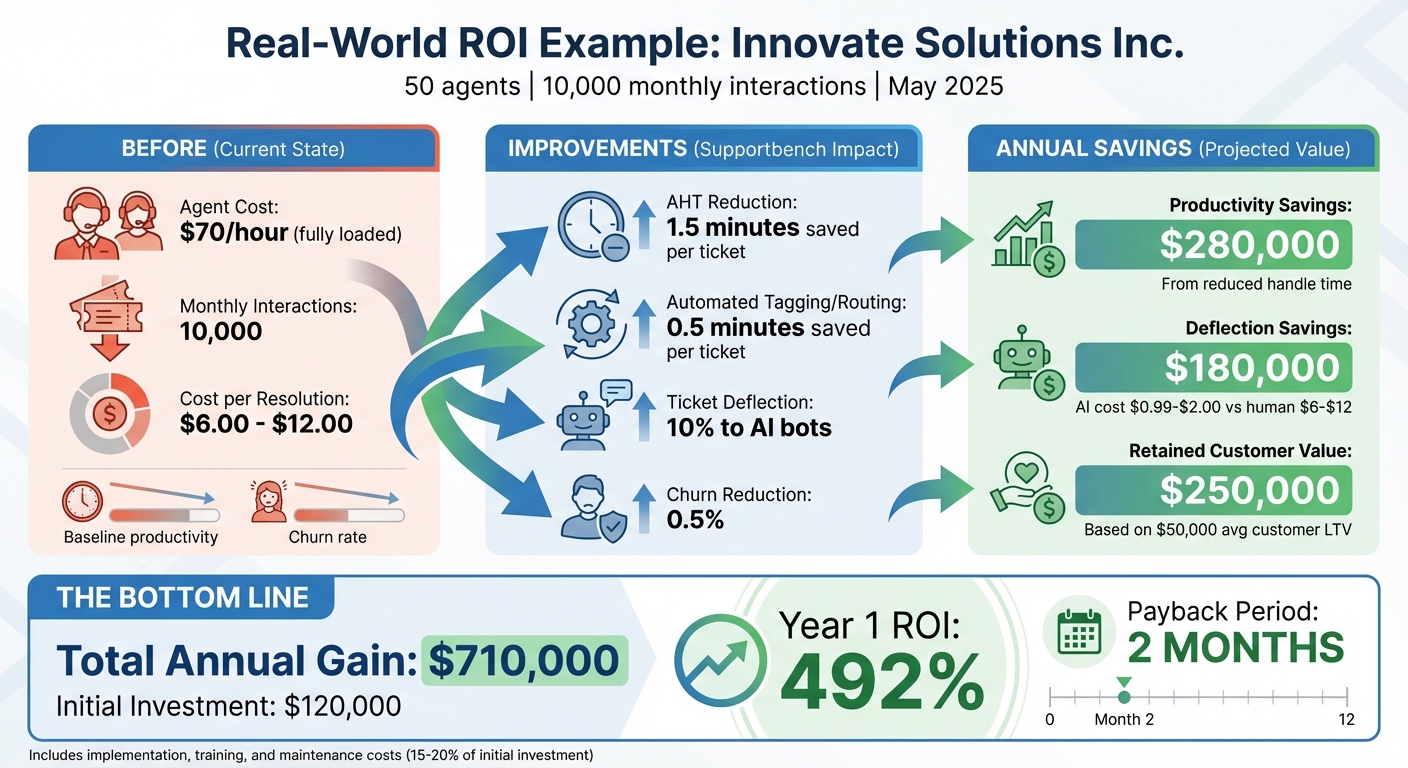
Here’s a real-world scenario: In May 2025, Innovate Solutions Inc., a software company with 50 agents handling 10,000 complex interactions monthly, implemented Supportbench AI. Their agents, earning a fully loaded rate of $70/hour, saw a 1.5-minute reduction in AHT thanks to AI Copilot suggestions. Automated tagging and routing saved an additional 0.5 minutes per ticket, while 10% of inquiries were deflected to AI bots [1].
Results: The company saved $280,000 annually from reduced handle time, $180,000 from deflecting tickets to AI, and $250,000 in retained customer value by reducing churn by 0.5% (based on a $50,000 average customer lifetime value). With an initial investment of $120,000, they achieved a 492% Year 1 ROI and recouped their investment in just two months [1].
Here’s how they calculated their savings:
Productivity Savings = (Avg. Time Saved per Interaction in Minutes) × (Number of Interactions) ÷ 60 × (Avg. Fully Loaded Agent Cost per Hour) [1]
Deflection Savings = (Number of Deflected Interactions) × (Avg. Cost per Human Interaction) [1]
Churn Reduction Value = (Number of Customers) × (Estimated Churn Rate Reduction) × (Avg. Customer LTV) [1]
| Metric | Before Supportbench | After Supportbench | Annual Impact |
|---|---|---|---|
| Cost per Resolution | $6.00–$12.00 | $0.99–$2.00 (AI) / $6–$12 (Human) | $180,000 savings |
| Agent Productivity | Baseline | +14% tickets/hour | $280,000 savings |
| Churn Rate | Baseline | -0.5% reduction | $250,000 retained value |
| Total Investment | – | $120,000 | – |
| Year 1 ROI | – | – | 492% |
As Nooshin Alibhai, Founder and CEO of Supportbench, puts it:
"For organizations where support quality and accuracy are paramount, simply automating agents away isn’t the goal… The true ROI encompasses empowerment and intelligence." [1]
Be sure to include implementation, training, and maintenance costs (typically 15–20% of the initial investment) in your ROI for a realistic calculation [1][10]. While harder to quantify, don’t overlook "softer" benefits like improved agent satisfaction and enhanced brand reputation – these can strengthen your business case even further [1].
These measurable gains and efficiency improvements set the stage for connecting Supportbench’s capabilities to your broader business objectives in the next step.
Step 3: Match Supportbench Features to Your Business Goals
Once you’ve established clear ROI metrics, it’s time to connect Supportbench’s features directly to your business objectives. Demonstrate how each tool addresses your specific challenges and drives improvement in the key performance indicators that matter most to your organization.
AI Features That Drive Efficiency and Quality
Supportbench’s AI-driven tools are designed to enhance both efficiency and quality. For instance, the AI Agent-Copilot can save agents 1–2 minutes per complex B2B interaction by pulling relevant information from your knowledge base, past tickets, and CRM in real time [1]. This feature not only speeds up support but also equips agents to handle intricate compliance, contract, or technical issues with greater confidence.
Another standout feature is Predictive CSAT and CES scoring, which flags dissatisfied customers and high-effort cases even before surveys are sent. This allows your Customer Success team to step in proactively. Considering that a mere 5% boost in retention can increase profits by 25% to 95% [1], this tool is a game-changer for maintaining revenue. Similarly, AI Case Summarization condenses lengthy email threads or multi-touch cases, enabling agents to quickly grasp the context without sifting through extensive histories [1][2].
To maintain quality at scale, AI-Powered Quality Assurance reviews tickets for empathy, accuracy, and tone, providing instant feedback without the need for manual checks [2]. Meanwhile, Intelligent Triage uses sentiment analysis, keywords, and customer value to prioritize tickets, ensuring that critical B2B accounts receive the attention they need promptly [1][2].
These AI tools are key to improving efficiency and quality, but Supportbench also offers features like dynamic SLAs and advanced knowledge management to address the unique demands of B2B support.
Dynamic SLAs and Knowledge Management for B2B Challenges
For B2B operations, Dynamic SLAs are a game-changer. Supportbench adjusts SLAs in real time based on factors like case content, sentiment, and customer context. For example, critical issues tied to contract renewals or high-value accounts are prioritized to ensure they are resolved quickly [2].
AI-Powered Knowledge Management automates the creation of knowledge base articles from resolved tickets with just one click [1][2]. This supports Knowledge-Centered Service (KCS) practices by capturing complex solutions immediately, ensuring they are documented and easily searchable for future use. The benefits? Fewer escalations, better First Contact Resolution (FCR), and a robust self-service knowledge base that reduces routine inquiries.
| Supportbench Feature | Business Goal Addressed | Measurable Impact |
|---|---|---|
| AI Agent-Copilot | Reduce AHT and improve productivity | Saves 1–2 minutes per complex interaction [1] |
| Predictive CSAT/CES | Increase retention and reduce churn | Proactive intervention for at-risk accounts [1][2] |
| Dynamic SLAs | Prioritize high-value accounts | Faster response times for critical cases [2] |
| AI KB Creation | Improve FCR and deflection rates | Consistent answers and fewer escalations [1][2] |
| AI QA Reviews | Maintain quality at scale | 100% ticket review without manual effort [2] |
Step 4: Get Stakeholder Approval
Once you’ve demonstrated ROI and pinpointed key challenges, the next step is to secure stakeholder approval. With 77% of decision-makers hesitant about adopting AI because they don’t view it as "critical" to their business [8], and 87% of AI projects failing to deploy [8], it’s no surprise that stakeholders may approach with caution. Addressing their concerns directly and presenting a clear, compelling business case is essential to gain their buy-in.
Answer Common Objections
Stakeholder objections typically fall into four main categories: financial risk, technical complexity, operational accuracy, and strategic fit. Let’s break these down and provide tailored responses using Supportbench’s capabilities.
"What if the AI gives wrong answers?"
Mistakes in AI responses can lead to compliance issues or contract errors. As Nooshin Alibhai, Founder and CEO of Supportbench, puts it:
"For organizations where support quality and accuracy are paramount, simply automating agents away isn’t the goal" [1].
Position Supportbench as an Agent Copilot – a tool that enhances your team’s capabilities rather than replacing them [1][2]. The AI provides agents with relevant knowledge, past ticket insights, and CRM data, while ensuring agents maintain control over customer interactions.
"Will this require heavy IT involvement?"
Supportbench’s no-code automations and ready-to-use AI setup reduce the need for IT resources [2]. This approach minimizes implementation risks and accelerates the time it takes to start seeing results.
"What about hidden costs as we scale?"
Be upfront about the total cost of ownership (TCO), including licenses, implementation fees, and training time [1]. Supportbench’s flat-rate pricing eliminates surprises – AI features, SLAs, and migration costs are included from the start, with no additional fees for add-ons.
"How do we know this won’t fail like other projects?"
With 87% of AI projects failing [8], it’s crucial to mitigate risk. Propose a phased pilot program targeting high-impact use cases, such as AI-assisted knowledge creation or automated triage, to demonstrate early wins [8][11]. For example, start with AI Case Summarization in your busiest queue, measure time savings over 30 days, and expand from there. This step-by-step approach builds trust and confidence.
| Objection Category | Concern | Our Solution |
|---|---|---|
| Financial | High upfront costs / Unclear ROI | Present data-backed ROI showing a 2-month payback period [1] |
| Technical | Heavy IT burden for setup | Use no-code automations and out-of-the-box AI [2] |
| Operational | AI might give wrong answers | AI serves as a Copilot for agent verification, not a full replacement [1] |
| Strategic | "We already have a CRM/Slack" | Highlight gaps in B2B SLA enforcement and account-focused data [3] |
Once these objections are addressed, consolidate the information into a well-organized business case document for final review.
Create a Clear Business Case Document
After addressing common concerns, your business case should clearly outline the benefits and ROI of Supportbench. A structured document allows stakeholders to quickly understand the problem, evaluate the solution, and approve the investment. Include these key sections:
Executive Summary: Summarize the problem (e.g., high Average Handle Time, missed retention opportunities), the solution (Supportbench), key benefits (productivity gains, cost reductions, improved CSAT), expected ROI (e.g., 492% Year 1 ROI with a 2-month payback [1]), and your specific funding request (e.g., $120,000 annual investment).
Problem Statement: Use actual data to highlight challenges. For instance:
"Our 50 agents handle 10,000 complex B2B interactions monthly, with an Average Handle Time of 12 minutes. Agents spend 31% of their time researching resolutions [8], and we lack tools to proactively identify accounts at risk of churning."
Proposed Solution: Detail how Supportbench addresses these challenges with features like the AI Agent Copilot for faster resolutions, Predictive CSAT and CES for retention, Dynamic SLAs to prioritize high-value accounts, and AI-Powered Knowledge Management for consistent responses [1][2].
Total Cost of Ownership (TCO): Break down the costs, such as $100,000 for annual software licenses, $20,000 for one-time implementation fees, and internal training expenses [1]. Be transparent about what’s included: flat-rate pricing covers AI, SLAs, workflows, dashboards, and live support – no hidden fees.
ROI Analysis: Use the ROI framework from Step 2 to quantify benefits. For example:
- Reducing AHT by 1.5 minutes per interaction saves $280,000 annually.
- Achieving 10% bot deflection saves $180,000.
- Reducing churn by 0.5% adds $250,000 in retained revenue.
Total annual gain: $710,000 against a $120,000 investment = 492% Year 1 ROI [1].
Risks & Mitigation: Acknowledge potential challenges, like adoption resistance or data quality issues, and outline mitigation strategies. For example:
"To ensure data quality, we’ll clean up the knowledge base in Month 1 before enabling AI features. To drive adoption, we’ll conduct hands-on training sessions and appoint ‘AI Champions’ for each team."
12-Month Implementation Plan: Break the rollout into phases:
- Phase 1 (Months 1-3): Implement AI Copilot in Assist mode for a high-volume queue.
- Phase 2 (Months 4-6): Enable Predictive CSAT and AI Case Summarization for all queues.
- Phase 3 (Months 7-12): Introduce AI-Powered QA and expand automation with safeguards [1][7].
This phased approach ensures early validation of savings while minimizing risk.
Final Recommendation: Conclude with a direct request:
"We recommend approving a $120,000 annual investment in Supportbench to address inefficiencies and unlock $710,000 in annual value. We propose starting with a 90-day pilot in Q2 2026 to validate ROI before full deployment."
Step 5: Build Your Business Case Template
Now that you’ve calculated ROI and secured stakeholder support, it’s time to organize everything into a well-structured business case. This document should clearly lay out the problem, propose Supportbench as the solution, and outline actionable steps to move forward.
Template Structure and Main Sections
Your business case should flow logically, guiding stakeholders from the challenges you’re addressing to the proposed solution and next steps:
- Executive Summary
Start with a concise, one-page overview. Highlight the problem, introduce Supportbench as the solution, summarize the benefits, and present the expected ROI alongside your funding request. - Pain Point Analysis
Use real data to detail current operational challenges and baseline metrics. This establishes the urgency for change. - Proposed Solution
Match Supportbench’s features to your identified challenges. For example, the AI Agent Copilot minimizes research time, Intelligent Triage prioritizes tickets based on customer sentiment, and Predictive CSAT/CES identifies dissatisfied customers before issues escalate [1][2]. - Financial Investment
Provide a transparent breakdown of costs, including software licenses, implementation fees, and training expenses. Emphasize the flat-rate pricing model, which includes all key features without hidden fees. - Benefits & ROI Calculation
Refer back to your ROI analysis from Step 2. Demonstrate how improvements in productivity, case deflection, and customer retention translate into measurable financial returns. - Risks & Mitigation
Acknowledge potential risks and propose specific solutions. For instance: "We’ll clean up the knowledge base in the first month before enabling AI features. To ensure adoption, we’ll provide hands-on training and assign ‘AI Champions’ for each team." - Implementation Plan & Timeline
Outline a phased rollout to reduce risks while achieving early wins:- Phase 1 (Months 1–3): Implement AI Copilot in Assist Mode for one high-volume queue.
- Phase 2 (Months 4–6): Expand Predictive CSAT and AI Case Summarization across all queues.
- Phase 3 (Months 7–12): Introduce AI-powered Quality Assurance and extend automation with safeguards.
- Success Metrics
Define your primary KPIs (e.g., ticket deflection rate, AHT reduction) and secondary KPIs (e.g., escalation rate, agent satisfaction) to measure progress.
| Template Section | Key Content | Purpose |
|---|---|---|
| Executive Summary | Problem, solution, ROI, funding request | Provide decision-making essentials in one page |
| Pain Point Analysis | Baseline metrics, operational challenges | Establish the need for change |
| Proposed Solution | Supportbench features aligned with pain points | Show how features address specific challenges |
| Financial Investment | Licenses, implementation, training costs | Offer a clear breakdown of total cost |
| Benefits & ROI | Productivity gains, case deflection, retention | Quantify financial impact |
| Risks & Mitigation | Potential hurdles, proposed solutions | Address concerns proactively |
| Implementation Plan | Phased rollout with timelines | Reduce risk with a structured deployment |
| Success Metrics | Primary and secondary KPIs | Define how success will be measured |
Add Example Scenarios to Support Your Case
Real-world examples make your business case more relatable and persuasive. Use a "Before and After" approach to demonstrate the impact:
Example: "Current State"
"When a customer asks about product compatibility, agents spend 15 minutes searching scattered documentation and reviewing past tickets. With 200 such inquiries monthly, this adds up to 50 agent hours spent on repetitive research."
"Future State with Supportbench"
"With the AI Agent Copilot, relevant knowledge base articles and resolved cases are surfaced instantly. Agents respond in 5 minutes, saving 33 hours monthly – equivalent to $2,640 in labor costs (at $80/hour)."
Focus on high-volume workflows that drain resources. For example, in B2B settings, routine "How do I" questions can make up 30% to 70% of customer inquiries [12]. AI automation could reduce ticket handling time by 30% to 50% for such cases.
Consider a phased implementation example: In Month 1, deploy the AI Copilot for an Enterprise queue handling 2,000 tickets monthly. Agents use AI-suggested responses with manual control, tracking time savings weekly. Once a 20% reduction in AHT is confirmed, expand to other queues.
Don’t overlook qualitative benefits either:
"Currently, new agents take 8 weeks to become fully productive. With Supportbench’s AI Copilot providing instant access to relevant information, we estimate reducing ramp-up time to 5 weeks – saving around $4,800 per new hire in training costs" [1].
As Samir Motwani, Product Head at Salesmate, wisely points out:
"Leadership teams are no longer skeptical of AI. They’re skeptical of unclear investments."
Use relatable examples to strengthen your case. For instance, in 2021, Medallia implemented an AI-driven relevance platform for its service operations. By giving Tier 1 agents immediate access to critical content, they managed to handle 34% more cases independently.
Finally, clearly define what’s "Out of Scope" to manage expectations:
"During the pilot phase, AI will not handle payment disputes, contract negotiations, or escalated complaints. These tasks will remain fully human-managed until AI’s effectiveness in routine workflows is validated."
Tie each scenario back to your ROI analysis, whether it’s about improving productivity, deflecting cases, retaining customers, or speeding up onboarding. This structured template ensures a smooth transition from planning to execution.
Conclusion: Present Your Supportbench Business Case with Confidence
Now that you’ve completed your ROI analysis and secured stakeholder buy-in, it’s time to deliver your case with clarity and confidence. Your presentation should bridge current pain points with tangible, measurable outcomes – whether that’s shortening Average Handle Time, leveraging AI chatbots to deflect tickets, or slashing onboarding time for new agents. Your goal? Remove uncertainty by presenting clear, quantifiable projections.
Focus on executive-level metrics like payback period, Net Present Value (NPV), and Internal Rate of Return (IRR) [13]. For instance, Step 2 illustrates how a 50-agent team can achieve a 492% ROI and a 2-month payback period [1]. These kinds of results make it easier for decision-makers to shift from "maybe" to "yes." Use conservative estimates to build credibility – aim to underpromise and overdeliver.
Craft your pitch to address the priorities of each stakeholder. A CFO will want to see Total Cost of Ownership (TCO) and a clear cost breakdown. The CX Lead will focus on metrics like First Contact Resolution (FCR) and CSAT, CES, and NPS improvements, while the IT Lead will need reassurance that implementation won’t disrupt day-to-day operations. This tailored approach naturally transitions into a well-planned, phased rollout.
Supportbench doesn’t replace agents – it empowers them. By providing your team with tools for faster, more accurate support, it ensures they maintain the human touch that B2B customers value.
Leverage your structured template to propose a gradual deployment strategy that minimizes risk. Start with "Assist mode" in one high-volume queue, track results, and expand only after meeting your KPIs. This step-by-step approach builds trust, demonstrates value, and lays out a clear roadmap to modernizing your support operations, cutting costs, and achieving measurable success.
FAQs
What data do I need to build an ROI case for Supportbench?
To make a strong ROI case for Supportbench, start by collecting data on costs and measurable benefits. Focus on key metrics such as support costs (including salaries, software expenses, and training), ticket volume and resolution rates, savings from deflection and automation, improvements in operational efficiency, and customer satisfaction scores like CSAT and CES. Don’t forget to evaluate the total cost of ownership (TCO). By analyzing these metrics, you can clearly demonstrate how Supportbench contributes to cost reductions, boosts efficiency, and enhances customer outcomes.
How do I run a low-risk pilot and prove results fast?
To kick off a low-risk pilot and see results quickly, start by targeting high-volume but low-impact workflows. These are ideal for showcasing measurable gains without causing significant disruptions. For instance, you could use AI tools to automate ticket routing or build a knowledge base. Focus on tangible outcomes like cutting down ticket handling time or saving costs. Establish clear metrics – such as improved resolution times – to gauge success, and share these results to secure stakeholder buy-in for broader implementation.
How do we keep AI accurate and compliant in B2B support?
To keep AI accurate and compliant in B2B support, it’s essential to set up a governance framework. This includes defining clear rules, assigning accountability, and ensuring everything aligns with your business objectives. Potential risks, such as biased outputs or security issues, should be tackled with safeguards like human oversight, data anonymization, and routine audits.
Consistently tracking AI performance through key performance indicators (KPIs) is another critical step. Alongside this, maintaining thorough documentation and blending automated tools with human collaboration helps sustain both quality and compliance in everyday operations.






